
spring cloud 使用spring cloud bus自动刷新配置
Spring Cloud Bus提供了批量刷新配置的机制,它使用轻量级的消息代理(例如RabbitMQ、Kafka等)连接分布式系统的节点,这样就可以通过Spring Cloud Bus广播配置的变化或者其他的管理指令。使用Spring Cloud Bus后的架构如图9-2所示。
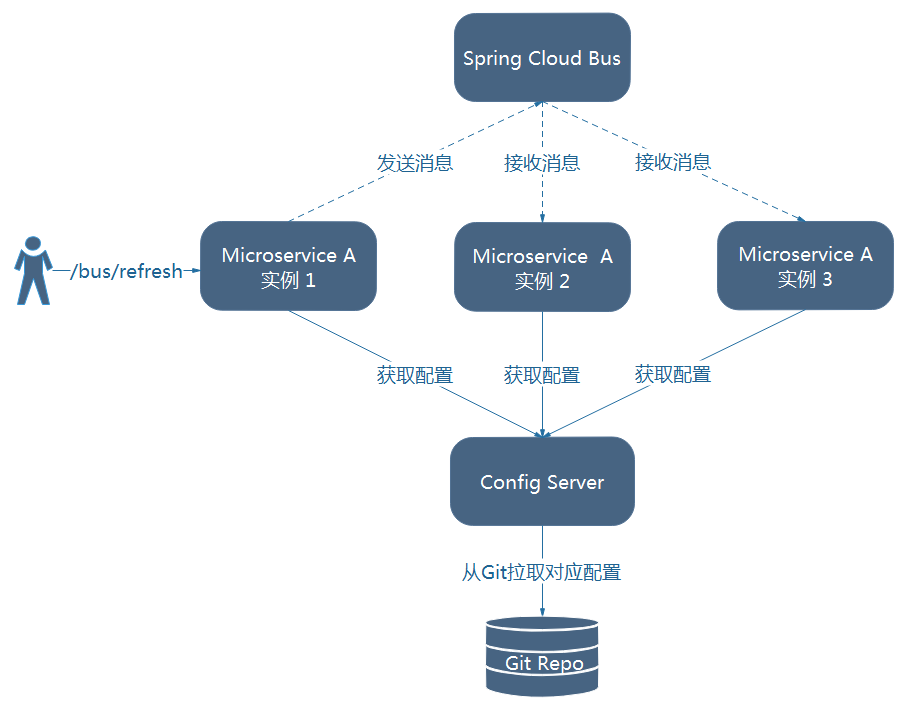
图9-2 使用Spring Cloud Bus的架构图
由图可知,微服务A的所有实例通过消息总线连接到了一起,每个实例都会订阅配置更新事件。当其中一个微服务节点的/bus/refresh端点被请求时,该实例就会向消息总线发送一个配置更新事件,其他实例获得该事件后也会更新配置。
下面我们以RabbitMQ为例,为大家讲解如何使用Spring Cloud Bus实现配置的自动刷新。
(1) 安装RabbitMQ。RabbitMQ的安装非常简单,本书不再赘述。
(2) 创建项目microservice-config-client-refresh-cloud-bus
(3) 为项目添加spring-cloud-starter-bus-amqp 的依赖。
<dependency>

    <groupId>org.springframework.cloud</groupId>

    <artifactId>spring-cloud-starter-bus-amqp</artifactId>

</dependency>
(4) 在bootstrap.yml中添加以下内容:
spring:

  rabbitmq:

    host: localhost

    port: 5672

    username: guest

    password: guest
management:
security:
enabled: false #是否开启actuator安全认证
测试
(1) 启动microservice-config-server
(2) 启动microservice-config-client-refresh-cloud-bus,可发现此时控制台打印类似于以下的内容:
[ main] o.s.b.a.e.mvc.EndpointHandlerMapping : Mapped "{[/bus/refresh],methods=[POST]}" onto public void org.springframework.cloud.bus.endpoint.RefreshBusEndpoint.refresh(java.lang.String)
说明此时有一个/bus/refresh 端点
(3) 将microservice-config-client-refresh-cloud-bus的端口改成8082,再启动一个节点。
(4) 访问http://localhost:8081/profile ,可获得结果:dev-1.0。
(4) 将git仓库中的microservice-foo-dev.properties文件内容改为profile=dev-1.0-bus
(5) 发送POST请求到其中一个Config Client节点的的/bus/refresh端点,例如:
curl -X POST http://localhost:8081/bus/refresh
借助Git仓库的WebHook,我们就可轻松实现配置的自动刷新。如图9-3所示。
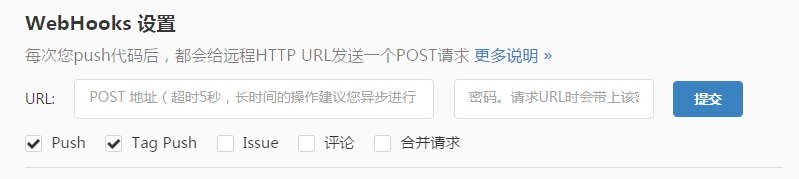
图9-3 Git WebHooks设置
借助Git仓库的WebHook,我们就可轻松实现配置的自动刷新。如图9-3所示。(6) 访问两个Config Client节点的/profile端点,会发现两个节点都会返回dev-1.0-bus ,说明配置内容已被刷新。
局部刷新
某些场景下(例如灰度发布),我们可能只想刷新部分微服务的配置,此时可通过/bus/refresh端点的destination参数来定位要刷新的应用程序。
例如:/bus/refresh?destination=customers:9000 ,这样消息总线上的微服务实例就会根据destination参数的值来判断是否需要要刷新。其中,customers:9000 指的是各个微服务的ApplicationContext ID。
destination参数也可以用来定位特定的微服务。例如:/bus/refresh?destination=customers:**,这样就可以触发customers微服务所有实例的配置刷新。
扩展阅读:关于ApplicationContext ID
默认情况下,ApplicationContext ID是spring.application.name:server.port,详见org.springframework.boot.context.ContextIdApplicationContextInitializer.getApplicationId(ConfigurableEnvironment)方法。
http://www.itmuch.com/spring-cloud-code-read/spring-cloud-code-read-spring-cloud-bus/
架构改进
在前面的示例中,我们通过请求某个微服务的/bus/refresh端点的方式来实现配置刷新,但这种方式并不优雅。原因如下:
(1) 打破了微服务的职责单一性。微服务本身是业务模块,它本不应该承担配置刷新的职责。
(2) 破坏了微服务各节点的对等性。
(3) 有一定的局限性。例如,微服务在迁移时,它的网络地址常常会发生变化,此时如果想要做到自动刷新,那就不得不修改WebHook的配置。
我们不妨改进一下我们的架构。
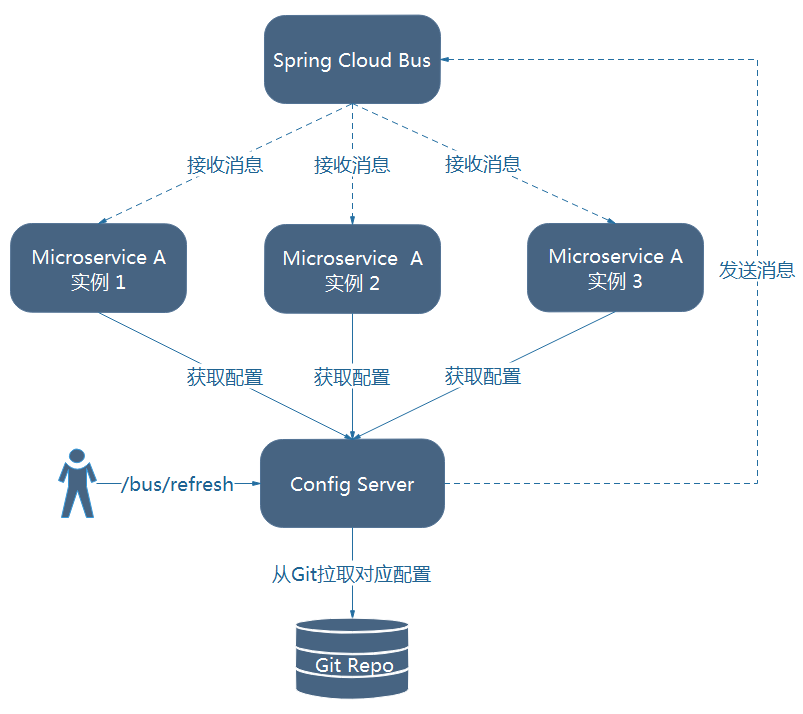
图9-4 使用Spring Cloud Bus的架构图
如图9-4,我们将Config Server也加入到消息总线中,并使用Config Server的/bus/refresh端点来实现配置的刷新。这样,各个微服务只需要关注自身的业务,而不再承担配置刷新的职责。
1.在springcloud-configServer中配置bus,加入pom依赖
<dependency>

  <groupId>org.springframework.cloud</groupId>

  <artifactId>spring-cloud-starter-bus-amqp</artifactId>

</dependency>
2.springcloud-configServer中配置bus ym文件
spring:

  rabbitmq:

    host: localhost

    port: 5672

    username: guest

    password: guest

  management:

    security:

      enabled: false #是否开启actuator安全认证
3.在微服务端springcloud-ssmServer配置bus接收
pom.xml
<dependency>

            <groupId>org.springframework.boot</groupId>

            <artifactId>spring-boot-starter-actuator</artifactId>

        </dependency>

        <dependency>

            <groupId>org.springframework.cloud</groupId>

            <artifactId>spring-cloud-starter-bus-amqp</artifactId>

        </dependency>
application.properties
#mq

spring.rabbitmq.host=localhost

spring.rabbitmq.port=5672

spring.rabbitmq.username=guest

spring.rabbitmq.password=guest

management.security.enabled=false
在需要自动刷新的位置加入@RefreshScope 例如
package com.pupeiyuan.controller;

import org.springframework.beans.factory.annotation.Value;

import org.springframework.cloud.context.config.annotation.RefreshScope;

import org.springframework.web.bind.annotation.GetMapping;

import org.springframework.web.bind.annotation.RestController;

@RestController

@RefreshScope

public class ConfigClientController {

    @Value("${multiple.datasource.master.InitialSize}")

      private String profile;

      @GetMapping("/profile")

      public String getProfile() {

        return this.profile;

      }

}
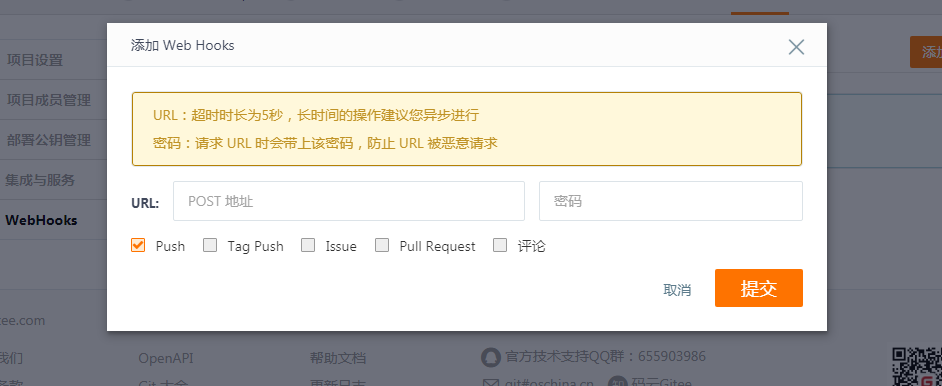
利用webhook自动请求,配置/bus/refresh到springcloud-configServer项目,springcloud-configServer在利用bus传播特性,通过mq传播到指定客户端进行更新
跟踪总线事件
一些场景下,我们可能希望知道Spring Cloud Bus事件传播的细节。此时,我们可以跟踪总线事件(RemoteApplicationEvent的子类都是总线事件)。
跟踪总线事件非常简单,只需设置spring.cloud.bus.trace.enabled=true ,这样在/bus/refresh端点被请求后,访问/trace端点就可获得类似如下的结果:
{

  "timestamp": 1481098786017,

  "info": {

    "signal": "spring.cloud.bus.ack",

    "event": "RefreshRemoteApplicationEvent",

    "id": "66d172e0-e770-4349-baf7-0210af62ea8d",

    "origin": "microservice-foo:8081",

    "destination": "**"

  }

},{

  "timestamp": 1481098779073,

  "info": {

    "signal": "spring.cloud.bus.sent",

    "type": "RefreshRemoteApplicationEvent",

    "id": "66d172e0-e770-4349-baf7-0210af62ea8d",

    "origin": "microservice-config-server:8080",

    "destination": "**:**"

  }

}...
这样,我们就可清晰地知道事件的传播细节。
spring cloud 使用spring cloud bus自动刷新配置的更多相关文章
- Springboot整合Spring Cloud Kubernetes读取ConfigMap,支持自动刷新配置
1 前言 欢迎访问南瓜慢说 www.pkslow.com获取更多精彩文章! Docker & Kubernetes相关文章:容器技术 之前介绍了Spring Cloud Config的用法,但 ...
- SpringBoot整合Nacos自动刷新配置
目的 Nacos作为SpringBoot服务的注册中心和配置中心. 在NacosServer中修改配置文件,在SpringBoot不重启的情况下,获取到修改的内容. 本例将在配置文件中配置一个 cml ...
- Spring Cloud Bus 自动更新配置
---恢复内容开始--- Spring Cloud Config 结合 Spring Cloud bus 实现 git 仓库提交配置文件 触发消息队列 应用自动更新配置 1. config 服务端 添 ...
- 带你入门SpringCloud 之 通过SpringCloud Bus 自动更新配置
前言 在<带你入门SpringCloud统一配置 | SpringCloud Config>中通过 SpringCloud Config 完成了统一配置基础环境搭建,但是并没有实现配置修改 ...
- 【Spring Cloud】Spring Cloud使用总结
项目概要 项目环境信息 IDEA ultimate 2018.3.2 springboot 2.1.7.RELEASE springCloud Greenwich.SR2 Eureka 介绍 基于ne ...
- 通过总线机制实现自动刷新客户端配置(Consul,Spring Cloud Config,Spring Cloud Bus)
通过总线机制实现自动刷新客户端配置 方案示意图 利用Git服务的webhook通知功能,在每次更新配置之后,Git服务器会用POST方式调用配置中心的/actuator/bus-refresh接口,配 ...
- Spring Cloud 学习 之 Spring Cloud Bus实现修改远程仓库后配置自动刷新
版本号: Spring Boot:2.1.3.RELEASE Spring Cloud:G版 开发工具:IDEA 搭建配置中心,这里我们搭建一个简单版的就行 POM: <?xml ...
- Spring Cloud Config 自动刷新所有节点
全局刷新 详细参考:<Sprin Cloud 与 Docker 微服务架构实战>p160-9.9.2节 1.使用Spring Cloud Config 客户端时,可以使用 /refresh ...
- spring cloud - config 属性自动刷新
启动config-server,启动成功后就不需要在管了; 在config-client做些修改: 在使用的controller或service的类上加上一个注解@RefreshScope 在pom中 ...
随机推荐
- nutz学习笔记(1)
写在前头 最近到了合肥分公司,分公司用的架构为nutz·····目前在根据官方文档(http://nutzam.com/core/nutz_preface.html)自学并实践中,此笔记将不会如官方文 ...
- 微信小程序滚动Tab选项卡:左右可滑动切换
最终效果如上.问题: 1.tab标题总共8个,所以一屏无法全部显示. 2.tab内容区左右滑动切换时,tab标题随即做标记(active). 3.当active的标题不在当前屏显示时,要使其能显示到当 ...
- T5557 读写卡详解
T5557的基本信息就不在这里详细介绍,不了解的可以去看T5557的收据手册. 一上来直接开始讲操作 存在七种操作,我们重点介绍四种,Standard Write,Protected Write,Di ...
- 第四节:tensorflow图的基本操作
基本使用 使用图(graph)来表示计算任务 激活会话(Session)执行图 使用张量(tensor)表示数据 定义变量(Variable) 使用feed可以任意赋值或者从中获取数据,通常与占位符一 ...
- oracle查询语句 select a||','||b||','||c from table where a in('m','n')
查询table表中 字段a = m 或 n 时,a列,b列,c列的值,并且这三列之间用 ","(逗号)分割. 追问:连接符的作用呢?就是显示的时候链接abc和中间的逗号么?追答:| ...
- How to Train Triplet Networks with 100K Identities?
1. 为什么介绍此文? Triplet net 改进工作之一,主要思想是在大数据集(人脸识别)上的困难样本挖掘.人脸识别工作对于图像对匹配而言很有借鉴意义,共性是特征的提取和样本数据的挖掘. Trip ...
- Python使用MySQL数据库【转】
转自 Python使用MySQL数据库(新)[很详细][fetchall和fetchmany有啥区别呢?] - CSDN博客https://blog.csdn.net/u011350541/artic ...
- window10 matlabR2015b 安装minGw
第一步:下载TDM-GCC(注意看清是32位还是64位),TDM-GCC的安装路径不要包括空格: http://tdm-gcc.tdragon.net/download 第二步:点击“我的电脑”右键“ ...
- 设计模式C++学习笔记之二十(完结篇 & 面向对象原则)设计模式C++实例下载
Prototype(原型模式) 20.1.解释 概念:用原型实例指定创建对象的种类,并且通过拷贝这些原型创建新的对象. main(),客户 ICloneableNow,只有一个接口Clone CM ...
- 专题:CF图论杂题
题目是来自HZW的博客(构造题我是各种不会...) Solved 1 / 1 A CodeForces 500A New Year Transportation Solved 1 / 1 B Code ...