
flex布局快速成型(原创)
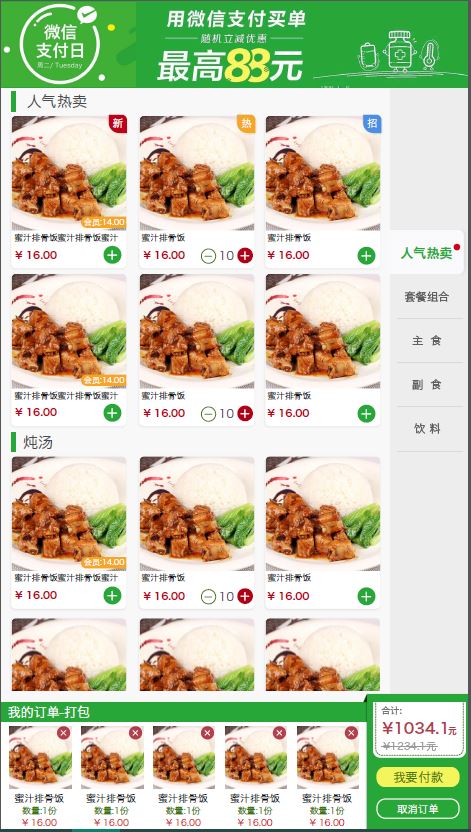
最近我根据一个UI设计,耗时3h快速实现较复杂页面布局,如上图。根据这份UI设计图,实现代码如下,暂不考虑具体细节,先以成型为主:
<!DOCTYPE html>

<html>

<style type="text/css">

*{

    padding: 0;

    margin: 0;

    font-size: 62.5%;

}

li{

    list-style:none

}

html{

    height:100%;

}

body{

    height:100%;

}

</style>

<head>

    <title>点餐页</title>

</head>

<body>

    <header style="width:100%;height:14.28%;background:red"></header>

    <div style="width:100%;height:71.42%;display:flex;">

        <span style="width:85.72%;overflow-y: auto">

            <div style="display: flex;flex-direction:column;height: 50rem">

                <span style="width: 100%;height:10%;background:black;margin: 0.5rem 0"></span>

                <ul style="width: 100%;background:pink;display: flex;flex-wrap:wrap;justify-content:space-between;">

                    <li style="width: 30%;height: 20rem;margin: 1rem;display: flex;flex-direction: column">

                        <span style="background:black ;height: 70%"></span>

                        <span style="height:10%;background:black;margin: 1rem  0"></span>

                        <span style="height:15%;background:blue;display: flex;justify-content:space-between;align-items: center;">

                            <span style="font-size: 2rem">123</span>

                            <button style="width: 25%">+</button>

                        </span>

                    </li>

                    <li style="width: 30%;height: 20rem;background: black;margin: 1rem"></li>

                    <li style="width: 30%;height: 20rem;background: black;margin: 1rem"></li>

                    <li style="width: 30%;height: 20rem;background: black;margin: 1rem"></li>

                    <li style="width: 30%;height: 20rem;background: black;margin: 1rem"></li>

                    <li style="width: 30%;height: 20rem;background: black;margin: 1rem"></li>

                </span>

            </div>

            <div style="display: flex;flex-direction:column;height: 50rem">

                <span style="width: 100%;height:10%;background:green;margin: 0.5rem 0"></span>

                <ul style="width: 100%;background:pink;display: flex;flex-wrap:wrap;justify-content:space-between;">

                    <li style="width: 30%;height: 20rem;margin: 1rem;display: flex;flex-direction: column">

                        <span style="background:black ;height: 70%"></span>

                        <span style="height:10%;background:black;margin: 1rem  0"></span>

                        <span style="height:15%;background:blue;display: flex;justify-content:space-between;align-items: center;">

                            <span style="font-size: 2rem">123</span>

                            <button style="width: 25%">+</button>

                        </span>

                    </li>

                    <li style="width: 30%;height: 20rem;background: black;margin: 1rem"></li>

                    <li style="width: 30%;height: 20rem;background: black;margin: 1rem"></li>

                    <li style="width: 30%;height: 20rem;background: black;margin: 1rem"></li>

                    <li style="width: 30%;height: 20rem;background: black;margin: 1rem"></li>

                    <li style="width: 30%;height: 20rem;background: black;margin: 1rem"></li>

                </ul>

            </div>

            <div style="display: flex;flex-direction:column;height: 50rem">

                <span style="width: 100%;height:10%;background:green;margin: 0.5rem 0"></span>

                <ul style="width: 100%;background:pink;display: flex;flex-wrap:wrap;justify-content:space-between;">

                    <li style="width: 30%;height: 20rem;margin: 1rem;display: flex;flex-direction: column">

                        <span style="background:black ;height: 70%"></span>

                        <span style="height:10%;background:black;margin: 1rem  0"></span>

                        <span style="height:15%;background:blue;display: flex;justify-content:space-between;align-items: center;">

                            <span style="font-size: 2rem">123</span>

                            <button style="width: 25%">+</button>

                        </span>

                    </li>

                    <li style="width: 30%;height: 20rem;background: black;margin: 1rem"></li>

                    <li style="width: 30%;height: 20rem;background: black;margin: 1rem"></li>

                    <li style="width: 30%;height: 20rem;background: black;margin: 1rem"></li>

                    <li style="width: 30%;height: 20rem;background: black;margin: 1rem"></li>

                    <li style="width: 30%;height: 20rem;background: black;margin: 1rem"></li>

                </ul>

            </div>

        </span>

        <span style="width:14.28%;background:blue"></div>

        </div>

        <footer style="width:100%;height:14.28%;display: flex">

            <span style="width: 75%;height: 100%">

                <div style="display: flex;height: 100%;flex-direction: column;">

                    <span style="height: 20%;background: green;width: 100%"></span>

                    <span style="height:80%;width: 100%">

                        <ul style="width: 100%;height: 100%;display: flex;flex-direction: row;overflow-x: auto;">

                            <li style="width: 10rem;height: 100%;display: flex;flex-direction: column;margin: 0 0.5rem;flex-shrink:0">

                                <span style="background:black ;height: 55%;width: 100%"></span>

                                <span style="height:10%;background:black;margin-top: 0.3rem ;width: 100%">

                                </span>

                                <span style="height:10%;background:black;margin: 0.3rem  0;width: 100%">

                                </span>

                                <span style="height:15%;background:blue;width: 100%"></span>

                            </li>

                                <li style="width: 10rem;height: 100%;display: flex;flex-direction: column;margin: 0 0.5rem;flex-shrink:0">

                                <span style="background:black ;height: 55%;width: 100%"></span>

                                <span style="height:10%;background:black;margin-top: 0.3rem ;width: 100%">

                                </span>

                                <span style="height:10%;background:black;margin: 0.3rem  0;width: 100%">

                                </span>

                                <span style="height:15%;background:blue;width: 100%"></span>

                            </li>

                                <li style="width: 10rem;height: 100%;display: flex;flex-direction: column;margin: 0 0.5rem;flex-shrink:0">

                                <span style="background:black ;height: 55%;width: 100%"></span>

                                <span style="height:10%;background:black;margin-top: 0.3rem ;width: 100%">

                                </span>

                                <span style="height:10%;background:black;margin: 0.3rem  0;width: 100%">

                                </span>

                                <span style="height:15%;background:blue;width: 100%"></span>

                            </li>

                                <li style="width: 10rem;height: 100%;display: flex;flex-direction: column;margin: 0 0.5rem;flex-shrink:0">

                                <span style="background:black ;height: 55%;width: 100%"></span>

                                <span style="height:10%;background:black;margin-top: 0.3rem ;width: 100%">

                                </span>

                                <span style="height:10%;background:black;margin: 0.3rem  0;width: 100%">

                                </span>

                                <span style="height:15%;background:blue;width: 100%"></span>

                            </li>

                                <li style="width: 10rem;height: 100%;display: flex;flex-direction: column;margin: 0 0.5rem;flex-shrink:0">

                                <span style="background:black ;height: 55%;width: 100%"></span>

                                <span style="height:10%;background:black;margin-top: 0.3rem ;width: 100%">

                                </span>

                                <span style="height:10%;background:black;margin: 0.3rem  0;width: 100%">

                                </span>

                                <span style="height:15%;background:blue;width: 100%"></span>

                            </li>

                                    <li style="width: 10rem;height: 100%;display: flex;flex-direction: column;margin: 0 0.5rem;flex-shrink:0">

                                <span style="background:black ;height: 55%;width: 100%"></span>

                                <span style="height:10%;background:black;margin-top: 0.3rem ;width: 100%">

                                </span>

                                <span style="height:10%;background:black;margin: 0.3rem  0;width: 100%">

                                </span>

                                <span style="height:15%;background:blue;width: 100%"></span>

                            </li>

                                    <li style="width: 10rem;height: 100%;display: flex;flex-direction: column;margin: 0 0.5rem;flex-shrink:0">

                                <span style="background:black ;height: 55%;width: 100%"></span>

                                <span style="height:10%;background:black;margin-top: 0.3rem ;width: 100%">

                                </span>

                                <span style="height:10%;background:black;margin: 0.3rem  0;width: 100%">

                                </span>

                                <span style="height:15%;background:blue;width: 100%"></span>

                            </li>

                                    <li style="width: 10rem;height: 100%;display: flex;flex-direction: column;margin: 0 0.5rem;flex-shrink:0">

                                <span style="background:black ;height: 55%;width: 100%"></span>

                                <span style="height:10%;background:black;margin-top: 0.3rem ;width: 100%">

                                </span>

                                <span style="height:10%;background:black;margin: 0.3rem  0;width: 100%">

                                </span>

                                <span style="height:15%;background:blue;width: 100%"></span>

                            </li>

                                    <li style="width: 10rem;height: 100%;display: flex;flex-direction: column;margin: 0 0.5rem;flex-shrink:0">

                                <span style="background:black ;height: 55%;width: 100%"></span>

                                <span style="height:10%;background:black;margin-top: 0.3rem ;width: 100%">

                                </span>

                                <span style="height:10%;background:black;margin: 0.3rem  0;width: 100%">

                                </span>

                                <span style="height:15%;background:blue;width: 100%"></span>

                            </li>

                                    <li style="width: 10rem;height: 100%;display: flex;flex-direction: column;margin: 0 0.5rem;flex-shrink:0">

                                <span style="background:black ;height: 55%;width: 100%"></span>

                                <span style="height:10%;background:black;margin-top: 0.3rem ;width: 100%">

                                </span>

                                <span style="height:10%;background:black;margin: 0.3rem  0;width: 100%">

                                </span>

                                <span style="height:15%;background:blue;width: 100%"></span>

                            </li>

                        </ul>

                    </span>

                </div>

            </span>

            <span style="width: 25%">

                <div style="display: flex;flex-direction: column;height: 100%;">

                    <span style="height: 50%;background: black"></span>

                    <span style="height: 25%;background:blue"></span>

                    <span style="height: 25%;background: pink"></span>

                </div>

            </span>

        </footer>

    </body>

    </html>
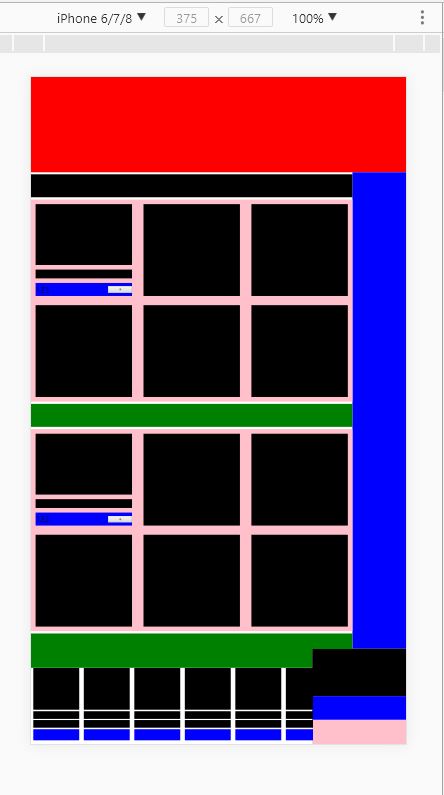
效果如图:
flex布局快速成型(原创)的更多相关文章
- CSS flex 布局快速入门
以前已经学过flex了,一直没做笔记,现在做下笔记再回忆下. 首先,flex布局的迷之属性们,如果一知半解,机械记忆的话,那不到半个月基本忘光光.先感受一下这12个flex布局属性,是不是很“迷”人. ...
- flex布局帮助你快速实现布局
flex布局可以帮我们快速布局一些区块,实现你想要的效果,不用再去float,position之类的.我们在布局网页的时候很多时候都是一些特殊布局,flex就能帮我快速去布局,不需要去定位. 任何一个 ...
- 【原创】display:flex布局大全
全都是自己写的 希望大家可以点个赞 谢谢! Html代码(没时间精简 请多包涵) <!DOCTYPE html> <html lang="en"> < ...
- css3 深入理解flex布局
一.简要介绍 css3最喜欢的新属性之一便是flex布局属性,用六个字概括便是简单.方便.快速. flex( flexible box:弹性布局盒模型),是2009年w3c提出的一种可以简洁.快速弹性 ...
- 写给 Android 开发的小程序布局指南,Flex 布局!
一.序 Hi,大家好,我是承香墨影! 最近在做小程序,验证一些方向,开发效率确实很快,就是各种微信的审核有点费劲,但是总归是有办法解决的. 想要开发一款小程序,其实和我们正常写一款 App 类似,你需 ...
- 30分钟彻底弄懂flex布局
欢迎大家前往腾讯云+社区,获取更多腾讯海量技术实践干货哦~ 本文由elson发表于云+社区专栏 目前在不考虑IE以及低端安卓机(4.3-)的兼容下,已经可以放心使用flex进行布局了.什么是flex布 ...
- CSS魔法堂:Flex布局
前言 Flex是Flexible Box的缩写,就是「弹性布局」.从2012年已经面世,但由于工作环境的原因一直没有详细了解.最近工作忙到头晕脑胀,是要学点新东西刺激一下大脑,打打鸡血. Flex就 ...
- 【Taro】363- 玩转 Taro 跨端之 flex 布局篇
Taro 是一套遵循 React 语法规范的跨平台开发解决方案,但是目前当我们使用 Taro 的时候,在不同平台上的开发体验还有不一致的地方,所以我们也都期待有一套跨平台统一的解决方案,能够以最小差异 ...
- 谈谈flex布局实现水平垂直居中
我们在这要谈的是用flex布局来实现水平和垂直居中.随着移动互联网的发展,对于网页布局来说要求越来越高,而传统的布局方案对于实现特殊布局非常不方便,比如垂直居中.所以09年,W3C 提出了一种新的方案 ...
随机推荐
- .net使用websocket
专业挖坑21年 1.前 言 网上找了很多资料,可能是自己找的路子不对吧,都找不到适合我这样萌新的文章,大多.net环境使用的websocket都是在说一个通信的案例,学起来的确很吃力,自己也挖 ...
- springMVC常见错误-解决org.springframework.beans.factory.BeanCreationException: Error creating bean with name 'org.spring
笔者参考文档: https://blog.csdn.net/sinat_24928447/article/details/47807105 可能错误原因即解决方法: 1.配置文件错误 a)这是配置文件 ...
- Java多线程之wait、notify/notifyAll 详解,用wait 和notifyAll 以及synchronized实现阻塞队列,多线程拓展之ReentrantLock与Condition
前言:这几天看了很多关于多线程的知识,分享一波.(但是目前接触的项目还未用到过,最多用过线程池,想看线程池 请看我之前的博客) 关于基本的理论等 参考如下: https://www.cnblogs.c ...
- 【Tomcat】上线部署tomcat。常用命令
ps -ef | grep tomcat-web [查询tomact进程]kill -9 pid [结束tomcat进程]/opt/tomcat-web/bin/startup.sh [启动tomca ...
- vim打开不同的文件
sp vim -o file1 file2 纵向打开文件 Ctrl+w Ctrl+v vim -O file1 file2 横向打开文件
- SaaS技术栈的走势
本地部署时代 在软件还是“本地部署(on-premise)”的时候,SaaS的版图被大型玩家把持着,几乎所有的垂直领域(营销.支持.销售.人力)都被微软.SAP等大公司的解决方案占据.那时候的用户并没 ...
- IO学习一(File类)
File类 1.凡是与输入.输出相关的类.接口都定义在java.io包下 2.File有构造器来创建对象,此对象对应着一个文件或文件目录 支持文件类型:.txt .avi .doc .jpg .ppt ...
- 用webpack2.0构建vue2.0超详细精简版
初始化环境 npm init -y 初始化项目 安装各种依赖项 npm install --save vue 安装vue2.0 npm install --save-dev webpack@^2.1. ...
- BZOJ1299: [LLH邀请赛]巧克力棒(Nim游戏)
Time Limit: 10 Sec Memory Limit: 162 MBSubmit: 552 Solved: 331[Submit][Status][Discuss] Descriptio ...
- Python运维开发:运算符与数据类型(二)
python对象的相关术语: python程序中保存的所有数据都是围绕对象这个概念展开的: 程序中存储的所有数据都是对象 每个对象都有一个身份.一个类型和一个值 例如,school='MaGe Lin ...