
Grafan+Prometheus 监控 MySQL
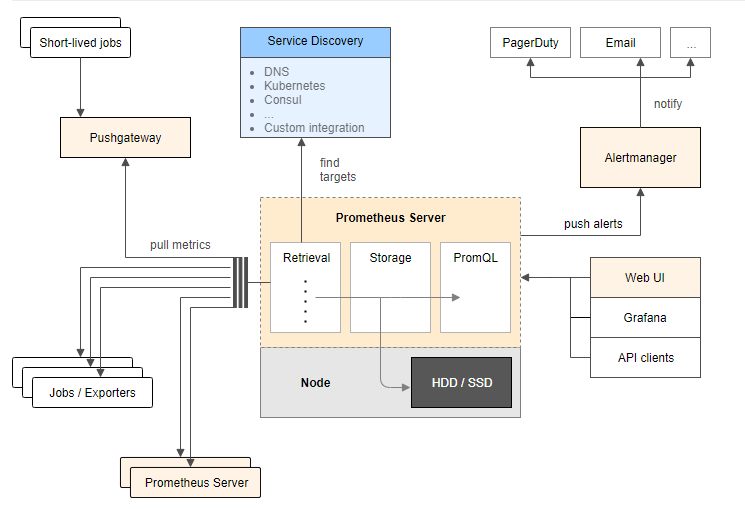
架构图
环境
| IP | 环境 | 需装软件 |
|---|---|---|
| 192.168.0.237 | mysql-5.7.20 | node_exporter-0.15.2.linux-amd64.tar.gz mysqld_exporter-0.10.0.linux-amd64.tar.gz |
| 192.168.0.248 | grafana+prometheus | prometheus-2.1.0.linux-amd64.tar.gz node_exporter-0.15.2.linux-amd64.tar.gz grafana-4.6.3.linux-x64.tar.gz |
在 192.168.0.248 上安装 grafana prometheus
安装 prometheus
# 创建保存软件的目录

mkdir /data/software/ -p

cd /data/software/

# 解压 prometheus

tar xvf prometheus-2.1.0.linux-amd64.tar.gz -C /iba/

cd /iba/

mv prometheus-2.1.0.linux-amd64 prometheus

cd prometheus/

cp prometheus.yml /tmp/prometheus.yml.20181203

# 配置 prometheus.yml

cat prometheus.yml

# my global config

global:

  scrape_interval:    15s # Set the scrape interval to every 15 seconds. Default is every 1 minute.

  evaluation_interval: 15s # Evaluate rules every 15 seconds. The default is every 1 minute.

  # scrape_timeout is set to the global default (10s).

# A scrape configuration containing exactly one endpoint to scrape:

# Here it's Prometheus itself.

scrape_configs:

- job_name: 'Host'

  file_sd_configs:

  - files:

    - host.yml

  metrics_path: /metrics

  relabel_configs:

  - source_labels: [__address__]

    regex: (.*)

    target_label: instance

    replacement: $1

  - source_labels: [__address__]

    regex: (.*)

    target_label: __address__

    replacement: $1:9100

- job_name: 'MySQL'

  file_sd_configs:

  - files:

    - mysql.yml

  metrics_path: /metrics

  relabel_configs:

  - source_labels: [__address__]

    regex: (.*)

    target_label: instance

    replacement: $1

  - source_labels: [__address__]

    regex: (.*)

    target_label: __address__

    replacement: $1:9104

- job_name: 'prometheus'

  static_configs:

  - targets:

    - localhost:9090

cat host.yml

- labels:

    service: test

  targets:

  - 192.168.0.248

  - 192.168.0.237

cat mysql.yml

- labels:

    service: test

  targets:

  - 192.168.0.237

# 测试 prometheus 是否可以正常启动

/iba/prometheus/prometheus --storage.tsdb.retention=30d &

ps -ef|grep prometh

kill -9 14650

# 配置 prometheus.service 文件

vi /usr/lib/systemd/system/prometheus.service

# 内容为

[Unit]

Description=Prometheus instance

Wants=network-online.target

After=network-online.target

[Service]

User=root

Group=root

Type=simple

Restart=on-failure

WorkingDirectory=/iba/prometheus/

RuntimeDirectory=prometheus

RuntimeDirectoryMode=0750

ExecStart=/iba/prometheus/prometheus  --storage.tsdb.retention=30d --config.file=/iba/prometheus/prometheus.yml

LimitNOFILE=10000

TimeoutStopSec=20

[Install]

WantedBy=multi-user.target

# 启动 prometheus

systemctl start prometheus

systemctl status prometheus -l

# 开放防火墙

firewall-cmd --permanent --add-rich-rule="rule family="ipv4" source address="192.168.0.0/16" accept"

firewall-cmd --reload
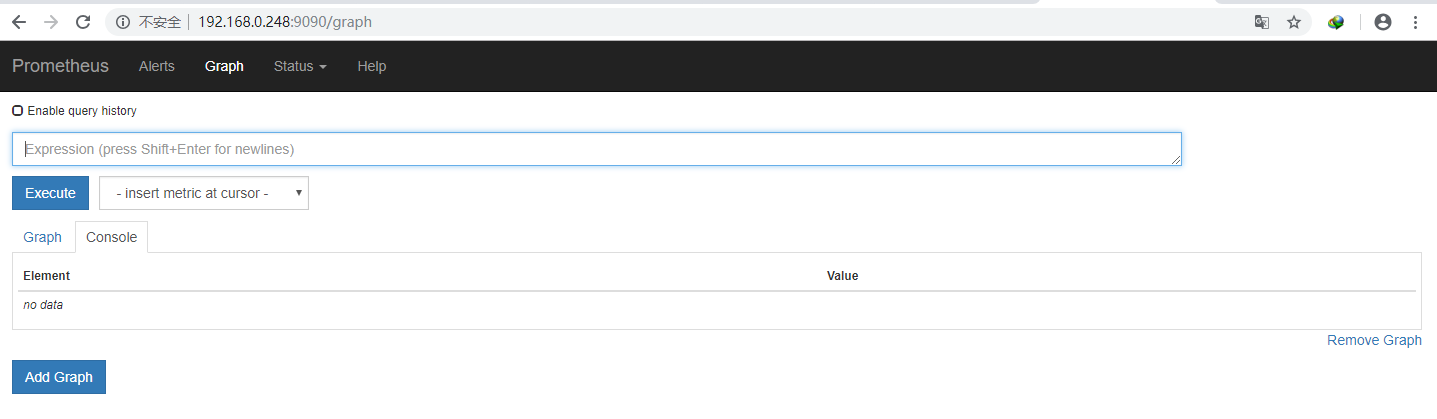
浏览器输入 http://192.168.0.248:9090 访问
prometheus.yml 文件参考:
https://prometheus.io/docs/prometheus/latest/configuration/configuration/
https://prometheus.io/docs/prometheus/latest/configuration/configuration/#<relabel_config>
https://prometheus.io/docs/prometheus/latest/configuration/configuration/#<file_sd_config>
安装 node_exporter 获取主机信息
# 解压 node_exporter

cd /data/software/

tar xf node_exporter-0.15.2.linux-amd64.tar.gz -C /usr/local

mv node_exporter-0.15.2.linux-amd64 node_exporter

nohup ./node_exporter &
安装 grafana
cd /iba/software

# 解压

tar xf grafana-4.6.3.linux-x64.tar.gz -C /iba/prometheus/

cd /iba/prometheus/

mv grafana-4.6.3 grafana

cd grafana/

# 测试

./bin/grafana-server

# 停止

ctrl+c

cat /usr/lib/systemd/system/grafana-server.service

[Unit]

Description=Grafana instance

Documentation=http://docs.grafana.org

Wants=network-online.target

After=network-online.target

[Service]

User=root

Group=root

Type=simple

Restart=on-failure

WorkingDirectory=/iba/prometheus/grafana

RuntimeDirectory=grafana

RuntimeDirectoryMode=0750

ExecStart=/iba/prometheus/grafana/bin/grafana-server

LimitNOFILE=10000

TimeoutStopSec=20

[Install]

WantedBy=multi-user.target

# 启动

systemctl start grafana-server

systemctl status grafana-server -l
访问 http://192.168.0.248:3000,默认用户和密码是 admin/admin

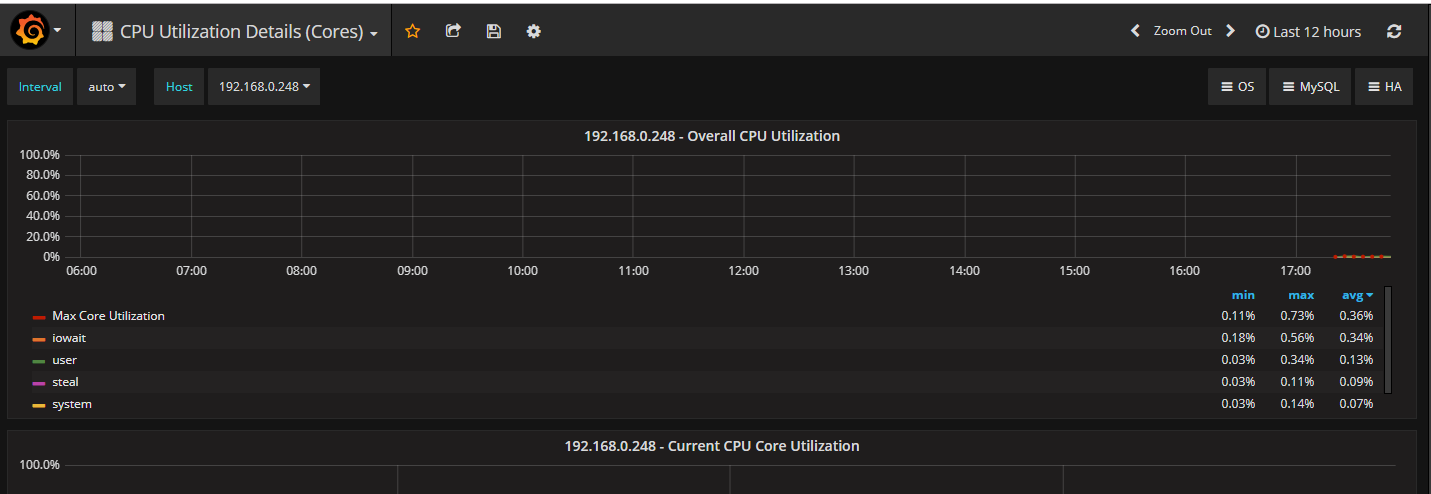
配置数据源


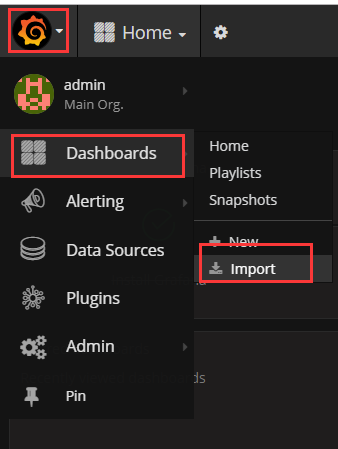
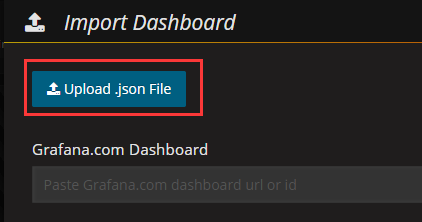
下载 grafana-dashboards-1.6.1.tar.gz,解压,使用浏览器导入 dashboard, 下载地址:https://github.com/percona/grafana-dashboards/archive/v1.6.1.tar.gz

在 192.168.0.237 安装 node_exporter 和 mysqld_exporter
cd /iba/software/

tar zxf node_exporter-0.15.2.linux-amd64.tar.gz -C /usr/local/

cd /usr/local/

mv node_exporter-0.15.2.linux-amd64 node_exporter

# 启动

cd node_exporter/

nohup ./node_exporter &
几分钟后 grafana 出现了新服务器的信息

在mysql上配置监控使用的用户
GRANT REPLICATION CLIENT, PROCESS, SELECT ON *.* TO 'mysql_monitor'@'%' IDENTIFIED BY 'mysql_monitor';

FLUSH PRIVILEGES;
cd /iba/software/

tar zxf mysqld_exporter-0.10.0.linux-amd64.tar.gz -C /usr/local/

cd /usr/local/

mv mysqld_exporter-0.10.0.linux-amd64/ mysqld_exporter

cd mysqld_exporter/

# 在 mysql 上创建一个专门用于监控的用户,

cat .my.cnf

[client]

user=mysql_monitor

password=mysql_monitor

# 启动

nohup /usr/local/mysqld_exporter/mysqld_exporter  -config.my-cnf="/usr/local/mysqld_exporter/.my.cnf" &
导入 dashboard: MySQL_Overview.json

Grafan+Prometheus 监控 MySQL的更多相关文章
- Grafana+Prometheus 监控 MySQL
转自:Grafana+Prometheus 监控 MySQL 架构图 环境 IP 环境 需装软件 192.168.0.237 mysql-5.7.20 node_exporter-0.15.2.lin ...
- Prometheus 监控Mysql服务器及Grafana可视化
Prometheus 监控Mysql服务器及Grafana可视化. mysql_exporter:用于收集MySQL性能信息. 使用版本 mysqld_exporter 0.11.0 官方地址 使用文 ...
- 使用 Docker 部署 Grafana + Prometheus 监控 MySQL 数据库
一.背景 在平时开发过程当中需要针对 MySQL 数据库进行监控,这里我们可以使用 Grafana 和 Prometheus 来实现监控功能.Grafana 是一款功能强大的仪表盘面板,支持多种数据源 ...
- 采用prometheus 监控mysql
1. prometheus 是什么 开源的系统监控和报警工具,监控项目的流量.内存量.负载量等实时数据. 它通过直接或短时jobs中介收集监控数据,在本地存储所有收集到的数据,并且通过定义好的rule ...
- Grafana+Prometheus监控mysql性能
#cmd /usr/local 今天讲一下如何监控服务器中的mysql数据库的性能 一.数据库操作 1.mysql启动 #service mysqld start #启动数据库 #service my ...
- Prometheus 监控MySQL
目录 0.简介 1.mysql_exporter部署 2.mysql报警规则 0.简介 文中主要监控MySQL/MySQL主从信息 版本:mysql-5.7,mysql_exporter-0.12.1 ...
- 手把手教你使用 Prometheus 监控 MySQL 与 MariaDB.md
概述 MySQL 是常用的关系型数据库,MariaDB 作为 MySQL 的分支版本,兼容 MySQL 协议,也越来越流行.在 Kubernetes 环境中如何使用 Prometheus 来对它们进行 ...
- prometheus监控mysql
创建一个用于mysqld_exporter连接到MySQL的用户并赋予所需的权限 mysql> GRANT REPLICATION CLIENT, PROCESS ON *.* TO '; my ...
- 使用Prometheus监控SpringBoot应用
通过之前的文章我们使用Prometheus监控了应用服务器node_exporter,数据库mysqld_exporter,今天我们来监控一下你的应用.(本文以SpringBoot 2.1.9.REL ...
随机推荐
- 吴恩达机器学习笔记30-神经网络的反向传播算法(Backpropagation Algorithm)
之前我们在计算神经网络预测结果的时候我们采用了一种正向传播方法,我们从第一层开始正向一层一层进行计算,直到最后一层的ℎ
- 《http权威指南》读书笔记17
概述 最近对http很感兴趣,于是开始看<http权威指南>.别人都说这本书有点老了,而且内容太多.我个人觉得这本书写的太好了,非常长知识,让你知道关于http的很多概念,不仅告诉你怎么做 ...
- ReentrantReadWriteLock 读写锁解析
4 java中锁是个很重要的概念,当然这里的前提是你会涉及并发编程. 除了语言提供的锁关键字 synchronized和volatile之外,jdk还有其他多种实用的锁. 不过这些锁大多都是基于AQS ...
- MyBatis 延迟加载的三种加载方式深入,你get了吗?
延迟加载 延迟加载对主对象都是直接加载,只有对关联对象是延迟加载. 延迟加载可以减轻数据库的压力, 延迟加载不可是一条SQL查询多表信息,这样构不成延迟加载,会形成直接加载. 延迟加载分为三种类型: ...
- python中os.path.isdir()等函数的作用和用法
一 用法和概念: Python中的os模块用于和系统进行交互,其中: 1 os.listdir()用于返回一个由文件名和目录名组成的列表,需要注意的是它接收的参数需要是一个绝对的路径. 2 os.pa ...
- Python编程Day4——if判断、while循环、for循环
一.if判断 语法一: if条件: 代码块1 代码块2 代码块3 示例: sex='female' age=18 is_beautiful=True if sex =='female'and age& ...
- 微信小程序 获得用户输入内容
在微信小程序里,如何获得用户输入的内容?? js: document.getElementById("Content").value jq:$("#Content&quo ...
- Struts2框架(4)---Action类访问servlet
Action类访问servlet Action类有三种方式servlet: (1)间接的方式访问Servlet API ---使用ActionContext对象 (2) 实现接口,访问Action ...
- mysql 开发基础系列9 存储引擎 MyISAM 介绍
MyISAM是mysql 默认存储引擎,它不支持事务,外键.但访问速度快,对事务完整性没有要求或者以select,insert 为主的应用基本上都可以使用这个引擎.每个MyISAM在磁盘上存储成3个文 ...
- [Shell]sed命令在MAC和Linux下的不同使用方式
---------------------------------------------------------------------------------------------------- ...