
定义SAP Portal Url别名
Defining URL Aliases
Use
A URL alias is the part of the portal URL after the section that specifies the portal J2EE application ( irj ), which by default ishttp://<server>:<port>/irj .
This section describes how to define custom URL aliases in the URL Alias Manager for your own portal usage scenarios. This is the recommended method for defining URL aliases. However, you can also define URL aliases in the web.xml file.
Procedure
Defining URL Aliases
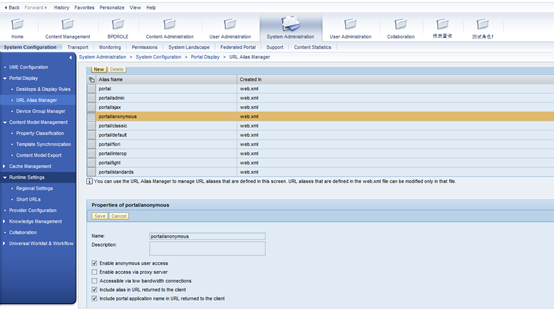
- In the portal, navigate to System Administration System Configuration Portal Display URL Alias Manager.
- In the URL Aliases list, choose New .
A new URL alias is added to the URL Aliases list.
- In the Properties of New alias area, enter a name and an optional description for the URL alias.
The URL alias name must be unique.
- Select any of the following system properties that you want to apply to the alias, to indicate the type of portal access to provide for users accessing the portal with this alias:
- Whether the portal can be accessed by anonymous users
- Whether the portal can be accessed via a proxy server
- Whether the portal can be accessed via a low-bandwidth connection
- Whether the alias is included in the URL returned to the client
- Whether the portal application name ( irj ) is included in the URL returned to the client
- Define any custom properties that you require:
- Choose Add custom property .
- Enter a name and value for the property and choose Save .
Note
You can remove a custom property that is no longer needed by choosing Remove property next to the relevant custom property.
- Choose Save .
The properties of the new URL alias are updated in the URL Aliases list.
Defining URL Aliases in the Web.xml File
Use
A URL alias is the part of the portal URL after the section that specifies the portal J2EE application ( irj ), which by default ishttp://<server>:<port>/irj .
This section describes how to define URL aliases in the web.xml file for your own portal usage scenarios. However, the preferred way to define URL aliases is using the URL Alias Manager. For more information, see Defining URL Aliases .
Procedure
- Locate the com.sap.portal.runtime.dispatcher.war file in\usr\sap\ <SID> \ <instance ID> \j2ee\cluster\apps\sap.com\irj\servlet_jsp\irj.
- Extract the web.xml file.
- Add an initial parameter ( <init-param> element) for the gateway servlet.
- Define the parameter name ( <param-name> element) as the new URL alias. The URL alias name must be unique.
- Set the parameter value ( <param-value> element) to a string of key-value pairs, separated by commas (,). All values are either 0(false) or 1 (true).
The following keys are available:
|
Key |
Description |
|
anonymous |
Indicates whether anonymous user access is enabled |
|
low_bandwidth |
Indicates whether users are accessing the portal via low-bandwidth connections |
|
proxy |
Indicates whether users can access the portal via a proxy server |
|
include_in_url |
Indicates whether the alias is part of the URL returned to the client |
|
include_application_name_in_url |
Indicates whether the portal application name ( irj ) is part of the URL returned to the client |
The following is a sample parameter value:
anonymous=<value>,proxy=<value>,low_bandwidth=<value>, include_in_url=1, include_application_name in_url =1
- Add the updated web.xml file to the .war file.
- Locate the com.sap.portal.runtime.dispatcher.ear file. This file is part of the com.sap.portal.runtime.dispatcher.sda file located in the EP-Basis SCA.
Make a copy of the .ear file.
- Insert the .war file into com.sap.portal.runtime.dispatcher.ear , overwriting the existing .war file.
- Deploy the modified .ear file on the server.
- Restart the portal.
The following shows the XML that is added to create a new URL alias called myAlias :
<servlet>
<servlet-name>gateway</servlet-name>
<servlet-class>com.sap.portal.navigation.Gateway</servlet-class>
<load-on-startup>0</load-on-startup>
.
.
.
<init-param>
<param-name>myAlias</param-name>
<param-value>anonymous=0,proxy=0,low_bandwidth=0,include_in_url=1,include_application_name_in_url=1
</param-value>
</init-param>
.
.
.
</servlet>
定义SAP Portal Url别名的更多相关文章
- yii2系统定义的常用路径别名
@yii 表示Yii框架所在的目录,也是 yii\BaseYii 类文件所在的位置: @app 表示正在运行的应用的根目录,一般是 digpage.com/frontend :物理路径 @vendor ...
- Django 传递额外参数及 URL别名
传递额外参数到视图函数中 在 urls.py 文件中添加下面内容 from django.conf.urls import url urlpatterns = [ url(r'index', view ...
- SAP Portal 上传资源到WRR
Uploading Resources to the Web Resource Repository Prerequisites You have been assigned the Content ...
- day58——模板继承、组件、自定义标签和过滤器、inclusion_tag、静态文件配置、url别名和反向解析、url命名空间
day58 模板相关 模板继承(母版继承) 1. 创建一个xx.html页面(作为母版,其他页面来继承它使用) 2. 在母版中定义block块(可以定义多个,整个页面任意位置) {% block co ...
- django url别名和反向解析 命名空间
url别名和反向解析 我们平时写的url名字都是死的,如果项目过大,需要项目中某个文件名改动一下,那么改动起来就不是一般的麻烦了,所以我们就在定义的时候给url起一个别名,以后不管哪个文件中运用都是用 ...
- Django路由系统---Django重点之url别名
django重点之url别名[参数名必须是name,格式是name="XXX] 不论后台路径如何进行修改路径,前台访问的路径不变,永远是alias, 这样方便开发 前台根据 {{ url & ...
- strak组件(3):URL别名的优化
将生成URL别名的功能进行解耦.效果和上一节的一样. 效果图: 新增函数 get_url_name(self, param) # 生成url别名,需要一个参数(list/add/edit/delete ...
- Thymeleaf 之 内置对象、定义变量、URL参数及标签自定义属性
Thymeleaf 之 内置对象.定义变量.URL参数及标签自定义属性 本文章来自[知识林] 如标题所述,这篇文章主要讲述Thymeleaf中的内置对象(list解析.日期格式化.数字格式化等).定义 ...
- Django重点之url别名
django重点之url别名[参数名必须是name,格式是name="XXX] 不论后台路径如何进行修改路径,前台访问的路径不变,永远是alias, 这样方便开发 前台根据 {{ url & ...
随机推荐
- TimeOut Error :因为远程服务器关闭导致mnist数据集不能通过input_data下载下来
解决办法: 修改文件: C:\Users\501-PC\AppData\Local\Programs\Python\Python35\Lib\site-packages\tensorflow\con ...
- Kafka~消费的有效期
消息的过期时间 我们在使用Kafka存储消息时,如果已经消费过了,再永久存储是一种资源的浪费,所有,kafka为我们提供了消息文件的过期策略,可以通过配置server.properies来实现# vi ...
- EasyUI系列学习(九)-Panel(面板)
一.加载方式 1.class加载 <div class="easyui-panel" title="面板一" style="width:500p ...
- Spring-Aop的两种代理方式
Spring-Aop两种代理方式: 1.JDK动态代理:用于目标类实现了接口: 2.Cglib动态代理:用于目标类没有实现接口: spring会依据目标类是否实现接口来选择使用哪种代理方式(目标类:相 ...
- MVC之参数验证(三)
在实际开发中,项目经理会一直强调一句话,永远不要相信客户端的数据(前端可以不用验证,但是后端必须验证).大家同意这样的说法吧..新端验证毋庸质疑JS验证,提高用户体验我们不得不添加一些与后端一致的验证 ...
- Java内存模型原理,你真的理解吗?
[51CTO.com原创稿件]这篇文章主要介绍模型产生的问题背景,解决的问题,处理思路,相关实现规则,环环相扣,希望读者看完这篇文章后能对 Java 内存模型体系产生一个相对清晰的理解,知其然知其所以 ...
- [ CodeForces 1065 B ] Vasya and Isolated Vertices
\(\\\) \(Description\) 求一个\(N\)个点\(M\)条边的无向图,点度为 \(0\) 的点最多和最少的数量. \(N\le 10^5,M\le \frac {N\times ( ...
- opencv3.3+vs2015调用笔记本摄像头成功
先上代码 成功图片如下: #include <opencv2/highgui/highgui.hpp> #include <opencv2/imgproc/imgproc.hpp&g ...
- C#常见问题总结(三)
11.sql比access好在哪里,为什么都用sql 解决方法: 数据量大,可以在服务器端,access一般在单机的时候用 12.c#基础视频教程有吗 解决方法: 零基础学C#这本书带全套C#基础视频 ...
- iOS 声明属性关键字讲解
atomic: 原子操作(原子性是指事务的一个完整操作,操作成功就提交,反之就回滚. 原子操作就是指具有原子性的操作)在objective-c 属性设置里面 默认的就是atomic ,意思就是 set ...