
定义SAP Portal Url别名
Defining URL Aliases
Use
A URL alias is the part of the portal URL after the section that specifies the portal J2EE application ( irj ), which by default ishttp://<server>:<port>/irj .
This section describes how to define custom URL aliases in the URL Alias Manager for your own portal usage scenarios. This is the recommended method for defining URL aliases. However, you can also define URL aliases in the web.xml file.
Procedure
Defining URL Aliases
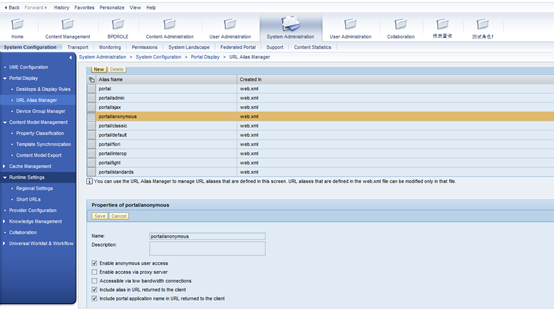
- In the portal, navigate to System Administration System Configuration Portal Display URL Alias Manager.
- In the URL Aliases list, choose New .
A new URL alias is added to the URL Aliases list.
- In the Properties of New alias area, enter a name and an optional description for the URL alias.
The URL alias name must be unique.
- Select any of the following system properties that you want to apply to the alias, to indicate the type of portal access to provide for users accessing the portal with this alias:
- Whether the portal can be accessed by anonymous users
- Whether the portal can be accessed via a proxy server
- Whether the portal can be accessed via a low-bandwidth connection
- Whether the alias is included in the URL returned to the client
- Whether the portal application name ( irj ) is included in the URL returned to the client
- Define any custom properties that you require:
- Choose Add custom property .
- Enter a name and value for the property and choose Save .
Note
You can remove a custom property that is no longer needed by choosing Remove property next to the relevant custom property.
- Choose Save .
The properties of the new URL alias are updated in the URL Aliases list.
Defining URL Aliases in the Web.xml File
Use
A URL alias is the part of the portal URL after the section that specifies the portal J2EE application ( irj ), which by default ishttp://<server>:<port>/irj .
This section describes how to define URL aliases in the web.xml file for your own portal usage scenarios. However, the preferred way to define URL aliases is using the URL Alias Manager. For more information, see Defining URL Aliases .
Procedure
- Locate the com.sap.portal.runtime.dispatcher.war file in\usr\sap\ <SID> \ <instance ID> \j2ee\cluster\apps\sap.com\irj\servlet_jsp\irj.
- Extract the web.xml file.
- Add an initial parameter ( <init-param> element) for the gateway servlet.
- Define the parameter name ( <param-name> element) as the new URL alias. The URL alias name must be unique.
- Set the parameter value ( <param-value> element) to a string of key-value pairs, separated by commas (,). All values are either 0(false) or 1 (true).
The following keys are available:
|
Key |
Description |
|
anonymous |
Indicates whether anonymous user access is enabled |
|
low_bandwidth |
Indicates whether users are accessing the portal via low-bandwidth connections |
|
proxy |
Indicates whether users can access the portal via a proxy server |
|
include_in_url |
Indicates whether the alias is part of the URL returned to the client |
|
include_application_name_in_url |
Indicates whether the portal application name ( irj ) is part of the URL returned to the client |
The following is a sample parameter value:
anonymous=<value>,proxy=<value>,low_bandwidth=<value>, include_in_url=1, include_application_name in_url =1
- Add the updated web.xml file to the .war file.
- Locate the com.sap.portal.runtime.dispatcher.ear file. This file is part of the com.sap.portal.runtime.dispatcher.sda file located in the EP-Basis SCA.
Make a copy of the .ear file.
- Insert the .war file into com.sap.portal.runtime.dispatcher.ear , overwriting the existing .war file.
- Deploy the modified .ear file on the server.
- Restart the portal.
The following shows the XML that is added to create a new URL alias called myAlias :
<servlet>
<servlet-name>gateway</servlet-name>
<servlet-class>com.sap.portal.navigation.Gateway</servlet-class>
<load-on-startup>0</load-on-startup>
.
.
.
<init-param>
<param-name>myAlias</param-name>
<param-value>anonymous=0,proxy=0,low_bandwidth=0,include_in_url=1,include_application_name_in_url=1
</param-value>
</init-param>
.
.
.
</servlet>
定义SAP Portal Url别名的更多相关文章
- yii2系统定义的常用路径别名
@yii 表示Yii框架所在的目录,也是 yii\BaseYii 类文件所在的位置: @app 表示正在运行的应用的根目录,一般是 digpage.com/frontend :物理路径 @vendor ...
- Django 传递额外参数及 URL别名
传递额外参数到视图函数中 在 urls.py 文件中添加下面内容 from django.conf.urls import url urlpatterns = [ url(r'index', view ...
- SAP Portal 上传资源到WRR
Uploading Resources to the Web Resource Repository Prerequisites You have been assigned the Content ...
- day58——模板继承、组件、自定义标签和过滤器、inclusion_tag、静态文件配置、url别名和反向解析、url命名空间
day58 模板相关 模板继承(母版继承) 1. 创建一个xx.html页面(作为母版,其他页面来继承它使用) 2. 在母版中定义block块(可以定义多个,整个页面任意位置) {% block co ...
- django url别名和反向解析 命名空间
url别名和反向解析 我们平时写的url名字都是死的,如果项目过大,需要项目中某个文件名改动一下,那么改动起来就不是一般的麻烦了,所以我们就在定义的时候给url起一个别名,以后不管哪个文件中运用都是用 ...
- Django路由系统---Django重点之url别名
django重点之url别名[参数名必须是name,格式是name="XXX] 不论后台路径如何进行修改路径,前台访问的路径不变,永远是alias, 这样方便开发 前台根据 {{ url & ...
- strak组件(3):URL别名的优化
将生成URL别名的功能进行解耦.效果和上一节的一样. 效果图: 新增函数 get_url_name(self, param) # 生成url别名,需要一个参数(list/add/edit/delete ...
- Thymeleaf 之 内置对象、定义变量、URL参数及标签自定义属性
Thymeleaf 之 内置对象.定义变量.URL参数及标签自定义属性 本文章来自[知识林] 如标题所述,这篇文章主要讲述Thymeleaf中的内置对象(list解析.日期格式化.数字格式化等).定义 ...
- Django重点之url别名
django重点之url别名[参数名必须是name,格式是name="XXX] 不论后台路径如何进行修改路径,前台访问的路径不变,永远是alias, 这样方便开发 前台根据 {{ url & ...
随机推荐
- mysqladmin(MySQL管理工具)
mysqladmin是一个执行管理操作的客户端程序.它可以用来检查服务器的配置和当前状态.创建和删除数据库等. 1.mysqladmin命令的语法: shell > mysqladmin [op ...
- 397 Integer Replacement 整数替换
给定一个正整数 n,你可以做如下操作:1. 如果 n 是偶数,则用 n / 2替换 n.2. 如果 n 是奇数,则可以用 n + 1或n - 1替换 n.n 变为 1 所需的最小替换次数是多少?示例 ...
- 【雅虎2017】一个在线展示广告的CVR预估框架实践
论文A Practical Framework of Conversion Rate Prediction for Online Display Advertising 定期更新,获取更多,欢迎sta ...
- javascript 到将来某个时间(2020-5-20)的倒计时
function countDown(dateStr){ var end = +new Date(dateStr), start = +new Date(), during = Math.floor( ...
- EF CodeFirst 不得不说的Where与OrderBy
先来聊上5毛钱的“排序” Code: using (ApplicationDbContext Db=new ApplicationDbContext()) { var res = Db.Threes. ...
- strong,weak, retain, assign的区别@property的参数
strong,weak, retain, assign的区别@property的参数 先说经验 使用场合 copy:NSString,block, weak:UI控件,代理 strong:一般对象.自 ...
- JVM GC调优一则–增大Eden Space提高性能
缘起 线上有Tomcat升级到7.0.52版,然后有应用的JVM FullGC变频繁,在高峰期socket连接数,Cpu使用率都暴增. 思路 思路是Tomcat本身的代码应该是没有问题的,有问题的可能 ...
- CherryPy 入门
CherryPy是一个Python的HTTP框架,可以用Python来处理HTTP请求然后返回结果. 1. 安装 可以去这个地址下载 CherryPy-3.1.2.win32.exe .或者去这个链接 ...
- (转)WKT转换工具terraformers
http://blog.csdn.net/gisshixisheng/article/details/53150111 概述: 前面的文章中,提到了Arcgis中实现wkt转换为geometry,但是 ...
- bzoj3940 censoring 题解(AC自动机)
题目描述 Farmer John has purchased a subscription to Good Hooveskeeping magazine for his cows, so they h ...