
iOS UIAlertController
在Xcode的iOS9.0 SDK中,UIAlertView和UIActionSheet都被UIAlertController取代。
在iOS 9中,UIAlertController在功能上是和UIAlertView以及UIActionSheet相同的,UIAlertController以一种模块化替换的方式来代替这两货的功能和作用。是使用对话框(alert)还是使用上拉菜单(action sheet),就取决于在创建控制器时,您是如何设置首选样式的。
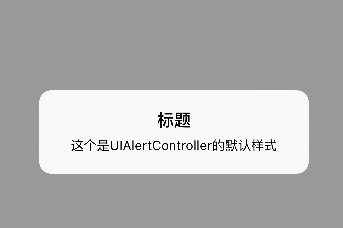
1、对话框
    UIAlertController *alertController = [UIAlertController alertControllerWithTitle:@"标题"message:@"这个是UIAlertController的默认样式"preferredStyle:UIAlertControllerStyleAlert];

    [self presentViewController:alertController animated:YES completion:nil];
同创建UIAlertView相比,我们无需指定代理,也无需在初始化过程中指定按钮。不过要特别注意第三个参数,要确定您选择的是对话框样式还是上拉菜单样式。
2、将动作按钮添加到控制器
通过创建UIAlertAction的实例,您可以将动作按钮添加到控制器上。UIAlertAction由标题字符串、样式以及当用户选中该动作时运行的代码块组成。通过UIAlertActionStyle,您可以选择如下三种动作样式:常规(default)、取消(cancel)以及警示(destruective)。为了实现原来我们在创建UIAlertView时创建的按钮效果,我们只需创建这两个动作按钮并将它们添加到控制器上即可。
   UIAlertController *alertController = [UIAlertController alertControllerWithTitle:@"标题"message:@"这个是UIAlertController的默认样式"preferredStyle:UIAlertControllerStyleAlert];

    UIAlertAction *cancelAction = [UIAlertAction actionWithTitle:@"取消" style:UIAlertActionStyleCancel handler:nil];

    UIAlertAction *okAction = [UIAlertAction actionWithTitle:@"好的" style:UIAlertActionStyleDefault handler:nil];

    [alertController addAction:cancelAction];

    [alertController addAction:okAction];

    [self presentViewController:alertController animated:YES completion:nil];

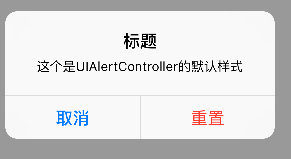
3、“警示”样式
    UIAlertController *alertController = [UIAlertController alertControllerWithTitle:@"标题"message:@"这个是UIAlertController的默认样式"preferredStyle:UIAlertControllerStyleAlert];

    UIAlertAction *resetAction = [UIAlertAction actionWithTitle:@"重置" style:UIAlertActionStyleDestructive handler:nil];

    UIAlertAction *cancelAction = [UIAlertAction actionWithTitle:@"取消" style:UIAlertActionStyleCancel handler:nil];

    //添加顺序和显示顺序相同

    [alertController addAction:cancelAction];

    [alertController addAction:resetAction];

    [self presentViewController:alertController animated:YES completion:nil];
4、文本对话框
设置输入框,并且设置通知,检测输入字符长度少于3时,不能点击“好的”。
值得注意的是,不像使用UIAlertView的时候可以用UIAlertViewDelegate检测文本框输入,UIAlertController没有对应的代理,只能自己实现监听。
    UIAlertController *alertController = [UIAlertController alertControllerWithTitle:@"文本对话框" message:@"登录和密码对话框示例" preferredStyle:UIAlertControllerStyleAlert];

    [alertController addTextFieldWithConfigurationHandler:^(UITextField *textField){

        [[NSNotificationCenter defaultCenter] addObserver:self selector:@selector(alertTextFieldDidChange:) name:UITextFieldTextDidChangeNotification object:textField];

        textField.placeholder = @"登录";

    }];

    [alertController addTextFieldWithConfigurationHandler:^(UITextField *textField) {

        [[NSNotificationCenter defaultCenter] addObserver:self selector:@selector(alertTextFieldDidChange:) name:UITextFieldTextDidChangeNotification object:textField];

        textField.placeholder = @"密码";

        textField.secureTextEntry = YES;

    }];

    UIAlertAction *okAction = [UIAlertAction actionWithTitle:@"好的" style:UIAlertActionStyleDefault handler:^(UIAlertAction *action) {

        UITextField *login = alertController.textFields.firstObject;

        UITextField *password = alertController.textFields.lastObject;

        NSLog(@"%@",login.text);

        NSLog(@"%@",password.text);

    }];

    UIAlertAction *cancelAction = [UIAlertAction actionWithTitle:@"取消" style:UIAlertActionStyleCancel handler:nil];

    [alertController addAction:cancelAction];

    [alertController addAction:okAction];

    [self presentViewController:alertController animated:YES completion:nil];
- (void)alertTextFieldDidChange:(NSNotification *)notification{

    UIAlertController *alertController = (UIAlertController *)self.presentedViewController;

    if (alertController) {

        UITextField *login = alertController.textFields.firstObject;

        UIAlertAction *okAction = alertController.actions.lastObject;

        okAction.enabled = login.text.length > ;

    }

}

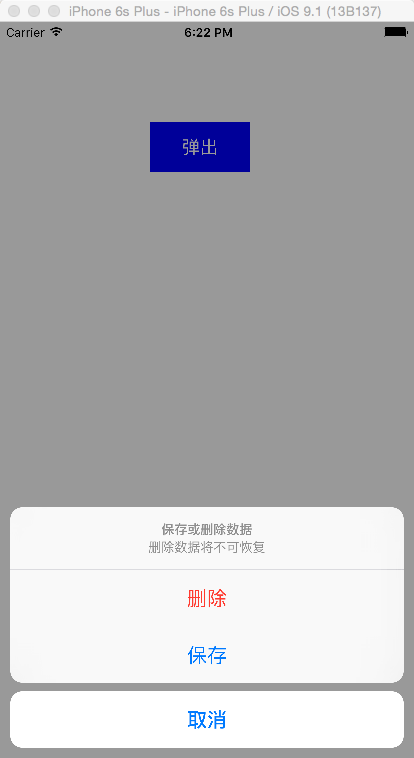
5、上拉菜单
    UIAlertController *alertController = [UIAlertController alertControllerWithTitle:@"保存或删除数据" message:@"删除数据将不可恢复" preferredStyle: UIAlertControllerStyleActionSheet];

    UIAlertAction *cancelAction = [UIAlertAction actionWithTitle:@"取消" style:UIAlertActionStyleCancel handler:^(UIAlertAction * action) {

        NSLog(@"点击了取消");

    }];

    UIAlertAction *deleteAction = [UIAlertAction actionWithTitle:@"删除" style:UIAlertActionStyleDestructive handler:^(UIAlertAction * action) {

        NSLog(@"点击了删除");

    }];

    UIAlertAction *archiveAction = [UIAlertAction actionWithTitle:@"保存" style:UIAlertActionStyleDefault handler:^(UIAlertAction * action) {

        NSLog(@"点击了保存");

    }];

    [alertController addAction:cancelAction];

    [alertController addAction:deleteAction];

    [alertController addAction:archiveAction];

    [self presentViewController:alertController animated:YES completion:nil];
iOS UIAlertController的更多相关文章
- iOS UIAlertController跟AlertView用法一样 && otherButtonTitles:(nullable NSString *)otherButtonTitles, ... 写法
今天写弹出框UIAlertController,用alertView习惯了,所以封装了一下,跟alertView用法一样,不说了,直接上代码: 先来了解一下otherButtonTitles:(nul ...
- IOS UIAlertController 使用方法
在很多种语言中,alert都表示弹窗操作,弹窗功能非常有用,不仅可以用于正式的app功能中,也可以在调试中使用.在OC中,UIAlertController类用来控制弹窗操作.在IOS 8.0之前, ...
- iOS UIAlertController中加入倒计时,输入框,Swift讲解
一.倒计时 @interface ViewController () { UIAlertController *alertview; NSString * message; NSTimer * wai ...
- iOS - UIAlertController三种显示提示框代码
UIAlertView在IOS 8以上版本已经过时了,官方推荐我们使用UIAlertController代替UIAlertView.UIActionSheet 1、UIAlertController显 ...
- iOS:UIAlertController和UIAlertAction的详解
提示框控制器:UIAlertController 提示框按钮:UIAlertAction 功能:用来提示信息,并给出一些可以进行选择的按钮来处理相应的要求. 注意:在Xcode的iOS8 SD ...
- iOS UIAlertController在iPhone与iPad上的区别
很简单的一段代码: // 首先声明一个UIAlertController对象 private var alertController: UIAlertController! // 初始化UIAlert ...
- iOS UIAlertController在Tableview中显示缓慢,迟钝,延迟
在UITableViewCell中弹窗Alert延迟.在cellForRow中:cell.selectionStyle = UITableViewCellSelectionStyleNone; 或者在 ...
- iOS 8.0后使用UIAlertController
iOS 8的新特性之一就是让接口更有适应性.更灵活,因此许多视图控制器的实现方式发生了巨大的变化.全新的UIPresentationController在实现视图控制器间的过渡动画效果和自适应设备尺寸 ...
- IOS 修改UIAlertController的按钮标题的字体颜色,字号,内容
IOS 修改UIAlertController的按钮标题的字体颜色,字号,内容 UIAlertController *alertVC = [UIAlertController alertControl ...
随机推荐
- 苹果官方发布,iPhone 6 & Plus 设计素材
苹果发布 iPhone 6 和 iPhone 6 Plus 有一段时间了,据说首日预定量达到了创纪录的1600万部,真是不可思议.苹果已经创建了一些指引,让开发者可以受益.他们已经发布了一组苹果官方的 ...
- WEB编程中获取src目录下的文件(没有src目录)
这种情况遇见的会比较多,像一个WEB工程,如果在src下面写了一个xml或者一些其它的文件,当工程发布到服务器时,web程序是在tomcat等服务器下运行这个程序的,这个时候,程序目录里面并没有src ...
- HT For Web 拓扑图背景设置
HT For Web 的HTML5拓扑图组件graphView背景设置有多种途径可选择: divBackground:通过css设置graphView对应的div背景 Painter:通过graphV ...
- .NET Core爬坑记 1.0 项目文件
前言: 之所以要写这个系列是因为在移植项目到ASP.NET Core平台的过程中,遇到了一些“新变化”,这些变化有编译方面的.有API方面的,今天要讲的是编译方面的一些问题.我把它们整理后分享出来,以 ...
- Navigation Drawer的使用及遇到的问题
ActionBar的问题 Navigation View是Android Support Library中的一个新的组件,该组件提供类似于Sliding Menu的抽屉功能,在张兴业的博客中有讲解到具 ...
- 使用Graphviz绘图(一)
前言 日常开发或者编写课程论文时,除了代码文档的编写,其中一个很重要的部分就是需要绘制流程图.示意图 绘制流程图有很多工具,一般常见的就有如下几种: Word.PPT等办公软件 Viso以及开源的Di ...
- node.js下LDAP查询实践
目标: 从一个LDAP Server获取uid=kxh的用户数据 LDAP地址为:ldap://10.233.21.116:389 在工程根目录中,先npm一个LDAP的访问库ldpajs npm i ...
- iOS阶段学习第31天笔记(UINavigationBar介绍)
iOS学习(UI)知识点整理 一.UINavigationBar 的介绍 1)概念:UINavigationBar 是用于定义导航栏按钮的一个类对象 2)在使用UINavigationBar之前必须先 ...
- csharp:workflow and bpm(Business Process Management)
http://ccflow.codeplex.com/ http://winwf.codeplex.com/ http://nginn.codeplex.com/ https://github.com ...
- How to throw an error in MySql procedure?
http://stackoverflow.com/questions/4862911/how-to-throw-an-error-in-mysql-procedure 9down votefavori ...