
iOS UIAlertController
在Xcode的iOS9.0 SDK中,UIAlertView和UIActionSheet都被UIAlertController取代。
在iOS 9中,UIAlertController在功能上是和UIAlertView以及UIActionSheet相同的,UIAlertController以一种模块化替换的方式来代替这两货的功能和作用。是使用对话框(alert)还是使用上拉菜单(action sheet),就取决于在创建控制器时,您是如何设置首选样式的。
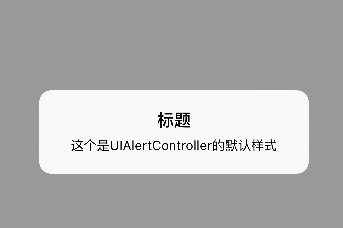
1、对话框
    UIAlertController *alertController = [UIAlertController alertControllerWithTitle:@"标题"message:@"这个是UIAlertController的默认样式"preferredStyle:UIAlertControllerStyleAlert];

    [self presentViewController:alertController animated:YES completion:nil];
同创建UIAlertView相比,我们无需指定代理,也无需在初始化过程中指定按钮。不过要特别注意第三个参数,要确定您选择的是对话框样式还是上拉菜单样式。
2、将动作按钮添加到控制器
通过创建UIAlertAction的实例,您可以将动作按钮添加到控制器上。UIAlertAction由标题字符串、样式以及当用户选中该动作时运行的代码块组成。通过UIAlertActionStyle,您可以选择如下三种动作样式:常规(default)、取消(cancel)以及警示(destruective)。为了实现原来我们在创建UIAlertView时创建的按钮效果,我们只需创建这两个动作按钮并将它们添加到控制器上即可。
   UIAlertController *alertController = [UIAlertController alertControllerWithTitle:@"标题"message:@"这个是UIAlertController的默认样式"preferredStyle:UIAlertControllerStyleAlert];

    UIAlertAction *cancelAction = [UIAlertAction actionWithTitle:@"取消" style:UIAlertActionStyleCancel handler:nil];

    UIAlertAction *okAction = [UIAlertAction actionWithTitle:@"好的" style:UIAlertActionStyleDefault handler:nil];

    [alertController addAction:cancelAction];

    [alertController addAction:okAction];

    [self presentViewController:alertController animated:YES completion:nil];

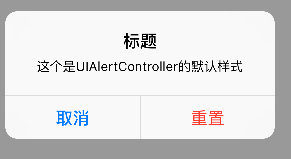
3、“警示”样式
    UIAlertController *alertController = [UIAlertController alertControllerWithTitle:@"标题"message:@"这个是UIAlertController的默认样式"preferredStyle:UIAlertControllerStyleAlert];

    UIAlertAction *resetAction = [UIAlertAction actionWithTitle:@"重置" style:UIAlertActionStyleDestructive handler:nil];

    UIAlertAction *cancelAction = [UIAlertAction actionWithTitle:@"取消" style:UIAlertActionStyleCancel handler:nil];

    //添加顺序和显示顺序相同

    [alertController addAction:cancelAction];

    [alertController addAction:resetAction];

    [self presentViewController:alertController animated:YES completion:nil];
4、文本对话框
设置输入框,并且设置通知,检测输入字符长度少于3时,不能点击“好的”。
值得注意的是,不像使用UIAlertView的时候可以用UIAlertViewDelegate检测文本框输入,UIAlertController没有对应的代理,只能自己实现监听。
    UIAlertController *alertController = [UIAlertController alertControllerWithTitle:@"文本对话框" message:@"登录和密码对话框示例" preferredStyle:UIAlertControllerStyleAlert];

    [alertController addTextFieldWithConfigurationHandler:^(UITextField *textField){

        [[NSNotificationCenter defaultCenter] addObserver:self selector:@selector(alertTextFieldDidChange:) name:UITextFieldTextDidChangeNotification object:textField];

        textField.placeholder = @"登录";

    }];

    [alertController addTextFieldWithConfigurationHandler:^(UITextField *textField) {

        [[NSNotificationCenter defaultCenter] addObserver:self selector:@selector(alertTextFieldDidChange:) name:UITextFieldTextDidChangeNotification object:textField];

        textField.placeholder = @"密码";

        textField.secureTextEntry = YES;

    }];

    UIAlertAction *okAction = [UIAlertAction actionWithTitle:@"好的" style:UIAlertActionStyleDefault handler:^(UIAlertAction *action) {

        UITextField *login = alertController.textFields.firstObject;

        UITextField *password = alertController.textFields.lastObject;

        NSLog(@"%@",login.text);

        NSLog(@"%@",password.text);

    }];

    UIAlertAction *cancelAction = [UIAlertAction actionWithTitle:@"取消" style:UIAlertActionStyleCancel handler:nil];

    [alertController addAction:cancelAction];

    [alertController addAction:okAction];

    [self presentViewController:alertController animated:YES completion:nil];
- (void)alertTextFieldDidChange:(NSNotification *)notification{

    UIAlertController *alertController = (UIAlertController *)self.presentedViewController;

    if (alertController) {

        UITextField *login = alertController.textFields.firstObject;

        UIAlertAction *okAction = alertController.actions.lastObject;

        okAction.enabled = login.text.length > ;

    }

}

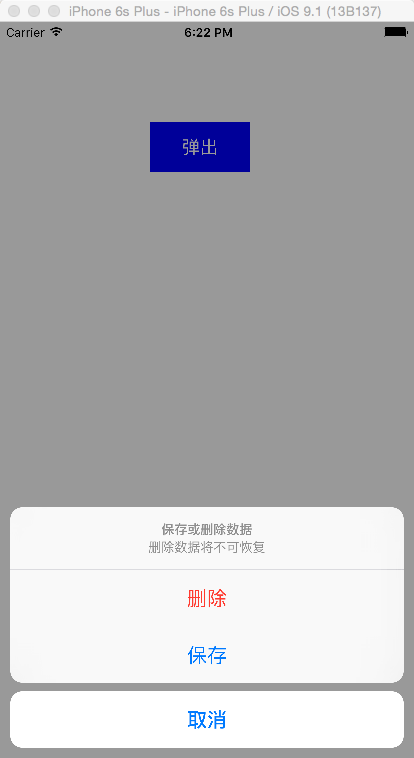
5、上拉菜单
    UIAlertController *alertController = [UIAlertController alertControllerWithTitle:@"保存或删除数据" message:@"删除数据将不可恢复" preferredStyle: UIAlertControllerStyleActionSheet];

    UIAlertAction *cancelAction = [UIAlertAction actionWithTitle:@"取消" style:UIAlertActionStyleCancel handler:^(UIAlertAction * action) {

        NSLog(@"点击了取消");

    }];

    UIAlertAction *deleteAction = [UIAlertAction actionWithTitle:@"删除" style:UIAlertActionStyleDestructive handler:^(UIAlertAction * action) {

        NSLog(@"点击了删除");

    }];

    UIAlertAction *archiveAction = [UIAlertAction actionWithTitle:@"保存" style:UIAlertActionStyleDefault handler:^(UIAlertAction * action) {

        NSLog(@"点击了保存");

    }];

    [alertController addAction:cancelAction];

    [alertController addAction:deleteAction];

    [alertController addAction:archiveAction];

    [self presentViewController:alertController animated:YES completion:nil];
iOS UIAlertController的更多相关文章
- iOS UIAlertController跟AlertView用法一样 && otherButtonTitles:(nullable NSString *)otherButtonTitles, ... 写法
今天写弹出框UIAlertController,用alertView习惯了,所以封装了一下,跟alertView用法一样,不说了,直接上代码: 先来了解一下otherButtonTitles:(nul ...
- IOS UIAlertController 使用方法
在很多种语言中,alert都表示弹窗操作,弹窗功能非常有用,不仅可以用于正式的app功能中,也可以在调试中使用.在OC中,UIAlertController类用来控制弹窗操作.在IOS 8.0之前, ...
- iOS UIAlertController中加入倒计时,输入框,Swift讲解
一.倒计时 @interface ViewController () { UIAlertController *alertview; NSString * message; NSTimer * wai ...
- iOS - UIAlertController三种显示提示框代码
UIAlertView在IOS 8以上版本已经过时了,官方推荐我们使用UIAlertController代替UIAlertView.UIActionSheet 1、UIAlertController显 ...
- iOS:UIAlertController和UIAlertAction的详解
提示框控制器:UIAlertController 提示框按钮:UIAlertAction 功能:用来提示信息,并给出一些可以进行选择的按钮来处理相应的要求. 注意:在Xcode的iOS8 SD ...
- iOS UIAlertController在iPhone与iPad上的区别
很简单的一段代码: // 首先声明一个UIAlertController对象 private var alertController: UIAlertController! // 初始化UIAlert ...
- iOS UIAlertController在Tableview中显示缓慢,迟钝,延迟
在UITableViewCell中弹窗Alert延迟.在cellForRow中:cell.selectionStyle = UITableViewCellSelectionStyleNone; 或者在 ...
- iOS 8.0后使用UIAlertController
iOS 8的新特性之一就是让接口更有适应性.更灵活,因此许多视图控制器的实现方式发生了巨大的变化.全新的UIPresentationController在实现视图控制器间的过渡动画效果和自适应设备尺寸 ...
- IOS 修改UIAlertController的按钮标题的字体颜色,字号,内容
IOS 修改UIAlertController的按钮标题的字体颜色,字号,内容 UIAlertController *alertVC = [UIAlertController alertControl ...
随机推荐
- JavaScript的学习--JavaScript设计模式的总结
这篇博客只是自己对设计模式的理解的备忘~ 看完了<JavaScript设计模式>这本书,一直没有写博客记录一下,最近抽出时间来重读了一下,就顺便记录一下~ 如果你只是想粗略了解一下Java ...
- WebStorm 9 自动编译 SCSS 产出 CSS 和 source maps
1. 上一节我们学习了Windows下搭建Ruby开发环境,也为这一节的学习做了铺垫.因为本节需要在Ruby环境下安装SASS.详细请见:http://www.cnblogs.com/wind128 ...
- 单纯形方法(Simplex Method)
最近在上最优理论这门课,刚开始是线性规划部分,主要的方法就是单纯形方法,学完之后做了一下大M算法和分段法的仿真,拿出来与大家分享一下.单纯形方法是求解线性规划问题的一种基本方法. 线性规划就是在一系列 ...
- JS魔法堂:初探传说中的setImmediate函数
一.前言 由于JavaScript程序为单线程,因此在执行长时间的操作时(如循环和递归操作)到导致UI线程长期被阻塞,无法响应用户操作请求(如点击按钮等),让用户体验大打折扣.于是想到将一个长时间 ...
- 『给它加个壳』纯MarkDown博客阅读体验优化
今天鼓捣了一天纯MarkDown书写的博客样式的美化,事实证明图表较多的MarkDown撰写的博文一样可以展现出非常漂亮的效果.为了让纯MarkDown书写的博客有一个干净舒服的阅读体验,我主要针对博 ...
- eclipse设置及快捷键
快捷键 查看所有快捷键: Ctrl+Shift+L 调试代码: F11 逐语句: F5 逐过程: F6 快速执行代码: Ctrl+F11 自动格式化代码: Ctrl+Shift+F 在本行代码下插入新 ...
- javascript小数点后4舍5进
toFixed();获得小数点后面多少为数字.四舍五入的方法. 例如: var floatNum = 5.234 var temp = floatNum.toFixed(1); -- temp = 5 ...
- iOS学习笔记——iOS高级控件
UITableView UITableView的样式有两种,一种是Grouped(左图),另一种是Plain(右图),如下图,它的属性是style,类型为UITableViewStyle,枚举值分别是 ...
- 一个疑难杂症 IIS URL区分大小写(FF的自动变换URL问题)?
(II8 VS14 CTP3 Windows7 ASP.NET WEBFORM) 在我的印象里面,IIS的URL在一般情况下面是不分大小写的. 所以下面两个URL应该是一样的. http://loca ...
- 对Java并发编程的几点思考
1. Threads 和 Runnables 所有的现代操作系统都通过进程和线程来支持并发.进程是通常彼此独立运行的程序的实例,比如,如果你启动了一个Java程序,操作系统产生一个新的进程,与其他程序 ...