
Django 开发投票系统
主要参考官方文档
Windows 10
Python 23.5
Django 1.9
1.创建项目(mysite)与应用(polls)
D:\python>django-admin.py startproject mysite
D:\python>cd mysite
D:\python\mysite>python manage.py startapp polls
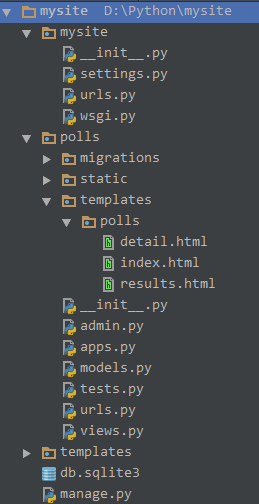
创建app后将app加入到setting中,打开mysite/setting.py,将polls这个应用添加进去
INSTALLED_APPS = [

    'polls.apps.PollsConfig',

    'django.contrib.admin',

    'django.contrib.auth',

    'django.contrib.contenttypes',

    'django.contrib.sessions',

    'django.contrib.messages',

    'django.contrib.staticfiles',

]
2.创建模型
打开polls/models.py
import datetime

from django.db import models

from django.utils.encoding import python_2_unicode_compatible

from django.utils import timezone

# Create your models here.

# 问题

@python_2_unicode_compatible

class Question(models.Model):

    question_text = models.CharField(max_length=200)

    pub_date = models.DateTimeField('date published')

    def was_published_recently(self):

        now = timezone.now()

        return timezone.now()-datetime.timedelta(days=1) <= self.pub_date <= now

    was_published_recently.admin_order_field = 'pub_date'

    was_published_recently.boolean = True

    was_published_recently.short_description = 'Published recently?'

    def __str__(self):

        return self.question_text

# 选择

@python_2_unicode_compatible

class Choice(models.Model):

    question = models.ForeignKey(Question, on_delete = models.CASCADE)

    choice_text = models.CharField(max_length=200)

    votes = models.IntegerField(default=0)

    def __str__(self):

        return self.choice_text
运行命令:python manage.py makemigrations 和python manage.py migrate全数据库生成相应的表
3.后台管理
打开polls/admin.py,
from django.contrib import admin

from .models import Question, Choice

# Register your models here.

class ChoiceInline(admin.TabularInline):

    model = Choice

    extra = 3

class QuestionAdmin(admin.ModelAdmin):

    fieldsets = [

        (None, {'fields': ['question_text']}),

        ('Date information', {'fields': ['pub_date']}),

    ]

    inlines = [ChoiceInline]

    list_filter = ['pub_date']

    list_display = ('question_text', 'pub_date', 'was_published_recently')

    search_fields = ['question_text']

admin.site.register(Question, QuestionAdmin)
4.编写视图函数(展示)
from django.shortcuts import render, get_object_or_404

from django.http import HttpResponseRedirect, Http404

from .models import Question, Choice

from django.core.urlresolvers import reverse

from django.views import generic

from django.utils import timezone

# Create your views here.

# 展示所有问题

class IndexView(generic.ListView):

    template_name = 'polls/index.html'

    context_object_name = 'latest_question_list'

    def get_queryset(self):

        #return the last five published question

        return Question.objects.filter(pub_date__lte = timezone.now()).order_by('-pub_date')[:5]

# 查看问题详情

class DetailView(generic.DetailView):

    model = Question

    template_name = 'polls/detail.html'

    def get_queryset(self):

        """

        Excludes any questions that aren't published yet.

        """

        return Question.objects.filter(pub_date__lte=timezone.now())

# 查看结果

class ResultsView(generic.DeleteView):

    model = Question

    template_name = 'polls/detail.html'

# 投票

def vote(request, question_id):

    question = get_object_or_404(Question, pk=question_id)

    try:

        selected_choice = question.choice_set.get(pk=request.POST['choice'])

    except (KeyError, Choice.DoesNotExist):

    # Redisplay the question voting form.

        return render(request, 'polls/detail.html', {'question': question, 'error_message': "You didn't select a choice.",})

    else:

        selected_choice.votes += 1

        selected_choice.save()

        # Always return an HttpResponseRedirect after successfully dealing

        # with POST data. This prevents data from being posted twice if a

        # user hits the Back button.

    return HttpResponseRedirect(reverse('polls:results', args=(question.id,)))
5.模板
视图函数处理的结果通过模板展示出来
detail.html
<h1>{{ question.question_text }}</h1>

{% if error_message %}<p><strong>{{ error_message }}</strong></p>{% endif %}

<form action="{% url 'polls:vote' question.id %}" method="post">

{% csrf_token %}

{% for choice in question.choice_set.all %}

<input type="radio" name="choice" id="choice{{ forloop.counter }}" value="{{ choice.id }}" />

<label for="choice{{ forloop.counter }}">{{ choice.choice_text }}</label><br />

{% endfor %}

<input type="submit" value="Vote" />

</form>
index.html
{% if latest_question_list %}

    <ul>

    {% for question in latest_question_list %}

        <li><a href="/polls/{{ question.id }}/">{{ question.question_text }}</a></li>

    {% endfor %}

    </ul>

{% else %}

    <p>No polls are available.</p>

{% endif %}
results.html
<h1>{{ question.question_text }}</h1>

<ul>

{% for choice in question.choice_set.all %}

<li>{{ choice.choice_text }} -- {{ choice.votes }} vote{{ choice.votes|pluralize }}</li>

{% endfor %}

</ul>

<a href="{% url 'polls:detail' question.id %}">Vote again?</a>
6.url分发
不同的url在这里进行分发到不同的函数处理
mysite/urls.py
from django.conf.urls import url, include

from django.contrib import admin

urlpatterns = [

    url(r'^polls/', include('polls.urls')),

    url(r'^admin/', admin.site.urls),

]
再次分发
polls/urls.py
#coding:utf-8

#!/usr/bin/env python

from django.conf.urls import url

from . import views

app_name = 'polls'

urlpatterns = [

               # ex: /polls/

               url(r'^$', views.IndexView.as_view(), name='index'),

               # ex: /polls/5/

               url(r'^(?P<pk>[0-9]+)/$', views.DetailView.as_view(), name='detail'),

               # /polls/5/results/

               url(r'^(?P<pk>[0-9]+)/results/$', views.ResultsView.as_view(), name='results'),

               # /polls/5/vote/

               url(r'^(?P<question_id>[0-9]+)/vote/$', views.vote, name='vote'),

               ]
输入命令python manage.py runserver,运行系统
登陆后:


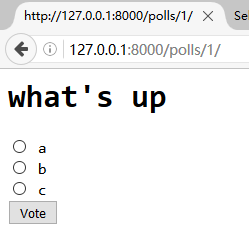
不登陆,可以查看到相应的问题,选中相应的小圆点,点击vote可进行投票。
Django 开发投票系统的更多相关文章
- Django快速开发投票系统
使用Django搭建简单的投票系统:这个是官网的教程:https://docs.djangoproject.com/en/2.0/intro/tutorial01/ 在Run manage.py Ta ...
- django用户投票系统详解
投票系统之详解 1.创建项目(mysite)与应用(polls) django-admin.py startproject mysite python manage.py startapp polls ...
- Django开发点菜系统学习笔记
1.使用django-simple-captcha包的时候,会调用到: register_form = RegisterForm(request.POST) 但是这个时候captcha不进行错误检验, ...
- Django快速开发之投票系统
https://docs.djangoproject.com/en/1.8/intro/tutorial01/ 参考官网文档,创建投票系统. ================ Windows 7/1 ...
- Django写的投票系统2(转)
在上一篇中 django实例:创建你的第一个应用投票系统(一) 已经介绍基本的功能,并已经启动服务了.这一节介绍数据库相关的东东. 首页打开mysite/settings.py配置文件, 设置数据库打 ...
- Django写的投票系统1(转)
当然主要是从django的帮助文档里面来的,权当是翻译吧 这个投票系统的主要功能有 1.一个前台页面,可以让用户来投票 2.一个管理员页面,可以用来添加.修改.删除投票 首页第一步要确定你已经安装了D ...
- 纯django开发博客系统
企业级教程:纯django开发博客系统 1.视频教程 https://www.duanshuilu.com/ 2.教程文档 https://www.duanshuilu.com/ 0.课程简介1.简价 ...
- JavaWeb项目开发案例精粹-第2章投票系统-006view层
1.index.jsp <%@ page language="java" import="java.util.*" pageEncoding=" ...
- django开发个人简易Blog——数据模型
提到数据模型,一定要说一下MVC,MVC框架是现代web开发中最流行的开发框架,它将数据与业务逻辑分开,减小了应用之间的高度耦合.个人非常喜欢MVC开发框架,除了具有上述特性,它使得web开发变得非常 ...
随机推荐
- 在 CentOS 7.x / Fedora 21 上面体验 PHP 7.0
编译自:http://linoxide.com/linux-how-to/install-php-7-centos-7-fedora-21/作者: Aun Raza原创:LCTT https://li ...
- NOIP2014提高组解方程
其实没有太难 但是不知道的话想不到 考场上大概有50分吧 #include <iostream> #include <stdio.h> #include <queue&g ...
- 关于java中static的应用及一种常见错误
JAVA中的static的应用 在web项目的开发中,遇到了类中的static方法不奏效. 在开发过程中,我定义了一个静态方法初始化数组,但是在创建类的对象后,访问该数组是全为null.我一直以为st ...
- 个人项目(JUnit单元测试)
---恢复内容开始--- 一. 题目简介 这次的单元测试我选择作了一个基本运算的程序,该程序实现了加,减,乘,除,平方,倒数的运算,该程序进行测试比较的简单,对于初步接触JUn ...
- 修改phpcms会员登录后头部登陆条的会员名称不带括号
phpcms会员登录后显示会员名称是带括号的,现在把他修改成不带括号. 找到函数库libs/functions/global.func.php,修改如下即可: function get_nicknam ...
- 网页中插入视频(object)
<object classid="clsid:D27CDB6E-AE6D-11cf-96B8-444553540000" codebase="http://down ...
- 使用TCP的HelloServer
HelloServer是一个在1234端口监听的服务端程序,它接受客户送来的数据,并且把这些数据解释为响应的ASCII字符,再对客户做出类似“Hello,...!"这样的响应.以下是Hell ...
- id生成策略 id工具类
import java.util.Random; /** * 各种id生成策略 * <p>Title: IDUtils</p> * <p>Description: ...
- 【P1915】[usaco09 dec gold]电视游戏问题
在百度上搜到了nzx学长的题解orz 原题: 农夫约翰的奶牛们游戏成瘾!本来FJ是想要按照陶叫兽的做法拿她们去电击戒瘾的,可是后来他发现奶牛们玩游戏之后比原先产更多的奶.很明显,这是因为满足的牛会产更 ...
- 在windows平臺下使用cygwin獲取root用戶權限
最近在使用cygwin時發現一個問題,當我要使用root用戶權限時,竟然創建不了root賬戶.最後在網上找了下後,暫時衹找到了通過更改當前用戶權限獲得root權限的方法,具體如下: 实际环境:win1 ...