
C++混合编程之idlcpp教程Python篇(8)
上一篇在这 C++混合编程之idlcpp教程Python篇(7)
第一篇在这 C++混合编程之idlcpp教程(一)
与前面的工程相似,工程PythonTutorial6中,同样加入了四个文件:PythonTutorial6.cpp, Tutorial6.cpp, Tutorial6.i, tutorial6.py。其中PythonTutorial6.cpp的内容基本和PythonTutorial5.cpp雷同,不再赘述。首先看一下Tutorial6.i的内容:
#import "../../paf/src/pafcore/typedef.i"

namespace tutorial

{
  template<N>

    struct Vector3

    {

        Vector3();

        Vector3(const Vector3& v);

        Vector3(N a, N b, N c);

        Vector3(const N* p);

        N getLength();

        N length get;

        N lengthSquare get;

        static Vector3<N> s_zero;

        nocode N x;

        nocode N y;

        nocode N z;

        nocode N v[#];

        #{

        union

        {

            struct

            {

                N x,y,z;

            };

            N v[];

        };

        #}

    };

    export Vector3<float>;

    export Vector3<double>;

    typedef Vector3<float> Vector3f;

    typedef Vector3<double> Vector3d;

    #{

    template<typename N>

    Vector3<N> Vector3<N>::s_zero(, , );

    template<typename N>

    inline Vector3<N>::Vector3()

    {

    }

    template<typename N>

    inline Vector3<N>::Vector3(const Vector3<N>& v) : x(v.x), y(v.y), z(v.z)

    {}

    template<typename N>

    inline Vector3<N>::Vector3(N a, N b, N c) : x(a), y(b), z(c)

    {}

    template<typename N>

    inline Vector3<N>::Vector3(const N* p) : x(p[]), y(p[]), z(p[])

    {}

    template<typename N>

    inline N Vector3<N>::getLength()

    {

        return N(sqrt(x * x + y * y + z * z));

    }

    template<typename N>

    inline N Vector3<N>::get_length()

    {

        return N(sqrt(x * x + y * y + z * z));

    }

    template<typename N>

    inline N Vector3<N>::get_lengthSquare()

    {

        return (x * x + y * y + z * z);

    }

    #}

}
template<N>
struct Vector3
这是一个模板类,C++的模板功能复杂强大,编译器实在难写。所以大多数C++模板的高级特性在idlcpp中都没有做支持,毕竟idlcpp只负责对脚本语言提供接口,有一些简单的模板功能就够用了。另外由于不准备支持数值做为模板参数,只支持类型做为模板参数。
static Vector3 s_zero;
这一行声明了一个静态成员变量。idlcpp支持静态成员变量,静态成员函数,静态属性(实际上也是静态成员函数)。
nocode N x;
nocode N y;
nocode N z;
nocode N v[#3];
#{
union
{
struct
{
N x,y,z;
};
N v[3];
};
#}
idlcpp 没有提供 union。好在可以通过nocode 和 #{#} 分别在生成的元数据描述代码和C++头文件提供各自的内容。
下面两行代码
export Vector3<float>;
export Vector3<double>;
用于生成元数据代码。idlcpp中通过这样的声明语句才会生成相应类型的元数据信息。
再下面两行代码
typedef Vector3<float> Vector3f;
typedef Vector3<double> Vector3d;
为模板类实例类型声明了类型别名。因为这两个类型名分别是::tutorial::Vector3<float> 和 ::tutorial::Vector3<double>,在脚本中使用不方便,有了类型别名之后就可以通过::tutorial::Vector3f和::tutorial::Vector3d来使用。
后面就是成员函数的实现代码,不在赘述。
编译后生成的Tutorial6.h的内容如下:
//DO NOT EDIT THIS FILE, it is generated by idlcpp

//http://www.idlcpp.org

#pragma once

namespace tutorial

{

    template<typename N>

    struct Vector3

    {

    public:

        Vector3();

        Vector3(const Vector3& v);

        Vector3(N a,N b,N c);

        Vector3(const N* p);

        N getLength();

        N get_length();

        N get_lengthSquare();

        static Vector3<N> s_zero;

        union

        {

            struct

            {

                N x,y,z;

            };

            N v[];

        };

    };

    typedef Vector3<float> Vector3f;

    typedef Vector3<double> Vector3d;

    template<typename N>

    Vector3<N> Vector3<N>::s_zero(, , );

    template<typename N>

    inline Vector3<N>::Vector3()

    {

    }

    template<typename N>

    inline Vector3<N>::Vector3(const Vector3<N>& v) : x(v.x), y(v.y), z(v.z)

    {}

    template<typename N>

    inline Vector3<N>::Vector3(N a, N b, N c) : x(a), y(b), z(c)

    {}

    template<typename N>

    inline Vector3<N>::Vector3(const N* p) : x(p[]), y(p[]), z(p[])

    {}

    template<typename N>

    inline N Vector3<N>::getLength()

    {

        return N(sqrt(x * x + y * y + z * z));

    }

    template<typename N>

    inline N Vector3<N>::get_length()

    {

        return N(sqrt(x * x + y * y + z * z));

    }

    template<typename N>

    inline N Vector3<N>::get_lengthSquare()

    {

        return (x * x + y * y + z * z);

    }

}
idlcpp会为只读属性length和lengthSquare 生成对应的函数声明get_length和get_lengthSquare。
其他的内容,C++和idl基本上都是一样的。
然后是Tutorial6.cpp
#include "Tutorial6.h"

#include "Tutorial6.mh"

#include "Tutorial6.ic"

#include "Tutorial6.mc"
因为模板类的代码都写在头文件中了,所以Tutorial6.cpp只需要包含对应的四个文件即可。
最后看一下Tutorial6.py的内容
import pafpython;

paf = pafpython.paf;

v1 = paf.tutorial.Vector3f.New(1,1,2);

v1.z = 1;

print(v1.length._);

v2 = paf.tutorial.Vector3d(2,2,1);

v2.v[2] = 2;

print(v2.getLength()._);
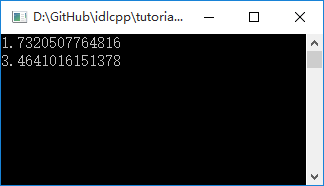
编译执行,结果如下图:
C++混合编程之idlcpp教程Python篇(8)的更多相关文章
- C++混合编程之idlcpp教程Python篇(9)
上一篇在这 C++混合编程之idlcpp教程Python篇(8) 第一篇在这 C++混合编程之idlcpp教程(一) 与前面的工程相比,工程PythonTutorial7中除了四个文件PythonTu ...
- C++混合编程之idlcpp教程Python篇(7)
上一篇在这 C++混合编程之idlcpp教程Python篇(6) 第一篇在这 C++混合编程之idlcpp教程(一) 与PythonTutorial4工程相似,工程PythonTutorial5中,同 ...
- C++混合编程之idlcpp教程Python篇(6)
上一篇在这 C++混合编程之idlcpp教程Python篇(5) 第一篇在这 C++混合编程之idlcpp教程(一) 工程PythonTutorial4中加入了四个文件:PythonTutorial4 ...
- C++混合编程之idlcpp教程Python篇(5)
上一篇在这 C++混合编程之idlcpp教程Python篇(4) 第一篇在这 C++混合编程之idlcpp教程(一) 与前面的工程相似,工程PythonTutorial3中,同样加入了三个文件:Py ...
- C++混合编程之idlcpp教程Python篇(4)
上一篇在这 C++混合编程之idlcpp教程Python篇(3) 第一篇在这 C++混合编程之idlcpp教程(一) 与前面的工程相似,工程PythonTutorial2中,同样加入了三个文件 Pyt ...
- C++混合编程之idlcpp教程Python篇(3)
上一篇 C++混合编程之idlcpp教程Python篇(2) 是一个 hello world 的例子,仅仅涉及了静态函数的调用.这一篇会有新的内容. 与PythonTutorial0相似,工程Pyth ...
- C++混合编程之idlcpp教程Python篇(2)
在上一篇 C++混合编程之idlcpp教程(一) 中介绍了 idlcpp 工具的使用.现在对 idlcpp 所带的示例教程进行讲解,这里针对的 Python 语言的例子.首先看第一个示例程序 Pyth ...
- C++混合编程之idlcpp教程Lua篇(6)
上一篇在这 C++混合编程之idlcpp教程Lua篇(5) 第一篇在这 C++混合编程之idlcpp教程(一) 工程LuaTutorial4中加入了四个文件:LuaTutorial4.cpp, Tut ...
- C++混合编程之idlcpp教程Lua篇(9)
上一篇在这 C++混合编程之idlcpp教程Lua篇(8) 第一篇在这 C++混合编程之idlcpp教程(一) 与前面的工程相比,工程LuaTutorial7中除了四个文件LuaTutorial7.c ...
随机推荐
- JS编写全选,复选按钮
<!DOCTYPE html><html lang="en"><head> <meta charset="UTF-8&qu ...
- colorbox 自适应 高度
$(".example3").colorbox({ inline: true, scrolling: false , onComplete: ...
- Unity3d利用opencv保存游戏视频
脚本MyVideoWriter.cs using UnityEngine; using System.Collections; using OpenCvSharp; using OpenCvSharp ...
- php框架制做笔记
在学习完基础之后,最好的提高方式是做一个自己的框架,因为框架会用到各个知识点,在制做过程中,复习,巩固,提高. 在框架中,因为是单入口,整个脚本运行时都存在的变量我们应该设为静态变量,这样它在每个地方 ...
- PHP正则表达式 /i, /is, /s, /isU等
PHP正则表达式 /i, /is, /s, /isU等 都是些什么东西呢? i 匹配大小写 s 模式中的圆点元字符(.)匹配所有的字符,包括换行符 x 模式中的空白字符除了被转义的或在字符类中的以外完 ...
- 一点一滴学shell
1. 获取shell脚本的名称 ${BASH_SOURCE-$0} 2. 获取shell脚本的路径 dirname "${BASH_SOURCE-$0}" 这个路径不一定是脚本的真 ...
- Ubuntu 14.04 更新源
deb http://mirrors.163.com/ubuntu/ trusty main restricted universe multiversedeb http://mirrors.163. ...
- 【Java】JavaWeb权限管理
权限管理分析 每个网站都涉及到访问权限的控制.每个站点资源都需要被管理起来,用户只有具有访问某个资源的特定权限,才能够访问,否则拒绝访问.网站的访问权限控制,一种方法从 URI 入手,站点的每个资源都 ...
- 动态加载js文件
由于最近在弄echarts,关于地图类的效果,但是全国地图整体的js文件太大了,加载很耗费资源,所以要根据不同省份加载不同地区的js地图, 于是就想的比较简单, var script = docume ...
- Mysql 启动不了,问题集锦
1. 报错信息 mysqld_safe mysqld from pid file xxx.pid ended 解决办法: 可能是pid所在目录,没有权限,赋予权限即可 2. 找不到 /tmp/mysq ...