
pycloudtag 标签云
https://study.163.com/course/courseMain.htm?courseId=1006383008&share=2&shareId=400000000398149(博主录制)
原创,机器学习,统计项目合作QQ:231469242,版权所有
GitHub 官网
https://github.com/amueller/word_cloud
Anaconda3,Python3
英文标签云
# -*- coding: utf-8 -*-

"""
Python3.0

Created on Sat Nov 26 08:54:26 2016

需要的安装包

pip install pytagcloud

pip install pygame

pip install simplejson

@author: daxiong

"""

import pytagcloud

#wordcounts 是一个列表,元素是元组

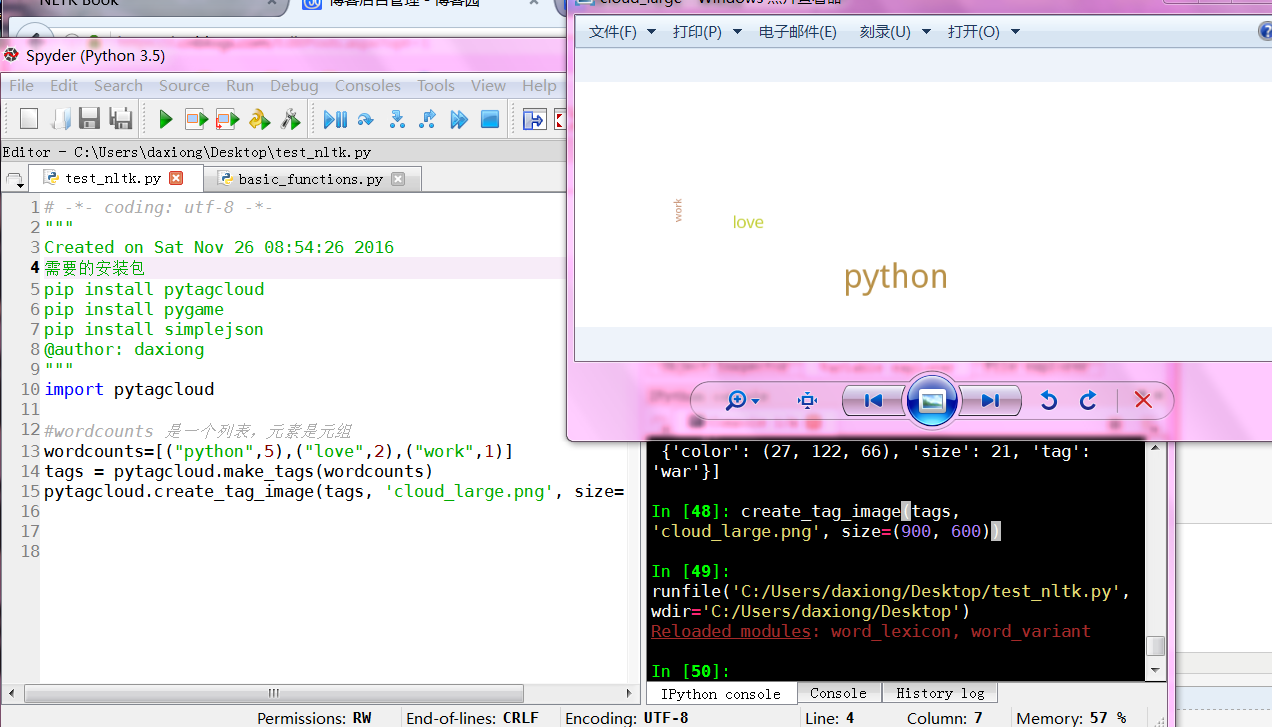
wordcounts=[("python",5),("love",2),("work",1)]

tags = pytagcloud.make_tags(wordcounts)

pytagcloud.createtag_image(tags, 'cloud_large.png', size=(900, 600))
说明文档
中文标签云
# -*- coding: utf-8 -*-

"""

Created on Mon Aug 14 15:55:43 2017

@author: toby

"""

from wordcloud import WordCloud

import matplotlib.pyplot as plt

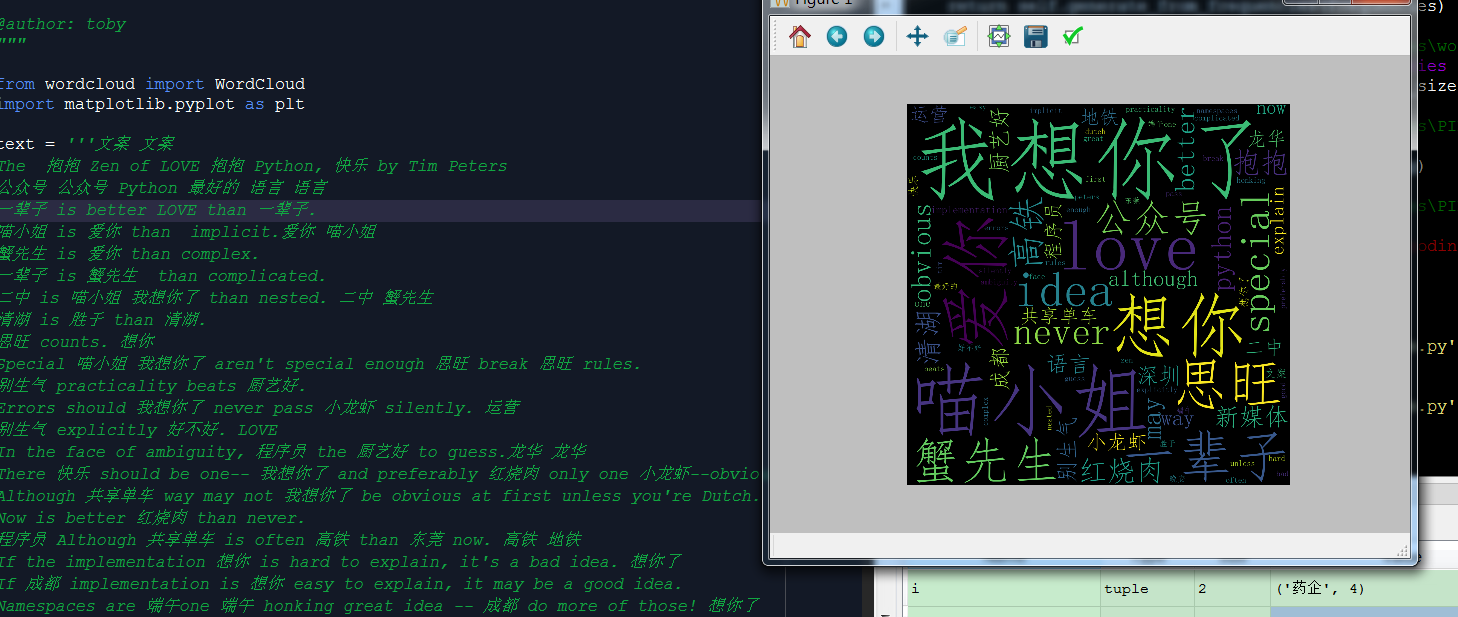
text = '''文案 文案

The  抱抱 Zen of LOVE 抱抱 Python, 快乐 by Tim Peters

公众号 公众号 Python 最好的 语言 语言

一辈子 is better LOVE than 一辈子.

喵小姐 is 爱你 than  implicit.爱你 喵小姐

蟹先生 is 爱你 than complex.

一辈子 is 蟹先生  than complicated.

二中 is 喵小姐 我想你了 than nested. 二中 蟹先生

清湖 is 胜于 than 清湖.

思旺 counts. 想你

Special 喵小姐 我想你了 aren't special enough 思旺 break 思旺 rules.

别生气 practicality beats 厨艺好.

Errors should 我想你了 never pass 小龙虾 silently. 运营

别生气 explicitly 好不好. LOVE

In the face of ambiguity, 程序员 the 厨艺好 to guess.龙华 龙华

There 快乐 should be one-- 我想你了 and preferably 红烧肉 only one 小龙虾--obvious way to do it.运营

Although 共享单车 way may not 我想你了 be obvious at first unless you're Dutch. 新媒体 地铁

Now is better 红烧肉 than never.

程序员 Although 共享单车 is often 高铁 than 东莞 now. 高铁 地铁

If the implementation 想你 is hard to explain, it's a bad idea. 想你了

If 成都 implementation is 想你 easy to explain, it may be a good idea.

Namespaces are 端午one 端午 honking great idea -- 成都 do more of those! 想你了

深圳 晚安 深圳 新媒体

'''

# the font from github: https://github.com/adobe-fonts

font = r'C:\Windows\Fonts\simfang.ttf'

wc = WordCloud(collocations=False, font_path=font, width=1400, height=1400, margin=2).generate(text.lower())

plt.imshow(wc)

plt.axis("off")

plt.show()

wc.to_file('show_Chinese.png')  # 把词云保存下来
爬虫+正则+标签云+pandas保存Excel
# -*- coding: utf-8 -*-
"""
Created on Mon Aug 14 08:57:21 2017 @author: toby
"""
import jieba
import pandas
import urllib
import re
from bs4 import BeautifulSoup
from wordcloud import WordCloud
import matplotlib.pyplot as plt
#引用微软的中文字体
font = r'C:\Windows\Fonts\simfang.ttf'
'''
#赛柏蓝
url="http://mp.weixin.qq.com/profile?src=3×tamp=1502674891&ver=1&signature=wDxrEoM1f5I3Js7rVZL7XeAOVS5q6FoHLVuMdM*iJLccLjB80A1BESmnMfk62BrS9Uz4VyJ05uzI8aJoW6r6Vw=="
#医药魔方
url="http://mp.weixin.qq.com/profile?src=3×tamp=1502690954&ver=1&signature=*jfLnFfVyfWmIcIyMN*R4*av27A-ubJUNLoiD2B17*Zqj9W*HPoPKdtFegntGr0Ft7jVfdMcW9tLMjBXf7r4vQ=="
''' url="http://mp.weixin.qq.com/profile?src=3×tamp=1502691348&ver=1&signature=piBaU5ZN*TbBiF41yhw-D4sDK9*mY8TOht4snXuo6Hrm3UKMe5I7wpU*zgCa2Bk3DS-joq3oSNOXboucANMwWg==" html = urllib.request.urlopen(url).read()
text = BeautifulSoup(html,"lxml").get_text()
#正则表达式规则
#标题名
regex = re.compile(r'\"title\"\:\"(.+?)\"')
#摘要
regex1 = re.compile(r'\"digest\"\:\"(.+?)\"')
#print(regex.findall(text))
#print(regex1.findall(text))
len1=len(regex.findall(text))
list_tilte=regex.findall(text)
list_digest=regex1.findall(text)
#把标题和摘要合并在一起
list_allWords=list_tilte+list_digest filename="nonesense_words.txt"
#list_noneSense_words=["赛柏蓝","出品","我们","一个","工作","问题","中国","大家"] #垃圾词库
def List_none_sense(filename):
file_noneSense_words=open(filename,'r')
list_noneSense_words=[]
for line in file_noneSense_words:
line_list=line.split()
for word in line_list:
list_noneSense_words.append(word)
return list_noneSense_words #判断一个单词是否在垃圾词表里
def none_sense_words_Judeg(word):
if word in list_noneSense_words:
return True
else:
return False #过滤停用词列表
def filter_none_sense_words(list1):
list2=[]
for i in list1:
#如果不在垃圾词库里或不是数字,汉字长度大于1
if none_sense_words_Judeg(i[0])==False and i[0].isdigit()==False and len(i[0])>1:
#print("remove",i)
list2.append(i)
return list2 def Fenci():
list_total=[]
for i in list_allWords:
seg_list = list(jieba.cut(i,cut_all=False))
list_total+=seg_list
#生成一个字典,每个单词排名
tf={}
for seg in list_total :
#print seg
seg = ''.join(seg.split())
if (seg != '' and seg != "\n" and seg != "\n\n") :
if seg in tf :
tf[seg] += 1
else :
tf[seg] = 1
return sorted(tf.items(),key=lambda item:item[1],reverse=True) #筛选排名大于三的,并且名词长度大于1
def more3_filter(list1):
list2=[]
for i in list1:
if i[1]>2 and len(i[0])>1:
list2.append(i)
return list2 #垃圾词表
list_noneSense_words=List_none_sense(filename)
list_words=Fenci()
#过滤停用词
list_words1=filter_none_sense_words(list_words)
list_words2=more3_filter(list_words1)
#前二十
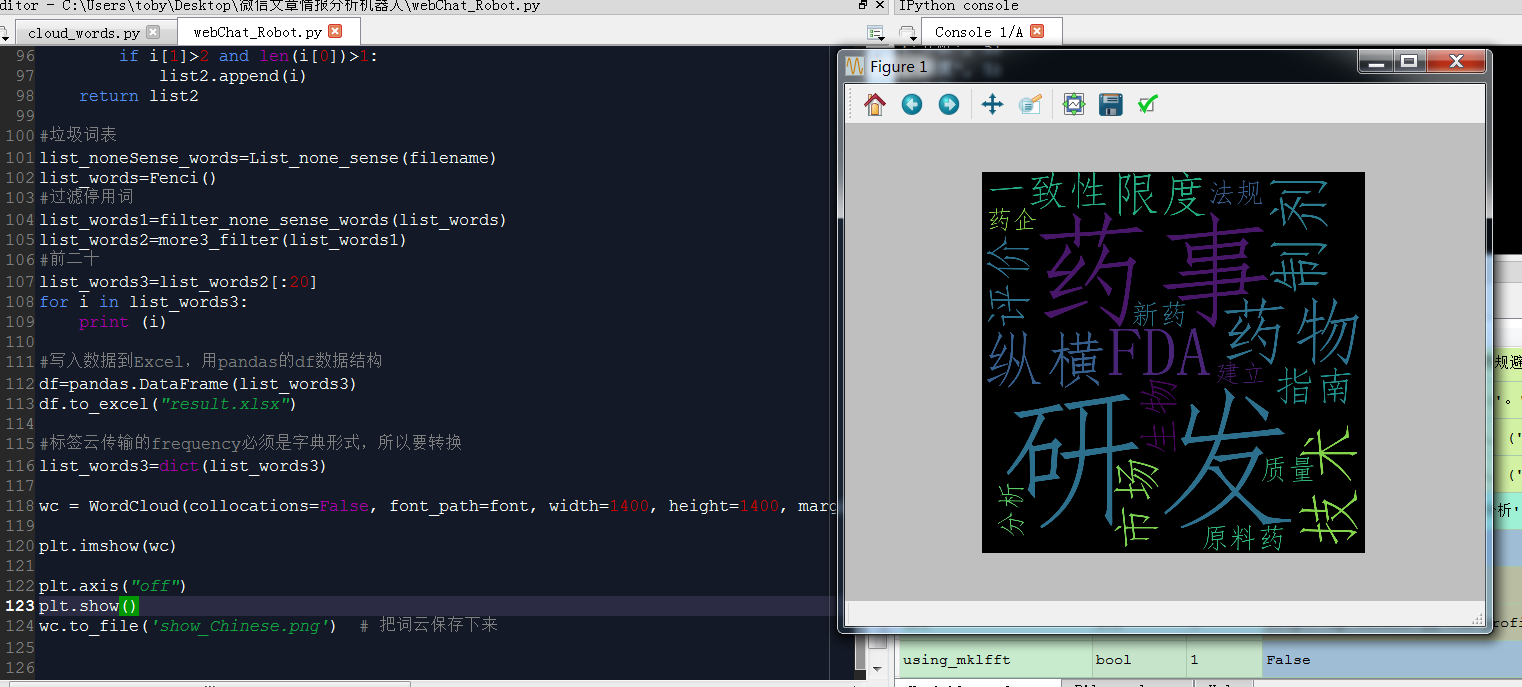
list_words3=list_words2[:20]
for i in list_words3:
print (i) #写入数据到Excel,用pandas的df数据结构
df=pandas.DataFrame(list_words3)
df.to_excel("result.xlsx") #标签云传输的frequency必须是字典形式,所以要转换
list_words3=dict(list_words3) wc = WordCloud(collocations=False, font_path=font, width=1400, height=1400, margin=2).generate_from_frequencies(list_words3) plt.imshow(wc) plt.axis("off")
plt.show()
wc.to_file('show_Chinese.png') # 把词云保存下来
https://study.163.com/provider/400000000398149/index.htm?share=2&shareId=400000000398149(博主视频教学主页)
pycloudtag 标签云的更多相关文章
- Android自定义控件之自定义ViewGroup实现标签云
前言: 前面几篇讲了自定义控件绘制原理Android自定义控件之基本原理(一),自定义属性Android自定义控件之自定义属性(二),自定义组合控件Android自定义控件之自定义组合控件(三),常言 ...
- 原生js文字标签云上下滚动播放
效果:http://hovertree.com/texiao/js/25/ 效果图: 代码如下: <!DOCTYPE html> <html> <head>< ...
- 用CSS制作伪标签云
performance testing stress testing conformance testing acceptane testing smoke testing regression te ...
- 基于纯 CSS3 技术实现美观的标签云效果
标签云是博客的标配功能,能够清晰的呈现博客的各个关键词和主题.在这个效果中,您将学习如何使用 CSS3 技术创建一个效果精美的标签云效果. 作为实验项目,使用了 CSS3 渐变,阴影和最重要的的 CS ...
- css3实践之摩天轮式图片轮播+3D正方体+3D标签云(perspective、transform-style、perspective-origin)
本文主要通过摩天轮式图片轮播的例子来讲解与css3 3D有关的一些属性. demo预览: 摩天轮式图片轮播(貌似没兼容360 最好用chrome) 3D正方体(chrome only) 3D标签云(c ...
- 在hexo静态博客中利用d3-cloud来展现标签云
效果: http://lucyhao.com/tags/ hexo自带的tag cloud的标签展现不太美观,想能够展现出“云”效果的标签.在网上找到了d3-cloud这个项目,github地址:ht ...
- python3生成标签云
标签云是现在大数据里面最喜欢使用的一种展现方式,其中在python3下也能实现标签云的效果,贴图如下: -------------------进入正文--------------------- 首先要 ...
- 3D球状标签云(兼容IE8)
看见一个很有趣的标签云,3D球状,兼容 IE 8,亲测可用!其他版本没有测试.觉得挺有意思就拿来记录下来,学习学习,本文下方会放出我看的文章地址,先看一下效果: 接下来是代码,html + css + ...
- div+css3实现漂亮的多彩标签云,鼠标移动会有动画
div+css3实现漂亮的多彩标签云,鼠标移动会有动画 点击运行效果 <style> .dict { margin: 20px 0;clear:both ;text-align:left; ...
随机推荐
- JVM之CMS收集器
CMS(Concurrent Mark Sweep) 最短回收停顿,适合维持响应时间上的要求. 初始标记 Initial mark:标记GC Roots能够关联到的对象.stop-mark. 并发标记 ...
- C#:委托和自定义事件
1. 委托概述 “委托”相当于C++中的“函数指针”,委托必须与所要“指向”的函数在“参数”和“返回类型”上保持一致; // 定义Person类 public class Person { publi ...
- ionic入门01
总述 ionic是一个强大的混合式/hybrid HTML5移动开发框架,特点是使用标准的HTML.CSS和JavaScript,开发跨平台的应用. 接下来,敝人会从0到1采用ionic构建一个简单的 ...
- docker-9 supervisord 参考docker从入门到实战
参考docker从入门到实战 使用 Supervisor 来管理进程 Docker 容器在启动的时候开启单个进程,比如,一个 ssh 或者 apache 的 daemon 服务.但我们经常需要在一个机 ...
- [转]教你一招 - 如何给nopcommerce增加一个类似admin的area
本文转自:http://www.cnblogs.com/wucf2004/p/nopcommerce-area.html asp.net mvc里面的area是什么,点击这里查看 如果在nopcomm ...
- 游戏测评-桥梁建造系Poly Bridge破力桥?游戏测评
最近在b站看到了谜之声的视频:大家来造桥吧! 实在是太搞笑了,看到是一款新出不久还未正式发行的游戏,兴致一来便入手玩了玩.顺手也就写下了这篇测评. POLY BRIDGE 对这个游戏名怎么起个有趣的中 ...
- Spring远程调用技术<1>-RMI
在java中,我们有多种可以使用的远程调用技术 1.远程方法调用(remote method invocation, RMI) 适用场景:不考虑网络限制时(例如防火墙),访问/发布基于java的服务 ...
- GHOST急速安装win10或win7
首先说说写这篇博客的原因,我自己曾经被装各种系统弄得焦头烂额,各种刻光盘光驱安装,写优盘安装以及pe盘恢复系统等等,每次都各种方式尝试一下,太浪费时间了,所以天真的想着能不能有一个类似"一劳 ...
- 分布式光伏系列:分布式光伏电站 运行与维护方案一览(zz)
原文:http://www.toutiao.com/a6353487210709516546/ 中小型光伏电站的特点是占地面积小.安装位置灵活且日常维护量少.由于光伏电站不同的运行环境,为了能够使光伏 ...
- FineUI(专业版)v1.2.0 和 FineUI(开源版)v4.1.1 同时发布!
FineUI(开源版)v4.1.1 (建议所有 v4.x 升级到此版本):http://fineui.com/demo/ +2014-08-15 v4.1.1 -修正Form中表单字段设 ...