
《DSP using MATLAB》Problem 7.24
又到清明时节,……


注意:带阻滤波器不能用第2类线性相位滤波器实现,我们采用第1类,长度为基数,选M=61
代码:
%% ++++++++++++++++++++++++++++++++++++++++++++++++++++++++++++++++++++++++++++++++

%%            Output Info about this m-file

fprintf('\n***********************************************************\n');

fprintf('        <DSP using MATLAB> Problem 7.24 \n\n');

banner();

%% ++++++++++++++++++++++++++++++++++++++++++++++++++++++++++++++++++++++++++++++++

% bandstop filter

% Type-2 FIR ---- No highpass or bandstop

wp1 = 0.3*pi; ws1 = 0.4*pi; ws2 = 0.6*pi; wp2 = 0.7*pi;

As = 50; Rp = 0.2;

tr_width = min( ws1-wp1, wp2-ws2 );

T1 = 0.5925; T2=0.1099;

M = 61; alpha = (M-1)/2; l = 0:M-1; wl = (2*pi/M)*l;

n = [0:1:M-1];  wc1 = (ws1+wp1)/2; wc2 = (wp2+ws2)/2;

Hrs = [ones(1,10),T1,T2,zeros(1,7),T2,T1,ones(1,20),T1,T2,zeros(1,7),T2,T1,ones(1,9)];   % Ideal Amp Res sampled

Hdr = [1, 1, 0, 0, 1, 1]; wdl = [0, 0.3, 0.4, 0.6, 0.7, 1];     % Ideal Amp Res for plotting

k1 = 0:floor((M-1)/2); k2 = floor((M-1)/2)+1:M-1;

%% ----------------------------------

%%           Type-1 LPF

%% ----------------------------------

angH = [-alpha*(2*pi)/M*k1, alpha*(2*pi)/M*(M-k2)];

H = Hrs.*exp(j*angH); h = real(ifft(H, M));

[db, mag, pha, grd, w] = freqz_m(h, 1); delta_w = 2*pi/1000;

[Hr, ww, a, L] = Hr_Type1(h);

Rp = -(min(db(1 :1: floor(wp1/delta_w))));                      % Actual Passband Ripple

fprintf('\nActual Passband Ripple is %.4f dB.\n', Rp);

As = -round(max(db(floor(ws1/delta_w)+1 : 1 : 0.55*pi/delta_w)));         % Min Stopband attenuation

fprintf('\nMin Stopband attenuation is %.4f dB.\n', As);

[delta1, delta2] = db2delta(Rp, As)

%Plot

figure('NumberTitle', 'off', 'Name', 'Problem 7.24a FreSamp Method')

set(gcf,'Color','white');

subplot(2,2,1); plot(wl(1:31)/pi, Hrs(1:31), 'o', wdl, Hdr, 'r'); axis([0, 1, -0.1, 1.1]);

set(gca,'YTickMode','manual','YTick',[0,0.5,1]);

set(gca,'XTickMode','manual','XTick',[0,0.3,0.4,0.6,0.7,1]);

xlabel('frequency in \pi nuits'); ylabel('Hr(k)'); title('Frequency Samples: M=61,T1=0.5925,T2=0.1099');

grid on;

subplot(2,2,2); stem(l, h); axis([-1, M, -0.3, 0.8]); grid on;

xlabel('n'); ylabel('h(n)'); title('Impulse Response');

subplot(2,2,3); plot(ww/pi, Hr, 'r', wl(1:31)/pi, Hrs(1:31), 'o'); axis([0, 1, -0.2, 1.2]); grid on;

xlabel('frequency in \pi units'); ylabel('Hr(w)'); title('Amplitude Response');

set(gca,'YTickMode','manual','YTick',[0,0.5,1]);

set(gca,'XTickMode','manual','XTick',[0,0.3,0.4,0.6,0.7,1]);

subplot(2,2,4); plot(w/pi, db); axis([0, 1, -100, 10]); grid on;

xlabel('frequency in \pi units'); ylabel('Decibels'); title('Magnitude Response');

set(gca,'YTickMode','manual','YTick',[-90,-58,0]);

set(gca,'YTickLabelMode','manual','YTickLabel',['90';'58';' 0']);

set(gca,'XTickMode','manual','XTick',[0,0.3,0.4,0.6,0.7,1]);

figure('NumberTitle', 'off', 'Name', 'Problem 7.24 h(n) FreSamp Method')

set(gcf,'Color','white');

subplot(2,2,1); plot(w/pi, db); grid on; axis([0 1 -120 10]);

set(gca,'YTickMode','manual','YTick',[-90,-58,0])

set(gca,'YTickLabelMode','manual','YTickLabel',['90';'58';' 0']);

set(gca,'XTickMode','manual','XTick',[0,0.3,0.4,0.6,0.7,1]);

xlabel('frequency in \pi units'); ylabel('Decibels'); title('Magnitude Response in dB');

subplot(2,2,3); plot(w/pi, mag); grid on; %axis([0 1 -100 10]);

xlabel('frequency in \pi units'); ylabel('Absolute'); title('Magnitude Response in absolute');

set(gca,'XTickMode','manual','XTick',[0,0.3,0.4,0.6,0.7,1,1.3,1.4,1.6,1.7,2]);

set(gca,'YTickMode','manual','YTick',[0,1.0]);

subplot(2,2,2); plot(w/pi, pha); grid on; %axis([0 1 -100 10]);

xlabel('frequency in \pi units'); ylabel('Rad'); title('Phase Response in Radians');

subplot(2,2,4); plot(w/pi, grd*pi/180);  grid on; %axis([0 1 -100 10]);

xlabel('frequency in \pi units'); ylabel('Rad'); title('Group Delay');

figure('NumberTitle', 'off', 'Name', 'Problem 7.24 AmpRes of h(n), FreSamp Method')

set(gcf,'Color','white');

plot(ww/pi, Hr); grid on; %axis([0 1 -100 10]);

xlabel('frequency in \pi units'); ylabel('Hr'); title('Amplitude Response');

set(gca,'YTickMode','manual','YTick',[-delta2, 0,delta2, 1-0.035, 1,1+0.035]);

%set(gca,'YTickLabelMode','manual','YTickLabel',['90';'45';' 0']);

set(gca,'XTickMode','manual','XTick',[0,0.3,0.4,0.6,0.7,1]);

%% ------------------------------------

%%     fir2 Method

%% ------------------------------------

f = [0 wp1 ws1 ws2 wp2 pi]/pi;

m = [1  1  0  0  1  1];

h_check = fir2(M+1, f, m);          % if M is odd, then M+1; order

[db, mag, pha, grd, w] = freqz_m(h_check, [1]);

%[Hr,ww,P,L] = ampl_res(h_check);

[Hr, ww, a, L] = Hr_Type1(h_check);

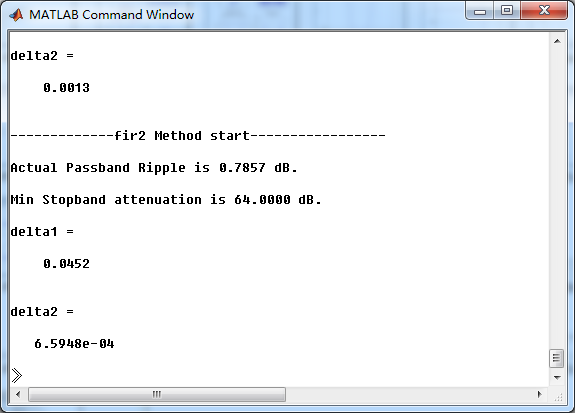
fprintf('\n-------------fir2 Method start-----------------\n');

Rp = -(min(db(1 :1: floor(wp1/delta_w))));                        % Actual Passband Ripple

fprintf('\nActual Passband Ripple is %.4f dB.\n', Rp);

%As = -round(max(db(floor(0.45*pi/delta_w)+1 : 1 : ws2/delta_w)));     % Min Stopband attenuation

As = -round(max(db(floor(0.45*pi/delta_w)+1 : 1 : 0.55*pi/delta_w)));

fprintf('\nMin Stopband attenuation is %.4f dB.\n', As);

[delta1, delta2] = db2delta(Rp, As)

figure('NumberTitle', 'off', 'Name', 'Problem 7.24 fir2 Method')

set(gcf,'Color','white');

subplot(2,2,1); stem(n, h); axis([0 M-1 -0.3 0.8]); grid on;

xlabel('n'); ylabel('h(n)'); title('Impulse Response');

%subplot(2,2,2); stem(n, w_ham); axis([0 M-1 0 1.1]); grid on;

%xlabel('n'); ylabel('w(n)'); title('Hamming Window');

subplot(2,2,3); stem([0:M+1], h_check); axis([0 M+1 -0.3 0.8]); grid on;

xlabel('n'); ylabel('h\_check(n)'); title('Actual Impulse Response');

subplot(2,2,4); plot(w/pi, db); axis([0 1 -120 10]); grid on;

set(gca,'YTickMode','manual','YTick',[-90,-64,-21,0])

set(gca,'YTickLabelMode','manual','YTickLabel',['90';'64';'21';' 0']);

set(gca,'XTickMode','manual','XTick',[0,0.3,0.4,0.6,0.7,1]);

xlabel('frequency in \pi units'); ylabel('Decibels'); title('Magnitude Response in dB');

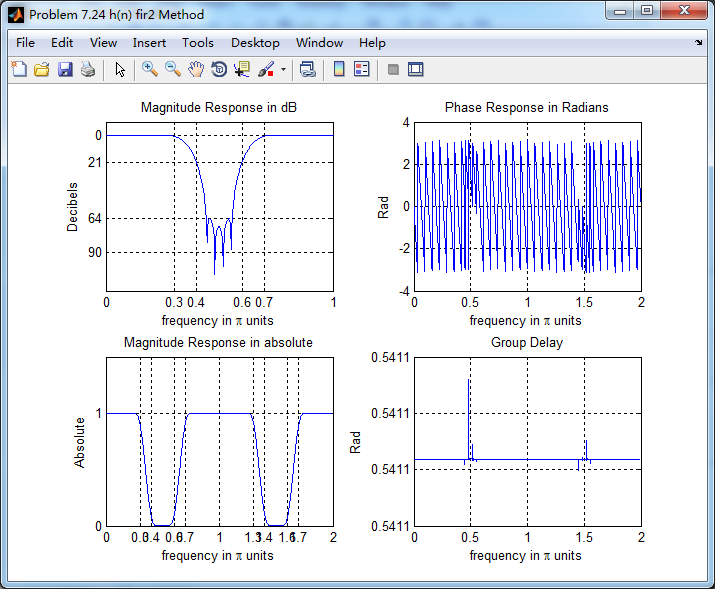
figure('NumberTitle', 'off', 'Name', 'Problem 7.24 h(n) fir2 Method')

set(gcf,'Color','white');

subplot(2,2,1); plot(w/pi, db); grid on; axis([0 1 -120 10]);

xlabel('frequency in \pi units'); ylabel('Decibels'); title('Magnitude Response in dB');

set(gca,'YTickMode','manual','YTick',[-90,-64,-21,0]);

set(gca,'YTickLabelMode','manual','YTickLabel',['90';'64';'21';' 0']);

set(gca,'XTickMode','manual','XTick',[0,0.3,0.4,0.6,0.7,1,1.3,1.4,1.6,1.7,2]);

subplot(2,2,3); plot(w/pi, mag); grid on; %axis([0 1 -100 10]);

xlabel('frequency in \pi units'); ylabel('Absolute'); title('Magnitude Response in absolute');

set(gca,'XTickMode','manual','XTick',[0,0.3,0.4,0.6,0.7,1,1.3,1.4,1.6,1.7,2]);

set(gca,'YTickMode','manual','YTick',[0,1.0]);

subplot(2,2,2); plot(w/pi, pha); grid on; %axis([0 1 -100 10]);

xlabel('frequency in \pi units'); ylabel('Rad'); title('Phase Response in Radians');

subplot(2,2,4); plot(w/pi, grd*pi/180);  grid on; %axis([0 1 -100 10]);

xlabel('frequency in \pi units'); ylabel('Rad'); title('Group Delay');

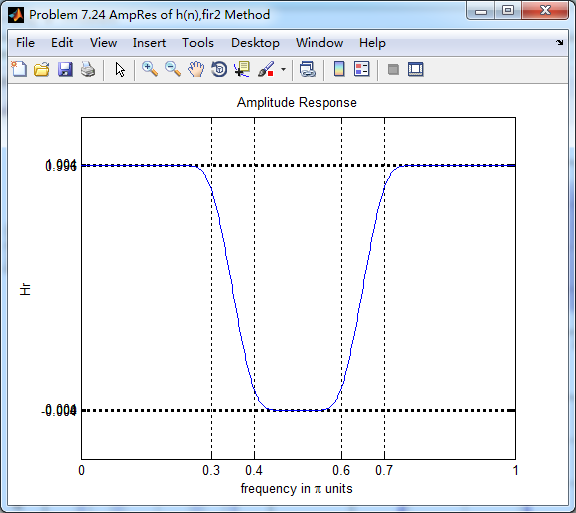
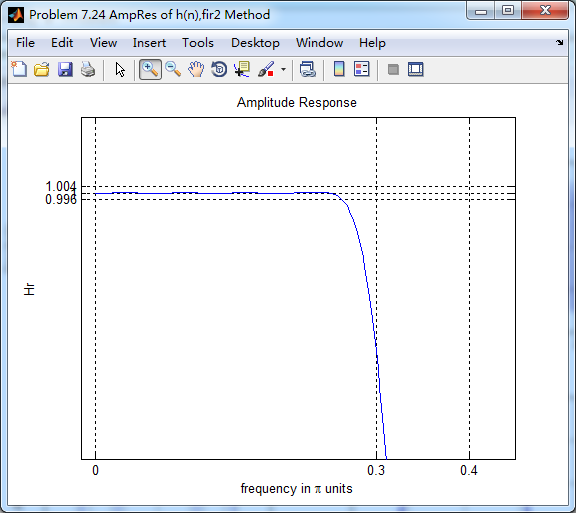
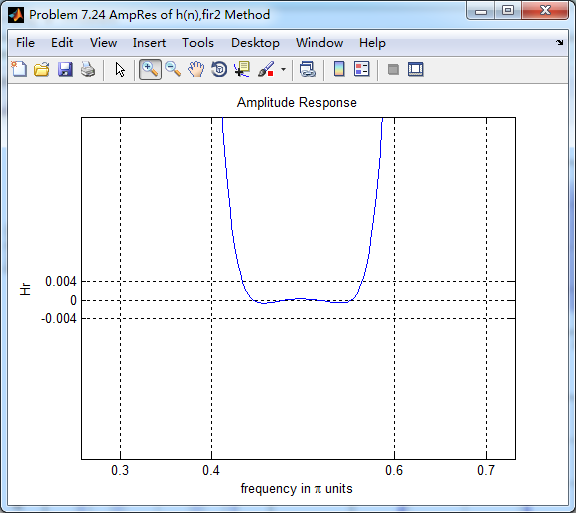
figure('NumberTitle', 'off', 'Name', 'Problem 7.24 AmpRes of h(n),fir2 Method')

set(gcf,'Color','white');

plot(ww/pi, Hr); grid on; %axis([0 1 -100 10]);

xlabel('frequency in \pi units'); ylabel('Hr'); title('Amplitude Response');

set(gca,'YTickMode','manual','YTick',[-0.004, 0,0.004, 1-0.004, 1,1+0.004]);

%set(gca,'YTickLabelMode','manual','YTickLabel',['90';'45';' 0']);

set(gca,'XTickMode','manual','XTick',[0,0.3,0.4,0.6,0.7,1]);
运行结果:
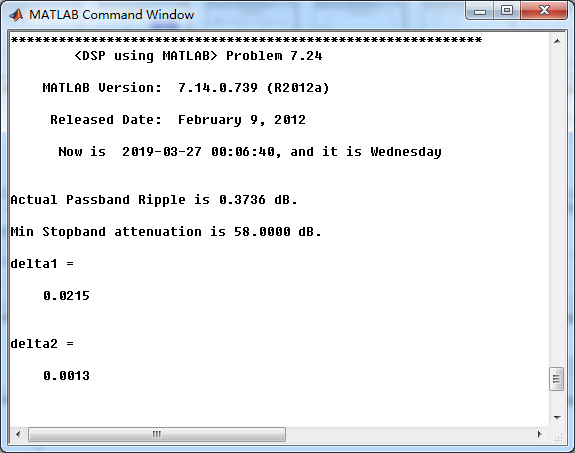
过渡带中有两个采样值,优化值直接抄书上的。
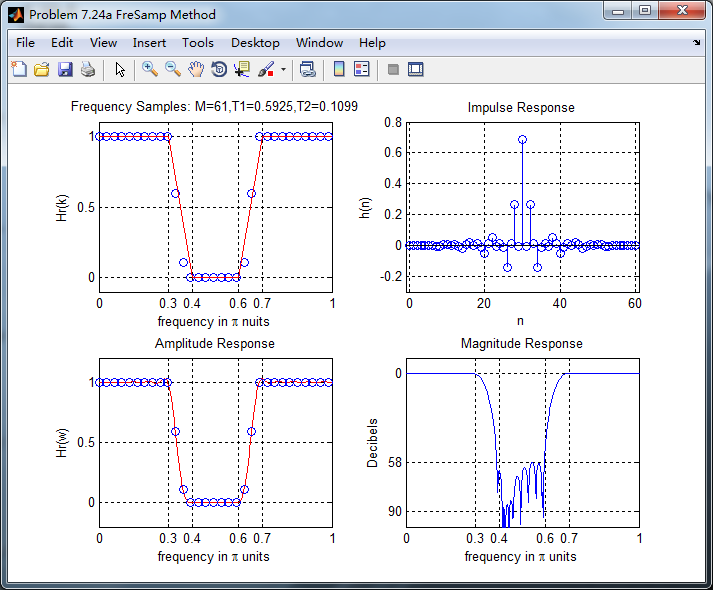

采用频率采样方法得到的脉冲响应
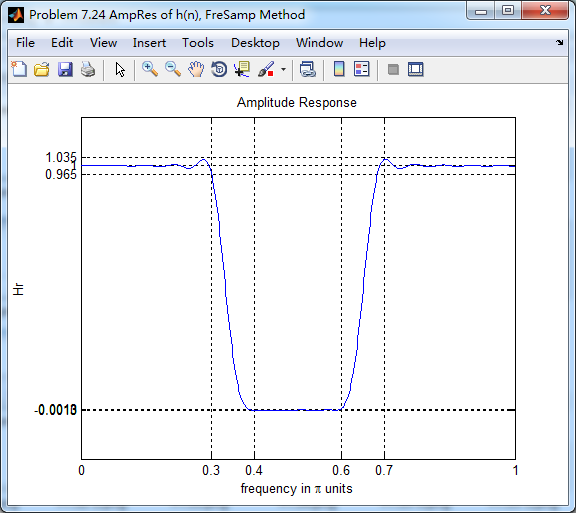
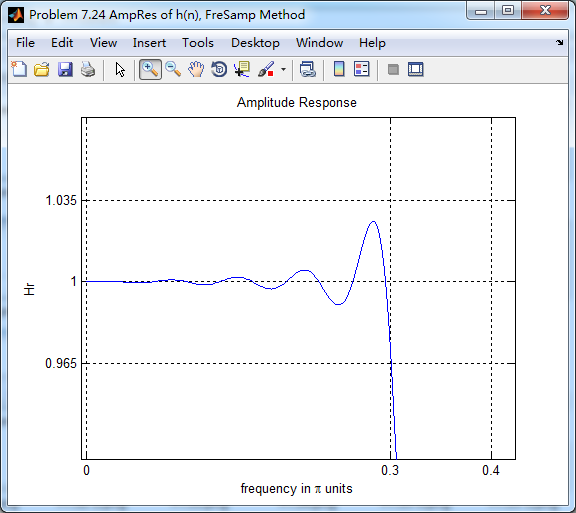

采用fir2函数 的方法得到滤波器脉冲响应

《DSP using MATLAB》Problem 7.24的更多相关文章
- 《DSP using MATLAB》Problem 6.24
代码: %% ++++++++++++++++++++++++++++++++++++++++++++++++++++++++++++++++++++++++++++++++ %% Output In ...
- 《DSP using MATLAB》Problem 4.24
Y(z)部分分式展开, 零状态响应部分分式展开, 零输入状态部分分式展开,
- 《DSP using MATLAB》Problem 6.15
代码: %% ++++++++++++++++++++++++++++++++++++++++++++++++++++++++++++++++++++++++++++++++ %% Output In ...
- 《DSP using MATLAB》Problem 6.8
代码: %% ++++++++++++++++++++++++++++++++++++++++++++++++++++++++++++++++++++++++++++++++ %% Output In ...
- 《DSP using MATLAB》Problem 5.24-5.25-5.26
代码: function y = circonvt(x1,x2,N) %% N-point Circular convolution between x1 and x2: (time domain) ...
- 《DSP using MATLAB》Problem 4.15
只会做前两个, 代码: %% ---------------------------------------------------------------------------- %% Outpu ...
- 《DSP using MATLAB》Problem 2.16
先由脉冲响应序列h(n)得到差分方程系数,过程如下: 代码: %% ------------------------------------------------------------------ ...
- 《DSP using MATLAB》 Problem 2.3
本题主要是显示周期序列的. 1.代码: %% ------------------------------------------------------------------------ %% O ...
- 《DSP using MATLAB》Problem 7.29
代码: %% ++++++++++++++++++++++++++++++++++++++++++++++++++++++++++++++++++++++++++++++++ %% Output In ...
随机推荐
- python变量存储
变量的存储 在高级语言中,变量是对内存及其地址的抽象. 对于python而言,python的一切变量都是对象,变量的存储,采用了引用语义的方式,存储的只是一个变量的值所在的内存地址,而不是这个变量的只 ...
- 零基础IDEA整合SpringBoot + Mybatis项目,及常见问题详细解答
开发环境介绍:IDEA + maven + springboot2.1.4 1.用IDEA搭建SpringBoot项目:File - New - Project - Spring Initializr ...
- Input禁用文本框
<input type="text" readonly="readonly" /> readonly:只读属性:
- Problem B: 一切皆对象
Description 一切都是对象 —— Everything is an object. 所以,现在定义一个类Thing,来描述世界上所有有名字的事物.该类只有构造函数.拷贝构造函数和析构函数,并 ...
- Oracle学习DayOne(SQL初步)
一.DML.DDL.DCL SQL语句分为以下三种类型: DML: Data Manipulation Language 数据操纵语言DDL: Data Definition Language 数据定 ...
- makefile笔记9 - makefile隐含规则
在我们使用 Makefile 时,有一些我们会经常使用,而且使用频率非常高的东西,比如,我们编译C/C++的源程序为中间目标文件(Unix 下是[.o]文件,Windows 下是[.obj]文件). ...
- 精进之路之AQS及相关组件
AQS ( AbstractQueuedSynchronizer)是一个用来构建锁和同步器的框架,使用AQS能简单且高效地构造出应用广泛的大量的同步器,比如我们提到的ReentrantLock,Sem ...
- java基础继承
为什么用继承: 因为继承可以减少代码的冗余,提高维护性,为了从根本上解决存在的问题,就需要继承,就是将多个类当中的相同的地方提取到一个父类当中.父类更通用,子类更具体. 父类的继承格式 语法:publ ...
- callback函数
const getUserInfo = function (callback) { try { let params = { "url": "https://h5.m.t ...
- 【5】用vector进行直接插入排序
百分百自己编的程序,越来越觉得编程很好玩了. 但这算是第一次自己用vector这种不是那么无脑的方法编程,只能最多对3个数进行排序wwwww 今天我要回去搬宿舍了,等明天有时间,我一定要把bug找到! ...