
Maven项目执行java入口main方法
在Maven项目中配置pom.xml文件加载maven-surefire-plugin插件来执行testng.xml,相信大家对此种用法已经非常熟悉了。但是有些场景可能需要我们去加载执行java的main方法,比如在多设备并发集成中:我们在main方法里面执行动态生成的testng.xml文件等等场景。
同样,也是在pom.xml文件中做文章,在文件中添加如下配置:
<build>

    <plugins>

        <plugin>

            <groupId>org.codehaus.mojo</groupId>

            <artifactId>exec-maven-plugin</artifactId>

            <version>1.1.1</version>

            <executions>

                <execution>

                    <phase>test</phase>

                    <goals>

                        <goal>java</goal>

                    </goals>

                    <configuration>

                      <mainClass>com.lemon.phoenix.util.StartServer</mainClass>

                    </configuration>

                </execution>

            </executions>

        </plugin>

    </plugins>

</build>
使用了插件的方式去配置生命周期触发指定的插件运行特定的任务,<phase>指定了Maven的生命周期阶段,<goal>指定了插件的目标为java
将StartServer类的main方法的执行绑定到了Maven的test阶段,通过执行mvn test即可执行main方法。
如果在运行main方法需要往里面传入参数,那么我们还可以进行如下配置,其中arg0,arg1即为对应的参数:
<build>

    <plugins>

        <plugin>

            <groupId>org.codehaus.mojo</groupId>

            <artifactId>exec-maven-plugin</artifactId>

            <version>1.1.1</version>

            <executions>

                <execution>

                    <phase>test</phase>

                    <goals>

                        <goal>java</goal>

                    </goals>

                    <configuration>

                        <mainClass>com.lemon.phoenix.util.StartServer</mainClass>

                        <arguments>

                            <argument>arg0</argument>

                            <argument>arg1</argument>

                        </arguments>

                    </configuration>

                </execution>

            </executions>

        </plugin>

    </plugins>

</build>
引入exec-maven-plugin插件可能出错的情况:
第一种:
-source 1.5 中不支持 diamond 运算符

[ERROR] (请使用 -source 7 或更高版本以启用 diamond 运算符)
原因:
执行main方法需要先进行compile(编译)过程,由于Maven compiler默认加载时使用JDK1.5来进行编译,但是我们项目里面的代码可能是JDK1.7或者JDK1.8,不兼容导致的,所以需要将compiler插件的JDK版本保持和项目同步
解决方案:
在pom.xml引入如下插件
<plugin>

    <groupId>org.apache.maven.plugins</groupId>

    <artifactId>maven-compiler-plugin</artifactId>

    <version>3.3</version>

    <configuration>

        <source>1.8</source>

        <target>1.8</target>

    </configuration>

</plugin>
第二种:
[ERROR] Failed to execute goal org.apache.maven.plugins:maven-compiler-plugin:3.3:compile (default-compile) on project appiumdemo: Fatal error compiling: basedir D:\eclipse-workspace\appiumdemo\target\generated-sources\annotations does not exist -> [Help 1]

[ERROR]

[ERROR] To see the full stack trace of the errors, re-run Maven with the -e switch.

[ERROR] Re-run Maven using the -X switch to enable full debug logging.

[ERROR]

[ERROR] For more information about the errors and possible solutions, please read the following articles:
原因:
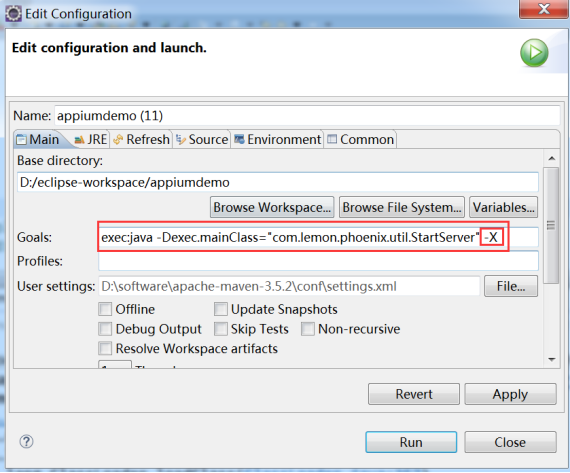
console里面并没有任何有效的关键信息,我们可以根据其中的提示加载-X参数来进行debug调试
解决方案:
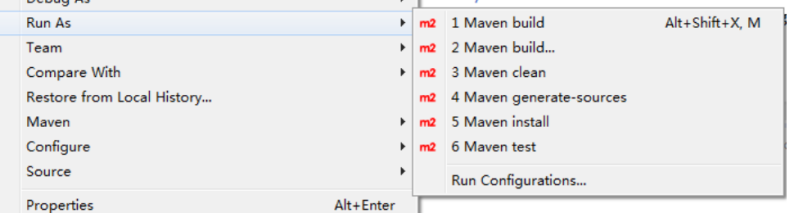
在项目右键选择run as->Run Configurations
加入如图参数即可执行main方法,并且会把调试信息进行输出
第三种:
Caused by: java.lang.ClassNotFoundException:

com.lemon.phoenix.util.StartServer

    at java.net.URLClassLoader.findClass (URLClassLoader.java:381)

    at java.lang.ClassLoader.loadClass (ClassLoader.java:424)

    at java.lang.ClassLoader.loadClass (ClassLoader.java:357)

at org.codehaus.mojo.exec.ExecJavaMojo$1.run

(ExecJavaMojo.java:276)

    at java.lang.Thread.run (Thread.java:748)
原因:
项目的主代码没有遵循Maven的约定造成的,项目主代码和测试代码不同,项目的主代码会被打包到最终的构件中(比如jar),而测试代码只在运行测试时用到,不会被打包。默认情况下,Maven假设项目主代码位于src/main/java目录,我们遵循Maven的约定,创建该目录,然后在该目录下创建文件。
解决方案:
将项目的主代码移动到src/main/java目录
Maven项目执行java入口main方法的更多相关文章
- 用maven运行指定java类main方法
mvn exec:java -Dexec.mainClass="com.java2s.ide.App"
- 解决idea中maven项目无法读取src/main/java目录下面的配置文件问题
解决idea中maven项目无法读取src/main/java目录下面的配置文件问题 当我们在maven项目中使用Mybatis的时候,需要给Mybatis配置核心xml文件(MyBatis-Conf ...
- 为什么java的main方法必须是静态的
今天看类型信息时发现一个问题,不能再main方法中打印this关键字的信息,这时想起了之前的知识,不能再静态方法中调用this.理由很简单,this表示“这个对象”,也就是声明一个类的对象,然而静态方 ...
- 1-为什么java的main方法必须是静态的
为什么java的main方法必须是静态的 今天看类型信息时发现一个问题,不能再main方法中打印this关键字的信息,这时想起了之前的知识,不能再静态方法中调用this.理由很简单,this表示“ ...
- eclipse 从git取项目,导入为maven项目,新加的方法,报加载主类错误
eclipse 从git取项目,导入为maven项目,新加的方法,报加载主类错误 具体描述: 整体编译能够编译成功,但新加一个java,里面创建一个main方法,运行时,报无法加载主类的错误, 整体编 ...
- Ant执行一个含有main方法的class文件
目前需要使用ant来执行一个含有main方法的class文件,并且需要通过命令来行传两个参数(start和end)到main方法. <target name="gsp" de ...
- AndroidStudio运行java的main方法
新建一个java文件,含有main方法 package com.why.project.androidcnblogsdemo.utils; /** * Created by HaiyuKing * U ...
- java中main方法的 (String []args)
java中main方法的 (String []args) String[] args是main函数的形式参数,可以用来获取命令行用户输入进去的参数.java 本身不存在不带String ...
- 构建maven项目,自定义目录结构方法
构建maven项目 创建自定义的文件目录方法: 在项目名称右键-->Builder Path-->Configure Builder Path...Source菜单下的Add Folder ...
随机推荐
- Oracle数据库体系结构之进程结构(4)
Oracle进程结构包括用户进程,服务进程,后台进程. 1. 用户进程 用户进程在数据库用户要求连接到Oracle服务器时开始启动. 用户进程是要求Oracle服务器交互的一种进程 它必须首先建立一个 ...
- 为什么浏览器User Agent中都有个mozilla
你是否好奇标识浏览器身份的User-Agent,为什么每个浏览器都有Mozilla字样? Mozilla/5.0 (Windows NT 6.1; WOW64) AppleWebKit/537.36 ...
- nand flash和nor flash的区别
NOR和NAND是现在市场上两种主要的非易失闪存技术. Intel于1988年首先开发出NOR flash技术,彻底改变了原先由EPROM和EEPROM一统天下的局面. 东芝于1989年开发出NAND ...
- Python 官方文档解读(2):threading 模块
使用 Python 可以编写多线程程序,注意,这并不是说程序能在多个 CPU 核上跑.如果你想这么做,可以看看关于 Python 并行计算的,比如官方 Wiki. Python 线程的主要应用场景是一 ...
- AspNet Core下利用 app-metrics+Grafana + InfluxDB实现高大上的性能监控界面
在日常系统工作中,我们为了洞察系统的问题和运作情况通常会记录日志的方式来进行分析,但是在很多情况下都是被动的在出问题后才会去查日志.在很多时候,我们可能更需要相对实时的了解整个系统或者某一时段的运行的 ...
- scrapy的持久化相关
终端指令的持久化存储 保证爬虫文件的parse方法中有可迭代类型对象(通常为列表or字典)的返回,该返回值可以通过终端指令的形式写入指定格式的文件中进行持久化操作. 需求是:将糗百首页中段子的内容和标 ...
- Akka.net 性能测试兼使用小技巧
最近想研究一下分布式开发,先拿了akka.net 跑一下性能 参考自己写个网络实现,一般在本机通讯,300M每秒的传输率,作为参考 嗯,先说结果,用Akka.net直接发bytearray,最后也只有 ...
- MyBatis3系列__Demo地址
一直光写博客了,并且感觉贴代码有点麻烦,但是以后的博客也尽量说的清楚,此外,觉得贴一下demo会好一些: 当然了,需要能够FQ哈,如果不能FQ的话建议百度或者参考这个:https://secure.s ...
- linux系统做raid
raid 常用步骤 1.ctrl+R 进入raid设置界面 2.F2 相当于右键功能 3.箭头 → 是下一个选项功能 4.ctrl+n是下一页,ctrl+p是前一页 5.Esc退出.最后ctrl+al ...
- tomcat注册服务
转自https://blog.csdn.net/wangmx1993328/article/details/81013715 在 tomcat 的 bin 目录下可以看到一个 service.bat ...