
python3 爬取qq音乐作者所有单曲 并且下载歌曲
  1 import requests

 import re

 import json

 import os

 # 便于存放作者的姓名

 zuozhe = []

 headers = {'User-Agent': 'Mozilla/5.0 (Windows NT 10.0; WOW64) AppleWebKit/537.36 (KHTML, like Gecko) Chrome/66.0.3359.139 Safari/537.36'}

 def get_singermid():

     name = input('请输入你要下载歌曲的作者:')

     zuozhe.append(name)

     if not os.path.exists(name):

         os.mkdir(name)

     url = 'https://c.y.qq.com/soso/fcgi-bin/client_search_cp'

     headers = {'user-agent': 'Mozilla/5.0 (Windows NT 10.0; WOW64) AppleWebKit/537.36 (KHTML, like Gecko) Chrome/66.0.3359.139 Safari/537.36'}

     data = {

             'w': name,

             'jsonpCallback': 'MusicJsonCallback885332333726736',}

     response = requests.get(url,headers=headers,params=data).text

     patt = re.compile('MusicJsonCallback\d+\((.*?)\}\)')

     singermid = re.findall(patt,response)[0]

     singermid = singermid+'}'

     dic = json.loads(singermid)

     return dic['data']['song']['list'][0]['singer'][0]['mid']

 def get_page_html(singermid):

     url = 'https://c.y.qq.com/v8/fcg-bin/fcg_v8_singer_track_cp.fcg'

     params = {

         'g_tk': 5381,

         'jsonpCallback': 'MusicJsonCallbacksinger_track',

         'loginUin': 0,

         'hostUin': 0,

         'format': 'jsonp',

         'inCharset': 'utf8',

         'outCharset': 'utf-8',

         'notice': 0,

         'platform': 'yqq',

         'needNewCode': 0,

         'singermid': singermid,

         'order': 'listen',

         'begin': 0,# 页数  0 30  60

         'num': 30,

         'songstatus': 1,

     }

     response = requests.get(url,headers=headers,params=params)

     return response.text

 def get_vkey_data(songmid,strMediaMid,name):

     url = 'https://c.y.qq.com/base/fcgi-bin/fcg_music_express_mobile3.fcg'

     strMediaMid1 = 'C400'+strMediaMid+'.m4a'

     data = {

         'g_tk': 5381,

         'jsonpCallback': "MusicJsonCallback4327043425715609",

         'loginUin': 0,

         'hostUin': 0,

         'format': 'json',

         'inCharset': 'utf8',

         'outCharset': 'utf-8',

         'notice': 0,

         'platform': 'yqq',

         'needNewCode': 0,

         'cid': 205361747,

         'callback': 'MusicJsonCallback4327043425715609',

         'uin': 0,

         'songmid': songmid,

         'filename': strMediaMid1,

         'guid': 4428680404,

     }

     response = requests.get(url,headers=headers,params=data).text

     try:

         patt = re.compile('\"vkey\":\"(.*?)\"')

         vkey = re.findall(patt,response)[0]

         patt = re.compile('\"filename\":\"(.*?)\"')

         filename = re.findall(patt, response)[0]

         url1 = 'http://dl.stream.qqmusic.qq.com/' + filename + '?vkey=' + vkey + '&guid=4428680404&uin=0&fromtag=66'

         yingyue = requests.get(url1,headers=headers).content

         with open(zuozhe[0]+'/'+name+'.m4a','wb') as f:

             f.write(yingyue)

             f.close()

             print('下载完成《'+name+'》')

     except Exception as e:

         print(e)

         pass

 def get_detail_html(html):

     if html:

         patt = re.compile('data\":{\"list\":(.*?),\"singer_id',re.S)

         json_html = re.findall(patt,html)[0]

         data_html = json.loads(json_html)

         for data in data_html:

             name = data['musicData']['songname']

             songmid = data['musicData']['songmid']

             strMediaMid = data['musicData']['strMediaMid']

             print('正在下载《' + name + '》......')

             get_vkey_data(songmid,strMediaMid,name)

 def main():

     # 获取 singermid

     singermid = get_singermid()

     html = get_page_html(singermid)

     get_detail_html(html)

 if __name__ == '__main__':

     main()
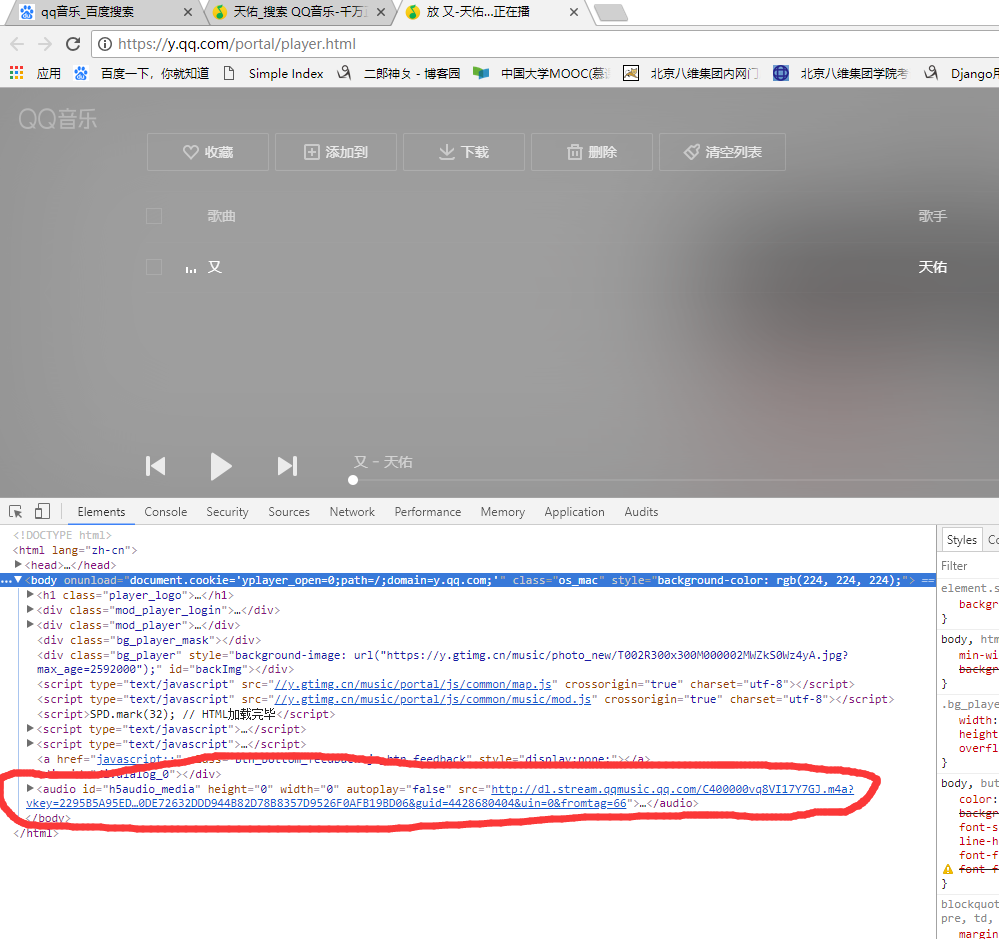

爬取qq音乐首先得找到'http://dl.stream.qqmusic.qq.com/' + filename + '?vkey=' + vkey + '&guid=4428680404&uin=0&fromtag=66'这个链接 然后其中只有filename 和vkey 在变化 然后就在列表页寻找这两个参数,找到以后拼接到这个url,然后请求就可以了 。
代码在上面只供参考
python3 可以直接复制然后运行
python3 爬取qq音乐作者所有单曲 并且下载歌曲的更多相关文章
- Python爬虫实战一之爬取QQ音乐
一.前言 前段时间尝试爬取了网易云音乐的歌曲,这次打算爬取QQ音乐的歌曲信息.网易云音乐歌曲列表是通过iframe展示的,可以借助Selenium获取到iframe的页面元素, 而QQ音乐采用的是 ...
- 爬取QQ音乐歌手的歌单
import requests# 引用requests库res_music = requests.get('https://c.y.qq.com/soso/fcgi-bin/client_search ...
- 爬取QQ音乐(讲解爬虫思路)
一.问题描述: 本次爬取的对象是QQmusic,为自己后面做django音乐网站的开发获取一些资源. 二.问题分析: 由于QQmusic和网易音乐的方式差不多,都是讲歌曲信息放入到播放界面播放,在其他 ...
- python3爬取咪咕音乐榜信息(附源代码)
参照上一篇爬虫小猪短租的思路https://www.cnblogs.com/aby321/p/9946831.html,继续熟悉基础爬虫方法,本次爬取的是咪咕音乐的排名 咪咕音乐榜首页http://m ...
- 爬取qq音乐巅峰榜---内地音乐的榜单
import requestsimport jsonimport sys for i in range(0,10): url = "https://szc.y.qq.com/v8/fcg-b ...
- python3 爬去QQ音乐
import requests import re import json import os def get_name(singer): url = 'https://c.y.qq.com/soso ...
- 手把手教你使用Python抓取QQ音乐数据(第一弹)
[一.项目目标] 获取 QQ 音乐指定歌手单曲排行指定页数的歌曲的歌名.专辑名.播放链接. 由浅入深,层层递进,非常适合刚入门的同学练手. [二.需要的库] 主要涉及的库有:requests.json ...
- 手把手教你使用Python抓取QQ音乐数据(第二弹)
[一.项目目标] 通过Python爬取QQ音乐数据(一)我们实现了获取 QQ 音乐指定歌手单曲排行指定页数的歌曲的歌名.专辑名.播放链接. 此次我们在之前的基础上获取QQ音乐指定歌曲的歌词及前15个精 ...
- python3爬取全民K歌
Python3爬取全民k歌 环境 python3.5 + requests 1.通过歌曲主页链接爬取 首先打开歌曲主页,打开开发者工具(F12). 选择Network,点击播放,会发现有一个请求返回的 ...
随机推荐
- Android 5.0 SEAndroid下如何获得对一个内核节点的访问权限
-9]* u:object_r:tty_device:s0 # We add here /dev/wf_bt u:object_r:wf_bt_device:s0 wf_bt ...
- Unity热更新之C#反射动态获取类属性及方法
如果我们要为发布出去的游戏更新一些功能,但又不想让用户重新下载整个游戏包,只让他下载我们更新的资源包,用assetBundle打包资源的方式是可以的,但其中有个最大的例外,那就是脚本. 虽然asset ...
- libevent之event
就如libevent官网上所写的“libevent - an event notification library”,libevent就是一个基于事件通知机制的库,可以看出event是整个库的核心.e ...
- java工具类(五)之日期格式字符串与日期实现互转
JAVA字符串转日期或日期转字符串 项目开发过程中需要实现日期格式的字符串与日期进行互转,并进行日期的加减操作. Demo如下: package weiming.lmapp.utils; import ...
- "《算法导论》之‘图’":单点最短路径(有向图)
也许最直观的图处理问题就是你常常需要使用某种地图软件或者导航系统来获取从一个地方到另一个地方的路径.我们立即可以得到与之对应的图模型:顶点对应交叉路口,边对应公路,边的权重对应该路段的成本(时间或距离 ...
- Android监听自身卸载,弹出用户反馈调查
1,情景分析 在上上篇博客中我写了一下NDK开发实践项目,使用开源的LAME库转码MP3,作为前面几篇基础博客的加深理解使用的,但是这样的项目用处不大,除了练练NDK功底.这篇博客,我将讲述一下一个各 ...
- Linux 获得机器的IP和网卡信息
Linux 获得机器的IP和网卡信息 代码来自于网络, 我改写了, 有美不敢自专, 特分享之.用法很简单,就3个函数. 头文件getmac.h: /** * getmac.h * * 2014-07- ...
- C语言实现某年某月某日是某年的第几天
看到这个标题,想实现这样的功能其实挺简单的,用C语言的switch语句加上闰年,平年条件的判断,再加上一定的逻辑可以轻松实现这样的函数,在linux内核中,存在判断闰年平年的接口,我将它移植出来后,写 ...
- nasm预处理器(3)
nasm提供一个限定符.nolist,可以包含它到一个宏定义中,这样该宏就不会在列表文件中被展开:限定符 .nolist直接放到参数后面: %macro foo 1.nolist 条件汇编 和C预处理 ...
- rails小重构:将图片加入产品Model
原先的产品product模式中存放的是图片的url,必须手动将图片存入指定目录中.现在略作改动,在数据库中新建一个pictures表,其设定如下: class CreatePictures < ...