
activity与service进程内通信
package com.example.binbin.testbinder;

import android.app.Service;

import android.content.Intent;

import android.os.Binder;

import android.os.IBinder;

import android.support.annotation.Nullable;

import android.util.Log;

import android.widget.Toast;

/**

 * Created by binbin on 2016/7/29.

 */

public class MyService extends Service {

    //自定义的binder,包含了我们所需的操作

    class myBinder extends Binder{

        //要在Service进行的操作

        public void sayHello(){

            Log.d("TAG","sayHello");

            Toast.makeText(MyService.this,"Hello",Toast.LENGTH_SHORT).show();

        }

        public void sayBye(){

            Log.d("TAG","sayBye");

            Toast.makeText(MyService.this,"Bye",Toast.LENGTH_SHORT).show();

        }

    };

    @Nullable

    @Override

    //绑定服务和进行通信的时候,一定要返回一个自定义的Binder

    public IBinder onBind(Intent intent) {

        Log.d("TAG","onBind");

        return new myBinder();

    }

    @Override

    public void onCreate() {

        super.onCreate();

        Log.d("TAG","onCreate");

    }

    @Override

    public int onStartCommand(Intent intent, int flags, int startId) {

        Log.d("TAG","onStartCommand");

        return super.onStartCommand(intent, flags, startId);

    }

    @Override

    public void onDestroy() {

        super.onDestroy();

        Log.d("TAG","onDestroy");

    }

    @Override

    public boolean onUnbind(Intent intent) {

        Log.d("TAG","onUnbind");

        return super.onUnbind(intent);

    }

}
自定义了myBinder,在Activity与Service绑定的时候,返回myBinder的实例,Activity就可以操作Service里面的方法了(sayHello和sayBye)。
Activity里面必须要有两个实例,一个是myBinder,用于与Service通信的。另一个是ServiceConnection,代表了activity与服务的连接,在后面绑定的时候要传入这个类的实例,只有两个方法,我们要重写。第一个是连接成功时要干什么,肯定是要把binder返回给activity里面的binder啦。
public class MainActivity extends AppCompatActivity {

    //四个按钮

    Button start, stop, bind, unbind,sayHello,sayBye;

    //自定义的Binder对象

    private MyService.myBinder binder;

    //绑定服务要添加的对象,ServiceConnection代表与服务的连接,系统自己会调用,我们只需要实现,不需要显示调用

    //绑定的时候要把这个对象传进去。

    private ServiceConnection conn = new ServiceConnection() {

        //连接成功

        @Override

        public void onServiceConnected(ComponentName name, IBinder service) {

            Log.d("TAG","Connect!");

            binder = (MyService.myBinder) service;  //获取其实例

            //binder.sayHello();                  //调用其方法

        }

        //连接失败

        @Override

        public void onServiceDisconnected(ComponentName name) {

        }

    };

    /**

     * ATTENTION: This was auto-generated to implement the App Indexing API.

     * See https://g.co/AppIndexing/AndroidStudio for more information.

     */

    private GoogleApiClient client;

    @Override

    protected void onCreate(Bundle savedInstanceState) {

        super.onCreate(savedInstanceState);

        setContentView(R.layout.activity_main);

        start = (Button) findViewById(R.id.Start);

        stop = (Button) findViewById(R.id.Stop);

        bind = (Button) findViewById(R.id.Bind);

        unbind = (Button) findViewById(R.id.unBind);

        sayHello = (Button) findViewById(R.id.hello);

        sayBye = (Button) findViewById(R.id.bye);

        start.setOnClickListener(new View.OnClickListener() {

            @Override

            public void onClick(View view) {

                Intent intent = new Intent(MainActivity.this, MyService.class);

                startService(intent);

            }

        });

        stop.setOnClickListener(new View.OnClickListener() {

            @Override

            public void onClick(View view) {

                Intent intent = new Intent(MainActivity.this, MyService.class);

                stopService(intent);

            }

        });

        bind.setOnClickListener(new View.OnClickListener() {

            @Override

            public void onClick(View view) {

                Intent intent = new Intent(MainActivity.this,MyService.class);

                //传进去了conn对象

                bindService(intent,conn,BIND_AUTO_CREATE);

            }

        });

        unbind.setOnClickListener(new View.OnClickListener() {

            @Override

            public void onClick(View view) {

                //解除只需要传入连接对象

                unbindService(conn);

            }

        });

        sayHello.setOnClickListener(new View.OnClickListener() {

            @Override

            public void onClick(View view) {

                binder.sayHello();

            }

        });

        sayBye.setOnClickListener(new View.OnClickListener() {

            @Override

            public void onClick(View view) {

                binder.sayBye();

            }

        });

        // ATTENTION: This was auto-generated to implement the App Indexing API.

        // See https://g.co/AppIndexing/AndroidStudio for more information.

        client = new GoogleApiClient.Builder(this).addApi(AppIndex.API).build();

    }
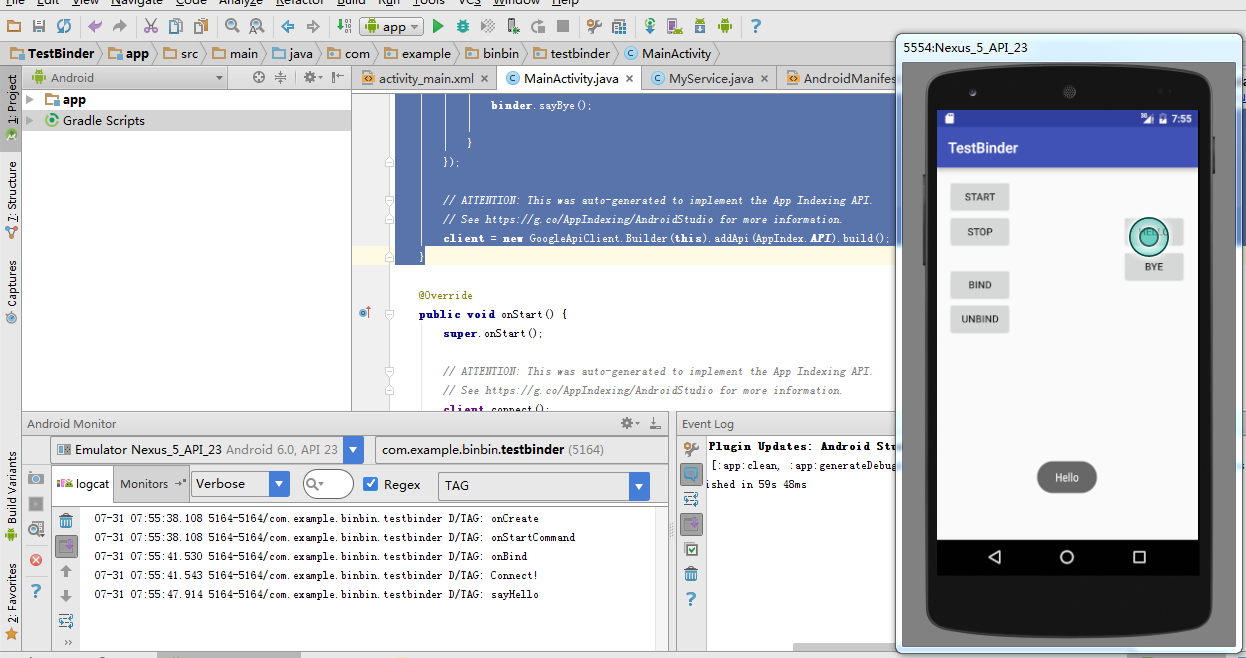
开启和绑定服务之后,按Hello,就可以使用服务里面的sayHello方法了。
activity与service进程内通信的更多相关文章
- MXNet源码分析 | KVStore进程内通信
本文主要基于MXNet1.6.0版本进行分析. MXNet的KVStore模块下有几个比较重要的类.KVStore是一个抽象类,提供了一些通用的API,例如Init.Push和Pull等.因为KVSo ...
- activity 与 service 之间的通信
activity和service通信:通过binder 举个我实际项目中的例子:在service中下载更新应用 首先是下载更新apk的service: public class UpdateVersi ...
- 通过messenger实现activity与service的相互通信
布局: <RelativeLayout xmlns:android="http://schemas.android.com/apk/res/android" xmlns:to ...
- 201709012工作日记--activity与service的通信机制
service生命周期 Service主要包含本地类和远程类. Service不是Thread,Service 是android的一种机制,当它运行的时候如果是Local Service,那么对应的 ...
- Android中Activity、Service和线程之间的通信
Activity.Service和线程应该是Android编程中最常见的几种类了,几乎大多数应用程序都会涉及到这几个类的编程,自然而然的,也就会涉及到三者之间的相互通信,本文就试图简单地介绍一下这三者 ...
- activity与service之间的通信方式
Activity之间的通信 1.activity与activity的通信可以通过Intent来封装数据,startActivityForResult()来实现,当跳转的activity调用finish ...
- Activity与Service通信(不同进程之间)
使用Messenger 上面的方法只能在同一个进程里才能用,如果要与另外一个进程的Service进行通信,则可以用Messenger. 其实实现IPC(Inter-Process Communicat ...
- Activity和Service是否是在同一个进程中运行。
一般情况下,Activity和Service在同一个包名内,并且没有设定属性android:process=":remote",两者在同一个进程中. 因为一个进程只有一个UI线程, ...
- Activity与Service通信的方式有三种:
在博客园看到的,看着挺不错的,借来分享下 继承Binder类 这个方式仅仅有当你的Acitivity和Service处于同一个Application和进程时,才干够用,比方你后台有一个播放背景音乐的S ...
随机推荐
- Android编程 EditView 中如何设置最多可以输入的字符数量 属性 android:ems 与 android:maxLength 的区别
最近有一个新的感悟,那就是工作的时候千万不要遇到那种特要人无语的领导,很不幸我现在就遇到了这样的一个领导,说是要给领导认识的一个熟人家的孩子写本科毕业设计预算把我给派过去给本科生写毕业设计,这事情的确 ...
- jquery.i18n.properties.js hacking
/****************************************************************************** * jquery.i18n.proper ...
- nodejs调用百度统计api摆脱人肉数据统计
var http = require("https"); var url = require('url'); var postData = JSON.stringify( { &q ...
- 拦截器springmvc防止表单重复提交【3】3秒后自动跳回首页【重点明白如何跳转到各自需要的页面没有实现 但是有思路】
[1]定义异常类 [重点]:异常类有个多参数的构造函数public CmsException(String s, String... args),可以用来接受多个参数:如(“异常信息”,“几秒跳转”, ...
- 使用python处理selenium中的获取文本问题
# 获取文本 button_name = self.driver.find_element_by_id("sign_in_display").text
- js禁用后退
history.pushState(null, null, document.URL); window.addEventListener('popstate', function() ...
- 看到就是赚到!Selenium完整框架——告别2017
这个框架大家可以拿过去直接用——作为送给大家的元旦礼物——船长对你们简直太好了! 学了这么长时间,又是定位,又是发邮件,还有乱七八糟的unittest,现在时候后把东西用起来了~而且学会了这一篇你就可 ...
- 给网站添加IPv6 DNS记录
一. 1) 使6box提供的DNS64服务,解析出自己网站对应的IPv6域名 Windows: Win+R打开运行,输入cmd,打开命令提示符,输入以下命令 Nslookup www.6box.cn ...
- Git之安装管理
1.Git安装部署 Git是分布式的版本控制系统,我们只要有了一个原始Git版本仓库,就可以让其他主机克隆走这个原始版本仓库,从而使得一个Git版本仓库可以被同时分布到不同的主机之上,并且每台主机的版 ...
- GridView合并表头多重表头
后台代码: using System; using System.Data; using System.Configuration; using System.Web; using System.We ...