
popupWindow 用法总结 控制位置
Activity
}
Activity2
}
工具类
}
常用API
构造方法
- public PopupWindow(View contentView)
- public PopupWindow(Context context)
- public PopupWindow(View contentView, int width, int height)
- public PopupWindow(View contentView, int width, int height, boolean focusable)
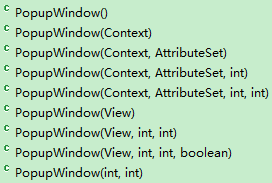
- contentView为要显示的view;PopupWindow没有默认布局,它不会像AlertDialog那样只setTitle就能弹出来一个框,所以contentView必须设置。
- width和height为要显示的view的宽和高,值为像素值或MATCHT_PARENT、WRAP_CONTENT;如果View是从xml得到的,那么xml的第一层view的大小属性将被忽略;必须设置宽和高,否则显示不出来。
- focusable为是否能获得焦点
show方法
- showAsDropDown(View anchor) 相对某个控件的位置(正左下方),无偏移。最终调用的是下面的方法
- showAsDropDown(View anchor, int xoff, int yoff) 相对某个控件的位置,有偏移,xoff表示x轴的偏移,正值表示向左,负值表示向右;yoff表示相对y轴的偏移,正值是向下,负值是向上;最终调用的是下面的方法
- showAsDropDown(View anchor, int xoff, int yoff, int gravity) 【注:这个方法貌似不起作用】相对某个控件的某个位置,有偏移。gravity的默认值为DEFAULT_ANCHORED_GRAVITY= Gravity.TOP | Gravity.START
- showAtLocation(View parent, int gravity, int x, int y) 相对于父控件(不管view设置的是哪一个,参照物都是整个屏幕的根布局)的某个位置(例如正中央Gravity.CENTER,下方Gravity.BOTTOM等),可以设置偏移或无偏移。

/*** Displays the content view in a popup window anchored to the corner of* another view. The window is positioned according to the specified* gravity and offset by the specified x and y coordinates.* <p>* If there is not enough room on screen to show the popup in its entirety,* this method tries to find a parent scroll view to scroll. If no parent* view can be scrolled, the specified vertical gravity will be ignored and* the popup will anchor itself such that it is visible.* <p>* If the view later scrolls to move <code>anchor</code> to a different* location, the popup will be moved correspondingly.** @param anchor the view on which to pin the popup window* @param xoff A horizontal offset from the anchor in pixels* @param yoff A vertical offset from the anchor in pixels* @param gravity Alignment of the popup relative to the anchor** @see #dismiss()*/public void showAsDropDown(View anchor, int xoff, int yoff, int gravity)/*** <p>* Display the content view in a popup window at the specified location. If the popup window* cannot fit on screen, it will be clipped. See {@link android.view.WindowManager.LayoutParams}* for more information on how gravity and the x and y parameters are related. Specifying* a gravity of {@link android.view.Gravity#NO_GRAVITY} is similar to specifying* <code>Gravity.LEFT | Gravity.TOP</code>.* </p>** @param parent a parent view to get the {@link android.view.View#getWindowToken()} token from* @param gravity the gravity which controls the placement of the popup window* @param x the popup's x location offset* @param y the popup's y location offset*/public void showAtLocation(View parent, int gravity, int x, int y)
setFocusable
/*** <p>Changes the focusability of the popup window. When focusable, the* window will grab the focus from the current focused widget if the popup* contains a focusable {@link android.view.View}. By default a popup* window is not focusable.</p>** <p>If the popup is showing, calling this method will take effect only* the next time the popup is shown or through a manual call to one of* the {@link #update()} methods.</p>** @param focusable true if the popup should grab focus, false otherwise.** @see #isFocusable()* @see #isShowing()* @see #update()*/public void setFocusable(boolean focusable) {mFocusable = focusable;}
setOutsideTouchable
/*** <p>Controls whether the pop-up will be informed of touch events outside* of its window. This only makes sense for pop-ups that are touchable* but not focusable, which means touches outside of the window will* be delivered to the window behind. The default is false.</p>** <p>If the popup is showing, calling this method will take effect only* the next time the popup is shown or through a manual call to one of* the {@link #update()} methods.</p>** @param touchable true if the popup should receive outside* touch events, false otherwise** @see #isOutsideTouchable()* @see #isShowing()* @see #update()*/public void setOutsideTouchable(boolean touchable) {mOutsideTouchable = touchable;}
附件列表
popupWindow 用法总结 控制位置的更多相关文章
- Android popupwindow 弹出的位置问题
在Android开发中,需要用到PopupWindow这个类.在初始化完成,显示之前,都需要获得这个对象的width,height去计算popupWindow弹出的位置. 这个时候会发现取得的widt ...
- Android中PopupWindow用法
参考资料链接:http://developer.android.com/reference/android/widget/PopupWindow.html 在Android中有很多级别的Window, ...
- Android PopupWindow怎么合理控制弹出位置(showAtLocation)
说到PopupWindow,应该都会有种熟悉的感觉,使用起来也很简单 // 一个自定义的布局,作为显示的内容 Context context = null; // 真实环境中要赋值 int layou ...
- 屏幕旋转时调用PopupWindow update方法更新位置失效的问题及解决方案
接到一个博友的反馈,在屏幕旋转时调用PopupWindow的update方法失效.使用场景如下:在一个Activity中监听屏幕旋转事件,在Activity主布局文件中有个按钮点击弹出一个Pop ...
- PopupWindow计算弹出位置
1.首先自定义PopupWindow popWindowView= LinearLayout.inflate(context, R.layout.popupWindow,null); po ...
- opencv播放视屏并控制位置
原文地址:http://blog.csdn.net/augusdi/article/details/9000592 cvGetCaptureProperty是我们需要使用到的获取视频属性的函数. do ...
- 一些特殊ACII码的用法 在控制台中覆盖显示、刷新显示和删除字符
很好奇怎么实现在控制台中不换行直接显示新的信息把旧的替换掉,于是找到了两个ACII码字符,他们可以帮助实现. 一个是‘\b’字符,这个字符是backspace,即删除上一个字符,于是可以清除以显示的旧 ...
- Unity 3D 中实现对物体 位置(position) 旋转(rotation) 大小(scale) 的全面控制
今天分享一些基础控制的脚本 1.位置(Position): 控制位置很简单,首先要知道要在xyz哪几个轴上移动,确定好后定义代表着那些轴的移动变量,速度(m_speed在函数外定义为全局变量)然后通过 ...
- android PopupWindow显示位置
PopupWindow的显示及位置设置 window.showAtLocation(parent, Gravity.RIGHT | Gravity.BOTTOM, 10,10); 第一个参数指定Pop ...
随机推荐
- ubuntu sublime text 3 集成 nodejs 插件
下载nodejs插件地址:https://github.com/tanepiper/SublimeText-Nodejs 解压重命名文件夹为Nodejs打开sublime text : prefere ...
- Could not apply the stored configuration for monitors
在用户目录下$user.home/.config/monitors.xml,要解决上面的问题,最简单的办法就是删除这个monitors.xml文件,重启一下电脑
- vscode debugger for chrome 调试webpack的配置问题
module.exports = { entry: './app.ts', output: { filename: 'bundle.js', publicPath: '/assets', devtoo ...
- JSP中常用JSTL用法
使用标签时,需要在jsp文件头加入以下代码: <%@ taglib prefix="c" uri="http://java.sun.com/jsp/jstl/cor ...
- Web应用类型扫描识别工具WhatWeb
Web应用类型扫描识别工具WhatWeb WhatWeb是一款Kali Linux预安装的Web扫描工具.它使用Ruby语言编写.该工具可以扫描网站,获取该网站的各类信息,如所使用的CMS.博客平 ...
- android 捕获所有异常 未捕获的异常
韩梦飞沙 韩亚飞 313134555@qq.com yue31313 han_meng_fei_sha 定义一个类 继承 应用, 实现 未捕获异常处理器 uncaughtExceptionHa ...
- 「THUWC 2017」随机二分图
「THUWC 2017」随机二分图 解题思路 : 首先有一个 \(40pts\) 的做法: 前 \(20pts\) 暴力枚举最终的匹配是怎样的,check一下计算方案数,后 \(20pts\) 令 \ ...
- [BZOJ4521][CQOI2016]手机号码(数位DP)
4521: [Cqoi2016]手机号码 Time Limit: 10 Sec Memory Limit: 512 MBSubmit: 875 Solved: 507[Submit][Status ...
- PHP配置文件经典漏洞
phithon师父在小蜜圈里放了一个经典的配置文件写入问题漏洞. <?phpif(!isset($_GET['option'])) die();$str = addslashes($_GET[' ...
- springmvc+hibernate4事务管理配置
1.事务的特性 事务的四种特性: 原子性:体现一个事务的操作的不可分割,要么权执行,要么全不执行. 一致性:事务的执行结果必须从一种一致性状态变到另一种一致性状态.最典型的就是转账,两个账户A.B总金 ...