
jmeter+influxdb+granfana+collectd监控cpu+mem+TPS
1.安装grafana
#####gafana过期安装包安装报错
Error unpacking rpm package grafana-5.1.4-1.x86_64
error: unpacking of archive failed on file /usr/sbin/grafana-cli;5e250e9c: cpio: read
Verifying : grafana-5.1.4-1.x86_64
原因安装包损坏不是最新的
######下载官网最新的包:
####grafana installer
https://grafana.com/grafana/download
#####binary install
wget https://dl.grafana.com/oss/release/grafana-6.5.3.linux-amd64.tar.gz
tar -zxvf grafana-6.5.3.linux-amd64.tar.gz
#### grafana rpm install
sudo yum install initscripts urw-fonts wget
wget <rpm package url>
sudo rpm -Uvh <local rpm package>
安装成功展示:
warning: grafana-6.5.3-1.x86_64.rpm: Header V4 RSA/SHA1 Signature, key ID 24098cb6: NOKEY
Preparing... ################################# [100%]
Updating / installing...
1:grafana-6.5.3-1 warning: /etc/init.d/grafana-server created as /etc/init.d/grafana-server.rpmnew
warning: /usr/lib/systemd/system/grafana-server.service created as /usr/lib/systemd/system/grafana-server.service.rpmnew
################################# [100%]
### NOT starting on installation, please execute the following statements to configure grafana to start automatically using systemd
sudo /bin/systemctl daemon-reload
sudo /bin/systemctl enable grafana-server.service
### You can start grafana-server by executing
sudo /bin/systemctl start grafana-server.service
POSTTRANS: Running script.............
#### 启动grafana,验证服务已启动
sudo systemctl daemon-reload
sudo systemctl start grafana-server
sudo systemctl status grafana-server
###启动成功验证:
● grafana-server.service - Grafana instance
Loaded: loaded (/usr/lib/systemd/system/grafana-server.service; enabled; vendor preset: disabled)
Active: active (running) since Mon 2020-01-20 10:31:27 CST; 12s ago
Docs: http://docs.grafana.org
Main PID: 63048 (grafana-server)
###配置开机自启动
sudo systemctl enable grafana-server.service
####防火墙开放grafana端口默认3000:
firewall-cmd --zone=public --add-port=3000/tcp --permanent
firewall-cmd --reload
firewall-cmd --zone=public --list-ports
或者直接停掉防火墙:
systemctl stop firewalld
###web访问grafana:
安装主机ip:3000
###修改grafana 配置,Grafana有许多配置选项,您可以在.ini配置文件中指定或使用环境变量指定,
您必须重新启动Grafana才能使所有配置更改生效。
官网doc文档地址:https://grafana.com/docs/grafana/latest/installation/configuration/
vi /etc/grafana/grafana.ini
###ini注释comment方法讲解:
所有注释以分号开头,如果需要更改配置比如web页面port ,
需要删除行前面分号,更改为
###关于web login密码账号更改也是如此,需要重启grafana才生效
37 # The http port to use
38 ;http_port = 3000
####web login
152 #################################### Security ####################################
153 [security]
154 # disable creation of admin user on first start of grafana
155 ;disable_initial_admin_creation = false
156
157 # default admin user, created on startup
158 ;admin_user = admin
159
160 # default admin password, can be changed before first start of grafana, or in profile settings
161 ;admin_password = admin
#####influxdb 启动失败问题解决,influxdb installer 配置路径:
/etc/influxdb/influxdb.conf
#####启用graphite配置########:
[[graphite]]
# Determines whether the graphite endpoint is enabled.
enabled = false
database = "graphite"
# retention-policy = ""
bind-address = ":2003"
protocol = "tcp"
consistency-level = "one"
http启用:
### [http]
###
### Controls how the HTTP endpoints are configured. These are the primary
### mechanism for getting data into and out of InfluxDB.
###
[http]
# Determines whether HTTP endpoint is enabled.
enabled = true
# The bind address used by the HTTP service.
bind-address = ":8086"
#### 默认influxdb数据存放:meta元数据,data
/var/lib/influxdb/data
/var/lib/influxdb/meta
>>>>>>>>>>>>>>>>>>>>>>>>>>>>>>>>>>>>>>>>>>>>>>
### [meta]
###
### Controls the parameters for the Raft consensus group that stores metadata
### about the InfluxDB cluster.
###
[meta]
# Where the metadata/raft database is stored
dir = "/var/lib/influxdb/meta"
# Automatically create a default retention policy when creating a database.
# retention-autocreate = true
# If log messages are printed for the meta service
# logging-enabled = true
###
### [data]
###
### Controls where the actual shard data for InfluxDB lives and how it is
### flushed from the WAL. "dir" may need to be changed to a suitable place
### for your system, but the WAL settings are an advanced configuration. The
### defaults should work for most systems.
###
[data]
# The directory where the TSM storage engine stores TSM files.
dir = "/var/lib/influxdb/data"
# The directory where the TSM storage engine stores WAL files.
wal-dir = "/var/lib/influxdb/wal"
>>>>>>>>>>>>>>>>>>>>>>>>>>>>>>>>>>>>>>>>>>>>>>>>>>>
#### influxdb log目录:
启动influxdb:systemctl start influxdb
查询启动状态:systemctl status influxdb
启动失败:
: Failed to start InfluxDB is an open-source, distributed, time series database.
tail -n 20 /var/log/messages 分析失败原因,查找到用户权限拒绝:
run: open server: open tsdb store: mkdir /var/lib/influxdb/data/_internal/_series: permission denied
#### 查询influxdb: 使用查询命令rpm -ql influxdb
/usr/lib/influxdb/scripts/influxdb.service
/var/lib/influxdb
/var/log/influxdb
####
ls -l -d influxdb
cd /var/lib/
chown -R influxdb:influxdb influxdb
#### influxdb 集成安装collectd 监控cpu,mem,disk
###yum 安装collectd:org:https://collectd.org/download.shtml
<<python 模块伪代码https://www.jianshu.com/p/a05da23150fb>>
####### collectd安装使用,官网地址:https://collectd.org/download.shtml
方法一yum安装:
yum install epel-release–y
yum install -y collectd
###修改配置:
vi /etc/collectd.conf
修改配置
vi /etc/collectd.conf
确保以下几项的注释(#)是去掉的
Hostname "192.168.1.126" 此处改为安装collectd的机器IP地址
LoadPlugin cpu
LoadPlugin memory
LoadPlugin network
LoadPlugin swap
<Plugin cpu>
ReportByCpu true
ReportByState true
ValuesPercentage true 此处启用cpu的使用率,5.7.*以上才有,低版本的不支持百分百
</Plugin>
<Plugin network>
<Server "192.168.1.222" "25826"> 此处指定将collectd收集的数据发送到的influxdb地址和influxdb conf里collectd配置的端口
# Interface "enp0s31f6" 通过ifconfig获取网卡的名称
</Server>
</Plugin>
启动:
systemctl start collectd.service
systemctl status collectd.service
● collectd.service - Collectd statistics daemon
Loaded: loaded (/usr/lib/systemd/system/collectd.service; disabled; vendor preset: disabled)
Active: active (running) since Mon 2020-01-20 17:11:49 CST; 23s ago
Docs: man:collectd(1)
man:collectd.conf(5)
Main PID: 6968 (collectd)
Tasks: 11
CGroup: /system.slice/collectd.service
└─6968 /usr/sbin/collectd
方法二:源码安装:
wget https://storage.googleapis.com/collectd-tarballs/collectd-5.9.2.tar.bz2
tar -xvf collectd-5.9.2.tar.bz2
mkdir -p /data/project/collectd_dir/datas
## compile c,collectd C 语言写的一个系统性能采集工具
./configure -prefix=/data/project/collectd_dir/datas
### install by datas dir
make all install prefix=/data/project/collectd_dir/datas
find / -name collectd.conf 查询安装的目录:
/data/project/collectd_dir/datas/etc/collectd.conf
####
Hostname "192.168.110.151"
#FQDNLookup true
#BaseDir "/var/lib/collectd"
#PIDFile "/var/run/collectd.pid"
#PluginDir "/usr/lib64/collectd"
#TypesDB "/usr/share/collectd/types.db"
####influxdb 安装,官网地址https://v2.docs.influxdata.com/v2.0/get-started/:
wget https://dl.influxdata.com/influxdb/releases/influxdb-1.7.2.x86_64.rpm
sudo yum localinstall influxdb-1.7.2.x86_64.rpm
环境变量:vi /etc/profile
## influx env
export INFLUXDB_CONFIG_PATH=/etc/influxdb/influxdb.conf
systemctl start influxdb
[root@hostuser1 project]# influx
Connected to http://localhost:8086 version 1.6.4
InfluxDB shell version: 1.6.4
> create database collectd
> use collectd
Using database collectd
> show databases
name: databases
name
----
_internal
jmeter
collectd
###influxdb的数据量一多,会非常影响性能,可以设置只保留5天的数据
>create retention policy "5_days" on collectd duration 5d replication 1 default
> show retention policies on collectd
name duration shardGroupDuration replicaN default
---- -------- ------------------ -------- -------
autogen 0s 168h0m0s 1 true
>
show measurements
### 检查连接tcp 25826连接情况:
ss -tuln
udp UNCONN 0 0 [::]:25826 [::]:*
udp UNCONN 0 0 [::1]:323 [::]:*
tcp LISTEN 0 128 *:111 *:*
#####collectd dashboard模板
https://grafana.com/grafana/dashboards/10179
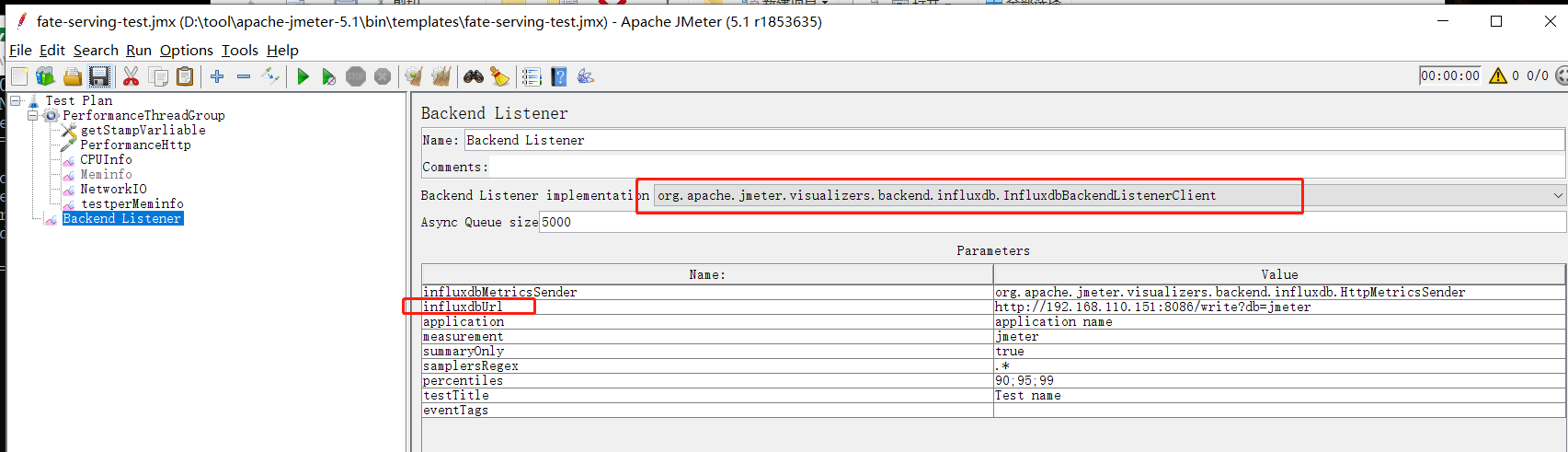
### JMETER >ADD>Listener>BackendListener
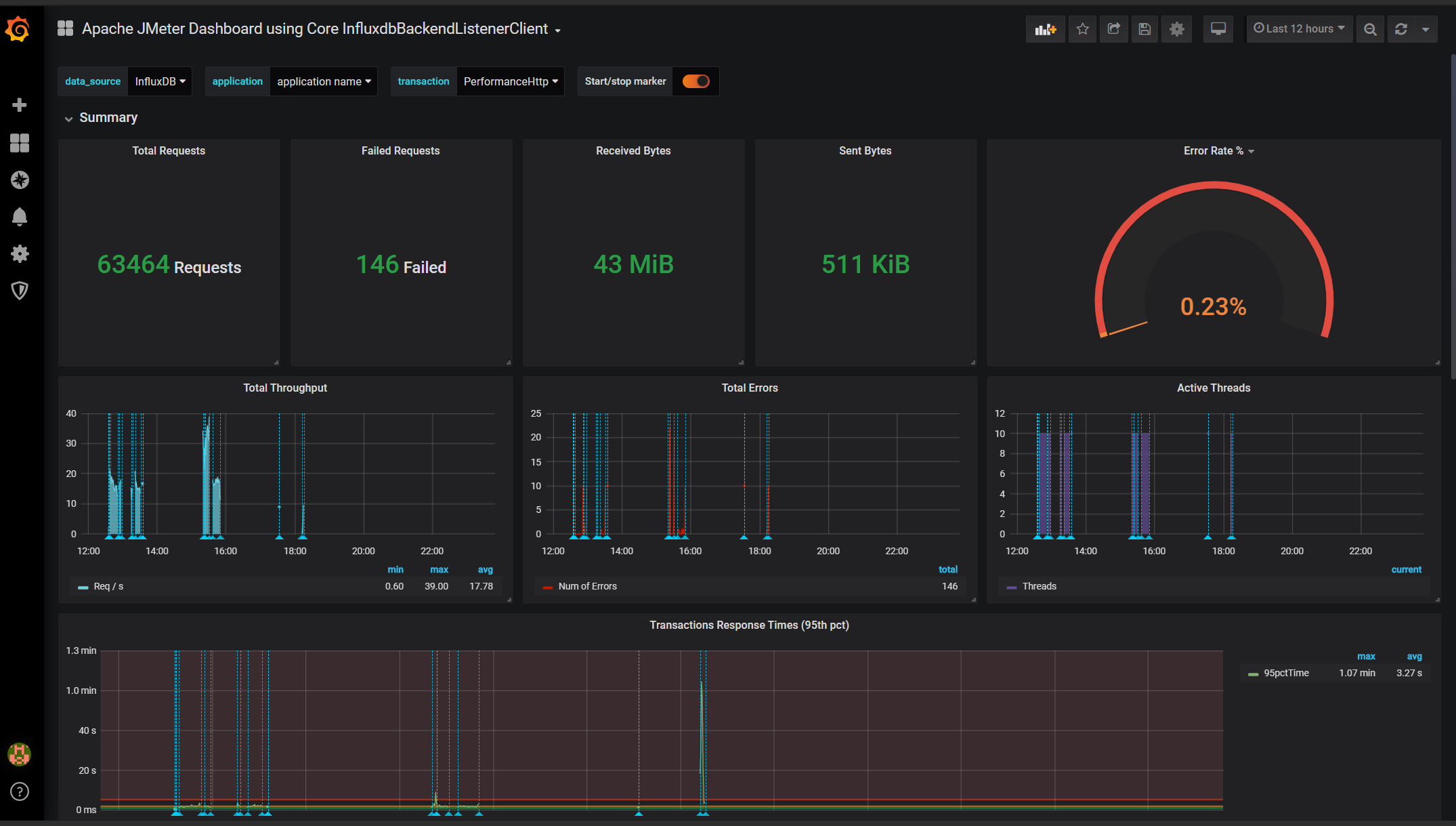
####TPS
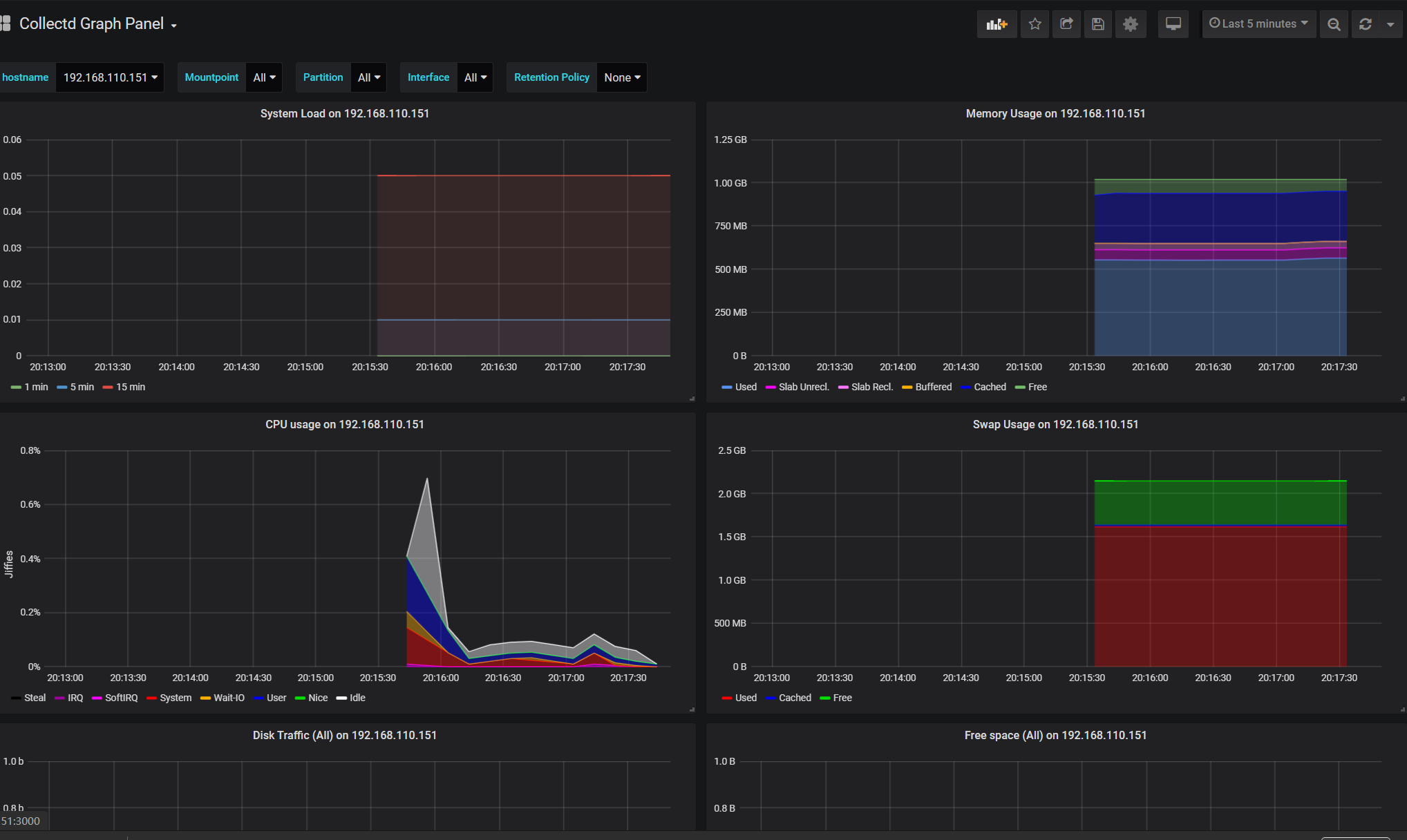
####cpu,mem
jmeter+influxdb+granfana+collectd监控cpu+mem+TPS的更多相关文章
- influxDB1.6版安装与配置(windows环境)、Jmeter+influxDB+Grafana性能监控
influxDB1.6版安装与配置(windows环境).Jmeter+influxDB+Grafana性能监控 来源:https://blog.csdn.net/SwTesting/article/ ...
- 全网最详细!Centos7.X 搭建Grafana+Jmeter+Influxdb 性能实时监控平台
背景 日常工作中,经常会用到Jmeter去压测,毕竟LR还要钱(@¥&*...),而最常用的接口压力测试,我们都是通过聚合报告去查看压测结果的,然鹅聚合报告的真的是丑到家了,作为程序猿这当然不 ...
- Centos7.X 搭建Grafana+Jmeter+Influxdb 性能实时监控平台(不使用docker)
工具介绍 [centos7安装influxDB] Influxdata官网下载路径:https://portal.influxdata.com/downloads/ 1.直接执行以下命令安装 2.安装 ...
- Centos8.X 搭建Grafana+Jmeter+Influxdb 性能实时监控平台
前言 本篇文章引用了小菠萝测试笔记,大部分内容非原创,基于自身实操过程中,完善了部分. 本篇随笔是在Linux上搭建的,后面会补充在docker以及k8s上如何部署安装 工具介绍 工具 介绍 Jmet ...
- jmeter+influxdb+grafana性能测试监控
背景: 话说Jmeter原生的监控确实太丑了,听大佬们在讨论Jmeter+InfluxDb+Grafana的监控,于是,为了有一个漂亮的测试报告,就手动开始进行部署. 安装步骤: 1.influxdb ...
- jmeter性能工具 之监控cpu,内存等信息(四)
1.jmeter 本身不支持直接监控 cpu,内存等信息,需要去官网下载控件 JMeterPlugins-Standard-1.4.0.zip 解压好将其中\lib\ext\JMeterPlug ...
- Centos7 搭建Grafana+Jmeter+Influxdb 性能实时监控平台
未完,待更新 背景 日常工作中,经常会用到Jmeter去压测,毕竟LR还要钱(@¥&*...),而最常用的接口压力测试,我们都是通过聚合报告去查看压测结果的,然鹅聚合报告的真的是丑到家了,作为 ...
- 性能测试监控:Jmeter +InfluxDB +collectd +Grafana
虚拟机ip 192.168.180.128 Influxdb Influxdb是一个开源的分布式时序.时间和指标数据库,使用go语言编写,无需外部依赖. 它有三大特性: 时序性(Time Series ...
- Jmeter +InfluxDB +collectd +Grafana16
Jmeter +InfluxDB +collectd +Grafana(十六) 虚拟机ip 192.168.180.128 Influxdb Influxdb是一个开源的分布式时序.时间和指标数据库, ...
随机推荐
- Netty中CompositeByteBuf的理解以及读写操作
转载请注明出处 https://www.cnblogs.com/majianming/articles/the_composite_byte_buf_read_and_wite_operation_o ...
- centos7上python3.6.5的安装及卸载
前言 最近开始安装配置公司给我的台式机,加上刚刚购买的ECS,处女座的我,环境前前后后大概装了有十来次吧,之前装总是临时网上找教程,但是装下来总是感觉有点别扭,当时服务器装的是3.6.5,虚拟机装的是 ...
- 自定义React-redux
实现mini版react-redux 1. 理解react-redux模块 1). react-redux模块整体是一个对象模块 2). 包含2个重要属性: Provider和connect 3). ...
- windows中Read函数引发数据异常的问题
[摘要] 在Window C/S开发中少不了客户端与服务端数据通信的情况,每当客户端从服务端获取数据时会将数据读到本地本件或缓存中,例如通过CInternetFile类的Read函数会将网卡缓存中的数 ...
- brew 安装 yarn 时候失败
1.mac 安装 brew install yarn 报错 Error: Failure while executing; `git config --local --replace-all home ...
- early-stopping的使用
early-stopping的使用 待办 https://blog.csdn.net/qq_37430422/article/details/103638681 github对应类导入,直接放在项目更 ...
- Trie树相关博客
1. c++代码实现,包含删除操作:https://www.cnblogs.com/luxiaoxun/archive/2012/09/03/2668611.html 2. 一种典型实现及简单分析:h ...
- 大二上学期Javaweb阶段性学习总结
本学期主要学了h5,css3,js,Java,SQL server数据库基本操作等相关知识,学会了简单web系统的制作. 这个学期总的来说学到了很多东西. 前期Java学习因为有了暑期学习及pta上5 ...
- nginx配置之后接口状态200,但是无返回数据问题小记
nginx配置可能有问题.导致nginx不能解析PHP文件,检测nginx里对于php的配置信息. location ~ \.php$ { fastcgi_pass 127.0.0.1:9000; f ...
- 二、vim的保存文件和退出命令
vim的保存文件和退出命令 命令 简单说明 :w 保存编辑后的文件内容,但不退出vim编辑器.这个命令的作用是把内存缓冲区中的数据写到启动vim时指定的文件中. :w! 强制写文件,即强制覆盖原有 ...