
JBehave
JBehave
上篇我们说到如何从Github上clone出一个JBehave项目,既是为了学习JBehava,也是为了熟悉下Github。
从clone下来的项目看来,基本没什么问题,稍微捋一捋就可以运行,但是就clone下来的代码来看,自己还是遇到一个问题(不知道是代码问题,还是我自己的操作有问题),就是没有办法运行(后面会详说)。
正如上篇所说,构建一个JBehave的应用的5大步骤:
- Write story
- Map steps to Java
- Configure Stories
- Run Stories
- View Reports
这里,我们结合clone下来的项目分别对应这五个步骤了解JBehave是如何运行的并完成测试的。
1.Write story,设定一个story,给出一个情景,使用通用语言进行表示,不管是开发或是非开发的都能看懂
本项目有两个测试案例,一个是模拟登录的story:
|
1
2
3
4
5
6
7
8
9
10
11
|
loginYahoo.story:Narrative:In order to show the yahoo functionAs a userI want to login yahooScenario: normal loginGiven yahoo login address by.bouncer.login.yahoo.comThen print successful |
另一个是模拟浏览的story:
|
1
2
3
4
5
6
7
8
9
10
11
12
13
14
15
16
17
18
19
20
21
22
23
|
TestStroies.story:Browse Etsy.comMeta:@category browsing@color redNarrative:In order to show the browsing cart functionalityAs a userI want to browse in a galleryScenario: Browsing around the site for itemsGiven I am on localhostThen print hello world!--Examples:!--|host|hello|!--|localhost|hello world|!--|www.baidu.com|hello baidu| |
2.Map steps to Java, 将上述的每个story细分成每一个step,给出Given条件,则会得到Then的结果,从而将通用语言转换成可以通过代码逻辑描述的问题
loginYahoo.story对应的steps类TestLogin.java:
|
1
2
3
4
5
6
7
8
9
10
11
|
public class TestLogin { @Given("yahoo login address $url") public void getHostPage(String url){ System.out.println("++++++++++++++++++++++++++++++"+url); } @Then("print $successful") public void hello(String successful){ System.out.println("++++++++++++++++++++++++++++++"+successful); }} |
TestStories.story对应的steps类TestStep.java:
|
1
2
3
4
5
6
7
8
9
10
11
|
public class TestStep { @Given("I am on $host") public void getHostPage(String host){ System.out.println("----------------------"+host); } @Then("print $hello") public void hello(String hello){ System.out.println("----------------------"+hello); }} |
3.Configure Stories 配置一些映射关系,比如如何找到并加载story文件等
|
1
2
3
4
5
6
7
8
9
10
11
12
13
14
15
16
17
18
19
20
21
22
23
24
25
|
public class EmbedderBase extends Embedder{ @Override public EmbedderControls embedderControls() { return new EmbedderControls().doIgnoreFailureInStories(true).doIgnoreFailureInView(true); } @Override public Configuration configuration() { Class<? extends EmbedderBase> embedderClass = this.getClass(); //MostUsefulConfiguration使用默认的配置 return new MostUsefulConfiguration() //设置story文件的加载路径 .useStoryLoader(new LoadFromClasspath(embedderClass.getClassLoader())) //设定生成报告的相关配置 .useStoryReporterBuilder(new StoryReporterBuilder() .withCodeLocation(CodeLocations.codeLocationFromClass(embedderClass)) .withFormats(Format.CONSOLE, Format.TXT) .withCrossReference(new CrossReference())) //设定相关参数的转换 .useParameterConverters(new ParameterConverters() .addConverters(new DateConverter(new SimpleDateFormat("yyyy-MM-dd")))) // use custom date pattern .useStepMonitor(new SilentStepMonitor()); }} |
4.Run Stories
|
1
2
3
4
5
6
7
8
9
10
11
12
13
14
15
16
|
public class TraderStoryRunner { @Test(groups={"test"}) public void runClasspathLoadedStoriesAsJUnit() { // Embedder defines the configuration and candidate steps Embedder embedder = new TestStories(); List<String> storyPaths = new StoryFinder().findPaths(CodeLocations.codeLocationFromClass(this.getClass()),"**/TestStories.story",""); // use StoryFinder to look up paths embedder.runStoriesAsPaths(storyPaths); } @Test(groups={"test"}) public void runClasspathLoadedStories() { // Embedder defines the configuration and candidate steps Embedder embedder = new loginYahoo(); List<String> storyPaths = new StoryFinder().findPaths(CodeLocations.codeLocationFromClass(this.getClass()),"**/loginYahoo.story",""); // use StoryFinder to look up paths embedder.runStoriesAsPaths(storyPaths); }} |
这里可以看出,声明了两个类TestStories和loginYahoo。
TestStories.java
|
1
2
3
4
5
6
7
8
|
public class TestStories extends EmbedderBase { @Override public InjectableStepsFactory stepsFactory() { return new InstanceStepsFactory(configuration(), new TestStep());//设定需要映射的step类 } } |
loginYahoo.java:
|
1
2
3
4
5
6
7
8
|
public class loginYahoo extends EmbedderBase { @Override public InjectableStepsFactory stepsFactory() { return new InstanceStepsFactory(configuration(), new TestLogin());//设定需要映射的step类 } } |
这两个类是一个桥梁的作用,用于设定从story到step的映射,注意这里的两个类是继承类EmbedderBase的,而EmbedderBase类又是Embedder的子类。
这是项目给出的测试类TraderStoryRunner,但是这里有一个问题,就是没有找到运行的入口,点击右键,除了一些maven的操作,并没有其他可以运行的指标,比如junit。
所以通过摸索,按照自己的方法,发现首先要做的就是添加junit测试库,这是必须的。具体步骤:
右键项目->Build path->Configured build path
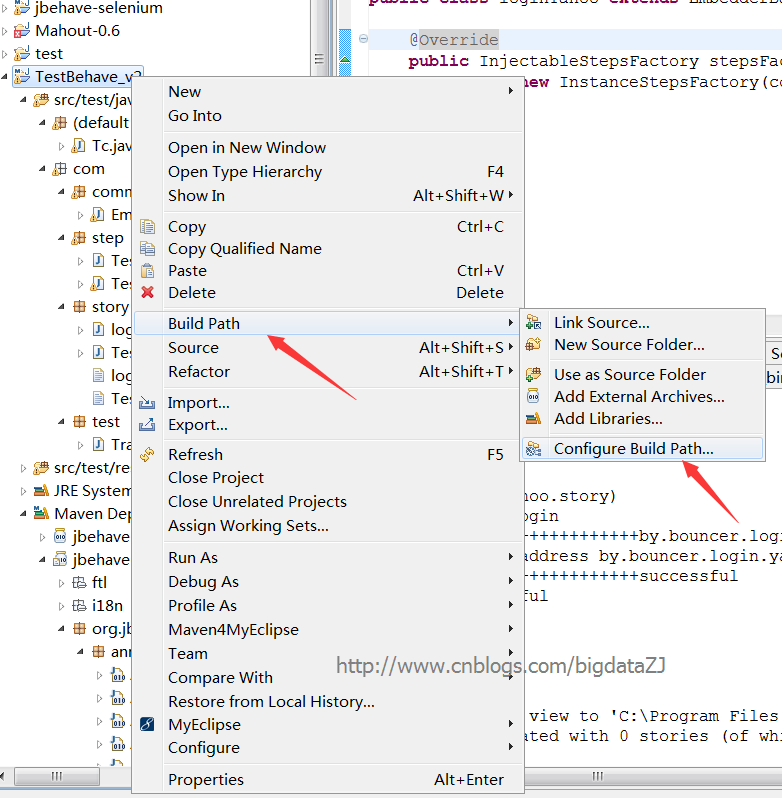
打开对话框,选择Libraries->Add Library->JUnit,点击next,选择junit4->finished。
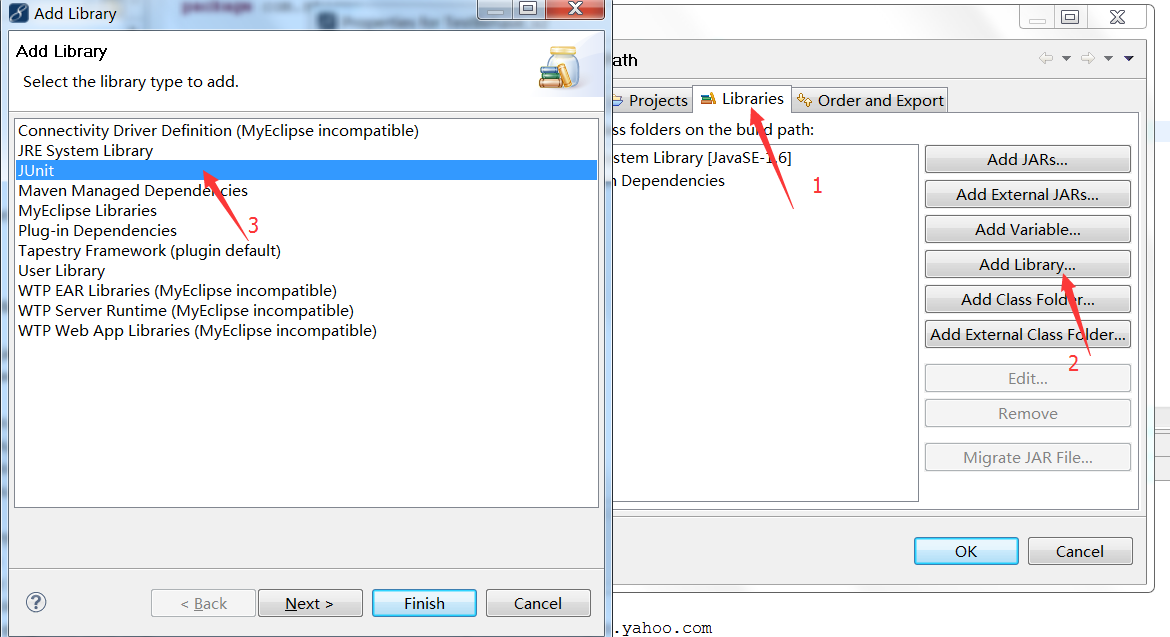
添加完Junit后,新建一个Junit测试类

将TraderStoryRunner类的主体方法放进去,命名为Tc.java
|
1
2
3
4
5
6
7
8
9
10
11
12
13
14
15
16
17
18
19
20
21
22
23
24
25
26
27
28
29
30
31
32
33
34
35
36
37
38
39
40
41
42
43
44
|
import static org.junit.Assert.*;import java.util.List;import org.jbehave.core.embedder.Embedder;import org.jbehave.core.io.CodeLocations;import org.jbehave.core.io.StoryFinder;import org.junit.After;import org.junit.AfterClass;import org.junit.Before;import org.junit.BeforeClass;import org.junit.Test;import com.story.TestStories;import com.story.loginYahoo;public class Tc { @BeforeClass public static void setUpBeforeClass() throws Exception { } @AfterClass public static void tearDownAfterClass() throws Exception { } @Before public void setUp() throws Exception { } @After public void tearDown() throws Exception { } // @Test : 表示这是一个测试用例,只有标识了改符号的函数才会被执行测试 @Test public void runClasspathLoadedStoriesAsJUnit() { // Embedder defines the configuration and candidate steps Embedder embedder = new TestStories(); List<String> storyPaths = new StoryFinder().findPaths(CodeLocations.codeLocationFromClass(this.getClass()),"**/TestStories.story",""); // use StoryFinder to look up paths embedder.runStoriesAsPaths(storyPaths); } @Test public void runClasspathLoadedStories() { // Embedder defines the configuration and candidate steps Embedder embedder = new loginYahoo(); List<String> storyPaths = new StoryFinder().findPaths(CodeLocations.codeLocationFromClass(this.getClass()),"**/loginYahoo.story",""); // use StoryFinder to look up paths embedder.runStoriesAsPaths(storyPaths); }} |
至此,这个项目是可以运行起来了。
5.View Reports
点击运行上面的Tc.java类,可以得到:
|
1
2
3
4
5
6
7
8
9
10
11
12
13
14
15
16
17
18
19
20
21
22
23
24
25
26
27
28
29
30
31
32
33
34
35
36
37
38
39
40
41
42
43
44
45
46
47
48
49
50
51
52
53
54
55
56
57
58
59
60
61
62
|
Processing system properties {}Using controls EmbedderControls[batch=false,skip=false,generateViewAfterStories=true,ignoreFailureInStories=false,ignoreFailureInView=false,verboseFailures=false,verboseFiltering=false,storyTimeoutInSecs=300,threads=1](BeforeStories)Running story com/story/TestStories.storyNarrative:In order to show the browsing cart functionalityAs a userI want to browse in a galleryBrowse Etsy.com(com/story/TestStories.story)Meta:@category browsing@color redScenario: Browsing around the site for items----------------------localhostGiven I am on localhost----------------------hello world!--Examples:!--|host|hello|!--|localhost|hello world|!--|www.baidu.com|hello baidu|Then print hello world!--Examples:!--|host|hello|!--|localhost|hello world|!--|www.baidu.com|hello baidu|(AfterStories)Generating reports view to 'C:\Program Files (x86)\Git\Jbehave\TestBehave_v2_testng\target\jbehave' using formats '[console, txt]' and view properties '{defaultFormats=stats, decorateNonHtml=true, viewDirectory=view, decorated=ftl/jbehave-report-decorated.ftl, reports=ftl/jbehave-reports-with-totals.ftl, maps=ftl/jbehave-maps.ftl, navigator=ftl/jbehave-navigator.ftl, views=ftl/jbehave-views.ftl, nonDecorated=ftl/jbehave-report-non-decorated.ftl}'Reports view generated with 0 stories (of which 0 pending) containing 0 scenarios (of which 0 pending)Processing system properties {}Using controls EmbedderControls[batch=false,skip=false,generateViewAfterStories=true,ignoreFailureInStories=false,ignoreFailureInView=false,verboseFailures=false,verboseFiltering=false,storyTimeoutInSecs=300,threads=1](BeforeStories)Running story com/story/loginYahoo.storyNarrative:In order to show the yahoo functionAs a userI want to login yahoo(com/story/loginYahoo.story)Scenario: normal login++++++++++++++++++++++++++++++by.bouncer.login.yahoo.comGiven yahoo login address by.bouncer.login.yahoo.com++++++++++++++++++++++++++++++successfulThen print successful(AfterStories)Generating reports view to 'C:\Program Files (x86)\Git\Jbehave\TestBehave_v2_testng\target\jbehave' using formats '[console, txt]' and view properties '{defaultFormats=stats, decorateNonHtml=true, viewDirectory=view, decorated=ftl/jbehave-report-decorated.ftl, reports=ftl/jbehave-reports-with-totals.ftl, maps=ftl/jbehave-maps.ftl, navigator=ftl/jbehave-navigator.ftl, views=ftl/jbehave-views.ftl, nonDecorated=ftl/jbehave-report-non-decorated.ftl}'Reports view generated with 0 stories (of which 0 pending) containing 0 scenarios (of which 0 pending) |
大体的思路,是将story和step对应起来,将story中的条件、参数传入step对应的类中,如果满足则通过测试,得到then给出的结果,否则得不到理想的结果。
JBehave的更多相关文章
- 开发人员看测试之细说JBehave
上篇我们说到如何从Github上clone出一个JBehave项目,既是为了学习JBehava,也是为了熟悉下Github.从clone下来的项目看来,基本没什么问题,稍微捋一捋就可以运行,但是就cl ...
- 开发人员看测试之运行Github中的JBehave项目
本文要阐述的主要有两点,一是介绍自动化测试框架JBehave,二是介绍如何在Github上拉项目,编译成myeclipse环境中的项目,并最终导入Myeclipse中运行. JBehave是何物? J ...
- (org.jbehave.core.failures.BeforeOrAfterFailed: webdriver selenium错误解决。
(org.jbehave.core.failures.BeforeOrAfterFailed: Method initWebDriver (annotated with @BeforeStory in ...
- Atitit各种SDM 软件开发过程SDP sdm的ddd tdd bdd设计
Atitit各种SDM 软件开发过程SDP sdm的ddd tdd bdd设计 1.1. software development methodology (also known as SDM 1 1 ...
- Java资源大全中文版(Awesome最新版)
Awesome系列的Java资源整理.awesome-java 就是akullpp发起维护的Java资源列表,内容包括:构建工具.数据库.框架.模板.安全.代码分析.日志.第三方库.书籍.Java 站 ...
- Cucumber(一): Preparation
Every time I wrote some code in ruby and executed our cucumber features I craved for something simil ...
- 开发人员看测试之TDD和BDD
前言: 已经数月没有来园子了,写博客贵在坚持,一旦松懈了,断掉了,就很难再拾起来.但是每每看到自己博客里的博文的浏览量每天都在增加,都在无形当中给了我继续写博客的动力.最近这两天有听到Jbehave这 ...
- Android Testing学习01 介绍 测试测什么 测试的类型
Android Testing学习01 介绍 测试测什么 测试的类型 Android 测试 测什么 1.Activity的生命周期事件 应该测试Activity的生命周期事件处理. 如果你的Activ ...
- 从手工测试转型web自动化测试继而转型成专门做自动化测试的学习路线。
在开始之前先自学两个工具商业web自动化测试工具请自学QTP:QTP的学习可以跳过,我是跳过了的.开源web自动化测试工具请自学Selenium:我当年是先学watir(耗时1周),再学seleniu ...
随机推荐
- C陷阱与缺陷之语法陷阱
2.1理解函数声明 不论什么C变量的声明都由两部分组成:类型以及一组类似表达式的声明符号.比如 float f; 这个声明的含义是:当对其求值时,表达式f和g的类型为浮点数类.由于声 明符与表达式的相 ...
- swift 笔记 (十八) —— 扩展
扩展 扩展能够让我们给一个已有的类.结构体.枚举等类型加入�新功能,包含属性和方法,甚至是构造器,下标,支持协议等等... 甚至是我们拿不到源码的类.结构体.枚举,我们依旧能够给它加扩展... 看到这 ...
- 疯狂Java学习笔记(84)----------大约 Java 对象序列化,你不知道 5 事
几年前,.当一个软件团队一起用 Java 书面申请.我认识比一般程序猿多知道一点关于 Java 对象序列化的知识所带来的优点. 关于本系列 您认为自己懂 Java 编程?其实,大多数程序猿对于 Jav ...
- 将 Android* x86 NDK 供 Eclipse* 而移植 NDK 演示示例应用程序
目标 面向 Eclipse (ADT) 的 Android 插件如今支持基于 NDK 的应用开发. 其可自己主动生成项目和构件文件以及代码存根.并可集成到整个 Android 应用开发中(构建原生库. ...
- ECLIPSE中反编译插件JAD的配置安装,轻松查看JAVA源代码
第一步:下载jad的eclipse插件jar包 http://jadclipse.sourceforge.net/wiki/index.php/Main_Page#Download 第二步:将此jar ...
- C# Out和Ref区别
rel是有进有出,out是只出不进 ref 要求参数在传递给函数前要初始化,out则不需要
- 2014在百度之星资格赛的第二个问题Disk Schedule
事实上,我认为它可以用来费用流问题.但光建地图上加班. ..不科学啊.. . 因副作用太大,否则,必然在.最后,想啊想,或者使用dp对.... 别想了一维dp... .我不知道我是怎么想.无论如何,这 ...
- ** poj Y2K Accounting Bug 2586
Y2K Accounting Bug Time Limit: 1000MS Memory Limit: 65536K Total Submissions: 10117 Accepted: 50 ...
- 返璞归真 asp.net mvc (12) - asp.net mvc 4.0 新特性之移动特性
原文:返璞归真 asp.net mvc (12) - asp.net mvc 4.0 新特性之移动特性 [索引页][源码下载] 返璞归真 asp.net mvc (12) - asp.net mvc ...
- Eclipse在Jar形成和应用程序包
最近的熟悉Java语言.在学习过程中Eclipse经常使用再熟悉它.本文简单说下Jar形成和应用程序包. Java在Jar相当于包C/C++该lib库,它是.class文件打包:经常使用Jar包有AP ...