
Solr:Slor初识(概述、Windows版本的安装、添加IK分词器)
1、Solr概述
(1)Solr与数据库相比的优势
搜索速度更快、搜索结果能够按相关度排序、搜索内容格式不固定等
(2)Lucene与Solr的区别
Lucene提供了完整的查询引擎和索引引擎,目的是为软件开发人员提供一个简单易用的工具包
Solr的目标是打造一款企业级的搜索引擎系统,它是一个搜索引擎服务,可以独立运行,通过Solr可以非常快速的构建企业的搜索引擎,通过Solr也可以高效的完成站内搜索功能。
2、Solr的Windows版本的安装
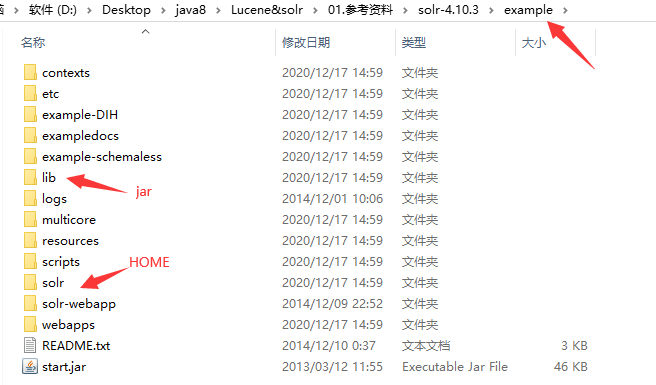
(1)目录结构

Solr的启动在bin目录下,用的是内置的服务器不是很稳定
contrib:插件
dist:jar包
(2)安装
- 将Solr的example的webapps目录下的solr.war复制到tomcat的webapps目录下并解压
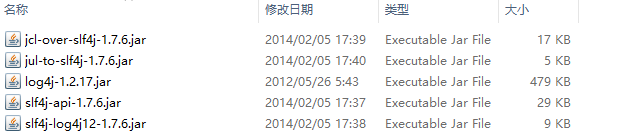
- 将example目录下的jar包放到tomcat的lib目录下:
- 配置家目录:

目录的内容是从solr中复制过来的:
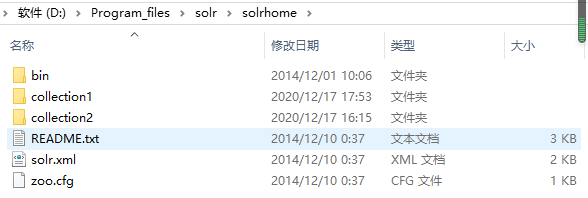
在配置文件中配置:

    <env-entry>

       <env-entry-name>solr/home</env-entry-name>

       <env-entry-value>D:\Program_files\solr\solrhome</env-entry-value>

       <env-entry-type>java.lang.String</env-entry-type>

    </env-entry>
(3)启动
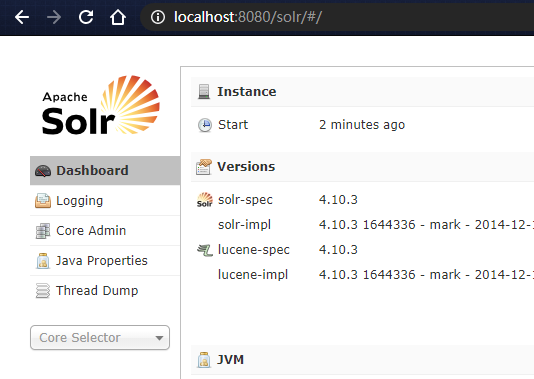
- 先在bin目录下启动tomcat并访问Solr
3、Solr的后台界面
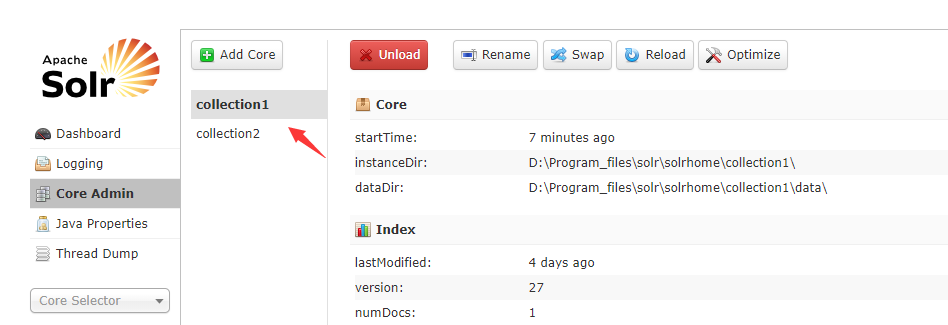
(1)添加核
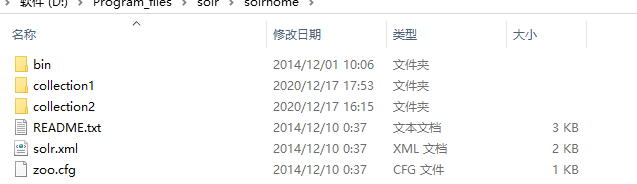
在Solr的家目录复制一个collection并修改目录的名称,打开目录将配置文件中的name属性也更改为目录的名称

效果:
(2)功能
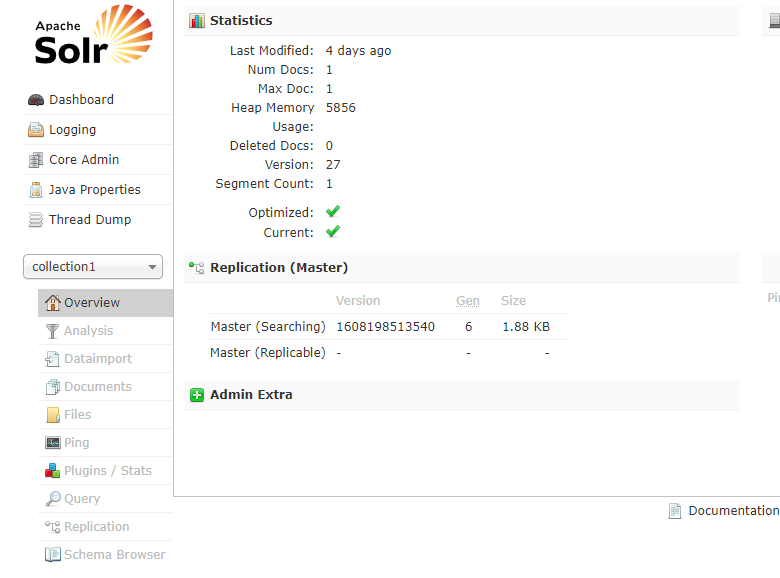
analysis:分词器
dataimport:导入数据库数据
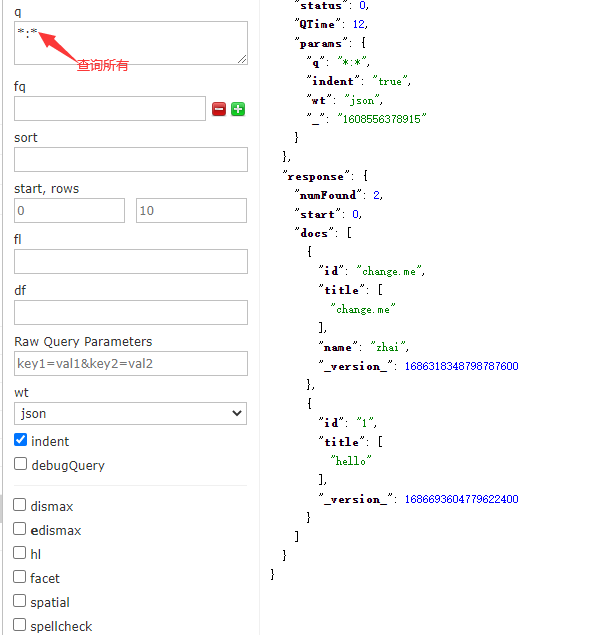
Documents:进行增删改查

Query:查询
Files:配置文件(在核的conf目录下)

Ping:测试服务是否存在
(3)schema.xml配置文件中的域
域:
 <field name="title" type="text_general" indexed="true" stored="true" multiValued="true"/>

   <field name="subject" type="text_general" indexed="true" stored="true"/>

   <field name="description" type="text_general" indexed="true" stored="true"/>

   <field name="comments" type="text_general" indexed="true" stored="true"/>

   <field name="author" type="text_general" indexed="true" stored="true"/>

   <field name="keywords" type="text_general" indexed="true" stored="true"/>

   <field name="category" type="text_general" indexed="true" stored="true"/>

   <field name="resourcename" type="text_general" indexed="true" stored="true"/>

   <field name="url" type="text_general" indexed="true" stored="true"/>

   <field name="content_type" type="string" indexed="true" stored="true" multiValued="true"/>

   <field name="last_modified" type="date" indexed="true" stored="true"/>

   <field name="links" type="string" indexed="true" stored="true" multiValued="true"/>
动态域:
 <dynamicField name="*_i"  type="int"    indexed="true"  stored="true"/>

   <dynamicField name="*_is" type="int"    indexed="true"  stored="true"  multiValued="true"/>

   <dynamicField name="*_s"  type="string"  indexed="true"  stored="true" />

   <dynamicField name="*_ss" type="string"  indexed="true"  stored="true" multiValued="true"/>

   <dynamicField name="*_l"  type="long"   indexed="true"  stored="true"/>

   <dynamicField name="*_ls" type="long"   indexed="true"  stored="true"  multiValued="true"/>

   <dynamicField name="*_t"  type="text_general"    indexed="true"  stored="true"/>

   <dynamicField name="*_txt" type="text_general"   indexed="true"  stored="true" multiValued="true"/>

   <dynamicField name="*_en"  type="text_en"    indexed="true"  stored="true" multiValued="true"/>

   <dynamicField name="*_b"  type="boolean" indexed="true" stored="true"/>

   <dynamicField name="*_bs" type="boolean" indexed="true" stored="true"  multiValued="true"/>

   <dynamicField name="*_f"  type="float"  indexed="true"  stored="true"/>

   <dynamicField name="*_fs" type="float"  indexed="true"  stored="true"  multiValued="true"/>

   <dynamicField name="*_d"  type="double" indexed="true"  stored="true"/>

   <dynamicField name="*_ds" type="double" indexed="true"  stored="true"  multiValued="true"/>
拷贝域:
<copyField source="cat" dest="text"/>

   <copyField source="name" dest="text"/>

   <copyField source="manu" dest="text"/>

   <copyField source="features" dest="text"/>

   <copyField source="includes" dest="text"/>

   <copyField source="manu" dest="manu_exact"/>
实际搜索的是text域,就是将多个域进行合并,只搜索一个域
4、配置IK分词器
(1)导入jar包

(2)新建classes目录并创建配置文件

(3)自定义域的类型
  <fieldType name="text_ik" class="solr.TextField">

      <analyzer class="org.wltea.analyzer.lucene.IKAnalyzer"/>

   </fieldType>
(4)自定义域
  <field name="title_ik" type="text_ik" indexed="true" stored="true" />

   <field name="content_ik" type="text_ik" indexed="true" stored="false" multiValued="true"/>
(5)重启测试

Solr:Slor初识(概述、Windows版本的安装、添加IK分词器)的更多相关文章
- Solr4.4入门,介绍Solr的安装、IK分词器的配置及高亮查询结果(转)
一.Windows下安装solr-4.4.0 1. 下载solr.4.4 2. 下载绿色版tomcat6.0.18 3. 解压下载的solr到d:\study\solr,将dist目录下的sol ...
- Docker 下Elasticsearch 的安装 和ik分词器
(1)docker镜像下载 docker pull elasticsearch:5.6.8 (2)安装es容器 docker run -di --name=changgou_elasticsearch ...
- Solr(四)Solr实现简单的类似百度搜索高亮功能-1.配置Ik分词器
配置Ik分词器 一 效果图 二 实现此功能需要添加分词器,在这里使用比较主流的IK分词器. 1 没有配置IK分词器,用solr自带的text分词它会把一句话分成单个的字. 2 配置IK分词器,的话它会 ...
- [Linux]Linux下安装和配置solr/tomcat/IK分词器 详细实例一.
在这里一下讲解着三个的安装和配置, 是因为solr需要使用tomcat和IK分词器, 这里会通过图文教程的形式来详解它们的安装和使用.注: 本文属于原创文章, 如若转载,请注明出处, 谢谢.关于设置I ...
- ElasticSearch(六):IK分词器的安装与使用IK分词器创建索引
之前我们创建索引,查询数据,都是使用的默认的分词器,分词效果不太理想,会把text的字段分成一个一个汉字,然后搜索的时候也会把搜索的句子进行分词,所以这里就需要更加智能的分词器IK分词器了. 1. i ...
- IK分词器的安装与使用IK分词器创建索引
之前我们创建索引,查询数据,都是使用的默认的分词器,分词效果不太理想,会把text的字段分成一个一个汉字,然后搜索的时候也会把搜索的句子进行分词,所以这里就需要更加智能的分词器IK分词器了. 1. i ...
- 史上最全Windows版本搭建安装React Native环境配置
史上最全Windows版本搭建安装React Native环境配置 配置过React Native 环境的都知道,在Windows React Native环境配置有很多坑要跳,为了帮助新手快速无误的 ...
- 史上最详细Windows版本搭建安装React Native环境配置 转载,比官网的靠谱亲测可用
史上最详细Windows版本搭建安装React Native环境配置 2016/01/29 | React Native技术文章 | Sky丶清| 95条评论 | 33530 views ...
- windows版本免安装redis, nginx, zookeeper
redis官网:https://redis.io/ windows版本免安装redis下载链接:https://github.com/MSOpenTech/redis/releases nginx官网 ...
随机推荐
- Mac读写ntfs软件究竟哪一款适合我们?
生活中我们免不了会使用一些硬盘设备来存储文件或者是数据,然而绝大多数的移动硬盘都是ntfs格式.Mac读写ntfs软件有很多,究竟哪一款适合我们? 首先,我们一起了解一下什么是ntfs格式.ntfs, ...
- FL studio系列教程(九):FL Studio中如何排列编曲
在FL Studio水果音乐制作软件播放列表中可以对制作的样本进行编排,除此之外,播放列表中排列的对象被叫做剪辑.在其中可以排列以下剪辑. 1.样本剪辑:样本剪辑包含了编排好的插件乐器音符数据. 2. ...
- JVM垃圾回收器、内存分配与回收策略
新生代垃圾收集器 1. Serial收集器 serial收集器即串行收集器,是一个单线程收集器. 串行收集器在进行垃圾回收时只使用一个CPU或一条收集线程去完成垃圾回收工作,并且会暂停其他的工作线程( ...
- Docker安装基本命令操作,带你了解镜像和容器的概念!
上一章节我们了解了Docker的基本概念,以及相关原理.这一章节进行实操. <Docker这么火爆.章节一:带你详尽了解Docker容器的介绍及使用> 一.Docker安装 声明:Dock ...
- Java蓝桥杯练习题——求小数n位后3个数
求整数除法小数点后第n位开始的3位数 位数不足的补0,如0.125小数第3位后三位:0.12500→500 输入格式:a b n,空格分开,a是被除数,b是除数,n是小数后的位置 输出格式:3位数字, ...
- Flash----一种VirtualActor模式的分布式有状态系统原型
首先, 这个Flash不是我们在浏览器用的Flash这种技术, 而是: 动作缓慢, 车速极快------闪电(Flash). 18年的某一个周末, 即兴用Python写了一个Virtual Actor ...
- 【Linux】Linux 资料大全(100% 纯干货)
作者:李春港 出处:https://www.cnblogs.com/lcgbk/p/14071875.html 本文章给大家分享一些 Linux 学习资料,包含:社区网站.在线教程.命令大全.在线模拟 ...
- kali修改配置文件后并保存
vim是进入配置文件并修改 修改完按Esc进入控制模式,再:w保存 :wq是保存并退出
- Asp.NetCore之AutoMapper基础篇
应用场景 现在由于前后端技术的分离,后端程序员在使用ORM框架开发后台API接口的时候,往往会将数据库的"数据模型"直接提供给前端.而大多数时候,可能这些数据并不能够满足前端展示的 ...
- PyQt(Python+Qt)学习随笔:树型部件QTreeWidget中判断项是否首列跨所有列展示的isFirstItemColumnSpanned方法
老猿Python博文目录 专栏:使用PyQt开发图形界面Python应用 老猿Python博客地址 在前面<PyQt(Python+Qt)学习随笔:QTreeWidgetItem项是否首列跨所有 ...