
家庭记账本app进度之对于登录和注册两个界面点击按钮的相互跳转
这次主要完成了两个两个android页面之间的跳转。从登录页面点击注册就会跳转到注册页面。在注册页面点击返回登录,这样就可以返回到登录界面。主要是这样的操作。其中遇到了一个困难主要是当点击按钮的时候,它并不会进行页面的相关跳转,而是显示软件停止工作。最终经过查找相应的网上资料发现。其问题出在自己没有在manifest.xml添加对应新建.java文件的activity。导致错误的出现。下面是主要的代码以及运行的结果图。
对于页面跳转的主要的应用的代码是如下:
Intent intent = new Intent(RegisterActivity1.this, MainActivity.class);
startActivity(intent);
依次来确定软件点击时候的页面的跳转。
activity_main.xml
<?xml version="1.0" encoding="utf-8"?>

<RelativeLayout xmlns:android="http://schemas.android.com/apk/res/android"

    xmlns:app="http://schemas.android.com/apk/res-auto"

    xmlns:tools="http://schemas.android.com/tools"

    android:layout_width="match_parent"

    android:layout_height="match_parent"

    android:layout_gravity="center_horizontal"

    tools:context=".MainActivity">

    <TextView

        android:id="@+id/iv"

        android:layout_width="wrap_content"

        android:layout_height="wrap_content"

        android:layout_centerHorizontal="true"

        android:padding="10dp"

        android:text="进入界面"

        android:textColor="#9832"

        android:textSize="30dp" />

    <LinearLayout

        android:id="@+id/number"

        android:layout_width="match_parent"

        android:layout_height="wrap_content"

        android:layout_below="@+id/iv"

        android:layout_centerVertical="true"

        android:layout_marginBottom="5dp"

        android:layout_marginLeft="10dp"

        android:layout_marginRight="10dp"

        android:layout_marginTop="15dp"

        android:background="#ffffff">

        <TextView

            android:id="@+id/tv_number"

            android:layout_width="wrap_content"

            android:layout_height="wrap_content"

            android:padding="10dp"

            android:text="账号"

            android:textColor="#000"

            android:textSize="20dp" />

        <EditText

            android:id="@+id/et_username"

            android:layout_width="match_parent"

            android:layout_height="wrap_content"

            android:layout_marginLeft="5dp"

            android:background="@null"

            android:padding="10dp" />

    </LinearLayout>

    <LinearLayout

        android:id="@+id/password"

        android:layout_width="match_parent"

        android:layout_height="wrap_content"

        android:layout_below="@+id/number"

        android:layout_centerVertical="true"

        android:layout_marginLeft="10dp"

        android:layout_marginRight="10dp"

        android:background="#ffffff">

        <TextView

            android:id="@+id/tv_password"

            android:layout_width="wrap_content"

            android:layout_height="wrap_content"

            android:padding="10dp"

            android:text="密码"

            android:textSize="20dp"

            android:textColor="#000" />

        <EditText

            android:id="@+id/et_password"

            android:layout_width="match_parent"

            android:layout_height="wrap_content"

            android:layout_marginLeft="5dp"

            android:layout_toRightOf="@id/tv_password"

            android:background="@null"

            android:inputType="textPassword"

            android:padding="10dp" />

    </LinearLayout>

    <Button

        android:id="@+id/button_login"

        android:layout_width="match_parent"

        android:layout_height="wrap_content"

        android:layout_below="@id/password"

        android:layout_marginLeft="10dp"

        android:layout_marginRight="10dp"

        android:layout_marginTop="60dp"

        android:background="#3c8dc4"

        android:text="登录"

        android:textColor="#ffffff"

        android:textSize="20dp" />

    <Button

        android:id="@+id/button_register"

        android:layout_width="match_parent"

        android:layout_height="wrap_content"

        android:layout_below="@id/button_login"

        android:layout_marginLeft="10dp"

        android:layout_marginRight="10dp"

        android:layout_marginTop="30dp"

        android:background="#7983"

        android:text="注册"

        android:textColor="#ffffff"

        android:textSize="20dp" />

    <CheckBox

        android:checked="false"

        android:layout_width="wrap_content"

        android:layout_height="wrap_content"

        android:text="记住密码"

        android:id="@+id/checkBox"

        android:layout_below="@+id/password"

        android:layout_marginLeft="10dp"

        android:layout_marginTop="10dp"/>

</RelativeLayout>
MainActivity.java
package com.example.myapplicationhome;

import androidx.appcompat.app.AppCompatActivity;

import android.content.Intent;

import android.os.Bundle;

import android.view.View;

import android.widget.Button;

import android.widget.Toast;

public class MainActivity extends AppCompatActivity implements View.OnClickListener{

    private Button btn_register;

    @Override

    protected void onCreate(Bundle savedInstanceState) {

        super.onCreate(savedInstanceState);

        setContentView(R.layout.activity_main);

        btn_register =(Button) findViewById(R.id.button_register);

        btn_register.setOnClickListener(this);

    }

        @Override

        public void onClick(View view){

            //String text = "csdnicjbsndicnsdicnsojdn";

            //Toast.makeText(MainActivity.this, text, Toast.LENGTH_SHORT).show();

            Intent intent = new Intent(MainActivity.this,RegisterActivity1.class);

            startActivity(intent);

            }

        }
register_activity.xml
<?xml version="1.0" encoding="utf-8"?>

<RelativeLayout xmlns:android="http://schemas.android.com/apk/res/android"

    xmlns:app="http://schemas.android.com/apk/res-auto"

    android:orientation="vertical"

    android:layout_width="match_parent"

    android:layout_height="match_parent">

    tools:context=".RegisterActivity1">

    <TextView

        android:layout_marginTop="60dp"

        android:id="@+id/reg_number1"

        android:layout_width="wrap_content"

        android:layout_height="wrap_content"

        android:padding="10dp"

        android:text="账号:"

        android:textColor="#000"

        android:textSize="20dp" />

    <EditText

        android:layout_alignBottom="@+id/reg_number1"

        android:layout_toRightOf="@+id/reg_number1"

        android:id="@+id/reg_username"

        android:layout_width="match_parent"

        android:layout_height="wrap_content"

        android:padding="10dp" />

    <TextView

        android:id="@+id/reg_number2"

        android:layout_marginTop="5dp"

        android:layout_width="wrap_content"

        android:layout_height="wrap_content"

        android:layout_below="@+id/reg_number1"

        android:padding="10dp"

        android:text="密码:"

        android:textColor="#000"

        android:textSize="20dp" />

    <EditText

        android:layout_alignBottom="@id/reg_number2"

        android:layout_toRightOf="@+id/reg_number2"

        android:id="@+id/reg_password"

        android:layout_width="match_parent"

        android:layout_height="wrap_content"

        android:padding="10dp" />

    <TextView

        android:id="@+id/reg_number3"

        android:layout_marginTop="5dp"

        android:layout_width="wrap_content"

        android:layout_height="wrap_content"

        android:layout_below="@+id/reg_number2"

        android:padding="10dp"

        android:text="密码:"

        android:textColor="#000"

        android:textSize="20dp" />

    <EditText

        android:layout_alignBottom="@id/reg_number3"

        android:layout_toRightOf="@+id/reg_number3"

        android:id="@+id/reg_password2"

        android:layout_width="match_parent"

        android:layout_height="wrap_content"

        android:padding="10dp" />

    <TextView

        android:id="@+id/reg_number4"

        android:layout_marginTop="5dp"

        android:layout_width="wrap_content"

        android:layout_height="wrap_content"

        android:layout_below="@+id/reg_number3"

        android:padding="10dp"

        android:text="邮箱:"

        android:textColor="#000"

        android:textSize="20dp" />

    <EditText

        android:layout_alignBottom="@id/reg_number4"

        android:layout_toRightOf="@+id/reg_number4"

        android:id="@+id/reg_mail"

        android:layout_width="match_parent"

        android:layout_height="wrap_content"

        android:padding="10dp" />

    <Button

        android:layout_width="wrap_content"

        android:layout_height="wrap_content"

        android:text="确定注册"

        android:background="#74e674"

        android:id="@+id/reg_btn_sure"

        android:layout_marginTop="38dp"

        android:layout_below="@+id/reg_mail"

        android:layout_marginLeft="90dp" />

    <Button

        android:layout_width="wrap_content"

        android:layout_height="wrap_content"

        android:text="返回登录"

        android:background="#f27758"

        android:id="@+id/reg_btn_login"

        android:layout_alignBottom="@id/reg_btn_sure"

        android:layout_toRightOf="@id/reg_btn_sure"

        android:layout_marginLeft="40dp"

        />

    <TextView

        android:layout_width="wrap_content"

        android:layout_height="wrap_content"

        android:layout_centerHorizontal="true"

        android:text="账号注册"

        android:textSize="30dp"

        android:layout_marginTop="5dp"

        />

</RelativeLayout>
RegisterActivity1.java
package com.example.myapplicationhome;

import android.content.Intent;

import android.os.Bundle;

import android.view.View;

import android.widget.Button;

import androidx.appcompat.app.AppCompatActivity;

import android.content.Intent;

import android.os.Bundle;

import android.view.View;

import android.widget.Button;

import androidx.appcompat.app.AppCompatActivity;

    public class RegisterActivity1 extends AppCompatActivity implements View.OnClickListener {

        private Button reg_btn_login;

        @Override

        protected void onCreate(Bundle savedInstanceState) {

            super.onCreate(savedInstanceState);

            setContentView(R.layout.register_activity);

            reg_btn_login = (Button) findViewById(R.id.reg_btn_login);

            reg_btn_login.setOnClickListener(this);

        }

        @Override

        public void onClick(View v) {

            Intent intent = new Intent(RegisterActivity1.this, MainActivity.class);

            startActivity(intent);

        }

    }
AndroidManifest.xml
<?xml version="1.0" encoding="utf-8"?>

<manifest xmlns:android="http://schemas.android.com/apk/res/android"

    package="com.example.myapplicationhome">

    <application

        android:allowBackup="true"

        android:icon="@mipmap/ic_launcher"

        android:label="@string/app_name"

        android:roundIcon="@mipmap/ic_launcher_round"

        android:supportsRtl="true"

        android:theme="@style/AppTheme">

        <activity android:name=".MainActivity">

            <intent-filter>

                <action android:name="android.intent.action.MAIN" />

                <category android:name="android.intent.category.LAUNCHER" />

            </intent-filter>

        </activity>

        <activity android:name=".RegisterActivity1">

        </activity>

    </application>

</manifest>
对应的运行结果如下:
刚开始的时候:
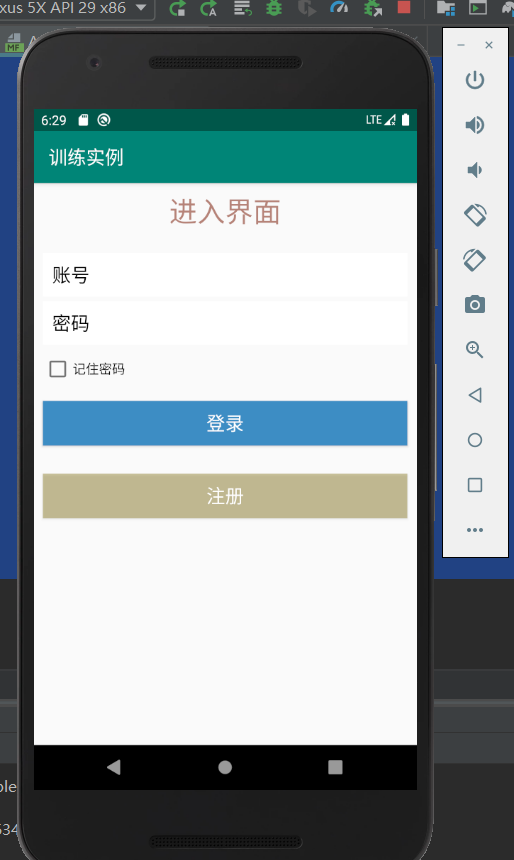
之后当点击注册按钮的时候:
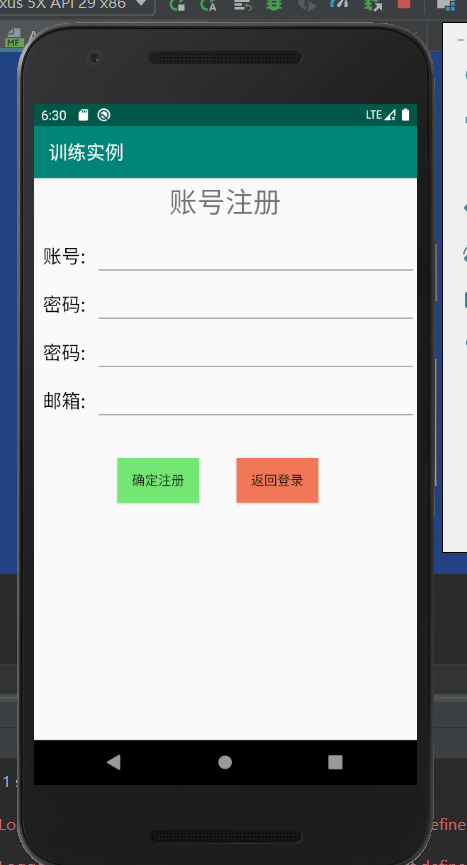
当点击返回登录的时候就会返回到刚刚的登录界面。
家庭记账本app进度之对于登录和注册两个界面点击按钮的相互跳转的更多相关文章
- 家庭记账本app进度之关于单选按钮的相关操作(添加点击按钮事件以及点击单选更改事件)
这次主要是通过代码实现了android中的相关单选按钮的相关操作,之后再最下面有一个按钮,当点击这个按钮的时候,会获取当上面的相关信息,之后再下方会进行相应的文字显示,获取的信息不同显示的信息也不会一 ...
- 家庭记账本app进度之android中AlertDialog的相关应用以及对日期时间的相关操作(应用alertdialog使用的谈话框)
对于AlertDialog的相关知识: 1.创建构造器AlertDialog.Builder的对象: 2.通过构造器对象调用setTitle.setMessage.setIcon等方法构造对话框 ...
- 家庭记账本app进度之下拉框和数字转轮的相关应用
这次主要是悬系的下拉框Spinner和数字转轮NumberPicker的使用.先分析相关的用到的知识点. 在Android中,用string-array是一种简单的提取XML资源文件数据的方法. 例子 ...
- 家庭记账本app进度之复选框以及相应滚动条的应用
这次主要是对于android中复选框的相应的操作.以及其中可能应用到的滚动条的相关应用.每一个复选框按钮都要有一个checkBox与之相对应. 推荐使用XML配置,基本语法如下:<CheckBo ...
- 家庭记账本app进度之关于tap的相关操作1
今天还主要学习关于怎样制作微信的先关的tap. 今天的主要成果是已经了解了相关的技术,以及相关的思路.代码经过一个下午的编写,基本接近尾声. 更详细的实验代码,以及相关的知识点将在明天完善后进行发表. ...
- 家庭记账本app进度之ui相关概念控制ui界面与布局管理
ui就是用户界面设计的意思. 首先是view,view相当于窗户上的玻璃. 1.android:id属性.android:id="@+id/user".他的id是user前面的@+ ...
- 进度1_家庭记账本App
今天完成了昨天的初步构想,详细介绍见上一篇博客,具体项目结构和案例如下: MainActivity.java: package com.example.familybooks; import andr ...
- 家庭记账本app实现登录注册界面以及仿微信操作界面(共4个实现一个)遇到了麻烦
今天学习了数据的创建,以及关于数据库的相关操作. 今天主要是实现了对于数据库的增加和查找. 具体的代码如下: 首先是数据库的创建: DBOpenMessage.java package com.exa ...
- 家庭版记账本app进度之对于按钮的点击事件以及线性布局以及(alertdialog)等相关内容的应用测试
通过线性布局,制作出连个按钮还有文本输入框以及嘴上放的标题文本进行信息的相关显示,完后最后的信息的输入,之后在屏幕的的下方进行显示 当点击第一个按钮的时候,在下方就会简单的出现你自己刚刚输入的相关信息 ...
随机推荐
- fatal: I don't handle protocol 'git@http' 解决
新建的git,在git push的时候遇到了报错“fatal: I don't handle protocol 'git@http'” 网上搜这个错误基本都是“fatal: I don't handl ...
- 【TIJ4】第四章全部习题
第四章 没啥好说的...... 4.1 package ex0401; //[4.1]写一个程序打印从1到100的值 public class PrintOneToHundred { public s ...
- atomic的底层实现
atomic操作 在编程过程中我们经常会使用到原子操作,这种操作即不想互斥锁那样耗时,又可以保证对变量操作的原子性,常见的原子操作有fetch_add.load.increment等. 而对于atom ...
- Vulnhub靶场 DC-2 WP
DC-2简介 描述 与DC-1一样,DC-2是另一个专门构建的易受攻击的实验室,目的是获得渗透测试领域的经验. 与原始DC-1一样,它在设计时就考虑了初学者. 必须具备Linux技能并熟悉Linux命 ...
- 聊聊 WebSocket,还有 HTTP
还记得曾经风靡一时的 QQ 秀聊天室吗?那时,还在上初.高中的我们,QQ 是最常用的聊天交友工具:而 QQ 秀聊天室的出现打破了只能按条件查找好友的局限性,大家可以随意进入聊天室房间,进行在线聊天.怀 ...
- 大多数人不知道的表格其他写法的onmouseover效果
<!DOCTYPE html> <html> <head> <meta charset="utf-8"> <meta http ...
- 【2019多校第一场补题 / HDU6578】2019多校第一场A题1001Blank——dp
HDU6578链接 题意 有一串字符串,仅由 {0,1,2,3}\{0, 1, 2, 3\}{0,1,2,3} 组成,长度为 nnn,同时满足 mmm 个条件.每个条件由三个整数组成:l.r.xl.r ...
- TensorFlow系列专题(十一):RNN的应用及注意力模型
磐创智能-专注机器学习深度学习的教程网站 http://panchuang.net/ 磐创AI-智能客服,聊天机器人,推荐系统 http://panchuangai.com/ 目录: 循环神经网络的应 ...
- Inception系列理解
博客:博客园 | CSDN | blog 写在前面 Inception 家族成员:Inception-V1(GoogLeNet).BN-Inception.Inception-V2.Inception ...
- windows找不到文件gpedit.msc处理方法
新建一个txt,输入 @echo offpushd "%~dp0"dir /b C:\Windows\servicing\Packages\Microsoft-Windows-Gr ...