
第1节 flume:13、14、更多flume案例一,通过拦截器实现不同类型的数据区分
1.6、flume案例一
1. 案例场景
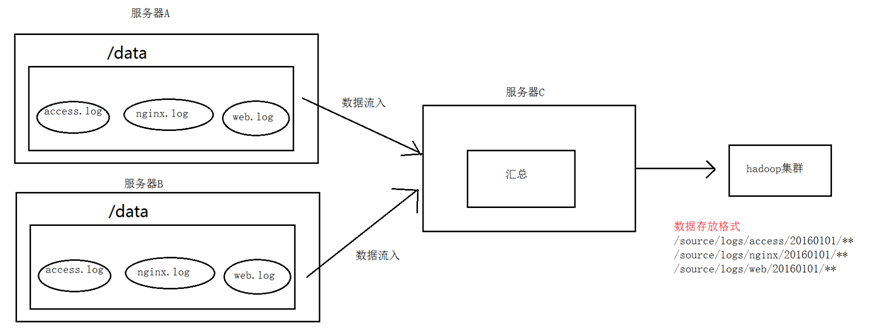
A、B两台日志服务机器实时生产日志主要类型为access.log、nginx.log、web.log
现在要求:
把A、B 机器中的access.log、nginx.log、web.log 采集汇总到C机器上然后统一收集到hdfs中。
但是在hdfs中要求的目录为:
/source/logs/access/20180101/**
/source/logs/nginx/20180101/**
/source/logs/web/20180101/**
2. 场景分析
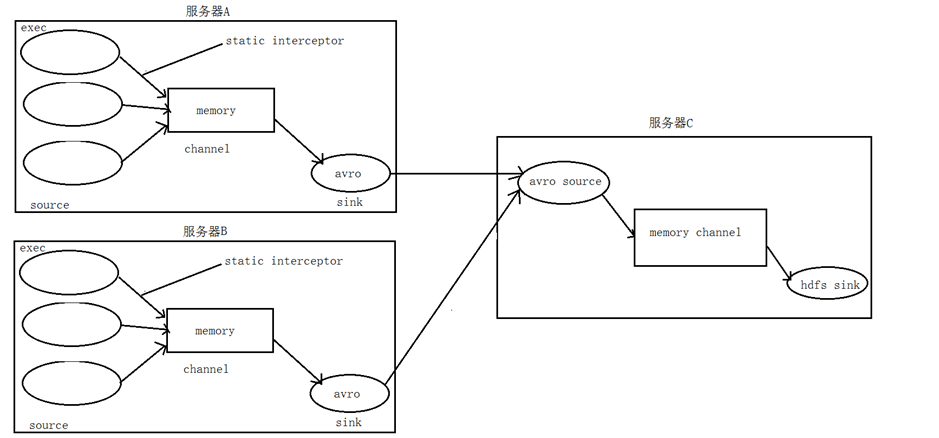
3. 数据流程处理分析
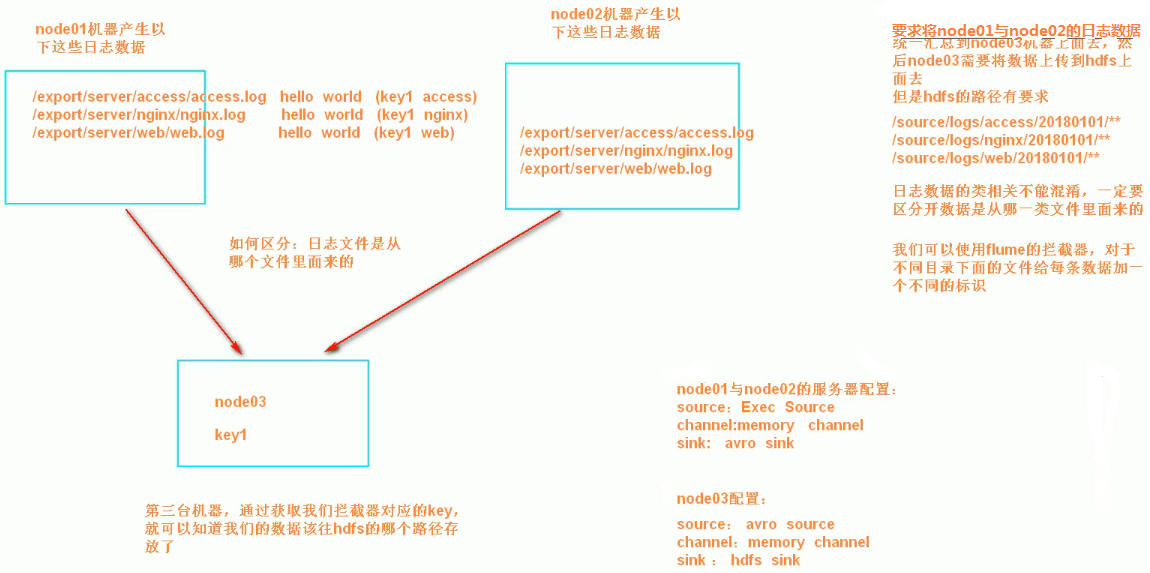
4、实现
服务器A对应的IP为 192.168.52.100
服务器B对应的IP为 192.168.52.110
服务器C对应的IP为 192.168.52.120
采集端配置文件开发
node01与node02服务器开发flume的配置文件
cd /export/servers/apache-flume-1.6.0-cdh5.14.0-bin/conf
vim exec_source_avro_sink.conf
# Name the components on this agent
a1.sources = r1 r2 r3
a1.sinks = k1
a1.channels = c1
# Describe/configure the source
a1.sources.r1.type = exec
a1.sources.r1.command = tail -F /export/servers/taillogs/access.log
a1.sources.r1.interceptors = i1
a1.sources.r1.interceptors.i1.type = static
## static拦截器的功能就是往采集到的数据的header中插入自己定## 义的key-value对
a1.sources.r1.interceptors.i1.key = type
a1.sources.r1.interceptors.i1.value = access
a1.sources.r2.type = exec
a1.sources.r2.command = tail -F /export/servers/taillogs/nginx.log
a1.sources.r2.interceptors = i2
a1.sources.r2.interceptors.i2.type = static
a1.sources.r2.interceptors.i2.key = type
a1.sources.r2.interceptors.i2.value = nginx
a1.sources.r3.type = exec
a1.sources.r3.command = tail -F /export/servers/taillogs/web.log
a1.sources.r3.interceptors = i3
a1.sources.r3.interceptors.i3.type = static
a1.sources.r3.interceptors.i3.key = type
a1.sources.r3.interceptors.i3.value = web
# Describe the sink
a1.sinks.k1.type = avro
a1.sinks.k1.hostname = node03
a1.sinks.k1.port = 41414
# Use a channel which buffers events in memory
a1.channels.c1.type = memory
a1.channels.c1.capacity = 20000
a1.channels.c1.transactionCapacity = 10000
# Bind the source and sink to the channel
a1.sources.r1.channels = c1
a1.sources.r2.channels = c1
a1.sources.r3.channels = c1
a1.sinks.k1.channel = c1
服务端配置文件开发
在node03上面开发flume配置文件
cd /export/servers/apache-flume-1.6.0-cdh5.14.0-bin/conf
vim avro_source_hdfs_sink.conf
a1.sources = r1
a1.sinks = k1
a1.channels = c1
#定义source
a1.sources.r1.type = avro
a1.sources.r1.bind = 192.168.52.120
a1.sources.r1.port =41414
#添加时间拦截器
a1.sources.r1.interceptors = i1
a1.sources.r1.interceptors.i1.type = org.apache.flume.interceptor.TimestampInterceptor$Builder
#定义channels
a1.channels.c1.type = memory
a1.channels.c1.capacity = 20000
a1.channels.c1.transactionCapacity = 10000
#定义sink
a1.sinks.k1.type = hdfs
a1.sinks.k1.hdfs.path=hdfs://192.168.52.100:8020/source/logs/%{type}/%Y%m%d
a1.sinks.k1.hdfs.filePrefix =events
a1.sinks.k1.hdfs.fileType = DataStream
a1.sinks.k1.hdfs.writeFormat = Text
#时间类型
a1.sinks.k1.hdfs.useLocalTimeStamp = true
#生成的文件不按条数生成
a1.sinks.k1.hdfs.rollCount = 0
#生成的文件按时间生成
a1.sinks.k1.hdfs.rollInterval = 30
#生成的文件按大小生成
a1.sinks.k1.hdfs.rollSize = 10485760
#批量写入hdfs的个数
a1.sinks.k1.hdfs.batchSize = 10000
#flume操作hdfs的线程数(包括新建,写入等)
a1.sinks.k1.hdfs.threadsPoolSize=10
#操作hdfs超时时间
a1.sinks.k1.hdfs.callTimeout=30000
#组装source、channel、sink
a1.sources.r1.channels = c1
a1.sinks.k1.channel = c1
采集端文件生成脚本
在node01与node02上面开发shell脚本,模拟数据生成
cd /export/servers/shells
vim server.sh
#!/bin/bash
while true
do
date >> /export/servers/taillogs/access.log;
date >> /export/servers/taillogs/web.log;
date >> /export/servers/taillogs/nginx.log;
sleep 0.5;
done
顺序启动服务
node03启动flume实现数据收集
cd /export/servers/apache-flume-1.6.0-cdh5.14.0-bin
bin/flume-ng agent -c conf -f conf/avro_source_hdfs_sink.conf -name a1 -Dflume.root.logger=DEBUG,console
node01与node02启动flume实现数据监控
cd /export/servers/apache-flume-1.6.0-cdh5.14.0-bin
bin/flume-ng agent -c conf -f conf/exec_source_avro_sink.conf -name a1 -Dflume.root.logger=DEBUG,console
node01与node02启动生成文件脚本
cd /export/servers/shells
sh server.sh
5、项目实现截图
第1节 flume:13、14、更多flume案例一,通过拦截器实现不同类型的数据区分的更多相关文章
- Flume 拦截器(interceptor)详解
flume 拦截器(interceptor)1.flume拦截器介绍拦截器是简单的插件式组件,设置在source和channel之间.source接收到的事件event,在写入channel之前,拦截 ...
- 大数据学习——flume拦截器
flume 拦截器(interceptor)1.flume拦截器介绍拦截器是简单的插件式组件,设置在source和channel之间.source接收到的事件event,在写入channel之前,拦截 ...
- 第1节 flume:15、flume案例二,通过自定义拦截器实现数据的脱敏
1.7.flume案例二 案例需求: 在数据采集之后,通过flume的拦截器,实现不需要的数据过滤掉,并将指定的第一个字段进行加密,加密之后再往hdfs上面保存 原始数据与处理之后的数据对比 图一 ...
- Flume 自定义拦截器 多行读取日志+截断
前言: Flume百度定义如下: Flume是Cloudera提供的一个高可用的,高可靠的,分布式的海量日志采集.聚合和传输的系统,Flume支持在日志系统中定制各类数据发送方,用于收集数据:同时,F ...
- 分布式实时日志系统(二) 环境搭建之 flume 集群搭建/flume ng资料
最近公司业务数据量越来越大,以前的基于消息队列的日志系统越来越难以满足目前的业务量,表现为消息积压,日志延迟,日志存储日期过短,所以,我们开始着手要重新设计这块,业界已经有了比较成熟的流程,即基于流式 ...
- flume【源码分析】分析Flume的拦截器
h2 { color: #fff; background-color: #7CCD7C; padding: 3px; margin: 10px 0px } h3 { color: #fff; back ...
- Flume自定义拦截器(Interceptors)或自带拦截器时的一些经验技巧总结(图文详解)
不多说,直接上干货! 一.自定义拦截器类型必须是:类全名$内部类名,其实就是内部类名称 如:zhouls.bigdata.MySearchAndReplaceInterceptor$Builder 二 ...
- js如何判断一组数字是否连续,得到一个临时数组[[3,4],[13,14,15],[17],[20],[22]];
var arrange = function(arr){ var result = [], temp = []; arr.sort(function(source, dest){ return sou ...
- intellij idea 13&14 插件推荐及快速上手建议 (已更新!)
原文:intellij idea 13&14 插件推荐及快速上手建议 (已更新!) 早些年 在外企的时候,公司用的是intellij idea ,当时也是从eclipse.MyEclipse转 ...
随机推荐
- 【WIP】LaTex入门
创建: 2018/06/15 说明: 这鸟东西实在没什么用的感觉,无奈学校报告要用这个写.无奈抽点时间学一下.
- gSoap传输二进制数据
最近使用gSoap传输二进制数据,遇到问题.gSoap不能一次传输二进制数据.所以使用分包传送. struct xsd_DwgInfo { ];//分包大小 int m_nReadSize;// bo ...
- SPOJ PHT【二分】+SPOJ INUM【最小/大值重复】
BC 两道其实都是水 没有完整地想好直接就码出事情.wa了一次以后要找bug,找完要把思路理的非常清楚 SPOJ PHT[二分] #include<bits/stdc++.h> using ...
- lightoj1001【简单题】
题意: 一个人的值不能超过10: #include<stdio.h> #include<queue> #include<string.h> #include< ...
- 稳定UI运行结果-自动化测试失败重试和截图
运行自动化测试的时候,有时会因为网络不稳定,测试环境或者第三方环境正在重启而造成用例运行结果不稳定,时而能跑过时而跑不过.这些难以重现的环境因素造成的用例失败会让测试人员很困扰,排查即耗费时间也没有太 ...
- DB2 学习--(1)--安装教程
db2 linux 安装部署 1 解压文件 tar -zxvf db2_v101_linuxx64_expc.tar.gz 2 切换路径 cd expc/ 3 启动安装程序 ./db2_install ...
- django项目设置
1 项目下的文件 用于项目设定的setting.py 用于url规则匹配的urls.py 用于创建socket对象的wsgi.py 2 urls django2.0相比1.x,在url匹配语法上有很大 ...
- 洛谷 P4362 [NOI2002]贪吃的九头龙
https://www.luogu.org/problemnew/show/P4362 首先有个很显然的dp:ans[i][j][k]表示i节点用j号头,i节点为根的子树中共有k个点用大头时i节点为根 ...
- D - 連結 / Connectivity 并查集
http://abc049.contest.atcoder.jp/tasks/arc065_b 一开始做这题的时候,就直接蒙逼了,n是2e5,如果真的要算出每一个节点u能否到达任意一个节点i,这不是f ...
- 如何在asp.net mvc中添加自定义的HTML辅助种方法
很久没在博客园发表文章了,今天来总结一下如何在asp.net mvc中添加自定义的HTML辅助方法.我们现在设计这么一个目前,利用自定义的HTML方法来渲染一个普通的img标记.直接进入主题吧: 首先 ...