
Unity3d学习 预设体(prefab)的一些理解
之前一直在想如果要在Unity3d上创建很多个具有相同结构的对象,是如何做的,后来查了相关资料发现预设体可以解决这个问题!
预设体的概念: 组件的集合体 , 预制物体可以实例化成游戏对象.
创建预设体的作用: 可以重复的创建具有相同结构的游戏对象。
.1下面来讲解一下如何制作一个简单的预设体(上下为流程和结果图):

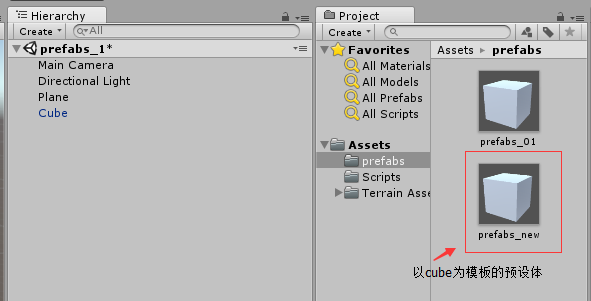
.2 创建多个prefabs_new(代码,结果图):
 using UnityEngine;

 using System.Collections;

 //[ExecuteInEditMode]表示在编辑模式下运行(注意改变prefab的属性其他属性也会变)

 public class CreateInstance : MonoBehaviour {

     public GameObject prefabs = null;

     private Vector3 pos;

     void Start () {

         if (prefabs != null)

         {

             pos = new Vector3(, 2.7f, -10.5114f);

             for (int i = ; i < ; ++i)

             {

                 Object tmpObj = Instantiate(prefabs, pos , Quaternion.identity);

                 pos.x = pos.x - ;

             }

         }

         else

         {

             Debug.Log("prefabs is null");

         }

     }

 }

如果(预设物C = 预设物B 和 预设物 A的组合) 则会形成 修改预设物A的数据不会影响预设物C中的内嵌数据,下面方法可以帮助解决!
.4关于perfab之间的嵌套(主要是一个perfab数据修改了嵌套这个perfab的数据要做对应的更新):

关于预设体嵌套预设体的代码(在实例化时会拿到最新的perfab数据):
using UnityEngine;

#if UNITY_EDITOR

using UnityEditor;

using UnityEditor.Callbacks;

#endif

using System.Collections.Generic;

[ExecuteInEditMode]

public class PrefabInstance : MonoBehaviour

{

    public GameObject prefab;

#if UNITY_EDITOR

    // Struct of all components. Used for edit-time visualization and gizmo drawing

    public struct Thingy {

        public Mesh mesh;

        public Matrix4x4 matrix;

        public List<Material> materials;

    }

    [System.NonSerializedAttribute] public List<Thingy> things = new List<Thingy> ();

    void OnValidate () {

        things.Clear();

        if (enabled)

            Rebuild (prefab, Matrix4x4.identity);

    }

    void OnEnable () {

        things.Clear();

        if (enabled)

            Rebuild (prefab, Matrix4x4.identity);

    }

    void Rebuild (GameObject source, Matrix4x4 inMatrix) {

        if (!source)

            return;

        Matrix4x4 baseMat = inMatrix * Matrix4x4.TRS (-source.transform.position, Quaternion.identity, Vector3.one);

        foreach (MeshRenderer mr in source.GetComponentsInChildren(typeof (Renderer), true))

        {

            things.Add(new Thingy () {

                mesh = mr.GetComponent<MeshFilter>().sharedMesh,

                matrix = baseMat * mr.transform.localToWorldMatrix,

                materials = new List<Material> (mr.sharedMaterials)

            });

        }

        foreach (PrefabInstance pi in source.GetComponentsInChildren(typeof (PrefabInstance), true))

        {

            if (pi.enabled && pi.gameObject.activeSelf)

                Rebuild (pi.prefab, baseMat * pi.transform.localToWorldMatrix);

        }

    }

    // Editor-time-only update: Draw the meshes so we can see the objects in the scene view

    void Update () {

        if (EditorApplication.isPlaying)

            return;

        Matrix4x4 mat = transform.localToWorldMatrix;

        foreach (Thingy t in things)

            for (int i = ; i < t.materials.Count; i++)

                Graphics.DrawMesh (t.mesh, mat * t.matrix, t.materials[i], gameObject.layer, null, i);

    }

    // Picking logic: Since we don't have gizmos.drawmesh, draw a bounding cube around each thingy

    void OnDrawGizmos () { DrawGizmos (new Color (,,,)); }

    void OnDrawGizmosSelected () { DrawGizmos (new Color (,,,.2f)); }

    void DrawGizmos (Color col) {

        if (EditorApplication.isPlaying)

            return;

        Gizmos.color = col;

        Matrix4x4 mat = transform.localToWorldMatrix;

        foreach (Thingy t in things)

        {

            Gizmos.matrix = mat * t.matrix;

            Gizmos.DrawCube(t.mesh.bounds.center, t.mesh.bounds.size);

        }

    }

    // Baking stuff: Copy in all the referenced objects into the scene on play or build

    [PostProcessScene(-)]

    public static void OnPostprocessScene() {

        foreach (PrefabInstance pi in UnityEngine.Object.FindObjectsOfType (typeof (PrefabInstance)))

            BakeInstance (pi);

    }

    public static void BakeInstance (PrefabInstance pi) {

        if(!pi.prefab || !pi.enabled)

            return;

        pi.enabled = false;

        GameObject go = PrefabUtility.InstantiatePrefab(pi.prefab) as GameObject;

        Quaternion rot = go.transform.localRotation;

        Vector3 scale = go.transform.localScale;

        go.transform.parent = pi.transform;

        go.transform.localPosition = Vector3.zero;

        go.transform.localScale = scale;

        go.transform.localRotation = rot;

        pi.prefab = null;

        foreach (PrefabInstance childPi in go.GetComponentsInChildren<PrefabInstance>())

            BakeInstance (childPi);

    }

#endif
上述是两个 如果是多个关联呢?
Unity3d学习 预设体(prefab)的一些理解的更多相关文章
- Unity3D 基于预设(Prefab)的泛型对象池实现
背景 在研究Inventory Pro插件的时候,发现老外实现的一个泛型对象池,觉得设计的小巧实用,不敢私藏,特此共享出来. 以前也看过很多博友关于对象池的总结分享,但是世界这么大,这么复杂到底什么样 ...
- Unity3D学习笔记(四):物理系统碰撞和预制体
Rigidbody(刚体组件):加了此组件游戏物体就变成刚体了 ----Mass(质量,单位kg):重力G = 质量m * 重力加速度g(g=9.81 m/s^2) --------冲量守恒定理 动量 ...
- OpenNI结合Unity3D Kinect进行体感游戏开发(转)
OpenNI结合Unity3D Kinect进行体感游戏开发(转) 楼主# 更多 发布于:2012-07-17 16:42 1. 下载安装Unity3D(目前版本为3.4)2. 下载OpenN ...
- 【Unity】3.2 利用预设(Prefab)制作可复用的组件
分类:Unity.C#.VS2015 创建日期:2016-04-02 一.简介 预制体(Prefab,也叫预设)是"存储在工程视图(Project View)中"的一种特殊的资源, ...
- Unity -- 材质-Material和预设体-Prefabs
材质(Materials)用来把网格(Mesh)或粒子渲染器(Particle Renderers)贴到游戏对象上.他们在定义对象怎么被显示发挥重要组成部分.材质包括用于呈现网状或颗粒着色器的参考,所 ...
- Unity3D学习笔记3——Unity Shader的初步使用
目录 1. 概述 2. 详论 2.1. 创建材质 2.2. 着色器 2.2.1. 名称 2.2.2. 属性 2.2.3. SubShader 2.2.3.1. 标签(Tags) 2.2.3.2. 渲染 ...
- Unity3D学习笔记4——创建Mesh高级接口
目录 1. 概述 2. 详论 3. 其他 4. 参考 1. 概述 在文章Unity3D学习笔记2--绘制一个带纹理的面中使用代码的方式创建了一个Mesh,不过这套接口在Unity中被称为简单接口.与其 ...
- Unity3D学习笔记7——GPU实例化(2)
目录 1. 概述 2. 详论 2.1. 实现 2.2. 解析 3. 参考 1. 概述 在上一篇文章<Unity3D学习笔记6--GPU实例化(1)>详细介绍了Unity3d中GPU实例化的 ...
- Unity3D学习笔记8——GPU实例化(3)
目录 1. 概述 2. 详论 2.1. 自动实例化 2.2. MaterialPropertyBlock 3. 参考 1. 概述 在前两篇文章<Unity3D学习笔记6--GPU实例化(1)&g ...
随机推荐
- CoreCRM 开发实录 —— Profile
再简单的功能,也需要一坨代码的支持.Profile 的编辑功能主要就是修改个人的信息.比如用户名.头像.性别.电话--虽然只是一个编辑界面,但添加下来,涉及了6个文件的修改和7个新创建的文件.各种生成 ...
- SQLServer执行命令出现“目录无效的提示”
异常处理汇总-数据库系列 http://www.cnblogs.com/dunitian/p/4522990.html 一般都是清理垃圾清理过头了,把不该删的目录删了 网上说法: 问题描述: 1.s ...
- bootstrap-datetimepicker 进一步跟进~~~开始时间和结束时间的样式显示
上次简单介绍了一下:05.LoT.UI 前后台通用框架分解系列之——漂亮的时间选择器(http://www.cnblogs.com/dunitian/p/5524019.html) 这次深入再介绍一下 ...
- spark处理大规模语料库统计词汇
最近迷上了spark,写一个专门处理语料库生成词库的项目拿来练练手, github地址:https://github.com/LiuRoy/spark_splitter.代码实现参考wordmaker ...
- ASP.NET MVC5+EF6+EasyUI 后台管理系统(65)-MVC WebApi 用户验证 (1)
系列目录 前言: WebAPI主要开放数据给手机APP,其他需要得知数据的系统,或者软件应用,所以移动端与系统的数据源往往是相通的. Web 用户的身份验证,及页面操作权限验证是B/S系统的基础功能, ...
- SVD奇异值分解的基本原理和运用
SVD奇异值分解: SVD是一种可靠的正交矩阵分解法.可以把A矩阵分解成U,∑,VT三个矩阵相乘的形式.(Svd(A)=[U*∑*VT],A不必是方阵,U,VT必定是正交阵,S是对角阵<以奇异值 ...
- Django admin定制化,User字段扩展[原创]
前言 参考上篇博文,我们利用了OneToOneField的方式使用了django自带的user,http://www.cnblogs.com/caseast/p/5909248.html , 但这么用 ...
- JSP 标准标签库(JSTL)
JSP 标准标签库(JSTL) JSP标准标签库(JSTL)是一个JSP标签集合,它封装了JSP应用的通用核心功能. JSTL支持通用的.结构化的任务,比如迭代,条件判断,XML文档操作,国际化标签, ...
- AspNetPager分页控件样式的使用
分页是Web应用程序中最常用到的功能之一,AspNetPager 简单实用,应用到项目后台中,棒极了! 自定义样式: <style type="text/css"> ...
- WEB安全隐患
org.apache.commons.lang.StringEscapeUtils 进行输入框内容处理 [StringEscapeUtils.escapeSql(str);StringEscapeUt ...