
Unity3D学习笔记(四):物理系统碰撞和预制体
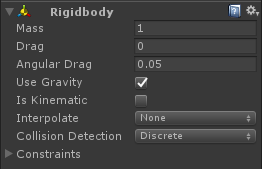
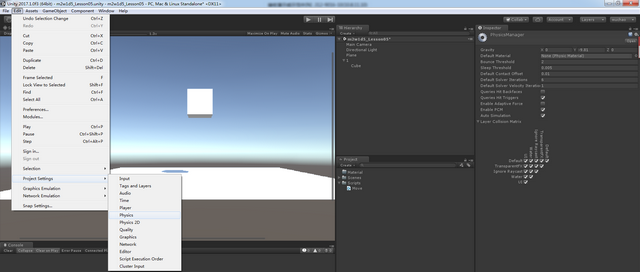
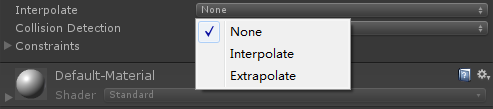

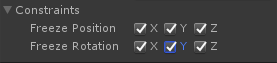
----Constraints:约束(冻结)某一根轴,或者位移,或者旋转,冻结偏移度

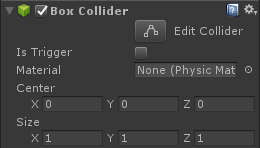
using System.Collections;

using System.Collections.Generic;

using UnityEngine;

public class CollisionTest : MonoBehaviour {

    //检测碰撞

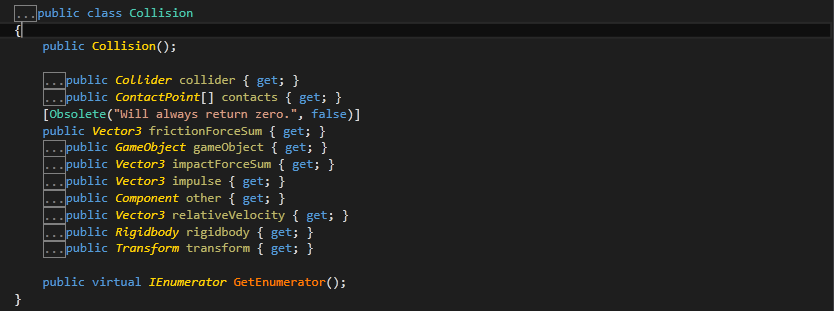
    //Collision是类,是发生碰撞信息的集合(另一个物体的信息)

    //两个物体,发生接触的时候

    private void OnCollisionEnter(Collision collision)

    {

        Debug.Log("我进来了!");

        Debug.Log(collision.gameObject.name);

    }

    //两个物体,持续接触的时候

    private void OnCollisionStay(Collision collision)

    {

        Debug.Log("我在里面了!");

    }

    //两个物体,发生分离的时候

    private void OnCollisionExit(Collision collision)

    {

        Debug.Log("我出来了!");

    }

    //触发器检测

    //Collider是碰撞器的引用,包含于collision

    //触发器和触发器或碰撞器,发生接触的时候

    private void OnTriggerEnter(Collider other)

    {

        Debug.Log("触发了!");

    }

    private void OnTriggerStay(Collider other)

    {

    }

    private void OnTriggerExit(Collider other)

    {

    }

}

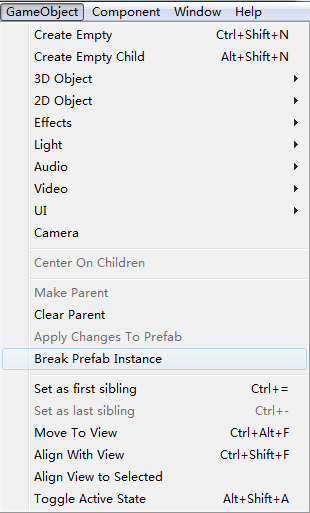
Unity复习
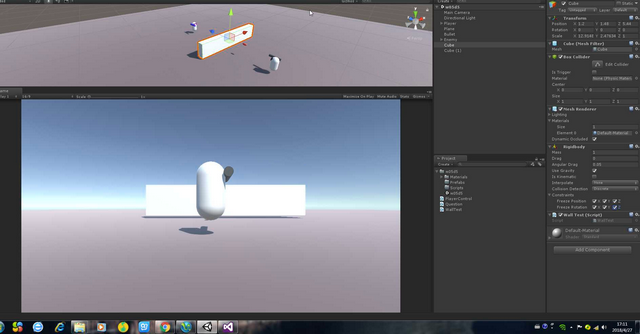
using System.Collections;

using System.Collections.Generic;

using UnityEngine;

public class WallTest : MonoBehaviour {

    Rigidbody rig;

    private void Awake()

    {

        rig = GetComponent<Rigidbody>();

    }

    // Use this for initialization

    void Start()

    {

          // 可以碰撞的 (运动学干刚体和非运动学刚体)

          // 冻结的时候 刚体会进入休眠吗?    不会

          // 如果不冻结的状态 经过几秒种以后 就会进入休眠状态

    }

    private void OnGUI()

    {

        GUILayout.Label("Sleep :" + rig.IsSleeping());

    }

    void OnCollisionEnter(Collision collision)

    {

        Debug.Log("有碰撞到");

    }

    // Update is called once per frame

    void Update () {

        rig.WakeUp();   // 唤醒

       }

}
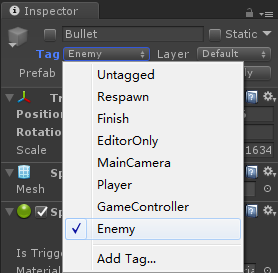
子弹销毁:延时销毁,集中销毁
using System.Collections;

using System.Collections.Generic;

using UnityEngine;

public class BulletMove : MonoBehaviour {

    public float moveSpeed = ;

    // Use this for initialization

    void Start()

    {

        Destroy(gameObject, );

    }

       // Update is called once per frame

       void Update () {

       }

    void FixedUpdate()

    {

        transform.Translate(Vector3.up * moveSpeed * Time.deltaTime);

    }

    private void OnCollisionEnter(Collision collision)

    {

        if(collision.gameObject.tag == "Enemy")

        {

            // 敌人掉血

            EnemyInfo enemyInfo = collision.gameObject.GetComponent<EnemyInfo>();

            if(enemyInfo) enemyInfo.GetDamage(Random.Range(, ));

            // 子弹销毁

            Destroy(gameObject);

        }

    }

}
using System.Collections;

using System.Collections.Generic;

using UnityEngine;

public class PlayerControl : MonoBehaviour {

    // 子弹的预制体

    public GameObject bulletPrefab;     // 资源面板中的

    // 生成的位置

    public Transform firePos;

    public float moveSpeed = ;

    public float rotSpeed = ;

       // Use this for initialization

       void Start () {

       }

       // Update is called once per frame

       void Update () {

        if(Input.GetKeyDown(KeyCode.Space))

        {

            // 发射子弹 在某个位置 实例化一个子弹

            GameObject bullet = Instantiate(bulletPrefab, firePos.position, firePos.rotation);

            BulletMove bulletMove = bullet.GetComponent<BulletMove>();

            bulletMove.moveSpeed = ;

        }

       }

    // 物理相关的 写在 FixedUpdate

    private void FixedUpdate()

    {

        transform.Translate(Vector3.forward * moveSpeed * Time.deltaTime * Input.GetAxis("Vertical"));

        transform.Rotate(Vector3.up * rotSpeed * Time.deltaTime * Input.GetAxis("Horizontal"), Space.World);

    }

}
敌人信息
using System.Collections;

using System.Collections.Generic;

using UnityEngine;

public class EnemyInfo : MonoBehaviour {

    public int hp = ;

       // Use this for initialization

       void Start () {

       }

       // Update is called once per frame

       void Update () {

       }

    public void GetDamage(int dmg)

    {

        hp -= dmg;

        if(hp <= )

        {

            hp = ;

            Destroy(gameObject);

        }

    }

}
敌人控制
using System.Collections;

using System.Collections.Generic;

using UnityEngine;

public class EnemyControl : MonoBehaviour {

    public float moveSpeed = ;

    Transform playerTrans;

       // Use this for initialization

       void Start () {

        GameObject player = GameObject.Find("Player");

        if(player)

        {

            playerTrans = player.transform;    // 如果没有找到主角 会报 空引用

        }

    }

       // Update is called once per frame

       void Update () {

        transform.LookAt(playerTrans);

        transform.Translate(Vector3.forward * moveSpeed * Time.deltaTime);

       }

}
敌人生成点:需要生成的预制体,需要生成的位置
using System.Collections;

using System.Collections.Generic;

using UnityEngine;

public class SpawnEnemy : MonoBehaviour {

    // 需要生成的预制体

    public GameObject enemyPrefab;

    float spawnInterval;

    float timeCount = ;

       // Use this for initialization

       void Start () {

        spawnInterval = Random.Range(, );

    }

       // Update is called once per frame

       void Update () {

        timeCount += Time.deltaTime;

        if(timeCount >= spawnInterval)

        {

            Instantiate(enemyPrefab, transform.position, Quaternion.identity);  //  Quaternion.identity 表示没有旋转

            spawnInterval = Random.Range(, );

            timeCount = ;

        }

       }

}
Unity3D学习笔记(四):物理系统碰撞和预制体的更多相关文章
- java之jvm学习笔记四(安全管理器)
java之jvm学习笔记四(安全管理器) 前面已经简述了java的安全模型的两个组成部分(类装载器,class文件校验器),接下来学习的是java安全模型的另外一个重要组成部分安全管理器. 安全管理器 ...
- javascript学习笔记(四) Number 数字类型
数字格式化方法toFixed().toExponential().toPrecision(),三个方法都四舍五入 toFixed() 方法指定小数位个数 toExponential() 方法 用科学 ...
- muduo网络库学习笔记(四) 通过eventfd实现的事件通知机制
目录 muduo网络库学习笔记(四) 通过eventfd实现的事件通知机制 eventfd的使用 eventfd系统函数 使用示例 EventLoop对eventfd的封装 工作时序 runInLoo ...
- kvm虚拟化学习笔记(四)之kvm虚拟机日常管理与配置
KVM虚拟化学习笔记系列文章列表----------------------------------------kvm虚拟化学习笔记(一)之kvm虚拟化环境安装http://koumm.blog.51 ...
- Linux学习笔记(四) vi编辑器
一.vi 编辑器 vi 编辑器 (Visual Interface) 是所有 Unix 及 Linux 系统下标准的编辑器,相当于 Windows 系统中的记事本 它有三种模式,分别是: Comman ...
- Linux学习笔记(七) 查询系统
1.查看命令 (1)man 可以使用 man 命令名称 命令查看某个命令的详细用法,其显示的内容如下: NAME:命令名称 SYNOPSIS:语法 DESCRIPTION:说明 OPTIONS:选项 ...
- MySql学习笔记四
MySql学习笔记四 5.3.数据类型 数值型 整型 小数 定点数 浮点数 字符型 较短的文本:char, varchar 较长的文本:text, blob(较长的二进制数据) 日期型 原则:所选择类 ...
- unity3d学习笔记(一) 第一人称视角实现和倒计时实现
unity3d学习笔记(一) 第一人称视角实现和倒计时实现 1. 第一人称视角 (1)让mainCamera和player(视角对象)同步在一起 因为我们的player是生成的,所以不能把mainCa ...
- ZooKeeper学习笔记四:使用ZooKeeper实现一个简单的分布式锁
作者:Grey 原文地址: ZooKeeper学习笔记四:使用ZooKeeper实现一个简单的分布式锁 前置知识 完成ZooKeeper集群搭建以及熟悉ZooKeeperAPI基本使用 需求 当多个进 ...
随机推荐
- 常见浏览器兼容性问题与解决方案css篇
浏览器兼容问题一:不同浏览器的标签默认的外补丁和内补丁不同 问题症状:随便写几个标签,不加样式控制的情况下,各自的margin 和padding差异较大. 碰到频率:100% 解决方案:CSS里 ...
- dedecms获取当前文章所在栏目URL
我们知道dedecms有一个面包屑导航的调用函数,{dede:field name='position'/},这个样式是固定的,有时要个性化一些的话需要修改很多地方,那么织梦cms有没其他方法获取当前 ...
- 【spring mvc】application context的生命周期
上一次讲application context中bean的生命周期,后面贴了一部分代码,但根本没理解代码意思,有幸在博客园看到一篇关于这部分的代码解析,特别长,特此做了一些整理笔记,并附上链接:htt ...
- XtraBackup完整备份与增量备份的原理
MySQL数据库实现备份的操作包括完整备份和增量备份等,本文我们主要介绍一下增量备份和完整备份的原理,接下来我们就一起来了解一下这部分内容. 完整备份的原理: 对于InnoDB,XtraBackup基 ...
- [LeetCode] 199. Binary Tree Right Side View_ Medium tag: BFS, Amazon
Given a binary tree, imagine yourself standing on the right side of it, return the values of the nod ...
- CloudFlare Support - Error 522: Connection timed out 错误522:连接超时
522错误意味着我们无法在所有到达原点Web服务器. 这方面有几个主要原因: 原始服务器太超载回应. 源Web服务器具有挡住了我们的请求的防火墙,或者数据包被主机的网络内下降. 源Web服务器脱机,或 ...
- SQL Expression Language Tutorial 学习笔记一
http://docs.sqlalchemy.org/en/latest/core/tutorial.html Google 翻译了一下 SQLAlchemy Expression Language, ...
- 深入浅出TCP之listen
原文:http://blog.chinaunix.net/uid-29075379-id-3858844.html int listen(int fd, int backlog); 有几个概念需要在开 ...
- Unirest-拼装http请求发送rest接口
public static Integer getInfo(String name) { HttpResponse<Integer> httpResponse = null; try { ...
- Object-C-block
块是对c语言的一种扩展语法 块看起来像函数,不同的是,快可以直接写在函数内部 块能够作为参数传递给函数或者方法 void sayHello(){NSLog(@"hello!");} ...