
Android ViewPager2 + TabLayout + BottomNavigationView
Android ViewPager2 + TabLayout + BottomNavigationView 实际案例
本篇主要介绍一下 ViewPager2 + TabLayout + BottomNavigationView 的结合操作

概述
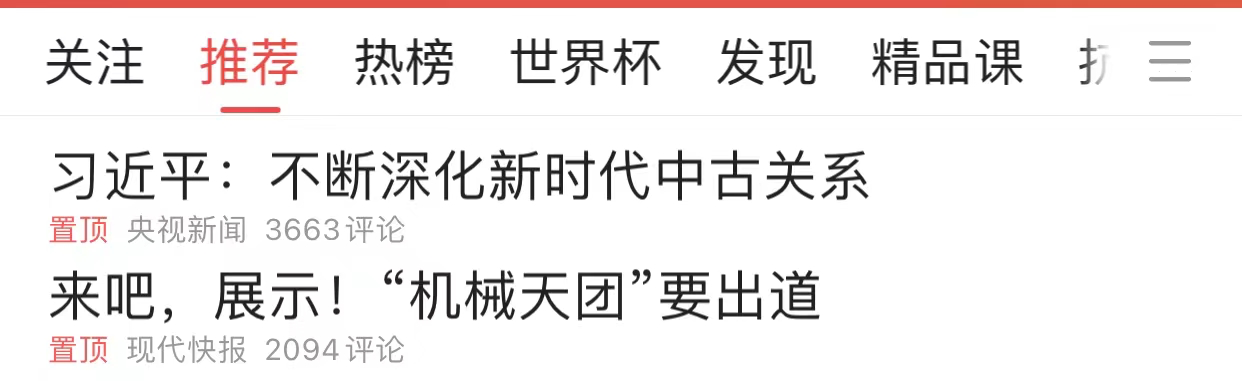
相信大家都看过今日头条的的样式 如下: 顶部有这种tab 并且是可以滑动的, 这就是本篇所介绍的 ViewPager2 + TabLayout 的组合 下面来看看如何实现把
实现思路
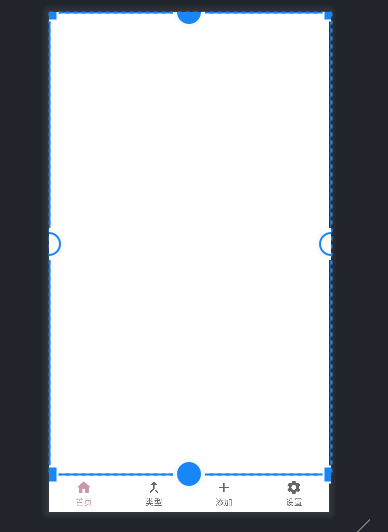
1.Activity 布局文件中引入BottomNavigationView 和 FragmentContainerView控件
2.编写 TabLayoutHomeFragment 布局文件
3.编写 Fragment 用于集成ViewPager2 和TabLayout
4. 编写 RecFragment 用于继承RecycleView 展示
5.实现 ViewPager2TabLayoutActivity
代码实现
1.Activity 布局文件中引入BottomNavigationView 和 FragmentContainerView控件
其中 menu 使用上一篇中的指定的 menu
<?xml version="1.0" encoding="utf-8"?>

<androidx.constraintlayout.widget.ConstraintLayout xmlns:android="http://schemas.android.com/apk/res/android"

    xmlns:app="http://schemas.android.com/apk/res-auto"

    xmlns:tools="http://schemas.android.com/tools"

    android:layout_width="match_parent"

    android:layout_height="match_parent"

    tools:context=".ViewPager2TabLayoutActivity">

    <androidx.fragment.app.FragmentContainerView

        android:id="@+id/container_view"

        android:layout_width="match_parent"

        android:layout_height="0dp"

        app:layout_constraintTop_toTopOf="parent"

        app:layout_constraintBottom_toTopOf="@id/bootomnav3"/>

    <com.google.android.material.bottomnavigation.BottomNavigationView

        android:id="@+id/bootomnav3"

        android:layout_width="match_parent"

        android:layout_height="0dp"

        app:layout_constraintStart_toStartOf="parent"

        app:layout_constraintBottom_toBottomOf="parent"

        app:menu="@menu/bottom_item_menu"

        app:labelVisibilityMode="labeled"

        />

</androidx.constraintlayout.widget.ConstraintLayout>
2.编写 TabLayoutHomeFragment 布局文件
主要想在这个 Home首页 Fragment 中 实现TabLayout 和 ViewPager2滑动功能
<?xml version="1.0" encoding="utf-8"?>

<androidx.constraintlayout.widget.ConstraintLayout xmlns:android="http://schemas.android.com/apk/res/android"

    xmlns:tools="http://schemas.android.com/tools"

    android:layout_width="match_parent"

    android:layout_height="match_parent"

    xmlns:app="http://schemas.android.com/apk/res-auto"

    tools:context=".tablayout.TabLayoutHomeFragment">

    <com.google.android.material.tabs.TabLayout

        android:id="@+id/mytablayout2"

        android:layout_width="match_parent"

        android:layout_height="wrap_content"

        app:tabMode="auto"

        app:tabGravity="start"

        app:tabBackground="@color/pink"

        app:tabTextColor="@color/white"

        app:layout_constraintStart_toStartOf="parent"

        app:layout_constraintTop_toTopOf="parent"

        app:layout_constraintBottom_toTopOf="@id/myviepage2"

        />

    <androidx.viewpager2.widget.ViewPager2

        android:id="@+id/myviepage2"

        android:layout_width="match_parent"

        android:layout_height="0dp"

        app:layout_constraintTop_toBottomOf="@id/mytablayout2"

        app:layout_constraintBottom_toBottomOf="parent"

        app:layout_constraintStart_toStartOf="parent"

        />

</androidx.constraintlayout.widget.ConstraintLayout>
3. 编写 TabLayoutHomeFragment代码部分 用于集成ViewPager2 和TabLayout
package com.johnny.slzzing.tablayout;

import android.os.Bundle;

import android.util.Log;

import android.view.LayoutInflater;

import android.view.View;

import android.view.ViewGroup;

import androidx.annotation.NonNull;

import androidx.annotation.Nullable;

import androidx.fragment.app.Fragment;

import androidx.fragment.app.FragmentActivity;

import androidx.viewpager2.adapter.FragmentStateAdapter;

import androidx.viewpager2.widget.ViewPager2;

import com.google.android.material.tabs.TabLayout;

import com.google.android.material.tabs.TabLayoutMediator;

import com.johnny.slzzing.BottomFragment;

import com.johnny.slzzing.R;

import com.johnny.slzzing.RecFragment;

import java.util.Arrays;

import java.util.List;

public class TabLayoutHomeFragment2 extends Fragment {

    private static final String ARG_PARAM1 = "param1";

    private static final String ARG_PARAM2 = "param2";

    private static final String TAG = "TabLayoutHomeFragment";

    // TODO: Rename and change types of parameters

    private String mParam1;

    private String mParam2;

    private ViewPager2 viewPager2;

    private TabLayout tabLayout;

    public TabLayoutHomeFragment2() {}

    public static TabLayoutHomeFragment2 newInstance(String param1, String param2) {

        TabLayoutHomeFragment2 fragment = new TabLayoutHomeFragment2();

        Bundle args = new Bundle();

        args.putString(ARG_PARAM1, param1);

        args.putString(ARG_PARAM2, param2);

        fragment.setArguments(args);

        return fragment;

    }

    @Override

    public void onCreate(Bundle savedInstanceState) {

        super.onCreate(savedInstanceState);

        if (getArguments() != null) {

            mParam1 = getArguments().getString(ARG_PARAM1);

            mParam2 = getArguments().getString(ARG_PARAM2);

        }

    }

    @Override

    public View onCreateView(

            LayoutInflater inflater, ViewGroup container, Bundle savedInstanceState) {

        return inflater.inflate(R.layout.fragment_tab_layout_home2, container, false);

    }

    @Override

    public void onViewCreated(@NonNull View view, @Nullable Bundle savedInstanceState) {

        super.onViewCreated(view, savedInstanceState);

        viewPager2 = view.findViewById(R.id.myviepage2);

        viewPager2.setSaveEnabled(false);

        tabLayout = view.findViewById(R.id.mytablayout2);

        List<String> titleList = initPageTitleList();

        TabLayoutChildViewPager tabLayoutChildViewPager =

                new TabLayoutChildViewPager(getActivity(),initChildFragmentList());

         //重点!! ViewPager2绑定Adapter

        viewPager2.setAdapter(tabLayoutChildViewPager);

         //重点!! 关联 TabLayout 和 ViewPager2

        new TabLayoutMediator(tabLayout, viewPager2, true,

                (tab, position) -> tab.setText(titleList.get(position)))

                .attach();

    }

    private List<String> initPageTitleList() {

       return Arrays.asList("推荐","关注","娱乐","游戏","电影", "电视剧","实时新闻");

    }

    private List<Fragment> initChildFragmentList() {

        //在tablayout 的第一个fragment 中使用 RecycleView 优化一下页面

        RecFragment recFragment = new RecFragment();

        //BottomFragment bottomFragment = BottomFragment.newInstance("推荐", "");

        BottomFragment bottomFragment2 = BottomFragment.newInstance("关注", "");

        BottomFragment bottomFragment3 = BottomFragment.newInstance("娱乐", "");

        BottomFragment bottomFragment4 = BottomFragment.newInstance("游戏", "");

        BottomFragment bottomFragment5 = BottomFragment.newInstance("电影", "");

        BottomFragment bottomFragment6 = BottomFragment.newInstance("电视剧", "");

        BottomFragment bottomFragment7 = BottomFragment.newInstance("实时新闻", "");

        return Arrays.asList(

                recFragment,

                bottomFragment2,

                bottomFragment3,

                bottomFragment4,

                bottomFragment5,

                bottomFragment6,

                bottomFragment7);

    }

    static class TabLayoutChildViewPager extends FragmentStateAdapter{

        private List<Fragment> fragmentList;

        public TabLayoutChildViewPager(@NonNull FragmentActivity fragmentActivity, List<Fragment> fragmentList) {

            super(fragmentActivity);

            this.fragmentList = fragmentList;

        }

        @NonNull

        @Override

        public Fragment createFragment(int position) {

            return fragmentList.get(position);

        }

        @Override

        public int getItemCount() {

            return fragmentList.size();

        }

    }

}
4. 编写 RecFragment 用于继承RecycleView 展示
主要是优化TabLayout 的第一个fragment 样式
package com.johnny.slzzing;

import static com.johnny.slzzing.R.drawable.discountberry;

import static com.johnny.slzzing.R.drawable.discountbrocoli;

import static com.johnny.slzzing.R.drawable.discountmeat;

import android.os.Bundle;

import android.view.LayoutInflater;

import android.view.View;

import android.view.ViewGroup;

import androidx.annotation.NonNull;

import androidx.annotation.Nullable;

import androidx.fragment.app.Fragment;

import androidx.recyclerview.widget.LinearLayoutManager;

import androidx.recyclerview.widget.RecyclerView;

import java.util.ArrayList;

import java.util.List;

/**

 * A simple {@link Fragment} subclass.

 * Use the {@link RecFragment#newInstance} factory method to

 * create an instance of this fragment.

 */

public class RecFragment extends Fragment {

    // TODO: Rename parameter arguments, choose names that match

    // the fragment initialization parameters, e.g. ARG_ITEM_NUMBER

    private static final String ARG_PARAM1 = "param1";

    private static final String ARG_PARAM2 = "param2";

    // TODO: Rename and change types of parameters

    private String mParam1;

    private String mParam2;

    private RecyclerView discountRecyclerView;

    private DiscountedProductAdapter discountedProductAdapter;

    public RecFragment() {

        // Required empty public constructor

    }

    /**

     * Use this factory method to create a new instance of

     * this fragment using the provided parameters.

     *

     * @param param1 Parameter 1.

     * @param param2 Parameter 2.

     * @return A new instance of fragment RecFragment.

     */

    // TODO: Rename and change types and number of parameters

    public static RecFragment newInstance(String param1, String param2) {

        RecFragment fragment = new RecFragment();

        Bundle args = new Bundle();

        args.putString(ARG_PARAM1, param1);

        args.putString(ARG_PARAM2, param2);

        fragment.setArguments(args);

        return fragment;

    }

    @Override

    public void onCreate(Bundle savedInstanceState) {

        super.onCreate(savedInstanceState);

        if (getArguments() != null) {

            mParam1 = getArguments().getString(ARG_PARAM1);

            mParam2 = getArguments().getString(ARG_PARAM2);

        }

    }

    @Override

    public View onCreateView(LayoutInflater inflater, ViewGroup container,

                             Bundle savedInstanceState) {

        // Inflate the layout for this fragment

        return inflater.inflate(R.layout.fragment_rec, container, false);

    }

    @Override

    public void onViewCreated(@NonNull View view, @Nullable Bundle savedInstanceState) {

        super.onViewCreated(view, savedInstanceState);

        discountRecyclerView = view.findViewById(R.id.discountedRecycler);

        setDiscountedRecycler(initDiscountList());

    }

    private List<DiscountedProducts> initDiscountList() {

        List<DiscountedProducts> discountedProductsList = new ArrayList<>();

        discountedProductsList.add(new DiscountedProducts(1, discountberry, "草莓", "草莓,多年生草本植物。高10-40厘米,茎低于叶或近相等,密被开展黄色柔毛"));

        discountedProductsList.add(new DiscountedProducts(2, discountbrocoli, "花菜","花椰菜(是十字花科、芸薹属植物野甘蓝的变种。"));

        discountedProductsList.add(new DiscountedProducts(3, discountmeat, "西红柿", "番茄 是茄科茄属 [2]  一年生或多年生草本植物,体高0.6-2米,全体生粘质腺毛,有强烈气味,茎易倒伏,叶羽状复叶或羽状深裂"));

        discountedProductsList.add(new DiscountedProducts(4, discountberry, "西瓜","西瓜 一年生蔓生藤本;茎、枝粗壮,具明显的棱。卷须较粗壮,具短柔毛,叶柄粗,密被柔毛"));

        discountedProductsList.add(new DiscountedProducts(5, discountbrocoli,  "南瓜","南瓜 葫芦科南瓜属的一个种,一年生蔓生草本植物"));

        discountedProductsList.add(new DiscountedProducts(6, discountmeat, "猕猴桃", "中华猕猴桃 是猕猴桃科、猕猴桃属大植物。大型落叶藤本;幼一枝或厚或薄地被有灰白色茸毛或褐色长硬毛或铁锈色硬毛状刺毛,老时秃净或留有断损残毛"));

        discountedProductsList.add(new DiscountedProducts(7, discountberry, "草莓", "草莓,多年生草本植物。高10-40厘米,茎低于叶或近相等,密被开展黄色柔毛"));

        discountedProductsList.add(new DiscountedProducts(8, discountbrocoli, "花菜","花椰菜 是十字花科、芸薹属植物野甘蓝的变种。"));

        discountedProductsList.add(new DiscountedProducts(9, discountmeat, "西红柿", "番茄 是茄科茄属 [2]  一年生或多年生草本植物,体高0.6-2米,全体生粘质腺毛,有强烈气味,茎易倒伏,叶羽状复叶或羽状深裂"));

        discountedProductsList.add(new DiscountedProducts(10, discountberry, "西瓜","西瓜 一年生蔓生藤本;茎、枝粗壮,具明显的棱。卷须较粗壮,具短柔毛,叶柄粗,密被柔毛"));

        discountedProductsList.add(new DiscountedProducts(11, discountbrocoli,  "南瓜","南瓜 葫芦科南瓜属的一个种,一年生蔓生草本植物"));

        discountedProductsList.add(new DiscountedProducts(12, discountmeat, "猕猴桃", "中华猕猴桃 是猕猴桃科、猕猴桃属大植物。大型落叶藤本;幼一枝或厚或薄地被有灰白色茸毛或褐色长硬毛或铁锈色硬毛状刺毛,老时秃净或留有断损残毛"));

        return discountedProductsList ;

    }

    private void setDiscountedRecycler(List<DiscountedProducts> dataList) {

        RecyclerView.LayoutManager layoutManager = new LinearLayoutManager(getContext(), LinearLayoutManager.VERTICAL, false);

        discountedProductAdapter = new DiscountedProductAdapter(getContext(),dataList);

        discountRecyclerView.setLayoutManager(layoutManager);

        discountRecyclerView.setAdapter(discountedProductAdapter);

    }

}
5.实现 ViewPager2TabLayoutActivity
package com.johnny.slzzing;

import android.annotation.SuppressLint;

import android.os.Bundle;

import android.view.MenuItem;

import androidx.annotation.NonNull;

import androidx.appcompat.app.AppCompatActivity;

import androidx.fragment.app.Fragment;

import androidx.fragment.app.FragmentContainerView;

import com.google.android.material.bottomnavigation.BottomNavigationView;

import com.google.android.material.navigation.NavigationBarView;

import com.johnny.slzzing.tablayout.TabLayoutHomeFragment2;

import java.util.HashMap;

import java.util.Map;

public class ViewPager2TabLayoutActivity extends AppCompatActivity {

    BottomNavigationView bottomNavigationView;

    FragmentContainerView fragmentContainerView;

    @Override

    protected void onCreate(Bundle savedInstanceState) {

        super.onCreate(savedInstanceState);

        setContentView(R.layout.activity_view_pager2_tab_layout);

        bottomNavigationView = findViewById(R.id.bootomnav3);

        fragmentContainerView  = findViewById(R.id.container_view);

        Map<Integer, Fragment> fragmentMap = new HashMap<>();

        TabLayoutHomeFragment2 tabLayoutHomeFragment2 = new TabLayoutHomeFragment2();

        //这里 第一个home fragment 使用上面编写的 TabLayoutHomeFragment2

        fragmentMap.put(R.id.home_item,tabLayoutHomeFragment2);

        fragmentMap.put(R.id.type_item,Bottom2Fragment.newInstance("我是typefragment", ""));

        fragmentMap.put(R.id.add_item,Bottom2Fragment.newInstance("我是addfragment", ""));

        fragmentMap.put(R.id.setting_item,Bottom2Fragment.newInstance("我是settingfragment", ""));

        //bottomNavigationView 点击用于替换 FragmentContainerView

        bottomNavigationView.setOnItemSelectedListener(new NavigationBarView.OnItemSelectedListener() {

            @SuppressLint("NonConstantResourceId")

            @Override

            public boolean onNavigationItemSelected(@NonNull MenuItem item) {

                int itemId = item.getItemId();

                switch (itemId){

                    case R.id.home_item:

                        getSupportFragmentManager().beginTransaction()

                                .replace(R.id.container_view, fragmentMap.get(R.id.home_item))

                                .commit();

                        break;

                    case R.id.type_item:

                        getSupportFragmentManager().beginTransaction()

                                .replace(R.id.container_view, fragmentMap.get(R.id.type_item))

                                .commit();

                    case R.id.add_item:

                        getSupportFragmentManager().beginTransaction()

                                .replace(R.id.container_view, fragmentMap.get(R.id.add_item))

                                .commit();

                    case R.id.setting_item:

                        getSupportFragmentManager().beginTransaction()

                                .replace(R.id.container_view, fragmentMap.get(R.id.setting_item))

                                .commit();

                }

                return true;

            }

        });

        getSupportFragmentManager().beginTransaction()

                .replace(R.id.container_view, fragmentMap.get(R.id.home_item))

                .commit();

    }

}
效果
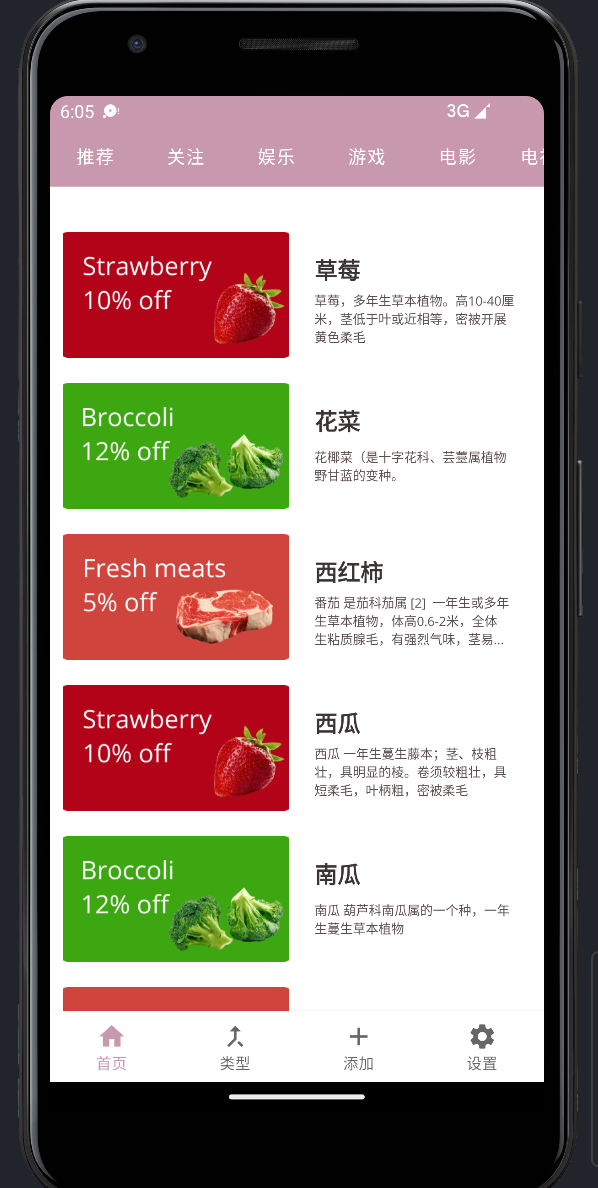
可以看到 顶部有类似 今日头条的 Tab 并且可以滑动哟
总结
本篇主要介绍了 ViewPager2 + TabLayout 的一个集成 实现类似今日头条的顶部Tab 并且支持滑动
核心联动代码
不同于ViewPager , ViewPager2 使用 TabLayoutMediator 来联动TabLayout 和ViewPager2 以及 tab的标题,注意最后要 attach()
viewPager2.setAdapter(tabLayoutChildViewPager);

new TabLayoutMediator(tabLayout, viewPager2, true,

        (tab, position) -> tab.setText(titleList.get(position)))

        .attach();
欢迎大家访问 个人博客 Johnny小屋
欢迎关注个人公众号

Android ViewPager2 + TabLayout + BottomNavigationView的更多相关文章
- Android开发 Tablayout的学习
前言 Tablayout一般做主页底下的导航栏开发或者上面的选择栏开发,就个人感觉Tablayout用于主页导航栏会比BottomNavigationView更好,自定义方面也更容易.缺点是没有动画也 ...
- 【android】TabLayout文字闪烁问题
安卓MD设计提供了一个非常酷炫的效果,TabLayout拿来做选项卡时非常合适的,但是在实际使用中发现22.2.1版本号的TabLayout在ViewPager滑动的时候会出现闪烁现象. 解决方法:在 ...
- Android开发—— Tablayout的使用
Tablayout的使用 属性 属性名 说明 app:tabMod 设置Tab模式 app:tabTextColor 设置文本颜色 app:tabSelectedTextColor 设置选中文本颜色 ...
- 关于Android中使用BottomNavigationView切换横屏导致返回主页的问题
问题: 如图,"发现"页即为主页,然后我们切换到"我"页,一切正常. 那么问题来了,如果切换到"我"页后把手机横屏,则会出现下面的情况. 嗯 ...
- Android 底部按钮BottomNavigationView + Fragment 的使用(二)
这里来试验BottomNavigationView + Fragment 底部按钮通过点击底部选项,实现中间的Fragment进行页面的切换. 使用BottomNavigationView 控件,实现 ...
- Android 底部按钮BottomNavigationView + Fragment + viewPager 的使用(一)
实现的效果,左右滑动,底部栏跟着滑动,中间加的是分帧的页面 上代码:主页面activity_main.xml <?xml version="1.0" encod ...
- Android中Tablayout设置下划线宽度 和 dp和px之间进行相互转换
开发中遇到了一个问题,Tablayout设置下换线长度,看了点资料,分享给大家. 效果图: 直接贴代码(要在tabLayout添加完所有的tab后调用) public vo ...
- Android 修改TabLayout底部导航条Indicator的长短
关于Tablayout,使用的应该很频繁了,但是底部导航条长短是固定死的,需要自己来改动长短,找了半天没找着方法,看了下官方建议,可以通过映射来修改自己想要的长短,其实也就几行代码的问题,看代码: p ...
- Android 去掉TabLayout下的阴影,AppBarLayout下的阴影
开始还以为是TabLayout在高版本系统上的特殊表现呢,没有在意,UI提出说感觉不好看就查了一下,原来是在TabLayout放在AppBarLayout里面才有这样的效果,只需要对AppBarLay ...
- Android 使用TabLayout、ViewPager和Fragment实现顶部菜单可滑动切换
效果图如下 首先,要使用控件需要添加design library,在Android Studio中添加 compile 'com.android.support:design:23.4.0' 然后是布 ...
随机推荐
- Elasticsearch中text与keyword的区别
text类型 1:支持分词,全文检索,支持模糊.精确查询,不支持聚合,排序操作; 2:test类型的最大支持的字符长度无限制,适合大字段存储: 使用场景: 存储全文搜索数据, 例如: 邮箱内容.地址. ...
- Winsw将jar包部署为windows服务
1. 下载Winsw https://github.com/winsw/winsw/releases 下载winsw官网上的xml文件和.exe文件 2. 编辑配置文件 创建一个文件夹demo,将所需 ...
- 6. EFK:免费的日志采集与可视化搜索套件
收集日志是为了做进一步的分析.收集是第一步,收集到日志后还需要进行存储.索引,以便进行快速查询分析.我们还需要一个友好的查询界面,来方便用户使用日志. 本文介绍一个免费的开源软件组合,正好可以实现上述 ...
- 2_CSS
1. 什么是CSS 1.1 什么是CSS Cascading Style Sheet 层叠样式表 是一种用来表现HTML(标准通用标记语言的一个应用)或XML(标准通用标记语言的一个子集)等文件样式的 ...
- PHP全栈开发(八):CSS Ⅰ 选择器
直到目前为止,我们把从HTML中的数据是如何通过PHP到服务器端,然后又通过PHP到数据库,然后从数据库中出来,通过PHP到HTML的整个过程通过一个案例过了一遍. 可以说,这些才刚刚开始.下面我们开 ...
- 【.NET 6+Loki+Grafana】实现轻量级日志可视化服务功能
前言:日志功能是几乎所有程序或系统都必备的一个功能.该文章通过使用Loki+Grafana来实现日志记录与可视化查询,欢迎围观. 有关环境: 操作系统:WIN 10 .NET环境:.NET 6 开发环 ...
- MySQL精华笔记
1.mysql分为 server 层和存储引擎: server 层: 1.连接器:管理连接权限验证 2.查询缓存:命中缓存直接换回查询结果 3.分析器:分析语法 4.优化器:生成执行计划,选择索引 5 ...
- Python模拟服务端
本机服务端 import socket # 获取到socket sk = socket.socket() # 获取到地址 ip 和 端口号 address = ('127.0.0.1', 8001) ...
- 不允许还有Java程序员不了解BlockingQueue阻塞队列的实现原理
我们平时开发中好像很少使用到BlockingQueue(阻塞队列),比如我们想要存储一组数据的时候会使用ArrayList,想要存储键值对数据会使用HashMap,在什么场景下需要用到Blocking ...
- 【听如子说】-python模块系列-AIS编解码Pyais
Pyais Module Introduce pyais一个简单实用的ais编解码模块 工作中需要和ais打交道,在摸鱼的过程中发现了一个牛逼的模块,对ais编解码感兴趣的可以拿项目学习一下,或者运用 ...