
Spring Boot Web开发与thymeleaf模板引擎
简介:
- 使用Springboot应用,选中需要的模块,
- Spring已经默认将场景配置好了,只需在配置文件中少量配置就可以运行起来
- 自己编写业务代码
自动配置原理
这个场景Springboot帮我们配置了什么、能不能修改呢?能修改哪些配置?
xxxxxAutoConfiguration :帮我们给容器自动配置组件
xxxproperties 配置类来封装配置文件的内容
Springboot对静态资源的映射规则
@ConfigurationProperties(prefix = "spring.resources", ignoreUnknownFields = false)

public class ResourceProperties implements ResourceLoaderAware {

  //可以设置和静态资源有关的参数,缓存时间等

}

 //webMVC的自动配置

WebMvcAuotConfiguration:

        @Override

        public void addResourceHandlers(ResourceHandlerRegistry registry) {

            if (!this.resourceProperties.isAddMappings()) {

                logger.debug("Default resource handling disabled");

                return;

            }

            Integer cachePeriod = this.resourceProperties.getCachePeriod();

            if (!registry.hasMappingForPattern("/webjars/**")) {

                customizeResourceHandlerRegistration(

                        registry.addResourceHandler("/webjars/**").addResourceLocations("classpath:/META-INF/resources/webjars/").setCachePeriod(cachePeriod));

            }

            String staticPathPattern = this.mvcProperties.getStaticPathPattern();

              //静态资源文件夹映射

            if (!registry.hasMappingForPattern(staticPathPattern)) {

      customizeResourceHandlerRegistration(registry.addResourceHandler(staticPathPattern).addResourceLocations(this.resourceProperties.getStaticLocations()).setCachePeriod(cachePeriod));

            }

        }

        //配置欢迎页映射  默认识别我们template下的index.html; 页面

        @Bean

        public WelcomePageHandlerMapping welcomePageHandlerMapping(ResourceProperties resourceProperties) {

            return new WelcomePageHandlerMapping(resourceProperties.getWelcomePage(),

                    this.mvcProperties.getStaticPathPattern());

        }

       //配置喜欢的图标 即我们网页标签最左边的图标

        @Configuration

        @ConditionalOnProperty(value = "spring.mvc.favicon.enabled", matchIfMissing = true)

        public static class FaviconConfiguration {

            private final ResourceProperties resourceProperties;

            public FaviconConfiguration(ResourceProperties resourceProperties) {this.resourceProperties = resourceProperties;

            }

            @Bean

            public SimpleUrlHandlerMapping faviconHandlerMapping() {

                SimpleUrlHandlerMapping mapping = new SimpleUrlHandlerMapping();

                mapping.setOrder(Ordered.HIGHEST_PRECEDENCE + 1);

                  //所有  **/favicon.ico

               mapping.setUrlMap(Collections.singletonMap("**/favicon.ico",faviconRequestHandler()));

                return mapping;

            }

            @Bean

            public ResourceHttpRequestHandler faviconRequestHandler() {

                ResourceHttpRequestHandler requestHandler = new ResourceHttpRequestHandler();

                requestHandler.setLocations(this.resourceProperties.getFaviconLocations());

                return requestHandler;

            }

        }
静态资源的映射
- 所有的 /webjars/** 都去 classpath:/META-INF/resources/webjars/ 找资源; webjars:以jar包的方式引入静态资源; http://www.webjars.org/
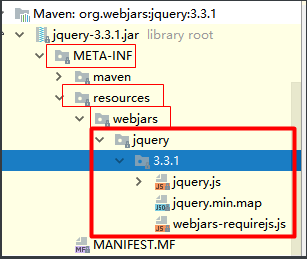
pom.xml 依赖:
<!--引入jquery-webjar-->在访问的时候只需要写webjars下面资源的名称即可

        <dependency>

            <groupId>org.webjars</groupId>

            <artifactId>jquery</artifactId>

            <version>3.3.1</version>

        </dependency>
访问地址:localhost:8080/webjars/jquery/3.3.1/jquery.js
- "/**" 访问当前项目的任何资源,都去(静态资源的文件夹)找映射 (以下路径优先级从上往下)
"classpath:/META-INF/resources/",

"classpath:/resources/",

"classpath:/static/",

"classpath:/public/"

"/":当前项目的根路径
localhost:8080/abc === 默认去静态资源文件夹里面找abc
- 欢迎页; 静态资源文件夹下的所有index.html页面;被"/**"映射;
- localhost:8080/ 找index页面
- 所有的 **/favicon.ico 都是在静态资源文件下找;
模板引擎
常用的模板引擎有:JSP,Velocity、Freemarker、Thymeleaf
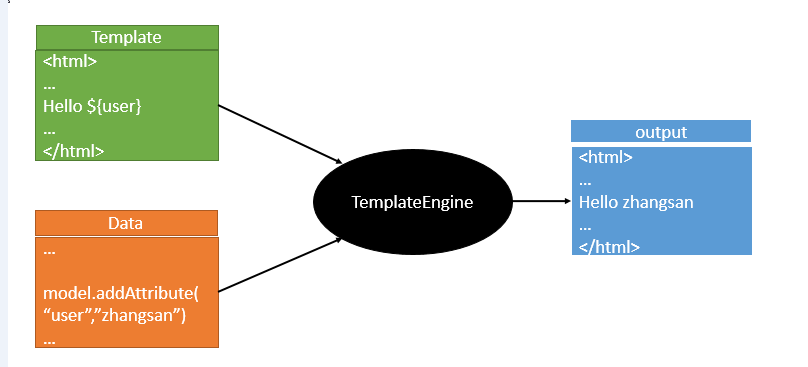
Springboot 推荐使用thymeleaf ,语法更简单,功能更强大。
引入thymeleaf
       <dependency>

            <groupId>org.springframework.boot</groupId>

            <artifactId>spring-boot-starter-thymeleaf</artifactId>

       </dependency>

SpringBoot默认的thymeleaf 版本为 2.1.6 ,该版本太低,所以我们需要手动切换thymeleaf版本

<properties>

        <thymeleaf.version>3.0.9.RELEASE</thymeleaf.version>

        <!-- 布局功能的支持程序  thymeleaf3主程序  layout2以上版本 -->

        <!-- thymeleaf2   layout1-->

        <thymeleaf-layout-dialect.version>2.2.2</thymeleaf-layout-dialect.version>

  </properties>
SpringBoot 的其他默认版本的依赖也是这样切换,如果需要修改的话,一样的切换思路。
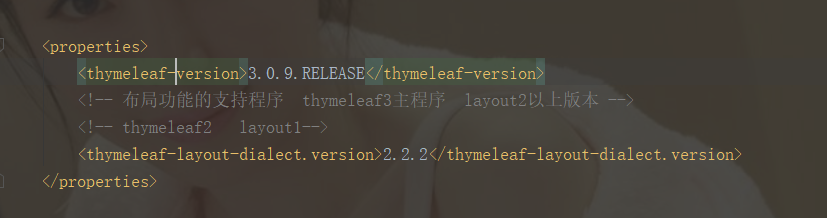
配置上面这两个的时候,启动Springboot 会报错误
An attempt was made to call the method org.thymeleaf.spring5.SpringTemplateEngine.setRenderHiddenMarkersBeforeCheckboxes(Z)V but it does not exist. Its class, org.thymeleaf.spring5.SpringTemplateEngine, is available from the following locations:
jar:file:/E:/springboot/repository/org/thymeleaf/thymeleaf-spring5/3.0.9.RELEASE/thymeleaf-spring5-3.0.9.RELEASE.jar!/org/thymeleaf/spring5/SpringTemplateEngine.class
It was loaded from the following location:
file:/E:/springboot/repository/org/thymeleaf/thymeleaf-spring5/3.0.9.RELEASE/thymeleaf-spring5-3.0.9.RELEASE.jar
Action:
Correct the classpath of your application so that it contains a single, compatible version of org.thymeleaf.spring5.SpringTemplateEngine
修改为以下即可: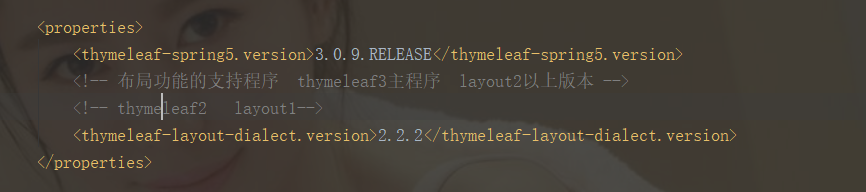
thymeleaf的使用
配置:
@ConfigurationProperties(prefix = "spring.thymeleaf")

public class ThymeleafProperties {

    private static final Charset DEFAULT_ENCODING = Charset.forName("UTF-8");

    private static final MimeType DEFAULT_CONTENT_TYPE = MimeType.valueOf("text/html");
//只要我们把HTML页面放在classpath:/templates/,thymeleaf就能自动渲染;
  public static final String DEFAULT_PREFIX = "classpath:/templates/";
   public static final String DEFAULT_SUFFIX = ".html";
使用:
1,在html 页面上导入thymeleaf的命名空间 , 不导入也可以,只是在写代码的时候,没有相应的代码提示。
<html lang="en" xmlns:th="http://www.thymeleaf.org">
thymeleaf的语法
<!DOCTYPE html>

<html lang="en" xmlns:th="http://www.thymeleaf.org">

<head>

    <meta charset="UTF-8">

    <title>Title</title>

</head>

<body>

    <h1>成功!</h1>

    <!--th:text 将div里面的文本内容设置为 -->

    <div th:text="${hello}">这是显示欢迎信息</div>

</body>

</html>
语法规则:
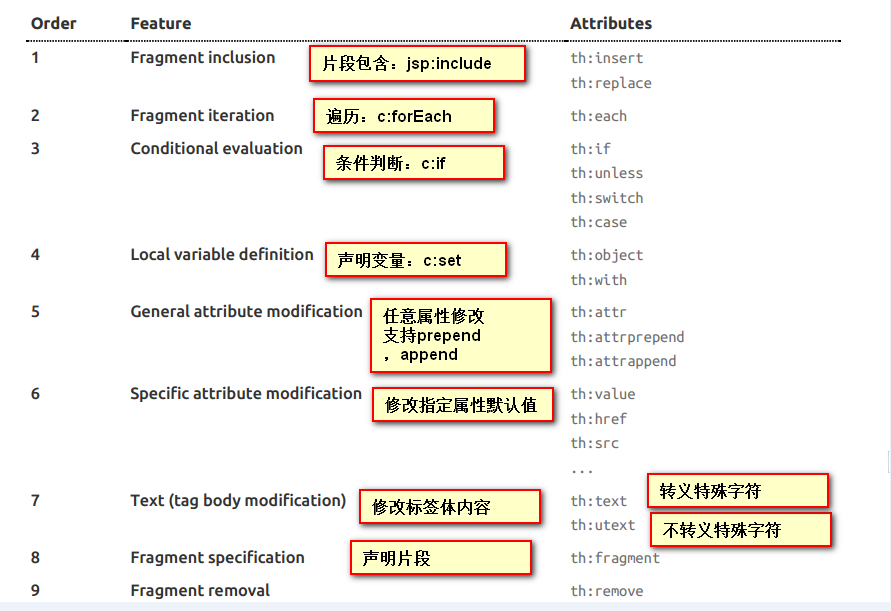
1)、th:text;改变当前元素里面的文本内容;
th:任意html属性;来替换原生属性的值
2)、表达式
Simple expressions:(表达式语法)

    Variable Expressions: ${...}:获取变量值;OGNL;

            1)、获取对象的属性、调用方法

            2)、使用内置的基本对象:

                #ctx : the context object.

                #vars: the context variables.

                #locale : the context locale.

                #request : (only in Web Contexts) the HttpServletRequest object.

                #response : (only in Web Contexts) the HttpServletResponse object.

                #session : (only in Web Contexts) the HttpSession object.

                #servletContext : (only in Web Contexts) the ServletContext object.

                ${session.foo}

            3)、内置的一些工具对象:

#execInfo : information about the template being processed.

#messages : methods for obtaining externalized messages inside variables expressions, in the same way as they would be obtained using #{…} syntax.

#uris : methods for escaping parts of URLs/URIs

#conversions : methods for executing the configured conversion service (if any).

#dates : methods for java.util.Date objects: formatting, component extraction, etc.

#calendars : analogous to #dates , but for java.util.Calendar objects.

#numbers : methods for formatting numeric objects.

#strings : methods for String objects: contains, startsWith, prepending/appending, etc.

#objects : methods for objects in general.

#bools : methods for boolean evaluation.

#arrays : methods for arrays.

#lists : methods for lists.

#sets : methods for sets.

#maps : methods for maps.

#aggregates : methods for creating aggregates on arrays or collections.

#ids : methods for dealing with id attributes that might be repeated (for example, as a result of an iteration).

    Selection Variable Expressions: *{...}:选择表达式:和${}在功能上是一样;

        补充:配合 th:object="${session.user}:

   <div th:object="${session.user}">

    <p>Name: <span th:text="*{firstName}">Sebastian</span>.</p>

    <p>Surname: <span th:text="*{lastName}">Pepper</span>.</p>

    <p>Nationality: <span th:text="*{nationality}">Saturn</span>.</p>

    </div>

    Message Expressions: #{...}:获取国际化内容

    Link URL Expressions: @{...}:定义URL;

            @{/order/process(execId=${execId},execType='FAST')}

    Fragment Expressions: ~{...}:片段引用表达式

            <div th:insert="~{commons :: main}">...</div>

Literals(字面量)

      Text literals: 'one text' , 'Another one!' ,…

      Number literals: 0 , 34 , 3.0 , 12.3 ,…

      Boolean literals: true , false

      Null literal: null

      Literal tokens: one , sometext , main ,…

Text operations:(文本操作)

    String concatenation: +

    Literal substitutions: |The name is ${name}|

Arithmetic operations:(数学运算)

    Binary operators: + , - , * , / , %

    Minus sign (unary operator): -

Boolean operations:(布尔运算)

    Binary operators: and , or

    Boolean negation (unary operator): ! , not

Comparisons and equality:(比较运算)

    Comparators: > , < , >= , <= ( gt , lt , ge , le )

    Equality operators: == , != ( eq , ne )

Conditional operators:条件运算(三元运算符)

    If-then: (if) ? (then)

    If-then-else: (if) ? (then) : (else)

    Default: (value) ?: (defaultvalue)

Special tokens:

    No-Operation: _
Spring Boot Web开发与thymeleaf模板引擎的更多相关文章
- Spring Boot Web开发中Thymeleaf模板引擎的使用
这里使用的是idea 1.新建Spring Boot项目 File-->New-->Project...,然后选择左边的Spring Initializr-->Next,可根据自己的 ...
- Spring Boot 2.0 整合Thymeleaf 模板引擎
本节将和大家一起实战Spring Boot 2.0 和thymeleaf 模板引擎 1. 创建项目 2. 使用Spring Initlizr 快速创建Spring Boot 应用程序 3. 填写项目配 ...
- Springboot 系列(五)Spring Boot web 开发之静态资源和模版引擎
前言 Spring Boot 天生的适合 web 应用开发,它可以快速的嵌入 Tomcat, Jetty 或 Netty 用于包含一个 HTTP 服务器.且开发十分简单,只需要引入 web 开发所需的 ...
- SpringBoot Web开发(4) Thymeleaf模板与freemaker
SpringBoot Web开发(4) Thymeleaf模板与freemaker 一.模板引擎 常用得模板引擎有JSP.Velocity.Freemarker.Thymeleaf SpringBoo ...
- Springboot 系列(七)Spring Boot web 开发之异常错误处理机制剖析
前言 相信大家在刚开始体验 Springboot 的时候一定会经常碰到这个页面,也就是访问一个不存在的页面的默认返回页面. 如果是其他客户端请求,如接口测试工具,会默认返回JSON数据. { &quo ...
- Spring Boot学习记录(二)--thymeleaf模板 - CSDN博客
==他的博客应该不错,没有细看 Spring Boot学习记录(二)--thymeleaf模板 - CSDN博客 http://blog.csdn.net/u012706811/article/det ...
- Spring Boot 2.0 整合 FreeMarker 模板引擎
本篇博文将和大家一起使用Spring Boot 2.0 和FreeMarker 模板引擎整合实战. 1. 创建新的项目 2. 填写项目配置信息 3. 勾选web 模块 4. 勾选freemarker模 ...
- Springboot 系列(六)Spring Boot web 开发之拦截器和三大组件
1. 拦截器 Springboot 中的 Interceptor 拦截器也就是 mvc 中的拦截器,只是省去了 xml 配置部分.并没有本质的不同,都是通过实现 HandlerInterceptor ...
- Spring Boot Web 开发@Controller @RestController 使用教程
在 Spring Boot 中,@Controller 注解是专门用于处理 Http 请求处理的,是以 MVC 为核心的设计思想的控制层.@RestController 则是 @Controller ...
随机推荐
- python的Requests库的使用
Requests模块: Requests 是用Python语言编写,基于 urllib,采用 Apache2 Licensed 开源协议的 HTTP 库.它比 urllib 更加方便,可以节约我们大量 ...
- PHP 获取服务器详细信息的原生方法
获取系统类型及版本号: php_uname() (例:Windows NT PCA15130 6.1 build 7601 (Windows 7 Ultimate Edition Ser ...
- 优雅解决 SpringBoot 工程中多环境下 application.properties 的维护问题
微信号:geekoftaste, 期待与大家一起探讨! 背景 我们知道 SpringBoot 有一个全局的配置文件 application.properties, 可以把工程里用到的占位符,第三方库的 ...
- ThinkPHP5——引入公共部分head和foot(多种方法)
在项目中,header和footer重复使用的次数高,于是我们把header和footer作为公共部分,其他模板需要的话就引用.下面我教大家引用公共模板 1.使用include 首先在view下面新建 ...
- nginx、redis在Centos7中,加入开机自启动
nginx加入开机启动 cat <<EOF >> /etc/systemd/system/nginx.service> [Unit]> Description=ng ...
- 分享一个Vue数组赋值的错误
今天在写项目用到Vue的时候,遇到的一个问题,纠结了好一会,首先我的代码是这样的 有没有毛病!! 开始我感觉是没啥毛病啊,按照之前写Java代码的逻辑,我感觉这没一点毛病 . 但是它就是有毛病, 假 ...
- C语言I作业12-学期总结
一.我学到的内容 二.我的收获 我完成的作业: 第一次作业 C语言I博客作业02 C语言I作业004 C语言I博客作业05 C语言I博客作业06 C语言I博客作业07 C语言I博客作业08 C语言I博 ...
- “Unknown class XXViewController in Interface Builder file.”问题处理
在静态库中写了一个XXViewController类,然后在主工程的xib中,将xib的类指定为XXViewController,程序运行时,报了如下错误: “Unknown class XXView ...
- 去除npm run dev日志warn记录
目录 一 babel的一些eslint方法废除了 问题 解决方案 相关文档 二 webpack的loaderUtils.parseQuery()被废弃了 问题 解决方案 相关文档 三 postcss相 ...
- EditText 无法失焦与失焦后键盘不收缩解决方案
背景 有一个需求,比方说下图: 点击了上图的Image 区域才可以编辑. 那么我首先想到的就是: android:focusable="false" 不让它获取到焦点不就ok吗? ...