
【Azure 应用服务】部署Jar到App Service for Linux,因启动命令路径配置错误而引起:( Application Error 问题
问题描述
App Service for Linux 资源创建完成后,通过FTP方式把 .jar包(logdemo.jar)包上传到 /site/wwwroot/ 文件夹后,在App Service的Configration 配置页面配置启动命令为:
java -jar /site/wwwroot/logdemo.jar
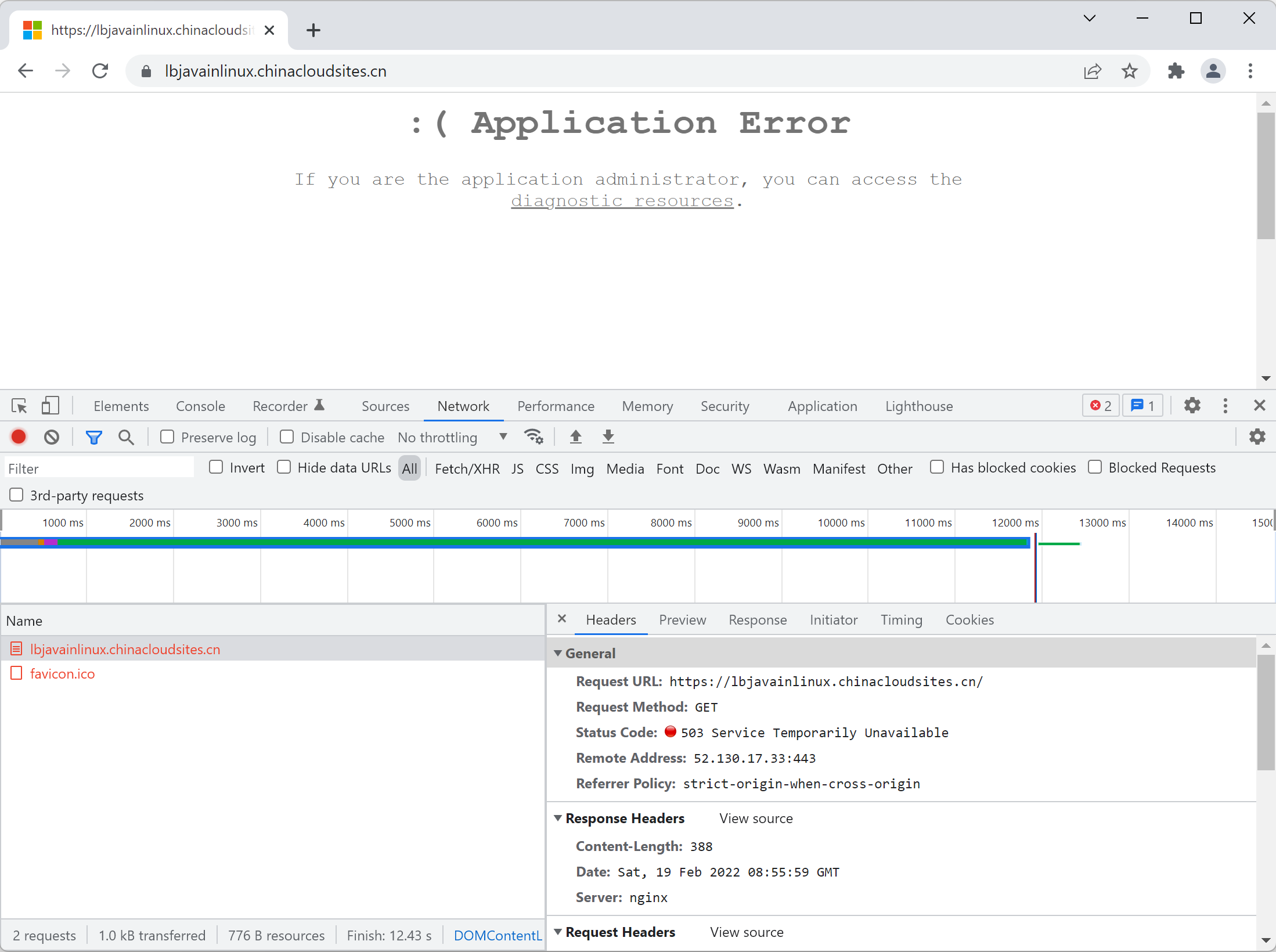
但是,在访问App Service时,却是 Application Error 错误 (503 Service Temporarily Unavailable)
问题解决
第一步:查看日志
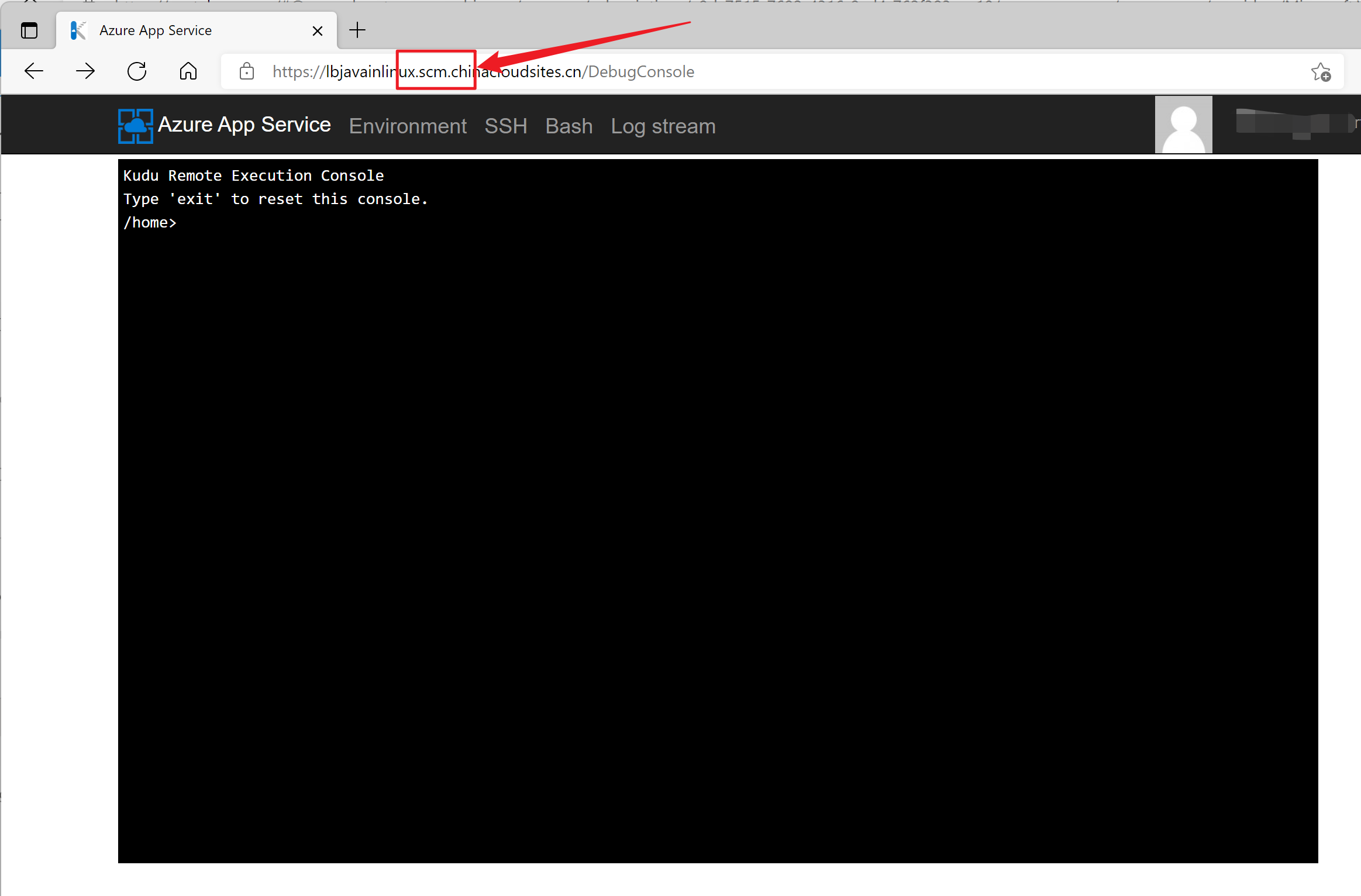
进入App Service的Kudu站点(https://<your app service name>.scm.chinacloudsites.cn/DebugConsole),查看Log Stream,检查错误日志
第二步:分析错误信息
2022-02-19T08:55:59.035870757Z Add private certificates to keystore if exists...

2022-02-19T08:55:59.035875157Z Configuring max heap = 1346 MB

2022-02-19T08:55:59.076047416Z STARTUP_FILE=

2022-02-19T08:55:59.076713522Z STARTUP_COMMAND=java -jar /site/wwwroot/logdemo.jar

2022-02-19T08:55:59.076729422Z No STARTUP_FILE available.

2022-02-19T08:55:59.085391200Z Running STARTUP_COMMAND: java -jar /site/wwwroot/logdemo.jar

2022-02-19T08:55:59.087846422Z Error: Unable to access jarfile /site/wwwroot/logdemo.jar

2022-02-19T08:55:59.095872294Z Finished running startup file 'java -jar /site/wwwroot/logdemo.jar'. Exit code: '1'.

2022-02-19T08:55:59.115095866Z Custom startup complete. Now, exiting with exit code '1'

/home/LogFiles/2022_02_19_lw0sdlwk00005J_docker.log  (https://xxxxx.scm.chinacloudsites.cn/api/vfs/LogFiles/2022_02_19_lw0sdlwk00005J_docker.log)

2022-02-19T08:55:49.578Z INFO  - Pull Image successful, Time taken: 0 Minutes and 0 Seconds

2022-02-19T08:55:49.659Z INFO  - Starting container for site

2022-02-19T08:55:49.660Z INFO  - docker run -d -p 8080:8080 --name lbjavainlinux_0_2fbcc321 -e PORT=8080 -e WEBSITE_SITE_NAME=lbjavainlinux -e WEBSITE_AUTH_ENABLED=False -e WEBSITE_ROLE_INSTANCE_ID=0 -e WEBSITE_HOSTNAME=lbjavainlinux.chinacloudsites.cn -e WEBSITE_INSTANCE_ID=f902a04a85d38b0fa81789a73bd7f0fd35ab4400956424760d2a2f982ef05b43 mcr.microsoft.com/azure-app-service/java:8-jre8_210526002747 java -jar /site/wwwroot/logdemo.jar

2022-02-19T08:55:49.660Z INFO  - Logging is not enabled for this container.

Please use https://aka.ms/linux-diagnostics to enable logging to see container logs here.

2022-02-19T08:55:58.101Z INFO  - Initiating warmup request to container lbjavainlinux_0_2fbcc321 for site lbjavainlinux

2022-02-19T08:55:59.460Z ERROR - Container lbjavainlinux_0_2fbcc321 for site lbjavainlinux has exited, failing site start

2022-02-19T08:55:59.467Z ERROR - Container lbjavainlinux_0_2fbcc321 didn't respond to HTTP pings on port: 8080, failing site start. See container logs for debugging.

2022-02-19T08:55:59.497Z INFO  - Stopping site lbjavainlinux because it failed during startup.
日志显示,不能访问jar文件 /site/wwwroot/logdemo.jar, 所以站点无法启动。 但是通过Kudu Bash查看App Service的文件,发现logdemo.jar文件时存在的:
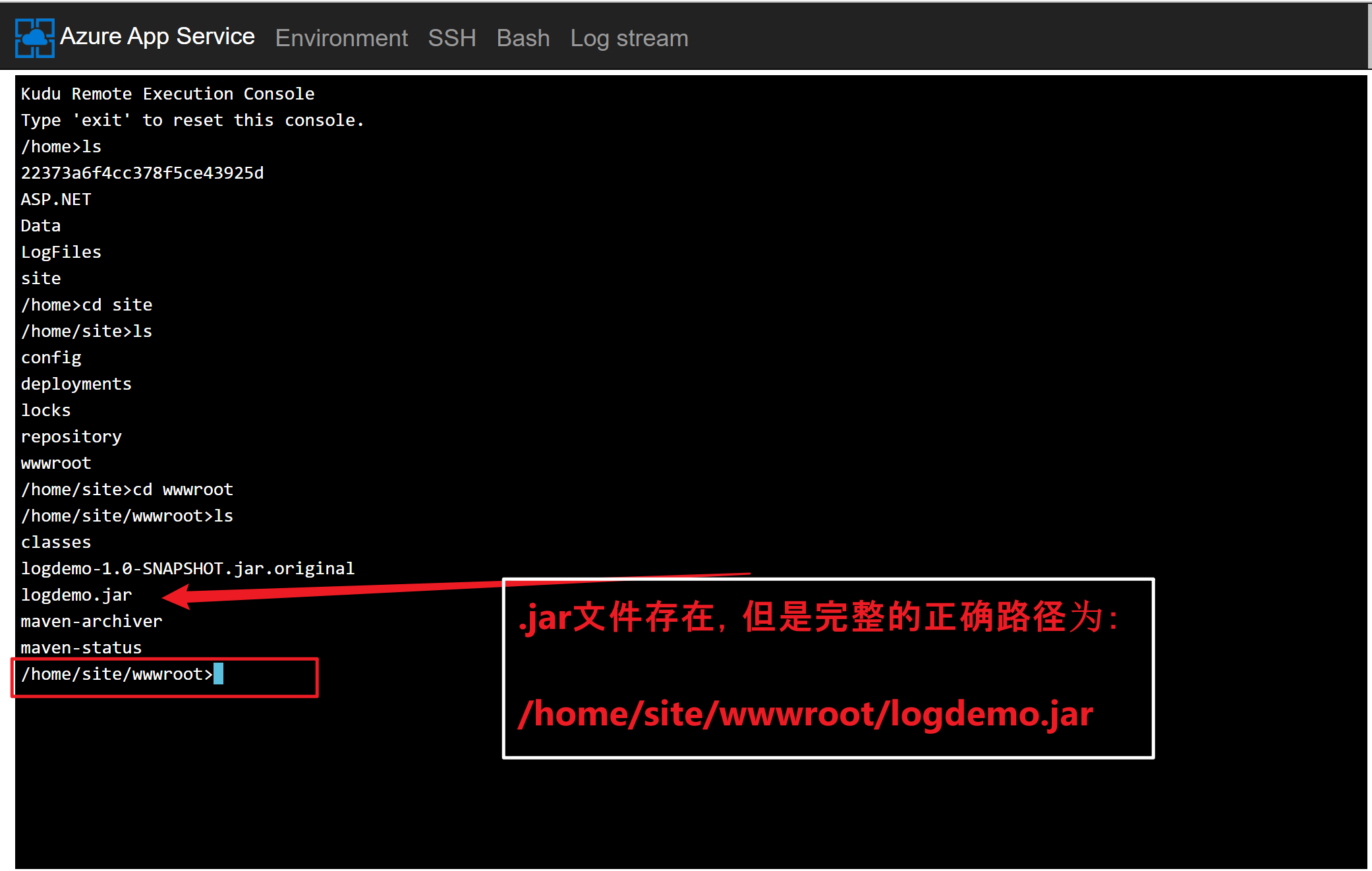
所以问题根源就是 App Service的Java应用启动命令中,jar包路径配置错误。正确的启动命令为:
java -jar /home/site/wwwroot/logdemo.jar
PS: 因为通过FTP工具显示的文件根路径就是/,并没有/home/显示,所以在Linux环境中,极易忽略home而导致以上错误。
第三步:问题解决,查看日志启动成功
/home/LogFiles/2022_02_19_lw0sdlwk00005J_docker.log  (https://lbjavainlinux.scm.chinacloudsites.cn/api/vfs/LogFiles/2022_02_19_lw0sdlwk00005J_docker.log)

2022-02-19T09:11:02.556Z INFO  - 8-jre8_210526002747 Pulling from azure-app-service/java

2022-02-19T09:11:02.557Z INFO  -  Digest: sha256:b26811cc1b99fc7cfa7485d2313da3abbf0f96f742961908ee7da07ef489ddc6

2022-02-19T09:11:02.557Z INFO  -  Status: Image is up to date for mcr.microsoft.com/azure-app-service/java:8-jre8_210526002747

2022-02-19T09:11:02.565Z INFO  - Pull Image successful, Time taken: 0 Minutes and 0 Seconds

2022-02-19T09:11:02.617Z INFO  - Starting container for site

2022-02-19T09:11:02.617Z INFO  - docker run -d -p 8080:8080 --name lbjavainlinux_0_ffad47c9 -e PORT=8080 -e WEBSITE_SITE_NAME=lbjavainlinux -e WEBSITE_AUTH_ENABLED=False -e WEBSITE_ROLE_INSTANCE_ID=0 -e WEBSITE_HOSTNAME=lbjavainlinux.chinacloudsites.cn -e WEBSITE_INSTANCE_ID=f902a04a85d38b0fa81789a73bd7f0fd35ab4400956424760d2a2f982ef05b43 mcr.microsoft.com/azure-app-service/java:8-jre8_210526002747 java -jar /home/site/wwwroot/logdemo.jar

2022-02-19T09:11:02.637Z INFO  - Logging is not enabled for this container.

Please use https://aka.ms/linux-diagnostics to enable logging to see container logs here.

2022-02-19T09:11:08.645Z INFO  - Initiating warmup request to container lbjavainlinux_0_ffad47c9 for site lbjavainlinux

/home/LogFiles/webssh/.log  (https://lbjavainlinux.scm.chinacloudsites.cn/api/vfs/LogFiles/webssh/.log)

Ending Log Tail of existing logs ---

Starting Live Log Stream ---

2022-02-19T09:11:08.645Z INFO  - Initiating warmup request to container lbjavainlinux_0_ffad47c9 for site lbjavainlinux

2022-02-19 09:11:22.559  INFO 125 --- [main] com.example.App                          : Starting App v1.0-SNAPSHOT on f60af282340b with PID 125 (/home/site/wwwroot/logdemo.jar started by root in /)

2022-02-19 09:11:23.022  INFO 125 --- [main] ationConfigEmbeddedWebApplicationContext : Refreshing org.springframework.boot.context.embedded.AnnotationConfigEmbeddedWebApplicationContext@447d90dd: startup date [Sat Feb 19 09:11:23 GMT 2022]; root of context hierarchy

2022-02-19 09:11:29.200  INFO 125 --- [main] o.s.b.f.s.DefaultListableBeanFactory     : Overriding bean definition for bean 'beanNameViewResolver': replacing [Root bean: class [null]; scope=; abstract=false; lazyInit=false; autowireMode=3; dependencyCheck=0; autowireCandidate=true; primary=false; factoryBeanName=org.springframework.boot.autoconfigure.web.ErrorMvcAutoConfiguration$WhitelabelErrorViewConfiguration; factoryMethodName=beanNameViewResolver; initMethodName=null; destroyMethodName=(inferred); defined in class path resource [org/springframework/boot/autoconfigure/web/ErrorMvcAutoConfiguration$WhitelabelErrorViewConfiguration.class]] with [Root bean: class [null]; scope=; abstract=false; lazyInit=false; autowireMode=3; dependencyCheck=0; autowireCandidate=true; primary=false; factoryBeanName=org.springframework.boot.autoconfigure.web.WebMvcAutoConfiguration$WebMvcAutoConfigurationAdapter; factoryMethodName=beanNameViewResolver; initMethodName=null; destroyMethodName=(inferred); defined in class path resource [org/springframework/boot/autoconfigure/web/WebMvcAutoConfiguration$WebMvcAutoConfigurationAdapter.class]]

2022-02-19 09:11:32.370  INFO 125 --- [main] trationDelegate$BeanPostProcessorChecker : Bean 'org.springframework.transaction.annotation.ProxyTransactionManagementConfiguration' of type [class org.springframework.transaction.annotation.ProxyTransactionManagementConfiguration$$EnhancerBySpringCGLIB$$b749a166] is not eligible for getting processed by all BeanPostProcessors (for example: not eligible for auto-proxying)

2022-02-19 09:11:32.721  INFO 125 --- [main] trationDelegate$BeanPostProcessorChecker : Bean 'transactionAttributeSource' of type [class org.springframework.transaction.annotation.AnnotationTransactionAttributeSource] is not eligible for getting processed by all BeanPostProcessors (for example: not eligible for auto-proxying)

2022-02-19 09:11:32.842  INFO 125 --- [main] trationDelegate$BeanPostProcessorChecker : Bean 'transactionInterceptor' of type [class org.springframework.transaction.interceptor.TransactionInterceptor] is not eligible for getting processed by all BeanPostProcessors (for example: not eligible for auto-proxying)

2022-02-19 09:11:32.903  INFO 125 --- [main] trationDelegate$BeanPostProcessorChecker : Bean 'org.springframework.transaction.config.internalTransactionAdvisor' of type [class org.springframework.transaction.interceptor.BeanFactoryTransactionAttributeSourceAdvisor] is not eligible for getting processed by all BeanPostProcessors (for example: not eligible for auto-proxying)

2022-02-19 09:11:37.004  INFO 125 --- [main] s.b.c.e.t.TomcatEmbeddedServletContainer : Tomcat initialized with port(s): 8080 (http)

2022-02-19T09:11:40.611Z INFO  - Waiting for response to warmup request for container lbjavainlinux_0_ffad47c9. Elapsed time = 31.9663615 sec

2022-02-19 09:11:40.594  INFO 125 --- [main] o.apache.catalina.core.StandardService   : Starting service Tomcat

2022-02-19 09:11:40.633  INFO 125 --- [main] org.apache.catalina.core.StandardEngine  : Starting Servlet Engine: Apache Tomcat/8.0.28

2022-02-19 09:11:41.800  INFO 125 --- [localhost-startStop-1] o.a.c.c.C.[Tomcat].[localhost].[/]       : Initializing Spring embedded WebApplicationContext

2022-02-19 09:11:41.819  INFO 125 --- [localhost-startStop-1] o.s.web.context.ContextLoader            : Root WebApplicationContext: initialization completed in 18816 ms

2022-02-19 09:11:48.263  INFO 125 --- [localhost-startStop-1] o.s.b.c.e.ServletRegistrationBean        : Mapping servlet: 'dispatcherServlet' to [/]

2022-02-19 09:11:48.295  INFO 125 --- [localhost-startStop-1] o.s.b.c.embedded.FilterRegistrationBean  : Mapping filter: 'characterEncodingFilter' to: [/*]

2022-02-19 09:11:48.304  INFO 125 --- [localhost-startStop-1] o.s.b.c.embedded.FilterRegistrationBean  : Mapping filter: 'hiddenHttpMethodFilter' to: [/*]

2022-02-19 09:11:51.478  INFO 125 --- [main] s.w.s.m.m.a.RequestMappingHandlerAdapter : Looking for @ControllerAdvice: org.springframework.boot.context.embedded.AnnotationConfigEmbeddedWebApplicationContext@447d90dd: startup date [Sat Feb 19 09:11:23 GMT 2022]; root of context hierarchy

2022-02-19 09:11:52.406  INFO 125 --- [main] s.w.s.m.m.a.RequestMappingHandlerMapping : Mapped "{[/]}" onto java.lang.String com.example.HelloController.hello()

2022-02-19 09:11:52.412  INFO 125 --- [main] s.w.s.m.m.a.RequestMappingHandlerMapping : Mapped "{[/newhello]}" onto java.lang.String com.example.HelloController.hello2()

2022-02-19 09:11:52.422  INFO 125 --- [main] s.w.s.m.m.a.RequestMappingHandlerMapping : Mapped "{[/error],produces=[text/html]}" onto public org.springframework.web.servlet.ModelAndView org.springframework.boot.autoconfigure.web.BasicErrorController.errorHtml(javax.servlet.http.HttpServletRequest)

2022-02-19 09:11:52.435  INFO 125 --- [main] s.w.s.m.m.a.RequestMappingHandlerMapping : Mapped "{[/error]}" onto public org.springframework.http.ResponseEntity<java.util.Map<java.lang.String, java.lang.Object>> org.springframework.boot.autoconfigure.web.BasicErrorController.error(javax.servlet.http.HttpServletRequest)

2022-02-19 09:11:52.666  INFO 125 --- [main] o.s.w.s.handler.SimpleUrlHandlerMapping  : Mapped URL path [/webjars/**] onto handler of type [class org.springframework.web.servlet.resource.ResourceHttpRequestHandler]

2022-02-19 09:11:52.684  INFO 125 --- [main] o.s.w.s.handler.SimpleUrlHandlerMapping  : Mapped URL path [/**] onto handler of type [class org.springframework.web.servlet.resource.ResourceHttpRequestHandler]

2022-02-19 09:11:53.066  INFO 125 --- [main] o.s.w.s.handler.SimpleUrlHandlerMapping  : Mapped URL path [/**/favicon.ico] onto handler of type [class org.springframework.web.servlet.resource.ResourceHttpRequestHandler]

2022-02-19T09:11:55.939Z INFO  - Waiting for response to warmup request for container lbjavainlinux_0_ffad47c9. Elapsed time = 47.2941072 sec

2022-02-19 09:11:55.146  INFO 125 --- [main] o.s.j.e.a.AnnotationMBeanExporter        : Registering beans for JMX exposure on startup

2022-02-19 09:11:55.950  INFO 125 --- [main] s.b.c.e.t.TomcatEmbeddedServletContainer : Tomcat started on port(s): 8080 (http)

2022-02-19 09:11:56.000  INFO 125 --- [main] com.example.App                          : Started App in 35.854 seconds (JVM running for 40.855)

2022-02-19 09:11:56.002  INFO 125 --- [main] com.example.App                          : test java logs  : info

2022-02-19 09:11:56.010 ERROR 125 --- [main] com.example.App                          : test java logs  : error

2022-02-19 09:11:56.012  WARN 125 --- [main] com.example.App                          : test java logs  : warn

2022-02-19 09:11:56.409  INFO 125 --- [http-nio-8080-exec-1] o.a.c.c.C.[Tomcat].[localhost].[/]       : Initializing Spring FrameworkServlet 'dispatcherServlet'

2022-02-19 09:11:56.413  INFO 125 --- [http-nio-8080-exec-1] o.s.web.servlet.DispatcherServlet        : FrameworkServlet 'dispatcherServlet': initialization started

2022-02-19 09:11:56.545  INFO 125 --- [http-nio-8080-exec-1] o.s.web.servlet.DispatcherServlet        : FrameworkServlet 'dispatcherServlet': initialization completed in 131 ms

2022-02-19T09:11:57.181Z INFO  - Container lbjavainlinux_0_ffad47c9 for site lbjavainlinux initialized successfully and is ready to serve requests.
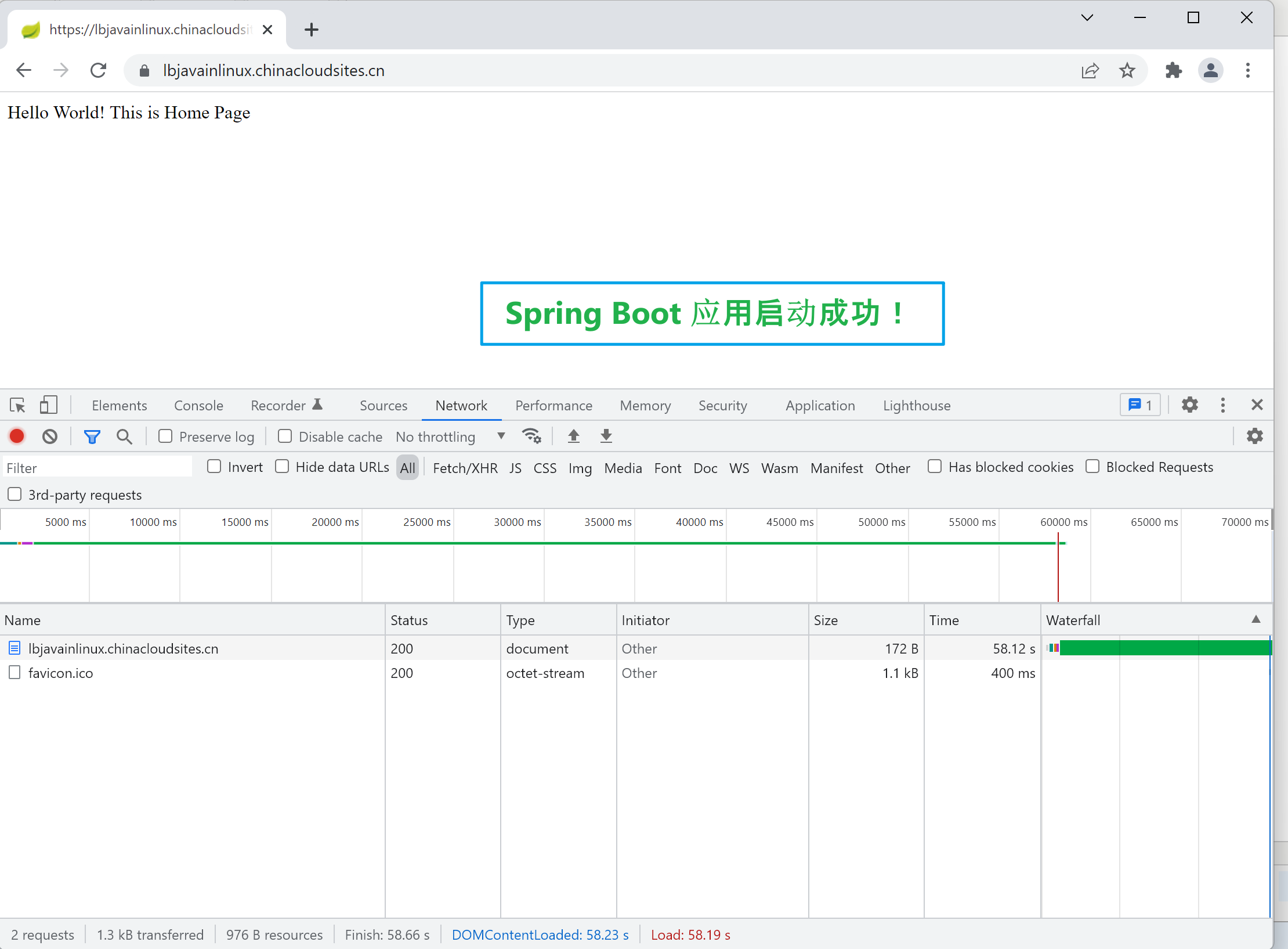
Java应用启动完成!
参考资料
为 Azure 应用服务配置 Java 应用: https://docs.azure.cn/zh-cn/app-service/configure-language-java?pivots=platform-linux#java-se
【Azure 应用服务】部署Jar到App Service for Linux,因启动命令路径配置错误而引起:( Application Error 问题的更多相关文章
- 【Azure 应用服务】App Service For Linux 部署PHP Laravel 项目,如何修改首页路径为 wwwroot\public\index.php
问题描述 参考官方文档部署 PHP Laravel 项目到App Service for Linux环境中,但是访问应用时候遇见了500 Server Error 错误. 从部署的日志中,可以明确看出 ...
- 【Azure 应用服务】App Service For Linux 部署Java Spring Boot应用后,查看日志文件时的疑惑
编写Java Spring Boot应用,通过配置logging.path路径把日志输出在指定的文件夹中. 第一步:通过VS Code创建一个空的Spring Boot项目 第二步:在applicat ...
- 【Azure 应用服务】PHP应用部署在App Service for Linux环境中,上传文件大于1MB时,遇见了413 Request Entity Too Large 错误的解决方法
问题描述 在PHP项目部署在App Service后,上传文件如果大于1MB就会遇见 413 Request Entity Too Large 的问题. 问题解决 目前这个问题,首先需要分析应用所在的 ...
- 【Azure 应用服务】Azure App Service For Linux 上实现 Python Flask Web Socket 项目 Http/Https
问题描述 在上篇博文"[Azure 应用服务]App Service for Linux 中实现 WebSocket 功能 (Python SocketIO)"中,实现了通过 HT ...
- 【Azure 应用服务】App Service For Linux 如何在 Web 应用实例上住抓取网络日志
问题描述 在App Service For Windows的环境中,我们可以通过ArmClient 工具发送POST请求在Web应用的实例中抓取网络日志,但是在App Service For Linu ...
- 【Azure 应用服务】App Service for Linux 中实现 WebSocket 功能 (Python SocketIO)
问题描述 使用 python websockets 模块作为Socket的服务端,发布到App Service for Linux环境后,发现Docker Container无法启动.错误消息为: 2 ...
- 【Azure App Service】C#下制作的网站,所有网页本地测试运行无误,发布至Azure之后,包含CHART(图表)的网页打开报错,错误消息为 Runtime Error: Server Error in '/' Application
问题描述 C#下制作的网站,所有网页本地测试运行无误,发布至Azure之后,包含CHART(图表)的网页打开报错,错误消息为 Runtime Error: Server Error in '/' Ap ...
- 【Azure 应用服务】Python flask 应用部署在Aure App Service 遇见的 3 个问题
在App Service(Windows)中部署Flask应用时的注意事项: ● 添加Python扩展插件,Python 3.6.4 x64: ●● 配置 FastCGI 处理程序,添加Web.con ...
- 【Azure 应用服务】Python flask 应用部署在Aure App Service中作为一个子项目时,解决遇见的404 Not Found问题
问题描述 在成功的部署Python flask应用到App Service (Windows)后,如果需要把当前项目(如:hiflask)作为一个子项目(子站点),把web.config文件从wwwr ...
随机推荐
- nuxt 相关
https://github.com/xuqiang521/nuxt-ssr-demo https://www.cnblogs.com/laozhang-is-phi/p/10249248.html ...
- 图形测试分析毫无头绪?HarmonyOS图形栈测试技术帮你解决
作者:huangran,图形图像技术专家 应用开发以后无法知道性能瓶颈的根因是什么?滑动卡顿.白块产生的原因是什么?代码写完之后,不知道如何优化让它表现地更好-- 我们发现,如今测试人员的需求已经不只 ...
- Lucene8.5.x全文检索工具
本文的资源展示: hotword:是热词的文本,比如不是词语的中文,但是是什么人名或者公司名称的词语,需要分词成一个词语的将需要的加入hotword.dic stopword:无意义的词放入的词典,或 ...
- P5024 [NOIP2018 提高组] 保卫王国
思路: 首先想到每次询问两个点后就从这两个点开始往上爬,沿路更新 dp 值即可. #include <bits/stdc++.h> #define For(i,a,b) for(int i ...
- Android官方文档翻译 十六 4.Managing the Activity Lifecycle
Managing the Activity Lifecycle 管理activity的生命周期 Dependencies and prerequisites 依赖关系和先决条件 How to crea ...
- github与gitlab创建新仓库
github创建新仓库 然后根据下一页的命令提示进行即可 gitlab创建新仓库 git init git remote add origin git@***.***.**.**:user/proje ...
- Python 为什么不设计 do-while 循环结构?
在某些编程语言中,例如 C/C++.C#.PHP.Java.JavaScript 等等,do-while 是一种基本的循环结构. 它的核心语义是:先执行一遍循环体代码,然后执行一遍条件语句,若条件语句 ...
- 初识WorldWind——WorldWind编译生成,解决乱码等问题
本文中World Wind的GitHub源码下载地址:https://github.com/hujiulin/WorldWind 美国国家航空航天局(National Aeronautics and ...
- Vue.use()用法
通常我们引入一个第三方组件形式的插件进来时,我们在main.js里面需要Vue.use('该插件名字'),比如引入一个vant组件 那么我们如何自己也来尝试将自己封装的组件以Vue.use()的形式来 ...
- 关于C++11共享数据带来的死锁问题的提出与解决
举个例子,如果有一份资源,假如为list<int>资源,假设有两个线程要对该资源进行压入弹出操作,如果不进行锁的话,那么如果两个线程同时操作,那么必然乱套,得到的结果肯定不是我们想要的结果 ...