
SpringBoot中的静态资源访问
一、说在前面的话
我们之间介绍过SpringBoot自动配置的原理,基本上是如下:
xxxxAutoConfiguration:帮我们给容器中自动配置组件;

xxxxProperties:配置类来封装配置文件的内容;
具体可参考【SpringBoot之自动配置原理解析】
二、静态资源映射规则
1、对哪些目录映射?
classpath:/META-INF/resources/

classpath:/resources/

classpath:/static/

classpath:/public/

/:当前项目的根路径
2、什么意思?
就我们在上面五个目录下放静态资源(比如:a.js等),可以直接访问(http://localhost:8080/a.js),类似于以前web项目的webapp下;放到其他目录下无法被访问。
3、为什么是那几个目录?
3.1、看源码
我们一起来读下源码,这个是SpringBoot自动配置的WebMvcAutoConfiguration.java类来帮我们干的。
@Override

public void addResourceHandlers(ResourceHandlerRegistry registry) {

    if (!this.resourceProperties.isAddMappings()) {

        logger.debug("Default resource handling disabled");

        return;

    }

    Integer cachePeriod = this.resourceProperties.getCachePeriod();

    if (!registry.hasMappingForPattern("/webjars/**")) {

        customizeResourceHandlerRegistration(

                registry.addResourceHandler("/webjars/**")

                        .addResourceLocations(

                                "classpath:/META-INF/resources/webjars/")

                .setCachePeriod(cachePeriod));

    }

    String staticPathPattern = this.mvcProperties.getStaticPathPattern();

    if (!registry.hasMappingForPattern(staticPathPattern)) {

        customizeResourceHandlerRegistration(

                registry.addResourceHandler(staticPathPattern)

                        .addResourceLocations(

                                this.resourceProperties.getStaticLocations())

                .setCachePeriod(cachePeriod));

    }

}
3.2、分析源码
我们重点分析后半截,前半截后面会介绍。
// staticPathPattern是/**

String staticPathPattern = this.mvcProperties.getStaticPathPattern();

if (!registry.hasMappingForPattern(staticPathPattern)) {

    customizeResourceHandlerRegistration(

            registry.addResourceHandler(staticPathPattern)

                    .addResourceLocations(

                            this.resourceProperties.getStaticLocations())

            .setCachePeriod(cachePeriod));

}

this.resourceProperties.getStaticLocations()

========>

ResourceProperties

public String[] getStaticLocations() {

    return this.staticLocations;

}

========>

private String[] staticLocations = RESOURCE_LOCATIONS;

========>

private static final String[] RESOURCE_LOCATIONS;

private static final String[] SERVLET_RESOURCE_LOCATIONS = { "/" };

private static final String[] CLASSPATH_RESOURCE_LOCATIONS = {

            "classpath:/META-INF/resources/", "classpath:/resources/",

            "classpath:/static/", "classpath:/public/" };

========>

static {

    // 可以看到如下是对上面两个数组进行复制操作到一个新数组上,也就是合并。

    RESOURCE_LOCATIONS = new String[CLASSPATH_RESOURCE_LOCATIONS.length

            + SERVLET_RESOURCE_LOCATIONS.length];

    System.arraycopy(SERVLET_RESOURCE_LOCATIONS, 0, RESOURCE_LOCATIONS, 0,

            SERVLET_RESOURCE_LOCATIONS.length);

    System.arraycopy(CLASSPATH_RESOURCE_LOCATIONS, 0, RESOURCE_LOCATIONS,

            SERVLET_RESOURCE_LOCATIONS.length, CLASSPATH_RESOURCE_LOCATIONS.length);

}

所以上述代码经过我的翻译后成为了如下样子:

registry.addResourceHandler("/**").addResourceLocations(

    "classpath:/META-INF/resources/", "classpath:/resources/",

            "classpath:/static/", "classpath:/public/", "/")

    // 设置缓存时间

    .setCachePeriod(cachePeriod));
3.3、一句话概括
WebMvcAutoConfiguration类自动为我们注册了如下目录为静态资源目录,也就是说直接可访问到资源的目录。
classpath:/META-INF/resources/

classpath:/resources/

classpath:/static/

classpath:/public/

/:当前项目的根路径
优先级从上到下。
所以,如果static里面有个index.html,public下面也有个index.html,则优先会加载static下面的index.html,因为优先级!
4、默认首页
PS:就是直接输入ip:port/项目名称默认进入的页面。
4.1、看源码
WebMvcAutoConfiguration.java

@Bean

public WelcomePageHandlerMapping welcomePageHandlerMapping(

      ResourceProperties resourceProperties) {

   return new WelcomePageHandlerMapping(resourceProperties.getWelcomePage(),

         this.mvcProperties.getStaticPathPattern());

}
4.2、分析源码
resourceProperties.getWelcomePage()

========>

public Resource getWelcomePage() {

    // 遍历默认静态资源目录后面拼接个index.html的数组

    // 比如:[/static/index.html, /public/index.html等等]

    for (String location : getStaticWelcomePageLocations()) {

        Resource resource = this.resourceLoader.getResource(location);

        try {

            if (resource.exists()) {

                resource.getURL();

                return resource;

            }

        }

        catch (Exception ex) {

            // Ignore

        }

    }

    return null;

}

========>

// 下面这段代码通俗易懂,就是给默认静态资源目录后面拼接个index.html并返回,比如:/static/index.html

private String[] getStaticWelcomePageLocations() {

    String[] result = new String[this.staticLocations.length];

    for (int i = 0; i < result.length; i++) {

        String location = this.staticLocations[i];

        if (!location.endsWith("/")) {

            location = location + "/";

        }

        result[i] = location + "index.html";

    }

    return result;

}
所以上述代码经过我的翻译后成为了如下样子:
return new WelcomePageHandlerMapping(

    "classpath:/META-INF/resources/index.html",

    "classpath:/resources/index.html",

    "classpath:/static/index.html",

    "classpath:/public/index.html",

    "/index.html"

    , "/**");
4.3、一句话概括
WebMvcAutoConfiguration类自动为我们注册了如下文件为默认首页。
classpath:/META-INF/resources/index.html

classpath:/resources/index.html

classpath:/static/index.html

classpath:/public/index.html

/index.html
优先级从上到下。
所以,如果static里面有个index.html,public下面也有个index.html,则优先会加载static下面的index.html,因为优先级!
5、favicon.ico
PS:就是
image.png这个图标。

5.1、看源码
@Configuration

@ConditionalOnProperty(value = "spring.mvc.favicon.enabled", matchIfMissing = true)

public static class FaviconConfiguration {

   private final ResourceProperties resourceProperties;

   public FaviconConfiguration(ResourceProperties resourceProperties) {

      this.resourceProperties = resourceProperties;

   }

   @Bean

   public SimpleUrlHandlerMapping faviconHandlerMapping() {

      SimpleUrlHandlerMapping mapping = new SimpleUrlHandlerMapping();

      mapping.setOrder(Ordered.HIGHEST_PRECEDENCE + 1);

      mapping.setUrlMap(Collections.singletonMap("**/favicon.ico",

            faviconRequestHandler()));

      return mapping;

   }

   @Bean

   public ResourceHttpRequestHandler faviconRequestHandler() {

      ResourceHttpRequestHandler requestHandler = new ResourceHttpRequestHandler();

      requestHandler

            .setLocations(this.resourceProperties.getFaviconLocations());

      return requestHandler;

   }

}
5.2、分析源码
// 首先可以看到的是可以设置是否生效,通过参数spring.mvc.favicon.enabled来配置,若无此参数,则默认是生效的。

@ConditionalOnProperty(value = "spring.mvc.favicon.enabled", matchIfMissing = true)

========》

// 可以看到所有的**/favicon.ico都是在faviconRequestHandler()这个方法里找。

mapping.setUrlMap(Collections.singletonMap("**/favicon.ico", faviconRequestHandler()));

========》

faviconRequestHandler().this.resourceProperties.getFaviconLocations()

// 就是之前的五个静态资源文件夹。

List<Resource> getFaviconLocations() {

    List<Resource> locations = new ArrayList<Resource>(

            this.staticLocations.length + 1);

    if (this.resourceLoader != null) {

        for (String location : this.staticLocations) {

            locations.add(this.resourceLoader.getResource(location));

        }

    }

    locations.add(new ClassPathResource("/"));

    return Collections.unmodifiableList(locations);

}
5.3、一句话概括
只要把favicon.ico放到如下目录下,就会自动生效。
classpath:/META-INF/resources/

classpath:/resources/

classpath:/static/

classpath:/public/

/:当前项目的根路径
6、webjars
6.1、看源码
WebMvcAutoConfiguration

@Override

public void addResourceHandlers(ResourceHandlerRegistry registry) {

    if (!this.resourceProperties.isAddMappings()) {

        logger.debug("Default resource handling disabled");

        return;

    }

    Integer cachePeriod = this.resourceProperties.getCachePeriod();

    if (!registry.hasMappingForPattern("/webjars/**")) {

        customizeResourceHandlerRegistration(

                registry.addResourceHandler("/webjars/**")

                        .addResourceLocations(

                                "classpath:/META-INF/resources/webjars/")

                .setCachePeriod(cachePeriod));

    }

    String staticPathPattern = this.mvcProperties.getStaticPathPattern();

    if (!registry.hasMappingForPattern(staticPathPattern)) {

        customizeResourceHandlerRegistration(

                registry.addResourceHandler(staticPathPattern)

                        .addResourceLocations(

                                this.resourceProperties.getStaticLocations())

                .setCachePeriod(cachePeriod));

    }

}
6.2、分析源码
这次我们来分析前半截。
Integer cachePeriod = this.resourceProperties.getCachePeriod();

if (!registry.hasMappingForPattern("/webjars/**")) {

    customizeResourceHandlerRegistration(

            registry.addResourceHandler("/webjars/**")

                    .addResourceLocations(

                            "classpath:/META-INF/resources/webjars/")

            .setCachePeriod(cachePeriod));

}
6.3、一句话概括
所有/webjars/**都从classpath:/META-INF/resources/webjars/路径下去找对应的静态资源。
6.4、什么是webjars?
就是以jar包的方式引入静态资源。
官网地址:http://www.webjars.org/。类似于maven仓库。

我们可以做个例子,将jquery引入到项目中
<dependency>

    <groupId>org.webjars</groupId>

    <artifactId>jquery</artifactId>

    <version>3.3.1</version>

</dependency>
看项目依赖

会自动为我们引入jquery,要怎么使用呢?我们上面说过:
所有/webjars/*都从classpath:/META-INF/resources/webjars/路径下去找对应的静态资源。
所以我们启动项目,访问:http://localhost:8080/webjars/jquery/3.3.1/jquery.js即可。
以上原文:
链接:https://www.jianshu.com/p/a64195021ae7
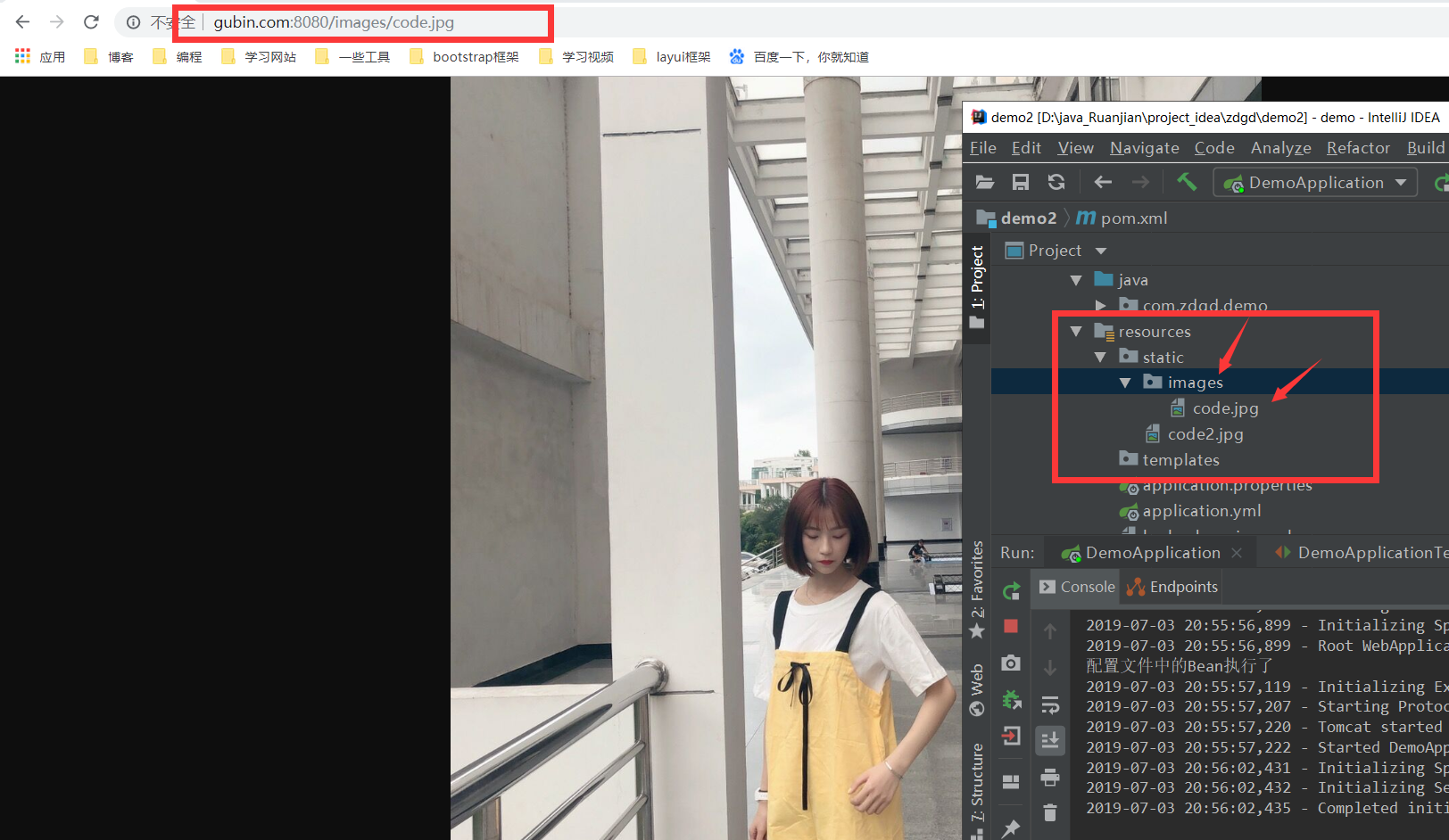
必须在这几个路径下SpringBoot才会扫描到!
"classpath:/META-INF/resources/",
"classpath:/resources/",
"classpath:/static/",
"classpath:/public/"
"/":当前项目的根路径
SpringBoot中的静态资源访问的更多相关文章
- SpringBoot 常用配置 静态资源访问配置/内置tomcat虚拟文件映射路径
Springboot 再模板引擎中引入Js等文件,出现服务器拒绝访问的错误,需要配置过滤器 静态资源访问配置 @Configuration @EnableWebMvc public class Sta ...
- SpringBoot2.X中的静态资源访问失效
今天开始使用SpringBoot写项目,于是先让其能够访问静态资源,但是配置半天也不能访问我的helloWorld页面,原来,在SpringBoot2.x中,一下静态资源路径不生效了. classpa ...
- springboot 静态资源访问,和文件上传 ,以及路径问题
springboot 静态资源访问: 这是springboot 默认的静态资源访问路径 访问顺序依次从前到后(http://localhost:8080/bb.jpg) spring.resourc ...
- IntelliJ IDEA+SpringBoot中静态资源访问路径陷阱:静态资源访问404
IntelliJ IDEA+SpringBoot中静态资源访问路径陷阱:静态资源访问404 .embody{ padding:10px 10px 10px; margin:0 -20px; borde ...
- SpringBoot静态资源访问+拦截器+Thymeleaf模板引擎实现简单登陆
在此记录一下这十几天的学习情况,卡在模板引擎这里已经是四天了. 对Springboot的配置有一个比较深刻的认识,在此和大家分享一下初学者入门Spring Boot的注意事项,如果是初学SpringB ...
- 聊聊、SpringBoot 静态资源访问
SpringBoot 1.X 版本和 SpringBoot 2.X 版本在静态资源访问上有一些区别,如果直接从 1.X 升级到 2.X 肯定是有问题的.这篇文章就来讲讲这方面问题,也是项目中的坑. 先 ...
- springmvc、springboot静态资源访问配置
如何访问项目中的静态资源? 一.springmvc springmvc中访问静态资源,如果DispatcherServlet拦截的为"",那么静态资源的访问也会交给Dispatch ...
- springboot + thymeleaf静态资源访问404
在使用springboot 和thtmeleaf开发时引用静态资源404,静态资源结如下: index.html文件: <!DOCTYPE html> <html xmlns:th= ...
- springboot学习入门简易版四---springboot2.0静态资源访问及整合freemarker视图层
2.4.4 SpringBoot静态资源访问(9) Springboot默认提供静态资源目录位置需放在classpath下,目录名需要符合如下规则 /static /public /resourc ...
随机推荐
- c语言:getch() getchar()
1.getchar();从键盘读取一个字符并输出,该函数的返回值是输入第一个字符的ASCII码:若用户输入的是一连串字符,函数直到用户输入回车时结束,输入的字符连同回车一起存入键盘缓冲区.若程序中有后 ...
- SpringBoot默认首页跳转设置
大家在使用SpringBoot时候会遇到将系统接口入门设置为"/",那么这个就是我们常见的默认首页跳转的设置.解决的方式有两种 第一种方式:controller里添加一个" ...
- Python+Requests+Re(正则)爬取某糗事百科图片(数据分析一)
1.博客目前在学习爬虫课程,使用正则表达式来爬取网页的图片信息 2.下面我们一起来回归下Python中的正则使用方式/方法 3.糗事百科图片爬取源码如下: import requestsimport ...
- python + pytest基本使用方法(参数化)
import pytestimport math#pytest 参数化#'base,exponent,expected'用来定义参数的名称.# 通过数组定义参数时,每一个元组都是一条测试用例使用的测试 ...
- 每天五分钟Go - 指针
什么是指针 一个指向内存地址的变量,称为指针变量,指针是一个特殊的变量,他的值存储的是另一个值的内存地址 指针变量的声明 var var_name *type var_name 是指针变量的名称,ty ...
- C++第四十七篇 -- VS2017带参数启动调试程序
参考链接:https://www.cnblogs.com/kileyi/p/10163269.html 举例:Test_Bluetooth.exe -help Test_Bluetooth.cpp # ...
- PySpider爬取去哪儿攻略数据项目
1 创建项目 点击WEB中的Create创建项目 填入相关项目名和其实爬取URL 创建后进入项目首页 右边 Handler 是pyspider的主类,整个爬虫一个Handler,其中可定义爬虫的爬取. ...
- jvm源码解读--05 常量池 常量项的解析JVM_CONSTANT_Utf8
当index=18的时候JVM_CONSTANT_Utf8 case JVM_CONSTANT_Utf8 : { cfs->guarantee_more(2, CHECK); // utf8_l ...
- 【奇妙的JavaScript】# 1
奇妙的JavaScript 本专题整理了一些JavaScript的怪异行为,大部分都是选择题,题目都是简单的表达式.可以测试你有多了解 JavaScript,拓宽你的认知边界! 该专题计划每周更新1- ...
- div 模拟alert弹出框
--------------信息展示弹出框---------------- <style> .over{background-color: rgba(0, 0, 0, 0.7);displ ...