
PlaceholderTextView
PlaceholderTextView
效果
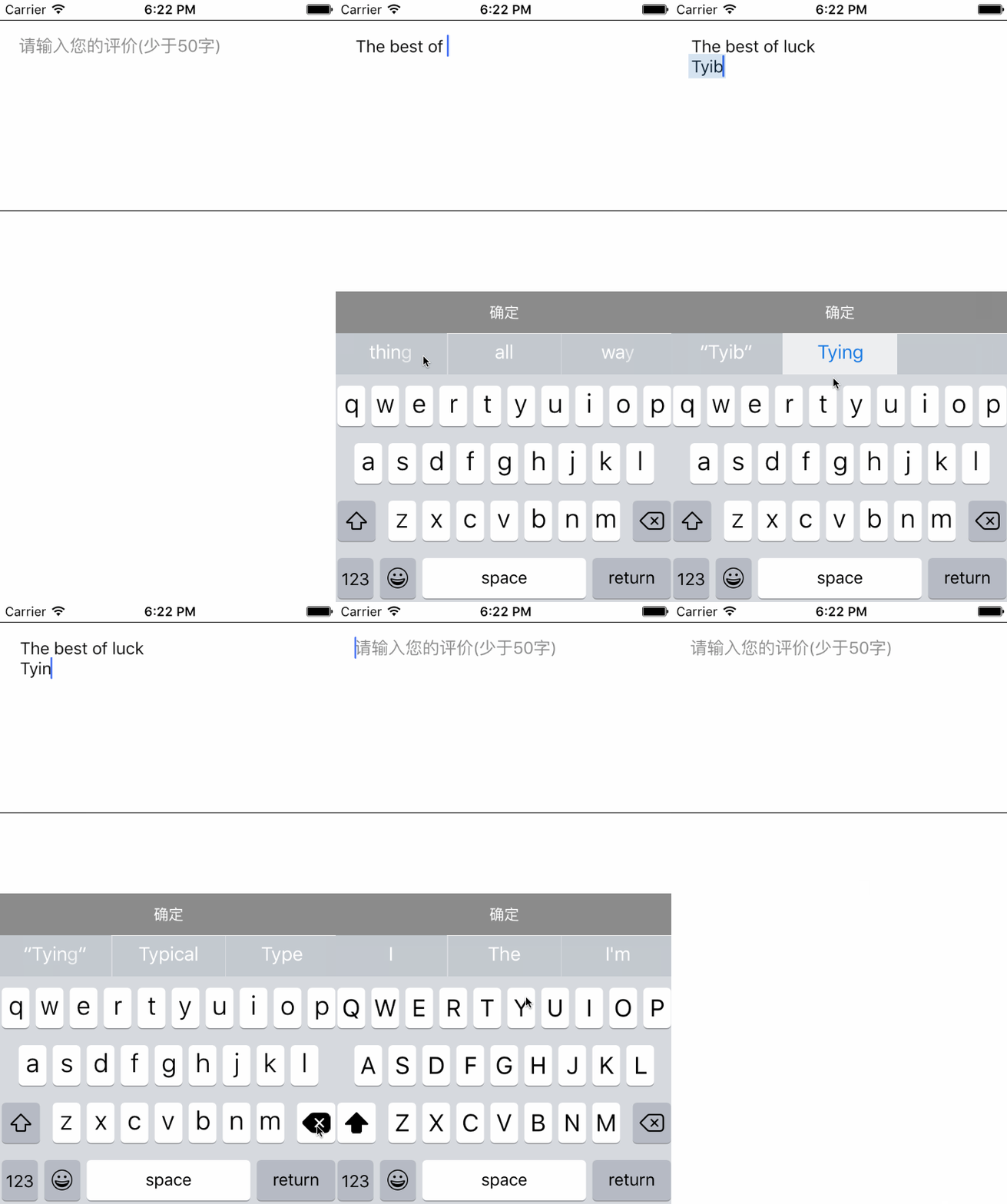
源码
https://github.com/YouXianMing/UI-Component-Collection 的 PlaceholderTextView
//

//  PlaceholderTextView.h

//  PlaceholderTextView

//

//  Created by YouXianMing on 16/7/18.

//  Copyright © 2016年 YouXianMing. All rights reserved.

//

#import <UIKit/UIKit.h>

@class PlaceholderTextView;

@protocol PlaceholderTextViewDelegate <NSObject>

@optional

/**

 *  Asks the delegate if editing should begin in the specified text view.

 *

 *  @param textView PlaceholderTextView's object.

 *

 *  @return YEStrue if an editing session should be initiated; otherwise, NOfalse to disallow editing.

 */

- (BOOL)placeholderTextViewShouldBeginEditing:(PlaceholderTextView *)textView;

/**

 *  Asks the delegate if editing should stop in the specified text view.

 *

 *  @param textView PlaceholderTextView's object.

 *

 *  @return YEStrue if editing should stop; otherwise, NOfalse if the editing session should continue

 */

- (BOOL)placeholderTextViewShouldEndEditing:(PlaceholderTextView *)textView;

/**

 *  Tells the delegate that editing of the specified text view has begun.

 *

 *  @param textView PlaceholderTextView's object.

 */

- (void)placeholderTextViewDidBeginEditing:(PlaceholderTextView *)textView;

/**

 *  Tells the delegate that editing of the specified text view has ended.

 *

 *  @param textView PlaceholderTextView's object.

 */

- (void)placeholderTextViewDidEndEditing:(PlaceholderTextView *)textView;

/**

 *  Asks the delegate whether the specified text should be replaced in the text view.

 *

 *  @param textView PlaceholderTextView's object.

 *

 *  @return YEStrue if the old text should be replaced by the new text; NOfalse if the replacement operation should be aborted.

 */

- (BOOL)placeholderTextShouldChangeText:(PlaceholderTextView *)textView;

@end

@interface PlaceholderTextView : UIView

/**

 *  PlaceholderTextView's delegate.

 */

@property (nonatomic, weak) id <PlaceholderTextViewDelegate> delegate;

/**

 *  Current string.

 */

@property (nonatomic, strong, readonly) NSString *currentString;

#pragma mark - UITextView related.

/**

 *  The TextView.

 */

@property (nonatomic, strong, readonly) UITextView   *textView;

/**

 *  The textView's containerInset.

 */

@property (nonatomic) UIEdgeInsets  textContainerInset;

#pragma mark - Placeholder related.

/**

 *  Placeholder attributed string.

 */

@property (nonatomic, strong) NSAttributedString *attributedPlaceholder;

/**

 *  PlaceHorderString gap from left.

 */

@property (nonatomic) CGFloat placeHorderLeftEdge;

/**

 *  PlaceHorderString gap from top.

 */

@property (nonatomic) CGFloat placeHorderTopEdge;

#pragma mark - PlaceholderTextView's event.

/**

 * PlaceholderTextView resign first responder.

 */

- (void)placeholderTextViewResignFirstResponder;

/**

 *  PlaceholderTextView become first responder.

 */

- (void)placeholderTextViewbecomeFirstResponder;

@end
//

//  PlaceholderTextView.m

//  PlaceholderTextView

//

//  Created by YouXianMing on 16/7/18.

//  Copyright © 2016年 YouXianMing. All rights reserved.

//

#import "PlaceholderTextView.h"

@interface PlaceholderTextView () <UITextViewDelegate>

@property (nonatomic, strong) UITextField *textField;

@property (nonatomic, strong) UITextView  *textView;

@property (nonatomic, strong) NSString    *currentString;

@end

@implementation PlaceholderTextView

#pragma mark - Frame related method.

- (void)layoutSubviews {

    [super layoutSubviews];

    self.textView.frame = self.bounds;

    [self resetPlaceHorderFrame];

}

- (instancetype)initWithFrame:(CGRect)frame {

    if (self = [super initWithFrame:frame]) {

        self.textField             = [[UITextField alloc] init];

        self.textField.enabled     = NO;

        self.textField.textColor   = [UIColor clearColor];

        [self addSubview:self.textField];

        self.textView                 = [[UITextView alloc] initWithFrame:self.bounds];

        self.textView.delegate        = self;

        self.textView.backgroundColor = [UIColor clearColor];

        self.textView.textColor       = [UIColor grayColor];

        [self addSubview:self.textView];

    }

    return self;

}

#pragma mark - FirstResponder related.

- (void)placeholderTextViewResignFirstResponder {

    [self.textView resignFirstResponder];

}

- (void)placeholderTextViewbecomeFirstResponder {

    [self.textView becomeFirstResponder];

}

#pragma mark - UITextViewDelegate

- (BOOL)textView:(UITextView *)textView shouldChangeTextInRange:(NSRange)range replacementText:(NSString *)text {

    NSString *currentText = [textView.text stringByReplacingCharactersInRange:range withString:text];

    self.textField.text   = currentText;

    self.currentString    = currentText;

    if (self.delegate && [self.delegate respondsToSelector:@selector(placeholderTextShouldChangeText:)]) {

        return [self.delegate placeholderTextShouldChangeText:self];

    } else {

        return YES;

    }

}

- (BOOL)textViewShouldBeginEditing:(UITextView *)textView {

    if (self.delegate && [self.delegate respondsToSelector:@selector(placeholderTextViewShouldBeginEditing:)]) {

        return [self.delegate placeholderTextViewShouldBeginEditing:self];

    } else {

        return YES;

    }

}

- (BOOL)textViewShouldEndEditing:(UITextView *)textView {

    if (self.delegate && [self.delegate respondsToSelector:@selector(placeholderTextViewShouldEndEditing:)]) {

        return [self.delegate placeholderTextViewShouldEndEditing:self];

    } else {

        return YES;

    }

}

- (void)textViewDidBeginEditing:(UITextView *)textView {

    if (self.delegate && [self.delegate respondsToSelector:@selector(placeholderTextViewDidBeginEditing:)]) {

        [self.delegate placeholderTextViewDidBeginEditing:self];

    }

}

- (void)textViewDidEndEditing:(UITextView *)textView {

    if (self.delegate && [self.delegate respondsToSelector:@selector(placeholderTextViewDidEndEditing:)]) {

        [self.delegate placeholderTextViewDidEndEditing:self];

    }

}

#pragma mark - PlaceHorder related

- (void)resetPlaceHorderFrame {

    self.textField.attributedPlaceholder = _attributedPlaceholder;

    [self.textField sizeToFit];

    CGRect newFrame      = self.textField.frame;

    newFrame.origin.x    = _placeHorderLeftEdge;

    newFrame.origin.y    = _placeHorderTopEdge;

    self.textField.frame = newFrame;

}

#pragma mark - Setter & Getter

- (void)setTextContainerInset:(UIEdgeInsets)textContainerInset {

    _textContainerInset          = textContainerInset;

    _textView.textContainerInset = textContainerInset;

}

- (void)setPlaceHorderLeftEdge:(CGFloat)placeHorderLeftEdge {

    _placeHorderLeftEdge = placeHorderLeftEdge;

    [self resetPlaceHorderFrame];

}

- (void)setPlaceHorderTopEdge:(CGFloat)placeHorderTopEdge {

    _placeHorderTopEdge = placeHorderTopEdge;

    [self resetPlaceHorderFrame];

}

- (void)setAttributedPlaceholder:(NSAttributedString *)attributedPlaceholder {

    _attributedPlaceholder = attributedPlaceholder;

    [self resetPlaceHorderFrame];

}

@end
//

//  PlaceholderTextView+ConvenientSetup.h

//  PlaceholderTextView

//

//  Created by YouXianMing on 16/7/18.

//  Copyright © 2016年 YouXianMing. All rights reserved.

//

#import "PlaceholderTextView.h"

@interface PlaceholderTextView (ConvenientSetup)

/**

 *  PlaceholderTextView's placeholderString setup.

 *

 *  @param string   The placeholderString.

 *  @param font     Font.

 *  @param color    Color.

 *  @param leftEdge Gap from left.

 *  @param topEdge  Gap from top.

 */

- (void)placeholderString:(NSString *)string font:(UIFont *)font color:(UIColor *)color leftEdge:(CGFloat)leftEdge topEdge:(CGFloat)topEdge;

/**

 *  PlaceholderTextView's textView setup.

 *

 *  @param font           Font.

 *  @param color          Color.

 *  @param containerInset TextContainerInset.

 */

- (void)textViewFont:(UIFont *)font color:(UIColor *)color containerInset:(UIEdgeInsets)containerInset;

/**

 *  Create the InputAccessoryView with the specified heigh.

 *

 *  @param height The view's height.

 *

 *  @return InputAccessoryView.

 */

- (UIView *)createInputAccessoryViewWithViewHeight:(CGFloat)height;

@end
//

//  PlaceholderTextView+ConvenientSetup.m

//  PlaceholderTextView

//

//  Created by YouXianMing on 16/7/18.

//  Copyright © 2016年 YouXianMing. All rights reserved.

//

#import "PlaceholderTextView+ConvenientSetup.h"

@implementation PlaceholderTextView (ConvenientSetup)

- (void)placeholderString:(NSString *)string font:(UIFont *)font color:(UIColor *)color leftEdge:(CGFloat)leftEdge topEdge:(CGFloat)topEdge {

    NSParameterAssert(string);

    NSParameterAssert(font);

    NSParameterAssert(color);

    NSString                  *placeHorderString = string;

    NSMutableAttributedString *attributeString   = [[NSMutableAttributedString alloc] initWithString:placeHorderString];

    [attributeString addAttribute:NSFontAttributeName value:font range:NSMakeRange(, placeHorderString.length)];

    [attributeString addAttribute:NSForegroundColorAttributeName value:color range:NSMakeRange(, placeHorderString.length)];

    self.placeHorderLeftEdge   = leftEdge;

    self.placeHorderTopEdge    = topEdge;

    self.attributedPlaceholder = attributeString;

}

- (void)textViewFont:(UIFont *)font color:(UIColor *)color containerInset:(UIEdgeInsets)containerInset {

    self.textView.font      = font;

    self.textView.textColor = color;

    self.textContainerInset = containerInset;

}

- (UIView *)createInputAccessoryViewWithViewHeight:(CGFloat)height {

    UIView *inputAccessoryView         = [[UIView alloc] initWithFrame:CGRectMake(, , [UIScreen mainScreen].bounds.size.width, height)];

    inputAccessoryView.backgroundColor = [UIColor clearColor];

    self.textView.inputAccessoryView   = inputAccessoryView;

    return inputAccessoryView;

}

@end
//

//  ViewController.m

//  PlaceholderTextView

//

//  Created by YouXianMing on 16/7/18.

//  Copyright © 2016年 YouXianMing. All rights reserved.

//

#import "ViewController.h"

#import "PlaceholderTextView.h"

#import "PlaceholderTextView+ConvenientSetup.h"

@interface ViewController () <PlaceholderTextViewDelegate> {

    PlaceholderTextView *_textView;

}

@end

@implementation ViewController

- (void)viewDidLoad {

    [super viewDidLoad];

    UIColor *grayColor  = [UIColor grayColor];

    UIColor *textColor  = [[UIColor blackColor] colorWithAlphaComponent:0.95f];

    UIColor *whiteColor = [UIColor whiteColor];

    UIFont  *font_16    = [UIFont systemFontOfSize:.f];

    // Add UITapGestureRecognizer.

    UITapGestureRecognizer *tapGesture = [[UITapGestureRecognizer alloc] initWithTarget:self action:@selector(gestureEvent)];

    [self.view addGestureRecognizer:tapGesture];

    // Create PlaceholderTextView.

    _textView                   = [[PlaceholderTextView alloc] initWithFrame:CGRectMake(, , , )];

    _textView.layer.borderWidth = 0.5f;

    _textView.delegate          = self;

    [self.view addSubview:_textView];

    // Set placeholderString.

    [_textView placeholderString:@"请输入您的评价(少于50字)" font:font_16 color:grayColor leftEdge:.f topEdge:.f];

    // Set textView.

    [_textView textViewFont:font_16 color:textColor containerInset:UIEdgeInsetsMake(.f, .f, .f, .f)];

    // Create inputAccessoryView.

    UIView *inputAccessoryView         = [_textView createInputAccessoryViewWithViewHeight:.f];

    inputAccessoryView.backgroundColor = grayColor;

    // Setup inputAccessoryView.

    UIButton *button       = [[UIButton alloc] initWithFrame:inputAccessoryView.bounds];

    button.titleLabel.font = [UIFont systemFontOfSize:.f];

    [button setTitle:@"确定" forState:UIControlStateNormal];

    [button setTitleColor:whiteColor forState:UIControlStateNormal];

    [button setTitleColor:[whiteColor colorWithAlphaComponent:0.5f] forState:UIControlStateHighlighted];

    [button addTarget:self action:@selector(inputAccessoryViewEvent) forControlEvents:UIControlEventTouchUpInside];

    [inputAccessoryView addSubview:button];

}

#pragma mark - Event related.

- (void)inputAccessoryViewEvent {

    [_textView placeholderTextViewResignFirstResponder];

}

- (void)gestureEvent {

    [self.view endEditing:YES];

}

#pragma mark - PlaceholderTextViewDelegate

- (BOOL)placeholderTextShouldChangeText:(PlaceholderTextView *)textView {

    NSLog(@"--> %@", textView.currentString);

    BOOL result; textView.currentString.length >=  ? (result = NO) : (result = YES);

    return result;

}

- (BOOL)placeholderTextViewShouldBeginEditing:(PlaceholderTextView *)textView {

    NSLog(@"placeholderTextViewShouldBeginEditing");

    return YES;

}

- (BOOL)placeholderTextViewShouldEndEditing:(PlaceholderTextView *)textView {

    NSLog(@"placeholderTextViewShouldEndEditing");

    return YES;

}

- (void)placeholderTextViewDidBeginEditing:(PlaceholderTextView *)textView {

    NSLog(@"placeholderTextViewDidBeginEditing");

}

- (void)placeholderTextViewDidEndEditing:(PlaceholderTextView *)textView {

    NSLog(@"placeholderTextViewDidEndEditing");

}

#pragma mark - System method.

- (void)viewDidAppear:(BOOL)animated {

    [super viewDidAppear:animated];

    [_textView placeholderTextViewbecomeFirstResponder];

}

@end
PlaceholderTextView的更多相关文章
- 简易封装一个带有占位文字的TextView
在实际iOS应用开发中我们经常会用到类似于下图所示的界面,即带有占位文字的文本框:
- 设计带有placeHolder的TextView
设计带有placeHolder的TextView 效果: 源码: PlaceholderTextView.h 与 PlaceholderTextView.m // // PlaceholderText ...
- UINavigationbar跳转黑色
bug效果:导航栏过渡出现黑色
随机推荐
- SOA 解惑
SOA 解惑 SOA 不是一种技术,它是一种设计方法.最近一段时间我碰到了很多关于 SOA 的具有误导性的文章.尤其是,有些人混淆了 SOA 和诸如 BPM.ESB 以及复合事件处理 (CEP) 之类 ...
- 【论文阅读】Learning Spatial Regularization with Image-level Supervisions for Multi-label Image Classification
转载请注明出处:https://www.cnblogs.com/White-xzx/ 原文地址:https://arxiv.org/abs/1702.05891 Caffe-code:https:// ...
- react 的JSX语法需要注意哪些点?
注释方式 ReactDOM.render( <div> {/*JSX 中的注释方式*/} </div>, document.getElementById('root') ) j ...
- JS 解析JSON实现导序
var chartData = [ { "online": '2013-10-23', "new": 0.00, "login": 0.00 ...
- HDU 4348 To the moon(主席树区间修改)
题意 给你一个区间,支持如下操作: 在一段区间内加上一个值,并生成一个历史版本 查询某个版本下一段区间内的和 回到一个历史版本上并舍弃之后的版本 做法 这就是主席树区间修改裸题啦QwQ 上一篇博客我讲 ...
- MVC 6 电商网站开发实战
[原创] ASP.NET 5系列教程 (六): 在 MVC6 中创建 Web API 标签: Web API MVC6 创建web API | 博主:powertoolsteam ASP.NE ...
- 日志收集框架flume的安装及简单使用
flume介绍 Flume是一个分布式.可靠.和高可用的海量日志采集.聚合和传输的系统. Flume可以采集文件,socket数据包等各种形式源数据,又可以将采集到的数据输出到HDFS.hbase.h ...
- 022 StringTokenizer替换掉String的操作
一:说明 1.说明 String的操作特别消耗内存,所以可以考虑优化. 二:程序 1.程序修改 这部分程序属于Mapper端的程序,稍微优化一下. 2.程序 //Mapper public stati ...
- Github如何撤销提交并清除痕迹
1.在命令行工具中进入项目目录 cd /Users/mac.manon/workspace/QuickCodes 2.sudo git reset --hard HEAD~4 根据提示输入本系统登录密 ...
- Ubuntu 18.04及Snap体验——让Linux入门更简单(转))
https://www.linuxidc.com/Linux/2018-06/152993.htm 初次听说过Linux的时候,是大一计算机课时候老师介绍说除了Windows还有Linux.Unix操 ...