
"揭秘CentosChina爬虫项目:掌握Scrapy框架的必备技巧与数据库设计"
Centoschina
项目要求
爬取centoschina_cn的所有问题,包括文章标题和内容
数据库表设计
库表设计:

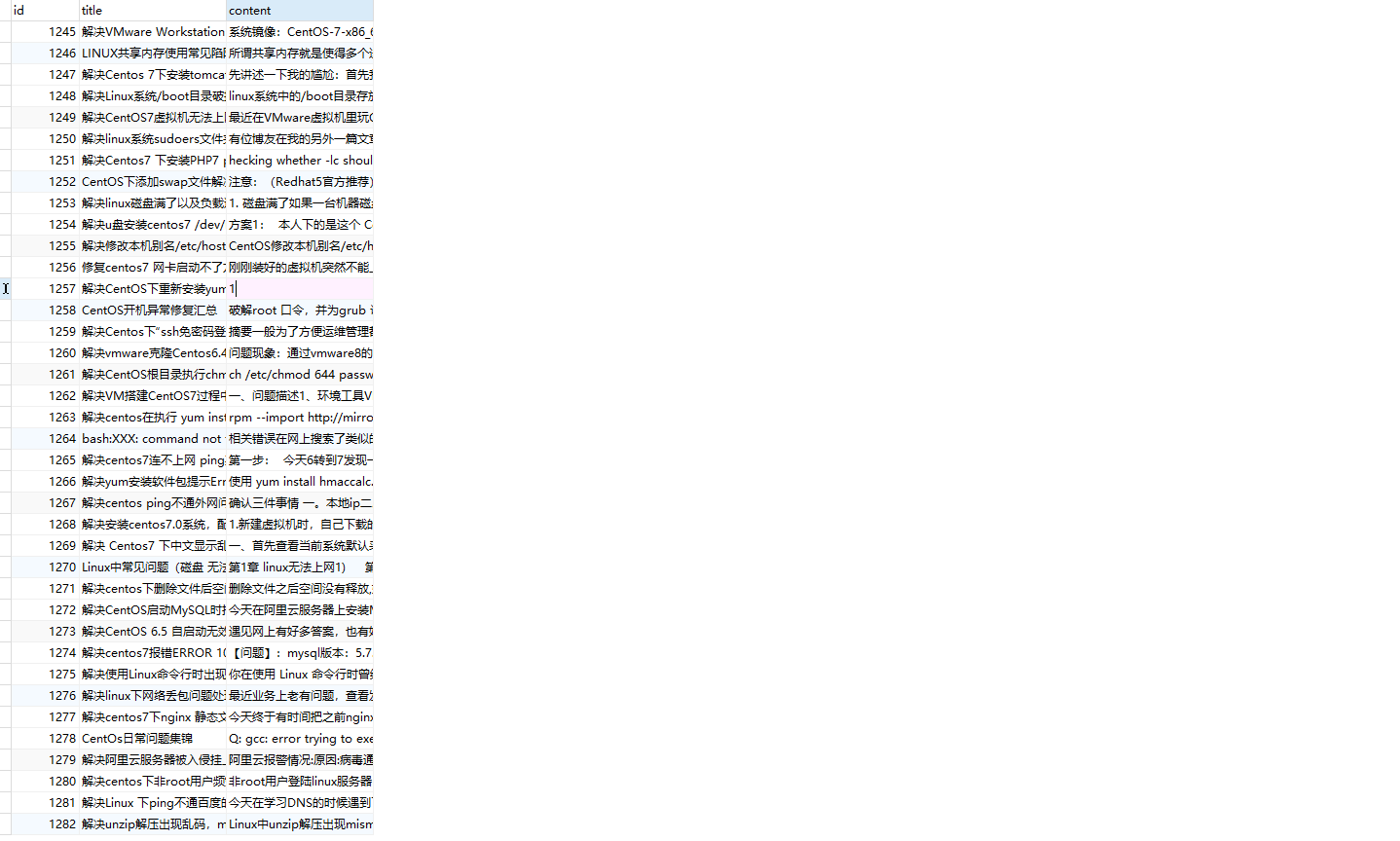
数据展示:
项目亮点
低耦合,高内聚。
爬虫专有settings
custom_settings = custom_settings_for_centoschina_cn
custom_settings_for_centoschina_cn = {

    'MYSQL_USER': 'root',

    'MYSQL_PWD': '123456',

    'MYSQL_DB': 'questions',

}
DownloaderMiddleware使用
class CentoschinaDownloaderMiddleware:

    # Not all methods need to be defined. If a method is not defined,

    # scrapy acts as if the downloader middleware does not modify the

    # passed objects.

    @classmethod

    def from_crawler(cls, crawler):

        # This method is used by Scrapy to create your spiders.

        s = cls()

        crawler.signals.connect(s.spider_opened, signal=signals.spider_opened)

        return s

    # 处理请求

    def process_request(self, request, spider):

        # Called for each request that goes through the downloader

        # middleware.

        # Must either:

        # - return None: continue processing this request 继续执行下一步操作,不处理默认返回None

        # - or return a Response object 直接返回响应, 如scrapy和pyppeteer不需要用下载器中间件访问外网,直接返回响应, pyppeteer有插件,一般和scrapy还能配合,selenium不行,没有插件

        # - or return a Request object 将请求返回到schdular的调度队列中供以后重新访问

        # - or raise IgnoreRequest: process_exception() methods of

        #   installed downloader middleware will be called

        return None

    # 处理响应

    def process_response(self, request, response, spider):

        # Called with the response returned from the downloader.

        # Must either;

        # - return a Response object 返回响应结果

        # - return a Request object 结果不对(判断结果对不对一般判断状态码和内容大小)一般返回request,也是将请求返回到schdular的调度队列中供以后重新访问

        # - or raise IgnoreRequest

        return response

    # 处理异常:如超时错误等

    def process_exception(self, request, exception, spider):

        # Called when a download handler or a process_request()

        # (from other downloader middleware) raises an exception.

        # Must either:

        # - return None: continue processing this exception 继续执行下一步,没有异常

        # - return a Response object: stops process_exception() chain 如果其返回一个 Response 对象,则已安装的中间件链的 process_response() 方法被调用。Scrapy将不会调用任何其他中间件的 process_exception() 方法。

        # - return a Request object: stops process_exception() chain 将请求返回到schdular的调度队列中供以后重新访问

        pass

    def spider_opened(self, spider):

        spider.logger.info("Spider opened: %s" % spider.name)
DownloaderMiddleware中抛弃请求写法
- 适用场景:请求异常,换代理或者换cookie等操作
# from scrapy.exceptions import IgnoreRequest

# raise IgnoreRequest(f'Failed to retrieve {request.url} after {max_retries} retries')
例子:处理下载异常并重试请求
import logging

from scrapy.exceptions import IgnoreRequest

class RetryExceptionMiddleware:

    def __init__(self):

        self.logger = logging.getLogger(__name__)

    def process_exception(self, request, exception, spider):

        # 记录异常信息

        self.logger.warning(f'Exception {exception} occurred while processing {request.url}')

        # 检查是否达到重试次数限制

        max_retries = 3

        retries = request.meta.get('retry_times', 0) + 1

        if retries <= max_retries:

            self.logger.info(f'Retrying {request.url} (retry {retries}/{max_retries})')

            # 增加重试次数

            request.meta['retry_times'] = retries

            return request

        else:

            self.logger.error(f'Failed to retrieve {request.url} after {max_retries} retries')

            raise IgnoreRequest(f'Failed to retrieve {request.url} after {max_retries} retries')
例子:切换代理
import random

class SwitchProxyMiddleware:

    def __init__(self, proxy_list):

        self.proxy_list = proxy_list

        self.logger = logging.getLogger(__name__)

    @classmethod

    def from_crawler(cls, crawler):

        proxy_list = crawler.settings.get('PROXY_LIST')

        return cls(proxy_list)

    def process_exception(self, request, exception, spider):

        self.logger.warning(f'Exception {exception} occurred while processing {request.url}')

        # 切换代理

        proxy = random.choice(self.proxy_list)

        self.logger.info(f'Switching proxy to {proxy}')

        request.meta['proxy'] = proxy

        # 重试请求

        return request
piplines中抛弃item写法
- 适用场景:数据清洗、去重、验证等操作
# from scrapy.exceptions import DropItem

# raise DropItem("Duplicate item found: %s" % item)
保存到文件(通过命令)
from scrapy.cmdline import execute

execute(['scrapy', 'crawl', 'centoschina_cn', '-o', 'questions.csv'])
更多精致内容:


"揭秘CentosChina爬虫项目:掌握Scrapy框架的必备技巧与数据库设计"的更多相关文章
- 第三百三十一节,web爬虫讲解2—Scrapy框架爬虫—Scrapy安装—Scrapy指令
第三百三十一节,web爬虫讲解2—Scrapy框架爬虫—Scrapy安装—Scrapy指令 Scrapy框架安装 1.首先,终端执行命令升级pip: python -m pip install --u ...
- 关于Scrapy爬虫项目运行和调试的小技巧(下篇)
前几天给大家分享了关于Scrapy爬虫项目运行和调试的小技巧上篇,没来得及上车的小伙伴可以戳超链接看一下.今天小编继续沿着上篇的思路往下延伸,给大家分享更为实用的Scrapy项目调试技巧. 三.设置网 ...
- 第三百三十五节,web爬虫讲解2—Scrapy框架爬虫—豆瓣登录与利用打码接口实现自动识别验证码
第三百三十五节,web爬虫讲解2—Scrapy框架爬虫—豆瓣登录与利用打码接口实现自动识别验证码 打码接口文件 # -*- coding: cp936 -*- import sys import os ...
- 第三百三十四节,web爬虫讲解2—Scrapy框架爬虫—Scrapy爬取百度新闻,爬取Ajax动态生成的信息
第三百三十四节,web爬虫讲解2—Scrapy框架爬虫—Scrapy爬取百度新闻,爬取Ajax动态生成的信息 crapy爬取百度新闻,爬取Ajax动态生成的信息,抓取百度新闻首页的新闻rul地址 有多 ...
- 第三百三十三节,web爬虫讲解2—Scrapy框架爬虫—Scrapy模拟浏览器登录—获取Scrapy框架Cookies
第三百三十三节,web爬虫讲解2—Scrapy框架爬虫—Scrapy模拟浏览器登录 模拟浏览器登录 start_requests()方法,可以返回一个请求给爬虫的起始网站,这个返回的请求相当于star ...
- 第三百三十二节,web爬虫讲解2—Scrapy框架爬虫—Scrapy使用
第三百三十二节,web爬虫讲解2—Scrapy框架爬虫—Scrapy使用 xpath表达式 //x 表示向下查找n层指定标签,如://div 表示查找所有div标签 /x 表示向下查找一层指定的标签 ...
- Python爬虫进阶之Scrapy框架安装配置
Python爬虫进阶之Scrapy框架安装配置 初级的爬虫我们利用urllib和urllib2库以及正则表达式就可以完成了,不过还有更加强大的工具,爬虫框架Scrapy,这安装过程也是煞费苦心哪,在此 ...
- python爬虫入门(六) Scrapy框架之原理介绍
Scrapy框架 Scrapy简介 Scrapy是用纯Python实现一个为了爬取网站数据.提取结构性数据而编写的应用框架,用途非常广泛. 框架的力量,用户只需要定制开发几个模块就可以轻松的实现一个爬 ...
- 爬虫基础(五)-----scrapy框架简介
---------------------------------------------------摆脱穷人思维 <五> :拓展自己的视野,适当做一些眼前''无用''的事情,防止进入只关 ...
- 爬虫(二)之scrapy框架
01-scrapy介绍 02-项目的目录结构: scrapy.cfg 项目的主配置信息.(真正爬虫相关的配置信息在settings.py 文件中) items.py 设置数据存储模板,用于结构化数据, ...
随机推荐
- RestApi请求地址支持多路径访问
RestApi请求地址支持多路径访问 @RestController@RequestMapping("/test") //单路径@RequestMapping(path = {&q ...
- 记一次 Edge 及谷歌 Chrome 浏览器兼容性冲突的解决
目录 记一次 Edge 及谷歌 Chrome 浏览器兼容性冲突的解决 浏览器兼容性冲突症状 解决方法 1. 把本机和远程的 8235 和 8237 端口屏蔽,包括 TCP 和 UDP 端口 2. 在 ...
- 我又学会了使用Range实现网络文件下载的断点续传
目录 前言 1.Range请求头 1.1.概述 1.2.使用限制 1.3.范围请求 1.4.预防资源变更 2.断点续传下载实现 2.1.流程设计 2.2.代码实现 2.3.运行结果 3.RandomA ...
- Css实现浏览滚动条效果
Css实现浏览滚动条效果 前言 也是有大半个月没有更新文章了,大部分时间都在玩,然后就是入职的事.今天就更新一个小知识,刷抖音的时候看到的,感觉还不错. 属性介绍 关键属性animation-time ...
- rsync 的使用
背景 原文地址:Rsync参数说明及使用文档(给我自己看的) 一.前言 最近发现rsync挺好用的--不过参数有点多,所以这儿写一篇给自己以后要用的时候做个参考. 二.参数说明 这儿全是我翻资料连蒙带 ...
- Legacy (线段树优化建图)
题目链接:Legacy - 洛谷 | 计算机科学教育新生态 (luogu.com.cn) 题解: 考虑题目中一个点向区间连边,如真的对区间中的每一点分别连边后跑最短路,时间空间都要炸. 因为是一个点向 ...
- P3749 题解
既然是求最大值而且有收益有代价,所以考虑建立一个最大权封闭子图模型. 收益 正的美味值是收益,所以假若 \(d_{i,j} \geq 0\) 则建边 \((s,pos_{i,j},d_{i,j})\) ...
- documen.write 和 innerHTML 的区别?
document.write只能重绘整个页面,innerHTML可以重绘页面的一部分. 1. ducument.write使用举例html文档: <!doctype html> <h ...
- SpringBoot 解决跨域问题
今天遇到一个很神奇的问题,之前写的项目,后端跨域都处理好的,按部就班使用原来的方式,前后端都开发完之后,部署本地后,跨域没起效,一脸懵逼,然后使用公司另外一个同事的跨域解决方案,具体我也没深入研究到底 ...
- springboot异常解决
问题解决 问题解释 出现这个问题表示拦截器或控制器的某个请求处理方法返回了一个与请求路径相同的视图名称,导致视图解析器循环地尝试解析并渲染这个视图,从而引发循环视图路径的异常. 问题分析 原先的jav ...