
React 从入门到进阶之路(七)
之前的文章我们介绍了 React 表单详解 约束性和非约束性组件 input text checkbox radio select textarea 以及获取表单的内容。接下来我们将介绍 React中的组件、父子组件、React props父组件给子组件传值、子组件给父组件传值、父组件中通过refs获取子组件属性和方法。
之前我们已经根据 create-react-app 模块创建了一个 React 项目,并定义 App.js 为根组件,即父组件,Home.js 为子组件。我们看一下两个组件的代码:
App.js
 import React, {Component} from 'react';

 import Home from './components/Home';

 class App extends Component {

     constructor(props) {

         super(props);

         this.state = {

             title: "I am father"

         }

     }

     fatherFunction = () => {

         console.log("I am fatherFunction")

     }

     fatherSelf = () => {

         console.log("I am fatherSelf")

     }

     getChildData = (name) => {

         console.log(name)

     }

     render() {

         return (

             <div className="App">

                 <Home

                     title={this.state.title}

                     fatherFunction={this.fatherFunction}

                     father={this}

                 />

             </div>

         );

     }

 }

 export default App;
Home.js
 import React, {Component} from 'react';

 class Home extends Component {

     constructor(props) {

         super(props);

         this.state = {

             name: "zhangsan",

         }

     }

     render() {

         return (

             <div>

                 <p>Hello {this.state.name}</p>

                 {/*接收父组件的传值*/}

                 {this.props.title}

                 <br/><br/>

                 {/*接收父组件的 fatherFunction 方法*/}

                 <button onClick={this.props.fatherFunction}>调用父组件的fatherFunction方法</button>

                 <br/><br/>

                 {/*调用父组件的fatherSelf方法*/}

                 <button onClick={this.props.father.fatherSelf}>调用父组件的fatherSelf方法</button>

                 <br/><br/>

                 {/*子组件给父组件传值*/}

                 <button onClick={this.props.father.getChildData.bind(this, this.state.name)}>子组件给父组件传值</button>

             </div>

         );

     }

 }

 export default Home;
我们在 App.js 的 render 中 插入 <Home /> 标签,即代表将子组件 Home 挂载到了父组件 App 中。
在父组件 App 标签 <Home /> 标签中传给子组件 Home:
值:
title={this.state.title},
方法:
fatherFunction={this.fatherFunction},
整个父组件 App:
father={this}
在子组件 Home 中:
通过 {this.props.title} 来获取父组件 App 的传值。
在子组件 Home 的 button 的 onClick 事件中绑定 {this.props.fatherFunction} 来获取父组件 App 传过来的方法。
在子组件 Home 的 button 的 onClick 事件中绑定 {this.props.father.fatherSelf} 来获取父组件 App 传过来整个 App 组件中的 fatherSelf 方法,在这里我们可以看出我们并没有向子组件中传递 fatherSelf 方法,但是我们将整个父组件传递给了子组件,所以子组件中能够调用父组件的所有方法和传值。
由于我们将整个父组件都传递给了子组件,在子组件中我们可以调用父组件的方法并将子组件的值传给父组件来完成父子组件间的通信。我们在子组件中通过 button 的 onClick 事件调用父组件的 getChildData 方法将 name 值传给父组件。onClick = {this.props.father.getChildData.bind(this, this.state.name)}。然后我们在父组件 App 中就可以获取到子组件 Home 传递过来的 name 值了。
运行结果如下:
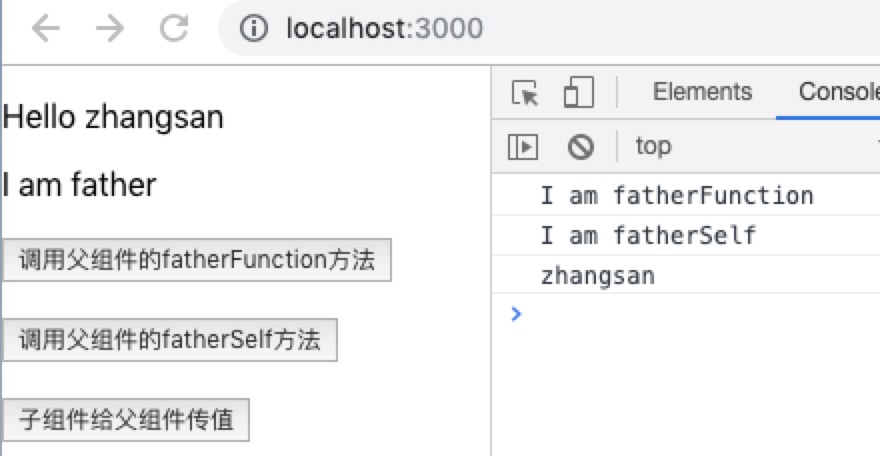
以上就是父子组件间的通信,当然子组件向父组件传值和方法还可以通过 ref 和 refs 来实现。如下:
App.js
 import React, {Component} from 'react';

 import Home from './components/Home';

 class App extends Component {

     getChildData = () => {

         console.log(this.refs.child.state.name);

         this.refs.child.childFunction();

     }

     render() {

         return (

             <div className="App">

                 <Home ref="child"/>

                 <button onClick={this.getChildData}>获取子组件的传值和方法</button>

             </div>

         );

     }

 }

 export default App;
Home.js
import React, {Component} from 'react';

class Home extends Component {

    constructor(props) {

        super(props);

        this.state = {

            name: "zhangsan",

        }

    }

    childFunction = () => {

        console.log("I am child")

    }

    render() {

        return (

            <div>

                <p>Hello {this.state.name}</p>

            </div>

        );

    }

}

export default Home;
我们在父组件 App 中挂载子组件 Home,并在标签<Home /> 中插入 ref="child",意思是将子组件 Home 通过 ref 传过来。然后在父组件 App 中的 button 的 onClick 事件中定义 getChildData 方法,在该方法里可以通过 this.refs.child.state.name 来获取子组件 Home 的 name 值,通过 this.refs.child.childFunction() 来调用子组件 Home 的 childFunction 方法。
最后运行结果如下:

React 从入门到进阶之路(七)的更多相关文章
- React 从入门到进阶之路(四)
之前的文章我们介绍了 React 绑定属性( 绑定class 绑定style).引入图片 循环数组渲染数据.接下来我们将介绍 React 事件,方法, React定义方法的几种方式 获取数据 改 ...
- React 从入门到进阶之路(三)
之前的文章我们介绍了 React 创建组件.JSX 语法.绑定数据和绑定对象.接下来我们将介绍 React 绑定属性( 绑定class 绑定style).引入图片 循环数组渲染数据. 上一篇中我们 ...
- React 从入门到进阶之路(五)
之前的文章我们介绍了 React 事件,方法, React定义方法的几种方式 获取数据 改变数据 执行方法传值.接下来我们将介绍 React 表单事件 键盘事件 事件对象以及 React中 的 re ...
- React 从入门到进阶之路(六)
之前的文章我们介绍了 React 表单事件 键盘事件 事件对象以及 React中 的 ref 获取 dom 节点 .双向数据绑定.接下来我们将介绍 React 表单详解 约束性和非约束性组件 inpu ...
- React 从入门到进阶之路(八)
之前的文章我们介绍了 React中的组件.父子组件.React props父组件给子组件传值.子组件给父组件传值.父组件中通过refs获取子组件属性和方法.接下来我们将介绍 React propTyp ...
- React 从入门到进阶之路(九)
之前的文章我们介绍了 React propTypes defaultProps.接下来我们将介绍 React 生命周期函数. 之前我们已经根据 create-react-app 模块创建了一个 Re ...
- React 从入门到进阶之路(二)
在之前的文章中我们介绍了 React 开发的环境搭建及目录介绍和整理,本篇文章将介绍 React 创建组件.JSX 语法.绑定数据和绑定对象. 之前我们已经将项目运行了起来,我们再来看一下目录结构: ...
- React 从入门到进阶之路(一)
在开始 React 学习之前我们先进入官网 https://react.docschina.org/ 看看官方对 React 的解释:React 是用于构建用户界面的JavaScript 库.我们只需 ...
- Python 爬虫从入门到进阶之路(七)
在之前的文章中我们一直用到的库是 urllib.request,该库已经包含了平常我们使用的大多数功能,但是它的 API 使用起来让人感觉不太好,而 Requests 自称 “HTTP for Hum ...
随机推荐
- 谈谈加载(Loading)的那点事
谈谈加载(Loading)的那点事 2013/10/12 | 分类: 设计 | 0 条评论 | 标签: 交互设计, 加载 分享到:33 原文出处: 搜狐焦点 对于加载(loading),想必大家都不陌 ...
- EasyRTMP实现的一套简单、高效、易用的全平台(Windows/Linux/ARM/Android/iOS)RTMP直播推送库
本文转自EasyDarwin开源团队成员Kim的博客:http://blog.csdn.net/jinlong0603/article/details/52938980 EasyRTMP介绍 Easy ...
- exp/imp三种模式——完全、用户、表
ORACLE数据库有两类备份方法.第一类为物理备份,该方法实现数据库的完整恢复,但数据库必须运行在归挡模式下(业务数据库在非归挡模式下运行),且需要极大的外部存储设备,例如磁带库:第二类备份方式为逻辑 ...
- keybd_event、SendInput笔记
void keybd_event(BYTE bVk, BYTE bScan, DWORD dwFlags, ULONG_PTR dwExtraInfo); bVk:虚拟键码 bScan:键的硬件扫描码 ...
- 将css 中的16进制颜色, 转化为 rgb格式
对dojo/_base/Color模块的注解. 源地址 https://github.com/robinxiong/dojo/blob/master/_base/Color.js function f ...
- 解决shell脚本“syntax error near unexpected token `fi'”的问题。
执行shell脚本的时候,提示如下错误: 查询资料后发现: 执行: vi finddir.sh 然后,输入 :set ff 结果是: 解决方案就是,修改为unix: :set ff=unix 执行保存 ...
- 《打造Facebook》
王淮的<打造Facebook>一书不厚,花半天时间轻松读完.书中没有大段的说教,只有近乎流水的陈述.正如作者所说,打造Facebook这本书由巴克伯格来写再合适不过.可惜他至少在近几年内没 ...
- 录音-树莓派USB摄像头话筒
实测可用: sudo arecord --duration=10 --device=plughw:1,0 --format=cd aaa.wav sudo arecord --duration=10 ...
- 对于URL中文和特殊字符的处理方法
1.中文的处理方法 NSString* string1 = @"https://www.cloudsafe.com/文件夹"; NSString* string2 = [strin ...
- HTML标题和段落
HTML标题 通过<h1> - <h6> 等标签进行定义 <h1>一标题</h1> <h2>二标题</h2> <h3> ...