
【Spring Boot学习之八】发布打包
环境
eclipse 4.7
jdk 1.8
Spring Boot 1.5.2
一、打jar类型
1、指定主程序入口,否则运行报错:没有主清单属性
pom.xml:
<build>

        <plugins>

            <plugin>

                <groupId>org.apache.maven.plugins</groupId>

                <artifactId>maven-compiler-plugin</artifactId>

                <version>3.1</version>

                <configuration>

                    <source>1.8</source>

                    <target>1.8</target>

                </configuration>

            </plugin>

            <plugin>

                <groupId>org.springframework.boot</groupId>

                <artifactId>spring-boot-maven-plugin</artifactId>

                <configuration>

                    <maimClass>com.wjy.APP</maimClass>

                </configuration>

                <executions>

                    <execution>

                        <goals>

                            <goal>repackage</goal>

                        </goals>

                    </execution>

                </executions>

            </plugin>

        </plugins>

    </build>
2、打包
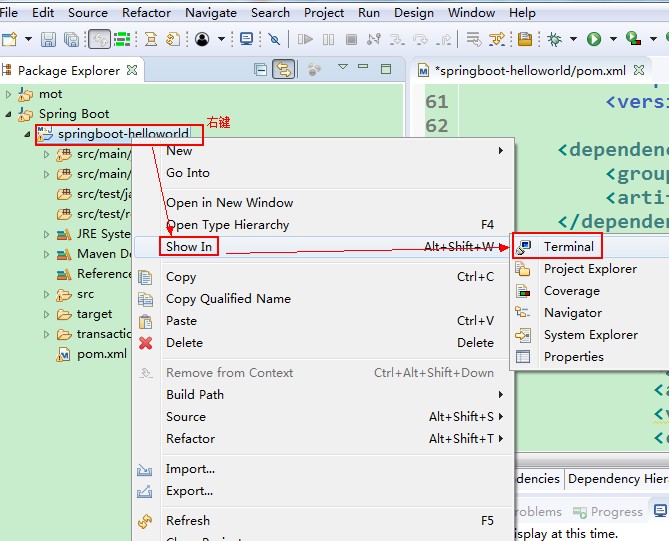
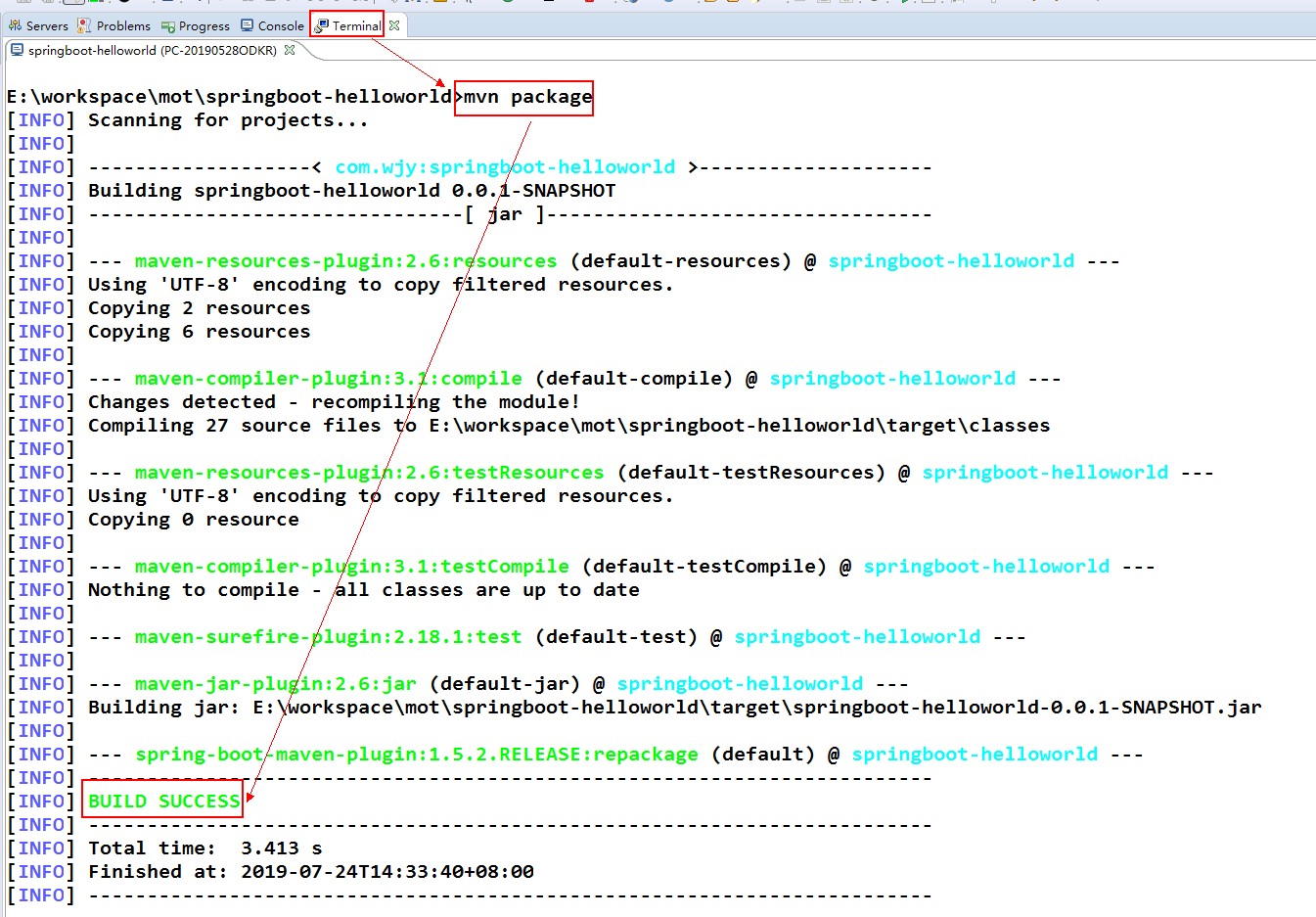
2、运行
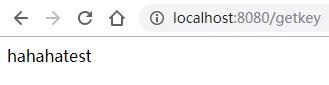
java -jar springboot-helloworld-0.0.1-SNAPSHOT.jar

二、打war类型
如果要使打出来的war包可以使用命令 java -jar运行,需要将静态文件(html/jsp)一并打入可执行文件
1、pom.xml
这是一个整合jsp的web应用
<project xmlns="http://maven.apache.org/POM/4.0.0"

    xmlns:xsi="http://www.w3.org/2001/XMLSchema-instance"

    xsi:schemaLocation="http://maven.apache.org/POM/4.0.0 http://maven.apache.org/xsd/maven-4.0.0.xsd">

    <modelVersion>4.0.0</modelVersion>

    <groupId>com.wjy</groupId>

    <artifactId>spring-boot-jsp</artifactId>

    <version>0.0.1-SNAPSHOT</version>

    <packaging>war</packaging>

    <parent>

        <groupId>org.springframework.boot</groupId>

        <artifactId>spring-boot-starter-parent</artifactId>

        <version>1.3.3.RELEASE</version>

    </parent>

    <dependencies>

        <!-- SpringBoot 核心组件 -->

        <dependency>

            <groupId>org.springframework.boot</groupId>

            <artifactId>spring-boot-starter-web</artifactId>

        </dependency>

        <dependency>

            <groupId>org.springframework.boot</groupId>

            <artifactId>spring-boot-starter-tomcat</artifactId>

        </dependency>

        <dependency>

            <groupId>org.apache.tomcat.embed</groupId>

            <artifactId>tomcat-embed-jasper</artifactId>

        </dependency>

        <!-- 强制添加依赖 否则可能在解析JSP报错:No Java compiler available -->

        <dependency>

            <groupId>org.eclipse.jdt.core.compiler</groupId>

            <artifactId>ecj</artifactId>

            <version>4.6.1</version>

            <scope>provided</scope>

        </dependency>

    </dependencies>

    <build>

        <resources>

            <resource>

                <!--注意必须要放在此目录下才能被访问到 -->

                <directory>${basedir}/src/main/webapp</directory>

                <targetPath>META-INF/resources</targetPath>

                <includes>

                    <include>**/**</include>

                </includes>

            </resource>

            <resource>

                <directory>${basedir}/src/main/resources</directory>

                <includes>

                    <include>**/**</include>

                </includes>

            </resource>

        </resources>

        <plugins>

            <plugin>

                <groupId>org.apache.maven.plugins</groupId>

                <artifactId>maven-compiler-plugin</artifactId>

                <version>3.1</version>

                <configuration>

                    <source>1.8</source>

                    <target>1.8</target>

                </configuration>

            </plugin>

            <plugin>

                <groupId>org.springframework.boot</groupId>

                <artifactId>spring-boot-maven-plugin</artifactId>

                <executions>

                    <execution>

                        <goals>

                            <goal>repackage</goal>

                        </goals>

                    </execution>

                </executions>

            </plugin>

        </plugins>

    </build>

</project>
2、打包
mvn package
3、运行
java -jar spring-boot-jsp-0.0.1-SNAPSHOT.war
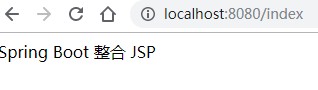
三、Spring Boot web应用打成WAR包部署到外部TOMCAT
1、pom.xml
(1)将打包方式修改为war
<packaging>war</packaging>
(2)移除tomcat依赖或者将tomcat依赖scope改为provide
<dependency>

  <groupId>org.springframework.boot</groupId>

    <artifactId>spring-boot-starter-web</artifactId>

    <!-- 移除嵌入式tomcat插件 -->

    <exclusions>

      <exclusion>

        <groupId>org.springframework.boot</groupId>

        <artifactId>spring-boot-starter-tomcat</artifactId>

      </exclusion>

    </exclusions>

</dependency>
或者
<dependency>

  <groupId>org.springframework.boot</groupId>

  <artifactId>spring-boot-starter-tomcat</artifactId>

  <scope>provided</scope>

</dependency>
2、继承SpringBootServletInitializer
继承org.springframework.boot.web.servlet.support.SpringBootServletInitializer,实现configure方法:
为什么继承该类,SpringBootServletInitializer就是原有的web.xml文件的替代。
(1)方式一,启动类继承SpringBootServletInitializer实现configure:
@SpringBootApplication

public class Application extends SpringBootServletInitializer {

    public static void main(String[] args) {

        SpringApplication.run(Application.class, args);

    }

    @Override

    protected SpringApplicationBuilder configure(SpringApplicationBuilder builder) {

        return builder.sources(Application.class);

    }

}
(2)方式二,新增加一个类继承SpringBootServletInitializer实现configure:
public class ServletInitializer extends SpringBootServletInitializer {

    @Override

    protected SpringApplicationBuilder configure(SpringApplicationBuilder builder) {

        //此处的Application.class为带有@SpringBootApplication注解的启动类

        return builder.sources(Application.class);

    }

}
3、注意事项:
(1)使用外部Tomcat部署访问的时候,application.properties(或者application.yml)中配置的
server.port=
server.servlet.context-path=
将失效;
(2)为了防止应用上下文所导致的项目访问资源加载不到的问题,建议pom.xml文件中<build></build>标签下添加<finalName></finalName>标签
<build>

  <finalName>${project.artifactId}</finalName>

</build>
(3)spring boot只支持tomcat 8.5 以上版本,如果外部tomcat版本过低,需要在pom.xml里指定低版本的tomcat
<properties>

    <tomcat.version>7.0.47</tomcat.version>

</properties>
4、示例:
SpringBoot整合jsp web应用使用外置容器运行示例:
(1)pom.xml
<project xmlns="http://maven.apache.org/POM/4.0.0"

    xmlns:xsi="http://www.w3.org/2001/XMLSchema-instance"

    xsi:schemaLocation="http://maven.apache.org/POM/4.0.0 http://maven.apache.org/xsd/maven-4.0.0.xsd">

    <modelVersion>4.0.0</modelVersion>

    <groupId>com.wjy</groupId>

    <artifactId>spring-boot-jsp</artifactId>

    <version>0.0.1-SNAPSHOT</version>

    <packaging>war</packaging>

    <parent>

        <groupId>org.springframework.boot</groupId>

        <artifactId>spring-boot-starter-parent</artifactId>

        <version>1.3.3.RELEASE</version>

    </parent>

    <dependencies>

        <!-- SpringBoot 核心组件 -->

        <dependency>

            <groupId>org.springframework.boot</groupId>

            <artifactId>spring-boot-starter-web</artifactId>

        </dependency>

        <dependency>

            <groupId>org.springframework.boot</groupId>

            <artifactId>spring-boot-starter-tomcat</artifactId>

            <scope>provided</scope>

        </dependency>

        <dependency>

            <groupId>org.apache.tomcat.embed</groupId>

            <artifactId>tomcat-embed-jasper</artifactId>

        </dependency>

        <!-- 强制添加依赖 否则可能在解析JSP报错:No Java compiler available -->

        <dependency>

            <groupId>org.eclipse.jdt.core.compiler</groupId>

            <artifactId>ecj</artifactId>

            <version>4.6.1</version>

            <scope>provided</scope>

        </dependency>

    </dependencies>

    <build>

        <plugins>

            <plugin>

                <groupId>org.apache.maven.plugins</groupId>

                <artifactId>maven-compiler-plugin</artifactId>

                <version>3.1</version>

                <configuration>

                    <source>1.8</source>

                    <target>1.8</target>

                </configuration>

            </plugin>

        </plugins>

        <finalName>${project.artifactId}</finalName>

    </build>

</project>
(2)Controller
package com.wjy.controller;

import org.springframework.stereotype.Controller;

import org.springframework.web.bind.annotation.RequestMapping;

@Controller

public class IndexController {

    @RequestMapping("/index")

    public String index() {

        return "index";

    }

}
(3)jsp
<%@ page language="java" contentType="text/html; UTF-8" pageEncoding="UTF-8"%>

<!DOCTYPE html PUBLIC "-//W3C//DTD HTML 4.01 Transitional//EN" "http://www.w3.org/TR/html4/loose.dtd">

<html>

<head>

<meta http-equiv="Content-Type" content="text/html; charset=UTF-8">

<title>Insert title here</title>

</head>

<body>

Spring Boot 整合 JSP

</body>

</html>
(4)启动类
package com.wjy;

import org.springframework.boot.SpringApplication;

import org.springframework.boot.autoconfigure.SpringBootApplication;

import org.springframework.boot.builder.SpringApplicationBuilder;

import org.springframework.boot.context.web.SpringBootServletInitializer;

@SpringBootApplication

public class App extends SpringBootServletInitializer{

    public static void main(String[] args) {

        SpringApplication.run(App.class, args);

    }

    @Override

    protected SpringApplicationBuilder configure(SpringApplicationBuilder builder) {

        return builder.sources(App.class);

    }

}
打包、部署到tomcat ,并启动tomcat:
测试验证:http://localhost:8080/spring-boot-jsp/index

参考:
SPRINGBOOT-把WEB项目打成WAR包部署到外部TOMCAT
【Spring Boot学习之八】发布打包的更多相关文章
- Spring Boot 学习方法论-如何正确的入门 Spring Boot
想要入门 Spring Boot,那么什么样的教程是符合初学者学习的(没有太多的Java基础但有一些程序基础或者软件编程知识). 这恰好能够勾出很多问题,比如是文章图文教程适合还是视频教程适合零基础初 ...
- Spring boot学习1 构建微服务:Spring boot 入门篇
Spring boot学习1 构建微服务:Spring boot 入门篇 Spring Boot是由Pivotal团队提供的全新框架,其设计目的是用来简化新Spring应用的初始搭建以及开发过程.该框 ...
- 转载:spring boot学习
Spring Boot学习 Spring Boot是为了简化Spring应用的创建.运行.调试.部署等而出现的,使用它可以做到专注于Spring应用的开发,而无需过多关注XML的配置. 简单来说,它提 ...
- Spring Boot 学习1-创建Spring Boot应用
如果使用Maven, 确保先安装好Maven再继续. 创建POM文件 在这里有两种方式: 继承Spring Boot parent的pom. 不继承. 继承Spring Boot pom 1 2 3 ...
- spring boot项目能启动打包失败
如题,项目本地可以正常启动.但是用 mvn clean package打包就失败! 事件原因如下: 一.pom.xml少packing元素 <groupId>com.sanyi</g ...
- Spring Boot学习大全(入门)
Spring Boot学习(入门) 1.了解Spring boot Spring boot的官网(https://spring.io),我们需要的一些jar包,配置文件都可以在下载.添置书签后,我自己 ...
- Spring Boot学习记录(二)--thymeleaf模板 - CSDN博客
==他的博客应该不错,没有细看 Spring Boot学习记录(二)--thymeleaf模板 - CSDN博客 http://blog.csdn.net/u012706811/article/det ...
- spring boot 学习资料
spring boot 学习资料: 学习资料 网址 Spring Boot Cookbook-极客学院 http://wiki.jikexueyuan.com/project/spring-boot- ...
- Spring Boot学习笔记2——基本使用之最佳实践[z]
前言 在上一篇文章Spring Boot 学习笔记1——初体验之3分钟启动你的Web应用已经对Spring Boot的基本体系与基本使用进行了学习,本文主要目的是更加进一步的来说明对于Spring B ...
随机推荐
- 学习:费马小定理 & 欧拉定理
费马小定理 描述 若\(p\)为素数,\(a\in Z\),则有\(a^p\equiv a\pmod p\).如果\(p\nmid a\),则有\(a^{p-1}\equiv 1\pmod p\). ...
- 【大数据】虚拟机网络配置-CentOS
cd /etc/sysconfig/network-scripts/ vi ifcfg-enoXXXX vi /etc/hostname
- 安装GO
1.中文社区 下载地址 https://studygolang.com/dl 选择自己操作系统版本 2.找到适合你系统的版本下载,本人下载的是windows版本.也可以下载Source自己更 ...
- 异步编程实现技术:回调、promise、协程序?
异步编程实现技术:回调.promise.协程序?
- Codeforces Round #558 (Div. 2)-Cat Party (Hard Edition)-(前缀和 + 模拟)
http://codeforces.com/problemset/problem/1163/B2 题意:有n天,每天有一个颜色,截取前x天,随便抽掉一天,使剩下的各个颜色出现的次数相等. 解题,也可以 ...
- SpringBoot整合ActiveMQ发送邮件
虽然ActiveMQ以被其他MQ所替代,但仍有学习的意义,本文采用邮件发送的例子展示ActiveMQ 1. 生产者1.1 引入maven依赖1.2 application.yml配置1.3 创建配置类 ...
- [教程]Ubuntu16.04安装texstudio
[教程]Ubuntu16.04安装texstudio step 1 首先要下载texlive. 不会的戳这里 然后直接终端命令 sudo apt-get install texstudio step ...
- MongoDB 查看当前配置
MongoDB Enterprise > db.adminCommand({getParameter:"*"}) MongoDB Enterprise > db._ad ...
- Linux/Windows 配置config 使用ssh连接
Linux 产看本地是否有ssh 公私钥 1 cd ~/.ssh 2 ls -a 有的话继续(没有 ssh-keygen 生成) 将公钥内容复制到要连接的服务器用户下 方法一 ssh-copy-id ...
- 使用haproxy 2.0 prometheus metrics 监控系统状态
haproxy 2.0 已经发布一段时间了,提供内部直接暴露的prometheus metrics 很方便 ,可以快速的监控系统的状态 以下是一个简单的demo 环境准备 docker-compose ...