
spring_08aop原理及案例
*参考优质文档: https://www.cnblogs.com/xrq730/p/4919025.html
一.简介
aop(Aspect Oriented Programming)是面向切面编程,即将一个方法插入到n个对象方法的指定位置
aop分为五种织入通知方式:前置,后置,环绕,异常,引入(只需要修改配置文件)
前置:在方法前执行
后置:在方法后执行
环绕:进入方法后,可以在所有语句前执行或者在所有语句后执行
异常:如果方法内有语句错误,则进入异常处理方法
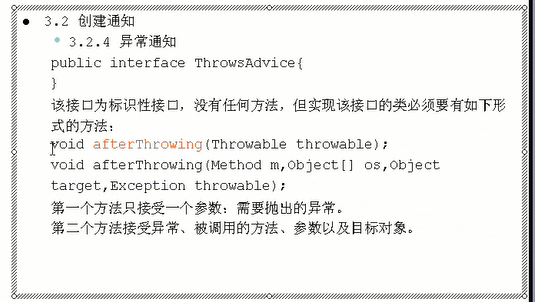
引入:只修改配置文件,操作前几种织入方法,用于配置某个对象织入什么方法
实现对应接口的类即可作为通知类
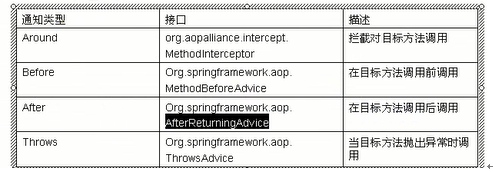
二.AOP核心概念
1、横切关注点
对哪些方法进行拦截,拦截后怎么处理,这些关注点称之为横切关注点
2、切面(aspect)
类是对物体特征的抽象,切面就是对横切关注点的抽象
3、连接点(joinpoint)
被拦截到的点,因为Spring只支持方法类型的连接点,所以在Spring中连接点指的就是被拦截到的方法,实际上连接点还可以是字段或者构造器
4、切入点(pointcut)
对连接点进行拦截的定义
5、通知(advice)
所谓通知指的就是指拦截到连接点之后要执行的代码,通知分为前置、后置、异常、最终、环绕通知五类
6、目标对象
代理的目标对象
7、织入(weave)
将切面应用到目标对象并导致代理对象创建的过程
8、引入(introduction)
在不修改代码的前提下,引入可以在运行期为类动态地添加一些方法或字段
三. 织入通知方法实现步骤
- 定义接口
- 编写对象(被代理对象=目标对象)
- 编写通知(前置通知目标方法前调用)
- 在beans.xml文件
4.1配置被代理对象=目标对象
4.2配置通知
4.3配置代理对象,是ProxyFactoryBean对象实例
4.3.1配置代理接口集
4.3.2织入通知
4.3.3配置被代理对象
四.案例(前置)
1.定义接口TestService
package com.ahd.aop;

public interface TestService {

    public void sayHello();

}
2.实现类Test1Service
package com.ahd.aop;

public class Test1Service implements TestService {

    private String name;

    @Override

    public void sayHello() {

        // TODO Auto-generated method stub

        System.out.println("******执行方法sayHello test1"+name+"******");

    }

    public String getName() {

        return name;

    }

    public void setName(String name) {

        this.name = name;

    }

}
Test1Service
3.前置织入类
package com.ahd.aop;

import java.lang.reflect.Method;

import org.springframework.aop.MethodBeforeAdvice;

public class MyMethodBeforeAdvice implements MethodBeforeAdvice {

    @Override

    public void before(Method method, Object[] args, Object target)

            throws Throwable {

        // TODO Auto-generated method stub

        System.out.println("前置通知,在方法执行前执行,写入日志,"+method.getName());

    }

}
MyMethodBeforeAdvice
4.beans.xml配置文件
<?xml version="1.0" encoding="UTF-8"?>

<beans xmlns="http://www.springframework.org/schema/beans"

        xmlns:xsi="http://www.w3.org/2001/XMLSchema-instance"

        xmlns:context="http://www.springframework.org/schema/context"

        xmlns:tx="http://www.springframework.org/schema/tx"

        xsi:schemaLocation="http://www.springframework.org/schema/beans http://www.springframework.org/schema/beans/spring-beans-2.5.xsd

                http://www.springframework.org/schema/context http://www.springframework.org/schema/context/spring-context-2.5.xsd

                http://www.springframework.org/schema/tx http://www.springframework.org/schema/tx/spring-tx-2.5.xsd">

    <!-- 配置被代理对象,即正常配置类 -->

    <bean id="test1Service" class="com.ahd.aop.Test1Service">

        <property name="name" value="爱华顿"></property>

    </bean>

    <!-- 配置前置通知 -->

    <bean id="myMethodBeforeAdvice" class="com.ahd.aop.MyMethodBeforeAdvice">

    </bean>

    <!-- 配置代理对象 -->

    <bean id="proxyFactoryBean" class="org.springframework.aop.framework.ProxyFactoryBean">

        <!-- 配置代理接口集 -->

        <property name="proxyInterfaces">

            <list>

                <value>com.ahd.aop.TestService</value>

            </list>

        </property>

        <!-- 织入通知 -->

        <property name="interceptorNames">

            <list>

                <value>myMethodBeforeAdvice</value>

            </list>

        </property>

        <!-- 配置被代理对象,可以指定 -->

        <property name="target" ref="test1Service"/>

    </bean>

</beans>
5.测试文件
package com.ahd.aop;

import org.springframework.aop.framework.ProxyFactoryBean;

import org.springframework.context.ApplicationContext;

import org.springframework.context.support.ClassPathXmlApplicationContext;

public class App1 {

    public static void main(String[] args) {

        // TODO Auto-generated method stub

        ApplicationContext ac=new ClassPathXmlApplicationContext("com/ahd/aop/beans.xml");

        TestService ts=(TestService) ac.getBean("proxyFactoryBean");

        ts.sayHello();

        System.out.println("***********************************");

        ((TestService2)ts).sayBye();

    }

}
测试文件
五.引入通知案例(在上面案例的基础上,修改配置文件)
<?xml version="1.0" encoding="UTF-8"?>

<beans xmlns="http://www.springframework.org/schema/beans"

        xmlns:xsi="http://www.w3.org/2001/XMLSchema-instance"

        xmlns:context="http://www.springframework.org/schema/context"

        xmlns:tx="http://www.springframework.org/schema/tx"

        xsi:schemaLocation="http://www.springframework.org/schema/beans http://www.springframework.org/schema/beans/spring-beans-2.5.xsd

                http://www.springframework.org/schema/context http://www.springframework.org/schema/context/spring-context-2.5.xsd

                http://www.springframework.org/schema/tx http://www.springframework.org/schema/tx/spring-tx-2.5.xsd">

    <!-- 配置被代理对象,即正常配置类 -->

    <bean id="test1Service" class="com.ahd.aop.Test1Service">

        <property name="name" value="爱华顿"></property>

    </bean>

    <!-- 配置前置通知 -->

    <bean id="myMethodBeforeAdvice" class="com.ahd.aop.MyMethodBeforeAdvice">

    <!-- 配置后置通知 -->

    <bean id="myBeforeReturningAdvice" class="com.ahd.aop.MyBeforeReturningAdvice"></bean>

    <!-- 配置环绕通知 -->

    <bean id="myMethodInterceptor" class="com.ahd.aop.MyMethodInterceptor"></bean>

    <!-- 配置异常通知 -->

    <bean id="myThrowsAdvice" class="com.ahd.aop.MyThrowsAdvice"></bean>

    </bean>

    <!-- 配置引入,配置接入点 -->

    <bean id="myMethodBeforeAdviceFilter" class="org.springframework.aop.support.NameMatchMethodPointcutAdvisor">

        <property name="advice" ref="myMethodBeforeAdvice"></property>

        <property name="mappedNames">

            <list>

                <value>sayHello</value>

            </list>

        </property>

    </bean>

    <!-- 配置代理对象 -->

    <bean id="proxyFactoryBean" class="org.springframework.aop.framework.ProxyFactoryBean">

        <!-- 配置代理接口集 -->

        <property name="proxyInterfaces">

            <list>

                <value>com.ahd.aop.TestService</value>

                <value>com.ahd.aop.TestService2</value>

            </list>

        </property>

        <!-- 织入通知 -->

        <property name="interceptorNames">

            <list>

                <value>myMethodBeforeAdviceFilter</value>

                <value>myBeforeReturningAdvice</value>

                <value>myMethodInterceptor</value>

                <value>myThrowsAdvice</value>

            </list>

        </property>

        <!-- 配置被代理对象,可以指定 -->

        <property name="target" ref="test1Service"/>

    </bean>

</beans>
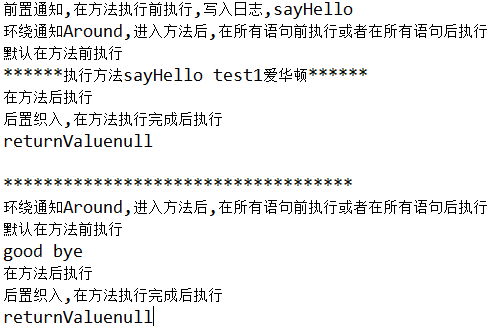
实现效果:
======================================================================================
我们都一样,我们都不一样!
=======================================================================================
spring_08aop原理及案例的更多相关文章
- 【MySQL】排序原理与案例分析
前言 排序是数据库中的一个基本功能,MySQL也不例外.用户通过Order by语句即能达到将指定的结果集排序的目的,其实不仅仅是Order by语句,Group by语句,Distinct语句都会隐 ...
- Office 2010 KMS激活原理和案例分享
Office 2010 KMS激活原理和案例分享 为了减低部署盗版(可能包含恶意软件.病毒和其他安全风险)的可能性,Office 2010面向企业客户推出了新的批量激活方式:KMS和MAK.这 ...
- 《大型网站技术架构:核心原理与案例分析》【PDF】下载
<大型网站技术架构:核心原理与案例分析>[PDF]下载链接: https://u253469.pipipan.com/fs/253469-230062557 内容简介 本书通过梳理大型网站 ...
- 11 K-Means 原理及案例
11 K-Means 原理及案例 非监督学习 unsupervised learning (非监督学习) ,只有特征值,没有目标值 聚类: 主要方法 - k-means (K - 需要分成的类别数) ...
- MySQL排序原理与案例分析
前言 排序是数据库中的一个基本功能,MySQL也不例外.用户通过Order by语句即能达到将指定的结果集排序的目的,其实不仅仅是Order by语句,Group by语句,Distinct ...
- [转]MySQL排序原理与案例分析
这篇文章非常好,就把他转过来 前言 排序是数据库中的一个基本功能,MySQL也不例外.用户通过Order by语句即能达到将指定的结果集排序的目的,其实不仅仅是Order by语句,Grou ...
- Office 2010 KMS激活原理和案例分享 - Your Office Solution Here - Site Home - TechNet Blogs
[作者:葛伟华.张玉工程师 , Office/Project支持团队, 微软亚太区全球技术支持中心 ] 为了减低部署盗版(可能包含恶意软件.病毒和其他安全风险)的可能性,Office 2010面向企 ...
- (转)MySQL排序原理与案例分析
前言 排序是数据库中的一个基本功能,MySQL也不例外.用户通过Order by语句即能达到将指定的结果集排序的目的,其实不仅仅是Order by语句,Group by语句,Distinct ...
- Spring_day01--课程安排_Spring概念_IOC操作&IOC底层原理&入门案例_配置文件没有提示问题
Spring_day01 Spring课程安排 今天内容介绍 Spring概念 Spring的ioc操作 IOC底层原理 IOC入门案例 配置文件没有提示问题 Spring的bean管理(xml方式) ...
随机推荐
- offset系列、scroll系列与client系列
offset系列: offsetLeft:获取元素距离最左边的距离,自身的margin包括在内,不包括自身的border offsetTop:获取元素距离最上边的距离,自身的margin包括在内,不包 ...
- hadoop安装笔记
环境是ubuntu java啥的有yum apt-get install default-jdk update-alternatives --display Java hadoop解压缩就行 tar ...
- [转]Examining Open vSwitch Traffic Patterns
In this post, I want to provide some additional insight on how the use of Open vSwitch (OVS) affects ...
- 5个相见恨晚的Linux命令
阅读本文大概需要 2.4 分钟. 作者 | 李火清 转载自[CU技术社区] 编者按:说到Linux命令相信大家都不陌生,就连前端现在也要经常在 terminal 敲一些 node,gulp等命令,本文 ...
- Metasploit Framework(3)Meterpreter
文章的格式也许不是很好看,也没有什么合理的顺序 完全是想到什么写一些什么,但各个方面都涵盖到了 能耐下心看的朋友欢迎一起学习,大牛和杠精们请绕道 Meterpreter:是一种高级的,动态的,可拓展的 ...
- cryptoJS AES 加解密简单使用
简单记录一下,前端利用 cryptoJS 如何加解密的.主要是关于 AES 加解密. 需求描述:需要对 url 中的参数进行 AES 解密,然后再把该参数进行 MD5 加密通过接口传递. AES AE ...
- jQuery之animate()用法
最近在学习jQuery,看到一个很有意思的函数animate(),但是在网上却没有查到相关的详细资料,于是打算参考jQuery API,自己总结一下. 概述 animate() 方法执行 CSS 属性 ...
- C语言中assert()断言函数的概念及用法
断言函数的格式如下所示: void assert (int expression);如果参数expression等于零,一个错误消息将会写入到设备的标准错误集并且会调用abort函数,就会结束程序的执 ...
- 微信小程序 获得用户输入内容
在微信小程序里,如何获得用户输入的内容?? js: document.getElementById("Content").value jq:$("#Content&quo ...
- java jar 后台运行
nohup java -jar $APP_NAME.jar >/dev/null &