
史上最简单的SpringCloud教程 | 第六篇: 分布式配置中心(Spring Cloud Config)
一、简介
在分布式系统中,由于服务数量巨多,为了方便服务配置文件统一管理,实时更新,所以需要分布式配置中心组件。
在Spring Cloud中,有分布式配置中心组件spring cloud config ,它支持配置服务放在配置服务的内存中(即本地),也支持放在远程Git仓库中。在spring cloud config 组件中,分两个角色,一是config server,二是config client。
二、构建Config Server
创建一个spring-boot项目,取名为config-server,其pom.xml:
<?xml version="1.0" encoding="UTF-8"?>

<project xmlns="http://maven.apache.org/POM/4.0.0" xmlns:xsi="http://www.w3.org/2001/XMLSchema-instance"

    xsi:schemaLocation="http://maven.apache.org/POM/4.0.0 https://maven.apache.org/xsd/maven-4.0.0.xsd">

    <modelVersion>4.0.0</modelVersion>

    <parent>

        <groupId>org.springframework.boot</groupId>

        <artifactId>spring-boot-starter-parent</artifactId>

        <version>2.0.6.RELEASE</version>

        <relativePath/> <!-- lookup parent from repository -->

    </parent>

    <groupId>com.example</groupId>

    <artifactId>configserver</artifactId>

    <version>0.0.1-SNAPSHOT</version>

    <name>config-server</name>

    <properties>

        <java.version>1.8</java.version>

        <spring-cloud.version>Finchley.SR2</spring-cloud.version>

    </properties>

    <dependencies>

        <dependency>

            <groupId>org.springframework.boot</groupId>

            <artifactId>spring-boot-starter-web</artifactId>

        </dependency>

        <dependency>

            <groupId>org.springframework.cloud</groupId>

            <artifactId>spring-cloud-config-server</artifactId>

        </dependency>

    </dependencies>

    <dependencyManagement>

        <dependencies>

            <dependency>

                <groupId>org.springframework.cloud</groupId>

                <artifactId>spring-cloud-dependencies</artifactId>

                <version>${spring-cloud.version}</version>

                <type>pom</type>

                <scope>import</scope>

            </dependency>

        </dependencies>

    </dependencyManagement>

    <build>

        <plugins>

            <plugin>

                <groupId>org.springframework.boot</groupId>

                <artifactId>spring-boot-maven-plugin</artifactId>

            </plugin>

        </plugins>

    </build>

</project>
在程序的入口Application类加上 @EnableConfigServer注解 开启配置服务器的功能,代码如下:
@SpringBootApplication

@EnableConfigServer

public class ConfigServerApplication {

    public static void main(String[] args) {

        SpringApplication.run(ConfigServerApplication.class, args);

    }

}
application.properties配置以下:
spring.application.name=config-server

server.port=8888

#服务注册中心

eureka.client.service-url.defaultZone=http://localhost:8761/eureka/

#服务的git仓库地址,末尾加或不加".git"都可

spring.cloud.config.server.git.uri=https://gitee.com/xiaoliu66007/springcloud /*替换成自己的git地址*/
#配置文件所在的目录

spring.cloud.config.server.git.searchPaths=/**/config /*替换成自己的git地址下的文件夹*/
#配置文件所在的分支
spring.cloud.config.label=master
spring.cloud.config.server.git.username=******* /*替换成git账号*/
spring.cloud.config.server.git.password=******* /*替换成git密码*/
注意事项:
----------------------------------------------------------------------------------------------------------------------------------------------------------------------------
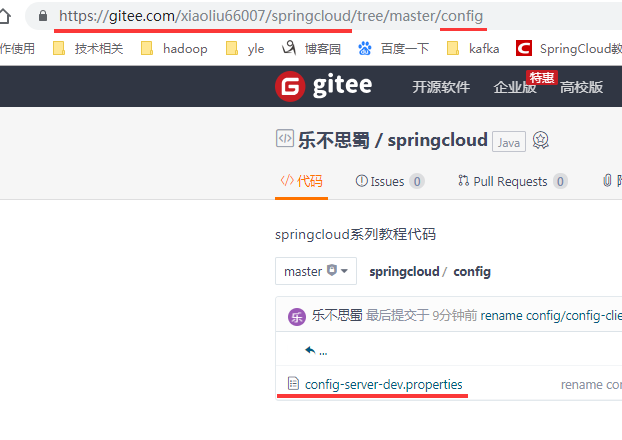
为了方便测试,我是在码云上自己上传了 config-server-dev.properties文件到config文件夹下,如图:
----------------------------------------------------------------------------注意事项完毕------------------------------------------------------------------------------------------------
config-server-dev.properties内容如下
foo = foo version 3
启动程序:访问http://localhost:8888/config-server/dev,其中的config-server和dev 参照下面的“http请求地址和资源文件映射:”
效果如下:

证明配置服务中心可以从远程程序获取配置信息。
接上面的注意事项,http请求地址和资源文件映射如下:
- /{application}/{profile}[/{label}]
- /{application}-{profile}.yml
- /{label}/{application}-{profile}.yml
- /{application}-{profile}.properties
- /{label}/{application}-{profile}.properties
三、构建一个config client
重新创建一个springboot项目,取名为config-client,其pom文件:
<?xml version="1.0" encoding="UTF-8"?>

<project xmlns="http://maven.apache.org/POM/4.0.0" xmlns:xsi="http://www.w3.org/2001/XMLSchema-instance"

    xsi:schemaLocation="http://maven.apache.org/POM/4.0.0 https://maven.apache.org/xsd/maven-4.0.0.xsd">

    <modelVersion>4.0.0</modelVersion>

    <parent>

        <groupId>org.springframework.boot</groupId>

        <artifactId>spring-boot-starter-parent</artifactId>

        <version>2.0.6.RELEASE</version>

        <relativePath/> <!-- lookup parent from repository -->

    </parent>

    <groupId>com.example</groupId>

    <artifactId>config-client</artifactId>

    <version>0.0.1-SNAPSHOT</version>

    <name>config-client</name>

    <description>Demo project for Spring Boot</description>

    <properties>

        <java.version>1.8</java.version>

        <spring-cloud.version>Finchley.SR2</spring-cloud.version>

    </properties>

    <dependencies>

        <dependency>

            <groupId>org.springframework.boot</groupId>

            <artifactId>spring-boot-starter-web</artifactId>

        </dependency>

        <dependency>

            <groupId>org.springframework.cloud</groupId>

            <artifactId>spring-cloud-starter-config</artifactId>

        </dependency>

    </dependencies>

    <dependencyManagement>

        <dependencies>

            <dependency>

                <groupId>org.springframework.cloud</groupId>

                <artifactId>spring-cloud-dependencies</artifactId>

                <version>${spring-cloud.version}</version>

                <type>pom</type>

                <scope>import</scope>

            </dependency>

        </dependencies>

    </dependencyManagement>

    <build>

        <plugins>

            <plugin>

                <groupId>org.springframework.boot</groupId>

                <artifactId>spring-boot-maven-plugin</artifactId>

            </plugin>

        </plugins>

    </build>

</project>
其配置文件bootstrap.properties:
server.port=8881
spring.application.name=config-server
spring.cloud.config.label=master
spring.cloud.config.profile=dev
spring.cloud.config.uri= http://localhost:8888/
- spring.cloud.config.label 指明远程仓库的分支
spring.cloud.config.profile
- dev开发环境配置文件
- test测试环境
- pro正式环境
spring.cloud.config.uri= http://localhost:8888/ 指明配置服务中心的网址。
程序的入口类,如下:
/**

 http://localhost:8881/hi可以访问到配置中心config-server,通过配置中心访问到远程git地址下的"config-server-dev.properties"(详见bootstrap.properties配置)

 bootstrap.properties文件指定读取的文件为:

     “【spring.application.name】- 【spring.cloud.config.profile】.properties”

     即config-server-dev.properties

 */

package com.example.demo;

import org.springframework.beans.factory.annotation.Value;

import org.springframework.boot.SpringApplication;

import org.springframework.boot.autoconfigure.SpringBootApplication;

import org.springframework.web.bind.annotation.RequestMapping;

import org.springframework.web.bind.annotation.RestController;

@SpringBootApplication

@RestController

public class ConfigClientApplication {

   public static void main(String[] args) {

      SpringApplication.run(ConfigClientApplication.class, args);

   }

   @Value("${foo}")

   String foo;

   @RequestMapping(value = "/hi")

   public String hi(){

      return foo;

   }

}
访问 http://localhost:8881/hi结果如下
foo version 3
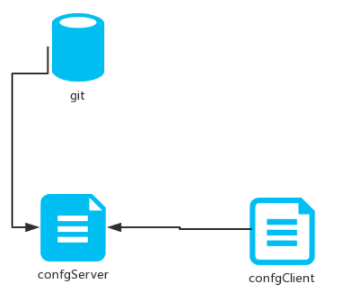
这就说明,config-client从config-server获取了name和age的属性,而config-server是从git仓库读取的,如图
本文源码下载:
https://github.com/forezp/SpringCloudLearning/tree/master/chapter6
史上最简单的SpringCloud教程 | 第六篇: 分布式配置中心(Spring Cloud Config)的更多相关文章
- SpringCloud教程 | 第六篇: 分布式配置中心(Spring Cloud Config)(Finchley版本)
在上一篇文章讲述zuul的时候,已经提到过,使用配置服务来保存各个服务的配置文件.它就是Spring Cloud Config. 一.简介 在分布式系统中,由于服务数量巨多,为了方便服务配置文件统一管 ...
- SpringCloud教程 | 第六篇: 分布式配置中心(Spring Cloud Config)
一.简介 在分布式系统中,由于服务数量巨多,为了方便服务配置文件统一管理,实时更新,所以需要分布式配置中心组件.在Spring Cloud中,有分布式配置中心组件spring cloud config ...
- 【SpringCloud】第六篇: 分布式配置中心(Spring Cloud Config)
前言: 必需学会SpringBoot基础知识 简介: spring cloud 为开发人员提供了快速构建分布式系统的一些工具,包括配置管理.服务发现.断路器.路由.微代理.事件总线.全局锁.决策竞选. ...
- SpringCloud学习(六)分布式配置中心(Spring Cloud Config)(Finchley版本)
在上一篇文章讲述zuul的时候,已经提到过,使用配置服务来保存各个服务的配置文件.它就是Spring Cloud Config. 简介 在分布式系统中,由于服务数量巨多,为了方便服务配置文件统一管理, ...
- springCloud学习-高可用的分布式配置中心(Spring Cloud Config)
1.简介 高可用的分布式配置中心,即将配置中心做成一个微服务,将其集群化,从而达到高可用.config-server和config-client向eureka-server注册,且将config-se ...
- 史上最简单的SpringCloud教程 | 第三篇: 服务消费者(Feign)
转载请标明出处: https://www.fangzhipeng.com/springcloud/2017/07/12/sc03-feign/ 本文出自方志朋的博客 最新Finchley版本请访问: ...
- 史上最简单的SpringCloud教程 | 第十篇: 高可用的服务注册中心(Finchley版本)
转载请标明出处: 原文首发于 https://www.fangzhipeng.com/springcloud/2018/08/30/sc-f10-eureka/ 本文出自方志朋的博客 文章 史上最简单 ...
- SpringCloud(6)分布式配置中心Spring Cloud Config
1.Spring Cloud Config 简介 在分布式系统中,由于服务数量巨多,为了方便服务配置文件统一管理,实时更新,所以需要分布式配置中心组件.在Spring Cloud中,有分布式配置中心组 ...
- 史上最简单的 SpringCloud 教程
史上最简单的 SpringCloud 教程 | 第一篇: 服务的注册与发现(Eureka)史上最简单的SpringCloud教程 | 第二篇: 服务消费者(rest+ribbon)史上最简单的Spri ...
随机推荐
- Linux信号-信号集&信号屏蔽字&捕捉信号【转】
转自:https://blog.csdn.net/Lycorisradiata__/article/details/80096203 一. 阻塞信号 1. 信号的常见其他概念 实际执行信号的处理 ...
- Net开发的部分知名网站案例
.Net开发的部分知名网站案例:http://www.godaddy.com 全球最大域名注册商http://www.ips.com 环迅支付,国内最早的在线支付平台http://www.icbc.c ...
- HashMap多线程put后get为null和多线程put的时候可能导致元素丢失
一.多线程put后get为null 源码定位 void transfer(Entry[] newTable) { Entry[] src = table; int newCapacity = newT ...
- [SCOI2014]方伯伯的OJ
看到这道题的第一想法就是要用FHQ treap 过了这道题...于是至今尚未成功(华丽的 T 掉了 (╯‵□′)╯︵┻━┻ ).于是附个地址. 然后水一波博客. 题意简介 emmmm...方伯伯脑抽做 ...
- BZOJ 3620: 似乎在梦中见过的样子
似乎在梦中见过的样子.... 一道水题调了这么久,还半天想不出来怎么 T 的...佩服自己(果然蒟蒻) 这题想想 KMP 但是半天没思路瞟了一眼题解发现暴力枚举起始点,然后 KMP 如图: O( n2 ...
- UVALive 8519 Arrangement for Contests 2017西安区域赛H 贪心+线段树优化
题意 等价于给一个数列,每次对一个长度为$K$的连续区间减一 为最多操作多少次 题解: 看样例猜的贪心,10分钟敲了个线段树就交了... 从1开始,找$[i,i+K]$区间的最小值,然后区间减去最小值 ...
- Unity3D之通过C#使用Advanced CSharp Messenger
Advanced CSharp Messenger 属于C#事件的一种. 维基百科中由详细的说明http://wiki.unity3d.com/index.php?title=Advanced_CSh ...
- bootstrap4简单使用和入门03-响应式布局
响应式布局的原理 页面源码 <!DOCTYPE html> <html lang="en"> <head> <meta charset=& ...
- MySQL的information_schema
在一次清空一张比较大的表时(在清空前占用400多兆),发现该表中记录为0条但是空间并没有被释放,采用下面方式可查看占用情况 -- 查询各个数据库占用磁盘的情况 ,),' MB') as data_si ...
- [C][代码实例]冒泡排序
#include <stdio.h> #include <stdlib.h> #include <stdbool.h> #include <string.h& ...