
【SpringCloud】第六篇: 分布式配置中心(Spring Cloud Config)
前言:
必需学会SpringBoot基础知识
简介:
spring cloud 为开发人员提供了快速构建分布式系统的一些工具,包括配置管理、服务发现、断路器、路由、微代理、事件总线、全局锁、决策竞选、分布式会话等等。它运行环境简单,可以在开发人员的电脑上跑。
工具:
JDK8
apache-maven-3.5.2
IntelliJ IDEA 2018.1 x64
一、简介
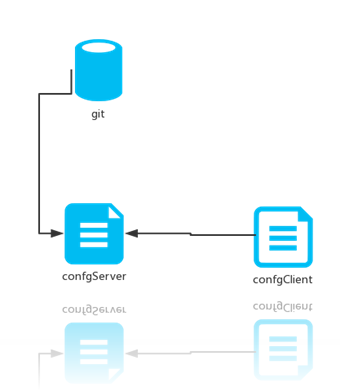
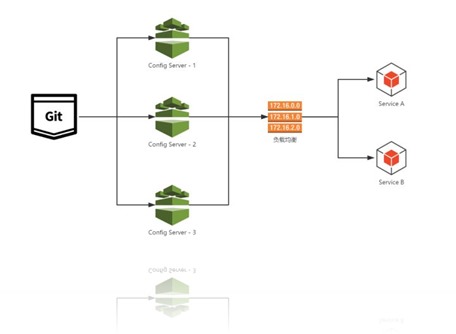
在分布式系统中,由于服务数量巨多,为了方便服务配置文件统一管理,实时更新,所以需要分布式配置中心组件。在Spring Cloud中,有分布式配置中心组件spring cloud config ,它支持配置服务放在配置服务的内存中(即本地),也支持放在远程Git仓库中。在spring cloud config 组件中,分两个角色,一是eureka-config-server,二是eureka-config-client。
二、构建 eureka-config-server
(1) 创建springboot项目, 命名: eureka-config-server
(2) pom.xml
<?xml version="1.0" encoding="UTF-8"?>

<project xmlns="http://maven.apache.org/POM/4.0.0" xmlns:xsi="http://www.w3.org/2001/XMLSchema-instance"

         xsi:schemaLocation="http://maven.apache.org/POM/4.0.0 http://maven.apache.org/xsd/maven-4.0.0.xsd">

    <modelVersion>4.0.0</modelVersion>

    <groupId>com.lwc</groupId>

    <artifactId>eureka-config-server</artifactId>

    <version>0.0.1-SNAPSHOT</version>

    <packaging>jar</packaging>

    <name>eureka-config-server</name>

    <description>Demo project for Spring Boot</description>

    <parent>

        <groupId>org.springframework.boot</groupId>

        <artifactId>spring-boot-starter-parent</artifactId>

        <version>1.5.10.RELEASE</version>

        <relativePath/> <!-- lookup parent from repository -->

    </parent>

    <properties>

        <project.build.sourceEncoding>UTF-8</project.build.sourceEncoding>

        <project.reporting.outputEncoding>UTF-8</project.reporting.outputEncoding>

        <java.version>1.8</java.version>

        <spring-cloud.version>Edgware.SR3</spring-cloud.version>

    </properties>

    <dependencies>

        <dependency>

            <groupId>org.springframework.cloud</groupId>

            <artifactId>spring-cloud-config-server</artifactId>

        </dependency>

        <dependency>

            <groupId>org.springframework.boot</groupId>

            <artifactId>spring-boot-starter-test</artifactId>

            <scope>test</scope>

        </dependency>

        <dependency>

            <groupId>org.springframework.cloud</groupId>

            <artifactId>spring-cloud-starter-eureka</artifactId>

        </dependency>

    </dependencies>

    <dependencyManagement>

        <dependencies>

            <dependency>

                <groupId>org.springframework.cloud</groupId>

                <artifactId>spring-cloud-dependencies</artifactId>

                <version>${spring-cloud.version}</version>

                <type>pom</type>

                <scope>import</scope>

            </dependency>

        </dependencies>

    </dependencyManagement>

    <build>

        <plugins>

            <plugin>

                <groupId>org.springframework.boot</groupId>

                <artifactId>spring-boot-maven-plugin</artifactId>

            </plugin>

        </plugins>

    </build>

</project>
(3) 启动类: 添加注解 @EnableConfigServer
package com.lwc;

import org.springframework.boot.SpringApplication;

import org.springframework.boot.autoconfigure.SpringBootApplication;

import org.springframework.cloud.config.server.EnableConfigServer;

/**

 * @author Eddie

 */

@EnableConfigServer

@SpringBootApplication

public class EurekaConfigServerApplication {

    public static void main(String[] args) {

        SpringApplication.run(EurekaConfigServerApplication.class, args);

    }

}
(4) application.yml 和 说明
| application.yml | application-dev.yml |
spring: |
server: |
spring.cloud.config.server.git.uri:配置git仓库地址
spring.cloud.config.server.git.searchPaths:配置仓库路径
spring.cloud.config.label:配置仓库的分支
spring.cloud.config.server.git.username:访问git仓库的用户名 (公共库可无视)
spring.cloud.config.server.git.password:访问git仓库的用户密码 (公共库可无视)
里面存在一个config-repo目录, 里面几个app*配置文件 (为方便大家,可使用本人提供的)
启动项目, 访问: http://localhost:8888/app/local/master
{
"name": "app",
"profiles": ["local"],
"label": "master",
"version": "e366cdb9f58c68216631b39432dbbaba7ad70809",
"state": null,
"propertySources": [{
"name": "https://github.com/eddie-code/SpringCloudDemo/config-repo/app-local.properties",
"source": {
"eddie": "local config"
}
},
{
"name": "https://github.com/eddie-code/SpringCloudDemo/config-repo/app.properties",
"source": {
"eddie": "default config"
}
}]
}证明配置服务中心可以从远程程序获取配置信息。
http请求地址和资源文件映射如下:
/{application}/{profile}[/{label}]
/{application}-{profile}.yml
/{label}/{application}-{profile}.yml
/{application}-{profile}.properties
/{label}/{application}-{profile}.properties
三、构建 eureka-config-client
(1) 创建springboot项目, 命名: eureka-config-client
(2) pom.xml
<?xml version="1.0" encoding="UTF-8"?>

<project xmlns="http://maven.apache.org/POM/4.0.0" xmlns:xsi="http://www.w3.org/2001/XMLSchema-instance"

         xsi:schemaLocation="http://maven.apache.org/POM/4.0.0 http://maven.apache.org/xsd/maven-4.0.0.xsd">

    <modelVersion>4.0.0</modelVersion>

    <groupId>com.lwc</groupId>

    <artifactId>eureka-config-client</artifactId>

    <version>0.0.1-SNAPSHOT</version>

    <packaging>jar</packaging>

    <name>eureka-config-client</name>

    <description>Demo project for Spring Boot</description>

    <parent>

        <groupId>org.springframework.boot</groupId>

        <artifactId>spring-boot-starter-parent</artifactId>

        <version>1.5.10.RELEASE</version>

        <relativePath/> <!-- lookup parent from repository -->

    </parent>

    <properties>

        <project.build.sourceEncoding>UTF-8</project.build.sourceEncoding>

        <project.reporting.outputEncoding>UTF-8</project.reporting.outputEncoding>

        <java.version>1.8</java.version>

        <spring-cloud.version>Edgware.SR3</spring-cloud.version>

    </properties>

    <dependencies>

        <dependency>

            <groupId>org.springframework.cloud</groupId>

            <artifactId>spring-cloud-starter-config</artifactId>

        </dependency>

        <dependency>

            <groupId>org.springframework.boot</groupId>

            <artifactId>spring-boot-starter-web</artifactId>

        </dependency>

        <dependency>

            <groupId>org.springframework.boot</groupId>

            <artifactId>spring-boot-starter-test</artifactId>

            <scope>test</scope>

        </dependency>

    </dependencies>

    <dependencyManagement>

        <dependencies>

            <dependency>

                <groupId>org.springframework.cloud</groupId>

                <artifactId>spring-cloud-dependencies</artifactId>

                <version>${spring-cloud.version}</version>

                <type>pom</type>

                <scope>import</scope>

            </dependency>

        </dependencies>

    </dependencyManagement>

    <build>

        <plugins>

            <plugin>

                <groupId>org.springframework.boot</groupId>

                <artifactId>spring-boot-maven-plugin</artifactId>

            </plugin>

        </plugins>

    </build>

    <repositories>

        <repository>

            <id>spring-milestones</id>

            <name>Spring Milestones</name>

            <url>https://repo.spring.io/milestone</url>

            <snapshots>

                <enabled>false</enabled>

            </snapshots>

        </repository>

    </repositories>

</project>
(3) 新建配置文件命名: bootstrap-*.yml
(local=本地测试, dev=开发环境, pro=正式环境)
(spring.cloud.config.label=指明远程仓库的分支, spring.cloud.config.uri=配置服务中心的网址)
| bootstrap.yml | bootstrap-dev.yml (其余自己新建) |
spring: |
server: |
(4) 控制层相关代码
package com.lwc;

import org.springframework.boot.SpringApplication;

import org.springframework.boot.autoconfigure.SpringBootApplication;

/**

 * @author Eddie

 */

@SpringBootApplication

public class EurekaConfigClientApplication {

    public static void main(String[] args) {

        SpringApplication.run(EurekaConfigClientApplication.class, args);

    }

}
package com.lwc.controller;

import com.lwc.dto.GitDto;

import org.springframework.beans.factory.annotation.Autowired;

import org.springframework.beans.factory.annotation.Value;

import org.springframework.web.bind.annotation.GetMapping;

import org.springframework.web.bind.annotation.RestController;

/**

 * @author eddie.lee

 * @Package com.lwc.controller

 * @ClassName AppController

 * @description 获取配置中心属性

 * @date created in 2018-04-03 14:22

 * @modified by

 */

@RestController

public class AppController {

    @Autowired

    private GitDto gitDto;

    @Value("${eddie}")

    private String eddie;

    @Value("${url}")

    private String url;

    @GetMapping("/url")

    public String url() {

        return this.url;

    }

    @GetMapping("/eddie")

    public String eddie() {

        return this.eddie;

    }

    @GetMapping("/configs")

    public String configs() {

        return "This is " + gitDto.getEddie() + " Blog: " + gitDto.getUrl();

    }

}
(5) 测试
访问: http://localhost:8881/configs
This is local config Blog: http://www.cnblogs.com/EddieBlog/
(6) 图解
四、源码下载
标签 6-1, 6-2
https://github.com/eddie-code/SpringCloudDemo/tree/master/eureka-config-server
https://github.com/eddie-code/SpringCloudDemo/tree/master/eureka-config-client
五、踩过的坑
源码有记录
【SpringCloud】第六篇: 分布式配置中心(Spring Cloud Config)的更多相关文章
- 第六篇: 分布式配置中心(Spring Cloud Config)
一.简介 在分布式系统中,由于服务数量巨多,为了方便服务配置文件统一管理,实时更新,所以需要分布式配置中心组件. 在Spring Cloud中,有分布式配置中心组件spring cloud confi ...
- SpringCloud教程 | 第六篇: 分布式配置中心(Spring Cloud Config)
一.简介 在分布式系统中,由于服务数量巨多,为了方便服务配置文件统一管理,实时更新,所以需要分布式配置中心组件.在Spring Cloud中,有分布式配置中心组件spring cloud config ...
- 史上最简单的SpringCloud教程 | 第六篇: 分布式配置中心(Spring Cloud Config)
一.简介 在分布式系统中,由于服务数量巨多,为了方便服务配置文件统一管理,实时更新,所以需要分布式配置中心组件. 在Spring Cloud中,有分布式配置中心组件spring cloud confi ...
- SpringCloud教程 | 第六篇: 分布式配置中心(Spring Cloud Config)(Finchley版本)
在上一篇文章讲述zuul的时候,已经提到过,使用配置服务来保存各个服务的配置文件.它就是Spring Cloud Config. 一.简介 在分布式系统中,由于服务数量巨多,为了方便服务配置文件统一管 ...
- SpringCloud(6)分布式配置中心Spring Cloud Config
1.Spring Cloud Config 简介 在分布式系统中,由于服务数量巨多,为了方便服务配置文件统一管理,实时更新,所以需要分布式配置中心组件.在Spring Cloud中,有分布式配置中心组 ...
- SpringCloud学习(六)分布式配置中心(Spring Cloud Config)(Finchley版本)
在上一篇文章讲述zuul的时候,已经提到过,使用配置服务来保存各个服务的配置文件.它就是Spring Cloud Config. 简介 在分布式系统中,由于服务数量巨多,为了方便服务配置文件统一管理, ...
- 一起来学Spring Cloud | 第七章:分布式配置中心(Spring Cloud Config)
上一章节,我们讲解了服务网关zuul,本章节我们从git和本地两种存储配置信息的方式来讲解springcloud的分布式配置中心-Spring Cloud Config. 一.Spring Cloud ...
- Spring Cloud Config(一):聊聊分布式配置中心 Spring Cloud Config
目录 Spring Cloud Config(一):聊聊分布式配置中心 Spring Cloud Config Spring Cloud Config(二):基于Git搭建配置中心 Spring Cl ...
- 【SpringCloud】第七篇: 高可用的分布式配置中心(Spring Cloud Config)
前言: 必需学会SpringBoot基础知识 简介: spring cloud 为开发人员提供了快速构建分布式系统的一些工具,包括配置管理.服务发现.断路器.路由.微代理.事件总线.全局锁.决策竞选. ...
随机推荐
- fastTime格式化时间
{ field: 'alarmTime', title: '告警时间', align: 'center', width: 90, valign: 'middle', formatter:functio ...
- IDEA+MAVEN构建一个webapp骨架项目(解决一直卡在downloading plugins for问题)
下载:链接:https://pan.baidu.com/s/1jJx73H8 密码:nud0 第一步 我在上面链接下载了这个骨架xml,放进本地(你的目录默认.m2)\repository\org ...
- mysql5.7.22tar包安装
mysql5.7.22tar包安装 #卸载系统自带的Mariadb [root@ ~]# rpm -qa|grep mariadb mariadb-libs-5.5.44-2.el7.centos.x ...
- Kadane算法
Kadane算法用于解决连续子数组最大和问题,我们用ci来表示数组a[0...i]的最大和. 观察可以发现当ci-1 < 0时,ci = ai.用e表示以当前为结束的子数组的最大和,以替代数组c ...
- JFinal DB.tx()事务回滚及lambda表达式应用
JFinal DB.tx()事务回滚 在要往数据库操作多条数据时,就需要用到事务,JFinal中有封装好的事务应用 写法: Db.tx(new IAtom(){ @Override public bo ...
- Python-调用系统指令小记
import subprocess def exec_command(cmd, log_path, **kwargs): with open(log_path, 'w') as f: p = subp ...
- [翻译]Hystrix wiki–How it Works
注:本文并非是精确的文档翻译,而是根据自己理解的整理,有些内容可能由于理解偏差翻译有误,有些内容由于是显而易见的,并没有翻译,而是略去了.本文更多是学习过程的产出,请尽量参考原官方文档. 流程图 下图 ...
- webpack4的react打包错误
因为之前一直用的是脚手架创建项目,第一次自己学习创建webpack打包.loader我是复制别人的. module: { loaders: [ { test: /\.js?$/, exclude: / ...
- hadoop学习笔记——用python写wordcount程序
尝试着用3台虚拟机搭建了伪分布式系统,完整的搭建步骤等熟悉了整个分布式框架之后再写,今天写一下用python写wordcount程序(MapReduce任务)的具体步骤. MapReduce任务以来H ...
- 【Hbase三】Java,python操作Hbase
Java,python操作Hbase 操作Hbase python操作Hbase 安装Thrift之前所需准备 安装Thrift 产生针对Python的Hbase的API 启动Thrift服务 执行p ...