
接口自动化框架(java)--3.get,delete请求,Excel管理多种请求类型
这套框架的报告是自己封装的
每种请求类型放入不同的sheet中,就可以避免新建太多的excel去做数据驱动。
XSSFSheet类提供了一个读取sheet的方法,getSheetAt(int),通过下标去访问想要的sheet
1.Excel,添加两个sheet页改名成get , delete,代表这两种类型的接口
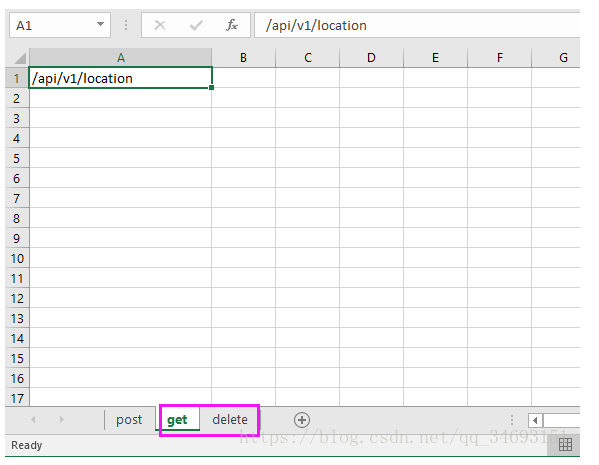
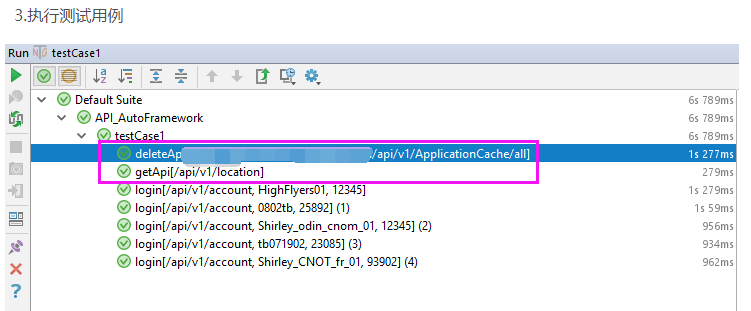
2. 在用例的dataProvider中将这两个sheet作两个方法分别读取。再传入对应的test中
 package com.qa.tests;

 import com.alibaba.fastjson.JSON;

 import com.qa.base.TestBase;

 import com.qa.Parameters.postParameters;

 import com.qa.restclient.RestClient;

 import com.qa.util.TestUtil;

 import org.apache.http.client.methods.CloseableHttpResponse;

 import org.testng.Assert;

 import org.testng.annotations.BeforeClass;

 import org.testng.annotations.DataProvider;

 import org.testng.annotations.Test;

 import java.io.IOException;

 import java.util.HashMap;

 import static com.qa.util.TestUtil.dtt;

 public class testCase1 extends TestBase {

     TestBase testBase;

     RestClient restClient;

     CloseableHttpResponse closeableHttpResponse;

     //host根url

     String host;

     //Excel路径

     String testCaseExcel;

     //header

     HashMap<String ,String> postHeader = new HashMap<String, String>();

     @BeforeClass

     public void setUp(){

         testBase = new TestBase();

         restClient = new RestClient();

         postHeader.put("Content-Type","application/json");

         //载入配置文件,接口endpoint

         host = prop.getProperty("Host");

         //载入配置文件,post接口参数

         testCaseExcel=prop.getProperty("testCase1data");

     }

     @DataProvider(name = "postData")

     public Object[][] post() throws IOException {

         //post类型接口

         return dtt(testCaseExcel,0);

     }

     @DataProvider(name = "get")

     public Object[][] get() throws IOException{

         //get类型接口

         return dtt(testCaseExcel,1);

     }

     @DataProvider(name = "delete")

     public Object[][] delete() throws IOException{

         //delete类型接口

         return dtt(testCaseExcel,2);

     }

     @Test(dataProvider = "postData")

     public void login(String loginUrl,String username, String passWord) throws Exception {

         //使用构造函数将传入的用户名密码初始化成登录请求参数

         postParameters loginParameters = new postParameters(username,passWord);

         //将登录请求对象序列化成json对象

         String userJsonString = JSON.toJSONString(loginParameters);

         //发送登录请求

         closeableHttpResponse = restClient.postApi(host+loginUrl,userJsonString,postHeader);

         //从返回结果中获取状态码

         int statusCode = TestUtil.getStatusCode(closeableHttpResponse);

         Assert.assertEquals(statusCode,200);

     }

     @Test(dataProvider = "get")

     public void getApi(String url) throws Exception{

         closeableHttpResponse = restClient.getApi(host+ url);

         int statusCode = TestUtil.getStatusCode(closeableHttpResponse);

         Assert.assertEquals(statusCode,200);

     }

     @Test(dataProvider = "delete")

     public void deleteApi(String url) throws Exception{

         System.out.println(url);

         closeableHttpResponse = restClient.deleteApi(url);

         int statusCode = TestUtil.getStatusCode(closeableHttpResponse);

         Assert.assertEquals(statusCode,204);

     }

     @BeforeClass

     public void endTest(){

         System.out.print("测试结束");

     }

 }
原文地址https://blog.csdn.net/qq_34693151/article/details/81875790
接口自动化框架(java)--3.get,delete请求,Excel管理多种请求类型的更多相关文章
- 接口自动化框架(java)--2.接口用例POST请求,参数配置
这套框架的报告是自己封装的 Post类型的接口通常有请求参数,请求参数也是json类型,所以需要写一个类将请求参数序列化成json对象 以常见的登录接口为例 新建一个package,和postPara ...
- 接口自动化框架(java)--5.通过testng.xml生成extentreport测试报告
这套框架的报告是自己封装的 由于之前已经通过Extentreport插件实现了Testng的IReport接口,所以在testng.xml中使用listener标签并指向实现IReport接口的那个类 ...
- 接口自动化框架(java)--4.接口Token传递
这套框架的报告是自己封装的 一般token会在登录接口返回结果中呈现,从代码层面获取token的方式有很多种,我是使用jsonpath这个json路径语言去匹配token所在路径的key值 packa ...
- 接口自动化框架(java)--1.项目概述
项目github地址: https://github.com/tianchiTester/API_AutoFramework 这套框架的报告是自己封装的 1.测试基类TestBase: 接口请求的te ...
- 转载:python + requests实现的接口自动化框架详细教程
转自https://my.oschina.net/u/3041656/blog/820023 摘要: python + requests实现的接口自动化框架详细教程 前段时间由于公司测试方向的转型,由 ...
- python + requests实现的接口自动化框架详细教程
前段时间由于公司测试方向的转型,由原来的web页面功能测试转变成接口测试,之前大多都是手工进行,利用postman和jmeter进行的接口测试,后来,组内有人讲原先web自动化的测试框架移驾成接口的自 ...
- Jmeter+ant+Jenkins接口自动化框架搭建
摘自:https://testerhome.com/topics/13389 一.背景 上一篇讲了Jmeter 接口自动化-脚本数据分离实例,我们知道怎么利用Jmeter去编写接口自动化脚本,但是接 ...
- 接口自动化框架搭建Unittes+HTMLTestRunner
本次主要尝试搭建接口自动化框架,基于 unittest+HTMLTestRunner 框架主要模块: config: 存放配置文件 lib: 封装了一些接口前置函数:处理各种事物 log: 存放生成的 ...
- 接口自动化框架(Pytest+request+Allure)
前言: 接口自动化是指模拟程序接口层面的自动化,由于接口不易变更,维护成本更小,所以深受各大公司的喜爱. 接口自动化包含2个部分,功能性的接口自动化测试和并发接口自动化测试. 本次文章着重介绍第一种, ...
随机推荐
- module.exports与exports
API文档是枯燥的,下面本人收集了一些论坛经常有人疑问和开源代码中经常遇到的案例供大家研究一下. module.exports与exports的区别 每一个node.js执行文件,都自动创建一个mod ...
- maven build pulgin
<build> <defaultGoal>compile</defaultGoal> <plugins> <!-- 生成清单文件相关 --> ...
- numpy的基础运算-【老鱼学numpy】
概述 本节主要讲解numpy数组的加减乘除四则运算. np.array()返回的是numpy的数组,官方称为:ndarray,也就是N维数组对象(矩阵),N-dimensional array obj ...
- net core体系-web应用程序-4asp.net core2.0 项目实战(1)-11项目日志解决方案
本文目录1. Net下日志记录2. NLog的使用 2.1 添加nuget引用NLog.Web.AspNetCore 2.2 配置文件设置 2.3 依赖配置及调用 2.4 日志 ...
- python运算符——逻辑运算符
not命令是取反命令,真的变成假的,假的变成真的(True是真的,False是假的) b = Trueprint(not b) 原本是真的,但是加了“not”指令就变成了假的,not指令是一元运算符, ...
- sql防止注入
使用PreparedStatement的参数化的查询可以阻止大部分的SQL注入.在使用参数化查询的情况下,数据库系统不会将参数的内容视为SQL指令的一部分来处理,而是在数据库完成SQL指令的编译后,才 ...
- Orleans框架简单示范
希望现在学习Orleans不会晚,毕竟Server Fabric都开源了.本篇博客从Sample的HelloWorld示例程序来解读Orleans的Grains. Server配置参考 : https ...
- easy-ui 中的事件触发 (tree)
easy-ui可以为插件添加事件,但没有触发事件的处理(可能是未找到),所以有时候,我们需要通过程序去触发某个插件指定的事件时,就一筹莫展了 以Tree插件为例 ,添加了onClick事件 jQuer ...
- 05-Python入门学习-字符串与列表的内置方法
字符串 一:基本使用 1 用途: 记录描述性的状态,比如人的名字.地址.性别 2 定义方式: 在"",'',"""""" ...
- HTML(五)
HTML5新结构标签 h5新增的主要语义化标签如下: 1.header 页面头部.页眉2.nav 页面导航3.article 一篇文章4.section 文章中的章节5.aside 侧边栏6.foot ...