
iOS开发-音乐播放
现在的各种App大行其道,其实常用也就是围绕着吃喝玩乐基本的需求,视频,音乐在智能手机出现之前更是必不可少的功能,每个手机都会有一个自带的音乐播放器,当然公众也有自己的需求所以也就造就了各种音乐播放软件,自己下午闲来无事简单的写了一个随机播放音乐的Demo,iOS中有三种播放音频的方式AVAudioPlayer、音频服务、音频队列。另外两种暂时没有用到,就简单的练手了一下AVAudioPlayer,还是开始正题吧;
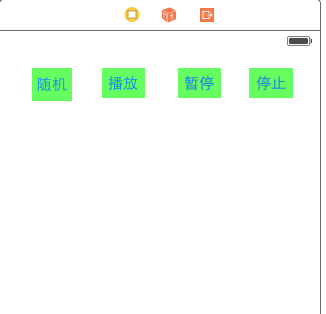
1.新建项目或者在原有项目重新弄一个页面,先看页面:
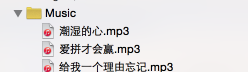
2.导入几首自己喜欢的歌曲:
3.导入AVFoundation/AVFoundation.h,对四个按钮进行事件操作,一个AVAudioPlayer只能对应一个URL,因此播放其他歌曲的时候需要情况一下;
定义两个成员变量,并且初始化成员变量:
@interface MusicViewController ()

@property (nonatomic,strong)AVAudioPlayer *player;

@property (nonatomic,strong)NSArray *musicArr;

@end
viewDidLoad实例化数组:
- (void)viewDidLoad {

    [super viewDidLoad];

    // Do any additional setup after loading the view.

    self.musicArr=@[@"潮湿的心.mp3",@"爱拼才会赢.mp3",@"给我一个理由忘记.mp3"];

    [self prepareMusic:self.musicArr[1]];

}

- (void)prepareMusic:(NSString *)path{

    //1.音频文件的url路径

    NSURL *url=[[NSBundle mainBundle]URLForResource:path withExtension:Nil];

    //2.实例化播放器

    _player=[[AVAudioPlayer alloc]initWithContentsOfURL:url error:Nil];

    //3.缓冲

    [_player prepareToPlay];

}
4.四个对应事件的代码:
随机:
- (IBAction)random:(id)sender {

    [self prepareMusic:self.musicArr[arc4random()%3]];

    [_player play];

}
播放:
- (IBAction)play:(id)sender {

    //播放

    [_player play];

}
暂停:
- (IBAction)pause:(id)sender {

    //暂停

    [_player pause];

}
停止:
- (IBAction)stop:(id)sender {

    //停止

    [_player stop];

}
5.设置循环次数,开始播放时间,设置音量
  //设置音量

    [_player setVolume:0.6];

    //设置当前播放事件

    [_player setCurrentTime:60];

    //设置循环次数

    [_player setNumberOfLoops:2];
MusicViewController.m中的代码:
//

//  MusicViewController.m

//  MyPicture

//

//  Created by keso on 15/1/17.

//  Copyright (c) 2015年 keso. All rights reserved.

//

#import "MusicViewController.h"

#import <AVFoundation/AVFoundation.h>

@interface MusicViewController ()

@property (nonatomic,strong)AVAudioPlayer *player;

@property (nonatomic,strong)NSArray *musicArr;

@end

@implementation MusicViewController

- (void)viewDidLoad {

    [super viewDidLoad];

    // Do any additional setup after loading the view.

    self.musicArr=@[@"潮湿的心.mp3",@"爱拼才会赢.mp3",@"给我一个理由忘记.mp3"];

    [self prepareMusic:self.musicArr[1]];

}

- (void)prepareMusic:(NSString *)path{

    //1.音频文件的url路径

    NSURL *url=[[NSBundle mainBundle]URLForResource:path withExtension:Nil];

    //2.实例化播放器

    _player=[[AVAudioPlayer alloc]initWithContentsOfURL:url error:Nil];

    //3.缓冲

    [_player prepareToPlay];

    //设置音量

    [_player setVolume:0.6];

    //设置当前播放事件

    [_player setCurrentTime:60];

    //设置循环次数

    [_player setNumberOfLoops:2];

}

- (IBAction)random:(id)sender {

    [self prepareMusic:self.musicArr[arc4random()%3]];

    [_player play];

}

- (IBAction)play:(id)sender {

    //播放

    [_player play];

}

- (IBAction)stop:(id)sender {

    //停止

    [_player stop];

}

- (IBAction)pause:(id)sender {

    //暂停

    [_player pause];

}

- (void)didReceiveMemoryWarning {

    [super didReceiveMemoryWarning];

    // Dispose of any resources that can be recreated.

}

/*

#pragma mark - Navigation

// In a storyboard-based application, you will often want to do a little preparation before navigation

- (void)prepareForSegue:(UIStoryboardSegue *)segue sender:(id)sender {

    // Get the new view controller using [segue destinationViewController].

    // Pass the selected object to the new view controller.

}

*/

@end
其实需要设置还有很多,播放出现异常,或者被更高级别的系统任务打断,可以通过设置相应的委托处理对应的的情形,Demo很小,iOS很多东西都是这样,概念很多,调用的时候根本都不需要写几行代码,iOS的模拟器播放的效果还是非常出色的~
由于是播放音乐,无法模拟效果,大概试验一下,应该没有什么问题~
iOS开发-音乐播放的更多相关文章
- iOS开发-音乐播放(AVAudioPlayer)
现在的手机的基本上没有人不停音乐的,我们无法想象在一个没有声音的世界里我们会过的怎么样,国内现在的主流的主流网易云音乐,QQ音乐,酷狗,虾米,天天基本上霸占了所有的用户群体,不过并没有妨碍大家对音乐的 ...
- iOS开发—音乐的播放
iOS开发—音乐的播放 一.简单说明 音乐播放用到一个叫做AVAudioPlayer的类,这个类可以用于播放手机本地的音乐文件. 注意: (1)该类(AVAudioPlayer)只能用于播放本地音频. ...
- Android 4.3实现类似iOS在音乐播放过程中如果有来电则音乐声音渐小铃声渐大的效果
目前Android的实现是:有来电时,音乐声音直接停止,铃声直接直接使用设置的铃声音量进行铃声播放. Android 4.3实现类似iOS在音乐播放过程中如果有来电则音乐声音渐小铃声渐大的效果. 如果 ...
- iOS开发--音乐文件播放工具类的封装(包含了音效的封装)
一.头文件 #import <Foundation/Foundation.h> #import <AVFoundation/AVFoundation.h> @interface ...
- iOS开发----音频播放、录音、视频播放、拍照、视频录制
随着移动互联网的发展,如今的手机早已不是打电话.发短信那么简单了,播放音乐.视频.录音.拍照等都是很常用的功能.在iOS中对于多媒体的支持是非常强大的,无论是音视频播放.录制,还是对麦克风.摄像头的操 ...
- iOS在线音乐播放SZKAVPlayer(基于AVPlayer的封装)
由于最近闲着没事,想找有关在线音乐播放的demo学习一下,在gitHub跟code4APP上面查找了很多帖子,结果很多在线音乐都是基于AudioStream实现的,我感觉用起来不太方便.后来突然发现, ...
- ios 视频音乐播放
IOS开发小技巧(视频和音乐播放).IOS视频播放代码(添加MediaPlayer.framework和#import) -(void)playMovie:(NSString *)fileName{ ...
- iOS 简单音乐播放器 界面搭建
如图搭建一个音乐播放器界面,具备以下几个简单功能: 1,界面协调,整洁. 2,点击播放,控制进度条. 3.三收藏歌曲,点击收藏,心形收藏标志颜色加深. 4,左右按钮,切换歌曲图片和标题. 5,点击中间 ...
- iOS 调用音乐播放以及视频播放器
音乐播放 NSString *path = [[NSBundle mainBundle] pathForResource:@"预谋" ofType:@"mp3" ...
随机推荐
- 【基本功】深入剖析Swift性能优化
简介 2014年,苹果公司在WWDC上发布Swift这一新的编程语言.经过几年的发展,Swift已经成为iOS开发语言的“中流砥柱”,Swift提供了非常灵活的高级别特性,例如协议.闭包.泛型等,并且 ...
- Kubernetes(k8s)集群部署(k8s企业级Docker容器集群管理)系列之flanneld网络介绍及部署(三)
0.前言 整体架构目录:ASP.NET Core分布式项目实战-目录 k8s架构目录:Kubernetes(k8s)集群部署(k8s企业级Docker容器集群管理)系列目录 一.flanneld介绍 ...
- python线程join
几个事实 1 python 默认参数创建线程后,不管主线程是否执行完毕,都会等待子线程执行完毕才一起退出,有无join结果一样 2 如果创建线程,并且设置了daemon为true,即thread.se ...
- DMA
DMA:如果将一串字符串通过串口传送到外设中去,用传统的方法,则CPU将不断的去扫描UTSTAT这个寄存器,在字符发送期间,CPU将不能做任何其他事情.为了解决这个问题,则在诞生了DMA CPU只需要 ...
- 在windows安装配置Git开发环境
开始配置Git的开发环境.首先从google code下载最新的windows的git安装包msysgit,当时我下载的是Git-1.7.4-preview20110204.exe,然后就开始安装了 ...
- Mybatis框架Day01(上)
框架课程 1 课程计划 第一天: 1.mybatis的介绍 2.Mybatis的入门 a) 使用jdbc操作数据库存在的问题 b) Mybatis的架构 c) Mybatis的入门程序 3.Dao的开 ...
- 河南省队选拔 HAOI2015 解题报告
其实省选在四天前就已经结束了,但由于题目难度略大我到今天上午才补完所有题目……(捂脸逃)考场上很幸运,打完了所有我会写的部分分,最后Round1的110分 + Round2的70分,勉强算是没有被 ...
- MySQL规约(阿里巴巴)
建表规约 [强制]表达是与否概念的字段,必须使用 is _ xxx 的方式命名,数据类型是 unsigned tinyint ( 1 表示是,0 表示否 ) ,此规则同样适用于 odps 建表. 说明 ...
- hdoj 5122 K.Bro Sorting 贪心
K.Bro Sorting Time Limit: 2000/2000 MS (Java/Others) Memory Limit: 512000/512000 K (Java/Others) Tot ...
- 匹配<a href="url">content</a>
grep -Po '<a href="(.*.rmvb")>(.*)</a>' te.txt | sed -n 's/<a href=\(.*\)&g ...