
SpringCloud-客户端的负载均衡Ribbon(三)
前言:微服务架构,不可避免的存在单个微服务有多个实例,那么客户端如何将请求分摊到多个微服务的实例上呢?这里我们就需要使用负载均衡了
一、Ribbon简介
Ribbon是Netflix发布的负载均衡器,它有助于控制HTTP和TCP客户端的行为。为Ribbon配置服务提供者地址列表后,Ribbon就可基于某种负载均衡算法,自动地帮助服务消费者去请求。Ribbon默认为我们提供了很多的负载均衡算法,例如:轮询,随机等,也可自定义;
Ribbon的GitHub:https://github.com/Netflix/ribbon
而在SpringCloud中使用Ribbon和Eureka时,Ribbon会自动从EurekaServer中获取服务提供者地址列表,并基于负载均衡算法。
二、Ribbon实战
1、创建EurekaServer,EurekaClient1,EurekaClient2,之前已经说过了Eureka的使用,这里直接上代码:
EurekaServer:
@SpringBootApplication

@EnableEurekaServer

public class ServerApplication {

    public static void main(String[] args) {

        SpringApplication.run(ServerApplication.class,args);

    }

}
ServerApplication.java
<?xml version="1.0" encoding="UTF-8"?>

<project xmlns="http://maven.apache.org/POM/4.0.0"

  xmlns:xsi="http://www.w3.org/2001/XMLSchema-instance"

  xsi:schemaLocation="http://maven.apache.org/POM/4.0.0 http://maven.apache.org/xsd/maven-4.0.0.xsd">

  <modelVersion>4.0.0</modelVersion>

  <groupId>com.cn</groupId>

  <artifactId>eureka-ribbon-server</artifactId>

  <version>1.0-SNAPSHOT</version>

  <properties>

    <project.build.sourceEncoding>UTF-8</project.build.sourceEncoding>

    <java.version>1.8</java.version>

  </properties>

  <parent>

    <groupId>org.springframework.boot</groupId>

    <artifactId>spring-boot-starter-parent</artifactId>

    <version>1.5.13.RELEASE</version>

  </parent>

  <dependencies>

    <dependency>

      <groupId>org.springframework.</groupId>

      <artifactId></artifactId>

    </dependency>

    <dependency>

      <groupId>org.springframework.cloud</groupId>

      <artifactId>spring-cloud-starter-eureka-server</artifactId>

    </dependency>

  </dependencies>

  <dependencyManagement>

    <dependencies>

      <dependency>

        <groupId>org.springframework.cloud</groupId>

        <artifactId>spring-cloud-dependencies</artifactId>

        <version>Edgware.SR3</version>

        <type>pom</type>

        <scope>import</scope>

      </dependency>

    </dependencies>

  </dependencyManagement>

  <!-- 添加spring-boot的maven插件 -->

  <build>

    <plugins>

      <plugin>

        <groupId>org.springframework.boot</groupId>

        <artifactId>spring-boot-maven-plugin</artifactId>

      </plugin>

    </plugins>

  </build>

</project>
pom.xml
server.port=8761

#注意:这两个配置eureka默认为true,要改成false,否则会报错,connot connect server

#表示是否将自己注册在EurekaServer上

eureka.client.register-with-eureka=false

#表示是否从EurekaServer获取注册信息

eureka.client.fetch-registry=false

eureka.client.service-url.defaultZone=http://localhost:8761/eureka/
application.properties
EurekaClient1:
<?xml version="1.0" encoding="UTF-8"?>

<project xmlns="http://maven.apache.org/POM/4.0.0"

  xmlns:xsi="http://www.w3.org/2001/XMLSchema-instance"

  xsi:schemaLocation="http://maven.apache.org/POM/4.0.0 http://maven.apache.org/xsd/maven-4.0.0.xsd">

  <modelVersion>4.0.0</modelVersion>

  <groupId>com.cn</groupId>

  <artifactId>eureka-ribbon-client</artifactId>

  <version>1.0-SNAPSHOT</version>

  <properties>

    <project.build.sourceEncoding>UTF-8</project.build.sourceEncoding>

    <java.version>1.8</java.version>

  </properties>

  <parent>

    <groupId>org.springframework.boot</groupId>

    <artifactId>spring-boot-starter-parent</artifactId>

    <version>1.5.13.RELEASE</version>

  </parent>

  <dependencies>

    <dependency>

      <groupId>org.springframework.cloud</groupId>

      <artifactId>spring-cloud-starter-ribbon</artifactId>

    </dependency>

    <dependency>

      <groupId>org.springframework.cloud</groupId>

      <artifactId>spring-cloud-starter-eureka</artifactId>

    </dependency>

  </dependencies>

  <dependencyManagement>

    <dependencies>

      <dependency>

        <groupId>org.springframework.cloud</groupId>

        <artifactId>spring-cloud-dependencies</artifactId>

        <version>Edgware.SR3</version>

        <type>pom</type>

        <scope>import</scope>

      </dependency>

    </dependencies>

  </dependencyManagement>

  <!-- 添加spring-boot的maven插件 -->

  <build>

    <plugins>

      <plugin>

        <groupId>org.springframework.boot</groupId>

        <artifactId>spring-boot-maven-plugin</artifactId>

      </plugin>

    </plugins>

  </build>

</project>
pom.xml
server.port=8762

spring.application.name=client-8762

eureka.client.service-url.defaultZone=http://localhost:8761/eureka/
application.properties
而在启动类中加入RestTemplate远程调用实例到容器中,并且添加LoadBalanced注解,使RestTemplate具备负载均衡的能力:
@SpringBootApplication

@EnableDiscoveryClient

public class ClientApplication {

    public static void main(String[] args) {

        SpringApplication.run(ClientApplication.class, args);

    }

    /**

     * @Description: 加入@LoadBalanced注解,就可以为RestTemplate加入负载均衡的能力

     * @Param:

     * @return:

     * @Author:

     * @Date: 2018/6/15

     */

    @Bean

    @LoadBalanced

    public RestTemplate getRestTemplate() {

        return new RestTemplate();

    }

}
创建Controller,注入RestTemplate、LoadBalancerClient实例:
package com.cn.controller;

import org.springframework.beans.factory.annotation.Autowired;

import org.springframework.cloud.client.ServiceInstance;

import org.springframework.cloud.client.loadbalancer.LoadBalancerClient;

import org.springframework.stereotype.Controller;

import org.springframework.web.bind.annotation.GetMapping;

import org.springframework.web.bind.annotation.ResponseBody;

import org.springframework.web.client.RestTemplate;

/**

 * @program: springcloud-example

 * @description:

 * @author:

 * @create: 2018-06-15 15:55

 **/

@Controller

public class RibbonController {

    @Autowired

    private LoadBalancerClient loadBalancerClient;

    @Autowired

    private RestTemplate restTemplate;

    @GetMapping("/loadInstance")

    @ResponseBody

    public String loadInstance() {

        ServiceInstance choose = this.loadBalancerClient.choose("client-87");

        System.out.println(choose.getServiceId()+":"+choose.getHost()+":"+choose.getPort());

        return choose.getServiceId() + ":" + choose.getHost() + ":" + choose.getPort();

    }

}
EurekaClient2:
pom.xml与EurekaClient1中一致
application.xml:
server.port=8763

spring.application.name=client-87

eureka.client.service-url.defaultZone=http://localhost:8761/eureka
package com.cn;

import org.springframework.boot.SpringApplication;

import org.springframework.boot.autoconfigure.SpringBootApplication;

import org.springframework.cloud.client.discovery.EnableDiscoveryClient;

/**

 * @program: springcloud-example

 * @description:

 * @author: 535504

 * @create: 2018-06-15 16:05

 **/

@SpringBootApplication

@EnableDiscoveryClient

public class ClientApplication {

    public static void main(String[] args) {

        SpringApplication.run(ClientApplication.class, args);

    }

}
ClientApplication
ClientController.java:
package com.cn.contorller;

import org.springframework.stereotype.Controller;

import org.springframework.web.bind.annotation.GetMapping;

import org.springframework.web.bind.annotation.ResponseBody;

/**

 * @program: springcloud-example

 * @description:

 * @author:

 * @create: 2018-06-15 16:12

 **/

@Controller

public class ClientController {

    @GetMapping("/getUser")

    @ResponseBody

    public String getUser() {

        System.out.println("获取用户成功");

        return "获取用户成功";

    }

}
2、启动顺序:
①、依次启动EurekaServer =》 EurekaClient1 =》 EurekaClient2 ;
②、然后将EurekaClient2中的application.properties的server.port=8763改为server.port=8764,再次启动该项目;
③、打开EurekaServer的配置页面(http://localhost:8761/),如下:
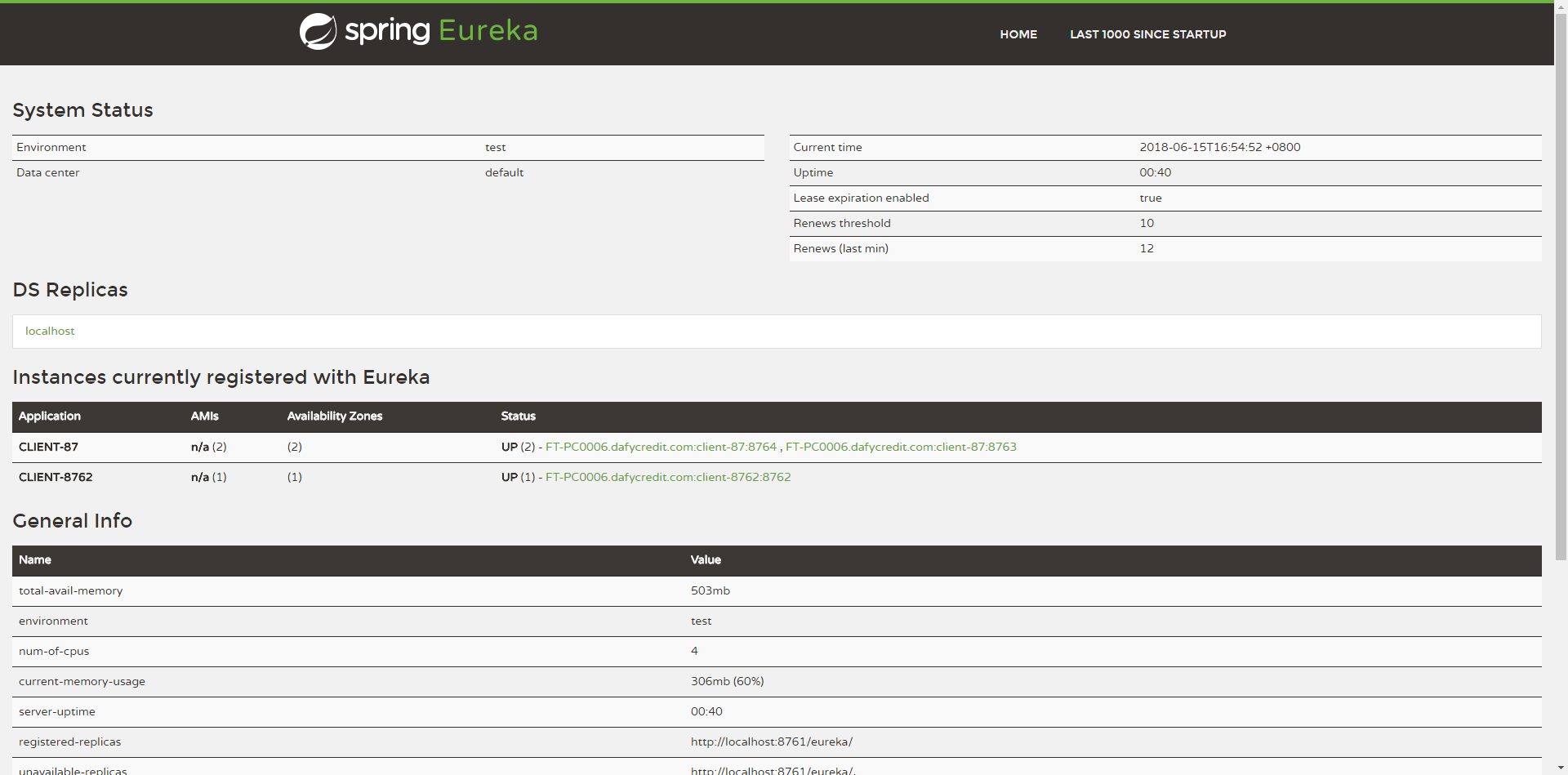
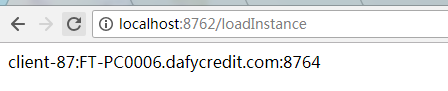
④、我们在地址栏输入http://localhost:8762/loadInstance,多刷新几次,会发现每次调用的端口实例都不同,如下图:

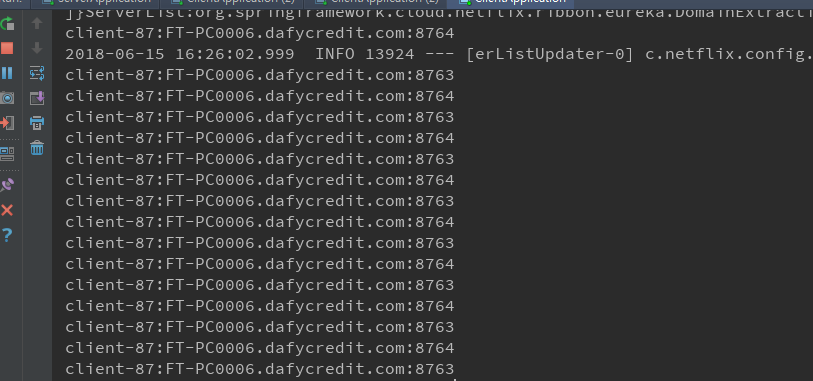
⑤、我们在看控制台,如图:
至此,Ribbon已经入门,是不是很简单,但是这只是最简单的应用,九牛一毛尔...学无止境乎!
示例代码:https://gitee.com/lfalex/springcloud-example
SpringCloud-客户端的负载均衡Ribbon(三)的更多相关文章
- SpringCloud之实现客户端的负载均衡Ribbon(二)
一 Ribbon简介 Ribbon是Netflix发布的负载均衡器,它有助于控制HTTP和TCP的客户端的行为.为Ribbon配置服务提供者地址后,Ribbon就可基于某种负载均衡算法,自动地帮助服务 ...
- 【微服务】之四:轻松搞定SpringCloud微服务-负载均衡Ribbon
对于任何一个高可用高负载的系统来说,负载均衡是一个必不可少的名称.在大型分布式计算体系中,某个服务在单例的情况下,很难应对各种突发情况.因此,负载均衡是为了让系统在性能出现瓶颈或者其中一些出现状态下可 ...
- 学习一下 SpringCloud (三)-- 服务调用、负载均衡 Ribbon、OpenFeign
(1) 相关博文地址: 学习一下 SpringCloud (一)-- 从单体架构到微服务架构.代码拆分(maven 聚合): https://www.cnblogs.com/l-y-h/p/14105 ...
- SpringCloud初体验:三、Feign 服务间调用(FeignClient)、负载均衡(Ribbon)、容错/降级处理(Hystrix)
FeignOpenFeign Feign是一种声明式.模板化的HTTP客户端. 看了解释过后,可以理解为他是一种 客户端 配置实现的策略,它实现 服务间调用(FeignClient).负载均衡(Rib ...
- SpringCloud系列七:使用Ribbon实现客户端侧负载均衡
1. 回顾 在前面,已经实现了微服务的注册与发现.启动各个微服务时,Eureka Client会把自己的网络信息注册到Eureka Server上. 但是,在生成环境中,各个微服务都会部署多个实例,因 ...
- SpringCloud学习系列之二 ----- 服务消费者(Feign)和负载均衡(Ribbon)使用详解
前言 本篇主要介绍的是SpringCloud中的服务消费者(Feign)和负载均衡(Ribbon)功能的实现以及使用Feign结合Ribbon实现负载均衡. SpringCloud Feign Fei ...
- 客户端负载均衡Ribbon之二:Loadbalance的源码
Load Balance负载均衡是用于解决一台机器(一个进程)无法解决所有请求而产生的一种算法. 像nginx可以使用负载均衡分配流量,ribbon为客户端提供负载均衡,dubbo服务调用里的负载均衡 ...
- 服务注册发现Eureka之三:Spring Cloud Ribbon实现客户端负载均衡(客户端负载均衡Ribbon之三:使用Ribbon实现客户端的均衡负载)
在使用RestTemplate来消费spring boot的Restful服务示例中,我们提到,调用spring boot服务的时候,需要将服务的URL写死或者是写在配置文件中,但这两种方式,无论哪一 ...
- 0403-服务注册与发现-客户端负载均衡-Ribbon的基本使用
一.概述 问题1.上一篇文章已说明如何注册微服务,但是调用方如何调用,以及如何防止硬编码.即电影微服务调用用户微服务 问题2.用户微服务多个节点,调用服务方如何负载均衡 二.实现负载均衡方式 2.1. ...
- 一起来学Spring Cloud | 第三章:服务消费者 (负载均衡Ribbon)
一.负载均衡的简介: 负载均衡是高可用架构的一个关键组件,主要用来提高性能和可用性,通过负载均衡将流量分发到多个服务器,多服务器能够消除单个服务器的故障,减轻单个服务器的访问压力. 1.服务端负载均衡 ...
随机推荐
- 转:eclipse的快捷键
22 21 Eclipse中10个最有用的快捷键组合 一个Eclipse骨灰级开发者总结了他认为最有用但又不太为人所知的快捷键组合.通过这些组合可以更加容易的浏览源代码,使得整体的开发效率和质量得到 ...
- TableView的cell加载倒计时重用问题解决方案
TableView的cell加载倒计时重用问题解决方案 效果 说明 1. 写过类似需求的朋友一定知道,TableView上面加载倒计时功能会遇到复杂的重用问题难以解决 2. 本人提供一种解决思路,高效 ...
- Linux ifconfig命令详解
ifconfig(interfaces config).通常需要以root身份登录或使用sudo来使用ifconfig工具 ifconfig 命令用来查看和配置网络设备.当网络环境发生改变时可通过此命 ...
- webshell扫描
可扫描 weevelyshell 生成 或加密的shell 及各种变异webshell 目前仅支持php 支持扫描 weevelyshell 生成 或加密的shell 支持扫描callback一句话s ...
- October 05th 2017 Week 40th Thursday
Happiness is to find someone who can give you warm and share your life together. 幸福,就是找一个温暖的人过一辈子. Y ...
- 一个最简单的WebSocket hello world demo
服务器端代码不超过42行: const WSServer = require("./server.js"); var counter = 0; function createWeb ...
- 盒子模型之margin相关技巧!
废话不多说,直接进入主题,margin相关技巧. 1.设置元素水平居中:margin:x auto; 2.margin负值让元素位移及边框合并. 外边距合并 指当两个垂直外边距相遇时,它们将形成一个外 ...
- 算法题:整形数组找a和b使得a+b=n
题目: 数组 A 由 1000 万个随机正整数 (int) 组成,设计算法,给定整数 n,在 A 中找出 a 和 b,使其符合如下等式: n = a + b 解题思路: 1. 1000w个随机正整数占 ...
- git使用,在ubuntu中
#安装sudo apt install git要先到github官网建一个账号. #配置 你的github git config --global user.name "fanbrightu ...
- Geeks : Kruskal’s Minimum Spanning Tree Algorithm 最小生成树
版权声明:本文作者靖心,靖空间地址:http://blog.csdn.net/kenden23/.未经本作者同意不得转载. https://blog.csdn.net/kenden23/article ...