
android 03 TableLayout
MainActivity.java(默认的,什么都没有)
package com.sxt.day02_02;

import android.os.Bundle;

import android.app.Activity;

import android.view.Menu;

public class MainActivity extends Activity {

    @Override

    protected void onCreate(Bundle savedInstanceState) {

        super.onCreate(savedInstanceState);

        setContentView(R.layout.activity_main);

    }

    @Override

    public boolean onCreateOptionsMenu(Menu menu) {

        getMenuInflater().inflate(R.menu.main, menu);

        return true;

    }

}
xml文件:
<LinearLayout xmlns:android="http://schemas.android.com/apk/res/android"

    android:layout_width="match_parent"

    android:layout_height="match_parent"

    android:orientation="vertical" >

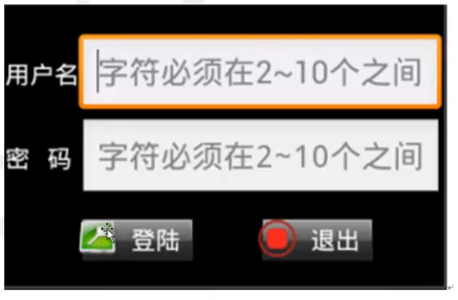
    <TableLayout    2行2列,用户名密码

        android:layout_width="match_parent"    宽:占满一行

        android:layout_height="wrap_content"   高:

        android:stretchColumns="1" >        从0开始,1就是第二列,第一列内容有多宽就多宽,第二列把剩余全部占据

        <TableRow>            第一行

            <TextView android:text="用户名" />第一列。不设置宽和高,则根据文字大小来定。

            <EditText android:hint="2-10个字符" />第一列,

        </TableRow>

        <TableRow>

            <TextView android:text="密码" />

            <EditText

                android:hint="2-10个字符"

                android:password="true" />

        </TableRow>

    </TableLayout>

    <TableLayout                1行2列,登陆退出

        android:layout_marginTop="20dp"

        android:layout_width="match_parent"

        android:layout_height="wrap_content"

        android:stretchColumns="0,1" >        这2列都是自动扩展,平分当前行,

        <TableRow>

            <Button

                android:background="@drawable/btn_bg"

                android:drawableLeft="@drawable/login32x32"   左图右字

                android:padding="3dp"   内部间距

                android:text="登陆"

                android:textColor="#fff"

                android:layout_gravity="center_horizontal"/>   水平居中

            <Button

                android:background="@drawable/btn_bg"

                android:drawableLeft="@drawable/exit32x32"

                android:padding="3dp"

                android:text="退出"

                android:textColor="#fff"   文字颜色,白色

                android:layout_gravity="center_horizontal"/>  水平居中

        </TableRow>

    </TableLayout>

</LinearLayout>
android 03 TableLayout的更多相关文章
- Android开发--TableLayout的应用
1.简介 TableLayout为表格框架结构
- android:TableLayout表格布局详解
1.TableLayout简介2.TableLayout行列数的确定3.TableLayout可设置的属性详解4.一个包含4个TableLayout布局的实例及效果图一.Tablelayout简介 ...
- Android 使用 TableLayout 布局拉伸宽度
转自:http://www.cnblogs.com/ghj1976/archive/2011/04/21/2023850.html 布局文件 <?xml version="1.0&qu ...
- android布局##TableLayout和FrameLayout-android学习之旅(十五)
TableLayout 表格布局 tablelayout简介 表格布局有TableLayout代表,但是它的本质定义仍然是线性管理器.表格布局采用行和列来管理UI,但是不需要明确的定义多少行,多少列, ...
- Android Layout: TableLayout
TableLayout<TableLayout xmlns:android="http://schemas.android.com/apk/res/android" andr ...
- Android之TableLayout表格布局
1.相关属性 1.1.常用属性 android:collapseColumns 设置需要被隐藏的列的序列号 android:shrinkColumns 设置允许被收缩的列的序列号 android:st ...
- Android 之 TableLayout 布局详解
TableLayout简介 •简介 Tablelayout 类以行和列的形式对控件进行管理,每一行为一个 TableRow 对象,或一个 View 控件. 当为 TableRow 对象时,可在 Tab ...
- Android布局-TableLayout表格布局
一.表格布局-TableLayout 1.概念 表格布局采用行列的形式来管理UI的控件.表格布局适合于有规则的布局. TableRow,用来管理行,TableRow中的一个空间占据该行的一列.若不用T ...
- UI篇--Android中TableLayout中的布局
表格布局是按照行列来组织子视图的布局.表格布局包含一系列的Tablerow对象,用于定义行(也可以使用其它子对象).表格布局不为它的行.列和单元格显示表格线.每个行可以包含个以上(包括)的单元 ...
随机推荐
- nginx 基础文档
Nginx基础 1. nginx安装 2. nginx 编译参数详解 3. nginx安装配置+清缓存模块安装 4. nginx+PHP 5.5 5. nginx配置虚拟主机 6. ngi ...
- 从gcc的__attribute__((packed))聊到结构体大小的问题
公司的前辈的代码里面 结构体的花括号最后 有__attribute__((packed))字样.以前没见过,所以查了查.学习学习http://blog.sina.com.cn/s/blog_559f6 ...
- JSP 结构
网络服务器需要一个JSP引擎,也就是一个容器来处理JSP页面. 容器负责截获对JSP页面的请求.本教程使用内嵌JSP容器的Apache来支持JSP开发. JSP容器与Web服务器协同合作,为JSP的正 ...
- RESTful风格的Web服务框架:Swagger
Swagger与SpringMVC项目整合 为了方便的管理项目中API接口,在网上找了好多关于API接口管理的资料,感觉目前最流行的莫过于Swagger了,功能强大,UI界面漂亮,并且支持在线测试等等 ...
- [LeetCode#187]Repeated DNA Sequences
Problem: All DNA is composed of a series of nucleotides abbreviated as A, C, G, and T, for example: ...
- Linux Shell编程(14)——内部变量
内建变量影响Bash脚本行为的变量.$BASHBash二进制程序文件的路径 bash$ echo $BASH /bin/bash$BASH_ENV该环境变量保存一个Bash启动文件路径,当启动一个脚本 ...
- MapReduce扩展:应用程序如何运行于Hadoop Yarn之上
1. 背景 “应用程序运行于Hadoop Yarn之上”的需求来源于微博运维数据平台中的调度系统,即调度系统中的任务需要运行于Hadoop Yarn之上.这里的应用程序可以简单理解为一个普通的进程 ...
- 水题:HDU 5112 A Curious Matt
Description There is a curious man called Matt. One day, Matt's best friend Ted is wandering on the ...
- 配置Myeclipse中的项目部署到服务器,报the selected server is enabled, but is not configured properly.
the selected server is enabled, but is not configured properly. deployment to it will not be permitt ...
- C/S结构与B/S结构的特点分析
C/S结构与B/S结构的特点分析 为了区别于传统的C/S模式,才特意将其称为B/S模式.认识到这些结构的特征,对于系统的选型而言是很关键的. 1.系统的性能 在系统的性能方面,B/S占有优势的是其异地 ...