
android 03 TableLayout
MainActivity.java(默认的,什么都没有)
package com.sxt.day02_02;

import android.os.Bundle;

import android.app.Activity;

import android.view.Menu;

public class MainActivity extends Activity {

    @Override

    protected void onCreate(Bundle savedInstanceState) {

        super.onCreate(savedInstanceState);

        setContentView(R.layout.activity_main);

    }

    @Override

    public boolean onCreateOptionsMenu(Menu menu) {

        getMenuInflater().inflate(R.menu.main, menu);

        return true;

    }

}
xml文件:
<LinearLayout xmlns:android="http://schemas.android.com/apk/res/android"

    android:layout_width="match_parent"

    android:layout_height="match_parent"

    android:orientation="vertical" >

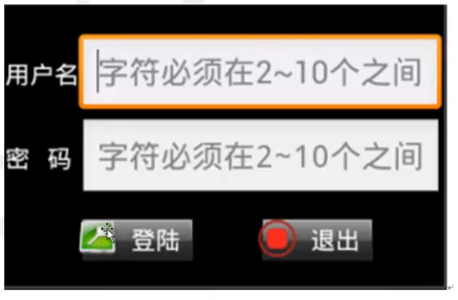
    <TableLayout    2行2列,用户名密码

        android:layout_width="match_parent"    宽:占满一行

        android:layout_height="wrap_content"   高:

        android:stretchColumns="1" >        从0开始,1就是第二列,第一列内容有多宽就多宽,第二列把剩余全部占据

        <TableRow>            第一行

            <TextView android:text="用户名" />第一列。不设置宽和高,则根据文字大小来定。

            <EditText android:hint="2-10个字符" />第一列,

        </TableRow>

        <TableRow>

            <TextView android:text="密码" />

            <EditText

                android:hint="2-10个字符"

                android:password="true" />

        </TableRow>

    </TableLayout>

    <TableLayout                1行2列,登陆退出

        android:layout_marginTop="20dp"

        android:layout_width="match_parent"

        android:layout_height="wrap_content"

        android:stretchColumns="0,1" >        这2列都是自动扩展,平分当前行,

        <TableRow>

            <Button

                android:background="@drawable/btn_bg"

                android:drawableLeft="@drawable/login32x32"   左图右字

                android:padding="3dp"   内部间距

                android:text="登陆"

                android:textColor="#fff"

                android:layout_gravity="center_horizontal"/>   水平居中

            <Button

                android:background="@drawable/btn_bg"

                android:drawableLeft="@drawable/exit32x32"

                android:padding="3dp"

                android:text="退出"

                android:textColor="#fff"   文字颜色,白色

                android:layout_gravity="center_horizontal"/>  水平居中

        </TableRow>

    </TableLayout>

</LinearLayout>
android 03 TableLayout的更多相关文章
- Android开发--TableLayout的应用
1.简介 TableLayout为表格框架结构
- android:TableLayout表格布局详解
1.TableLayout简介2.TableLayout行列数的确定3.TableLayout可设置的属性详解4.一个包含4个TableLayout布局的实例及效果图一.Tablelayout简介 ...
- Android 使用 TableLayout 布局拉伸宽度
转自:http://www.cnblogs.com/ghj1976/archive/2011/04/21/2023850.html 布局文件 <?xml version="1.0&qu ...
- android布局##TableLayout和FrameLayout-android学习之旅(十五)
TableLayout 表格布局 tablelayout简介 表格布局有TableLayout代表,但是它的本质定义仍然是线性管理器.表格布局采用行和列来管理UI,但是不需要明确的定义多少行,多少列, ...
- Android Layout: TableLayout
TableLayout<TableLayout xmlns:android="http://schemas.android.com/apk/res/android" andr ...
- Android之TableLayout表格布局
1.相关属性 1.1.常用属性 android:collapseColumns 设置需要被隐藏的列的序列号 android:shrinkColumns 设置允许被收缩的列的序列号 android:st ...
- Android 之 TableLayout 布局详解
TableLayout简介 •简介 Tablelayout 类以行和列的形式对控件进行管理,每一行为一个 TableRow 对象,或一个 View 控件. 当为 TableRow 对象时,可在 Tab ...
- Android布局-TableLayout表格布局
一.表格布局-TableLayout 1.概念 表格布局采用行列的形式来管理UI的控件.表格布局适合于有规则的布局. TableRow,用来管理行,TableRow中的一个空间占据该行的一列.若不用T ...
- UI篇--Android中TableLayout中的布局
表格布局是按照行列来组织子视图的布局.表格布局包含一系列的Tablerow对象,用于定义行(也可以使用其它子对象).表格布局不为它的行.列和单元格显示表格线.每个行可以包含个以上(包括)的单元 ...
随机推荐
- windows下使用cxfreeze打包python3程序
1:下载适合版本的cxfreeze http://sourceforge.net/projects/cx-freeze/files/4.3.2/ 2:安装,注意python版本是否正确 3:安装完成后 ...
- Mac os下安装pycurl
今天在Mac OS 10.9.2下安装pycurl时候失败,出现以下问题 Using curl-config (libcurl 7.30.0) clang: error: unknown argume ...
- Flex时间操作
小弟是Flex新手,最近一段时间领导要求使用Flex开发B/S的一些项目,需要用到时间上的一些操作.上网查询一番好多人都说不好操作,有的甚至非常麻烦.基于此,小弟整理了一些关于Flex时间操作的经验, ...
- (转载)KL距离,Kullback-Leibler Divergence
转自:KL距离,Kullback-Leibler Divergence KL距离,是Kullback-Leibler差异(Kullback-Leibler Divergence)的简称,也叫做相对 ...
- jQuery遍历对象、数组、集合实例
1.jquery 遍历对象 复制代码代码如下: <!DOCTYPE HTML PUBLIC "-//W3C//DTD HTML 4.0 Transitional//EN" ...
- [BZOJ 1053] [HAOI 2007] 反素数ant
题目链接:BZOJ 1053 想一想就会发现,题目让求的 1 到 n 中最大的反素数,其实就是 1 到 n 中因数个数最多的数.(当有多于一个的数的因数个数都为最大值时,取最小的一个) 考虑:对于一个 ...
- 浅谈JS DDoS攻击原理与防御
分布式拒绝服务攻击(DDoS)攻击是一种针对网站发起的最古老最普遍的攻击.Nick Sullivan是网站加速和安全服务提供商CloudFlare的一名系统工程师.近日,他撰文介绍了攻击者如何利用恶意 ...
- Jqgrid动态拖拽
//注册事件 jQuery("#list1").jqGrid('setGridParam', { gridComplete : function() { $("#_emp ...
- [LeetCode#276] Paint Fence
Problem: There is a fence with n posts, each post can be painted with one of the k colors. You have ...
- Node.js权威指南 (4) - 模块与npm包管理工具
4.1 核心模块与文件模块 / 574.2 从模块外部访问模块内的成员 / 58 4.2.1 使用exports对象 / 58 4.2.2 将模块定义为类 / 58 4.2.3 为模块类定义类变量或类 ...