
Sending e-mail with Spring MVC---reference
reference from:http://www.codejava.net/frameworks/spring/sending-e-mail-with-spring-mvc
Table of contents:
1.Spring framework’s support for e-mail
3.Creating e-mail sending form
4.Configuring SMTP server settings and Spring MVC
5.Creating Spring MVC controller class
6.Creating result page and error page
8.Download Eclipse project/WAR file
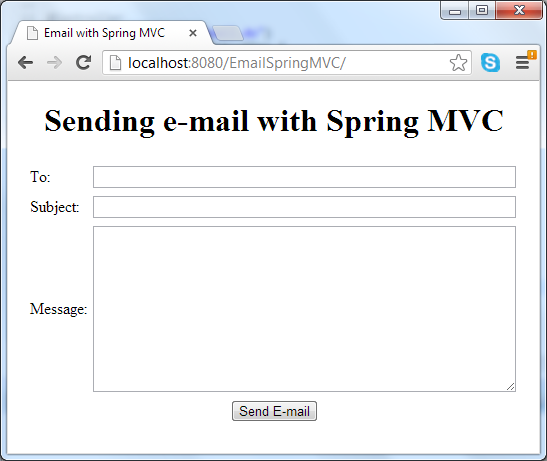
This tutorial provides a sample spring MVC application that allows user sending an e-mail message by filling a web form. The e-mail form looks like following screenshot:
In this tutorial, you are supposed to familiar with Java EE development as well as developing Spring MVC-based applications.
1. Spring framework’s support for e-mail
Based on JavaMail, Spring framework provides high-level abstraction API which greatly simplifies e-mail sending process. Let’s take a brief look at this API in the following class diagram:
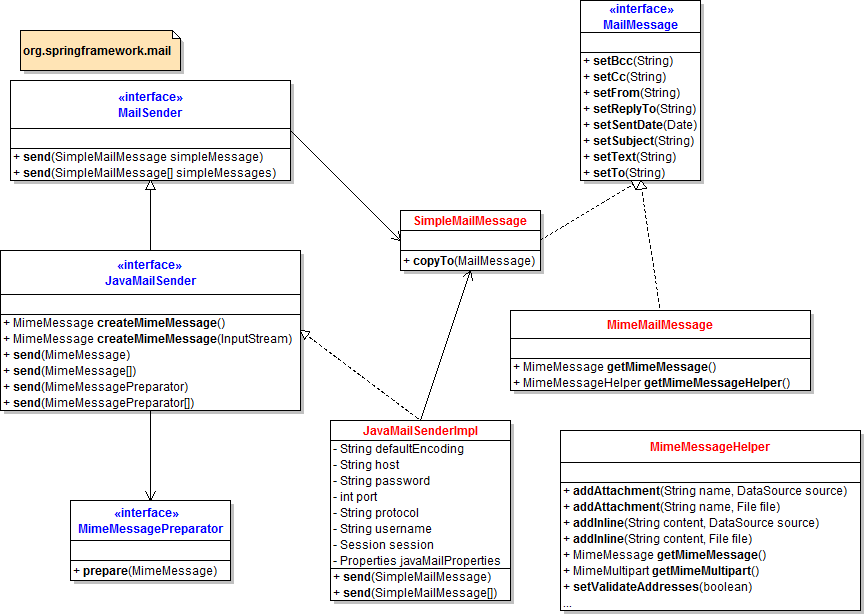
To send e-mail messages, we can use an implementation of interface MailSender – the JavaMailSenderImpl class which is built upon on JavaMail. It’s convenient to configure this implementation as a bean in Spring’s context:
|
1
2
3
4
5
6
7
8
9
10
11
12
13
14
15
16
|
<bean id="mailSender" class="org.springframework.mail.javamail.JavaMailSenderImpl"> <!-- SMTP settings --> <property name="host" value="SMTP_HOST" /> <property name="port" value="SMTP_PORT" /> <property name="username" value="USER_NAME" /> <property name="password" value="PASSWORD" /> <property name="javaMailProperties"> <!-- additional properties specific to JavaMail --> <props> <prop key="mail.transport.protocol">smtp</prop> <prop key="mail.smtp.auth">true</prop> <prop key="mail.smtp.starttls.enable">true</prop> </props> </property></bean> |
This bean holds properties for SMTP and JavaMail and can be injected to a business/service class which needs to send an e-mail, for example:
|
1
|
mailSender.send(email); |
In which email is an object of a type that implements MailMessage interface, such as SimpleMailMessage class. We can construct the email object as follows:
|
1
2
3
4
|
SimpleMailMessage email = new SimpleMailMessage();email.setTo(toAddress);email.setSubject(subject);email.setText(body); |
That’s for a simple mail message (plain text). In case if we want to send HTML e-mail or attach files to the e-mail, we can useMimeMailMessage class with the help of MimeMessagePreparator class and MimeMessageHelper class. For example, sending an e-mail in HTML format with an attachment:
|
1
2
3
4
5
6
7
8
9
10
|
mailSender.send(new MimeMessagePreparator() { public void prepare(MimeMessage mimeMessage) throws MessagingException { MimeMessageHelper message = new MimeMessageHelper(mimeMessage, true, "UTF-8"); message.setFrom(fromEmail); message.setTo(toEmail); message.setSubject("A file for you"); message.setText("<b>See the attached</b>", true); message.addAttachment("CoolStuff.doc", new File("CoolStuff.doc")); }}); |
The following table summarizes the interfaces and classes provided in org.springframework.mail package:
|
org.springframework.mail |
|
Click on a link in the table to see API documentation for the corresponding interface/class.
2. Required jar files
The application requires the following jar files copied to its WEB-INF\lib directory:
|
Required jar files |
|
|
mail.jar |
|
|
spring-beans-3.2.0.RELEASE.jar spring-context-3.2.0.RELEASE.jar spring-context-support-3.2.0.RELEASE.jar spring-core-3.2.0.RELEASE.jar spring-expression-3.2.0.RELEASE.jar spring-web-3.2.0.RELEASE.jar spring-webmvc-3.2.0.RELEASE.jar |
|
|
commons-logging-1.1.1.jar |
|
NOTE: Click on a hyperlink in the table above to download the corresponding software.
The sample application we are going to build contains the following key files:
- EmailForm.jsp: displays an e-mail form.
- Result.jsp: shows successful message after the e-mail has been sent.
- Error.jsp: shows error message in case of an exception is thrown.
- SendEmailController.java: the Spring controller class that takes input from e-mail form, calls Spring’s mailSender to send the e-mail, and redirects user to either successful page or error page.
- spring-mvc.xml: Spring’s context configuration file. Here we will configure SMTP server settings and various properties for JavaMail.
- web.xml: web deployment descriptor file.
3. Creating e-mail sending form
Create a JSP file called EmailForm.jsp with the following HTML code:
|
1
2
3
4
5
6
7
8
9
10
11
12
13
14
15
16
17
18
19
20
21
22
23
24
25
26
27
28
29
30
31
32
33
34
35
36
|
<%@ page language="java" contentType="text/html; charset=UTF-8" pageEncoding="UTF-8"%><!DOCTYPE html PUBLIC "-//W3C//DTD HTML 4.01 Transitional//EN" "http://www.w3.org/TR/html4/loose.dtd"><html><head><meta http-equiv="Content-Type" content="text/html; charset=UTF-8"><title>Email with Spring MVC</title></head><body> <center> <h1>Sending e-mail with Spring MVC</h1> <form method="post" action="sendEmail.do"> <table border="0" width="80%"> <tr> <td>To:</td> <td><input type="text" name="recipient" size="65" /></td> </tr> <tr> <td>Subject:</td> <td><input type="text" name="subject" size="65" /></td> </tr> <tr> <td>Message:</td> <td><textarea cols="50" rows="10" name="message"></textarea></td> </tr> <tr> <td colspan="2" align="center"> <input type="submit" value="Send E-mail" /> </td> </tr> </table> </form> </center></body></html> |
This is a simple form with three fields: To, Subject and Message – which are necessary attributes for a simple outgoing e-mail message. On submitting this form, the action named “sendEmail.do” will be called, as specified by the form’s action attribute. We will implement a Spring controller class for handling this action in the next section.
4. Configuring SMTP server settings and Spring MVC
Create a Spring context configuration file called spring-mvc.xml with the following XML code:
|
1
2
3
4
5
6
7
8
9
10
11
12
13
14
15
16
17
18
19
20
21
22
23
24
25
26
27
28
29
30
31
32
33
34
35
36
37
38
39
40
|
<?xml version="1.0" encoding="UTF-8"?><beans xmlns="http://www.springframework.org/schema/beans" xmlns:xsi="http://www.w3.org/2001/XMLSchema-instance" xmlns:context="http://www.springframework.org/schema/context" xsi:schemaLocation="http://www.springframework.org/schema/beans http://www.springframework.org/schema/beans/spring-beans-3.0.xsd http://www.springframework.org/schema/context http://www.springframework.org/schema/context/spring-context-3.0.xsd"> <context:component-scan base-package="net.codejava.spring" /> <bean id="mailSender" class="org.springframework.mail.javamail.JavaMailSenderImpl"> <property name="host" value="smtp.gmail.com" /> <property name="port" value="587" /> <property name="username" value="youremail" /> <property name="password" value="yourpassword" /> <property name="javaMailProperties"> <props> <prop key="mail.transport.protocol">smtp</prop> <prop key="mail.smtp.auth">true</prop> <prop key="mail.smtp.starttls.enable">true</prop> </props> </property> </bean> <bean id="viewResolver" class="org.springframework.web.servlet.view.InternalResourceViewResolver"> <property name="prefix" value="/" /> <property name="suffix" value=".jsp" /> </bean> <bean class="org.springframework.web.servlet.handler.SimpleMappingExceptionResolver"> <property name="exceptionMappings"> <props> <prop key="java.lang.Exception">Error</prop> </props> </property> </bean> </beans> |
This configuration is pretty straightforward:
- <context:component-scan ... />: tells Spring to scan the package net.codejava.spring for initializing components which are annotated by Spring annotations (It’s a Spring controller class, in case of this application).
- Bean mailSender: this is the important part because it declares a Spring bean for e-mail implementation – theJavaMailSenderImpl class and configures SMTP server settings, which is for a Gmail account in this case. This bean will be injected to a Spring controller class which will be covered in the next section.
- Bean viewResolver: maps logical view names to real JSP file names.
- Bean SimpleMappingExceptionResolver: maps all exceptions of type java.lang.Exception to be handled byError.jsp page.
The web deployment descriptor file (web.xml) is configured as follows:
|
1
2
3
4
5
6
7
8
9
10
11
12
13
14
15
16
17
18
19
20
21
22
23
24
25
26
27
28
|
<?xml version="1.0" encoding="UTF-8"?><web-app xmlns:xsi="http://www.w3.org/2001/XMLSchema-instance" xmlns="http://java.sun.com/xml/ns/javaee" xmlns:web="http://java.sun.com/xml/ns/javaee/web-app_2_5.xsd" xsi:schemaLocation="http://java.sun.com/xml/ns/javaee http://java.sun.com/xml/ns/javaee/web-app_3_0.xsd" id="WebApp_ID" version="3.0"> <display-name>EmailSpringMVC</display-name> <servlet> <servlet-name>SpringController</servlet-name> <servlet-class>org.springframework.web.servlet.DispatcherServlet</servlet-class> <init-param> <param-name>contextConfigLocation</param-name> <param-value>/WEB-INF/spring-mvc.xml</param-value> </init-param> <load-on-startup>1</load-on-startup> </servlet> <servlet-mapping> <servlet-name>SpringController</servlet-name> <url-pattern>*.do</url-pattern> </servlet-mapping> <welcome-file-list> <welcome-file>EmailForm.jsp</welcome-file> </welcome-file-list></web-app> |
It declares Spring controller servlet with its context configuration file (/WEB-INF/spring-mvc.xml). The controller is configured to handle all requests whose URL end with pattern: *.do. And the default page when accessing the application is the email form (EmailForm.jsp).
5. Creating Spring MVC controller class
In order to handle submission from the e-mail form, we need to create a Spring controller class as follows:
|
1
2
3
4
5
6
7
8
9
10
11
12
13
14
15
16
17
18
19
20
21
22
23
24
25
26
27
28
29
30
31
32
33
34
35
36
37
38
39
40
41
|
package net.codejava.spring;import javax.servlet.http.HttpServletRequest;import org.springframework.beans.factory.annotation.Autowired;import org.springframework.mail.SimpleMailMessage;import org.springframework.mail.javamail.JavaMailSender;import org.springframework.stereotype.Controller;import org.springframework.web.bind.annotation.RequestMapping;import org.springframework.web.bind.annotation.RequestMethod;@Controller@RequestMapping("/sendEmail.do")public class SendEmailController { @Autowired private JavaMailSender mailSender; @RequestMapping(method = RequestMethod.POST) public String doSendEmail(HttpServletRequest request) { // takes input from e-mail form String recipientAddress = request.getParameter("recipient"); String subject = request.getParameter("subject"); String message = request.getParameter("message"); // prints debug info System.out.println("To: " + recipientAddress); System.out.println("Subject: " + subject); System.out.println("Message: " + message); // creates a simple e-mail object SimpleMailMessage email = new SimpleMailMessage(); email.setTo(recipientAddress); email.setSubject(subject); email.setText(message); // sends the e-mail mailSender.send(email); // forwards to the view named "Result" return "Result"; }} |
This controller class is quite simple. It is declared as a Spring MVC controller by the annotation @Controller, and is mapped to the e-mail form’s action by the @RequestMapping annotation. We inject the mailSender bean declared in spring-mvc.xml file into this controller through the private field also named mailSender. The injection is done automatically by Spring as we use the @Autowired annotation.
The method doSendEmail()is responsible for capturing input from e-mail form, creating a SimpleMailMessage object and sending the e-mail by invoking the send() method on the mailSender bean. The e-mail is in plain text format. Finally, it returns a view named “Result” which causes Spring to use the viewResolver to find and load appropriate JSP file (Result.jsp).
6. Creating result page and error page
Code the Result.jsp file as follows:
|
1
2
3
4
5
6
7
8
9
10
11
12
13
14
15
|
<%@ page language="java" contentType="text/html; charset=UTF-8" pageEncoding="UTF-8"%><!DOCTYPE html PUBLIC "-//W3C//DTD HTML 4.01 Transitional//EN" "http://www.w3.org/TR/html4/loose.dtd"><html><head><meta http-equiv="Content-Type" content="text/html; charset=UTF-8"><title>Send e-mail result</title></head><body> <center> <h2>Thank you, your email has been sent.</h2> </center></body></html> |
And code the Error.jsp as follows:
|
1
2
3
4
5
6
7
8
9
10
11
12
13
14
15
16
|
<%@ page language="java" contentType="text/html; charset=UTF-8" pageEncoding="UTF-8"%><!DOCTYPE html PUBLIC "-//W3C//DTD HTML 4.01 Transitional//EN" "http://www.w3.org/TR/html4/loose.dtd"><html><head><meta http-equiv="Content-Type" content="text/html; charset=UTF-8"><title>Error</title></head><body> <center> <h2>Sorry, the email was not sent because of the following error:</h2> <h3>${exception.message}</h3> </center></body></html> |
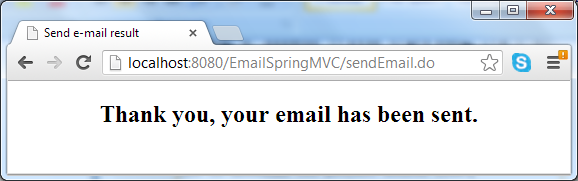
As we can see, the result page simply tells the user that the e-mail has been sent, while the error page displays an error message if any exception thrown during the process of sending e-mail.
7. Run the application
So far we have created all the key pieces of the application. Let’s deploy it on a servlet container like Tomcat, and access the application by typing the following URL into browser’s address bar (your host name and port number maybe different, depending on server configuration):
http://localhost:8080/EmailSpringMVC
The e-mail form is displayed, type in required information:
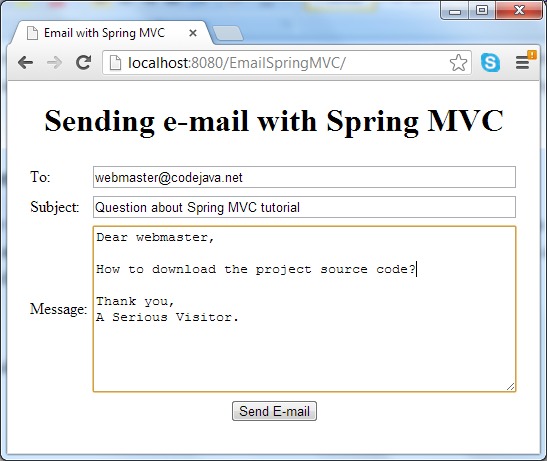
Hit Send E-mail button, it may take a while for the e-mail to be sent. A successful message comes from the result page in case everything is going well:
In case of error (such as network failure or the SMTP server could not be reached), the error page displays:
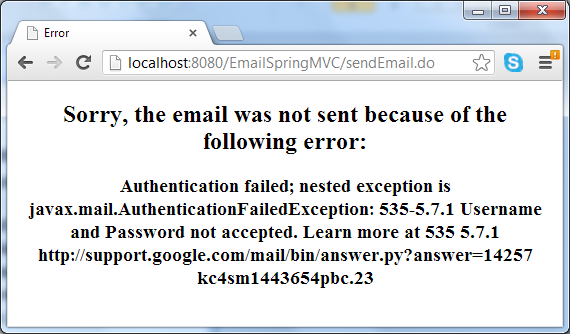
You can download the sample application as an Eclipse project or deployable WAR file in the attachment section, and remember to update SMTP settings to match your e-mail account.
Sending e-mail with Spring MVC---reference的更多相关文章
- Spring MVC Hello World Example(转)
Spring 3 You may interest at this Spring 3 MVC hello world example. In Spring MVC web application, i ...
- Spring Boot Reference Guide
Spring Boot Reference Guide Authors Phillip Webb, Dave Syer, Josh Long, Stéphane Nicoll, Rob Winch, ...
- Spring MVC Hibernate MySQL Integration(集成) CRUD Example Tutorial【摘】
Spring MVC Hibernate MySQL Integration(集成) CRUD Example Tutorial We learned how to integrate Spring ...
- 我是如何进行Spring MVC文档翻译项目的环境搭建、项目管理及自动化构建工作的
感兴趣的同学可以关注这个翻译项目 . 我的博客原文 和 我的Github 前段时间翻译的Spring MVC官方文档完成了第一稿,相关的文章和仓库可以点击以下链接.这篇文章,主要是总结一下这个翻译项目 ...
- Spring MVC 框架的架包分析,功能作用,优点
由于刚搭建完一个MVC框架,决定分享一下我搭建过程中学习到的一些东西.我觉得不管你是个初级程序员还是高级程序员抑或是软件架构师,在学习和了解一个框架的时候,首先都应该知道的是这个框架的原理和与其有关j ...
- spring mvc 快速入门
---------- 转自尚学堂 高淇 --------- Spring MVC 背景介绍 Spring 框架提供了构建 Web 应用程序的全功能 MVC 模块.使用 Spring 可插入的 MVC ...
- (转载)spring mvc DispatcherServlet详解之一---处理请求深入解析
要深入理解spring mvc的工作流程,就需要先了解spring mvc的架构: 从上图可以看到 前端控制器DispatcherServlet在其中起着主导作用,理解了DispatcherServl ...
- Spring MVC 学习总结(二)——控制器定义与@RequestMapping详解
一.控制器定义 控制器提供访问应用程序的行为,通常通过服务接口定义或注解定义两种方法实现. 控制器解析用户的请求并将其转换为一个模型.在Spring MVC中一个控制器可以包含多个Action(动作. ...
- Spring MVC学习笔记——Welcome
参考: http://blog.csdn.net/hehexiaoyou/article/details/23747617 http://www.codingyun.com/article/47.ht ...
- Spring MVC Integration,Spring Security
http://docs.spring.io/spring-security/site/docs/4.2.0.RELEASE/reference/htmlsingle/#authorize-reque ...
随机推荐
- JavaScript 将字符串转化为json对象
var json = eval('(' + data + ')'); 其中data为字符串数据
- Delphi组件indy 10中IdTCPServer修正及SSL使用心得
indy 10终于随着Delphi2005发布了,不过indy套件在我的印象中总是复杂并且BUG不断,说实话,不是看在他一整套组件的面子上,我还是喜欢VCL原生的Socket组件,简洁,清晰.Indy ...
- 远程仓库版本回退方法 good
1 简介 最近在使用git时遇到了远程分支需要版本回滚的情况,于是做了一下研究,写下这篇博客. 2 问题 如果提交了一个错误的版本,怎么回退版本? 如果提交了一个错误的版本到远程分支,怎么回退远程分支 ...
- [cocos2d]cocos2d 2.1与ios 6.0
最近把xcode升级到4.5了,ios也编程6.0 mark一下需要修改的地方(针对于cocos2d 2.1版本),虽然都是warning,但是对于强迫症患者来说无法忍受啊~ 修改一 libs-Coc ...
- 没有document.getElementByName
首先声明的是: document.getElementByName方法没有.document.getElementsByName得到的是标签的数组 document.getElementId得到的是某 ...
- Rocky(dfs)
题目描述 Sylvester Stallion is an old horse who likes nothing better than to wander around in the fields ...
- 【转】Android中intent传递对象和Bundle的用法
原文网址:http://blog.csdn.net/lixiang0522/article/details/8642202 android中的组件间传递的对象一般实现Parcelable接口,当然也可 ...
- 【转】Android bluetooth介绍(二): android blueZ蓝牙代码架构及其uart 到rfcomm流程
原文网址:http://blog.sina.com.cn/s/blog_602c72c50102uzoj.html 关键词:蓝牙blueZ UART HCI_UART H4 HCI L2CAP ...
- LoadRunner中的参数与变量
在LoadRunner脚本开发中,经常会遇到参数与变量相互转换的情况,本文对常见的转换情形进行了方法总结. 1.变量的赋值 //将字符串赋值给变量 ]; strcpy(strTemp, "H ...
- android获取package name
下载apk resigner(此被,,) 另外一个下载url 配置好android 环境,ANDROID_HOME 和路径直接到sdk,将.apk拖到此apk resigner,将会得出package ...