
Setup JIRA Service Desk 3.9.2 on Oracle Linux 6.8
|
OS |
Oracle Linux 6.8 |
V138414-01.iso |
|
Database |
mysql5.6.30 |
MySQL-5.6.30-1.el6.x86_64.rpm-bundle.tar |
|
JIRA Service Desk |
JIRA Service Desk 3.9.2 |
atlassian-servicedesk-3.9.2-x64.bin |
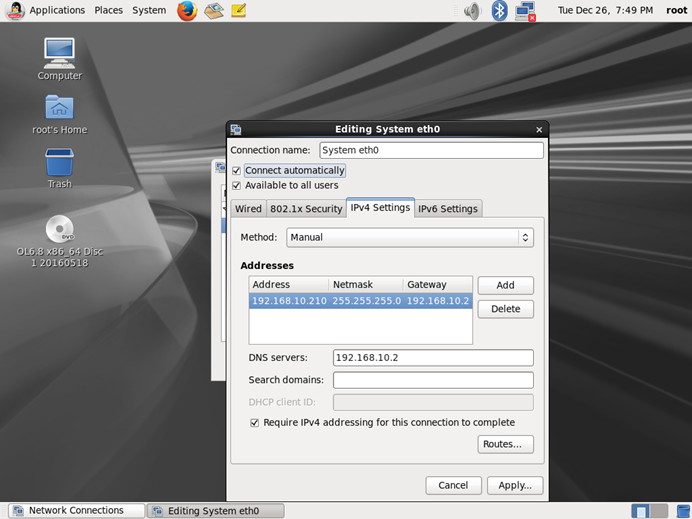
1、设置网络IP和关闭防火墙
[root@localhost ~]# service network restart
Shutting down interface eth0: Device state: 3 (disconnected)
[ OK ]
Shutting down loopback interface: [ OK ]
Bringing up loopback interface: [ OK ]
Bringing up interface eth0: Active connection state: activated
Active connection path: /org/freedesktop/NetworkManager/ActiveConnection/2
[ OK ]
[root@localhost ~]# service iptables restart
iptables: Setting chains to policy ACCEPT: filter [ OK ]
iptables: Flushing firewall rules: [ OK ]
iptables: Unloading modules: [ OK ]
iptables: Applying firewall rules: [ OK ]
[root@localhost ~]#
2、上载MYSQL5.6.30安装包到服务器 /tmp/atlassian
[root@localhost ~]# mkdir -p /tmp/atlassian

3、安装MYSQL5.6.30
# 检查LINUX之前是否安装过mysql相关组件
[root@localhost ~]# rpm -qa | grep mysql
mysql-5.1.73-7.el6.x86_64
mysql-devel-5.1.73-7.el6.x86_64
mysql-libs-5.1.73-7.el6.x86_64
[root@localhost ~]# rpm -e --nodeps mysql-5.1.73-7.el6.x86_64
[root@localhost ~]# rpm -e --nodeps mysql-devel-5.1.73-7.el6.x86_64
[root@localhost ~]# rpm -e --nodeps mysql-libs-5.1.73-7.el6.x86_64
[root@localhost ~]# rpm -qa | grep mysql
[root@localhost ~]#
[root@localhost ~]# cd /tmp/atlassian/
[root@localhost atlassian]# ll
total 221112
-rwsrwsrwt. 1 root root 226416640 May 21 2016 MySQL-5.6.30-1.el6.x86_64.rpm-bundle.tar
[root@localhost atlassian]# tar -xvf MySQL-5.6.30-1.el6.x86_64.rpm-bundle.tar
MySQL-devel-5.6.30-1.el6.x86_64.rpm
MySQL-shared-5.6.30-1.el6.x86_64.rpm
MySQL-test-5.6.30-1.el6.x86_64.rpm
MySQL-embedded-5.6.30-1.el6.x86_64.rpm
MySQL-client-5.6.30-1.el6.x86_64.rpm
MySQL-shared-compat-5.6.30-1.el6.x86_64.rpm
MySQL-server-5.6.30-1.el6.x86_64.rpm
[root@localhost atlassian]# rpm -ivh ./*.rpm
warning: ./MySQL-client-5.6.30-1.el6.x86_64.rpm: Header V3 DSA/SHA1 Signature, key ID 5072e1f5: NOKEY
Preparing... ########################################### [100%]
1:MySQL-devel ########################################### [ 14%]
2:MySQL-client ########################################### [ 29%]
3:MySQL-test ########################################### [ 43%]
4:MySQL-embedded ########################################### [ 57%]
5:MySQL-shared-compat ########################################### [ 71%]
6:MySQL-shared ########################################### [ 86%]
7:MySQL-server ########################################### [100%]
warning: user mysql does not exist - using root
warning: group mysql does not exist - using root
2017-12-26 20:06:34 0 [Warning] TIMESTAMP with implicit DEFAULT value is deprecated. Please use --explicit_defaults_for_timestamp server option (see documentation for more details).
2017-12-26 20:06:34 0 [Note] /usr/sbin/mysqld (mysqld 5.6.30) starting as process 11624 ...
2017-12-26 20:06:34 11624 [Note] InnoDB: Using atomics to ref count buffer pool pages
2017-12-26 20:06:34 11624 [Note] InnoDB: The InnoDB memory heap is disabled
2017-12-26 20:06:34 11624 [Note] InnoDB: Mutexes and rw_locks use GCC atomic builtins
2017-12-26 20:06:34 11624 [Note] InnoDB: Memory barrier is not used
2017-12-26 20:06:34 11624 [Note] InnoDB: Compressed tables use zlib 1.2.3
2017-12-26 20:06:34 11624 [Note] InnoDB: Using Linux native AIO
2017-12-26 20:06:34 11624 [Note] InnoDB: Using CPU crc32 instructions
2017-12-26 20:06:34 11624 [Note] InnoDB: Initializing buffer pool, size = 128.0M
2017-12-26 20:06:34 11624 [Note] InnoDB: Completed initialization of buffer pool
2017-12-26 20:06:34 11624 [Note] InnoDB: The first specified data file ./ibdata1 did not exist: a new database to be created!
2017-12-26 20:06:34 11624 [Note] InnoDB: Setting file ./ibdata1 size to 12 MB
2017-12-26 20:06:34 11624 [Note] InnoDB: Database physically writes the file full: wait...
2017-12-26 20:06:34 11624 [Note] InnoDB: Setting log file ./ib_logfile101 size to 48 MB
2017-12-26 20:06:34 11624 [Note] InnoDB: Setting log file ./ib_logfile1 size to 48 MB
2017-12-26 20:06:34 11624 [Note] InnoDB: Renaming log file ./ib_logfile101 to ./ib_logfile0
2017-12-26 20:06:34 11624 [Warning] InnoDB: New log files created, LSN=45781
2017-12-26 20:06:34 11624 [Note] InnoDB: Doublewrite buffer not found: creating new
2017-12-26 20:06:34 11624 [Note] InnoDB: Doublewrite buffer created
2017-12-26 20:06:34 11624 [Note] InnoDB: 128 rollback segment(s) are active.
2017-12-26 20:06:34 11624 [Warning] InnoDB: Creating foreign key constraint system tables.
2017-12-26 20:06:34 11624 [Note] InnoDB: Foreign key constraint system tables created
2017-12-26 20:06:34 11624 [Note] InnoDB: Creating tablespace and datafile system tables.
2017-12-26 20:06:34 11624 [Note] InnoDB: Tablespace and datafile system tables created.
2017-12-26 20:06:34 11624 [Note] InnoDB: Waiting for purge to start
2017-12-26 20:06:35 11624 [Note] InnoDB: 5.6.30 started; log sequence number 0
A random root password has been set. You will find it in '/root/.mysql_secret'.
2017-12-26 20:06:35 11624 [Note] Binlog end
2017-12-26 20:06:35 11624 [Note] InnoDB: FTS optimize thread exiting.
2017-12-26 20:06:35 11624 [Note] InnoDB: Starting shutdown...
2017-12-26 20:06:36 11624 [Note] InnoDB: Shutdown completed; log sequence number 1625977
2017-12-26 20:06:36 0 [Warning] TIMESTAMP with implicit DEFAULT value is deprecated. Please use --explicit_defaults_for_timestamp server option (see documentation for more details).
2017-12-26 20:06:36 0 [Note] /usr/sbin/mysqld (mysqld 5.6.30) starting as process 12205 ...
2017-12-26 20:06:36 12205 [Note] InnoDB: Using atomics to ref count buffer pool pages
2017-12-26 20:06:36 12205 [Note] InnoDB: The InnoDB memory heap is disabled
2017-12-26 20:06:36 12205 [Note] InnoDB: Mutexes and rw_locks use GCC atomic builtins
2017-12-26 20:06:36 12205 [Note] InnoDB: Memory barrier is not used
2017-12-26 20:06:36 12205 [Note] InnoDB: Compressed tables use zlib 1.2.3
2017-12-26 20:06:36 12205 [Note] InnoDB: Using Linux native AIO
2017-12-26 20:06:36 12205 [Note] InnoDB: Using CPU crc32 instructions
2017-12-26 20:06:36 12205 [Note] InnoDB: Initializing buffer pool, size = 128.0M
2017-12-26 20:06:36 12205 [Note] InnoDB: Completed initialization of buffer pool
2017-12-26 20:06:36 12205 [Note] InnoDB: Highest supported file format is Barracuda.
2017-12-26 20:06:36 12205 [Note] InnoDB: 128 rollback segment(s) are active.
2017-12-26 20:06:36 12205 [Note] InnoDB: Waiting for purge to start
2017-12-26 20:06:36 12205 [Note] InnoDB: 5.6.30 started; log sequence number 1625977
2017-12-26 20:06:36 12205 [Note] Binlog end
2017-12-26 20:06:36 12205 [Note] InnoDB: FTS optimize thread exiting.
2017-12-26 20:06:36 12205 [Note] InnoDB: Starting shutdown...
2017-12-26 20:06:38 12205 [Note] InnoDB: Shutdown completed; log sequence number 1625987
A RANDOM PASSWORD HAS BEEN SET FOR THE MySQL root USER !
You will find that password in '/root/.mysql_secret'.
You must change that password on your first connect,
no other statement but 'SET PASSWORD' will be accepted.
See the manual for the semantics of the 'password expired' flag.
Also, the account for the anonymous user has been removed.
In addition, you can run:
/usr/bin/mysql_secure_installation
which will also give you the option of removing the test database.
This is strongly recommended for production servers.
See the manual for more instructions.
Please report any problems at http://bugs.mysql.com/
The latest information about MySQL is available on the web at
Support MySQL by buying support/licenses at http://shop.mysql.com
New default config file was created as /usr/my.cnf and
will be used by default by the server when you start it.
You may edit this file to change server settings
4、创建JIRA Service Desk数据库
[root@localhost ~]# service mysql start
Starting MySQL. [ OK ]
[root@localhost ~]# more /root/.mysql_secret
# The random password set for the root user at Tue Dec 26 20:06:35 2017 (local time): wrMA0VutOkq8JLlH
# 修改root的mysql密码
[root@localhost ~]# mysql -u root -p
Enter password:
Welcome to the MySQL monitor. Commands end with ; or \g.
Your MySQL connection id is 1
Server version: 5.6.30
Copyright (c) 2000, 2016, Oracle and/or its affiliates. All rights reserved.
Oracle is a registered trademark of Oracle Corporation and/or its
affiliates. Other names may be trademarks of their respective
owners.
Type 'help;' or '\h' for help. Type '\c' to clear the current input statement.
mysql> set PASSWORD=PASSWORD('mysql');
Query OK, 0 rows affected (0.00 sec)
mysql> show databases;
+--------------------+
| Database |
+--------------------+
| information_schema |
| mysql |
| performance_schema |
| test |
+--------------------+
4 rows in set (0.00 sec)
mysql> use mysql;
Reading table information for completion of table and column names
You can turn off this feature to get a quicker startup with -A
Database changed
mysql> update user set password=password('mysql') where user='root';
Query OK, 3 rows affected (0.00 sec)
Rows matched: 4 Changed: 3 Warnings: 0
mysql> update user set host='%' where user='root' and host='localhost';
Query OK, 1 row affected (0.00 sec)
Rows matched: 1 Changed: 1 Warnings: 0
mysql> flush privileges;
Query OK, 0 rows affected (0.00 sec)
mysql> exit
Bye
[root@localhost ~]# chkconfig --list mysql
mysql 0:off 1:off 2:on 3:on 4:on 5:on 6:off
# 创建JRIA Service Desk数据库和用户
[root@localhost ~]# mysql -uroot -pmysql
Warning: Using a password on the command line interface can be insecure.
Welcome to the MySQL monitor. Commands end with ; or \g.
Your MySQL connection id is 3
Server version: 5.6.30 MySQL Community Server (GPL)
Copyright (c) 2000, 2016, Oracle and/or its affiliates. All rights reserved.
Oracle is a registered trademark of Oracle Corporation and/or its
affiliates. Other names may be trademarks of their respective
owners.
Type 'help;' or '\h' for help. Type '\c' to clear the current input statement.
mysql> create user 'jirauser'@'localhost' identified by 'jirauser';
mysql> create user 'jirauser'@'%' identified by 'jirauser';
Query OK, 0 rows affected (0.00 sec)
mysql> create database jira character set utf8 collate utf8_bin;
Query OK, 1 row affected (0.00 sec)
mysql> grant select,insert,update,delete,create,drop,alter,index on jira.* to 'jirauser'@'localhost' identified by 'jirauser';
mysql> grant select,insert,update,delete,create,drop,alter,index on jira.* to 'jirauser'@'%' identified by 'jirauser';
Query OK, 0 rows affected (0.00 sec)
mysql> flush privileges;
Query OK, 0 rows affected (0.00 sec)
mysql> exit
Bye
5、安装JIAR Service Desk软件
[root@localhost ~]# cd /tmp/atlassian
[root@localhost atlassian]# ll
total 817160
-rw-r--r--. 1 root root 383930514 Dec 25 17:11 atlassian-servicedesk-3.9.2-x64.bin
-rwsrwsrwt. 1 root root 226416640 May 21 2016 MySQL-5.6.30-1.el6.x86_64.rpm-bundle.tar
-rw-r--r--. 1 7155 31415 18928540 Mar 4 2016 MySQL-client-5.6.30-1.el6.x86_64.rpm
-rw-r--r--. 1 7155 31415 3424912 Mar 4 2016 MySQL-devel-5.6.30-1.el6.x86_64.rpm
-rw-r--r--. 1 7155 31415 89732912 Mar 4 2016 MySQL-embedded-5.6.30-1.el6.x86_64.rpm
-rw-r--r--. 1 7155 31415 56982836 Mar 4 2016 MySQL-server-5.6.30-1.el6.x86_64.rpm
-rw-r--r--. 1 7155 31415 1961716 Mar 4 2016 MySQL-shared-5.6.30-1.el6.x86_64.rpm
-rw-r--r--. 1 7155 31415 3969756 Mar 4 2016 MySQL-shared-compat-5.6.30-1.el6.x86_64.rpm
-rw-r--r--. 1 7155 31415 51401352 Mar 4 2016 MySQL-test-5.6.30-1.el6.x86_64.rpm
[root@localhost atlassian]# chmod +x atlassian-servicedesk-3.9.2-x64.bin
[root@localhost atlassian]# ./atlassian-servicedesk-3.9.2-x64.bin
Unpacking JRE ...
Starting Installer ...
Dec 26, 2017 8:23:08 PM java.util.prefs.FileSystemPreferences$1 run
INFO: Created user preferences directory.
This will install JIRA Service Desk 3.9.2 on your computer.
OK [o, Enter], Cancel [c]
Choose the appropriate installation or upgrade option.
Please choose one of the following:
Express Install (use default settings) [1], Custom Install (recommended for advanced users) [2, Enter], Upgrade an existing JIRA installation [3]
Where should JIRA Service Desk be installed?
[/opt/atlassian/jira]
Default location for JIRA Service Desk data
[/var/atlassian/application-data/jira]
Configure which ports JIRA Service Desk will use.
JIRA requires two TCP ports that are not being used by any other
applications on this machine. The HTTP port is where you will access JIRA
through your browser. The Control port is used to startup and shutdown JIRA.
Use default ports (HTTP: 8080, Control: 8005) - Recommended [1, Enter], Set custom value for HTTP and Control ports [2]
JIRA can be run in the background.
You may choose to run JIRA as a service, which means it will start
automatically whenever the computer restarts.
Install JIRA as Service?
Yes [y, Enter], No [n]
Details on where JIRA Service Desk will be installed and the settings that will be used.
Installation Directory: /opt/atlassian/jira
Home Directory: /var/atlassian/application-data/jira
HTTP Port: 8080
RMI Port: 8005
Install as service: Yes
Install [i, Enter], Exit [e]
Extracting files ...
Please wait a few moments while JIRA Service Desk is configured.
Installation of JIRA Service Desk 3.9.2 is complete
Start JIRA Service Desk 3.9.2 now?
Yes [y, Enter], No [n]
Please wait a few moments while JIRA Service Desk starts up.
Launching JIRA Service Desk ...
Installation of JIRA Service Desk 3.9.2 is complete
Your installation of JIRA Service Desk 3.9.2 is now ready and can be
accessed via your browser.
JIRA Service Desk 3.9.2 can be accessed at http://localhost:8080
Finishing installation ...
# 停止JIRA Service Desk服务
[root@localhost atlassian]# service jira stop
executing using dedicated user
.....
.... .NMMMD. ...
.8MMM. $MMN,..~MMMO.
.?MMM. .MMM?.
OMMMMZ. .,NMMMN~
.IMMMMMM. .NMMMN. .MMMMMN,
,MMMMMM$..3MD..ZMMMMMM.
=NMMMMMM,. .,MMMMMMD.
.MMMMMMMM8MMMMMMM,
.ONMMMMMMMMMMZ.
,NMMMMMMM8.
.:,.$MMMMMMM
.IMMMM..NMMMMMD.
.8MMMMM: :NMMMMN.
.MMMMMM. .MMMMM~.
.MMMMMN .MMMMM?.
Atlassian JIRA
Version : 7.6.2
If you encounter issues starting or stopping JIRA, please see the Troubleshooting guide at http://confluence.atlassian.com/display/JIRA/Installation+Troubleshooting+Guide
Server startup logs are located in /opt/atlassian/jira/logs/catalina.out
Using CATALINA_BASE: /opt/atlassian/jira
Using CATALINA_HOME: /opt/atlassian/jira
Using CATALINA_TMPDIR: /opt/atlassian/jira/temp
Using JRE_HOME: /opt/atlassian/jira/jre/
Using CLASSPATH: /opt/atlassian/jira/bin/bootstrap.jar:/opt/atlassian/jira/bin/tomcat-juli.jar
Using CATALINA_PID: /opt/atlassian/jira/work/catalina.pid
Tomcat stopped.
6、破解JIAR Service Desk软件
# 上载JIRA连接mysql的Java插件 mysql-connector-java-5.1.44.tar.gz
# 上载破解补丁包 jira7.3_crack.zip
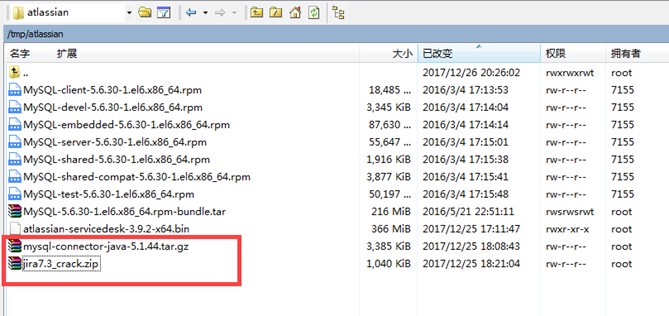
[root@localhost atlassian]# tar -zxvf mysql-connector-java-5.1.44.tar.gz
[root@localhost atlassian]# unzip jira7.3_crack.zip
Archive: jira7.3_crack.zip
creating: jira7.3/
inflating: jira7.3/atlassian-extras-3.2.jar
creating: __MACOSX/
creating: __MACOSX/jira7.3/
inflating: __MACOSX/jira7.3/._atlassian-extras-3.2.jar
inflating: jira7.3/mysql-connector-java-5.1.39-bin.jar
inflating: __MACOSX/jira7.3/
[root@localhost atlassian]# cp /tmp/atlassian/mysql-connector-java-5.1.44/mysql-connector-java-5.1.44-bin.jar /opt/atlassian/jira/lib
[root@localhost ~]# cp /tmp/atlassian/jira7.3/atlassian-extras-3.2.jar /opt/atlassian/jira/atlassian-jira/WEB-INF/lib/
[root@localhost ~]# cp /tmp/atlassian/jira7.3/mysql-connector-java-5.1.39-bin.jar /opt/atlassian/jira/atlassian-jira/WEB-INF/lib/
[root@localhost atlassian]# service jira start
To run JIRA in the foreground, start the server with start-jira.sh -fg
executing using dedicated user: jira
.....
.... .NMMMD. ...
.8MMM. $MMN,..~MMMO.
.?MMM. .MMM?.
OMMMMZ. .,NMMMN~
.IMMMMMM. .NMMMN. .MMMMMN,
,MMMMMM$..3MD..ZMMMMMM.
=NMMMMMM,. .,MMMMMMD.
.MMMMMMMM8MMMMMMM,
.ONMMMMMMMMMMZ.
,NMMMMMMM8.
.:,.$MMMMMMM
.IMMMM..NMMMMMD.
.8MMMMM: :NMMMMN.
.MMMMMM. .MMMMM~.
.MMMMMN .MMMMM?.
Atlassian JIRA
Version : 7.6.2
If you encounter issues starting or stopping JIRA, please see the Troubleshooting guide at http://confluence.atlassian.com/display/JIRA/Installation+Troubleshooting+Guide
Server startup logs are located in /opt/atlassian/jira/logs/catalina.out
Using CATALINA_BASE: /opt/atlassian/jira
Using CATALINA_HOME: /opt/atlassian/jira
Using CATALINA_TMPDIR: /opt/atlassian/jira/temp
Using JRE_HOME: /opt/atlassian/jira/jre/
Using CLASSPATH: /opt/atlassian/jira/bin/bootstrap.jar:/opt/atlassian/jira/bin/tomcat-juli.jar
Using CATALINA_PID: /opt/atlassian/jira/work/catalina.pid
Tomcat started.
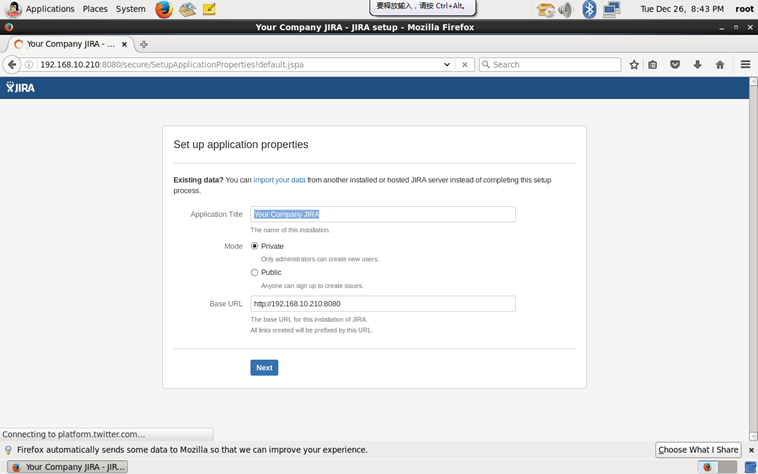
7、配置 JIRA Service Desk
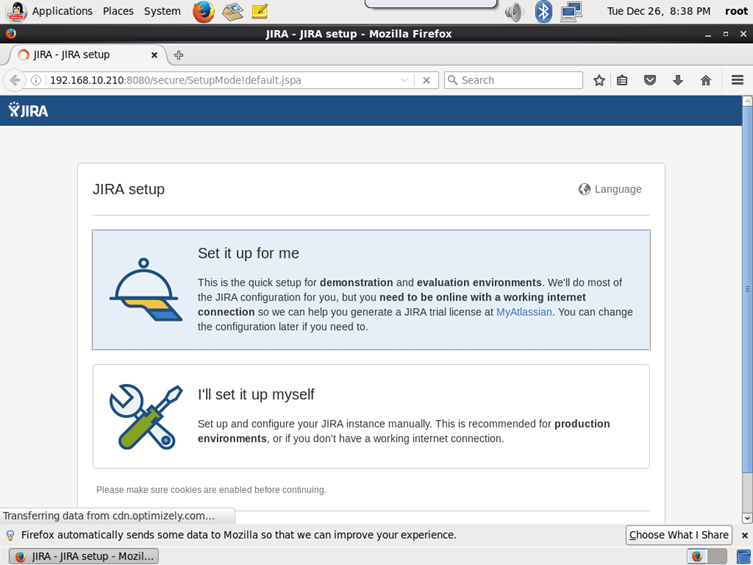
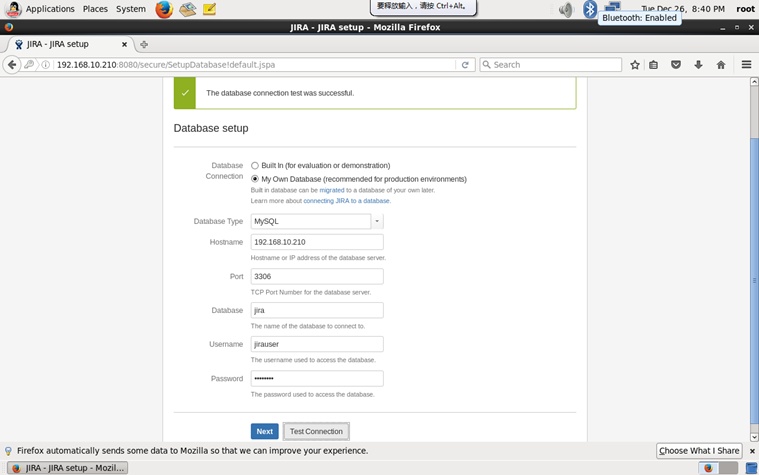
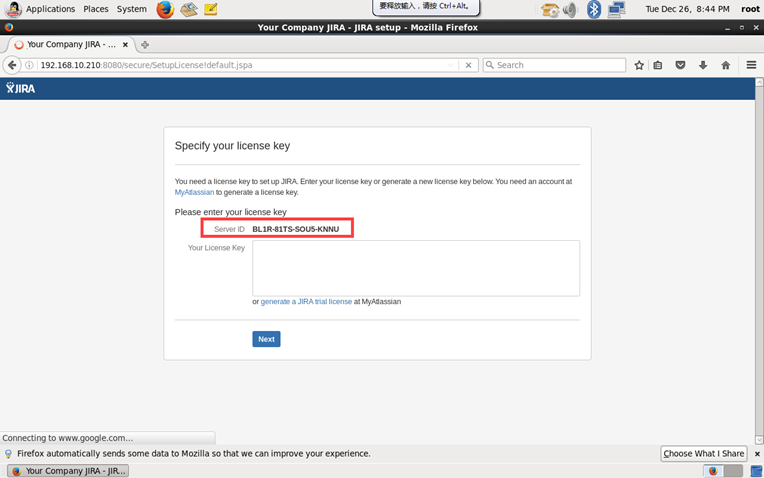
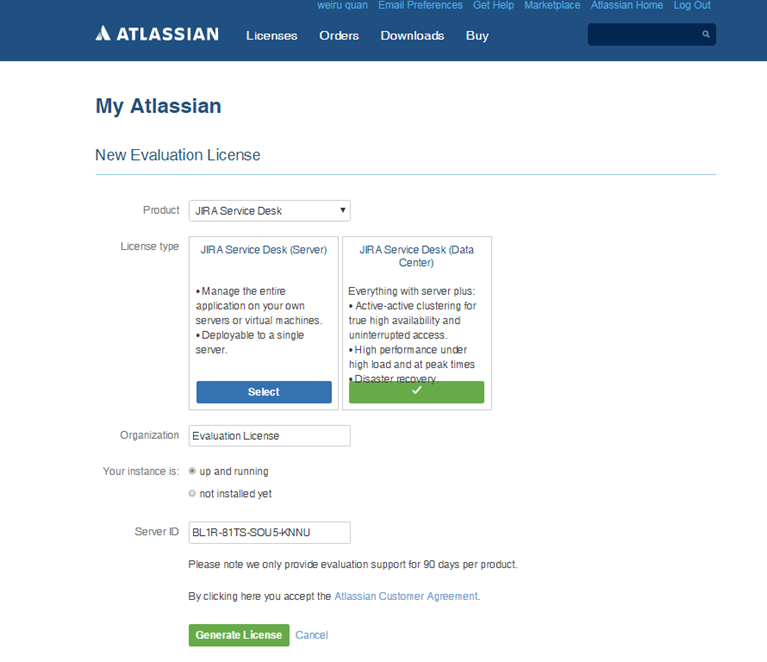
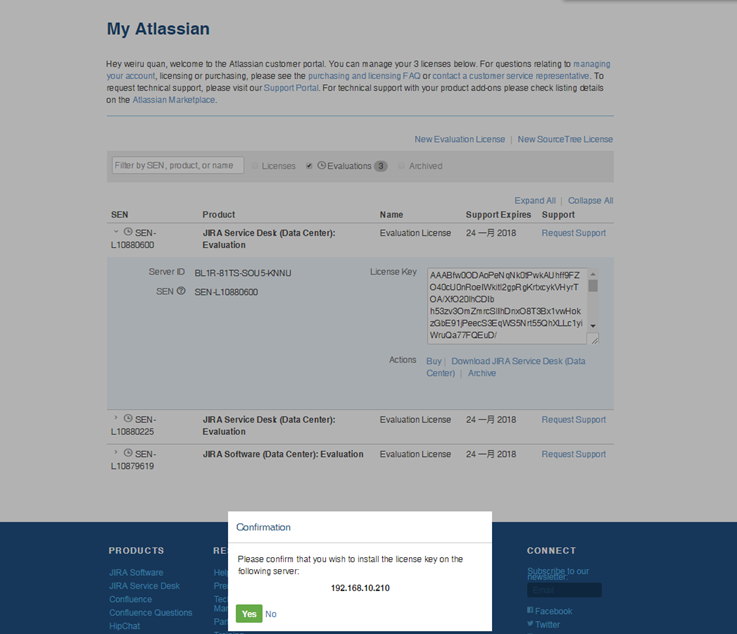
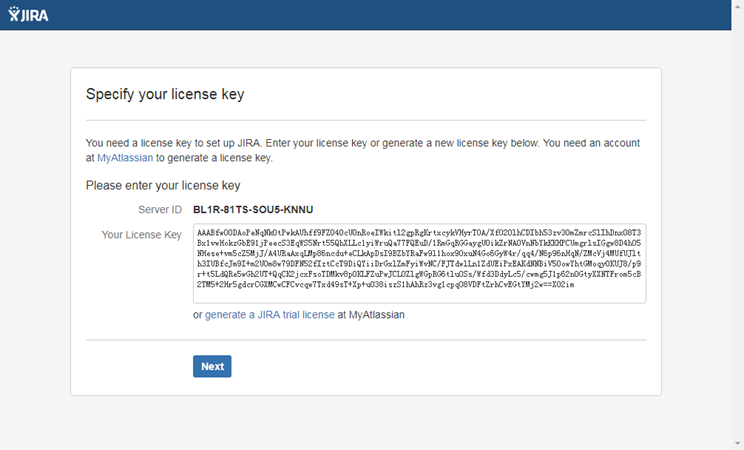
Server ID BL1R-81TS-SOU5-KNNU
Your License Key
AAABfw0ODAoPeNqNk0tPwkAUhff9FZO40cU0nRoeIWkitl2gpRgKrtxcykVHyrTOA/XfO20lhCDIbh53zv3OmZmrcSlIhDnxO8T3Bx1vwHokzGbE91jPeecS3EqWS5Nrt55QhXLLc1yiWruQa77FQEuD/1RmGqRGGaygUOikZrNAOVnNbYkKKHPCUmgrlsIGgw8D4hO5NHese+vm5cZ5MjJ/A4URaAxqLMp86ncdu+eCLkApDsI9BZbYRaFw9l1hox9OxuN4Go6GyW4r/qq4/N6p96nHqN/ZMcVj4MUfUJlth3IUBfcJm9I+m2U0m8w79DFN52fIztCcT9DiQYiiDrGxlZmFyiWvNC/FJTdwlLn1ZdUEiPxEAKdNNBiV5OowYhtGMoqyOKUJ8/p9r+t5LdQRe5wGh2UT+QqCK2jcxFsoTDMkv8pOKLFZuPwJCLOZlgWGpRG6tlu0Ss/Wfd3DdyLc5/cwmg5J1p62n0GtyXXNTFrom5cB2TM5+2Hr5gdcrCGXMCwCFCvcqw7Txd49sT+Xp+uO38iszS1hAhRz3vg1cpqO8VDFtZrhCvEGtYMj2w==X02im
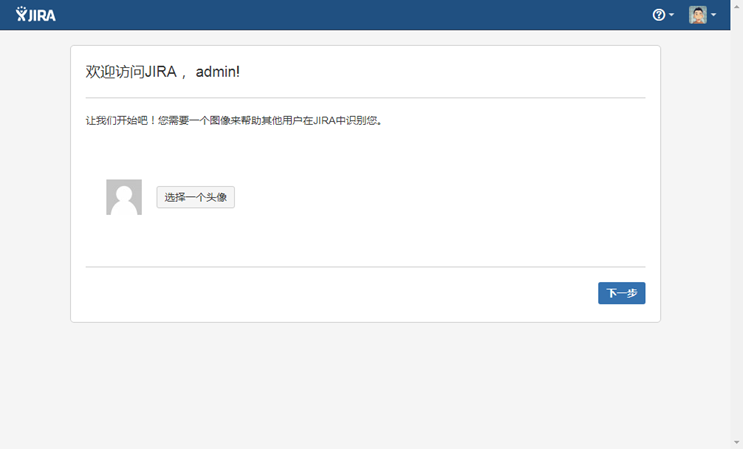
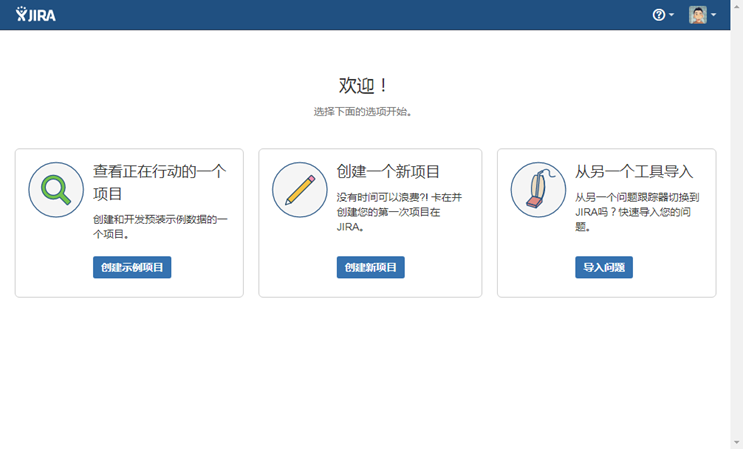
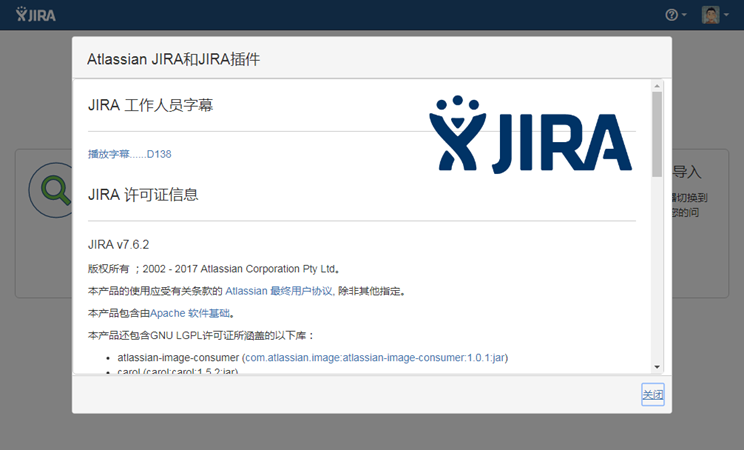
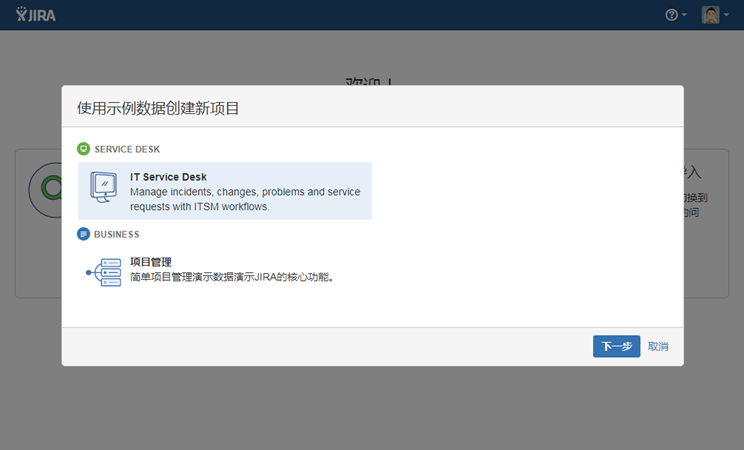
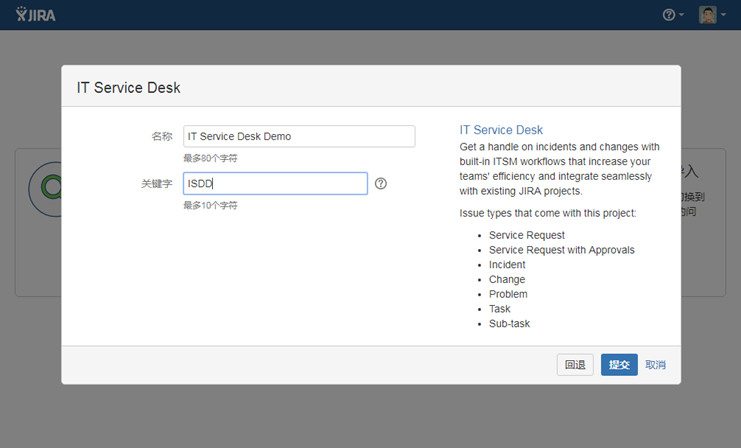
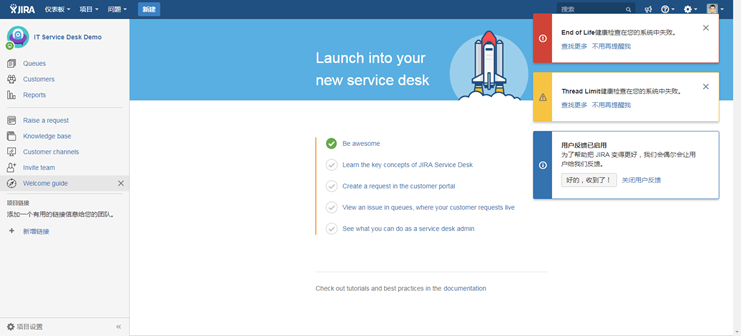
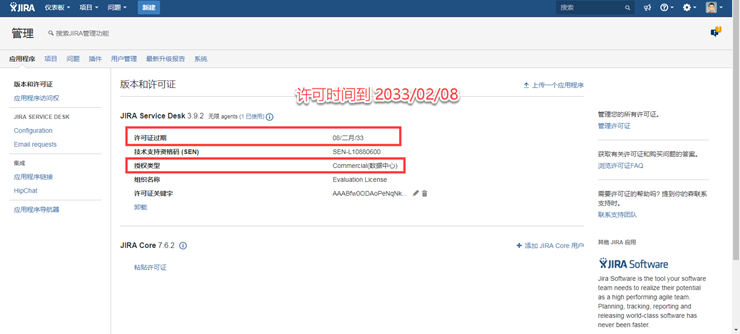
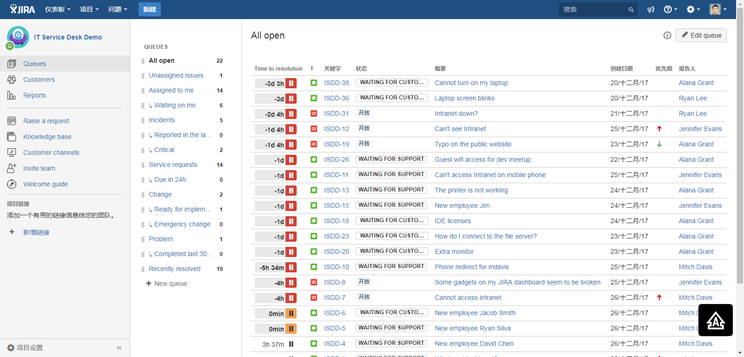
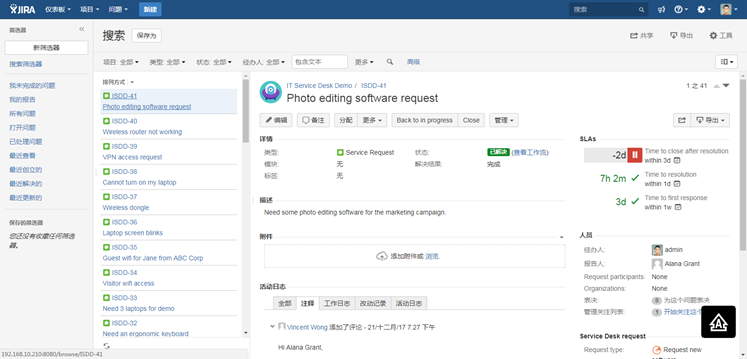
Setup JIRA Service Desk 3.9.2 on Oracle Linux 6.8的更多相关文章
- Confluence 6 给一个从 Jira Service Desk 的非许可证用户访问权限
如果你正在使用 Confluence 为 Jira 服务桌面(Jira Service Desk)的知识库,你可以选择允许所有活动的用户和客户(客户是可以登录的用户,但是这些用户是没有 Conflue ...
- JIRA Service Desk 3.9.2 没有许可证
https://my.atlassian.com/license/evaluation Server ID BFHT-0XFL-3NM8-3KRF SEN SEN-L10880225 License ...
- Setup JIRA Software 7.6.2 on Oracle Linux 6.8
OS Oracle Linux 6.8 V138414-01.iso Database mysql5.6.30 MySQL-5.6.30-1.el6.x86_64.rpm-bundle.tar JIR ...
- Unified Service Desk Overview
As we implement CRM in enterprise, we usually integrate with many other information system such as E ...
- 最佳实践 | 通过使用 Jira Service Management 改进 HR 工作流程
Jira Service Management 承诺解锁高速团队.技术团队和与之合作的业务部门都可以从 Jira Service Management中受益,尤其是 HR 团队. Atlassi ...
- Deploying OpenFire for IM (instant message) service (TCP/IP service) with database MySQL , client Spark on linux部署OpenFire IM 消息中间件服务
Are you a hacker? How to build another QQ/Wechat/whatsapp/skype/imessage? Let's go through this!!!! ...
- 【Service】【Database】【Oracle】Oracle client 12.1.0.2 for MacOS
1. 概述:为了在我的macos上搭建python的cx_Oracle开发环境,首先需要配置oracle client 2. 环境与版本: 2.1. OS:Mac OS Sierra 10.12.2 ...
- JIRA
https://www.jianshu.com/p/8c14b52ce692 JIRA这个工具接触有好几年了,在多个海外项目上都用过这个工具.去年又在项目上深度使用后就有点爱不释手了,回国后也在找机会 ...
- JIRA & GitHub
JIRA & GitHub https://confluence.atlassian.com/adminjiracloud/connect-jira-cloud-to-github-81418 ...
随机推荐
- 2015多校第6场 HDU 5353 Average 贪心,细节处理
题目链接:http://acm.hdu.edu.cn/showproblem.php?pid=5353 题意:有n个人围城一个环,每一个人手里都有一些糖果,第i个人有ai块.现在有三种操作:第i个人给 ...
- Oracle数据库共享内存分配不足问题的解决
问题: ORA-: unable to allocate bytes of shared memory ("shared pool,)","session param v ...
- redis之(十)redis实现消息中间件的功能
[一]任务队列的好处 --->松耦合:生产者和消费者无需知道彼此实现的细节,只需要约定好任务的描述格式.这使得生产者和消费者可以由不同的团队使用不同的编程语言编写. --->易于扩展:消费 ...
- Linux磁盘的性能详细测试办法
# 测试写入20Gb文件sync && time -p bash -c "(dd if=/dev/zero of=test.dd bs=1000K count=20000; ...
- SEO如何写好文章标题
近一半网民只看标题不点内容,许多网站有个标题和内容摘要,而这个摘要基本概括了整篇新闻的大致内容,所以的互联网信息泛滥的今天,看标题看摘要成了最快阅读新闻资讯的一种有效方式. 如何写好标题?我一直愁这事 ...
- SPOJ - SUBST1 D - New Distinct Substrings
D - New Distinct Substrings 题目大意:求一个字符串中不同子串的个数. 裸的后缀数组 #include<bits/stdc++.h> #define LL lon ...
- sprint定时任务执行两次
我这里遇到的是tomcat问题,把appBase设置为空 <Host name="localhost" appBase="" unpackWARs=&qu ...
- 19. Remove Nth Node From End of List【Medium】【删除单链表倒数第n个结点】
Given a linked list, remove the n-th node from the end of list and return its head. Example: Given l ...
- CodeForces 732E Sockets
贪心,优先队列. 将$s$按照从小到大的顺序扔进优先队列.从小的开始与电脑配对,如果找不到合适的电脑,那么再变小一次,直到找到与之配对的电脑或者作废. #pragma comment(linker, ...
- 洛谷P1491 集合位置 [最短路,SPFA]
题目传送门 题目描述 每次有大的活动,大家都要在一起“聚一聚”,不管是去好乐迪,还是避风塘,或者汤姆熊,大家都要玩的痛快.还记得心语和花儿在跳舞机上的激情与释放,还记得草草的投篮技艺是如此的高超,还记 ...