
matplotlib 操作子图(subplot,axes)
Matplotlib 中文用户指南 3.3 使用 GridSpec 自定义子图位置
- ax:matplotlib.axes._subplots.AxesSubplot,的基本操作
ax.set_xticks([]), ax_set_yticks([]):关闭坐标刻度ax.axis('off'):关闭坐标轴ax.set_title():设置标题
1. subplots
fig, ax = plt.subplots(nrows=1, ncols=2, figsize=(8, 4))

ax[0].plot(...)

ax[0].set_xlabel(...)

ax[0].set_title(...)

ax[1].plot(...)

ax[1].set_xlabel(...)

...
fig, (ax1, ax2, ax3) = plt.subplots(3, 1, sharex=True)更一般的做法(也是matlab的风格)是这样的:
fig = plt.figure()          # 创建一个figure对象,底下的一切显示均在此figure上完成

plt.subplot(121)

plt.imshow(img1)

plt.subplot(122)

plt.imshow(img2)

plt.show()

# 当然放在一个range里边

for i in range(ndim):

    plt.subplot(ndim//5, 5, i+1)

    plt.hist()
2. subplot2grid
subplot2grid
# 以下两条语句等价

ax = plt.subplot2grid((2,2),(0, 0))

ax = plt.subplot(221) # 下标从 0 开始- colspan、rowspan 与 索引的对应关系
import matplotlib.pyplot as plt

def disable_axis(ax):

    ax.set_xticks([])

    ax.set_yticks([])

    # ax.axis('off')

def set_title(ax, title):

    ax.set_title(title)

def subplot2grid_demo():

    ax1 = plt.subplot2grid((3, 3), (0, 0), colspan=2)

    disable_axis(ax1)

    set_title(ax1, 'ax1')

    ax2 = plt.subplot2grid((3, 3), (1, 0))

    disable_axis(ax2)

    set_title(ax2, 'ax2')

    ax3 = plt.subplot2grid((3, 3), (1, 1))

    disable_axis(ax3)

    set_title(ax3, 'ax3')

    ax4 = plt.subplot2grid((3, 3), (0, 2), rowspan=2)

    disable_axis(ax4)

    set_title(ax4, 'ax4')

    ax5 = plt.subplot2grid((3, 3), (2, 0), colspan=3)

    disable_axis(ax5)

    set_title(ax5, 'ax5')

    # plt.xticks([])

    # plt.yticks([])

    # plt.axis('off')

    plt.show()

if __name__ == '__main__':

    subplot2grid_demo()
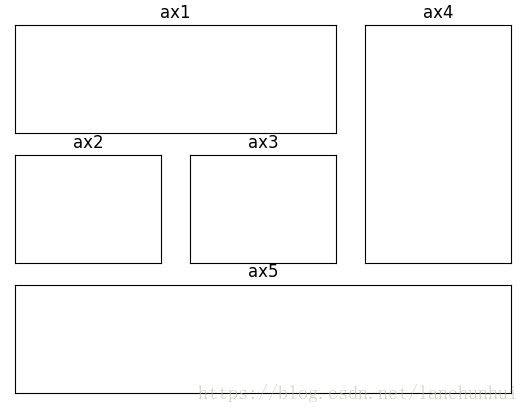
3. GridSpec:方便的切片操作
GridSpec 提供了十分方便的切片操作,实现上述功能,则只需如下代码:
def gridspec_demo():

    gs = gridspec.GridSpec(3, 3)

    ax1 = plt.subplot(gs[0, :2])

    ax2 = plt.subplot(gs[1, 0])

    ax3 = plt.subplot(gs[1, 1])

    ax4 = plt.subplot(gs[0:2, 2])

    ax5 = plt.subplot(gs[2:, :])

    plt.show()
matplotlib 操作子图(subplot,axes)的更多相关文章
- (转)Matplotlib的子图subplot的使用
转:https://www.jianshu.com/p/de223a79217a 前言 Matplotlib的可以把很多张图画到一个显示界面,这就设计到面板切分成一个一个子图.这是怎么做到的呢.mat ...
- Matlab绘制子图subplot使用攻略
参考:https://jingyan.baidu.com/article/915fc414ad794b51394b20e1.html Matlab绘制子图subplot使用攻略 听语音 原创 | 浏览 ...
- matplotlib 的 subplot, axes and axis
fig = plt.figure('多图', (10, 10), dpi=80) #第一个指定窗口名称,第二个指定图片大小,创建一个figure对象 plt.subplot(222) #2*2的第二个 ...
- matplotlib ----- 多子图, subplots
这一篇讲的比较详细. http://matplotlib.org/examples/pylab_examples/subplots_demo.html 官方文档给出的subplots用法, http: ...
- matplotlib添加子图(拼图功能)
我们已经知道,matplotlib是python中的一个十分好用的作图库,它的简单的使用方法可以在之前的随笔中找到.传送门:https://www.cnblogs.com/chester-cs/p/1 ...
- matplotlib画子图时设置总标题
matplotlib subplots绘图时 设置总标题 :fig.suptitle(name)
- matplotlib调整子图大小
因为子图太多而导致每个子图很小,很密,如何调整
- matplotlib绘制子图
fig,subs = plt.subplots(2,2) subs[0][0].plot(data_math_C1) subs[0][0].set_title('C_1 曲线') subs[0][1] ...
- python使用matplotlib:subplot绘制多个子图
1 问题描述 matploglib 能够绘制出精美的图表, 有些时候, 我们希望把一组图放在一起进行比较, 有没有什么好的方法呢? matplotlib 中提供的 subplot 可以很好的解决这个问 ...
随机推荐
- shell 杀掉指定进程的服务
check_results=`ps -ef|grep bp_driver.launch|awk '{print $2}'|sed -n 1p` echo `kill - $check_results` ...
- 【Robot Framework 项目实战 01】使用 RequestsLibrary 进行接口测试
写在前面 本文我们一起来学习如何使用Robot Framework 的RequestsLibrary库,涉及POST.GET接口测试,RF用例分层封装设计等内容. 接口 接口测试是我们最常见的测试类型 ...
- Spring AMQP 源码分析 02 - CachingConnectionFactory
### 准备 ## 目标 了解 CachingConnectionFactory 在默认缓存模式下的工作原理 ## 前置知识 <Spring AMQP 源码分析 01 - Impatie ...
- 动态规划-最长可互除子序列 Largest Divisible Subset
2018-08-28 17:51:04 问题描述: 问题求解: 本题是一个求最优解的问题,很自然的会想到动态规划来进行解决.但是刚开始还是陷入了僵局,直到看到了hint:LIS,才有了进一步的思路.下 ...
- 部署ovf模板,突然出现用户取消任务。
查看了网上的文章,自己做了一下实验. 发觉导出ovf模板时,虚拟CDROM的选项要选[客户端设备],导入时才不会出事. 参考连接 http://lukebarklimore.wordpress.com ...
- Intellij IDEA 搭建Spring Boot项目(一)
原文出处 第一步选择File –> New –> Project –>Spring Initialer –> 点击Next 第二步自己修改 Group 和 Artifact 字 ...
- Illumina Sequence Identifiers 序列标识符 index详解
大家基本都知道什么是 FASTA 和 FastQ 格式了,但这是不够的. 我们还需要了解世界上最大的测序公司自己定制的 FastQ 格式,因为你可能会经常用到,有时还会亲自去处理它们. 本文主题:Il ...
- 5-15 devise(git指南,部分认为重要的内容的译文)
git指南:https://github.com/plataformatec/devise 维基百科上有how to 的很多文章. Stackoverflow有大量问题的答案. 全的文档devise: ...
- hdu2845_最大不连续子段和
---恢复内容开始--- Beans Time Limit: 2000/1000 MS (Java/Others) Memory Limit: 32768/32768 K (Java/Other ...
- UVA-10163 Storage Keepers (0-1背包)
题目大意:有n个仓库,m个应聘者,每人对应一个能力值.一个人可以看多个仓库,一间仓库只能被一个人看.如果一个能力为p的人看k间仓库,那么安全系数为p/k,求出最大的最小安全系数,并且求出在此情况下所有 ...