
Unity使用OpenGL绘制经纬线圈
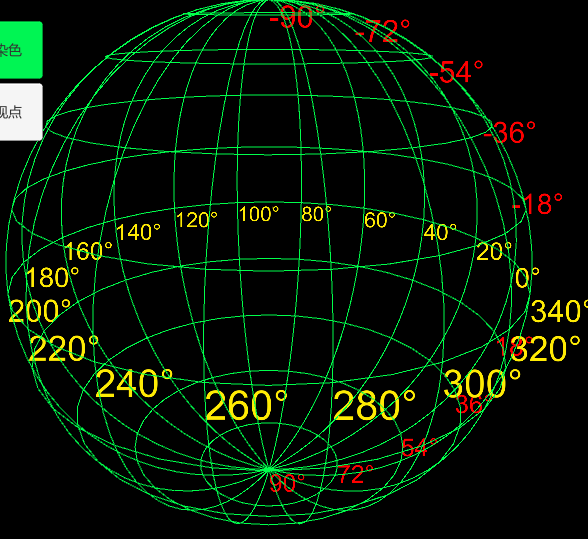
using System.Collections;

using System.Collections.Generic;

using UnityEngine;

public class LatLonGridGL : MonoBehaviour {

    /// <summary>

    /// 地球半径

    /// </summary>

    public float R = ;

    /// <summary>

    /// 纬线圈数(不包括南极点和北极点)

    /// </summary>

    public int latNum = ;

    /// <summary>

    /// 经线数

    /// </summary>

    public int lonNum = ;

    /// <summary>

    /// 一条纬线圈分段

    /// </summary>

    public int latSegment = ;

    /// <summary>

    /// 一条经线(半圆)分段

    /// </summary>

    public int lonSegment = ;

    /// <summary>

    /// 网格颜色

    /// </summary>

    public Color color = Color.white;

    /// <summary>

    /// 显示度数

    /// </summary>

    private Object latlonText3D;

    private List<List<Vector3>> latLines = new List<List<Vector3>>();

    private List<List<Vector3>> lonLines = new List<List<Vector3>>();

    /// <summary>

    /// 里面包含了shader

    /// </summary>

    static Material lineMaterial;

    void Start()

    {

        float latSpan = Mathf.PI / (latNum + );//纬线间隔度数

        float lonSpan = Mathf.PI *  / lonNum;//经线间隔度数

        float anglePerLatSeg = Mathf.PI *  / latSegment;//一条纬线每一段对应的度数

        float anglePerLonSeg = Mathf.PI / lonSegment;//一条经线每一段对应的度数

        latlonText3D = Resources.Load("LatLonText3D", typeof(GameObject));

        // 纬度度数

        for (int r = ; r < latNum + ; r++)

        {

            GameObject obj = Instantiate(latlonText3D, this.transform) as GameObject;

            obj.transform.position = new Vector3(R * Mathf.Sin(latSpan * r), R * Mathf.Cos(latSpan * r), );

            obj.GetComponent<TextMesh>().text = (int)(Mathf.Rad2Deg * (latSpan * r)) -  + "°";

            obj.GetComponent<TextMesh>().fontSize = ;

            obj.transform.localScale = new Vector3(0.01f, 0.01f, 0.01f);

            obj.GetComponent<TextMesh>().color = Color.red;

        }

        //经度度数

        for (int c = ; c < lonNum; c++)

        {

            GameObject obj = Instantiate(latlonText3D, this.transform) as GameObject;

            obj.transform.position = new Vector3(R * Mathf.Cos(lonSpan * c), , R * Mathf.Sin(lonSpan * c));

            obj.GetComponent<TextMesh>().text = (int)(Mathf.Rad2Deg * (lonSpan * c)) + "°";

            obj.GetComponent<TextMesh>().fontSize = ;

            obj.transform.localScale = new Vector3(0.01f, 0.01f, 0.01f);

            obj.GetComponent<TextMesh>().color = Color.yellow;

        }

        // 绘制纬线圈

        for (int r = ; r < latNum; r++)

        {

            //顶点

            List<Vector3> vertices = new List<Vector3>();

            for (int n = ; n < latSegment+; n++)

            {

                Vector3 v;

                v.x = R * Mathf.Sin(latSpan * (r + )) * Mathf.Cos(anglePerLatSeg * n);

                v.y = R * Mathf.Cos(latSpan * (r + ));

                v.z = R * Mathf.Sin(latSpan * (r + )) * Mathf.Sin(anglePerLatSeg * n);

                vertices.Add(v);

            }

            latLines.Add(vertices);

        }

        // 绘制经线圈

        for (int c = ; c < lonNum; c++)

        {

            //顶点

            List<Vector3> vertices = new List<Vector3>();

            for (int n = ; n < lonSegment+; n++)

            {

                Vector3 v;

                v.x = R * Mathf.Sin(anglePerLonSeg * n) * Mathf.Cos(lonSpan * c);

                v.y = R * Mathf.Cos(anglePerLonSeg * n);

                v.z = R * Mathf.Sin(anglePerLonSeg * n) * Mathf.Sin(lonSpan * c);

                vertices.Add(v);

            }

            lonLines.Add(vertices);

        }

    }

    public void OnRenderObject()

    {

        CreateLineMaterial();

        // Apply the line material

        lineMaterial.SetPass();

        GL.PushMatrix();

        // Set transformation matrix for drawing to

        // match our transform

        GL.MultMatrix(transform.localToWorldMatrix);

        // Draw lines

        foreach (List<Vector3> vertices in latLines)

        {

            GL.Begin(GL.LINE_STRIP);

            GL.Color(color);

            //GL.Color(new Color(0, 0.5f, 1, 0.5F));

            foreach (Vector3 ver in vertices)

            {

                GL.Vertex3(ver.x, ver.y, ver.z);

            }

            GL.End();

        }

        foreach (List<Vector3> vertices in lonLines)

        {

            GL.Begin(GL.LINE_STRIP);

            GL.Color(color);

            //GL.Color(new Color(0, 0.5f, 1, 1.0F));

            foreach (Vector3 ver in vertices)

            {

                GL.Vertex3(ver.x, ver.y, ver.z);

            }

            GL.End();

        }

        /*for (int i = 0; i < lineCount; ++i)

        {

            float a = i / (float)lineCount;

            float angle = a * Mathf.PI * 2;

            // Vertex colors change from red to green

            GL.Color(new Color(a, 1 - a, 0, 0.8F));

            // One vertex at transform position

            //GL.Vertex3(0, 0, 0);

            // Another vertex at edge of circle

            GL.Vertex3(Mathf.Cos(angle) * radius, Mathf.Sin(angle) * radius, 0);

        }*/

        GL.PopMatrix();

    }

    void OnPostRender()

    {

        // Set your materials

        GL.PushMatrix();

        // yourMaterial.SetPass( );

        // Draw your stuff

        GL.PopMatrix();

    }

    static void CreateLineMaterial()

    {

        if (!lineMaterial)

        {

            // Unity has a built-in shader that is useful for drawing

            // simple colored things.

            Shader shader = Shader.Find("Hidden/Internal-Colored");

            lineMaterial = new Material(shader);

            lineMaterial.hideFlags = HideFlags.HideAndDontSave;

            // Turn on alpha blending

            lineMaterial.SetInt("_SrcBlend", (int)UnityEngine.Rendering.BlendMode.SrcAlpha);

            lineMaterial.SetInt("_DstBlend", (int)UnityEngine.Rendering.BlendMode.OneMinusSrcAlpha);

            // Turn backface culling off

            lineMaterial.SetInt("_Cull", (int)UnityEngine.Rendering.CullMode.Off);

            // Turn off depth writes

            lineMaterial.SetInt("_ZWrite", );

        }

    }

}
Unity使用OpenGL绘制经纬线圈的更多相关文章
- Unity使用OpenGL绘制线段
using System.Collections; using System.Collections.Generic; using UnityEngine; public class ShowGrid ...
- Opengl绘制我们的小屋(二)第一人称漫游
这章我们先讲第一人称漫游的实现.在openTK里,我们用函数Matrix4.LookAt(caram.Eye,caram.Target,Vector3.UnitY)来放置摄像机,其中三个参数分别与摄像 ...
- [Modern OpenGL系列(三)]用OpenGL绘制一个三角形
本文已同步发表在CSDN:http://blog.csdn.net/wenxin2011/article/details/51347008 在上一篇文章中已经介绍了OpenGL窗口的创建.本文接着说如 ...
- opengl绘制正弦曲线
利用opengl绘制正弦曲线 ,见代码: #include <windows.h> //#include <GLUT/glut.h> #include <GL/glut. ...
- OpenGL绘制自由落体小球
OpenGL绘制自由落体小球 一. 程序运行的软硬件环境 本次设计在window10系统下进行,运用C++进行编写,在CodeBlocks环境下使用OpenGL进行设计. 所需环境配置分为2部分 ...
- OpenGL绘制简单场景,实现旋转缩放平移和灯光效果
本项目实现了用OpenGL绘制一个简单场景,包括正方体.球体和网格,实现了物体的旋转.缩放.平移和灯光效果.附有项目完整代码.有具体凝视.适合刚開始学习的人熟悉opengl使用. 开发情况 开发环境V ...
- OpenGl 绘制一个立方体
OpenGl 绘制一个立方体 为了绘制六个正方形,我们为每个正方形指定四个顶点,最终我们需要指定6*4=24个顶点.但是我们知道,一个立方体其实总共只有八个顶点,要指定24次,就意味着每个顶点其实重复 ...
- OPENGL绘制文字
OPENGL没有提供直接绘制文字的功能,需要借助于操作系统. 用OPENGL绘制文字比较常见的方法是利用显示列表.创建一系列显示列表,每个字符对应一个列表编号.例如,'A'对应列表编号1000+'A' ...
- 第一课、OpenGL绘制直线等等
第一课.OpenGL绘制直线等等 分类: [开发技术]OpenGL 2012-01-18 14:59 5217人阅读 评论(0) 收藏 举报 buffer图形c // // main.c // o ...
随机推荐
- 【转】nGrinder 简易使用教程
https://www.cnblogs.com/jwentest/p/7136727.html 背景 性能压测工具之前使用的是jmeter,这次说的是nGrinder,先直接搬运两者之间的比较 比较点 ...
- php 统计一维数组中重复的元素个数
<?php echo "<pre>"; $array = array(1, 1, 1, 54, 3,4, 3,4, 3, 14, 3,4, 3,7,8,9,12, ...
- tensorflow里面共享变量、name_scope, variable_scope等如何理解
tensorflow里面共享变量.name_scope, variable_scope等如何理解 name_scope, variable_scope目的:1 减少训练参数的个数. 2 区别同名变量 ...
- python爬虫数据-下载图片经典案例
'''Urllib 模块提供了读取web页面数据的接口,我们可以像读取本地文件一样读取www和ftp上的数据.首先,我们定义了一个getHtml()函数: urllib.urlopen()方法用于打开 ...
- image 和 barplot 的组合
代码示例: par(mfrow = c(1, 2)) par(mar = c(1, 10, 1, 0), las = 1, ann = F) image(1:10, 1:10, matrix(samp ...
- linux的awk命令解读
转自:http://blog.csdn.net/guoer9973/article/details/44650729 awk是行处理器: 相比较屏幕处理的优点,在处理庞大文件时不会出现内存溢出或是处理 ...
- 第一个jquery程序
<html> <head></head> <script type="text/javascript" src="jquery- ...
- UNIX环境编程学习笔记(17)——进程管理之进程的几个基本概念
lienhua342014-10-05 1 main 函数是如何被调用的? 在编译 C 程序时,C 编译器调用链接器在生成的目标可执行程序文件中,设置一个特殊的启动例程为程序的起始地址.当内核执行 C ...
- Android学习之——GridView
背景知识 GridView在Android开发中和ListView一样经常被使用.如我们经常使用的快图浏览,里面就有将图片的布局改为网格(即GridView)的选项.还有约X神器——陌陌的搜索界也是用 ...
- Android四大组件之——ContentProvider(二)
Content Resolver介绍: 开发者文档中这么定义的: This class provides applications access to the content model. 这个类为应 ...