
吴裕雄 实战PYTHON编程(7)
import os
from win32com import client
word = client.gencache.EnsureDispatch('Word.Application')
word.Visible = 1
word.DisplayAlerts = 0
doc = word.Documents.Add()
range1 = doc.Range(0,0) #文件起始处
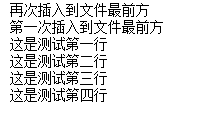
range1.InsertAfter("这是测试第一行\n这是测试第二行\n")
range1.InsertAfter("这是测试第三行\n这是测试第四行\n")
range1.InsertBefore("第一次插入到文件最前方\n")
range1.InsertBefore("再次插入到文件最前方\n")
# cpath = os.path.dirname(__file__)
doc.SaveAs("F:\\pythonBase\\pythonex\\test1.docx")
doc.Close()
word.Quit()
import os
from win32com import client
word = client.gencache.EnsureDispatch('Word.Application')
word.Visible = 0
word.DisplayAlerts = 0
# cpath=os.path.dirname(__file__)
doc = word.Documents.Open("F:\\pythonBase\\pythonex\\test1.docx")
print(doc.Content)
doc.Close()
word.Quit()
import os
from win32com import client
word = client.gencache.EnsureDispatch('Word.Application')
word.Visible = 0
word.DisplayAlerts = 0
doc = word.Documents.Open("F:\\pythonBase\\pythonex\\test1.docx")
paragraphs = doc.Paragraphs
for p in paragraphs:
text = p.Range.Text.strip()
print(text)
doc.Close()
word.Quit()
import os
from win32com import client
word = client.gencache.EnsureDispatch('Word.Application')
word.Visible = 0
word.DisplayAlerts = 0
doc = word.Documents.Open("F:\\pythonBase\\pythonex\\test1.docx")
paragraphs = doc.Paragraphs
print("第一段:" + paragraphs(1).Range.Text.strip())
print("第三段:" + paragraphs(3).Range.Text.strip())
doc.Close()
word.Quit()

import os
import time
from win32com import client
from win32com.client import constants
word = client.gencache.EnsureDispatch('Word.Application')
word.Visible = 1
word.DisplayAlerts = 0
doc = word.Documents.Open("F:\\pythonBase\\pythonex\\test1.docx")
paragraphs = doc.Paragraphs
range1 = paragraphs(1).Range #第1段
range1.Style = constants.wdStyleHeading1
range1.Style.Font.Name = "标楷体"
range1.Style.Font.Color = 0xFF0000 #蓝色
range1.Style.Font.Bold = 1 #Italic, Underline, Shadow, Outline
range2 = paragraphs(2).Range #第2段
range2.Style = constants.wdStyleHeading3
range2.ParagraphFormat.Alignment = constants.wdAlignParagraphRight
range3 = paragraphs(3).Range #第3段
range3.Style.Font.Size = "10"
doc.Close()
word.Quit()
time.sleep(3)
import os
from win32com import client
word = client.gencache.EnsureDispatch('Word.Application')
word.Visible = 1
word.DisplayAlerts = 0
doc = word.Documents.Open("F:\\pythonBase\\pythonex\\08\\clipgraph.docx")
data = [ ["型号", "尺寸", "颜色", "价格"], ["A8", "5.0英寸", "白色", "8000"],["A10", "5.5 英寸", "金黄", "22000"] ]
paragraphs = doc.Paragraphs #读取所有段落
range1 = paragraphs(4).Range #取第4段的起止范围
table = doc.Tables.Add(range1, 3, 4) #在第4段之前插入一个3行4列表格
for i in range(1,table.Rows.Count+1): #i取值分别为1~3。切记rang()函数的特性
print(i)
# for j in range(1,table.Columns.Count+1): #j取值分别为1~4
# table.Cell(i,j).Range.Text = data[i-1][j-1] #第一次会把data[0][0],即"型号",插入Cell(1,1)
#table.Cell(2,3).Range.Font.Color = 0x0000FF #设置第2行第3列单元格的字体颜色
#doc.Close()
#word.Quit()
import os
from win32com import client
word = client.gencache.EnsureDispatch('Word.Application')
word.Visible = 1
word.DisplayAlerts = 0
doc = word.Documents.Open("F:\\pythonBase\\pythonex\\clipgraph.docx")
paragraphs = doc.Paragraphs
range1 = paragraphs(4).Range
range1.InlineShapes.AddPicture(cpath + "F:\\pythonBase\\pythonex\\ch08\\media\\cell.jpg", False, True)
#doc.Close()
#word.Quit()
import os
from win32com import client as client
from win32com.client import constants
word = client.gencache.EnsureDispatch('Word.Application')
word.Visible = 1
word.DisplayAlerts = 0
cpath=os.path.dirname(__file__)
doc = word.Documents.Open(cpath + "\\media\\clipgraph.docx")
word.Selection.Find.ClearFormatting()
word.Selection.Find.Replacement.ClearFormatting()
word.Selection.Find.Execute("方法",False,False,False,False,False,True,constants.wdFindContinue,False,"method",constants.wdReplaceAll)
#doc.Close()
#word.Quit()
def getrandom2(n1, n2): #取得2个不重复的随机值
while True:
r1 = random.randint(n1, n2)
r2 = random.randint(n1, n2)
if r1 != r2: #如果两数不相等就跳出,相等则继续取
break
return r1, r2
import os, random
from win32com import client
from win32com.client import constants
word = client.gencache.EnsureDispatch('Word.Application')
word.Visible = 1
word.DisplayAlerts = 0 #不显示警告
doc = word.Documents.Add()
range1 = doc.Range(0,0) #文件开头
range1.Style.Font.Size = "16" #字体大小
title = "明星小学营养午餐菜单"
year1 = "2017年8月"
week = ["一","二","三","四","五"]
teacher = ["欧阳怡","翟定国","陈碧山","陈丽娟","郑怡衡","林邓超","朱健政","刘伟明","刘维基","梁银燕"]
rice = ["糙米饭","白米饭","拌面"]
vegetable = ["毛豆白菜","豆芽菜","蛋香时瓜","高丽菜","佛手瓜","酸菜豆包","冬瓜","萝卜海带结","茄汁洋芋","家常豆腐","鲜菇花椰","豆皮三丝","伍彩雪莲","干香根丝","茄汁豆腐","香炒花椰","芹香粉丝","红萝卜","洋葱","青椒"]
meat = ["糖醋排骨","美味大鸡腿","椒盐鱼条","香菇肉燥","宫保鸡丁","香卤腿排","梅干绞肉","香酥鱼丁","条瓜烧鸡","时瓜肉丝","海结卤肉","葱烧鸡","柳叶鱼","咖哩绞肉","笋香鸡","沙茶猪柳","五香棒腿","三杯鸡丁","海结猪柳","茄汁鸡丁"]
soup = ["蛋香木须汤","味噌海芽汤","绿豆汤","榨菜肉丝汤","姜丝海芽汤","枸杞爱玉汤","冬菜蛋花汤","冬瓜西米露","紫菜蛋花汤","蛋香木须汤"]
date1= 1 #开始日期为1日
weekday = 2 #开始日期为星期六
while weekday < 6 and date1 < 31: #周一到周五及30日前才制作菜单
range1.InsertAfter(title + "\n")
range1.InsertAfter("日期:" + year1 + str(date1) + "日 (星期" + week[weekday-1] + ")\n")
range1.InsertAfter("制作者:" + teacher[random.randint(0,9)] + "老师\n") #10位老师中随机选一位
range1.InsertAfter("今日菜单:\n")
range1.InsertAfter("一、" + rice[random.randint(0,2)] + "\n") #取1个随机数作为主食列表下标
rand1, rand2 = getrandom2(0,19) #取得两个随机数,作为菜品列表下标
range1.InsertAfter("二、" + vegetable[rand1] + "\n")
range1.InsertAfter("三、" + vegetable[rand2] + "\n")
rand1, rand2 = getrandom2(0,19) #重取两个随机数,作为肉品列表下标
range1.InsertAfter("四、" + meat[rand1] + "\n")
range1.InsertAfter("五、" + meat[rand2] + "\n")
range1.InsertAfter("六、" + soup[random.randint(0,9)] + "\n") #取一个随机数,作为汤品列表下标
range1.Collapse(constants.wdCollapseEnd) #移到range尾
range1.InsertBreak(constants.wdSectionBreakNextPage) #换页
weekday += 1 #星期加1
date1 += 1 #日期加1
if weekday == 6: #如果是星期六
weekday = 1 #设为星期一
date1 += 2 #日期加2(星期六及星期日)
cpath=os.path.dirname(__file__)
doc.SaveAs(cpath + "\\media\\food.docx") #获取文件保存路径并把文件保存为food.docx
#doc.Close()
#word.Quit()
import os
from win32com import client
from win32com.client import constants
word = client.gencache.EnsureDispatch('Word.Application')
word.Visible = 0
word.DisplayAlerts = 0
runpath = os.path.dirname(__file__) + "\\replace" #获取replace文件夹的路径
tree = os.walk(runpath) #取得目录树
print("所有 Word 文件:")
for dirname, subdir, files in tree:
allfiles = []
for file in files: # 取得所有.docx .doc文件,存入allfiles列表中
ext = file.split(".")[-1] #取得文件名后缀
if ext=="docx" or ext=="doc": #取得所有.docx .doc文件
allfiles.append(dirname + '\\' + file) #加入allfiles列表
if len(allfiles) > 0: #如果有符合条件的文件
for dfile in allfiles:
print(dfile)
doc = word.Documents.Open(dfile) #打开文件
word.Selection.Find.ClearFormatting()
word.Selection.Find.Replacement.ClearFormatting()
word.Selection.Find.Execute("方法",False,False,False,False,False,True,constants.wdFindContinue,False,"method",constants.wdReplaceAll)
doc.Close()
word.Quit()
吴裕雄 实战PYTHON编程(7)的更多相关文章
- 吴裕雄 实战PYTHON编程(10)
import cv2 cv2.namedWindow("frame")cap = cv2.VideoCapture(0)while(cap.isOpened()): ret, im ...
- 吴裕雄 实战PYTHON编程(9)
import cv2 cv2.namedWindow("ShowImage1")cv2.namedWindow("ShowImage2")image1 = cv ...
- 吴裕雄 实战PYTHON编程(8)
import pandas as pd df = pd.DataFrame( {"林大明":[65,92,78,83,70], "陈聪明":[90,72,76, ...
- 吴裕雄 实战PYTHON编程(6)
import matplotlib.pyplot as plt plt.rcParams['font.sans-serif']=['Simhei']plt.rcParams['axes.unicode ...
- 吴裕雄 实战PYTHON编程(5)
text = '中华'print(type(text))#<class 'str'>text1 = text.encode('gbk')print(type(text1))#<cla ...
- 吴裕雄 实战PYTHON编程(4)
import hashlib md5 = hashlib.md5()md5.update(b'Test String')print(md5.hexdigest()) import hashlib md ...
- 吴裕雄 实战python编程(3)
import requests from bs4 import BeautifulSoup url = 'http://www.baidu.com'html = requests.get(url)sp ...
- 吴裕雄 实战python编程(2)
from urllib.parse import urlparse url = 'http://www.pm25x.com/city/beijing.htm'o = urlparse(url)prin ...
- 吴裕雄 实战python编程(1)
import sqlite3 conn = sqlite3.connect('E:\\test.sqlite') # 建立数据库联接cursor = conn.cursor() # 建立 cursor ...
随机推荐
- Flask视图函数与普通函数的区别,响应对象Response
视图函数与普通函数看似没什么区别,其实他们的返回值上有着很大的区别. from flask import Flask app = Flask(__name__) @app.route('/hello' ...
- EF 的一些不常用的功能
1.Add-Migration Initia-IgnoreChanges 生成已有数据库初始化代码 2.update-database -verbose 升级数据库并显示sql语句 3.Update- ...
- java枚举使用详解,整理的很好,只能收下。。。
java枚举使用详解 在实际编程中,往往存在着这样的“数据集”,它们的数值在程序中是稳定的,而且“数据集”中的元素是有限的. 例如星期一到星期日七个数据元素组成了一周的“数据集”,春夏秋冬四个数据元素 ...
- php7 数据库操作的 方法
连接数据库的方法PHP7.0以上的: 方法一: <?php/* Connect to a MySQL server 连接数据库服务器 */$link = mysqli_connect('loca ...
- Android RILD运行机制详解
前言 在上一篇文章里(http://blog.csdn.net/jason_wzn/article/details/53232022),简要介绍了Android RIL的架构.这一篇文章,就来看一看R ...
- js判断各种浏览器
<script type="text/javascript"> if (navigator.appName.indexOf("Microsoft Intern ...
- Windows环境下多版本JDK切换
因为有切换多个版本的JDK需求,但是本机的JDK安装比较混乱(因为不是我最先使用的),所以出现了一些问题在这里记录下.本来我以为只需要修改环境变量中的JAVA_HOME环境路径即可,如果没有配置JAV ...
- iOS TTF文件改变字体
TTF(True Type Font):是一种字库名称 TTF文件:是Apple公司和Microsoft公司共同推出的字体文件格式 使用: 1 获取字体文件 从各种渠道下载字体ttf,网站或从别的ip ...
- spark 存储管理机制
累加器 -- Accumulators 广播变量--Broadcast Variables 思考 回顾 存储管理模块架构--从架构上来看 存储管理模块架构--通信层 存储管理模块架构--存储层 存储管 ...
- NVMe on RHEL7
原文地址https://www.dell.com/support/article/cn/zh/cnbsd1/sln312382/nvme-on-rhel7?lang=en Posted on beha ...