
Unity UGUI 图片 轴对称效果 减少资源
制作UI的过程中,为了节省资源,对称的图一般美术切一半给我们
手动拼图 有时会出现拼接处出现裂缝或重叠
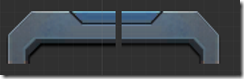
调整大小时也不方便 得一块一块调整
所以就用BaseMeshEffect 的ModifyMesh写了一个脚本
效果是
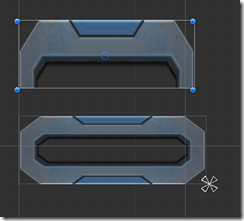
这样调整这种拼接的UI会方便一些
using UnityEngine;
using System.Collections.Generic;

using UnityEngine.UI;

[AddComponentMenu("UI/Effects/TestImageGhost")]

public class TestImageGhost : BaseMeshEffect

{

    public enum Type

    {

        Double,

        Quad,

    }

    [SerializeField]

    private Type m_type = Type.Double;

    [SerializeField]

    private bool m_UseGraphicAlpha = true;

    private Vector2 xy;

    public Type GhostType

    {

        get { return m_type; }

        set

        {

            if (m_type == value)

                return;

            m_type = value;

            if (graphic != null)

                graphic.SetVerticesDirty();

        }

    }

#if UNITY_EDITOR

    protected override void OnValidate()

    {

        xy = this.GetComponent<RectTransform>().sizeDelta;

        base.OnValidate();

        if (graphic != null)

            graphic.SetVerticesDirty();

    }

#endif

    protected override void OnEnable()

    {

        base.OnEnable();

        if (graphic != null)

            graphic.SetVerticesDirty();

        xy = this.GetComponent<RectTransform>().sizeDelta;

        Debug.Log("dfsdf");

    }

    public bool useGraphicAlpha

    {

        get { return m_UseGraphicAlpha; }

        set

        {

            m_UseGraphicAlpha = value;

            if (graphic != null)

                graphic.SetVerticesDirty();

        }

    }

    protected void ApplyGhostDouble(List<UIVertex> verts, int start, int end, float x1, float y1, float x2, float y2,bool self = false)

    {

        UIVertex vt;

        var neededCpacity = verts.Count * ;

        if (verts.Capacity < neededCpacity)

            verts.Capacity = neededCpacity;

        for (int i = start; i < end; i++)

        {

            vt = verts[i];

            if(!self)

                verts.Add(vt);//添加一遍mesh

            Vector3 v = vt.position;

            int offset = i % ;

            switch (offset)

            {

                case :

                case :

                case : v.x += x1; break;

                case :

                case :

                case : v.x += x2; break;

            }

            switch (offset)

            {

                case :

                case :

                case : v.y += y1; break;

                case :

                case :

                case : v.y += y2; break;

            }

            vt.position = v;

            verts[i] = vt;

        }

    }

    protected void ApplyGhost(List<UIVertex> verts, int start, int end)

    {

        if (m_type == Type.Double)

        {

            var neededCpacity = verts.Count * ;

            if (verts.Capacity < neededCpacity)

                verts.Capacity = neededCpacity;

            ApplyGhostDouble(verts, start, end, , , -xy.x / ,);

            start = end;

            end = verts.Count;

            ApplyGhostDouble(verts, start, end, xy.x, , -xy.x / , ,true);

        }

        else

        {

            var neededCpacity = verts.Count * ;

            if (verts.Capacity < neededCpacity)

                verts.Capacity = neededCpacity;

            start = ;

            end = verts.Count;

            ApplyGhostDouble(verts, start, end,  , , -xy.x / , xy.y / );

            start = end;

            end = verts.Count;

            ApplyGhostDouble(verts, start, end, xy.x ,, -xy.x / , xy.y / );

            start = end;

            end = verts.Count;

            ApplyGhostDouble(verts, start, end, , -xy.y, -xy.x / , xy.y / );

            start = end;

            end = verts.Count;

            ApplyGhostDouble(verts, start, end, xy.x, -xy.y, -xy.x / , xy.y / , true);

        }

    }

    public override void ModifyMesh(VertexHelper vh)

    {

        if (!IsActive())

            return;

        xy = GetComponent<RectTransform>().sizeDelta;

        List<UIVertex> output = new List<UIVertex>();

        vh.GetUIVertexStream(output);

        ApplyGhost(output, , output.Count);

        vh.Clear();

        vh.AddUIVertexTriangleStream(output);

    }

}
Unity UGUI 图片 轴对称效果 减少资源的更多相关文章
- Unity UGUI在鼠标位置不同时 图片浮动效果
/// <summary> /// 在鼠标位置不同时 图片浮动效果 /// </summary> public class TiltWindow : MonoBehaviour ...
- Unity Shader 效果(1) :图片流光效果
很多游戏Logo中可以看到这种流光效果,一般的实现方案就是对带有光条的图片uv根据时间进行移动,然后和原图就行叠加实现,不过实现过程中稍稍有点需要注意的地方.之前考虑过风宇冲的实现方式,但是考虑到sh ...
- [Unity UGUI]ScrollRect效果大全
UGUI各种优化效果 本文所实现的UGUI效果需求如下: - 支持缩放滑动效果 - 支持动态缩放循环加载 - 支持大数据固定Item复用加载 - 支持不用Mask遮罩无限循环加载 - 支持Object ...
- Unity UGUI图文混排源码(二)
Unity UGUI图文混排源码(一):http://blog.csdn.net/qq992817263/article/details/51112304 Unity UGUI图文混排源码(二):ht ...
- Unity UGUI图文混排源码(一)
Unity UGUI图文混排源码(一):http://blog.csdn.net/qq992817263/article/details/51112304 Unity UGUI图文混排源码(二):ht ...
- Unity UGUI实现图文混排
目前在unity实现图文混排的好像都是通过自定义字体然后在文本获取字符的位置,用图片替换掉图片标签,这样对于支持英文来说,并没有什么影响.然后对于中文来说就是一个相当麻烦的事了,毕竟图文混排多用于游戏 ...
- Unity UGUI Layout自动排版组件用法介绍
Unity UGUI布局组件 本文提供全流程,中文翻译. Chinar 坚持将简单的生活方式,带给世人!(拥有更好的阅读体验 -- 高分辨率用户请根据需求调整网页缩放比例) Chinar -- 心分享 ...
- NGUI和UGUI图片字 艺术字(Bitmap图片转文字)制作方法
用图片字而不是图片 美术和程序的配合,需要程序能够很快抓住问题重点并提出解决方案.美术出的图片字比我们使用的字体更好好看,那么是否要一个个图片去拼成数字呢? NGUI创建图片字 准备材料 美术提供的数 ...
- js鼠标滚轮滚动图片切换效果
效果体验网址:http://keleyi.com/keleyi/phtml/image/12.htm HTML文件代码: <!DOCTYPE html PUBLIC "-//W3C// ...
随机推荐
- ATK系列库介绍
1.一个完整支持分布式服务框架: 2.代码生成工具,可快速生成基于服务框架的应用: 3.其他支持库 4.完整代码见https://github.com/azthinker 目标:使应用开发,低代码.高 ...
- A+B Problem(高精)
题目背景 无 题目描述 高精度加法,x相当于a+b problem,[b][color=red]不用考虑负数[/color][/b] 输入输出格式 输入格式: 分两行输入a,b<=10^500 ...
- JVM 垃圾回收机制和常见算法和 JVM 的内存结构和内存分配(面试题)
一.JVM 垃圾回收机制和常见算法 Sun 公司只定义了垃圾回收机制规则而不局限于其实现算法,因此不同厂商生产的虚拟机采用的算法也不尽相同.GC(Garbage Collector)在回收对象前首先必 ...
- gcc 手动安装
由于公司内部服务器没有联通外网,只能苦逼的手动安装gcc(自带的版本太老) rpm -ivh ppl-0.10.2-11.el6.x86_64.rpm rpm -ivh cloog-ppl-0.15. ...
- JS小数运算失精度的问题
JS因为是解释性语言,在运算中会有丢失精度的问题,这种现象多出现在浮点型运算的情况下. 例如 5.11 * 100 得到的结果是 511.00000000000006 这种情况尤其是在处理金额的时候 ...
- Java中调用存储过程或函数
//?代表一个参数,多个参数用逗号隔开 CallableStatement cs = connect.prepareCall("{?=call 存储过程名称或函数名(?)}"); ...
- docker API 配置与使用
在网上看到一大堆乱乱七八招的博客,很多都不能用,我根据这些天踩的坑来总结一下吧 首先!怎么配置 docker API 两种方法 在/etc/sysconfig/docker文件里加一行OPTIONS= ...
- php面向对象基础知识整理之类中的属性和方法的使用
<?php /** * class Index * 类包含什么 * 1.创建类 * 2.类的属性和类中方法 * 3.类中访问修饰符 * 4.类的封装.继承.多态 */ // 创建类,创建的类名是 ...
- tp5多条件查询
->where('m.user_nickname|w.nickname|c.companyname','like','%'.$search.'%')\
- JS 定时器,定时调用PHP
$(function() { var voiceplay=function(){ var site = location.href.split('_cms')[0] + '_cms/'; $.ajax ...