
user32的使用
- 通过代码查询特定的窗口,并在文本框中输入文字然后单击"OK"按钮
- 需要查找的Dialog

- 使用Spy++查看窗口信息
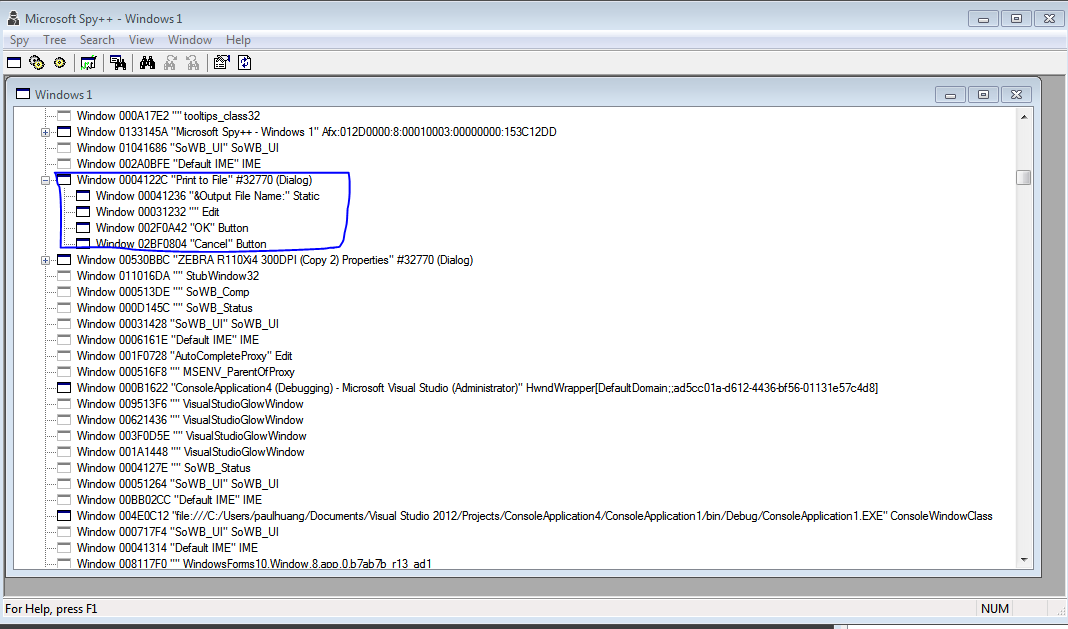
- 通过代码实现功能
     class Program

     {

         //define method

         /// <summary>

         /// 查找顶级窗口,如果有指定的类名和窗口的名字则表示成功返回一个窗口的句柄。否则返回零。

         /// </summary>

         /// <param name="lpClassName">lpClassName参数指向类名</param>

         /// <param name="lpWindowName">lpWindowName指向窗口名</param>

         /// <returns></returns>

         [DllImport("User32.dll", EntryPoint = "FindWindow")]

         private static extern IntPtr FindWindow(string lpClassName, string lpWindowName);

         /// <summary>

         /// 在窗口列表中寻找与指定条件相符的第一个子窗口

         /// </summary>

         /// <param name="hwndParent">父窗口句柄</param>

         /// <param name="hwndChildAfter">子窗口句柄</param>

         /// <param name="lpszClass">窗口类名</param>

         /// <param name="lpszWindow">窗口名</param>

         /// <returns></returns>

         [DllImport("user32.dll", EntryPoint = "FindWindowEx")]

         private static extern IntPtr FindWindowEx(IntPtr hwndParent, IntPtr hwndChildAfter, string lpszClass, string lpszWindow);

         /// <summary>

         /// 该函数将指定的消息发送到一个或多个窗口

         /// </summary>

         /// <param name="hWnd">接收消息的窗口句柄</param>

         /// <param name="Msg">指定被发送的消息类型</param>

         /// <param name="wParam"></param>

         /// <param name="lParam">发送的消息</param>

         /// <returns></returns>

         [DllImport("User32.dll", EntryPoint = "SendMessage")]

         private static extern int SendMessage(IntPtr hWnd, int Msg, IntPtr wParam, string lParam);

         //define message type

         private const int WM_GETTEXT = 0x000D;

         private const int WM_SETTEXT = 0x000C;

         private const int WM_CLICK = 0x00F5;

         public static void Main()

         {

             SearchWindow();

         }

         private static void SearchWindow()

         {

             //主窗口类型名及窗口名

             string lpszParentClassName = "";

             string lpszParentWindowName = "Print To File";

             //主窗口句柄

             IntPtr ParenthWnd = new IntPtr();

             //子窗口句柄

             IntPtr EdithWnd = new IntPtr();

             //查到主窗体,得到整个窗体

             ParenthWnd = FindWindow(null, lpszParentWindowName);

             //判断这个窗体是否有效

             if (!ParenthWnd.Equals(IntPtr.Zero))

             {

                 //得到FileName这个子窗体,并设置其内容

                 EdithWnd = FindWindowEx(ParenthWnd, EdithWnd, "Edit", "");

                 if (!EdithWnd.Equals(IntPtr.Zero))

                 {

                     //调用SendMessage方法设置其内容

                     SendMessage(EdithWnd, WM_SETTEXT, (IntPtr), "你需要输入的文本");

                 }

                 //得到OK这个子窗体,并设置其内容

                 EdithWnd = FindWindowEx(ParenthWnd, EdithWnd, "Button", "OK");

                 if (!EdithWnd.Equals(IntPtr.Zero))

                 {

                     SendMessage(EdithWnd, WM_CLICK, (IntPtr), "");

                 }

             }

         }

     }
- 需要查找的Dialog
user32的使用的更多相关文章
- C#中可直接调用WIN32的API函数--USER32.DLL
Win32的API函数可以直接在C#中直接调用,在做WinForm时还是很有帮助的.有时候直接调用Win32的API,可以很高效的实现想要的效果. using System; using System ...
- Winform API "user32.dll"中的函数
命名空间:System.Runtime.InteropServices /// <summary> /// 该函数检索一指定窗口的客户区域或整个屏幕的显示设备上下文环境的句柄,以后可以在G ...
- 整理分享C#通过user32.dll模拟物理按键操作的代码
对系统模拟按键方面的知识和按键映射代码做了一下梳理,在这里分享出来,适用于开发自动操作工具和游戏外挂. 主代码: public const int KEYEVENTF_EXTENDEDKEY = 0x ...
- 【转】c# 调用windows API(user32.dll)
using System; using System.Collections.Generic; using System.Linq; using System.Text; using System.R ...
- Python 调用 user32.dll
import ctypes h = ctypes.windll.LoadLibrary("C:\\Windows\\System32\\user32.dll") h.Message ...
- user32.dll
user32.dll中的所有函数 using System; using System.Collections.Generic; using System.Linq; using System.Tex ...
- C# 之 user32函数库
using System; using System.Collections.Generic; using System.Linq; using System.Text; using System.R ...
- 【WinAPI】User32.dll注释
#region User32.dll 函数 /// <summary> /// 该函数检索一指定窗口的客户区域或整个屏幕的显示设备上下文环境的句柄,以后可以在GDI函数中使用该句柄来在设备 ...
- 【整理】c# 调用windows API(user32.dll)
User32.dll提供了很多可供调用的接口,大致如下(转自http://blog.csdn.net/zhang399401/article/details/6978803) using System ...
- Win32 API中的user32.dll中的ShowWindow方法参数整理
在使用ShowWindow方法来设置窗体的状态时,由于不知道参数值,用起来非常容易混乱,所以整理了以下其参数的枚举值,方便以后的的使用. public class User32API { #reg ...
随机推荐
- Nginx从搭建到配置支持HTTPS
原文地址:https://www.xingkongbj.com/blog/nginx/nginx.html 安装 基础包 ububtu apt-get install build-essential ...
- vue、html与iframe html事件相互调用
一.html文件中引入的iframe标签 1.在父html中调用子iframe html 中的事件 通过contentwindow属性 document.getElementById("my ...
- LeetCode 中级 - 从前序与中序遍历序列构造二叉树(105)
一个前序遍历序列和一个中序遍历序列可以确定一颗唯一的二叉树. 根据前序遍历的特点, 知前序序列(PreSequence)的首个元素(PreSequence[0])为二叉树的根(root), 然后在中 ...
- 【模板】tarjan算法
tarjan求强连通分量 #include<bits/stdc++.h> #define MAX 10005 using namespace std; int dfn[MAX],low[M ...
- sql sever 基础 建表
---恢复内容开始--- SQL Sever 基础以创建银行数据库bankDB为案例 1.创建数据库 1-1 创建文件夹用以存放数据库 1-2 创建建库bankDB 2.创建数据库 2-1.创建用户信 ...
- 【nginx下对服务器脚本php的支持】
安装php7 下载地址:https://secure.php.net/downloads.php这里下载的是:wget http://ar2.php.net/distributions/php ...
- input输入框类型
输入大小写字母.数字.下划线: <input type="text" onkeyup="this.value=this.value.replace(/[^\w_]/ ...
- 基于OMAPL:Linux3.3内核的编译
基于OMAPL:Linux3.3内核的编译 OMAPL对应3个版本的linux源代码,分别是:Linux-3.3.Linux-2.6.37.Linux2.6.33,这里的差距在于Linux2,缺少SY ...
- JavaSE基础复习---Class类与反射机制
---恢复内容开始--- 目录: 1.java.lang.class类 2.Java中的反射机制 3.运行时与编译时概念 1. java.lang.class类 Java程序在运行时,Java运行时系 ...
- (数据科学学习手札12)K-means聚类实战(基于R)
上一篇我们详细介绍了普通的K-means聚类法在Python和R中各自的实现方法,本篇便以实际工作中遇到的数据集为例进行实战说明. 数据说明: 本次实战样本数据集来自浪潮集团提供的美团的商家信息,因涉 ...