
[图像处理] YUV图像处理入门4
9 yuv420图像截取
本程序中的函数主要是对YUV420P视频数据流的第一帧图像进行截取。类似opencv中的rect函数,函数的代码如下所示:
/**

 * @file 9 yuv_clip.cpp

 * @author luohen

 * @brief yuv image clip

 * @date 2018-12-08

 *

 */

#include "stdafx.h"

#include <stdio.h>

#include <stdlib.h>

#include <string.h>

#include <math.h>

#include <iostream>

using namespace std;

/**

 * @brief

 *

 * @param w width of input yuv420p file

 * @param h height of input yuv420p file

 * @param sx clipped initial position x of origin y image

 * @param sy clipped initial position y of origin y image

 * @param sw wdith of clipped image

 * @param sh height of clipped image

 * @param url location of input yuv420p file

 * @return int

 */

int yuv420_clip(int w, int h, int sx, int sy, int sw, int sh, const char *url)

{

	//reading yuv file

	FILE *input_fp;

	//writing yuv file

	FILE *output_fp = fopen("video_result/output_clip.yuv", "wb+");

	if ((input_fp = fopen(url, "rb")) == NULL)

	{

		printf("%s open error!\n", url);

		return -1;

	}

	else

	{

		printf("%s open.\n", url);

	}

	//origin image

	unsigned char *pic = new unsigned char[w * h * 3 / 2];

	//clipped image

	unsigned char *pic_clip = new unsigned char[sw * sh * 3 / 2];

	// y length of origin image

	int size_y = w * h;

	// yu length of origin image

	int size_yu = w * h + w * h / 4;

	// y length of clipped image

	int size_sy = sw * sh;

	// yu length of clipped image

	int size_syu = sw * sh + sw * sh / 4;

	fread(pic, sizeof(unsigned char), w * h * 3 / 2, input_fp);

	//y clip

	for (int j = 0; j < sh; j++)

	{

		for (int k = 0; k < sw; k++)

		{

			pic_clip[j * sw + k] = pic[(sx + j) * w + (sy + k)];

		}

	}

	//sw_uv,sh_uv

	int sw_uv = sw / 2;

	int sh_uv = sh / 2;

	//u clip

	for (int j = 0; j < sh_uv; j++)

	{

		for (int k = 0; k < sw_uv; k++)

		{

			pic_clip[size_sy + j * sw_uv + k] = pic[size_y + (sx / 2 + j) * w / 2 + (sy / 2 + k)];

		}

	}

	//v clip

	for (int j = 0; j < sh_uv; j++)

	{

		for (int k = 0; k < sw_uv; k++)

		{

			pic_clip[size_syu + j * sw_uv + k] = pic[size_yu + (sx / 2 + j) * w / 2 + (sy / 2 + k)];

		}

	}

	fwrite(pic_clip, 1, sw * sh * 3 / 2, output_fp);

	delete[] pic;

	delete[] pic_clip;

	fclose(input_fp);

	fclose(output_fp);

	return 0;

}

/**

 * @brief main

 *

 * @return int

 */

int main()

{

	int state = yuv420_clip(352, 288, 60, 50, 176, 144, "video/akiyo.yuv");

	return 0;

}
调用函数为:
int yuv420_clip(int w, int h, int sx, int sy, int sw, int sh, const char *url);
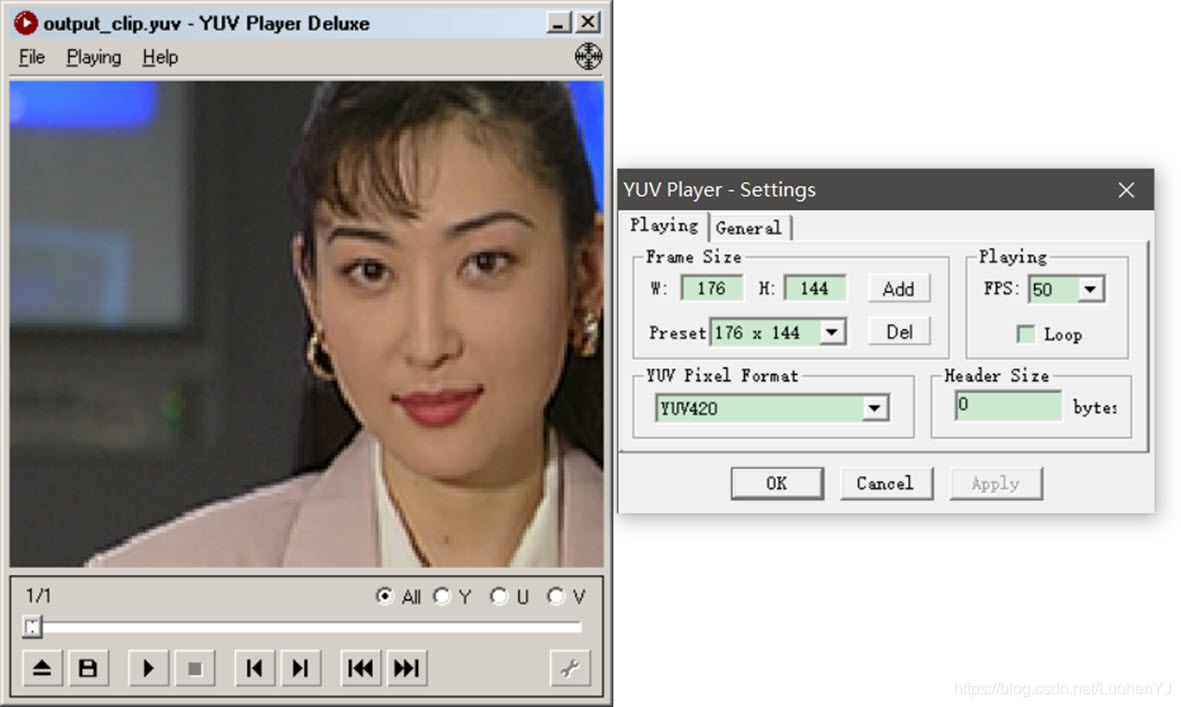
这段代码指的是对于宽高为w,h的yuv图像,相对于y分量来说截取宽为sw,高为sh的部分,截取部分左上角顶点坐标为(sx,sy);对于uv分量来截取宽高分别为sw/2,sh/2,截取部分左上角顶点坐标为(sx/2,sy/2)。然后分别对y,u,v分量截图。
这段程序sx=60,sy=50,sw=176,sh=144。最终的结果如下图:
10 yuv420图像帧差法运动检测
本程序中的函数主要是截取YUV420P视频数据流的第1帧图像和第200图像,通过帧差法对两幅图像的y分量进行对比实现运动检测。类似opencv中的absdiff函数,函数的代码如下所示:
/**

 * @file 10 yuv_framedifference.cpp

 * @author luohen

 * @brief Frame difference method of y

 * @date 2018-12-10

 *

 */

#include "stdafx.h"

#include <stdio.h>

#include <stdlib.h>

#include <string.h>

#include <math.h>

#include <string.h>

#include <iostream>

using namespace std;

/**

 * @brief

 *

 * @param pFrame1		the first frame

 * @param pFrame2		the second frame

 * @param pResult		the result image

 * @param w				width of input yuv420p file

 * @param h				height of input yuv420p file

 * @param yThreshold	threshold value

 */

void yuv420_Framedifference(unsigned char *pFrame1, unsigned char *pFrame2, unsigned char *pResult, int w, int h, int yThreshold)

{

	//the first frame

	unsigned char *Y1 = new unsigned char[w * h];

	//the second frame

	unsigned char *Y2 = new unsigned char[w * h];

	//copy y

	memcpy(Y1, pFrame1, w * h);

	memcpy(Y2, pFrame2, w * h);

	for (int y = 0; y < h; y++)

	{

		for (int x = 0; x < w; x++)

		{

			int i = y * w + x;

			//diff

			int temp = abs((int)Y1[i] - (int)Y2[i]);

			if (temp > yThreshold)

			{

				pResult[i] = 255;

			}

			else

			{

				pResult[i] = 0;

			}

		}

	}

	delete[] Y1;

	delete[] Y2;

}

/**

 * @brief main function

 *

 * @return int

 */

int main()

{

	//the yuv image size

	int w = 352, h = 288;

	//reading yuv file

	FILE *input_fp;

	//writing yuv file

	//the first yuv image

	FILE *fp1 = fopen("video_result/akiyo1.yuv", "wb+");

	//the second yuv image

	FILE *fp2 = fopen("video_result/akiyo2.yuv", "wb+");

	//the binary image of frame difference

	FILE *fp3 = fopen("video_result/output_diff.y", "wb+");

	const char * url = "video/akiyo.yuv";

	if ((input_fp = fopen(url, "rb")) == NULL)

	{

		printf("%s open error!\n", url);

		return 0;

	}

	else

	{

		printf("%s open.\n", url);

	}

	//result

	unsigned char *pResult = new unsigned char[w * h];

	//the first image

	unsigned char *pFrame1 = new unsigned char[w * h * 3 / 2];

	//the second image

	unsigned char *pFrame2 = new unsigned char[w * h * 3 / 2];

	//used for read frames

	unsigned char originalFrame[352 * 288 * 3 / 2];

	//reading image for a loop

	for (int i = 0; i < 200; i++)

	{

		//fread function automatically moves the pointer

		//take the first frame

		if (i == 0)

		{

			fread(pFrame1, w * h * 3 / 2, 1, input_fp);

		}

		//take the second frame

		if (i == 199)

		{

			fread(pFrame2, w * h * 3 / 2, 1, input_fp);

		}

		//Skip intermediate frame

		else

		{

			fread(originalFrame, w * h * 3 / 2, 1, input_fp);

		}

	}

	/* another way to read images

	fread(pFrame1, w * h * 3 / 2, 1, input_fp);

	int p = 199 * w*h * 3 / 2;

	//move the pointer

	fseek(input_fp, p, SEEK_SET);

	fread(pFrame2, w * h * 3 / 2, 1, input_fp);

	*/

	//the threshold is 30

	yuv420_Framedifference(pFrame1, pFrame2, pResult, w, h, 30);

	fwrite(pFrame1, 1, w * h * 3 / 2, fp1);

	fwrite(pFrame2, 1, w * h * 3 / 2, fp2);

	fwrite(pResult, 1, w * h, fp3);

	delete[] pResult;

	delete[] pFrame1;

	delete[] pFrame2;

	fclose(input_fp);

	fclose(fp1);

	fclose(fp2);

	fclose(fp3);

}
调用函数为:
void yuv420_Framedifference(unsigned char *pFrame1, unsigned char *pFrame2, unsigned char *pResult, int w, int h, int yThreshold);
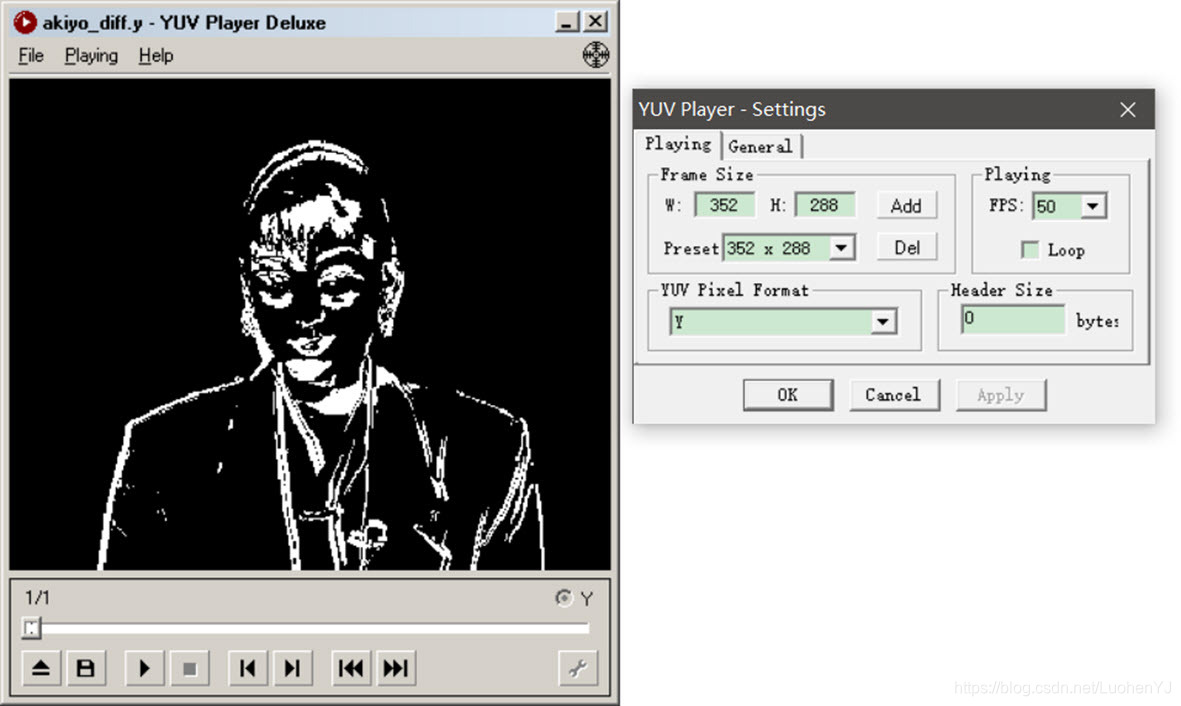
这段代码中忽略了uv分量的影响。计算第一帧y分量与第二帧y分量的差。然后通过类似opencv中的threshold函数,对于帧差得到的图像中像素值大于给定阈值yThreshold的点,其像素值置为255,小于阈值的点像素值置为0。也就是说像素值为255的区域就是运动区域,为0的区域就是背景区域。这是最基本的运动检测算法,当然这段代码改进的地方有:通过uv分量的差综合得到背景区域;或者引入三帧差法。
对于主函数中,由于akiyo.yuv是一个视频流,通过fread函数每读完一张图像,fread中的文件指针会直接移动到当前文件读取位置,这样就可以用fread函数读完视频中所有的图像。
当然这种方式比较傻,可以直接通过下列代码,先读取第一帧图像,然后通过fseek函数,将fread的文件指针,从SEEK_SET(文件开始处)移动到第199帧图像的结尾处,再用fread函数读取第200帧图像。
fseek(input_fp, p, SEEK_SET);

fread(pFrame1, w * h * 3 / 2, 1, input_fp);

int p = 199 * w*h * 3 / 2;

fseek(input_fp, p, SEEK_SET);

fread(pFrame2, w * h * 3 / 2, 1, input_fp);
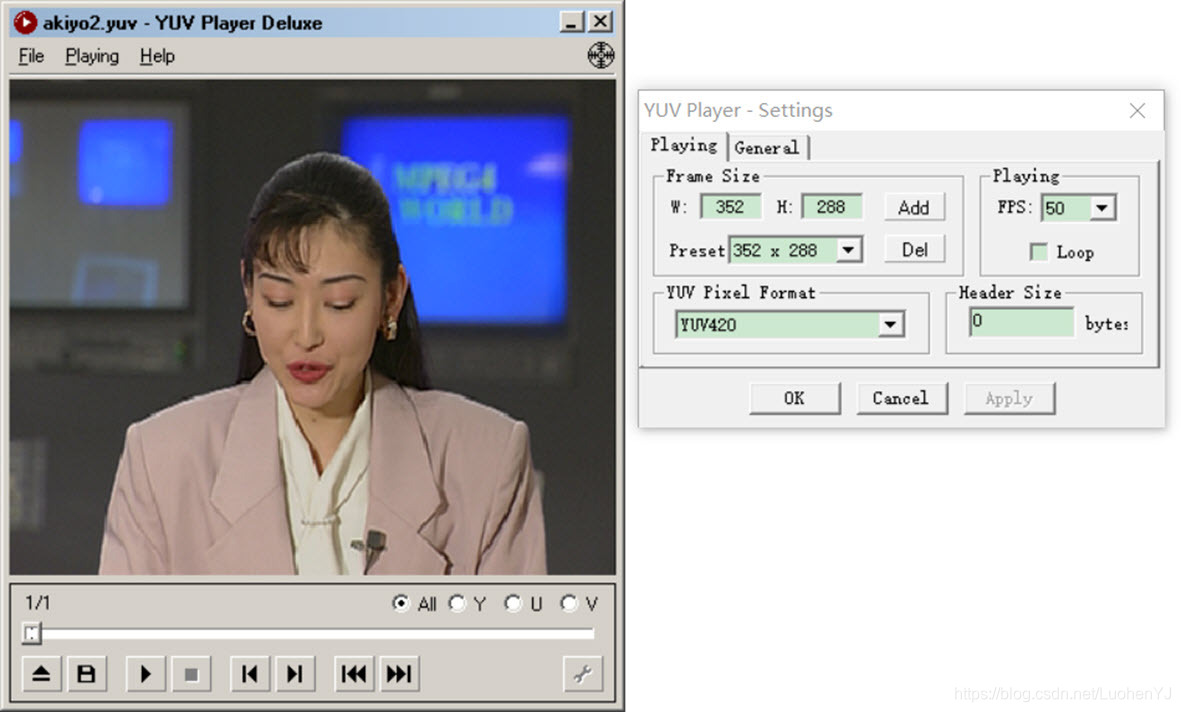
所提取的第1帧图像、第200帧图像以及帧差结果的二值图如图所示:

11 二值图像膨胀和腐蚀
本程序中的函数主要是对帧差法提取的运动区域二值图像进行膨胀和腐蚀操作,函数的代码如下所示:
/**

 * @file 11 yuv_dilate_erode.cpp

 * @author luohen

 * @brief dilate and erode of yuv image

 * @date 2018-12-10

 *

 */

#include "stdafx.h"

#include <stdio.h>

#include <stdlib.h>

#include <string.h>

#include <math.h>

#include <string.h>

#include <iostream>

using namespace std;

/**

 * @brief erode

 *

 * @param pFrame		the input binary image

 * @param pdilateResult	the output binary image

 * @param kernel		kernel of erode

 * @param w				width of image

 * @param h				height of image

 */

void yuv420_erode(unsigned char *pFrame, unsigned char *pErodeResult, int kernel, int w, int h)

{

	//copy data

	unsigned char *srcImg = new unsigned char[w * h];

	memcpy((char *)srcImg, (char *)pFrame, w * h);

	//kernel除中心之外像素点个数

	int nErodeThreshold = kernel * kernel - 1;

	//对于中点要erode像素区域步长

	int erodeDist = (kernel - 1) / 2;

	//ignore edge point

	for (int i = erodeDist; i < h - erodeDist; i++)

	{

		for (int j = erodeDist; j < w - erodeDist; j++)

		{

			// 如果值不为0才进行处理

			if (srcImg[i * w + j] != 0)

			{

				int iPointCount = 0;

				// 根据此点的邻域判断此点是否需要删除

				for (int r = -erodeDist; r <= erodeDist; r++)

				{

					for (int c = -erodeDist; c <= erodeDist; c++)

					{

						//统计不为0的个数

						if (srcImg[(i + r) * w + j + c] != 0)

						{

							iPointCount++;

						}

					}

				}

				// 如果邻域中不为0的个数小于阈值,则中心点像素值设置为0

				if (iPointCount < nErodeThreshold)

				{

					pErodeResult[i * w + j] = 0;

				}

				else

				{

					pErodeResult[i * w + j] = 255;

				}

			}

			else

			{

				pErodeResult[i * w + j] = 0;

			}

		}

	}

	delete[] srcImg;

	return;

}

/**

 * @brief dilate

 *

 * @param pFrame		the input binary image

 * @param pdilateResult	the output binary image

 * @param kernel		kernel of dilate

 * @param w				width of image

 * @param h				height of image

 */

void yuv420_dilate(unsigned char *pFrame, unsigned char *pdilateResult, int kernel, int w, int h)

{

	//copy data

	unsigned char *srcImg = new unsigned char[w * h];

	memcpy((char *)srcImg, (char *)pFrame, w * h);

	//对于中点要erode像素区域步长

	int erodeDist = (kernel - 1) / 2;

	//ignore edge point

	for (int i = erodeDist; i < h - erodeDist; i++)

	{

		for (int j = erodeDist; j < w - erodeDist; j++)

		{

			//对所有点进行判断

			int iPointCount = 0;

			// 根据此点的邻域判断此点是否需要删除

			for (int r = -erodeDist; r <= erodeDist; r++)

			{

				for (int c = -erodeDist; c <= erodeDist; c++)

				{

					//统计不为0的个数

					if (srcImg[(i + r) * w + j + c] != 0)

					{

						iPointCount++;

					}

				}

			}

			// 如果邻域中各像素点值都为0,则中心点像素值设置为0

			if (iPointCount == 0)

			{

				pdilateResult[i * w + j] = 0;

			}

			else

			{

				pdilateResult[i * w + j] = 255;

			}

		}

	}

	delete[] srcImg;

	return;

}

/**

 * @brief

 *

 * @param pFrame1		the first frame

 * @param pFrame2		the second frame

 * @param pResult		the result image

 * @param w				width of input yuv420p file

 * @param h				height of input yuv420p file

 * @param yThreshold	threshold value

 */

void yuv420_Framedifference(unsigned char *pFrame1, unsigned char *pFrame2, unsigned char *pResult, int w, int h, int yThreshold)

{

	//the first frame

	unsigned char *Y1 = new unsigned char[w * h];

	//the second frame

	unsigned char *Y2 = new unsigned char[w * h];

	;

	//copy y

	memcpy(Y1, pFrame1, w * h);

	memcpy(Y2, pFrame2, w * h);

	for (int y = 0; y < h; y++)

	{

		for (int x = 0; x < w; x++)

		{

			int i = y * w + x;

			//diff

			int temp = abs((int)Y1[i] - (int)Y2[i]);

			if (temp > yThreshold)

			{

				pResult[i] = 255;

			}

			else

			{

				pResult[i] = 0;

			}

		}

	}

	delete[] Y1;

	delete[] Y2;

}

/**

 * @brief main function

 *

 * @return int

 */

int main()

{

	//the yuv image size

	int w = 352, h = 288;

	//reading yuv file

	FILE *input_fp;

	//writing yuv file

	//the first yuv image

	FILE *fp1 = fopen("video_result/akiyo1.yuv", "wb+");

	//the second yuv image

	FILE *fp2 = fopen("video_result/akiyo2.yuv", "wb+");

	//the binary image of frame difference

	FILE *fp3 = fopen("video_result/akiyo_erode.y", "wb+");

	const char *url = "video/akiyo.yuv";

	if ((input_fp = fopen(url, "rb")) == NULL)

	{

		printf("%s open error!\n", url);

		return 0;

	}

	else

	{

		printf("%s open.\n", url);

	}

	//result

	unsigned char *pResult = new unsigned char[w * h];

	//the first image

	unsigned char *pFrame1 = new unsigned char[w * h * 3 / 2];

	//the second image

	unsigned char *pFrame2 = new unsigned char[w * h * 3 / 2];

	//used for read frames

	unsigned char originalFrame[352 * 288 * 3 / 2];

	//reading image for a loop

	for (int i = 0; i < 200; i++)

	{

		//fread function automatically moves the pointer

		//take the first frame

		if (i == 0)

		{

			fread(pFrame1, w * h * 3 / 2, 1, input_fp);

		}

		//take the second frame

		if (i == 199)

		{

			fread(pFrame2, w * h * 3 / 2, 1, input_fp);

		}

		//Skip intermediate frame

		else

		{

			fread(originalFrame, w * h * 3 / 2, 1, input_fp);

		}

	}

	/* another way to read images

	fread(pFrame1, w * h * 3 / 2, 1, input_fp);

	int p = 199 * w*h * 3 / 2;

	//move the pointer

	fseek(input_fp, p, SEEK_SET);

	fread(pFrame2, w * h * 3 / 2, 1, input_fp);

	*/

	//the threshold is 30

	yuv420_Framedifference(pFrame1, pFrame2, pResult, w, h, 30);

	//kernel size is 3 X 3.

	yuv420_erode(pResult, pResult, 3, w, h);

	//yuv420_dilate(pResult, pResult, 3, w, h);

	fwrite(pFrame1, 1, w * h * 3 / 2, fp1);

	fwrite(pFrame2, 1, w * h * 3 / 2, fp2);

	fwrite(pResult, 1, w * h, fp3);

	delete[] pResult;

	delete[] pFrame1;

	delete[] pFrame2;

	fclose(input_fp);

	fclose(fp1);

	fclose(fp2);

	fclose(fp3);

}
函数调用代码为:
void yuv420_dilate(unsigned char *pFrame, unsigned char *pdilateResult, int kernel, int w, int h);

void yuv420_erode(unsigned char *pFrame, unsigned char *pErodeResult, int kernel, int w, int h);
腐蚀膨胀的原理和作用见文章;
https://blog.csdn.net/qq_25847123/article/details/73744575
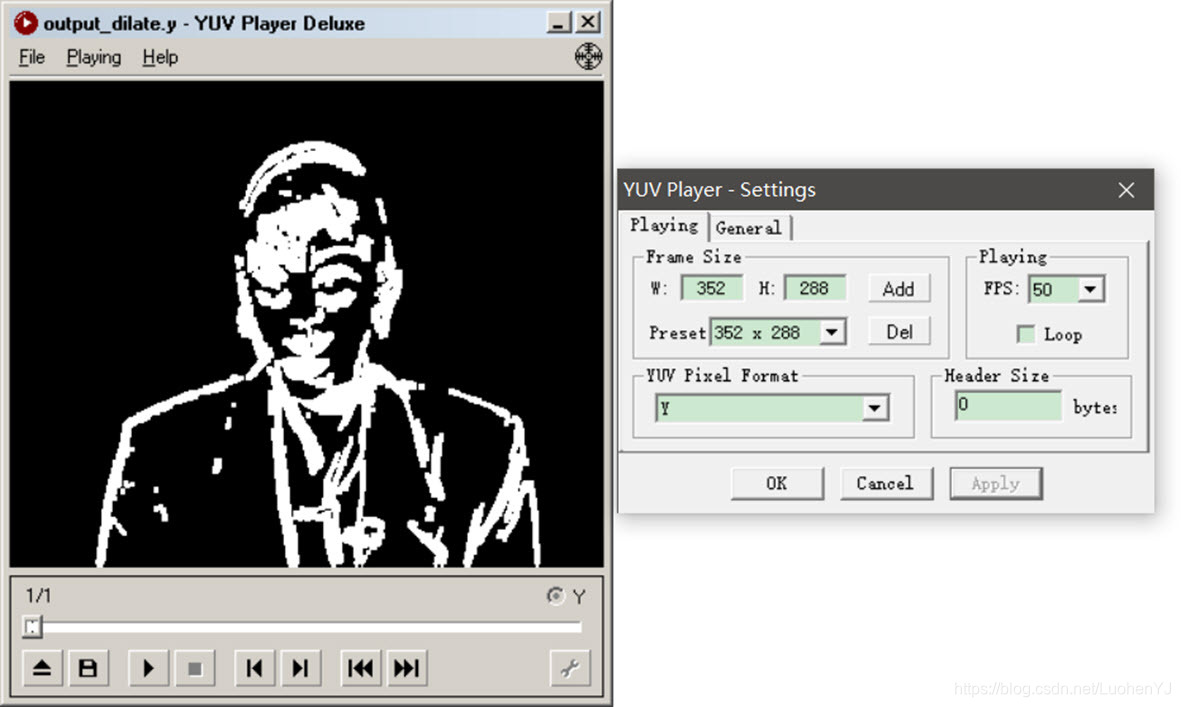
简单。这段代码是opencv中dilate和erode函数中的简化版。不同之处是,这段代码所用处理核只能是矩形的。此外对于边缘点,opencv中会用类似深度学习卷积神经网络中的padding操作,在周围填充点;这段代码就忽略边缘的点,直接处理中间的像素点。
代码很简单,通常对yuv图像处理就是读图,分离yuv分量,然后分别对像素点进行处理。
膨胀腐蚀的结果如图所示:

[图像处理] YUV图像处理入门4的更多相关文章
- [图像处理] YUV图像处理入门1
目前数字图像处理技术已经应用生活各个方面,但是大部分教程都是利用第三方库(如opencv)对RGB图像格式进行处理.对于YUV图像格式的图像处理教程较少.于是博主搬运总结了多个大牛的文章,总结出来这个 ...
- [图像处理] YUV图像处理入门2
1 分离YUV420中YUV分量 本程序中的函数主要是将YUV420P视频数据流的第一帧图像中的Y.U.V三个分量分离开并保存成三个文件.函数的代码如下所示: /** * @file 1 yuv_sp ...
- [图像处理] YUV图像处理入门5
12 yuv420转换为rgb(opencv mat) yuv格式具有亮度信息和色彩信息分离的特点,但大多数图像处理操作都是基于RGB格式,而且自己造轮子工作量太大.因此通常都会将yuv转换为rgb, ...
- [图像处理] YUV图像处理入门3
5 yuv420格式的灰阶测试图 本程序中的函数主要是为YUV420P视频数据流的第一帧图像添加边框.函数的代码如下所示: /** * @file 5 yuv_graybar.cpp * @autho ...
- Python图像处理库Pillow入门
http://python.jobbole.com/84956/ Pillow是Python里的图像处理库(PIL:Python Image Library),提供了了广泛的文件格式支持,强大的图像处 ...
- MATLAB图像处理_Bayer图像处理 & RGB Bayer Color分析
Bayer图像处理 Bayer是相机内部的原始图片, 一般后缀名为.raw. 很多软件都可以查看, 比如PS. 我们相机拍照下来存储在存储卡上的.jpeg或其它格式的图片, 都是从.raw格式转化 ...
- 打基础丨Python图像处理入门知识详解
摘要:本文讲解图像处理基础知识和OpenCV入门函数. 本文分享自华为云社区<[Python图像处理] 一.图像处理基础知识及OpenCV入门函数>,作者: eastmount. 一.图像 ...
- Atitit 图像处理知识点 知识体系 知识图谱v2
Atitit 图像处理知识点 知识体系 知识图谱v2 霍夫变换(Hough Transform) 霍夫变换是图像处理中从图像中识别几何形状的基本方法之一,应用很广泛,也有很多改进算法.主要用来从图像 ...
- Atitit 图像处理知识点 知识体系 知识图谱
Atitit 图像处理知识点 知识体系 知识图谱 图像处理知识点 图像处理知识点体系 v2 qb24.xlsx 基本知识图像金字塔op膨胀叠加混合变暗识别与检测分类肤色检测other验证码生成 基本 ...
随机推荐
- day08-MySQL事务
MySQL事务 先来看一个例子 有一张balance表: 需求:将tom的100块钱转到King账户中 执行的操作是: update balance set money = money -100 wh ...
- Linux 文件操作接口
目录 Linux 文件操作接口 C语言文件操作接口 C语言文件描述 fopen() r模式打开文件 w模式打开文件 a模式打开文件 其他模式类似 fclose() fwrite() fread() 系 ...
- 19.-哈希算法&注册登录
一.哈希算法 哈希: 给定明文-计算出一段定长的-不可逆的值 定长输出:不管明文输入多少,哈希都是定长的 不可逆:无法反向计算出对应的明文 雪崩效应:输入改变,输出必然变 md5:32位16进制 ...
- ES6学习笔记(七)正则表达式
正则表达式 1.基础 1.1 含义: 通俗的来讲,正则表达式是一种匹配和替换的工具.如:在JS中验证手机号时,我们需要考虑用户输入的字符必须是number类型,且必须是11位的整数,且数字的前三位必须 ...
- Electron是什么以及可以做什么
新用户购买<Electron + Vue 3 桌面应用开发>,加小册专属微信群,参与群抽奖,送<深入浅出Electron>.<Electron实战>作者签名版. 1 ...
- csp2022第一轮游记
DAY -7? 学校没买桶装水!我一时半会不去打水,真的渴.果不其然开始咳嗽了.DAY -1 隔壁班同学主动申请停课了,我也跟来复习,这天主要的成果是把选择题错误控制到2-3题,顺便整理了一点笔记. ...
- C语言指针重点
指针 指针与一维数组 万能公式 p[i] = *(p+i) = (i+p) = i[p] &p[i] == &((p+i))== p+i 指针与二维数组 二维数组万能公式: ((p+i ...
- 深度学习之深L层神经网络
声明 本文参考(8条消息) [中文][吴恩达课后编程作业]Course 1 - 神经网络和深度学习 - 第四周作业(1&2)_何宽的博客-CSDN博客 力求自己理解,刚刚走进深度学习希望可以一 ...
- python安装/环境变量配置/多版本共存
Python学习之路Day02: 一.今日学习内容概括: 计算机五大组成部分详解 计算机三大核心硬件 操作系统 编程与编程语言 编程语言的发展 编程语言分类 python解释器 Python Pyth ...
- C温故补缺(十):输入输出
输入输出 printf()和scanf() 用来格式化输入输出,它们都是有返回值的 int printf()返回输出的内容的长度 #include<stdio.h> int main(){ ...