
[图像处理] YUV图像处理入门2
1 分离YUV420中YUV分量
本程序中的函数主要是将YUV420P视频数据流的第一帧图像中的Y、U、V三个分量分离开并保存成三个文件。函数的代码如下所示:
/**

 * @file	1 yuv_split.cpp

 * @author	luohen

 * @brief	split of yuv

 * @date	2018-12-07

 *

 */

#include "stdafx.h"

#include <stdio.h>

#include <stdlib.h>

#include <string.h>

#include <math.h>

#include <iostream>

using namespace std;

/**

 * @brief

 *

 * @param url	location of input yuv420p file

 * @param w		width of input yuv420p file

 * @param h 	height of input yuv420p file

 * @return	int

 */

int yuv420_split(const char *url, int w, int h)

{

	//reading yuv image

	FILE *input_fp;

	if ((input_fp = fopen(url, "rb")) == NULL)

	{

		printf("%s open error!\n", url);

		return -1;

	}

	else

	{

		printf("%s open.\n", url);

	}

	//writing yuv image

	FILE *outputY_fp = fopen("video_result/output_420_y.y", "wb+");

	FILE *outputU_fp = fopen("video_result/output_420_u.y", "wb+");

	FILE *outputV_fp = fopen("video_result/output_420_v.y", "wb+");

	unsigned char *pic = new unsigned char[w * h * 3 / 2];

	//读数据,每次读取的字节数为sizeof(unsigned char)=1,共读取w*h*3/2次

	//reading data

	fread(pic, sizeof(unsigned char), w * h * 3 / 2, input_fp);

	//writing data

	//Y

	fwrite(pic, sizeof(unsigned char), w * h, outputY_fp);

	//U

	fwrite(pic + w * h, sizeof(unsigned char), w * h / 4, outputU_fp);

	//V

	fwrite(pic + w * h * 5 / 4, sizeof(unsigned char), w * h / 4, outputV_fp);

	//memory release and files closing

	delete[] pic;

	fclose(input_fp);

	fclose(outputY_fp);

	fclose(outputU_fp);

	fclose(outputV_fp);

	return 0;

}

/**

 * @brief main

 *

 * @return int

 */

int main()

{

	//Setting YUV information

	int state = yuv420_split("video/akiyo.yuv", 352, 288);

	return 0;

}
调用函数为:
int yuv420_split(const char *url, int w, int h);
从代码可以看出,程序先是读入一段视频数据流。通过fread函数读取wh3/2个unsigned char长度的数据实现第一帧图像的读取,unsigned
char占一个字节(通过sizeof(unsigned char)可以查看到),也就是说fread函数读取wh3/2字节的数据就可以实现一帧图像的读取。
其中这段代码的fread函数是指每次读取1个字节的数据,一共读取wh(y的长度)+(w/2h/2)(u的长度)+
(w/2h/2)(v的长度)=wh*3/2次。
fread(pic, sizeof(unsigned char), w * h * 3 / 2, input_fp);
写成下列形式也是一样的。
fread(pic, w * h * 3 / 2*sizeof(unsigned char), 1, input_fp);
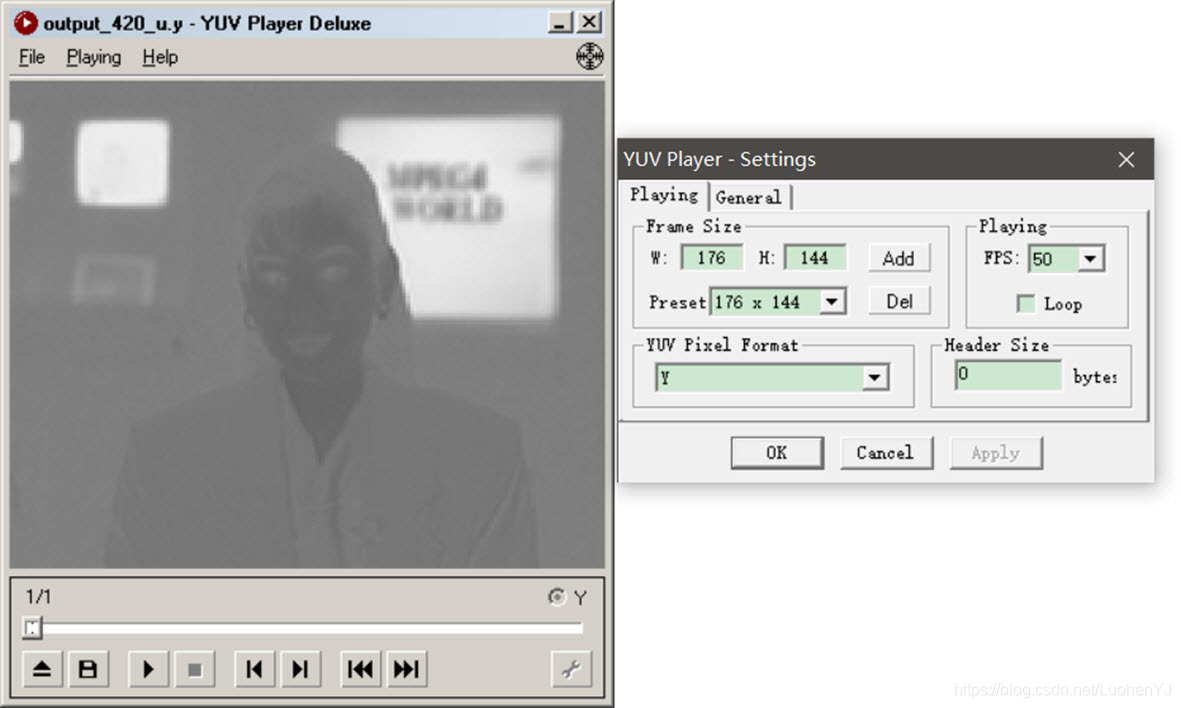
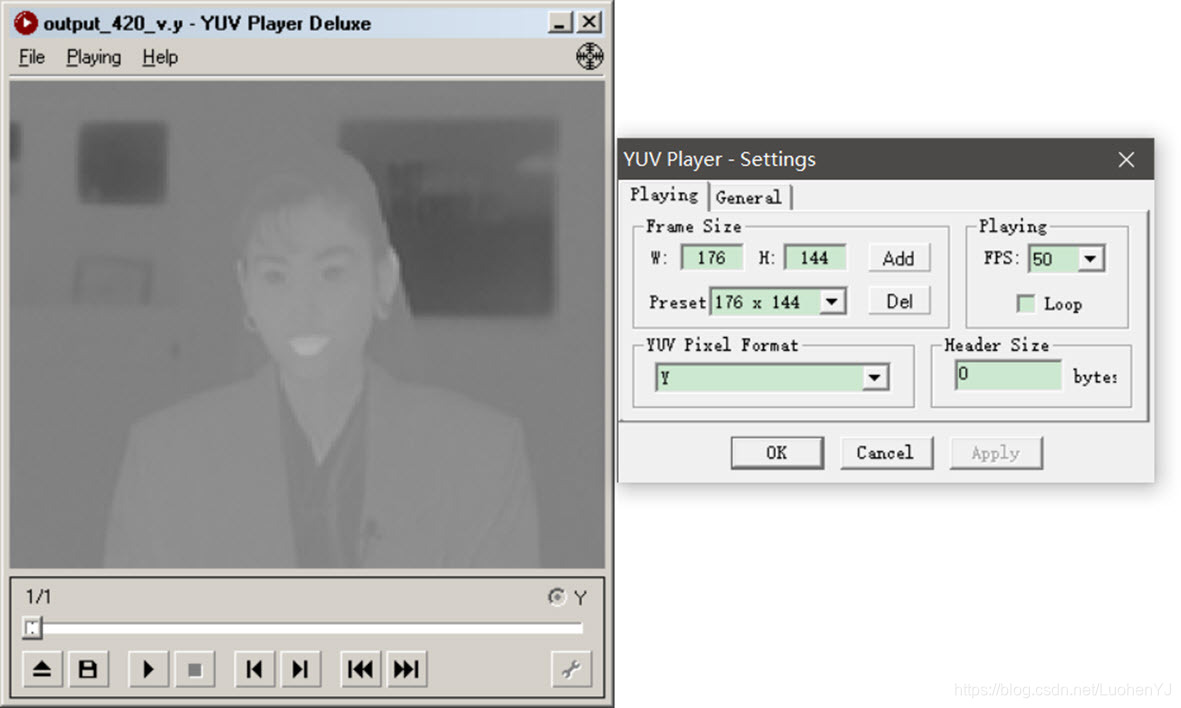
fwrite函数也是一样的用法。先存Y,再存UV。对于Y,U,Y分离后存储的格式可以是yuv格式也可以是单独的y格式。分离后的Y分量(352,288),U分量(176,144),V分量(176,144)。结果如下图所示:

2 YUV420灰度化
本程序中的函数主要是将YUV420P视频数据流的第一帧图像变为灰度图像。函数的代码如下所示:
/**

 * @file 2 yuv_gray.cpp

 * @author luohen

 * @brief gray scale of yuv

 * @date 2018-12-07

 *

 */

#include "stdafx.h"

#include <stdio.h>

#include <stdlib.h>

#include <string.h>

#include <math.h>

#include <iostream>

using namespace std;

/**

 * @brief

 *

 * @param url	location of input yuv420p file

 * @param w		width of input yuv420p file

 * @param h 	height of input yuv420p file

 * @return	int

 */

int yuv420_gray(const char *url, int w, int h)

{

	//reading yuv image

	FILE *input_fp;

	if ((input_fp = fopen(url, "rb")) == NULL)

	{

		printf("%s open error!\n", url);

		return -1;

	}

	else

	{

		printf("%s open.\n", url);

	}

	//writing yuv image

	FILE *outputGray_fp = fopen("video_result/output_gray.yuv", "wb+");

	unsigned char *pic = new unsigned char[w * h * 3 / 2];

	fread(pic, sizeof(unsigned char), w * h * 3 / 2, input_fp);

	//Gray

	//把pic+w*h开始所有的数据置为128,色度分量取值范围是-128至127,量化后范围为0至255

	//uv=128,实现灰度化

	memset(pic + w * h, 128, w * h / 2);

	fwrite(pic, sizeof(unsigned char), w * h * 3 / 2, outputGray_fp);

	delete[] pic;

	fclose(input_fp);

	fclose(outputGray_fp);

	return 0;

}

/**

 * @brief main函数

 *

 * @return int

 */

int main()

{

	int state = yuv420_gray("video/akiyo.yuv", 352, 288);

	return 0;

}
调用函数为:
int yuv420_gray(const char *url, int w, int h);
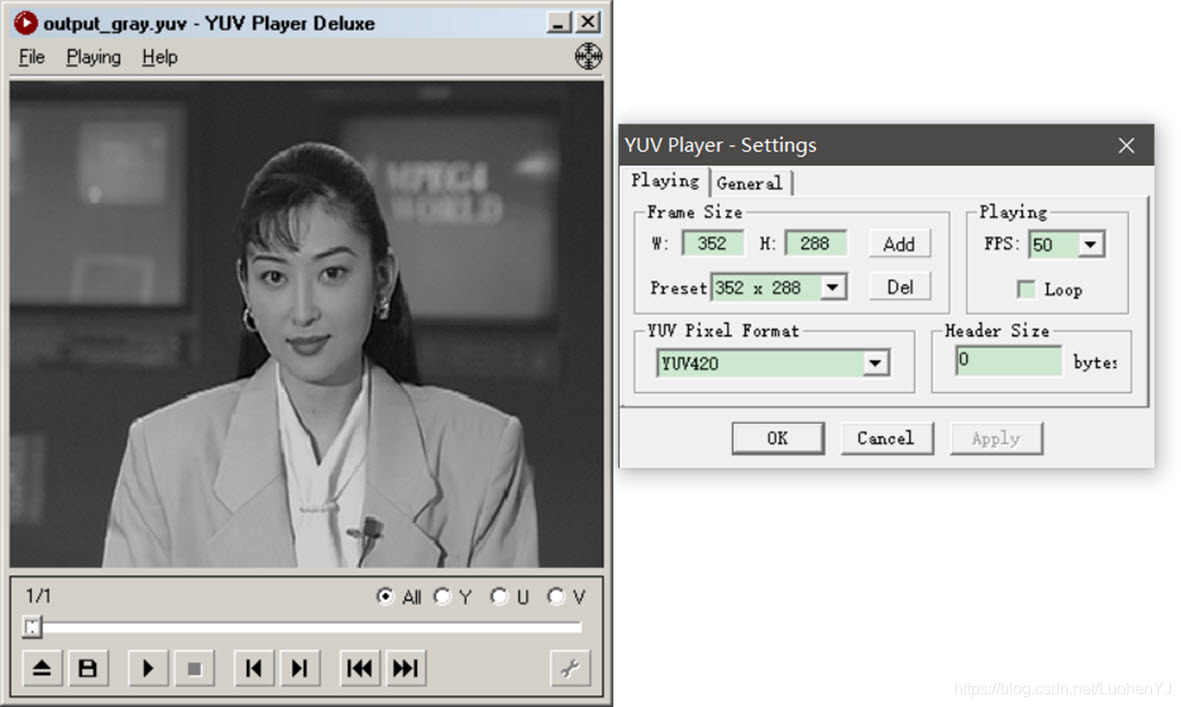
这段函数主要是将U、V分量置为128,从而得到灰度图像。将U、V置为128而不是0,主要原因是U、V本来的取值范围大概是-127到128(可能更大),因为YUV的数据流是无符号的,所以将其量化为0到255。UV的最初取值范围可以通过RGB与YUV的转换公式理解。具体见文章:
https://www.cnblogs.com/armlinux/archive/2012/02/15/2396763.html
最终得到的YUV灰度图像,UV分量都存在只是为128而已。事实上只提取出Y分量效果也是一样的。结果如下图所示:
3 YUV420亮度减半
本程序中的函数主要是将YUV420P视频数据流的第一帧图像亮度减半。函数的代码如下所示:
/**

 * @file 3 yuv_halfy.cpp

 * @author luohen

 * @brief Half of Y value

 * @date 2018-12-07

 *

 */

#include "stdafx.h"

#include <stdio.h>

#include <stdlib.h>

#include <string.h>

#include <math.h>

#include <iostream>

using namespace std;

/**

 * @brief

 *

 * @param url	location of input yuv420p file

 * @param w		width of input yuv420p file

 * @param h 	height of input yuv420p file

 * @return	int

 */

int yuv420_half(const char *url, int w, int h)

{

	//reading yuv image

	FILE *input_fp;

	if ((input_fp = fopen(url, "rb")) == NULL)

	{

		printf("%s open error!\n", url);

		return -1;

	}

	else

	{

		printf("%s open.\n", url);

	}

	//writing yuv image

	FILE *output_fp = fopen("video_result/output_half.yuv", "wb+");

	unsigned char *pic = new unsigned char[w * h * 3 / 2];

	fread(pic, sizeof(unsigned char), w * h * 3 / 2, input_fp);

	//half of Y

	for (int j = 0; j < w * h; j++)

	{

		unsigned char temp = pic[j] / 2;

		//printf("%d,\n",temp);

		pic[j] = temp;

	}

	fwrite(pic, 1, w * h * 3 / 2, output_fp);

	delete[] pic;

	fclose(input_fp);

	fclose(output_fp);

	return 0;

}

/**

 * @brief main函数

 *

 * @return int

 */

int main()

{

	int state = yuv420_half("video/akiyo.yuv", 352, 288);

	return 0;

}
调用函数为:
int yuv420_half(const char *url, int w, int h);
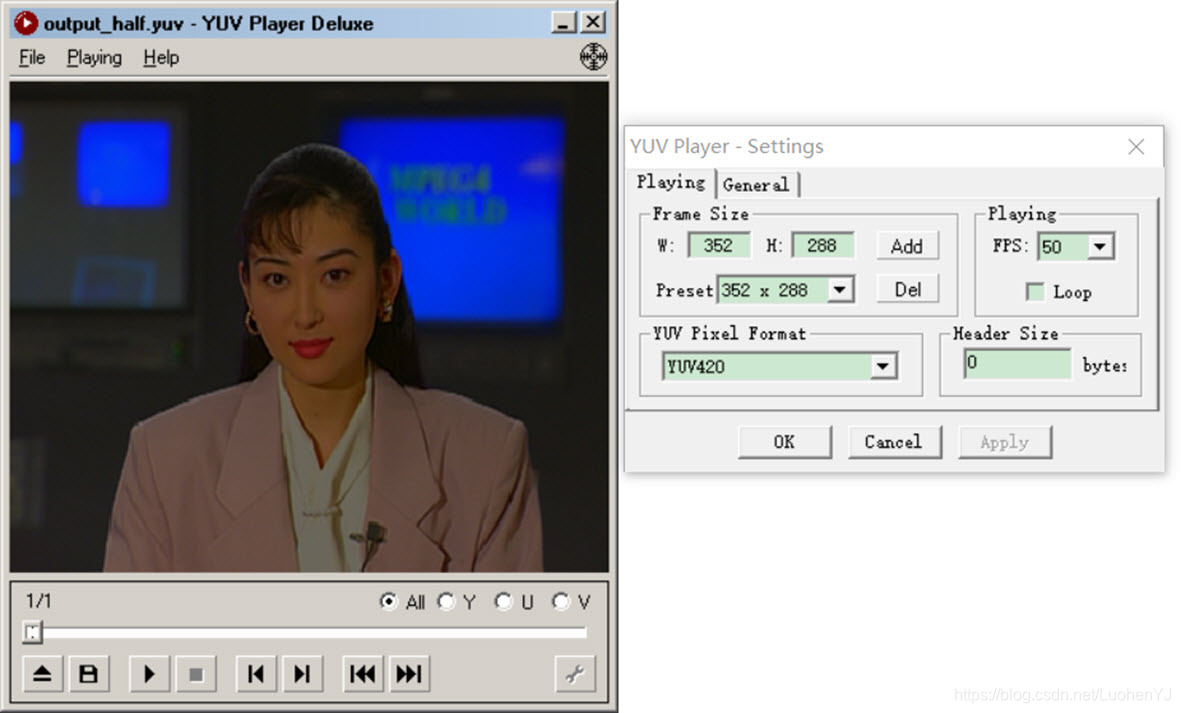
这段函数主要是将Y分量减半,从而得到灰度图像。而其他UV分量不需要调整。实际上YUV图像处理套路就是将YUV三个分量分别看成三张灰度图像,分别进行图像处理。除了YUV分量大小不一,其他与RGB像素处理一样。结果如下图所示:
4 YUV420添加边框
本程序中的函数主要是为YUV420P视频数据流的第一帧图像添加边框。函数的代码如下所示:
/**

 * @file 4 yuv_border.cpp

 * @author luohen

 * @brief  add a border to yuv

 * @date 2018-12-07

 *

 */

#include "stdafx.h"

#include <stdio.h>

#include <stdlib.h>

#include <string.h>

#include <math.h>

#include <iostream>

using namespace std;

/**

 * @brief

 *

 * @param url	location of input yuv420p file

 * @param w		width of input yuv420p file

 * @param h 	height of input yuv420p file

 * @return	int

 */

int yuv420_border(const char *url, int w, int h)

{

	//reading yuv image

	FILE *input_fp;

	if ((input_fp = fopen(url, "rb")) == NULL)

	{

		printf("%s open error!\n", url);

		return -1;

	}

	else

	{

		printf("%s open.\n", url);

	}

	//writing yuv image

	FILE *output_fp = fopen("video_result/output_border.yuv", "wb+");

	//border width

	int border = 30;

	unsigned char *pic = new unsigned char[w * h * 3 / 2];

	//reading y

	fread(pic, 1, w * h * 3 / 2, input_fp);

	//y

	for (int j = 0; j < h; j++)

	{

		for (int k = 0; k < w; k++)

		{

			if (k < border || k >(w - border) || j < border || j >(h - border))

			{

				//0最暗,255最亮

				pic[j * w + k] = 0;

				//pic[j*w+k]=255;

			}

		}

	}

	fwrite(pic, 1, w * h * 3 / 2, output_fp);

	delete[] pic;

	fclose(input_fp);

	fclose(output_fp);

	return 0;

}

/**

 * @brief main函数

 *

 * @return int

 */

int main()

{

	int state = yuv420_border("video/akiyo.yuv", 352, 288);

	return 0;

}
调用函数为:
int yuv420_border(const char *url, int w, int h);
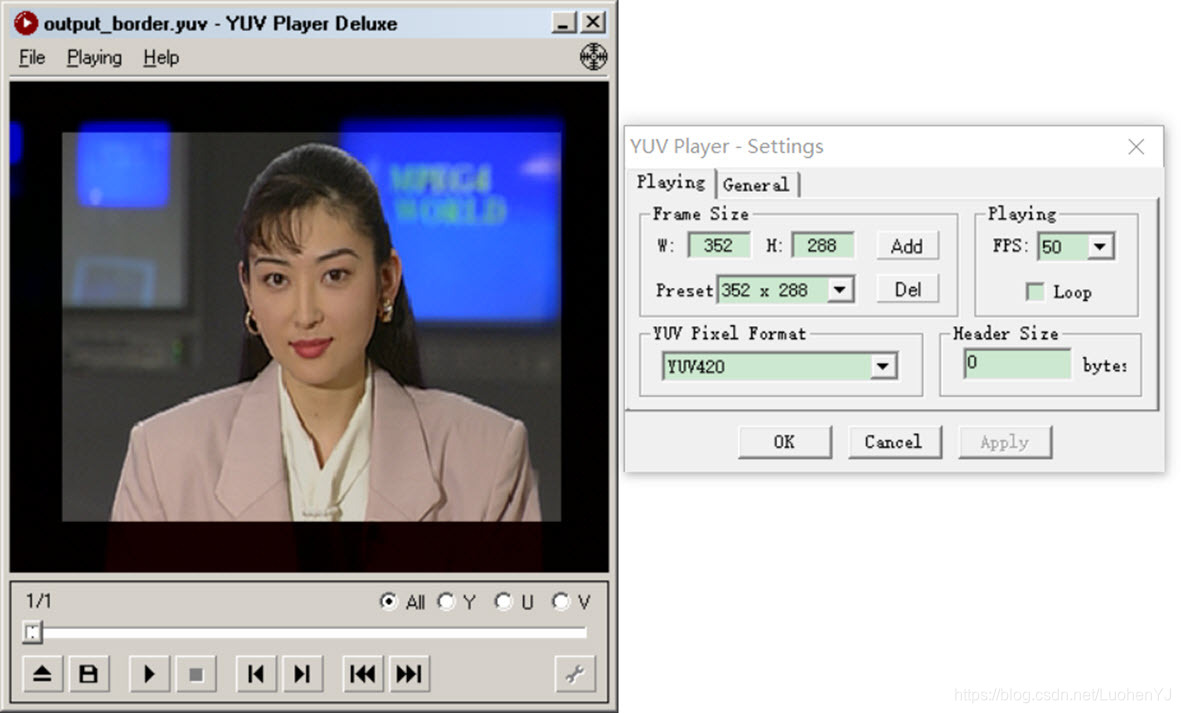
这段函数主要是调整图像边缘的Y分量数值,从而为图像添加边框。其中Y的初始值就是0-255,和灰度图一样,y为0时图像最暗,为255图像最暗。但是这段程序并没有实现严格意义上的添加图像边框,应该使得uv分量相同位置处的值为128(因为copy雷神代码。就懒得自己写了)。
结果如下图所示:
但是想了下,还是不能全copy雷神的代码。uv分量相同位置处的值为128,代码如下:
/**

 * @file 4 yuv_border.cpp

 * @author luohen

 * @brief  add a border to yuv

 * @date 2018-12-07

 *

 */

#include "stdafx.h"

#include <stdio.h>

#include <stdlib.h>

#include <string.h>

#include <math.h>

#include <iostream>

using namespace std;

/**

 * @brief

 *

 * @param url	location of input yuv420p file

 * @param w		width of input yuv420p file

 * @param h 	height of input yuv420p file

 * @return	int

 */

int yuv420_border(const char *url, int w, int h)

{

	//reading yuv image

	FILE *input_fp;

	if ((input_fp = fopen(url, "rb")) == NULL)

	{

		printf("%s open error!\n", url);

		return -1;

	}

	else

	{

		printf("%s open.\n", url);

	}

	//writing yuv image

	FILE *output_fp = fopen("video_result/output_border.yuv", "wb+");

	//border width

	int border = 30;

	unsigned char *pic = new unsigned char[w * h * 3 / 2];

	//reading y

	fread(pic, 1, w * h * 3 / 2, input_fp);

	//y

	for (int j = 0; j < h; j++)

	{

		for (int k = 0; k < w; k++)

		{

			if (k < border || k >(w - border) || j < border || j >(h - border))

			{

				//0最暗,255最亮

				pic[j * w + k] = 0;

				//pic[j*w+k]=255;

			}

		}

	}

	//u

	for (int j = 0; j < h / 2; j++)

	{

		for (int k = 0; k < w / 2; k++)

		{

			if (k < border / 2 || k >(w / 2 - border / 2) || j < border / 2 || j >(h / 2 - border / 2))

			{

				pic[w*h + j * w / 2 + k] = 128;

				//pic[j*w+k]=255;

			}

		}

	}

	//v

	for (int j = 0; j < h / 2; j++)

	{

		for (int k = 0; k < w / 2; k++)

		{

			if (k < border / 2 || k >(w / 2 - border / 2) || j < border / 2 || j >(h / 2 - border / 2))

			{

				pic[w*h + w / 2 * h / 2 + j * w / 2 + k] = 128;

				//pic[j*w+k]=255;

			}

		}

	}

	fwrite(pic, 1, w * h * 3 / 2, output_fp);

	delete[] pic;

	fclose(input_fp);

	fclose(output_fp);

	return 0;

}

/**

 * @brief main函数

 *

 * @return int

 */

int main()

{

	int state = yuv420_border("video/akiyo.yuv", 352, 288);

	return 0;

}
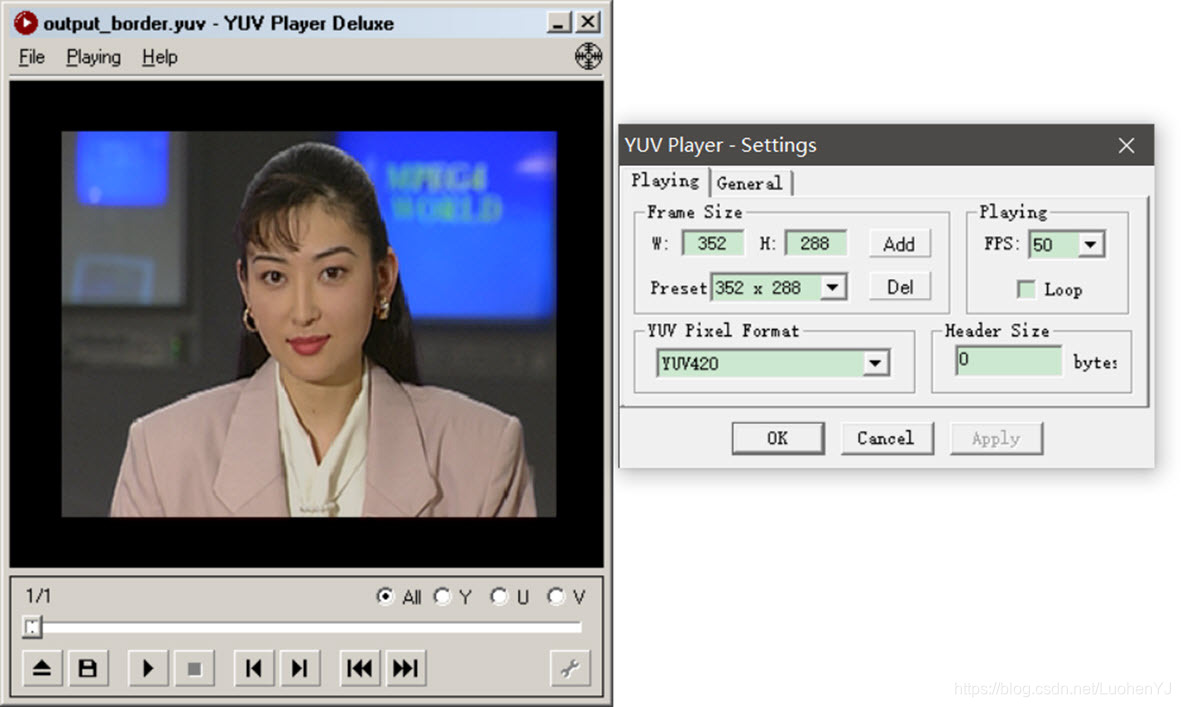
其中对uv处理时border要除以2,因u、v只有y的四分之一大小。
对u,v赋值代码如下,因为yuv420是以数据流依次存储。所以u处理时数据u从pic[wh]开始,而处理v从pic[wh+w/2*h/2]开始。
pic[w*h + j * w / 2 + k] = 128;

pic[w*h + w / 2 * h / 2 + j * w / 2 + k] = 128;
结果如图所示:
[图像处理] YUV图像处理入门2的更多相关文章
- [图像处理] YUV图像处理入门1
目前数字图像处理技术已经应用生活各个方面,但是大部分教程都是利用第三方库(如opencv)对RGB图像格式进行处理.对于YUV图像格式的图像处理教程较少.于是博主搬运总结了多个大牛的文章,总结出来这个 ...
- [图像处理] YUV图像处理入门4
9 yuv420图像截取 本程序中的函数主要是对YUV420P视频数据流的第一帧图像进行截取.类似opencv中的rect函数,函数的代码如下所示: /** * @file 9 yuv_clip.cp ...
- [图像处理] YUV图像处理入门5
12 yuv420转换为rgb(opencv mat) yuv格式具有亮度信息和色彩信息分离的特点,但大多数图像处理操作都是基于RGB格式,而且自己造轮子工作量太大.因此通常都会将yuv转换为rgb, ...
- [图像处理] YUV图像处理入门3
5 yuv420格式的灰阶测试图 本程序中的函数主要是为YUV420P视频数据流的第一帧图像添加边框.函数的代码如下所示: /** * @file 5 yuv_graybar.cpp * @autho ...
- Python图像处理库Pillow入门
http://python.jobbole.com/84956/ Pillow是Python里的图像处理库(PIL:Python Image Library),提供了了广泛的文件格式支持,强大的图像处 ...
- MATLAB图像处理_Bayer图像处理 & RGB Bayer Color分析
Bayer图像处理 Bayer是相机内部的原始图片, 一般后缀名为.raw. 很多软件都可以查看, 比如PS. 我们相机拍照下来存储在存储卡上的.jpeg或其它格式的图片, 都是从.raw格式转化 ...
- 打基础丨Python图像处理入门知识详解
摘要:本文讲解图像处理基础知识和OpenCV入门函数. 本文分享自华为云社区<[Python图像处理] 一.图像处理基础知识及OpenCV入门函数>,作者: eastmount. 一.图像 ...
- Atitit 图像处理知识点 知识体系 知识图谱v2
Atitit 图像处理知识点 知识体系 知识图谱v2 霍夫变换(Hough Transform) 霍夫变换是图像处理中从图像中识别几何形状的基本方法之一,应用很广泛,也有很多改进算法.主要用来从图像 ...
- Atitit 图像处理知识点 知识体系 知识图谱
Atitit 图像处理知识点 知识体系 知识图谱 图像处理知识点 图像处理知识点体系 v2 qb24.xlsx 基本知识图像金字塔op膨胀叠加混合变暗识别与检测分类肤色检测other验证码生成 基本 ...
随机推荐
- Vue学习之--------内置指令的使用【v-bind、v-model、v-for、v-on、v-if 、v-else、v-show、v-text。。。】(2022/7/19)
文章目录 1.常见的内置指令 2.代码实例 3.测试效果 1.常见的内置指令 v-bind: 单向绑定解析表达式, 可简写为 :xxx v-model: 双向数据绑定 v-for : 遍历数组/对象/ ...
- 7.websocket收发消息
客户端主动向服务端发起websocket连接,服务端接收到连接后通过(握手) 客户端 websocket socket = new WebSocket('ws://127.0.0.1/ws/'); 服 ...
- C# String.Empty和""的区别
个人观点 Empty其实是string类中的一个静态的只读字段,因为是静态成员变量,所以String.Empty是在设计String类的时候就已经在内存上分配好了空间,故在使用Empty这个变量的时候 ...
- Nginx四层负载均衡1
1.Nginx负载均衡Redis 服务器 IP地址 作用 系统版本 Nginx代理服务器 10.0.0.38 负载均衡服务器 Rocky8.6 Redis服务器1 10.0.0.18 Redis服务器 ...
- FastApi学习1
先写路由文件: 其次通过ORM操作数据库相关:
- 【lwip】12-一文解决TCP原理
目录 前言 12.1 TCP协议简介 12.2 TCP相关的一些概念词 12.2.1 MSL 12.2.2 MSS 12.3 TCP工作特性 12.3.1 面向连接 12.3.2 全双工通信 12.3 ...
- C#where关键字约束
where关键字的用法 where关键词一个最重要的用法就是在泛型的声明.定义中做出约束. 约束又分为接口约束.基类约束.构造函数约束.函数方法的约束. 1.接口约束,泛型参数必须实现相应的接口才可以 ...
- vue 过滤器时间格式化
1.导入了一个moment.js插件,里面封装了格式化时间的方法 ①:插件的链接:https://cdnjs.cloudflare.com/ajax/libs/moment.js/2.22.2/mom ...
- 2022春每日一题:Day 38
题目[USACO17JAN]Promotion Counting P 从根节点dfs一遍,树状数组维护进入和出去时这个节点的贡献,一减就是答案 代码: #include <cstdio> ...
- 基于python的数学建模---Fuzzy C-Means(模糊C均值聚类)
簇数的确定: 要用到k-means里面的轮廓系数 基于python的数学建模---轮廓系数的确定 - 坤丶 - 博客园 (cnblogs.com) 模糊c的代码 import copy import ...