
[OpenCV实战]23 使用OpenCV获取高动态范围成像HDR
目录
在本教程中,我们将学习如何使用不同曝光设置拍摄的多张图像创建高动态范围图像(HDR)。
1 背景
1.1 什么是高动态范围(HDR)成像?
大多数数码相机和显示器将彩色图像捕获或显示为24位矩阵。每个颜色通道有8位,一共三个通道,因此每个通道的像素值在0到255之间。换句话说,普通相机或显示器具有有限的动态范围。
然而,我们周围的世界颜色有一个非常大的变化范围。当灯关闭时,车库会变黑;太阳照射下,车库看起来变得非常明亮。即使不考虑这些极端情况,在日常情况下,8位也几乎不足以捕捉场景。因此,相机会尝试估计光线并自动设置曝光,以使图像中最有用的部分具有良好的动态颜色范围,而太暗和太亮的部分分别被设置为0和255。
在下图中,左侧的图像是正常曝光的图像。请注意,背景中的天空已完全消失,因为相机决定使用一个能够让小孩被正确拍摄而明亮的天空被忽略的设置。右侧图像是iPhone生成的HDR图像。
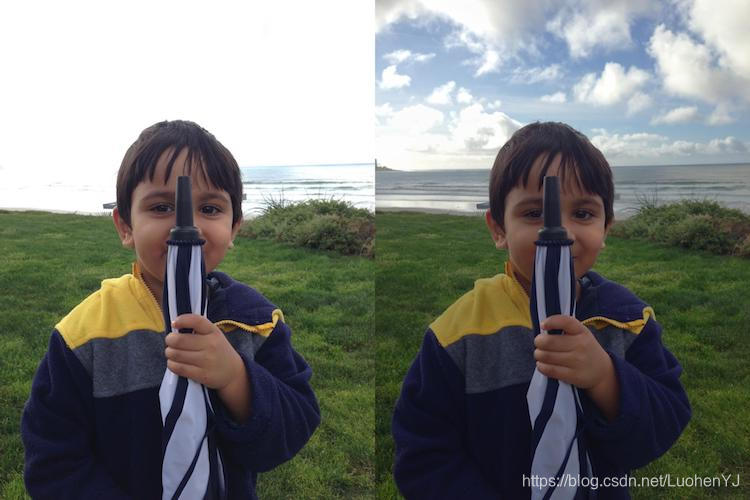
iPhone如何捕获HDR图像?它实际上在三种不同的曝光下拍摄3张图像。图像是连续快速拍摄的,因此三次拍摄之间几乎没有偏移。然后组合三个图像以产生HDR图像。
1.2 高动态范围(HDR)成像如何工作?
在本节中,我们将介绍使用OpenCV创建HDR图像的步骤。
1)使用不同曝光设置拍摄多张图像
当我们使用相机拍照时,每个通道只有8位来表示场景的动态范围(亮度范围)。但是我们可以通过改变快门速度在不同曝光下拍摄场景的多个图像。大多数单反相机都有一个称为自动包围曝光(AEB)的功能,只需按一下按钮,我们就可以在不同曝光下拍摄多张照片。在相机上使用AEB或在手机上使用自动包围应用程序,我们可以一个接一个地快速拍摄多张照片,因此场景不会改变。当我们在iPhone中使用HDR模式时,它需要三张照片(安卓可以下载超级相机这个软件)。
1曝光不足的图像:此图片比正确的曝光图像暗。目标是拍摄非常明亮的图像部分。
2正确曝光的图像:这是相机根据估计的照明度拍摄的常规图像。
3过度曝光的图像:此图片比正确的曝光图像亮。目标是捕捉非常黑暗的图像部分。
但是,如果场景的动态范围非常大,我们可以拍摄三张以上的图片来构成HDR图像。在本教程中,我们将使用曝光时间为1/30,0.25,2.5和15秒拍摄的4张图像。缩略图如下所示。

有关SLR相机或手机使用的曝光时间和其他设置的信息通常存储在JPEG文件的EXIF元数据中。通过以下链接可学习查看存储在Windows和Mac中的JPEG文件中的EXIF元数据。
https://www.howtogeek.com/289712/how-to-see-an-images-exif-data-in-windows-and-macos
windows下右键图片-属性-详细信息,有图像具体信息。如下所示:
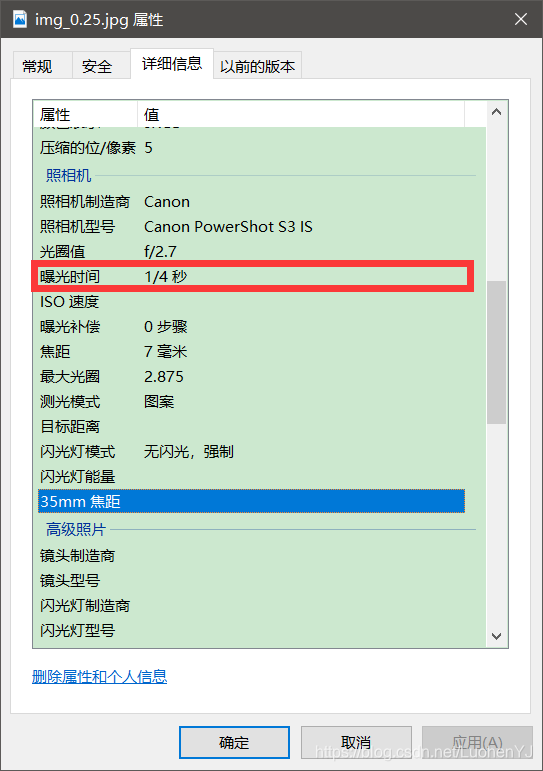
或者,您可以使用我最喜欢的名为EXIFTOOL的EXIF命令行实用程序。
EXIF: https://www.sno.phy.queensu.ca/~phil/exiftool/
2 代码
2.1 运行环境配置
由于本文所用代码涉及到opencv非免费代码,createTonemapMantiuk这部分算法都是申请专利需要收费(本文可以不要这段代码)。在使用时编译opencv和opencv_contrib需要选择OPENCV_ENABLE_NONFREE。具体见:
https://www.cnblogs.com/gengyi/p/10499964.html
如果是python,直接安装指定版本opencv就行了:
pip install opencv-contrib-python==3.4.2.17
在使用非免费代码
头文件和命名空间如下:
#include <opencv2/xphoto.hpp>

using namespace xphoto;
2.2 读取图像和曝光时间
手动输入图像,曝光时间以及图像个数。
代码如下:
C++:
/**
* @brief 读图
*
* @param images
* @param times
*/
void readImagesAndTimes(vector<Mat> &images, vector<float> ×)
{
//图像个数
int numImages = 3;
//图像曝光时间
static const float timesArray[] = { 1.0 / 25 ,1.0 / 17, 1.0 / 13 };
times.assign(timesArray, timesArray + numImages);
static const char* filenames[] = { "1_25.jpg", "1_17.jpg", "1_13.jpg"};
//读取图像
for (int i = 0; i < numImages; i++)
{
Mat im = imread(filenames[i]);
images.push_back(im);
}
}python:
def readImagesAndTimes():

  # List of exposure times

  times = np.array([ 1/30.0, 0.25, 2.5, 15.0 ], dtype=np.float32)

  # List of image filenames

  filenames = ["img_0.033.jpg", "img_0.25.jpg", "img_2.5.jpg", "img_15.jpg"]

  images = []

  for filename in filenames:

    im = cv2.imread(filename)

    images.append(im)

  return images, times
2.3 图像对齐
用于合成HDR图像的原始图像未对准可能导致严重的伪影。在下图中,左侧图像是使用未对齐图像组成的HDR图像,右侧图像是使用对齐图像的图像。通过放大图像的一部分,使用红色圆圈显示,我们在左图像中看到严重的重影瑕疵。
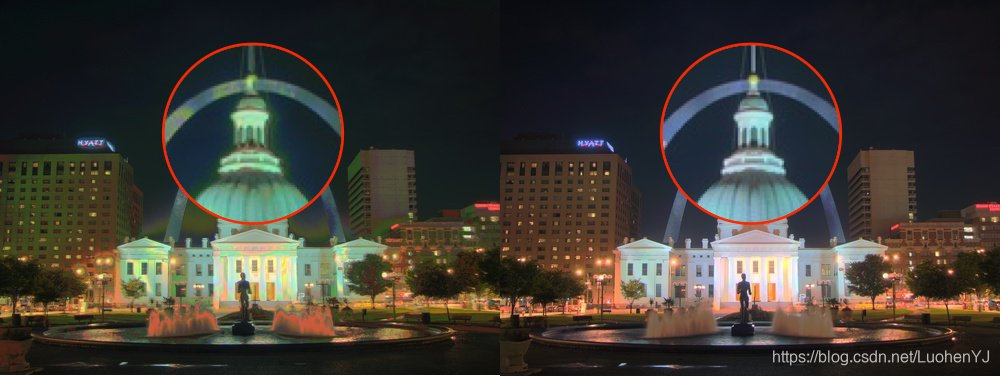
当然,在拍摄用于创建HDR图像的照片时,专业摄影师将相机安装在三脚架上。他们还使用一种称为反光镜锁死的功能来减少额外的振动。即使这样,图像也可能无法完美对齐,因为无法保证无振动的环境。使用手持相机或手机拍摄图像时,对齐问题会变得更糟。
幸运的是,OpenCV 提供了一种简单的方法,使用AlignMTB对齐这些图像。该算法将所有图像转换为中值阈值位图median threshold bitmaps(MTB)。图像的MTB生成方式为将比中值亮度亮的点分配为1,其余为0。MTB不随曝光时间的改变而改变。因此不需要我们指定曝光时间就可以对齐MTB。
代码如下:
C++:
// Align input images

Ptr<AlignMTB> alignMTB = createAlignMTB();

alignMTB->process(images, images);
python:
# Align input images

alignMTB = cv2.createAlignMTB()

alignMTB.process(images, images)
2.4 恢复相机响应功能
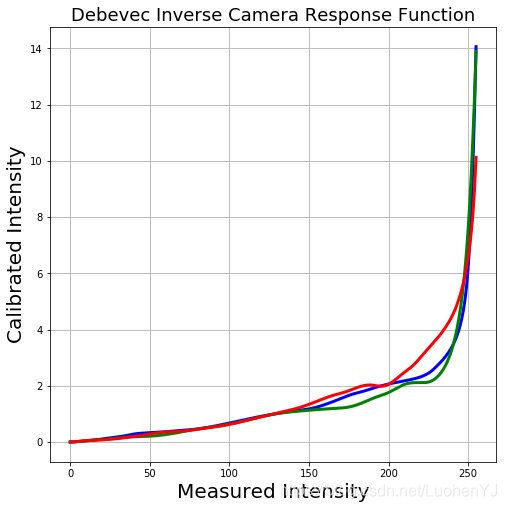
典型相机的响应与场景亮度不是线性的。那是什么意思?假设,一个摄像机拍摄了两个物体,其中一个物体的亮度是现实世界中的两倍。当您测量照片中两个对象的像素强度时,较亮对象的像素值将不会是较暗对象的两倍。在不估计相机响应函数(CRF)的情况下,我们将无法将图像合并为一个HDR图像。将多个曝光图像合并为HDR图像意味着什么?
在图像的某个位置(x,y)仅考虑一个像素。如果CRF是线性的,则像素值将与曝光时间成正比,除非像素在特定图像中太暗(即接近0)或太亮(即接近255)。我们可以过滤出这些不好的像素(太暗或太亮),并且将像素值除以曝光时间来估计像素的亮度,然后在像素不差的所有图像(太暗或太亮)上对亮度值取平均。我们可以对所有像素进行这样的处理,并通过对“好”像素进行平均来获得所有像素的单张图像。但是CRF不是线性的,我们需要在评估CRF前把图像强度变成线性。
好消息是,如果我们知道每张图像的曝光时间,可以从图像中估算CRF。与计算机视觉中的许多问题一样,找到CRF的问题被设置为优化问题,其中目标是最小化由数据项和平滑项组成的目标函数。这些问题通常会减少到使用奇异值分解(SVD)求解的线性最小二乘问题,而奇异值分解是所有线性代数包的一部分。CRF恢复算法细节见论文Recovering High Dynamic Range Radiance Maps from Photographs。http://www.pauldebevec.com/Research/HDR/debevec-siggraph97.pdf
使用CalibrateDebevec或在OpenCV中仅使用两行代码来查找CRF CalibrateRobertson。在本教程中我们将使用CalibrateDebevec。
代码如下:
C++:
// Obtain Camera Response Function (CRF)

Mat responseDebevec;

Ptr<CalibrateDebevec> calibrateDebevec = createCalibrateDebevec();

calibrateDebevec->process(images, responseDebevec, times);
python:
# Obtain Camera Response Function (CRF)

calibrateDebevec = cv2.createCalibrateDebevec()

responseDebevec = calibrateDebevec.process(images, times)
下图显示了使用红色,绿色和蓝色通道图像恢复的CRF。
2.5 合并图像
一旦估计了CRF,我们就可以将曝光图像合并为一个HDR图像MergeDebevec。C ++和Python代码如下所示。
C++:
// Merge images into an HDR linear image

Mat hdrDebevec;

Ptr<MergeDebevec> mergeDebevec = createMergeDebevec();

mergeDebevec->process(images, hdrDebevec, times, responseDebevec);

// Save HDR image.

imwrite("hdrDebevec.hdr", hdrDebevec);
Python:
# Merge images into an HDR linear image

mergeDebevec = cv2.createMergeDebevec()

hdrDebevec = mergeDebevec.process(images, times, responseDebevec)

# Save HDR image.

cv2.imwrite("hdrDebevec.hdr", hdrDebevec)
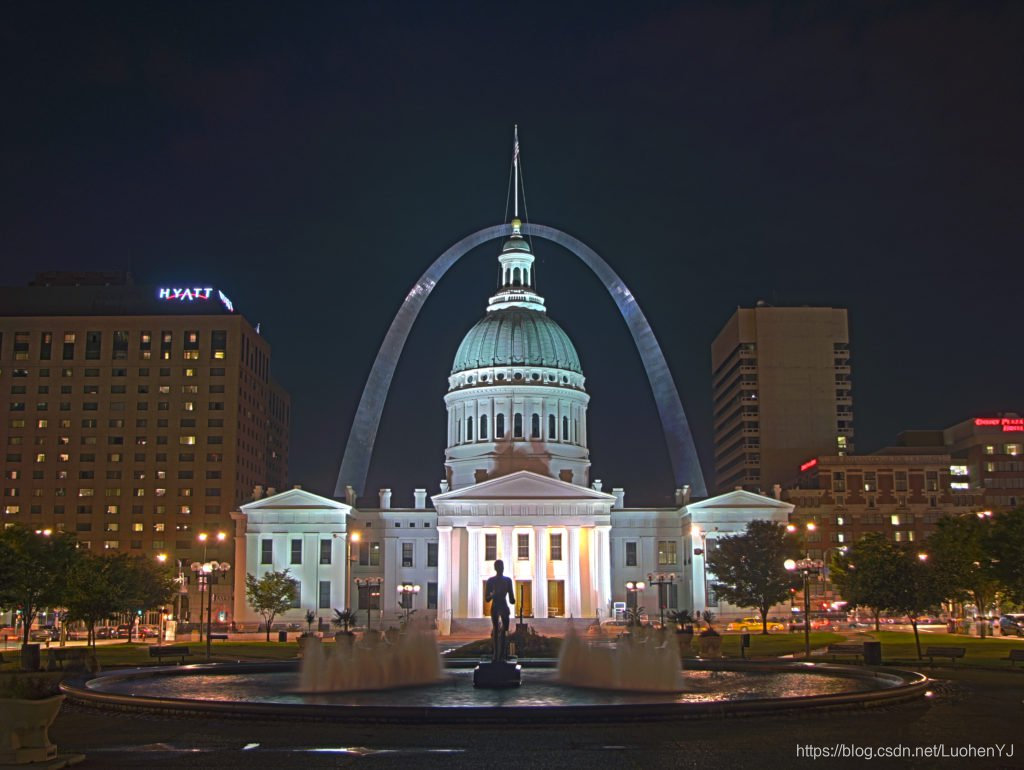
上面保存的HDR图像可以在Photoshop中加载并进行色调映射。一个例子如下所示。
2.6 色调映射
现在我们将曝光图像合并为一个HDR图像。你能猜出这张图片的最小和最大像素值吗?对于漆黑条件,最小值显然为0。什么是理论最大值?无穷!实际上,不同情况下的最大值是不同的。如果场景包含非常明亮的光源,我们将看到非常大的最大值。尽管我们已经使用多个图像恢复了相对亮度信息,但我们现在面临的挑战是将此信息保存为24位图像以用于显示。
色调映射:将高动态范围(HDR)图像转换为每通道8位图像同时保留尽可能多的细节的过程称为色调映射。
有几种色调映射算法。OpenCV实现了其中的四个。要记住的是,没有正确的方法来进行色调映射。通常,我们希望在色调映射图像中看到比在任何一个曝光图像中更多的细节。有时,色调映射的目标是产生逼真的图像,并且通常目标是产生超现实的图像。在OpenCV中实现的算法倾向于产生逼真的,因此不那么引人注目的结果。
我们来看看各种选项。下面列出了不同色调映射算法的一些常见参数。
1)伽马gamma:此参数通过应用伽马校正来压缩动态范围。当gamma等于1时,不应用校正。小于1的灰度会使图像变暗,而大于1的灰度会使图像变亮。
2)饱和度saturation:此参数用于增加或减少饱和度。当饱和度高时,颜色更丰富,更强烈。饱和度值接近零,使颜色渐渐变为灰度。
3)对比度contrast:控制输出图像的对比度(即log(maxPixelValue / minPixelValue))。
让我们来探索OpenCV中可用的四种色调映射算法
(1) Drago Tonemap
Drago Tonemap的参数如下所示:
createTonemapDrago

(

float   gamma = 1.0f,

float   saturation = 1.0f,

float   bias = 0.85f

)
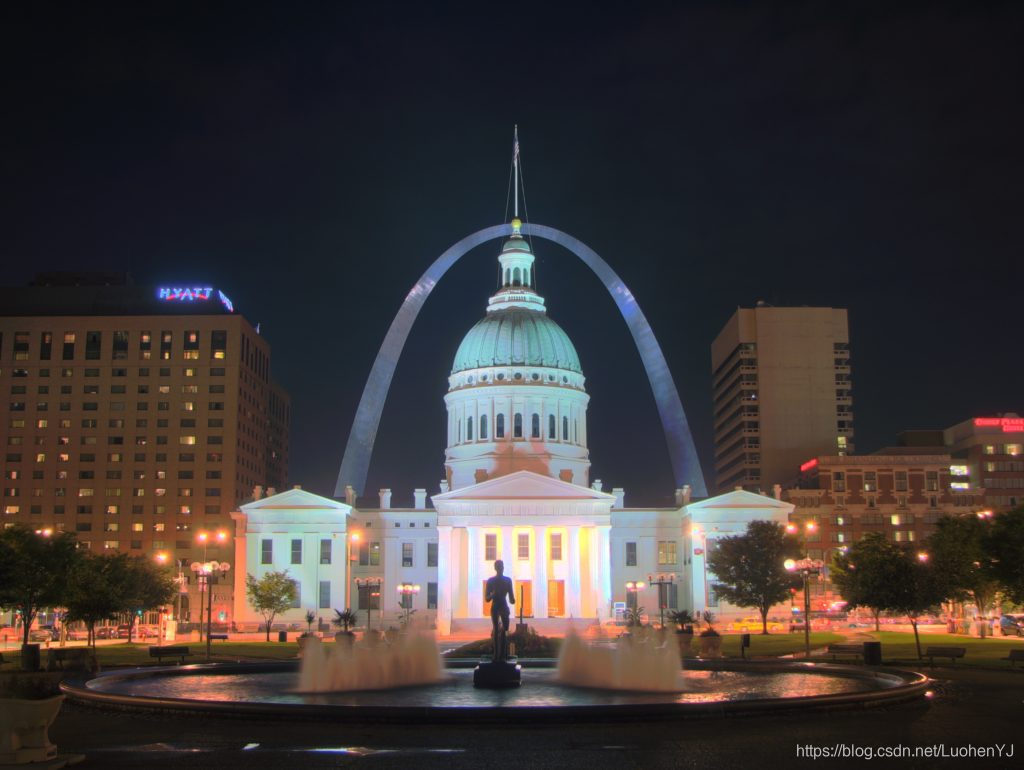
这里,bias是[0,1]范围内偏置函数的值。从0.7到0.9的值通常会得到最好的结果。默认值为0.85。有关更多技术细节,请参阅此文章。参数通过反复试验获得。最终输出乘以3只是因为它给出了最令人满意的结果。更多的技术细节见:
http://resources.mpi-inf.mpg.de/tmo/logmap/logmap.pdf
结果如下所示:
(2) Durand Tonemap
Durand Tonemap的参数如下所示:
createTonemapDurand

(

  float     gamma = 1.0f,

  float     contrast = 4.0f,

  float     saturation = 1.0f,

  float     sigma_space = 2.0f,

  float     sigma_color = 2.0f

);
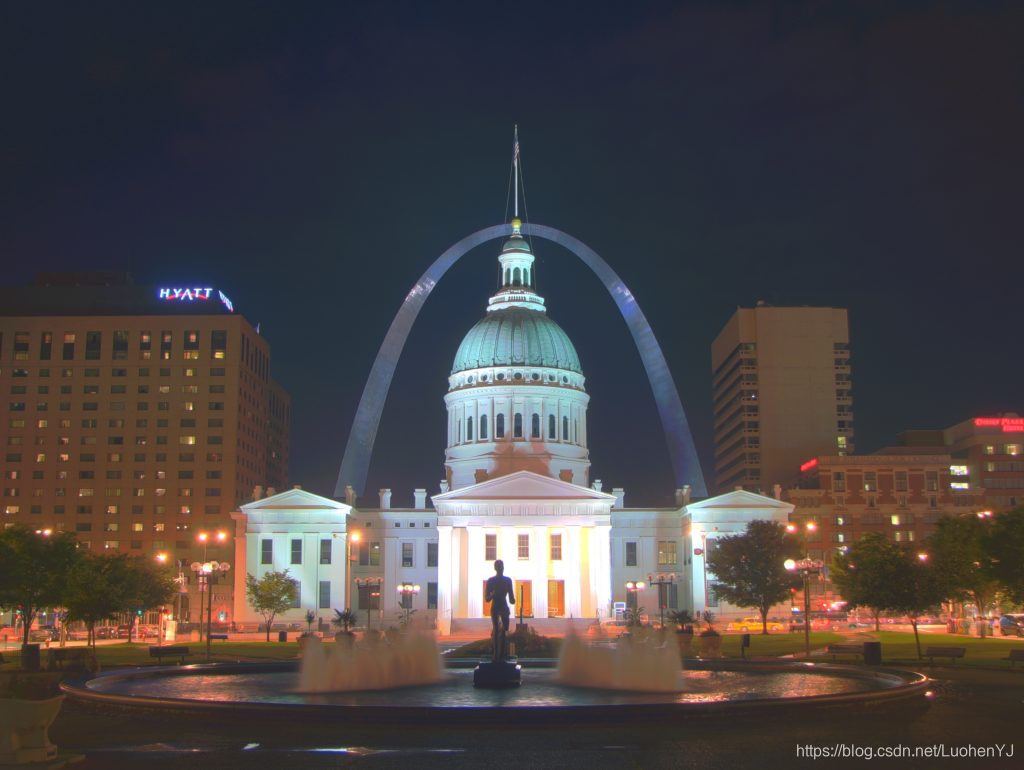
该算法基于将图像分解为基础层和细节层。使用称为双边滤波器的边缘保留滤波器获得基础层。sigma_space和sigma_color是双边滤波器的参数,分别控制空间域和颜色域中的平滑量。更多的技术细节见:
https://people.csail.mit.edu/fredo/PUBLI/Siggraph2002/DurandBilateral.pdf
结果如下所示:
(3) Reinhard Tonemap
Reinhard Tonemap的参数如下所示:
createTonemapReinhard

(

float   gamma = 1.0f,

float   intensity = 0.0f,

float   light_adapt = 1.0f,

float   color_adapt = 0.0f

)
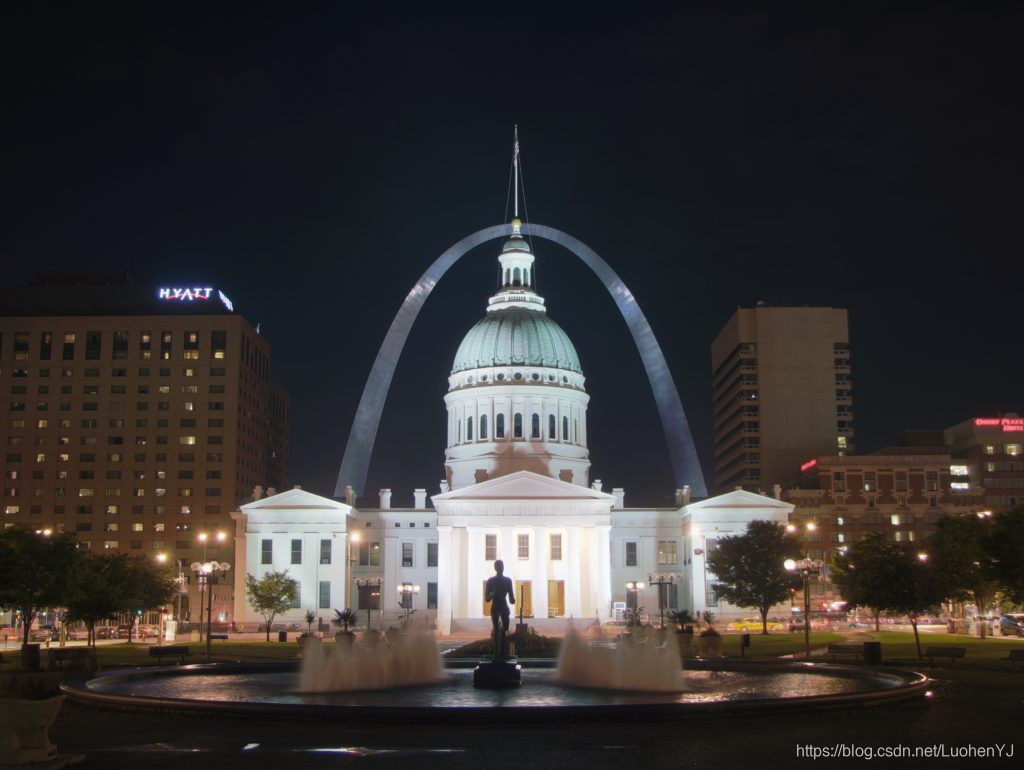
参数intensity应在[-8,8]范围内。强度值越大,结果越明亮。参数light_adapt控制灯光适应并且在[0,1]范围内。值1表示仅基于像素值的自适应,值0表示全局自适应。中间值可以用于两者的加权组合。参数color_adapt控制色度适应并且在[0,1]范围内。如果值设置为1,则独立处理通道,如果值设置为0,则每个通道的适应级别相同。中间值可用于两者的加权组合。更多的技术细节见:
http://citeseerx.ist.psu.edu/viewdoc/download?doi=10.1.1.106.8100&rep=rep1&type=pdf
结果如下所示:
(4) Mantiuk Tonemap
Mantiuk Tonemap的参数如下所示:
createTonemapMantiuk

(

float   gamma = 1.0f,

float   scale = 0.7f,

float   saturation = 1.0f

)
scale是对比度比例因子。从0.6到0.9的值产生最佳结果。更多的技术细节见:
http://citeseerx.ist.psu.edu/viewdoc/download?doi=10.1.1.60.4077&rep=rep1&type=pdf
结果如下所示:
上面所有色调映射代码见:
C++:
	// Tonemap using Drago's method to obtain 24-bit color image 色调映射算法

	cout << "Tonemaping using Drago's method ... ";

	Mat ldrDrago;

	Ptr<TonemapDrago> tonemapDrago = createTonemapDrago(1.0, 0.7);

	tonemapDrago->process(hdrDebevec, ldrDrago);

	ldrDrago = 3 * ldrDrago;

	imwrite("ldr-Drago.jpg", ldrDrago * 255);

	cout << "saved ldr-Drago.jpg" << endl;

	// Tonemap using Durand's method obtain 24-bit color image 色调映射算法

	cout << "Tonemaping using Durand's method ... ";

	Mat ldrDurand;

	Ptr<TonemapDurand> tonemapDurand = createTonemapDurand(1.5, 4, 1.0, 1, 1);

	tonemapDurand->process(hdrDebevec, ldrDurand);

	ldrDurand = 3 * ldrDurand;

	imwrite("ldr-Durand.jpg", ldrDurand * 255);

	cout << "saved ldr-Durand.jpg" << endl;

	// Tonemap using Reinhard's method to obtain 24-bit color image 色调映射算法

	cout << "Tonemaping using Reinhard's method ... ";

	Mat ldrReinhard;

	Ptr<TonemapReinhard> tonemapReinhard = createTonemapReinhard(1.5, 0, 0, 0);

	tonemapReinhard->process(hdrDebevec, ldrReinhard);

	imwrite("ldr-Reinhard.jpg", ldrReinhard * 255);

	cout << "saved ldr-Reinhard.jpg" << endl;

	// Tonemap using Mantiuk's method to obtain 24-bit color image 色调映射算法

	cout << "Tonemaping using Mantiuk's method ... ";

	Mat ldrMantiuk;

	Ptr<TonemapMantiuk> tonemapMantiuk = createTonemapMantiuk(2.2, 0.85, 1.2);

	tonemapMantiuk->process(hdrDebevec, ldrMantiuk);

	ldrMantiuk = 3 * ldrMantiuk;

	imwrite("ldr-Mantiuk.jpg", ldrMantiuk * 255);

	cout << "saved ldr-Mantiuk.jpg" << endl;
Python:
  # Tonemap using Drago's method to obtain 24-bit color image

  print("Tonemaping using Drago's method ... ")

  tonemapDrago = cv2.createTonemapDrago(1.0, 0.7)

  ldrDrago = tonemapDrago.process(hdrDebevec)

  ldrDrago = 3 * ldrDrago

  cv2.imwrite("ldr-Drago.jpg", ldrDrago * 255)

  print("saved ldr-Drago.jpg")

  # Tonemap using Durand's method obtain 24-bit color image

  print("Tonemaping using Durand's method ... ")

  tonemapDurand = cv2.createTonemapDurand(1.5,4,1.0,1,1)

  ldrDurand = tonemapDurand.process(hdrDebevec)

  ldrDurand = 3 * ldrDurand

  cv2.imwrite("ldr-Durand.jpg", ldrDurand * 255)

  print("saved ldr-Durand.jpg")

  # Tonemap using Reinhard's method to obtain 24-bit color image

  print("Tonemaping using Reinhard's method ... ")

  tonemapReinhard = cv2.createTonemapReinhard(1.5, 0,0,0)

  ldrReinhard = tonemapReinhard.process(hdrDebevec)

  cv2.imwrite("ldr-Reinhard.jpg", ldrReinhard * 255)

  print("saved ldr-Reinhard.jpg")

  # Tonemap using Mantiuk's method to obtain 24-bit color image

  print("Tonemaping using Mantiuk's method ... ")

  tonemapMantiuk = cv2.createTonemapMantiuk(2.2,0.85, 1.2)

  ldrMantiuk = tonemapMantiuk.process(hdrDebevec)

  ldrMantiuk = 3 * ldrMantiuk

  cv2.imwrite("ldr-Mantiuk.jpg", ldrMantiuk * 255)

  print("saved ldr-Mantiuk.jpg")
2.7 工程代码
本文所有代码见:
https://github.com/luohenyueji/OpenCV-Practical-Exercise
C++:
#include "pch.h"
#include <opencv2/opencv.hpp>
#include <opencv2/xphoto.hpp>
#include <vector>
#include <iostream>
#include <fstream>
using namespace cv;
using namespace std;
using namespace xphoto;
/**
* @brief 读图
*
* @param images
* @param times
*/
void readImagesAndTimes(vector<Mat> &images, vector<float> ×)
{
//图像个数
int numImages = 3;
//图像曝光时间
static const float timesArray[] = { 1.0 / 25 ,1.0 / 17, 1.0 / 13 };
times.assign(timesArray, timesArray + numImages);
static const char* filenames[] = { "1_25.jpg", "1_17.jpg", "1_13.jpg"};
//读取图像
for (int i = 0; i < numImages; i++)
{
Mat im = imread(filenames[i]);
images.push_back(im);
}
}
int main()
{
// Read images and exposure times 读取图像和图像曝光时间
cout << "Reading images ... " << endl;
//图像
vector<Mat> images;
//曝光时间
vector<float> times;
//读取图像和图像曝光时间
readImagesAndTimes(images, times);
// Align input images 图像对齐
cout << "Aligning images ... " << endl;
Ptr<AlignMTB> alignMTB = createAlignMTB();
alignMTB->process(images, images);
// Obtain Camera Response Function (CRF) 获得CRF
cout << "Calculating Camera Response Function (CRF) ... " << endl;
Mat responseDebevec;
Ptr<CalibrateDebevec> calibrateDebevec = createCalibrateDebevec();
calibrateDebevec->process(images, responseDebevec, times);
// Merge images into an HDR linear image 图像合并为HDR图像
cout << "Merging images into one HDR image ... ";
Mat hdrDebevec;
Ptr<MergeDebevec> mergeDebevec = createMergeDebevec();
mergeDebevec->process(images, hdrDebevec, times, responseDebevec);
// Save HDR image. 保存HDR图像
imwrite("hdrDebevec.hdr", hdrDebevec);
cout << "saved hdrDebevec.hdr " << endl;
// Tonemap using Drago's method to obtain 24-bit color image 色调映射算法
cout << "Tonemaping using Drago's method ... ";
Mat ldrDrago;
Ptr<TonemapDrago> tonemapDrago = createTonemapDrago(1.0, 0.7);
tonemapDrago->process(hdrDebevec, ldrDrago);
ldrDrago = 3 * ldrDrago;
imwrite("ldr-Drago.jpg", ldrDrago * 255);
cout << "saved ldr-Drago.jpg" << endl;
// Tonemap using Durand's method obtain 24-bit color image 色调映射算法
cout << "Tonemaping using Durand's method ... ";
Mat ldrDurand;
Ptr<TonemapDurand> tonemapDurand = createTonemapDurand(1.5, 4, 1.0, 1, 1);
tonemapDurand->process(hdrDebevec, ldrDurand);
ldrDurand = 3 * ldrDurand;
imwrite("ldr-Durand.jpg", ldrDurand * 255);
cout << "saved ldr-Durand.jpg" << endl;
// Tonemap using Reinhard's method to obtain 24-bit color image 色调映射算法
cout << "Tonemaping using Reinhard's method ... ";
Mat ldrReinhard;
Ptr<TonemapReinhard> tonemapReinhard = createTonemapReinhard(1.5, 0, 0, 0);
tonemapReinhard->process(hdrDebevec, ldrReinhard);
imwrite("ldr-Reinhard.jpg", ldrReinhard * 255);
cout << "saved ldr-Reinhard.jpg" << endl;
// Tonemap using Mantiuk's method to obtain 24-bit color image 色调映射算法
cout << "Tonemaping using Mantiuk's method ... ";
Mat ldrMantiuk;
Ptr<TonemapMantiuk> tonemapMantiuk = createTonemapMantiuk(2.2, 0.85, 1.2);
tonemapMantiuk->process(hdrDebevec, ldrMantiuk);
ldrMantiuk = 3 * ldrMantiuk;
imwrite("ldr-Mantiuk.jpg", ldrMantiuk * 255);
cout << "saved ldr-Mantiuk.jpg" << endl;
return 0;
}Python:
import cv2

import numpy as np

def readImagesAndTimes():

  times = np.array([ 1/30.0, 0.25, 2.5, 15.0 ], dtype=np.float32)

  filenames = ["img_0.033.jpg", "img_0.25.jpg", "img_2.5.jpg", "img_15.jpg"]

  images = []

  for filename in filenames:

    im = cv2.imread(filename)

    images.append(im)

  return images, times

if __name__ == '__main__':

  # Read images and exposure times

  print("Reading images ... ")

  images, times = readImagesAndTimes()

  # Align input images

  print("Aligning images ... ")

  alignMTB = cv2.createAlignMTB()

  alignMTB.process(images, images)

  # Obtain Camera Response Function (CRF)

  print("Calculating Camera Response Function (CRF) ... ")

  calibrateDebevec = cv2.createCalibrateDebevec()

  responseDebevec = calibrateDebevec.process(images, times)

  # Merge images into an HDR linear image

  print("Merging images into one HDR image ... ")

  mergeDebevec = cv2.createMergeDebevec()

  hdrDebevec = mergeDebevec.process(images, times, responseDebevec)

  # Save HDR image.

  cv2.imwrite("hdrDebevec.hdr", hdrDebevec)

  print("saved hdrDebevec.hdr ")

  # Tonemap using Drago's method to obtain 24-bit color image

  print("Tonemaping using Drago's method ... ")

  tonemapDrago = cv2.createTonemapDrago(1.0, 0.7)

  ldrDrago = tonemapDrago.process(hdrDebevec)

  ldrDrago = 3 * ldrDrago

  cv2.imwrite("ldr-Drago.jpg", ldrDrago * 255)

  print("saved ldr-Drago.jpg")

  # Tonemap using Durand's method obtain 24-bit color image

  print("Tonemaping using Durand's method ... ")

  tonemapDurand = cv2.createTonemapDurand(1.5,4,1.0,1,1)

  ldrDurand = tonemapDurand.process(hdrDebevec)

  ldrDurand = 3 * ldrDurand

  cv2.imwrite("ldr-Durand.jpg", ldrDurand * 255)

  print("saved ldr-Durand.jpg")

  # Tonemap using Reinhard's method to obtain 24-bit color image

  print("Tonemaping using Reinhard's method ... ")

  tonemapReinhard = cv2.createTonemapReinhard(1.5, 0,0,0)

  ldrReinhard = tonemapReinhard.process(hdrDebevec)

  cv2.imwrite("ldr-Reinhard.jpg", ldrReinhard * 255)

  print("saved ldr-Reinhard.jpg")

  # Tonemap using Mantiuk's method to obtain 24-bit color image

  print("Tonemaping using Mantiuk's method ... ")

  tonemapMantiuk = cv2.createTonemapMantiuk(2.2,0.85, 1.2)

  ldrMantiuk = tonemapMantiuk.process(hdrDebevec)

  ldrMantiuk = 3 * ldrMantiuk

  cv2.imwrite("ldr-Mantiuk.jpg", ldrMantiuk * 255)

  print("saved ldr-Mantiuk.jpg")
3 参考
https://www.learnopencv.com/high-dynamic-range-hdr-imaging-using-opencv-cpp-python/
https://www.imooc.com/article/36723
[OpenCV实战]23 使用OpenCV获取高动态范围成像HDR的更多相关文章
- [OpenCV实战]24 使用OpenCV进行曝光融合
目录 1 什么是曝光融合 2 曝光融合的原理 3 代码与结果 4 参考 本教程中,我们将了解使用OpenCV的Exposure Fusion(曝光融合). 1 什么是曝光融合 曝光融合是一种将使用不同 ...
- [OpenCV实战]14 使用OpenCV实现单目标跟踪
目录 1 背景 1.1 什么是目标跟踪 1.2 跟踪与检测 2 OpenCV的目标跟踪函数 2.1 函数调用 2.2 函数详解 2.3 综合评价 3 参考 在本教程中,我们将了解OpenCV 3中引入 ...
- [OpenCV实战]50 用OpenCV制作低成本立体相机
本文主要讲述利用OpenCV制作低成本立体相机以及如何使用OpenCV创建3D视频,准确来说是模仿双目立体相机,我们通常说立体相机一般是指双目立体相机,就是带两个摄像头的那种(目就是指眼睛,双目就是两 ...
- [OpenCV实战]48 基于OpenCV实现图像质量评价
本文主要介绍基于OpenCV contrib中的quality模块实现图像质量评价.图像质量评估Image Quality Analysis简称IQA,主要通过数学度量方法来评价图像质量的好坏. 本文 ...
- [OpenCV实战]47 基于OpenCV实现视觉显著性检测
人类具有一种视觉注意机制,即当面对一个场景时,会选择性地忽略不感兴趣的区域,聚焦于感兴趣的区域.这些感兴趣的区域称为显著性区域.视觉显著性检测(Visual Saliency Detection,VS ...
- [OpenCV实战]46 在OpenCV下应用图像强度变换实现图像对比度均衡
本文主要介绍基于图像强度变换算法来实现图像对比度均衡.通过图像对比度均衡能够抑制图像中的无效信息,使图像转换为更符合计算机或人处理分析的形式,以提高图像的视觉价值和使用价值.本文主要通过OpenCV ...
- [OpenCV实战]44 使用OpenCV进行图像超分放大
图像超分辨率(Image Super Resolution)是指从低分辨率图像或图像序列得到高分辨率图像.图像超分辨率是计算机视觉领域中一个非常重要的研究问题,广泛应用于医学图像分析.生物识别.视频监 ...
- [OpenCV实战]45 基于OpenCV实现图像哈希算法
目前有许多算法来衡量两幅图像的相似性,本文主要介绍在工程领域最常用的图像相似性算法评价算法:图像哈希算法(img hash).图像哈希算法通过获取图像的哈希值并比较两幅图像的哈希值的汉明距离来衡量两幅 ...
- [OpenCV实战]39 在OpenCV中使用ArUco标记的增强现实
文章目录 1 什么是ArUco标记? 2 在OpenCV中生成ArUco标记 3 检测Aruco标记 4 增强现实应用 5 总结和代码 5.1 生成aruco标记 5.2 使用aruco增强现实 6 ...
随机推荐
- AgileBoot - 项目内统一的错误码设计
本篇文章主要探讨关于统一错误码的设计,并提供笔者的实现 欢迎大家讨论,指正. 该错误码的设计在仓库: github:https://github.com/valarchie/AgileBoot-Bac ...
- Jedis测试redis。(redis在linux虚拟机中)
文章目录 1.确保虚拟机开启.并且连接到redis 2.建立一个maven工程 3.在pom中加入jedis的依赖 4.编写测试用例 5.测试结果 1.确保虚拟机开启.并且连接到redis 2.建立一 ...
- 最近无聊搭建一个齐博X1的下载页面
https://layui.wanxiangsucai.com/ 用layui官方镜像站的模版 改了个齐博X1的下载页面 https://x1.wanxiangsucai.com/ 哈哈哈!!! 还有 ...
- import cv2报错
其实是没错的,不过有的python编译器对这个不太支持,把import cv2 改为import cv2.cv2 as cv2就行了.
- 测试架构师CAP原理(最简单)
测试架构师CAP原理(最简单) 很多人都不是很了解CAP理论,其实CAP很简单,不要想复杂了! C:一致性,就是数据一致性,就是数据不出错! A:可用性,就是说速度快,不延迟,无论请求成功失败都很快返 ...
- ML-L1、L2 正则化
出现过拟合时,使用正则化可以将模型的拟合程度降低一点点,使曲线变得缓和. L1正则化(LASSO) 正则项是所有参数的绝对值的和.正则化不包含theta0,因为他只是偏置,而不影响曲线的摆动幅度. \ ...
- Scrapy 发送Request Payload
Scrapy 发送Request Payload 首先要打开 F12 进入调试模式 然后 查看是用什么方法获取的 如果是Json: 1. json.dumps 转化成Json yield Reques ...
- Python基础之函数:5、内置函数、迭代器对象、异常的捕获和处理
目录 一.重要内置函数 1.zip() 2.filter() 3.sorted() 二.常见内置函数 1. abs() 2.all.any() 3.bin.oct.hex.int() 4.bytes( ...
- 长事务 (Long Transactions)
长事务 长事务用于支持 AutoCAD 参照编辑功能,对于 ObjectARX 应用程序非常有用.这些类和函数为应用程序提供了一种方案,用于签出实体以进行编辑并将其签回其原始位置.此操作会将原始对象替 ...
- Ubuntu定时执行python脚本
Crontab命令 命令选项: crontab -l : 显示某个用户的任务计划 crontab -e :编辑某个用户的任务计划 cron服务 service cron start/stop/rest ...