
ERA5气压层数据驱动WRF的一些问题
参考了一些经验,并结合实际后,成功用ERA5驱动WRF。实际上,用ERA5数据驱动WRF的方法和用ERA-Interim 数据驱动WRF极其类似。
总结几点是,下载的变量要全,水平范围要覆盖,垂直层次设置要匹配
1 需要下载的变量
参考http://www2.mmm.ucar.edu/wrf/OnLineTutorial/Basics/UNGRIB/ungrib_req_fields.php
三维场:
'geopotential','relative_humidity','specific_humidity','temperature','u_component_of_wind','v_component_of_wind'
表面场:
'surface_pressure','mean_sea_level_pressure','10m_u_component_of_wind','10m_v_component_of_wind','2m_temperature','sea_surface_temperature','skin_temperature','2m_dewpoint_temperature','snow_depth','sea_ice_cover','land_sea_mask','soil_type','soil_temperature_level_1','soil_temperature_level_2','soil_temperature_level_3','soil_temperature_level_4','volumetric_soil_water_layer_1','volumetric_soil_water_layer_2','volumetric_soil_water_layer_3','volumetric_soil_water_layer_4'
经过本人测试,ERA-Interim.pl的Vtable可直接使用。
关于ERA5的地形和高度
https://confluence.ecmwf.int/display/CKB/ERA5%3A+surface+elevation+and+orography
2 变量场的水平范围大小
下载的变量场的水平范围要大于模拟区域的水平范围。以下报错均和变量场的水平范围太小有关:
metgrid.exe时候,报错,可能是驱动的物理量场范围太小。
FILE

WARNING: Field PRES has missing values at level 200100 at (i,j)=(1,411)

WARNING: Field GHT has missing values at level 200100 at (i,j)=(1,411)

WARNING: Field PMSL has missing values at level 200100 at (i,j)=(1,411)

WARNING: Field PSFC has missing values at level 200100 at (i,j)=(1,411)

WARNING: Field SOILHGT has missing values at level 200100 at (i,j)=(1,411)

ERROR: Missing values encountered in interpolated fields. Stopping.

Abort(53732176) on node 0 (rank 0 in comm 0): application called MPI_
参考wrfforum的意见(原网址忘了),下载的地面层使用的是全球区域的网格,能够通过了metgrid。(高空没有用全球网格) (这个论坛有类似问题,http://bbs.06climate.com/forum.php?mod=viewthread&tid=30928)
又一坑!metgrid过了,real又没过,翻遍搜索引擎,还是古狗好用:P
国外有大神早就发现了这个问题:http://www.iup.uni-bremen.de/~hilboll/blog/2018/12/wrf-errors-could-not-find-trapping-x-locations/
更新一下,之前下载的高空数据范围太小。和Dawn讨论了一下,下载的数据范围要稍微大一些,重新下载了地面和高空数据,能通过编译了。保险起见,下载变量场的水平范围,东西和南北方向上至少再扩10度以上。
更好的办法:设置好要模拟的网格后,先用WPS自带的plotgrids.ncl脚本将模拟的区域(WRF Domain)画出来,图形的角点和边界中点的位置可以大致确定模拟区域的水平范围。
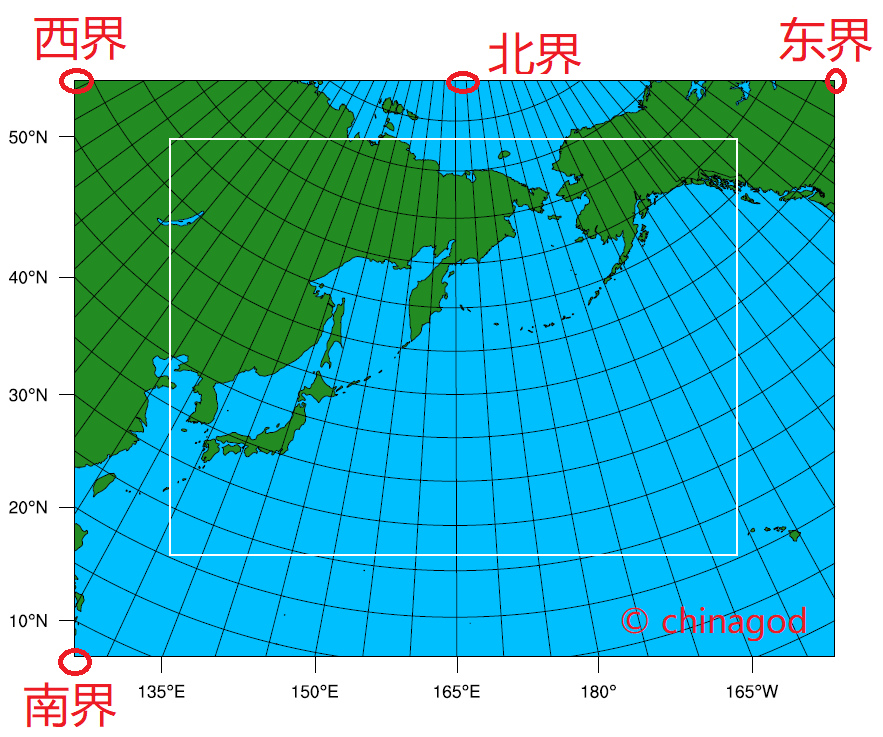
WPS网格水平范围说明
3 垂直层次设置的匹配
就是输入数据的垂直层次和namelist的层次设置(num_metgrid_levels)要匹配,
另一个坑 Mismatch between namelist and input file dimensions
WRFDomainwizard里面连接ECMWF的Vtable之后,在namelist.wps生成了model_level pres的字段,将其注释掉,否则会在后面出现报错 d01 2018-06-07_00:00:00 ---- ERROR: Mismatch between namelist and input file dimensions
不对!是把这个字段进行更改!num_metgrid_levels改成输入数据的层次(即输入气压层的层数)
关于 &mod_levs,参考了WRF_User_Guide相关章节
B. mod_levs.exe
The mod_levs.exe program is used to remove levels of data from intermediate format files. The levels which are to be kept are specified in a new namelist record in the namelist.wps file:&mod_levs
press_pa = 201300 , 200100 , 100000 ,
95000 , 90000 ,
85000 , 80000 ,
75000 , 70000 ,
65000 , 60000 ,
55000 , 50000 ,
45000 , 40000 ,
35000 , 30000 ,
25000 , 20000 ,
15000 , 10000 ,
5000 , 1000
/Within thenamelist record, the variable press_pa is used to specify a list of levels to keep; the specified levels should match values of xlvl in the intermediate format files (see the discussion of the WPS intermediate format for more information on the fields of the intermediate files). The mod_levs program takes two command-line arguments as its input. The first argument is the name of the intermediate file to operate on, and the second argument is the name of the output file to be written.
Removing all but a specified subset of levels from meteorological data sets is particularly useful, for example, when one data set is to be used for the model initial conditions and a second data set is to be used for the lateral boundary conditions. This can be done by providing the initial conditions data set at the first time period to be interpolated by metgrid, and the boundary conditions data set for all other times. If the both data sets have the same number of vertical levels, then no work needs to be done; however, when these two data sets have a different number of levels, it will be necessary, at a minimum,
to remove (m – n) levels, where m > n and m and n are the number of levels in each of the two data sets, from the data set with m levels. The necessity of having the same number of vertical levels in all files is due to a limitation in real.exe, which requires a constant number of vertical levels to interpolate from.The mod_levs utility is something of a temporary solution to the problem of accommodating two or more data sets with differing numbers of vertical levels. Should a user choose to use mod_levs, it should be noted that, although the vertical locations of the levels need not match between data sets, all data sets should have a surface level of data, and, when running real.exe and wrf.exe, the value of p_top must be chosen to be below the lowest top among the data sets.
翻译:
在 &mod_levs 字段 中,变量press_pa用于指定要保留的层次列表;指定的级别应与中间格式文件中xlvl的值匹配(有关中间文件记录的详细信息,请参阅对WPS中间格式的讨论)。mod_levs程序接受两个命令行参数作为输入。第一个参数是要操作的中间文件的名称,第二个参数是要写入的输出文件的名称。
从气象数据集中删除(指定的层次外的所有层次)特别有用,例如,当一个数据集用于模型初始条件,而第二个数据集用于横向边界条件时。这可以通过提供由metgrid插值的第一时间段的初始条件数据集和所有其他时间的边界条件数据集来实现。如果两个数据集具有相同数量的垂直层次,则无需执行任何工作;但是,当这两个数据集具有不同数量的层次时,至少需要执行以下操作:
要删除(m–n)层次,其中m>n和m和n是两个数据集中每一个数据集中具有m个层次的数据集中的层次数。所有文件中必须具有相同数量的垂直层次,这是由于real.exe中的一个限制,该限制要求从中插入的垂直层次数量恒定。
mod_levs实用程序是解决容纳两个或多个具有不同垂直层次数目的数据集问题的临时解决方案。如果用户选择使用mod_levs,则应注意,虽然层次的垂直位置不需要在数据集之间匹配,但所有数据集都应具有数据的表面层次,并且,在运行real.exe和wrf.exe时,必须选择p_top的值低于数据集中的最低的顶层。
参考网站
https://dreambooker.site/2019/10/03/Initializing-the-WRF-model-with-ERA5-pressure-level/
http://bbs.06climate.com/forum.php?mod=viewthread&tid=30962&highlight=ECMWF
ERA5气压层数据驱动WRF的一些问题的更多相关文章
- gfs下载文件较大,可以分区域分变量下载
一.下载 所有字段的GFS预报(大致有325个字段),1度的文件有1G多,0.5度的3.5G左右. 若每天下载0.6.12.18四个发布点的数据,那是很费时费力的.而且经常会被IDS/IPS设备 ...
- MyBatis持久层框架使用总结
MyBatis 本是apache的一个开源项目iBatis, 2010年这个项目由apache software foundation 迁移到了google code,并且改名为MyBatis . 2 ...
- 在 ASP.NET 中创建数据访问和业务逻辑层(转)
.NET Framework 4 当在 ASP.NET 中处理数据时,可从使用通用软件模式中受益.其中一种模式是将数据访问代码与控制数据访问或提供其他业务规则的业务逻辑代码分开.在此模式中,这两个层均 ...
- d3可视化实战02:理解d3数据驱动的真正含义
前文中已经提到,SVG从诞生之初起就可以非常方便地使用javascript脚本语言来进行其DOM对象的控制.当然,控制的方法有很多,有直接控制SVG对象的方法,例如使用原生js:有帮你封装一下图形接口 ...
- Web自动化框架LazyUI使用手册(8)--excel数据驱动详解(ExcelDataProvider)
概述 框架提供了excel数据驱动方式运行测试用例的工具,本文将针对数据驱动,进行详细演示. 详见类:lazy.test.ui.browser.ExcelDataProvider 被测对象: http ...
- 【译】为什么BERT有3个嵌入层,它们都是如何实现的
目录 引言 概览 Token Embeddings 作用 实现 Segment Embeddings 作用 实现 Position Embeddings 作用 实现 合成表示 结论 参考文献 本文翻译 ...
- MyBatis开发Dao层的两种方式(原始Dao层开发)
本文将介绍使用框架mybatis开发原始Dao层来对一个对数据库进行增删改查的案例. Mapper动态代理开发Dao层请阅读我的下一篇博客:MyBatis开发Dao层的两种方式(Mapper动态代理方 ...
- Python+Selenium+Unittest+Ddt+HTMLReport分布式数据驱动自动化测试框架结构
1.Business:公共业务模块,如登录模块,可以把登录模块进行封装供调用 ------login_business.py from Page_Object.Common_Page.login_pa ...
- Angular 2 + 折腾记 :(7) 初步了解表单:模板驱动及数据驱动及脱坑要点
前言 表单在整个系统中的作用相当重要,这里主要扯下响应表单的实现方式. 首先须要操作表单的模块引入这两个模块. import { FormsModule, ReactiveFormsModule } ...
- MyBatis持久层框架使用总结 转载
MyBatis持久层框架使用总结 MyBatis 本是apache的一个开源项目iBatis, 2010年这个项目由apache software foundation 迁移到了google co ...
随机推荐
- 红米note9 刷开机第一屏logo
参考:https://romprovider.com/change-boot-logo-redmi-9-prime/ 工具:https://sites.google.com/site/kadanuti ...
- c# RegistryKey 的相关简单操作(转)
c# RegistryKey 的相关简单操作 以下从'读''写''删除''判断'四个事例实现对注册表的简单操作 1.读取指定名称的注册表的值 private string GetRegistDat ...
- go 语言 for循环的一个坑
1.案例1 package main import "fmt" type Card struct { id int } func main() { list := make([]* ...
- C# DevExpress中GridControl控件的基本属性设置和使用方法
1.GridControl隐藏GroupPanel(主面板) 隐藏:鼠标单击Run Designer-OptionsView-ShowGroupPanel=False; 修改:鼠标单击Run Desi ...
- react 02 组件state click
一,组件 import React from 'react'; import ReactDOM from 'react-dom'; import './index.css'; // 函数式组件 ret ...
- VMware-共享文件夹挂载
[root@localhost jiangyinuo]# cd /cdromobash: cd: /cdromo: 没有那个文件或目录[root@localhost jiangyinuo]# cd / ...
- Win10 笔记本禁用/启用自带键盘
文章来源:华硕笔记本怎么禁用自带键盘_虽千万里,吾往矣!的博客-CSDN博客_华硕笔记本怎么禁用自带键盘 在小娜搜索栏中输入cmd,找到命令提示符(cmd),并且右键以管理员身份运行. 在弹出的窗口中 ...
- 四点DLT (Direct Linear Transformation) 算法
\(\mathrm{x}_{i}\) 表示变化前的齐次坐标 \(\mathbf{x}_{i}^{\prime}\) 表示变化后的齐次坐标 我们需要求到一个 \(3\times3\) 的变换矩阵 \(\ ...
- 基于AD9361的双收双发射频FMC子卡
FMC177-基于AD9361的双收双发射频FMC子卡 一.板卡介绍 FMC177射频模块分别包含两个接收通道与发射通道,其频率可覆盖达到70MHz~6GHz,AD9361芯片提供具有成本效益的实验平 ...
- dfs-入门模板
模板 void dfs()//参数用来表示状态 { if(到达终点状态) { ...//根据题意添加 return; } if(越界或者是不合法状态) return; if(特殊状态)//剪枝 ret ...